
Organic search still drives roughly a third of all ecommerce website traffic. Yet most online stores leave that channel underbuilt -- relying on paid ads alone while competitors quietly capture high-intent buyers through search. A strong ecommerce SEO strategy changes that equation, turning your product catalog into a compounding traffic asset that reduces acquisition costs over time.
If you run a DTC brand or growth-stage store, this guide gives you the framework to build (or fix) your organic search foundation -- from keyword research through technical execution to the emerging AI search surfaces that now influence how shoppers discover products.
SEO for ecommerce websites is fundamentally different from SEO for content sites or SaaS companies. The challenges are specific:
These realities mean you need a purpose-built approach, not a generic checklist. The payoff is significant: organic traffic compounds month over month, and unlike paid channels, it does not reset to zero when you pause spend. For a deeper look at how search engine positioning directly impacts traffic volume, the data is clear -- ranking improvements translate directly to revenue.
Effective ecommerce keyword research starts with intent, not volume. Organize your keyword targets into three tiers:
| Intent Tier | Example Keywords | Target Page Type |
|---|---|---|
| Transactional | "buy organic cotton sheets queen" | Product page |
| Commercial investigation | "best organic cotton sheets 2026" | Category or comparison page |
| Informational | "organic cotton vs bamboo sheets" | Blog post or buying guide |
Practical steps to build your keyword map:
An experienced ecommerce SEO specialist will typically start here, because the keyword map dictates every optimization decision that follows.
Technical issues kill ecommerce sites quietly. A store can have great products and strong content, but if search engines cannot efficiently crawl and index the catalog, none of it surfaces in results.
Search engines allocate a finite crawl budget to each domain. Ecommerce sites waste that budget when faceted navigation creates thousands of parameter-based URLs that add no unique value. Address this by:
noindex or blocking them via robots.txtGoogle's Core Web Vitals remain a ranking factor, and for ecommerce, speed directly affects conversion rates. Key metrics to monitor:
Schema markup is no longer optional for ecommerce stores. Implementing Product schema enables rich results that display price, availability, ratings, and shipping information directly in search results.
Priority schema types for ecommerce:
Proper technical execution is where comprehensive ecommerce SEO packages deliver the most immediate impact, because these fixes often unlock rankings that content alone cannot achieve.
Your product and category pages are your money pages. Optimizing them correctly determines whether search traffic converts.
Category pages often have the highest ranking potential for competitive head terms. Strengthen them by:
Building brand trust through your SEO presence matters here -- shoppers who land on a well-structured category page with clear product information, reviews, and transparent policies are far more likely to convert.
Product pages alone will not capture the full range of search queries your buyers use. A content strategy fills the gaps, targeting informational and commercial investigation keywords that product pages cannot rank for.
High-performing content types for ecommerce:
Each piece should link to relevant product and category pages. This creates a content hub structure where blog posts feed authority and traffic into your commercial pages.
Content also plays a critical role in earning backlinks. Authoritative buying guides and original research attract links from publications, bloggers, and industry sites -- which strengthens your entire domain's ability to rank.
Search behavior is shifting. Buyers now discover products through AI-powered surfaces like Google's AI Overviews, ChatGPT, and Perplexity. This means your SEO for ecommerce websites strategy needs to account for how AI systems select and cite sources.
Key principles for AI search visibility:
This is still an emerging area, but brands that invest in structured, authoritative content now will have a meaningful advantage as AI search adoption continues to grow.
The strongest ecommerce search strategies do not treat SEO and paid search as separate channels. They work together. Paid search data reveals which keywords convert, informing your organic priority list. Organic rankings reduce your dependence on ad spend for branded and high-volume terms, freeing budget for prospecting campaigns.
For a detailed breakdown of how to build a balanced search marketing plan that combines SEO and SEM, the integrated approach consistently outperforms either channel in isolation.
Many brands work with an ecommerce SEO consultant or dedicated ecommerce SEO services team to run this combined model, because it requires coordination between content, technical SEO, and media buying -- disciplines that rarely sit in the same person's skillset. EmberTribe's SEO services are built around this integrated model, connecting organic performance directly to revenue outcomes.
Ecommerce SEO is not a one-time project. It is an ongoing system that compounds over time -- each technical fix, each optimized product page, each piece of content strengthens your store's ability to capture organic demand.
The priority order is clear:
Stores that treat SEO as infrastructure -- not a checkbox -- consistently see lower customer acquisition costs, more resilient traffic, and stronger brand positioning in their category. The work is methodical, but the results compound in ways that paid channels simply cannot replicate.

Conversion rate optimization (CRO) is a crucial component of any successful online business strategy. It involves understanding user behavior, analyzing website data, and implementing strategies to maximize conversions. To help you on your CRO journey, here are three inspiring quotes that will motivate you to improve your conversion rates.
One of the most fundamental aspects of conversion rate optimization is testing. Testing allows you to gather data, identify potential improvements, and make informed decisions. As industry expert John A. Shedd once said,
"A ship in harbor is safe, but that is not what ships are built for."
When we think about this quote in the context of conversion rate optimization (CRO), it serves as a powerful reminder of the need to take risks and step outside of our comfort zones. It's easy to play it safe and stick with what we know, but true growth and improvement come from embracing the unknown and testing different strategies.
Just like a ship is built to sail the open seas, businesses are built to explore new horizons and reach new heights. By staying in our comfort zone, we limit our potential for growth and miss out on valuable opportunities. Testing different approaches, designs, and messaging is the key to unlocking these opportunities and driving more conversions.
When John A. Shedd said, "A ship in harbor is safe, but that is not what ships are built for," he was emphasizing the importance of pushing boundaries and venturing into uncharted territories. While it may be comforting to stay within the confines of a harbor, a ship's true purpose is to navigate the vast ocean and explore new destinations.
Similarly, in the world of CRO, playing it safe and sticking with the status quo will only limit our potential for growth. By embracing the unknown and testing different strategies, we can gather valuable insights and uncover hidden opportunities. It is through these calculated risks that we can achieve remarkable results and surpass our previous limitations.
In the context of CRO, this quote reminds us that playing it safe and sticking with the status quo will only limit our potential for growth. Testing different approaches, designs, and messaging can lead to valuable insights and ultimately drive more conversions. By taking calculated risks and embracing testing, we can push the boundaries of what is possible and achieve remarkable results.

When we think about the quote, "A ship in harbor is safe, but that is not what ships are built for," in relation to CRO, it becomes clear that staying within our comfort zone will only hinder our progress. Just as a ship is designed to sail the open seas, businesses are built to explore new horizons and reach new heights. Testing allows us to navigate uncharted territories and discover innovative ways to optimize conversion rates.
By continuously testing and experimenting with different strategies, we can gather data-driven insights that guide our decision-making process. This iterative approach to CRO enables us to identify potential improvements and make informed decisions, leading to better conversion rates and ultimately, increased success.
User experience (UX) is a critical factor in conversion rate optimization. As Steve Jobs famously stated,
"Design is not just what it looks like and feels like. Design is how it works."
This quote emphasizes the importance of prioritizing functionality and usability in design. It's not enough for a website to look visually appealing; it must also provide a seamless and intuitive user experience. The design should be focused on facilitating the user journey and making it as easy as possible for visitors to convert.
In the realm of CRO, this quote encourages us to view design as a means to enhance the user experience and drive conversions. By prioritizing usability and implementing intuitive design principles, we can create a website that not only looks great but also works seamlessly to guide users towards conversions. A well-designed website not only delights users but also builds trust and credibility, ultimately boosting conversion rates.
Analytics provide valuable insights that can shape your CRO strategy. As Marissa Mayer once said,
"Data beats opinions."
This quote emphasizes the importance of making data-driven decisions over relying solely on personal opinions or assumptions. Analytics allow us to gain a deep understanding of user behavior, identify patterns, and make informed decisions based on tangible evidence.
In the context of CRO, this quote reminds us that relying on gut feelings or personal opinions can lead to suboptimal results. By embracing data and utilizing robust analytics tools, we can uncover valuable insights about user behavior and preferences. This data-driven approach enables us to make informed optimizations that have a direct impact on conversion rates.

Imagine this: you're in the process of defining your business's mission statement and core values. You want to create a strategy that not only focuses on improving conversion rates but also aligns with your vision for the company. As you search for inspiration, you come across a quote by Steve Jobs: "Innovation distinguishes between a leader and a follower." This quote resonates with you and becomes the driving force behind your business strategy. It reminds you to always strive for innovation and be a leader in your industry.
A quote can serve as a guiding principle that aligns with your core values and aspirations. By incorporating meaningful quotes into your CRO strategy, you can create a sense of purpose and clarity that will propel you towards success.
If you’re using Facebook ads, the Facebook pixel is a huge asset.
You should be using this key tool to realize the full potential of your social ad budget. With a little learning under your belt, you can use the pixel to gain major advantages for your results.
Facebook Pixel refers to code on a website that measures an advertising campaign’s effectiveness by interpreting the actions visitors take on the website.
In other words, the Facebook Pixel is an analytics tool that helps you track the conversion rate generated from Facebook ads and builds the target audience for future ads. Businesses can use it to ensure that their ads go to the right people.
It sounds a little weird, right? We train horses, dogs, sometimes dragons…

But a snippet of code is a whole other animal.
Training your pixel means that you don’t run a campaign with the purpose of getting a huge profit but rather to find the right audience. When you find the right audience, conversions should naturally follow.
The only conversion that you can optimize for without a pixel is link clicks. On the other hand, a pixel makes it possible for you to optimize a variety of conversion types in close alignment with the goals and aims of the business.
The Facebook pixel allows you to gain insight into how people interact with your website and allows you to track customers across the various devices. To put it simply, it can track whether the customers saw your ads on mobile and turned to the desktop before making a purchase, or the other way around.
It’s the real brains of your Facebook advertising operation.
To sum up, training your pixel is essential because it creates a customized audience that will most likely convert and turn into a lead by learning about your audience.
This brings us to the next point.
The Facebook ads delivery system uses machine learning to optimize for results. The delivery system collects more insights about the right target audience each time one of your Facebook ads is displayed (or as ad pros say, “served”).
You’ll know that your ad is in the learning phase because the Delivery column in your ads manager will indicate the ad set is “Learning.”
The learning phase is a critical time for Facebook’s machine learning to kick in and collect helpful information that will help you optimize your campaign. Thanks to the learning phase, you can get information that can take your ads from running on your assumptions to running on a data-backed hypothesis.
The learning phase is typically defined by 50 conversions that need to occur per ad set within one week’s time. Sometimes this number might be more, sometimes less, depending on your particular niche. We like to say 50 is a good rule of thumb, but not a magic number.
Now this part is important. It might go against your instincts to tweak and optimize, but during the learning phase you should avoid changing any of the following:

You can’t touch these!
Because if you do, Facebook will start the whoooole thing over again. Basically, by trying to tweak with variables during the learning phase you’re not allowing Facebook the chance to properly learn.
It would be like introducing a new topic in math class every day and expecting a student to master the information on the fly. Not fair.
FEATURED RESOURCE: This one-pager walks you through the stages of the Facebook learning phase. Ditch the confusion and master Facebook learning!
At this time, Facebook has had the chance to explore all the best possible options to deliver your ad set.
Each time your ad was shown, the delivery system learned how to optimize your ad’s performance. This in turn helps you learn what ad strategies are working for your business and which ones you can toss out.
If you don’t get past the learning phase, Facebook will let you know that the ad set came back as “Learning Limited” — the ad set is not getting the required number of conversions for optimization or the system predicts that the ad set won’t be able to garner enough optimization events in the coming future.
It’s not the end of the world, but it does mean you’ll have to try again with a different ad set. We really value failure here, so even though Facebook comes back as “learning limited,” it’s definitely possible for you, the advertiser, to make educated adjustments to your ad creative to improve on future ads.
👍 If you’re not getting to that 50 conversion benchmark for purchases, try moving up the funnel and adjusting your ads for things like link click, page views, etc. That way you’re more likely to get the ad set through the learning phase and you’re getting more eyes on your ads (always a good thing). Once you’re optimized for top of funnel conversions, you’ll be better set up for bottom of funnel conversions.
👍 Run fewer ad sets in the beginning of your process. Remember: quality over quantity! If you have a limited budget, focus on a few key ad sets early on that you can really get through the learning phase as quickly as possible with a solid basis for scaling your ads for conversions.
👍 If you're not getting whatever the objective is that you’re going after, it could be that your ad creative just isn't hitting right with your target audience. So try testing new ad creative. Try out creating multiple ads, changing up the headline, making other bold changes to the ads before you enter the learning phase and see if any of these succeed.
Just like training a dog, training your Facebook pixel takes a lot of time, flexibility, and patience. But if you stick with it and make it through that learning phase to start optimizing, your pixel will be able to fetch you better results.

The rise of video and SERP advertising has opened up new avenues for businesses to promote their products and services. One such format that has gained substantial popularity is non-skippable YouTube ads. Below, we’ll dive into its details. Don’t miss it.
Non-skippable YouTube ads, as the name suggests, are video advertisements that cannot be skipped by viewers. These ads typically play before a viewer's selected video and have a specified duration, often ranging from 15 to 30 seconds. Unlike skippable ads, which allow users to bypass the advertisement after five seconds, non-skippable ads demand the viewer's undivided attention throughout.
But what makes non-skippable ads so effective? Non-skippable ads are strategically designed to capture the viewer's attention from the very beginning. They often employ captivating visuals, compelling storytelling, and persuasive calls to action to engage the audience. By eliminating the option to skip, these ads force viewers to pay attention, increasing the chances of brand recall and message retention.
By design, non-skippable ads offer marketers an opportunity to deliver their message without the risk of users skipping the content. They compel viewers to engage with the ad and increase the likelihood of brand recall. As a result, non-skippable ads can be a powerful tool for marketers seeking to create brand awareness and convey a concise message.
Non-skippable YouTube ads provide several distinct advantages for marketers. Firstly, they ensure that the key message is delivered effectively. With skippable ads, there is always a chance that users will bypass the content without absorbing the intended information. Non-skippable ads address this concern, guaranteeing that the viewer receives the complete advertising experience.
Moreover, non-skippable ads are particularly effective for campaigns that require immediate action or highlight time-sensitive offers. By capturing the viewer's full attention, these ads can increase the likelihood of conversions and generate instant results. For example, a limited-time sale or a flash promotion can benefit greatly from the non-skippable format, as it compels viewers to take immediate action.
Additionally, non-skippable ads can be an effective way to showcase storytelling techniques or introduce new products that require a longer, more immersive narrative. By leveraging the viewer's undivided attention, marketers can create engaging narratives that leave a lasting impact. These ads can be a powerful tool for building brand affinity and establishing an emotional connection with the audience.
Non-skippable YouTube ads have become a popular advertising tool for marketers seeking to reach their target audience effectively. These ads, as the name suggests, cannot be skipped by viewers, ensuring that the brand's message is delivered in its entirety. While they offer several advantages for marketers, it is essential to consider the potential drawbacks and user reactions.
As you figure, non-skippable YouTube ads have their advantages and disadvantages for marketers. While they provide guaranteed exposure and higher engagement rates, they can also lead to viewer annoyance and negative brand perception. Advertisers must carefully craft their non-skippable ads to strike the right balance between capturing attention and respecting the viewer's experience. By doing so, they can maximize the benefits of non-skippable ads while minimizing the potential drawbacks.
Creating non-skippable YouTube ads that leave a lasting impact requires careful planning and strategic execution. Marketers can employ various strategies to maximize the impact and engagement of their non-skippable ads.
One effective approach is to tailor the ad content. By leveraging data analytics and user insights, marketers can create personalized advertisements that resonate with their target audience. Understanding the viewer's preferences, behaviors, and demographics allows marketers to craft ads that are more relevant and appealing, increasing the chances of capturing their attention and driving conversions.
Also, interactive elements can be incorporated to boost engagement in non-skippable ads. By allowing viewers to participate in the ad experience or offering interactive features, marketers can create more immersive and memorable advertising campaigns. For example, interactive quizzes, polls, or mini-games can be integrated into the ad, encouraging viewers to actively engage with the brand. These strategies not only make the ad more enjoyable but also increase the chances of conversion and long-term brand loyalty.
Measuring the success of non-skippable YouTube ads requires a comprehensive evaluation of key performance metrics. One essential metric is the view-through rate (VTR), which indicates the percentage of viewers who watched the entire ad without skipping. A high VTR signifies strong engagement and indicates that the ad effectively captured the viewer's attention.
Other importants metrics are click-through rate (CTR), conversion rate, and return on ad spend (ROAS). These metrics provide insights into user behavior beyond the ad view, indicating whether the ad successfully persuaded viewers to take the desired action, such as visiting the website, making a purchase, or interacting with the brand.
Interpreting data from non-skippable ad campaigns is vital to making informed decisions. Marketers should analyze demographic information, engagement rates, and conversion data to gain insights into the effectiveness of their ad strategy. This data can guide future campaign optimizations, targeting adjustments, or creative enhancements to ensure continuous improvement and maximize return on investment.

The landscape of non-skippable YouTube advertising continues to evolve, with exciting developments on the horizon. One noteworthy trend is the use of personalized and interactive ads. Leveraging emerging technologies, marketers can create tailored experiences that resonate with individual viewers, fostering a deeper connection and engagement.
As the line between content and advertising blurs, native advertising within non-skippable ads is expected to grow. This approach seamlessly integrates brand messaging within relevant content, providing viewers with a more authentic and less intrusive advertising experience.
The future of non-skippable YouTube advertising presents both opportunities and challenges for marketers. Marketers must adapt their strategies to leverage emerging ad formats and interactive technologies. By staying attuned to viewer preferences and behavior, marketers can create non-skippable ads that are engaging, relevant, and respectful of the viewer's experience.
The rise of non-skippable YouTube ads underscores the need for marketers to continually innovate and evolve their advertising approaches. By understanding the benefits, drawbacks, and best practices associated with non-skippable ads, marketers can leverage this format effectively and drive meaningful results for their brands.
Non-skippable YouTube ads can be a powerful tool in a marketer's arsenal. By effectively capturing the viewer's attention and delivering a concise message, non-skippable ads offer a unique opportunity to create brand awareness and foster engagement. Marketers must carefully consider the potential drawbacks of these ads and strive to strike a balance between capturing attention and respecting the viewer's experience. Through the use of key strategies and robust measurement tools, marketers can optimize the impact of non-skippable ads and pave the way for future success in YouTube advertising.
Most advertisers skip straight from campaign strategy to the Google Ads editor, writing headlines and descriptions directly in the platform. The result is often ad copy that looks fine in a text field but falls flat on the actual search results page. A mockup bridges that gap. It gives you a realistic preview of how your ad will appear to users, allowing you to evaluate messaging, formatting, and competitive positioning before a single dollar of budget is spent.
For growth-stage brands running five- and six-figure monthly budgets, this preview step is not optional. A poorly structured ad wastes impressions, drives up cost per click, and drags down Quality Score. A well-crafted mockup, on the other hand, helps you spot weak copy, misaligned extensions, and formatting issues before they cost you real money.
Before building your mockup, it helps to understand the canvas you are working with. Google Ads supports multiple formats including Search ads, Display ads, Video ads, Shopping ads, and Performance Max campaigns. Each format has distinct creative requirements and user contexts.
For the purposes of this guide, we will focus on Search ads, the most common format for lead generation and direct-response campaigns. A standard Responsive Search Ad (RSA) allows up to 15 headlines (30 characters each) and 4 descriptions (90 characters each). Google dynamically assembles combinations to find top performers, but what the user actually sees on the SERP follows a predictable structure:
Your mockup should replicate this structure as closely as possible so you can evaluate the full ad unit rather than isolated text fields.
Every effective ad starts with a clear goal. Are you driving purchases, generating leads, promoting a specific offer, or building brand awareness? Your objective dictates the messaging angle, the call to action, and the landing page you send traffic to.
Write your objective in a single sentence before touching any ad copy. For example: "Drive demo requests from mid-market SaaS buyers evaluating CRM solutions." This constraint keeps your messaging focused and prevents the common trap of trying to say everything in a single ad.
Before writing a word of copy, search for your target keywords and study what is already on the page. Take note of:
This competitive context is critical. Your ad does not exist in isolation. It appears alongside three or four other ads and ten organic results. Your mockup should account for this environment so your copy stands out rather than blends in.
With your objective defined and competitive landscape mapped, it is time to draft your headlines and descriptions.
Headlines: Focus on three categories of headlines to pin in positions one, two, and three:
Descriptions: Use these to expand on the promise in your headlines. Include specifics like pricing, time frames, customer counts, or results. Vague descriptions like "We offer great solutions for your business" waste valuable real estate.
Write at least three complete headline/description combinations so you can compare them side by side in your mockup.
Extensions are one of the most underutilized levers in Google Ads. They increase your ad's visual footprint on the SERP, provide additional click targets, and directly improve Quality Score and click-through rate.
Build these extensions into your mockup:
When you include extensions in your mockup, you get a realistic view of how much SERP real estate your ad will occupy versus a competitor running ads without extensions.

You have several options for assembling your mockup into a visual format:
Whichever method you choose, create mockups for both desktop and mobile. Mobile SERPs truncate headlines more aggressively and display fewer extensions, so your ad needs to communicate its core message in the first two headlines.
Your mockup process should include a budget framework, not just creative. Align your bidding strategy with your campaign objective:
Document your target CPC, daily budget, and expected impression share alongside your mockup. This gives stakeholders a complete picture of what the campaign will look like and what it will cost.
A mockup gets you 80 percent of the way to a strong ad, but real performance data closes the remaining gap. Google's RSA format inherently tests headline and description combinations, but you should also run structured experiments:
Run each test for at least two to three weeks or until you reach statistical significance, typically 100 or more conversions per variant.
Once your campaign is live, track these metrics to evaluate whether your mockup translated into real-world performance:

Your mockup is a living document. Revisit and update it as you gather performance data:
Even experienced advertisers fall into these traps:
Creating a Google Ads mockup is not extra work. It is the work that prevents wasted spend, misaligned messaging, and underperforming campaigns. By previewing your ad in context, refining copy against competitors, and building in extensions from the start, you set your campaign up to win from day one.
Start with a clear objective, research your competitive SERP, build a complete ad unit including extensions, and test relentlessly once you launch. The brands that treat mockups as a core part of their paid media workflow consistently outperform those that skip straight to the editor.

There's no question here—we love advertising with Facebook because the platform continues to provide tools for eCommerce markers to reach an ever-broadening audience.
In 2015, Facebook launched Dynamic Product Ads (DPAs), a way for companies to get their ads in front of people who had visited and/or interacted with their Facebook page or website in the past. In 2017, Facebook expanded on this advertising format by launching Dynamic Ads for Broad Audiences (DABAs). This tool dramatically expands the potential reach of Facebook ads, helping eCommerce businesses improve ad performance.
DABAs expand on the concept of DPAs. However, instead of showing your ad to people who have previously interacted with your company, with DABAs, Facebook expands that audience to those people who have searched for a similar product or service to the ones you offer and/or who have interacted with a company similar to yours.
Obviously, this changes the dynamics of these ads from simply "preaching to the choir" to exposing your product to those who want what you are selling, but haven't yet heard of your company.
When you're not preaching to the choir, your ads can pop-and-lock their way to reach expanded audiences.

DABA campaigns aren't limited to Facebook feeds alone. They can appear on any of the Facebook platforms, including Instagram and Audience Network. They can be single-image ads, carousel ads, and collection ads. In addition, these ads are available across devices, including PCs and laptops, as well as mobile traffic.
With more than 2.5 billion registered users on Facebook and another one billion on Instagram, the potential of this marketing tool is difficult to ignore.
DABA campaigns are a great tool for reaching new customers aka top-of-funnel traffic. This ad tool considers the user's interest, behavior, and demographic data when deciding what ads an individual user will see. This can be beneficial when introducing a new product or a new marketing campaign. You can get your product information in front of potential customers who have already expressed interest (via their actions) in a product like the one you are promoting.
To make the most of your DABA campaigns, we suggest the following Best Practices:
1. Make sure that you write your ad to appeal to new customers. Since the goal of DABAs is to attract new customers to your eCommerce business, you want to write your ad to draw in those people. Don't assume in your ad copy that the reader has any knowledge or preconceived notion of your product or business.
2. Use demographics to fine-tune your audience. While Facebook and its subsidiaries have more than four billion registered users, it's not likely that all of them will have an interest in your product (unless you’re selling pizza—we imagine that’s a pretty universal sell 😋).
For example, are you interested in marketing to customers overseas? If not, you can limit your ad placement to US users. Are you looking to drive business to your local eatery? If so, then you'll want to hone your demographic information even more, so that only people within driving distance of your restaurant see your ad.
3. If you're using product sets, make sure to include a good number of products in each set. Facebook uses AI with DABAs to "learn" about its site visitors' preferences and extrapolate what products might interest them tomorrow...or next week. By including a large number of products in your set, the Facebook algorithm has room to work its magic and match a broader number of potential customers with products.
4. Exclude your current customers. Since you are looking for new customers with your DABA campaign, you want to exclude the people who have purchased from you in the past. We suggest those who purchased in the last 30 days. This function is found under "targeting". You exclude these people because you don't want your numbers to be skewed by people who already know and like your products.
5. Engage in ad testing to see what's working. Ad testing (which is an umbrella term for split tests and lift tests) will show you if you should replace some of your existing prospecting campaigns with DABAs.
Setting up a marketing campaign using DABA isn't difficult. It just takes a few steps. The good news is that you only have to do most of these steps once.
Dynamic Ads for Broader Audiences can dramatically transform your business. However, it does take a little bit of time and effort to set up.
At EmberTribe, we've been optimizing social media advertising like DABAs for our clients for several years and can do the tedious legwork for you so that you can concentrate on what you do best—interact with your customers.
To learn more about using Facebook ads for eCommerce and how to make dynamic ads for broad audiences work for you, book a call now!
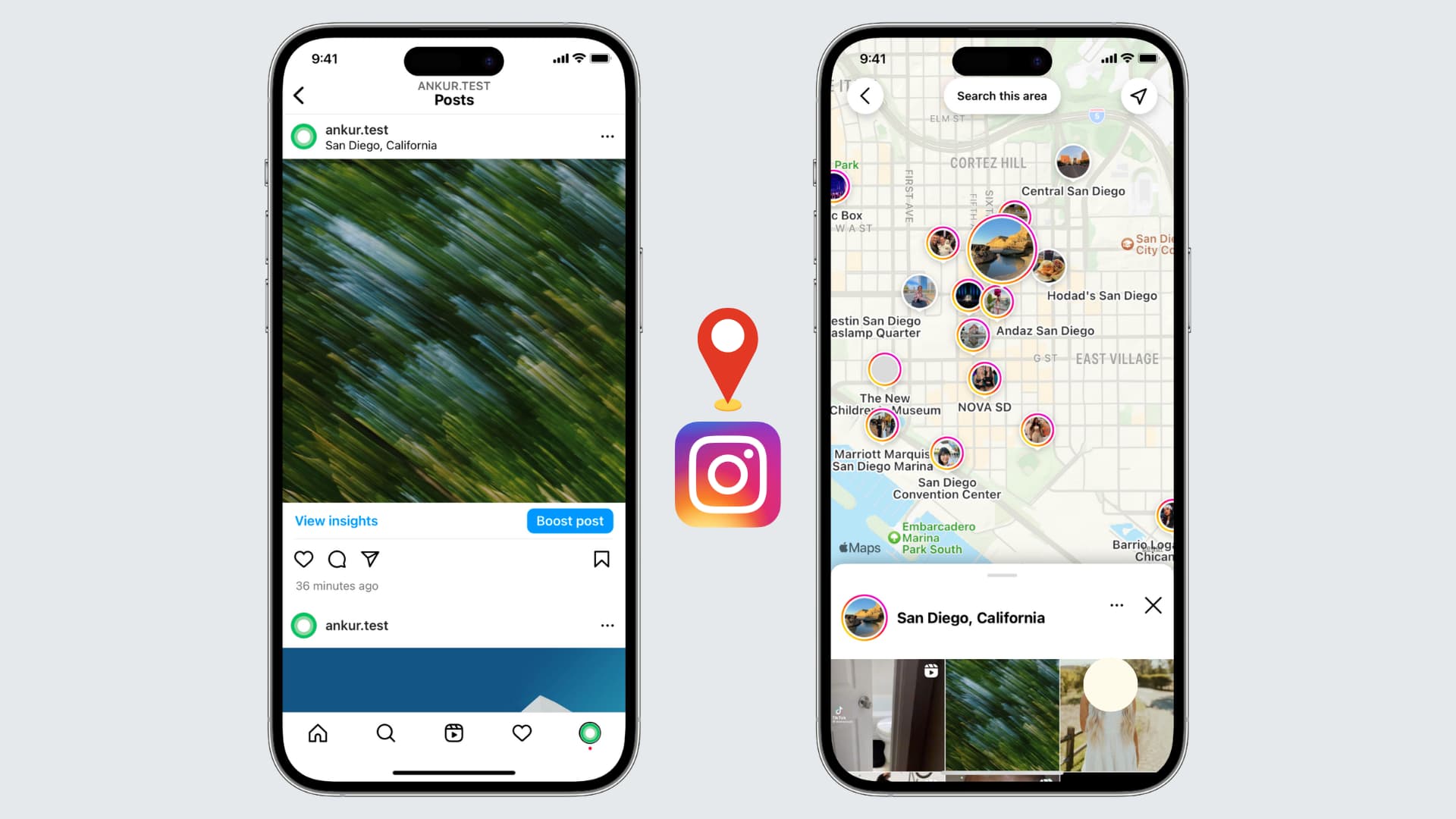
If you're an avid Instagram user looking to enhance your profile and connect with local followers, adding your location to your Instagram bio can be a game-raiser.
Before diving into the steps, it's essential to grasp why location plays a crucial role in your Instagram bio. The social media landscape, especially Instagram, thrives on personal connections and relatability. By including your location, you instantly provide potential followers with valuable information about where you live, work, or frequently visit. This simple piece of information can help foster a sense of trust and authenticity, making it easier to connect with others in your local community.
When you include your location in your Instagram bio, you are not only telling people where you are geographically but also giving them a glimpse into your lifestyle. For example, if you live in a bustling city like New York, your bio might indicate that you are a city dweller who enjoys the vibrant energy and cultural diversity that the city offers. On the other hand, if you live in a small town surrounded by nature, your bio might reflect your love for outdoor activities and a slower-paced lifestyle.
One of the primary benefits of adding your location to your Instagram bio is increased visibility. When users search for specific locations or browse through nearby profiles, having your location readily accessible in your bio gives you a better chance of appearing in those search results. This increased visibility can lead to new followers, collaborations, and even potential business opportunities.

Imagine you are a food blogger based in San Francisco. By including your location in your bio, you make it easier for people searching for food-related content in the city to discover your profile. This can result in more followers who are genuinely interested in your content and may even lead to collaborations with local restaurants or brands.
Location tagging also allows you to tap into the power of local hashtags. When you include your location in your bio, you can use location-specific hashtags in your posts to further boost your visibility. This strategy helps you connect with people who are actively searching for content related to your location, increasing the likelihood of engagement and interaction.
By including your location in your Instagram bio, you make it easier for local followers to find and connect with you. Whether you're looking to meet like-minded individuals, network with professionals in your area, or simply make new friends, adding your location can help attract the right audience. Building a strong local community on Instagram can lead to meaningful relationships both online and offline.
Now that you grasp the significance of adding your location to your Instagram bio, let's dive into the practical steps. Before making any changes, it's important to familiarize yourself with the Instagram app and navigate to your profile. Follow these steps to access your Instagram profile:
To access your Instagram profile, open the Instagram app on your mobile device and log in to your account. Once logged in, tap the profile icon, usually located in the bottom right corner. This will take you to your Instagram profile where all your posts, followers, and bio information are displayed.
Once you're on your Instagram profile, you'll be greeted by a visually appealing grid of your posts. This is where your creativity shines through as you curate a feed that reflects your personality and interests. Take a moment to browse through your posts, reminisce about the memories captured in each image, and appreciate the artistry you've shared with your followers.
Now that you've explored your posts, it's time to focus on your bio. Your Instagram bio is a small but powerful space where you can introduce yourself, showcase your passions, and leave a lasting impression on anyone who visits your profile. To make changes to your bio, navigate to the bio section by tapping the "Edit Profile" button located below your bio description. This will open up the editing options for your bio.
As you enter the bio editing screen, take a moment to reflect on who you are and what message you want to convey to your audience. Your bio should be a reflection of your personality, values, and interests. It's an opportunity to showcase your uniqueness and stand out from the crowd. Consider the tone you want to set, whether it's witty, professional, or heartfelt, and craft your bio accordingly.
Think about what makes you special and what sets you apart from others. Are you an avid traveler, a passionate foodie, or a dedicated fitness enthusiast? Incorporate these aspects into your bio to give people a glimpse into your world.
After you've made the necessary changes to your bio, take a step back and review it with a critical eye. Does it accurately represent who you are? Is it engaging and captivating? Make any final adjustments to ensure that your bio is a true reflection of yourself and leaves a lasting impression on anyone who stumbles upon your profile.
Now that you're in the bio editing section, you're ready to add your location. Simply follow these steps:
Within the bio editing section, locate the text field where your bio description is displayed. You can add your location information by typing it directly into the text field. It's important to be accurate and precise about your location to ensure the information is useful for potential followers.
After entering your location information, make sure to save your updated bio by tapping the "Save" button located in the top right corner of the screen. Once saved, your location will be visible in your Instagram bio, allowing others to easily identify your whereabouts.
Now that you know the steps to add your location to your Instagram bio, let's explore some additional tips to optimize your bio for maximum impact:
Incorporating relevant keywords related to your location can help attract specific audiences. For example, if you're a photographer based in New York City, including keywords like "NYC photographer" or "New York City-based artist" can help you stand out to users searching for those terms.
Hashtags are powerful tools for increasing your visibility on Instagram. Consider including location-specific hashtags in your bio to further connect with users interested in your area. This can expand your reach and help you gain exposure to a broader audience.

While adding your location to your Instagram bio is relatively straightforward, you may encounter some common issues along the way. Here are a few troubleshooting tips:
If your location isn't appearing in your bio after saving the changes, try refreshing your profile by closing the Instagram app and reopening it. Also ensure that your location settings are enabled in your device's privacy settings.
If you're unable to save your updated bio, double-check that you've entered your location information correctly and that you're connected to a stable internet connection. If the issue persists, try logging out and logging back into your Instagram account to resolve any temporary glitches.
By following these simple steps and implementing the tips mentioned, you can effortlessly add your location to your Instagram bio, boost your visibility, and connect with local followers. Embrace the power of location tagging and watch as your Instagram profile becomes a conversation topic.
The "Not Found" error on your Instagram ads account can halt campaigns and leave you locked out of a critical advertising channel. Whether you are scaling spend or launching a new campaign, an inaccessible ad account means lost revenue and wasted time.
This guide walks through every common cause of the error, the exact steps to resolve it, and the preventive measures that keep your account in good standing long term.
Several factors can trigger the "Not Found" error. Identifying the root cause is the fastest path to a fix.
Incorrect or outdated account settings are one of the most common culprits. If the Facebook Business Manager that owns your Instagram ad account has had permissions changed, or if the Instagram account was disconnected from the linked Facebook Page, the ad account may become inaccessible.
Instagram enforces strict advertising policies. Violations, even unintentional ones, can result in your ad account being disabled or suspended. Common violations include prohibited content, misleading claims, and targeting restrictions. If you are running ads on Facebook as well, review our guide on Facebook's ad policy to ensure compliance across both platforms.
A disabled ad account is different from one that simply cannot be found. If your account has been flagged for suspicious activity, repeated policy violations, or billing issues, Instagram may disable it entirely. You will typically see a message such as "Your account is disabled for violation of advertising policies."
Temporary platform outages or bugs on Instagram's end can cause the error to appear intermittently. These issues usually resolve within hours, but it is important to rule them out before pursuing more involved troubleshooting.
An outdated Instagram app or an incorrect deep link can also produce the error. Instagram regularly releases updates that patch bugs and improve compatibility, so running an old version increases the likelihood of encountering unexpected errors.
Before escalating to Instagram support, work through these checks. They resolve the majority of "Not Found" cases.
A slow or unstable connection can prevent the Instagram app or web interface from loading account data properly. Test your connection on another site or app first. If you are on mobile, try switching between Wi-Fi and cellular data.
Log into Facebook Business Manager and navigate to your ad accounts. Confirm that the Instagram ad account is active, not restricted, and not pending review. Look for any notifications or alerts related to billing, policy, or access.
If you see restrictions, address them immediately. A billing issue left unresolved for even a few days can trigger an automatic suspension.
Make sure you have the correct access level. If your role was changed from Admin to Advertiser, or if you were removed from the Business Manager entirely, the account will appear as "Not Found" from your perspective. Ask the account owner to verify your permissions.
In Business Manager, go to Business Settings and then Instagram Accounts. Confirm that the Instagram account is still connected and that the ad account has been assigned to it. A disconnected Instagram account is a frequent cause of this error, especially after organizational changes.
If the initial steps do not resolve the issue, these deeper fixes address more persistent problems.
Stored browser data can become corrupted and cause conflicts with the Instagram interface. Clear your cache and cookies, then try accessing your ad account again in a fresh browser session or incognito window.
Ensure you have the latest version of the Instagram app from the Apple App Store or Google Play Store. If you manage ads from a desktop browser, update Chrome, Firefox, or Safari to the latest release. Developers ship bug fixes and compatibility improvements in every update.
If clearing cache does not help, try accessing your ad account from a completely different browser or device. This isolates whether the problem is device-specific or account-wide.
Different error messages point to different underlying issues. Here is what each one typically means.
"Ad account not found" -- The account may have been deleted, you may lack permissions, or there is a temporary platform issue. Start with the permission and connection checks described above.
"Your account is disabled for violation of advertising policies" -- A policy violation has been identified. Review Instagram's advertising guidelines, identify the offending ad or practice, and prepare to submit an appeal.
"Temporary issue, try again later" -- This usually indicates a server-side problem. Wait 30 to 60 minutes and try again. If the message persists beyond a few hours, proceed to contact support.
"Ad account has no access to this Instagram account" -- The ad account and Instagram account are not properly linked. Reassign the ad account in Business Manager under Instagram Accounts.
When self-service troubleshooting does not resolve the error, reaching out to Instagram support is the next step.
Contact support after you have confirmed that your internet connection is stable, your app and browser are current, your permissions are correct, and the error has persisted for more than 24 hours. Having already completed basic troubleshooting demonstrates a genuine effort and can speed up the resolution process.
Navigate to the Instagram Help Center or use the "Report a Problem" feature inside the Instagram app. For ad-specific issues, the Meta Business Help Center often provides faster routing to a specialist.
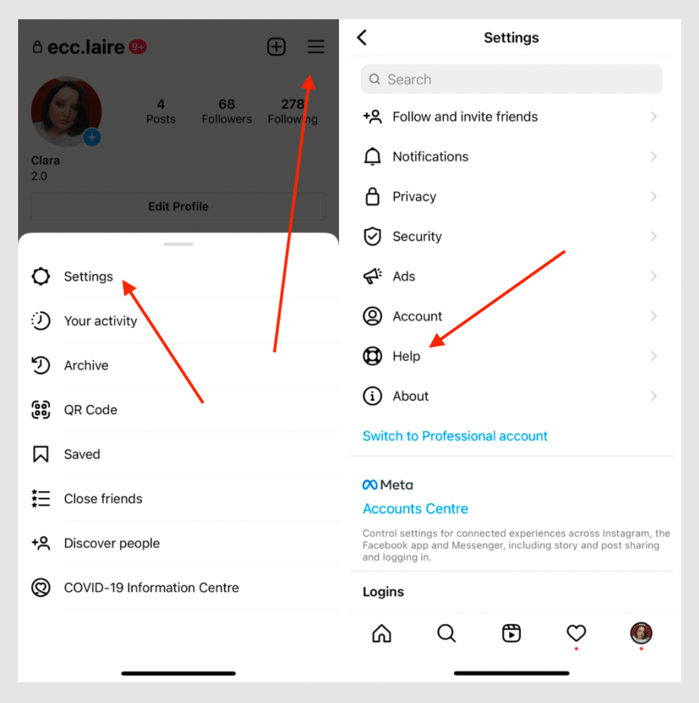
Provide the following details to help the support team resolve your case quickly:
The more specific your request, the faster the resolution.
If your ad account has been disabled rather than simply encountering a temporary error, you will need to go through the reinstatement process.
Each case is reviewed individually. Instagram evaluates the nature of the violation, your account history, and the documentation you provide. During the waiting period, review your ad content and ensure everything aligns with current platform policies so you are ready to relaunch as soon as access is restored.
If your first appeal is denied, you can submit a second appeal with additional context or documentation. Persistence and thoroughness improve your chances.
Proactive account management reduces the risk of encountering this error again.
Regularly update your billing details, contact email, and business verification documents. Outdated payment methods are one of the top reasons accounts get flagged or disabled.
Review Instagram's advertising policies at least quarterly. Policies change, and an ad format or targeting approach that was acceptable six months ago may no longer be compliant. If your Instagram ads strategy is not delivering, audit your creative and targeting against the latest guidelines before assuming a technical issue.
Check your Account Quality dashboard in Business Manager at least once a week. Address any warnings or restrictions immediately rather than letting them escalate.
Enable automatic updates for the Instagram app and your preferred browser. Running outdated software is a preventable source of errors.
When team members leave or roles change, update Business Manager permissions immediately. Orphaned access and stale permissions create security risks and can trigger account access issues.
If troubleshooting on your own is consuming time you cannot afford, or if the reinstatement process stalls, consider working with a paid social agency that has experience navigating Meta's support channels. An experienced agency can often resolve account issues faster because they have established relationships with platform representatives.
For advertisers who also run campaigns on Facebook, make sure your ad accounts are aligned across both platforms. Issues on one can cascade to the other. Our guides on what to do if your Instagram ad was rejected and fixing Instagram ads that are not delivering cover adjacent issues that frequently co-occur with the "Not Found" error.
The Instagram ad account "Not Found" error is disruptive, but it is almost always resolvable. Start with the basic checks: internet connection, account status, and permissions. Move to advanced troubleshooting if needed, and do not hesitate to contact Instagram support with a detailed, well-documented request. For disabled accounts, the reinstatement process requires patience and thorough documentation.
The best defense is prevention. Keep your account information current, stay compliant with platform policies, and monitor your account health consistently. A well-maintained ad account rarely encounters the "Not Found" error, and when it does, recovery is fast.
In this post:
A Facebook ad that accumulates hundreds of likes, shares, and comments is one of the most valuable assets in your advertising account. That engagement -- known as social proof -- signals trust to new audiences and makes your ad significantly more effective.
But here is the problem most advertisers run into: when you duplicate a high-performing ad to target a new audience, all of that engagement disappears. The likes, the comments, the shares -- gone.
The good news is there is a straightforward workaround. In this guide, we will cover what social proof is, how to build it, how to preserve it across campaigns using the existing post ID method, and four real examples of social proof in Facebook ad creative.
Social proof is the psychological principle that people look to the behavior of others when making decisions. In the context of Facebook ads, social proof takes two primary forms:
Engagement-based social proof refers to the visible reactions, comments, and shares on your ad. When a potential customer sees that an ad has 500 likes and dozens of positive comments, their natural response is to pay attention. This type of engagement creates a self-reinforcing loop: more reactions lead to more trust, which leads to more clicks and conversions.
Content-based social proof involves incorporating customer reviews, testimonials, and user-generated content directly into your ad creative or copy. Rather than relying on the ad's engagement metrics, you proactively place trust signals into the ad itself.
Both forms work because of a fundamental truth in digital advertising: your potential customer needs an external factor to rely on when making a purchase decision online. Unlike a brick-and-mortar store where shoppers can physically compare products, online buyers depend heavily on social signals to evaluate whether a product or brand is worth their money.
This is why social proof is part of nearly every successful social media advertising campaign. It can be the difference between a prospect scrolling past your ad and stopping to learn more.
Before you can reuse social proof, you need to build it. There are several proven strategies for generating engagement on your Facebook ads:
Target warm audiences first. Launch your ad to audiences that already know your brand -- email subscribers, website visitors, or past customers. These audiences are more likely to engage with your content, giving your ad an initial boost of social proof before you expand to cold traffic.
Use compelling creative. Ads that provoke an emotional response, ask a question, or share a bold claim tend to generate more comments and reactions. The more people interact, the more social proof you build.
Incorporate reviews and testimonials. Including real customer feedback in your ad copy or creative adds an immediate layer of trust. We will cover specific examples of how to do this later in this article.
Run engagement-optimized campaigns. While your primary Facebook ad campaign objective might be conversions or traffic, consider running a short engagement-focused campaign first to accumulate reactions before switching objectives.
Respond to comments. When people comment on your ad, reply to them. This increases total comment count and shows potential customers that there is a real team behind the brand.
Once your ad has built up meaningful engagement, the next step is making sure you do not lose it when scaling to new audiences.
One of the most common mistakes Facebook advertisers make is duplicating a high-performing ad to show it to a new audience. The duplication creates a completely new ad with zero engagement -- all of the social proof from the original is left behind.
The solution is to use the existing post ID method. This approach lets you run the same ad (with all its accumulated likes, shares, and comments) across multiple ad sets, campaigns, and audiences. Every new impression and reaction continues to build on the original post's engagement.
Here is how to do it in six steps.
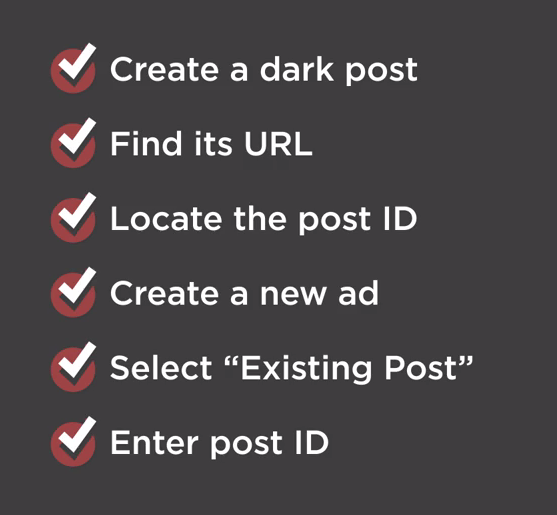
For this tactic to work, you need to start with a dark post -- an unpublished page post that does not appear on your Facebook page's timeline. Dark posts are created through Ads Manager and give you the ability to:
If you are unfamiliar with dark posts, the setup takes just a few minutes and is well worth learning.
In Ads Manager, find the ad that has accumulated the engagement you want to preserve. This is the ad whose social proof you will carry forward into new campaigns.
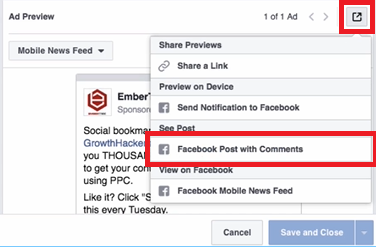
Select the ad and click the edit button. Under Ad Preview, locate the box icon in the right corner and click it, then scroll down to select the Facebook Post with Comments option.
This loads the full ad with all of its accumulated engagement:

Copy the entire URL from the browser bar. We recommend pasting it into a text editor so you can easily isolate the post ID.

The post ID is the number that appears after /posts/ in the URL. Copy everything from that number up to the question mark.

Save this number -- you will need it in a later step.
Create a new ad just as you normally would for any Facebook ad campaign. Choose the objective that aligns with your goals, and set up your new target audience.
Here is where the key difference comes in. Navigate to the Ads section and click the Use Existing Post button instead of creating a new ad from scratch.


Click Enter Post ID and paste the ID you copied earlier. Click Submit.
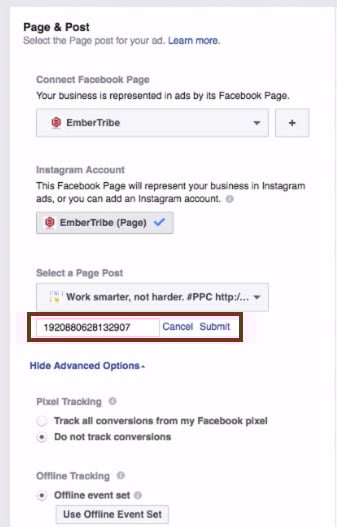
The ad appears with all of its original reactions, comments, and shares intact.

You can now go back to the ad set level, choose any audience segment, and run the ad wherever you want -- all while keeping the same engagement and social proof attached to the creative.
You can repeat this process as many times as needed for new campaigns and ad sets. Every impression and reaction across all placements feeds back into the same post, continuously building your social proof.
Quick reference:
Beyond preserving engagement across campaigns, you can also build social proof directly into your ad creative by featuring customer reviews and testimonials. This approach works especially well for retargeting warm audiences who are already familiar with your brand and need a final push to convert.
Here are four proven formats for incorporating social proof into your Facebook ad creative.
Placing a short customer quote directly in the ad headline is one of the most eye-catching approaches. The headline is one of the first elements a user reads, and leading with a real customer's words immediately establishes credibility.

This format works best when the review is concise -- a single sentence or phrase that captures the core benefit of the product.
Overlaying a customer testimonial directly onto the ad image makes the social proof impossible to miss. The review becomes part of the visual, which can stop users mid-scroll.
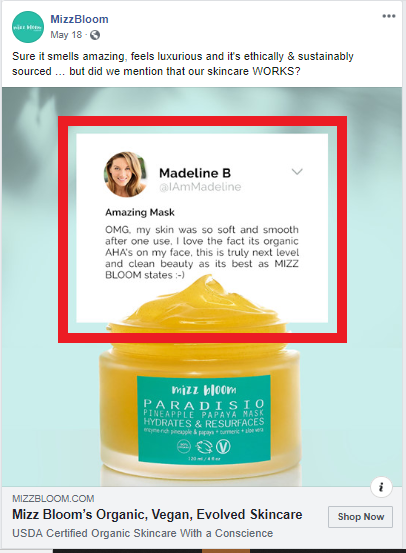
When using this approach, make sure the text is large enough to read on mobile devices and that you stay within Facebook's advertising guidelines for text-to-image ratios.
The primary text field above the ad image gives you room to share a longer customer review. This format is effective for products or services that benefit from detailed testimonials where the customer explains their experience.

For maximum impact, you can stack multiple short reviews in the primary text field. This creates a wall of positive feedback that is difficult for prospects to ignore.

When using customer reviews in your ads, keep these best practices in mind:
When incorporating reviews into your ad images, be aware of Facebook's text overlay guidelines. While Facebook previously enforced a strict 20 percent text rule on ad images, the platform now uses a more nuanced approach. However, ads with less text on the image generally perform better and receive wider distribution.
Key guidelines to follow:
For a deeper understanding of what Facebook will and will not approve, review our guide to Facebook advertising policies.
The most effective approach is to combine both social proof strategies covered in this guide. Start by creating ads that feature customer reviews in the creative, then use the existing post ID method to preserve the engagement those ads accumulate as you scale to new audiences.
This creates a compounding effect: the review in the creative builds initial trust, while the visible likes, comments, and shares reinforce that trust. Over time, your best-performing ads become increasingly powerful assets that you can deploy across your entire Facebook advertising strategy.
Have you tested the existing post ID method with your campaigns? If you are looking for more ways to optimize your Facebook ad performance, explore our guides on scaling Facebook ads without killing performance and identifying audience overlap to maximize your results.
If you've recently had your Instagram ad rejected, don't panic. It can be frustrating to see your carefully crafted ad being denied, but there are steps you can take to address the issue and get your ad approved. We will walk you through the process of understanding Instagram's ad policies, reviewing the rejection notice, making necessary changes to your ad, resubmitting it for review, and preventing future ad rejections.
.png)
One of the first things you should do when your Instagram ad is rejected is to familiarize yourself with Instagram's ad policies. These policies outline what types of content are allowed and what is prohibited. By understanding these guidelines, you can avoid making the same mistake in the future.
Instagram's ad policies are designed to maintain a safe and positive environment for users. They aim to prevent the promotion of harmful or inappropriate content that could potentially offend or violate the rights of others. These policies undergo regular updates to adapt to the evolving landscape of social media and ensure that advertisers adhere to the highest standards.
When creating an ad on Instagram, it's crucial to consider the platform's guidelines regarding various aspects of content, including but not limited to nudity, hate speech, and violence. By adhering to these guidelines, you can help create a respectful and effective advertising for all users.
There are several common reasons why Instagram may reject an ad. One reason could be that the ad violates Instagram's community guidelines, which include rules about nudity, hate speech, and violence. Instagram has a zero-tolerance policy for such content, as it strives to create a safe and welcoming space for its diverse user base.
Another common reason for ad rejection is that the ad doesn't comply with Instagram's policies on sensitive content. Instagram aims to protect its users from potentially offensive or distressing material. Therefore, ads that contain explicit or graphic content, even if it is relevant to a product or service, may be rejected to ensure the comfort and well-being of the platform's users.
Understanding these common issues can help you identify the problem with your ad. By analyzing your content against Instagram's ad policies and community guidelines, you can make necessary adjustments to ensure compliance and increase the chances of your ad being approved.
[[Here is an example of growth using social media best practices].](https://www.embertribe.com/heavy-duty-parts-ecommerce-brand-scaled-by-2m-in-1-year)
.png)
Instagram's community guidelines outline the rules and regulations that users must follow when using the platform. These guidelines apply not only to organic posts but also to ads. They cover a wide range of topics, including authenticity, safety, and respect.
Authenticity is a key aspect of Instagram's community guidelines. The platform encourages users to share genuine and original content that reflects their true selves. This principle extends to ads as well, as Instagram aims to maintain a transparent and trustworthy advertising environment.
Safety is another crucial element emphasized in Instagram's community guidelines. The platform strives to protect its users from harassment, bullying, and other forms of harmful behavior. Consequently, ads that promote violence, discrimination, or any form of hate speech are strictly prohibited.
Respect for others is a fundamental principle that Instagram upholds. The community guidelines emphasize the importance of treating others with kindness and respect. This includes refraining from posting content that may be offensive or disrespectful towards individuals or groups based on factors such as race, religion, gender, or sexual orientation.
Familiarizing yourself with these guidelines can help you ensure that your ads are compliant and avoid rejection in the future. By aligning your content with Instagram's community guidelines and ad policies, you contribute to a positive and inclusive advertising ecosystem on the platform.
Once your Instagram ad has been rejected, it's important to take the appropriate steps to address the issue. Here are the key steps you should follow:
When Instagram rejects your ad, they will provide you with a rejection notice. This notice will outline the specific reason for the rejection, giving you valuable insights into what went wrong. Take the time to carefully review this notice and understand the issue.
The rejection notice may include details about the policy or guideline that your ad violated. It could be related to the content, formatting, or any other specific requirements set by Instagram. Understanding the exact reason for the rejection will help you in taking the necessary corrective actions.
Additionally, the rejection notice might provide you with examples or suggestions on how to fix the issue. This can be helpful in guiding you towards making the right changes to your ad.
After reviewing the rejection notice, you need to identify the issue with your ad. It could be a violation of a specific policy or a mistake in the content or formatting. By pinpointing the issue, you can take the necessary steps to rectify it.
Take a closer look at your ad and compare it against the guidelines provided by Instagram. Pay attention to the specific requirements and restrictions mentioned in the guidelines. This will help you identify any potential areas where your ad may have deviated from the rules.
It's important to note that sometimes the issue may not be immediately apparent. In such cases, you may need to seek additional guidance from Instagram's support team or consult with an expert who has experience in dealing with ad rejections.
With a clear understanding of the issue, it's time to make the necessary changes to your ad. This might involve editing the content, removing sensitive materials, or adjusting the formatting. Pay close attention to the guidelines and policies to ensure that your ad complies with the rules.
When making changes to your ad, it's important to strike a balance between addressing the issue and maintaining the effectiveness of your message. Consider alternative approaches or creative solutions that can help you meet the guidelines without compromising the impact of your ad.
Once you have made the necessary changes, review your ad again to ensure that all the required modifications have been implemented. It's a good practice to seek feedback from others, such as colleagues or friends, to get a fresh perspective on the updated ad.
Remember, the goal is to create an ad that not only complies with Instagram's policies but also resonates with your target audience.

To resubmit your ad, go to the ad manager dashboard on Instagram and find the rejected ad. It's important to carefully analyze the reasons for rejection and make the necessary changes accordingly. Take your time to ensure that your ad complies with the platform's policies and guidelines. Once you are confident that you have rectified the issues, you can proceed to resubmit your ad.
Instagram has designed a user-friendly interface that makes the resubmission process seamless. Simply follow the prompts provided on the ad manager dashboard to submit your ad for review again. It's crucial to double-check all the changes you have made before hitting that resubmit button. This will help ensure that your ad has the best chance of being approved this time around.
After resubmitting your ad, you'll need to wait for Instagram to review it again. The review process typically takes a few days, so it's important to be patient during this time. While waiting, it's advisable to refrain from making any further changes to your ad. Making additional modifications might confuse the reviewing team and could potentially lead to more delays in the approval process.
During the review period, Instagram's team will carefully assess your ad to ensure that it complies with their policies and guidelines. They will evaluate various aspects, such as the ad's content, targeting, and overall user experience. This thorough examination ensures that all ads on Instagram meet the platform's standards and provide a positive experience for users.
Once the review process is complete, Instagram will notify you of their decision via email. This email will inform you whether your ad has been approved or if further changes are required. If your ad gets approved, congratulations! You can now start running your ad and reaching your target audience. However, if further changes are needed, make sure to carefully review the feedback provided by Instagram and make the necessary adjustments before resubmitting again.
Remember, the resubmission process is an opportunity for you to refine your ad and ensure that it aligns with Instagram's policies. By following the guidelines and taking the time to make the necessary changes, you increase your chances of getting your ad approved and reaching your desired audience effectively.
To prevent future ad rejections on Instagram, it's important to follow best practices and understand Instagram's algorithm. Here's what you can do:
This includes using high-quality images, compelling captions, and engaging call-to-actions. By creating ads that provide value to your audience and align with Instagram's guidelines, you can increase the chances of approval.
Instagram uses factors such as engagement, relevance, and timeliness to determine which ads to show to users. By understanding how the algorithm works, you can create ads that are more likely to be seen by your target audience.
We know that having your Instagram ad rejected can be tedious, but it's not the end of the world. By understanding Instagram's ad policies, taking the necessary steps to address the issue, and learning from others' experiences, you can improve your chances of getting your ads approved in the future. Remember to follow best practices, make the necessary changes, and stay persistent. Good luck!

If you've encountered a Google Ads 500 Error, don't panic. This guide will take you through the process of understanding the error, exploring its impact on your Google Ads campaigns, and providing you with step-by-step instructions on how to troubleshoot and prevent similar errors in the future.
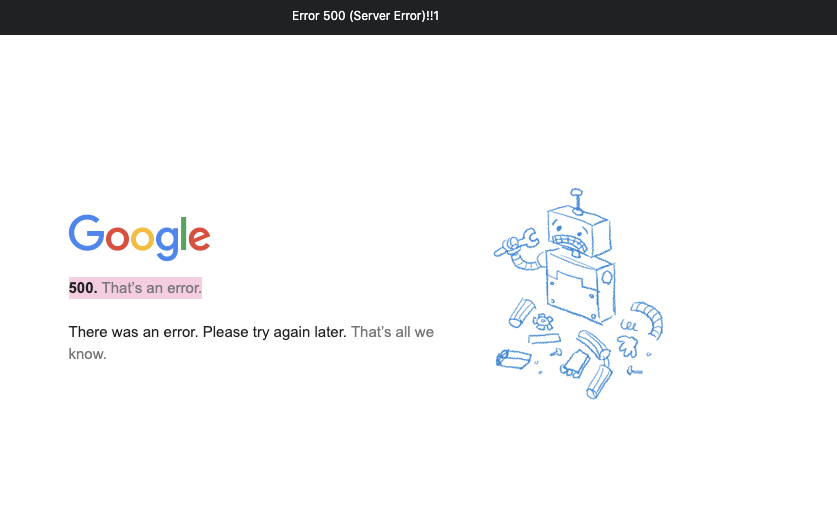
A 500 Error, also known as a Internal Server Error, indicates that an unexpected condition occurred, preventing the server from fulfilling your request. This could be due to a variety of factors, including misconfigurations, programming errors, or issues with the server infrastructure.
When you encounter a 500 Error, it's important to understand that the problem lies with the server, not your specific request or configuration. This means that you don't have direct control over resolving the error, but you can take steps to troubleshoot and report the issue to Google Ads support.
One possible cause of a 500 Error is a misconfiguration in the server settings. This could be related to the server software, such as Apache or Nginx, or the server's operating system. It's important to ensure that all server configurations are set up correctly and that any recent changes to the server's settings are thoroughly tested before deploying them in a production environment.
Another potential cause of a 500 Error is a programming error in the server-side code. This could be a bug or an issue with the code logic that is preventing the server from processing requests correctly. In such cases, it's crucial to review the server-side code, identify any errors or issues, and fix them accordingly.
When it comes to Google Ads, a 500 Error can have a significant impact on your advertising campaigns. The error interrupts the delivery of your ads, potentially leading to decreased visibility and potential revenue losses. Therefore, it's essential to address and resolve this issue promptly to ensure your ads reach their intended audience.
Not only can a 500 Error affect the delivery of your ads, but it can also impact the overall user experience on your website. If the error occurs when a user clicks on your ad and tries to access your website, they may encounter a blank page or an error message, leading to frustration and a negative perception of your brand.
A 500 Error can also impact your Quality Score in Google Ads. Quality Score is a metric used by Google to determine the relevance and quality of your ads and landing pages. If your website consistently returns 500 Errors, it may signal to Google that your website is unreliable or poorly maintained, resulting in a lower Quality Score and potentially higher advertising costs.
To mitigate the impact of a 500 Error on your Google Ads campaigns, it's crucial to monitor your ads and website regularly. Implementing a robust monitoring system can help you identify any server-side errors promptly and take immediate action to resolve them. Additionally, regularly testing your website's performance and functionality can help uncover any potential issues before they affect your advertising campaigns.

In some cases, your server might experience a momentary overload due to a sudden surge in traffic or other resource-intensive processes. This overload can result in a 500 Error. Monitoring and optimizing your server's performance can help prevent these issues.
Server overload can occur when your website experiences a significant increase in user traffic, causing the server to struggle to handle the load. This can happen during peak hours, when many users are accessing your website simultaneously. Additionally, resource-intensive processes such as running complex scripts or executing large database queries can also contribute to server overload.
To avoid server overload, it is essential to regularly monitor your website's traffic patterns and server performance. By identifying potential bottlenecks and optimizing your server's configuration, you can ensure that it can handle the expected load and prevent 500 Errors from occurring.
If you're using plugins or extensions in conjunction with your Google Ads campaigns, it's possible that one of them is causing conflicts and triggering the 500 Error. Disabling or updating these plugins can help resolve the issue.
Plugins and extensions can enhance the functionality of your website and provide additional features for your Google Ads campaigns. However, they can also introduce compatibility issues and conflicts that may lead to a 500 Error. These conflicts can occur when a plugin or extension modifies crucial files or interferes with the normal operation of your website.
To troubleshoot this issue, you can start by disabling all plugins and extensions and then enabling them one by one to identify the problematic one. Once you have identified the culprit, you can either update it to a newer version or find an alternative plugin or extension that provides similar functionality without causing conflicts.
In rare cases, corrupted files on your server can cause a 500 Error. These files may be integral to the functioning of your advertising campaigns. Identifying and repairing any corrupted files can help rectify the error.
Corrupted files can occur due to various reasons, such as incomplete file transfers, hardware failures, or software bugs. When these corrupted files are essential for the operation of your advertising campaigns, they can lead to a 500 Error and disrupt your Google Ads performance.
To address this issue, you can perform a thorough examination of your server's file system to identify any corrupted files. This can be done by checking file integrity using tools like checksum verification or by comparing file versions with known good copies. Once the corrupted files are identified, you can replace them with their undamaged counterparts or restore them from backups if available.
Regular backups of your website's files are crucial in mitigating the impact of corrupted files. By having up-to-date backups, you can quickly restore any corrupted files and minimize the downtime caused by a 500 Error.
With the causes in mind, let's now dive into the troubleshooting process for a Google Ads 500 Error.
Begin by inspecting your server logs. These logs can provide valuable insights into the underlying issue causing the 500 Error. Look for any error messages or indications of resource limitations. Analyzing these logs will guide you towards potential solutions.
If you suspect that a plugin or extension is triggering the error, disable them temporarily. Monitor whether the 500 Error persists. If the error disappears, it's likely that one of the plugins or extensions was the culprit. Gradually enable them one by one until you identify the problematic one. Updating or replacing that specific plugin or extension can resolve the issue.
If a corrupted file is causing the error, you'll need to locate and repair it. Consult with your server administrator or IT team to identify the affected files and work on restoring them. If possible, having regular file backups will prove to be invaluable in mitigating the impact of corrupted files.

Now that you've resolved the current 500 Error, it's essential to implement preventive measures to avoid encountering similar issues in the future.
Perform routine maintenance tasks on your server, ensuring that it remains optimized and up to date. Regularly monitor its performance and promptly address any potential issues that arise. By proactively managing your server, you can minimize the risk of encountering server-related errors.
Maintain a proactive approach towards managing your plugins and extensions. Regularly update them to ensure compatibility with the latest versions of other software or platforms you're using. Developers often release updates that address known bugs and vulnerabilities, reducing the chances of causing errors like the 500 Error.
Implement a reliable file backup system that performs regular backups of your important files. In the event of a corrupted file or other issues, having a recent backup can save you time and effort in resolving errors. Make sure that your backup system runs consistently and that you can easily restore files if needed.
By following these preventive measures, you'll greatly reduce the likelihood of experiencing Google Ads 500 Errors in the future, allowing your campaigns to run smoothly.
So, there you go: troubleshooting a Google Ads 500 Error might seem daunting, but with the right approach, it's entirely manageable. Understand the error, identify its causes, and follow the step-by-step guide provided. By implementing preventive measures, you'll not only troubleshoot the current error but also safeguard your campaigns from future disruptions. Keep your Google Ads running error-free and maximize their potential.

Email flow is the backbone of every message you send and receive, whether it is a one-to-one conversation or a marketing campaign reaching thousands of subscribers. Understanding the email process flow gives marketers a real advantage: better deliverability, fewer bounced messages, and campaigns that consistently reach the inbox.
In this guide, we break down what email flow is, how it works at a technical level, and why it matters for brands that depend on email as a growth marketing channel. We will also cover the most common email flow problems and how to troubleshoot them.
Email flow refers to the end-to-end process an email follows as it travels from the sender's device to the recipient's inbox. It involves multiple systems working together, including email clients, outgoing and incoming mail servers, DNS records, and internet service providers (ISPs).
At a high level, every email passes through three stages:
Understanding each stage is critical for marketers because a breakdown at any point, whether it is a DNS misconfiguration, a spam filter flag, or an authentication failure, means your message never reaches the subscriber.
The email communication process involves a precise sequence of handoffs between servers and protocols. Here is a step-by-step look at what happens after you press send.
When you compose and send an email, your email client (such as Gmail, Outlook, or a platform like Klaviyo) connects to an outgoing SMTP (Simple Mail Transfer Protocol) server. The SMTP server is responsible for routing your message toward its destination.
The first technical step is a DNS lookup. The sending server queries the Domain Name System to find the MX (Mail Exchange) records for the recipient's domain. For example, if you are sending to someone at example.com, the DNS lookup maps that domain to the IP address of the mail server responsible for handling example.com email.
Once the MX record is resolved, the SMTP server establishes a connection with the recipient's mail server and transfers the message. If the recipient uses a different email provider, the message may pass through multiple relay servers before arriving at its final destination.
When the message reaches the recipient's mail server, a series of checks begin:
If the email passes all checks, it is delivered to the recipient's inbox. If it fails authentication or triggers a spam filter, it may land in the junk folder or be rejected entirely.
This entire process typically completes in seconds, but the complexity behind it explains why email deliverability is never guaranteed, and why marketers need to understand each step.
Every email flow depends on three core infrastructure layers. When any of these components fail or are misconfigured, delivery suffers.
Email servers handle the storage, routing, and delivery of messages. There are two primary types:
For marketing teams, the health and reputation of your sending SMTP server directly impacts inbox placement. Shared IP addresses with poor sender reputation can drag down deliverability for every brand on that server.
Email clients are the applications people use to read and compose email, including Gmail, Apple Mail, Outlook, and mobile apps. From a marketing perspective, each client renders HTML email differently, which is why testing across clients is essential before launching a campaign.
Email clients also implement their own filtering layers. Gmail's tabbed inbox (Primary, Promotions, Social) is a client-side sorting mechanism that operates independently from server-side spam filters.
ISPs act as intermediaries between senders and recipients. They maintain their own spam filtering infrastructure and sender reputation databases. Major ISPs like Gmail, Yahoo, and Microsoft track sender behavior over time, including bounce rates, complaint rates, and engagement metrics. A poor reputation with any major ISP can result in your emails being silently dropped or routed to spam.
For DTC brands and growth-stage companies, email is often the highest-ROI channel available. But technical email flow knowledge is not just for IT teams. Marketers who understand how the email communication process works make better decisions about list hygiene, sending frequency, authentication, and content strategy.
Here are the practical implications:
If you are running Shopify email marketing campaigns, understanding these fundamentals can be the difference between a 40% open rate and a 10% one.
Even well-configured email systems encounter delivery problems. Here are the most common issues and their solutions.
Bounces occur when an email cannot be delivered to the intended recipient. There are two types:

High bounce rates signal poor list hygiene to ISPs and directly damage your sender reputation. Implement double opt-in for new subscribers and regularly clean your list to remove inactive or invalid addresses.
Spam filters use a combination of rule-based and machine-learning approaches to classify incoming email. Common triggers include:
If your marketing emails are landing in spam, audit your authentication records first, then review your content for common trigger patterns. Tools like Mail-Tester or GlockApps can help diagnose specific issues.
If SPF, DKIM, or DMARC records are missing or misconfigured, receiving servers may reject your email outright or route it to spam. This is especially common when brands migrate email platforms or add new sending services without updating DNS records.
Work with your email service provider to verify that all authentication records are current and properly aligned with your sending domains.
To maintain strong inbox placement and get the most from your email marketing, follow these proven practices:
The terms "email flow" and "email automation flow" are sometimes used interchangeably, but they refer to different concepts.
Email flow (the subject of this guide) describes the technical process by which an email travels from sender to recipient. It is an infrastructure-level concept.
Email automation flows (also called drip campaigns or sequences) are pre-built marketing workflows that send targeted emails based on subscriber behavior or triggers, such as a welcome series, abandoned cart sequence, or post-purchase follow-up.
Both concepts are important. The technical email flow determines whether your message can physically reach the inbox. The automation flow determines what message is sent, when, and to whom. Marketers who master both can optimize their sales funnel from first touch to repeat purchase.
If you are exploring communication channels beyond email, SMS marketing is a complementary channel that operates on different infrastructure but serves similar lifecycle marketing goals.
For teams that need a concise overview of how the email communication process works, here are the key steps in order:
| Step | What Happens | Key Protocol |
|---|---|---|
| 1. Compose | User writes the message in an email client | -- |
| 2. Send | Client connects to SMTP server | SMTP |
| 3. DNS Lookup | Sending server resolves recipient's MX records | DNS |
| 4. Transfer | Message is relayed to recipient's mail server | SMTP |
| 5. Authenticate | Receiving server checks SPF, DKIM, DMARC | SPF/DKIM/DMARC |
| 6. Filter | Spam and security checks are applied | ISP algorithms |
| 7. Deliver | Email is placed in the recipient's inbox or spam folder | IMAP/POP3 |
Each step represents a potential point of failure. When troubleshooting delivery issues, work through this process sequentially to isolate where the breakdown is occurring.
Understanding how email flow works is not just a technical exercise. For marketers and growth teams, this knowledge translates directly into better campaign performance. When you know how authentication, routing, and filtering affect delivery, you can proactively address issues before they impact revenue.
The brands that win at email marketing are the ones that treat deliverability as a core competency, not an afterthought. They monitor sender reputation, maintain clean lists, authenticate every sending domain, and continuously test their campaigns across email clients and ISPs. Pair that infrastructure discipline with smart newsletter content strategy, and email becomes the most reliable and profitable channel in your growth stack.
Instagram Highlights let you pin your best story content to your profile permanently — but most people only know the basic method. In this guide, we cover how to add highlights on Instagram, how to create new ones from scratch, and the workaround that lets you add highlights without posting to your story.
Instagram Highlights are collections of story clips pinned to your profile page, displayed directly below your bio. Unlike regular stories that disappear after 24 hours, Highlights stay visible for as long as you keep them.
Think of them as a virtual storefront. When someone visits your profile, Highlights are the first content they can browse — making them a powerful tool for personal branding and content curation. Each Highlight can be dedicated to a specific theme, product line, or topic, letting you attract like-minded followers or customers who connect with your content.
For businesses, Highlights are especially useful for showcasing testimonials, product demos, FAQs, behind-the-scenes content, and promotions — all without cluttering your main feed.
The standard method for creating Instagram Highlights pulls from your story archive. Here is how to do it:
Your new Highlight will now appear on your profile, right below your bio.
Note: Your stories are automatically saved to your archive by default. If yours aren't showing up, go to Settings > Privacy > Story and make sure "Save story to archive" is turned on.
You can also create a Highlight directly from a story you are currently viewing or have just posted:
This method is great for building Highlights in real time as you post stories throughout the day.
This is the workaround most people don't know about. If you want to add content to your Highlights without it showing up in your live story feed (where your followers would see it for 24 hours), follow these steps:

By using this method, you can keep your story feed clean while still building out your Highlights with the content you want. It is especially useful for businesses that want to add curated content to Highlights without sending notifications or cluttering their followers' story trays.
Pro tip: If the story appears briefly before you delete it, you can also toggle your account to private, post the story, immediately delete it, wait 24 hours, then restore and add to Highlights — then switch back to public. This ensures zero visibility.
Keeping your Highlights fresh and well-organized is important for making a good first impression. Here is how to edit or remove them:
The individual stories inside the Highlight will remain in your archive — only the Highlight collection itself is removed.
Instagram does not offer a built-in reorder feature. However, when you edit a Highlight (even just opening and saving it without changes), it moves to the front of the row. Use this trick to reorder your Highlights by editing them in reverse order of how you want them displayed.
Your Highlight covers are the first thing visitors see. Use custom-designed icons or branded images that clearly represent each category. Consistent cover designs make your profile look polished and professional.
Group your content into clear themes — products, testimonials, tutorials, behind-the-scenes, events. This makes it easier for visitors to find what they are looking for and keeps your profile structured.
Review your Highlights regularly and remove outdated content. A Highlight full of old promotions or expired offers hurts your credibility. Aim to refresh your Highlights at least once per quarter.
Place your most important Highlights first (closest to the left side of your profile). For businesses, this might be a "Start Here" guide, your best testimonials, or your core product showcase. For personal brands, consider leading with your strongest content or most popular series.
Yes. Post the story, delete it immediately, wait 24 hours, restore it from "Recently Deleted," and then add it to a Highlight from your archive. We walk through the full steps above.
Yes. Any photo or video that has been posted as a story and saved to your archive can be added to a Highlight — regardless of when it was originally posted. Just make sure "Save story to archive" is enabled in your settings.
Highlights stay on your profile indefinitely. Unlike stories, they do not expire after 24 hours. You can keep them visible for as long as you want and remove them at any time.
There is no limit to the number of Highlights you can create, and each individual Highlight can hold up to 100 story clips. Once a Highlight reaches 100, the oldest story is removed when a new one is added.
You can see viewer lists for story clips within a Highlight for up to 48 hours after the original story was posted. After that window, viewer data is no longer available — but the content remains in your Highlight.
Instagram Highlights are one of the most underused features on the platform. Whether you are building a brand, growing your Instagram presence, or just want a better-organized profile, taking the time to create and manage your Highlights will pay off every time someone visits your page.


.svg)