









In this post:
- What is social proof and why it matters for Facebook ads
- How to get social proof on Facebook ads
- How to reuse Facebook ads without losing social proof
- 4 social proof advertising examples that work
- Facebook ad text rules to keep in mind
A Facebook ad that accumulates hundreds of likes, shares, and comments is one of the most valuable assets in your advertising account. That engagement - known as social proof - signals trust to new audiences and makes your ad significantly more effective.
But here is the problem most advertisers run into: when you duplicate a high-performing ad to target a new audience, all of that engagement disappears. The likes, the comments, the shares - gone.
The good news is there is a straightforward workaround. In this guide, we will cover what social proof is, how to build it, how to preserve it across campaigns using the existing post ID method, and four real examples of social proof in Facebook ad creative.
What Is Social Proof in Facebook Advertising?
Social proof is the psychological principle that people look to the behavior of others when making decisions. In the context of Facebook ads, social proof takes two primary forms:
Engagement-based social proof refers to the visible reactions, comments, and shares on your ad. When a potential customer sees that an ad has 500 likes and dozens of positive comments, their natural response is to pay attention. This type of engagement creates a self-reinforcing loop: more reactions lead to more trust, which leads to more clicks and conversions.
Content-based social proof involves incorporating customer reviews, testimonials, and user-generated content directly into your ad creative or copy. Rather than relying on the ad's engagement metrics, you proactively place trust signals into the ad itself.
Both forms work because of a fundamental truth in digital advertising: your potential customer needs an external factor to rely on when making a purchase decision online. Unlike a brick-and-mortar store where shoppers can physically compare products, online buyers depend heavily on social signals to evaluate whether a product or brand is worth their money.
This is why social proof is part of nearly every successful social media advertising campaign. It can be the difference between a prospect scrolling past your ad and stopping to learn more.
How to Get Social Proof on Facebook Ads
Before you can reuse social proof, you need to build it. There are several proven strategies for generating engagement on your Facebook ads:
Target warm audiences first. Launch your ad to audiences that already know your brand - email subscribers, website visitors, or past customers. These audiences are more likely to engage with your content, giving your ad an initial boost of social proof before you expand to cold traffic.
Use compelling creative. Ads that provoke an emotional response, ask a question, or share a bold claim tend to generate more comments and reactions. The more people interact, the more social proof you build.
Incorporate reviews and testimonials. Including real customer feedback in your ad copy or creative adds an immediate layer of trust. We will cover specific examples of how to do this later in this article.
Run engagement-optimized campaigns. While your primary Facebook ad campaign objective might be conversions or traffic, consider running a short engagement-focused campaign first to accumulate reactions before switching objectives.
Respond to comments. When people comment on your ad, reply to them. This increases total comment count and shows potential customers that there is a real team behind the brand.
Once your ad has built up meaningful engagement, the next step is making sure you do not lose it when scaling to new audiences.
How to Reuse Facebook Ads Without Losing Social Proof
One of the most common mistakes Facebook advertisers make is duplicating a high-performing ad to show it to a new audience. The duplication creates a completely new ad with zero engagement - all of the social proof from the original is left behind.
The solution is to use the existing post ID method. This approach lets you run the same ad (with all its accumulated likes, shares, and comments) across multiple ad sets, campaigns, and audiences. Every new impression and reaction continues to build on the original post's engagement.
Here is how to do it in six steps.
Step 1: Create a Dark Post
For this tactic to work, you need to start with a dark post - an unpublished page post that does not appear on your Facebook page's timeline. Dark posts are created through Ads Manager and give you the ability to:
- Split test the same creative against different audiences
- Increase your total ad reach without fragmenting engagement
- Test different audience segments while maintaining a single engagement thread
If you are unfamiliar with dark posts, the setup takes just a few minutes and is well worth learning.
Step 2: Locate the High-Performing Ad
In Ads Manager, find the ad that has accumulated the engagement you want to preserve. This is the ad whose social proof you will carry forward into new campaigns.
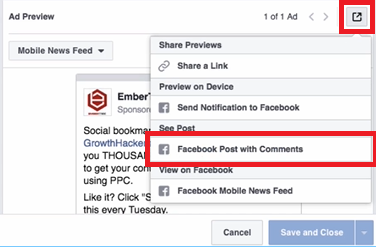
Select the ad and click the edit button. Under Ad Preview, locate the box icon in the right corner and click it, then scroll down to select the Facebook Post with Comments option.
This loads the full ad with all of its accumulated engagement:

Step 3: Copy the Post ID
Copy the entire URL from the browser bar. We recommend pasting it into a text editor so you can easily isolate the post ID.

The post ID is the number that appears after
/posts/in the URL. Copy everything from that number up to the question mark.

Save this number - you will need it in a later step.
Step 4: Create a New Ad Using the Existing Post
Create a new ad just as you normally would for any Facebook ad campaign. Choose the objective that aligns with your goals, and set up your new target audience.
Here is where the key difference comes in. Navigate to the Ads section and click the Use Existing Post button instead of creating a new ad from scratch.


Step 5: Enter the Post ID
Click Enter Post ID and paste the ID you copied earlier. Click Submit.
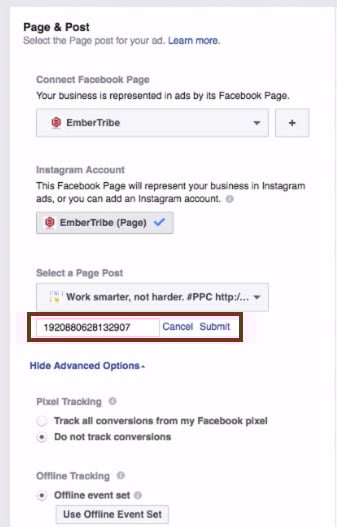
The ad appears with all of its original reactions, comments, and shares intact.

Step 6: Launch and Scale
You can now go back to the ad set level, choose any audience segment, and run the ad wherever you want - all while keeping the same engagement and social proof attached to the creative.
You can repeat this process as many times as needed for new campaigns and ad sets. Every impression and reaction across all placements feeds back into the same post, continuously building your social proof.
Quick reference:
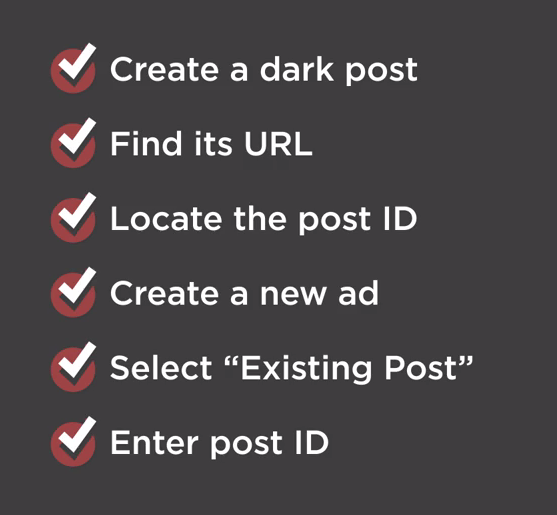
- Start with a dark post
- Find the URL of that dark post
- Copy the post ID from the URL
- Create a new ad and select "Use Existing Post"
- Enter your post ID
- Launch to your new audience
Social Proof Advertising Examples in Facebook Ads
Beyond preserving engagement across campaigns, you can also build social proof directly into your ad creative by featuring customer reviews and testimonials. This approach works especially well for retargeting warm audiences who are already familiar with your brand and need a final push to convert.
Here are four proven formats for incorporating social proof into your Facebook ad creative.
Example 1: Review in the Ad Headline
Placing a short customer quote directly in the ad headline is one of the most eye-catching approaches. The headline is one of the first elements a user reads, and leading with a real customer's words immediately establishes credibility.

This format works best when the review is concise - a single sentence or phrase that captures the core benefit of the product.
Example 2: Review in the Ad Creative Image
Overlaying a customer testimonial directly onto the ad image makes the social proof impossible to miss. The review becomes part of the visual, which can stop users mid-scroll.

When using this approach, make sure the text is large enough to read on mobile devices and that you stay within Facebook's advertising guidelines for text-to-image ratios.
Example 3: Review in the Ad Text (Primary Text)
The primary text field above the ad image gives you room to share a longer customer review. This format is effective for products or services that benefit from detailed testimonials where the customer explains their experience.

Example 4: Multiple Reviews in Ad Text
For maximum impact, you can stack multiple short reviews in the primary text field. This creates a wall of positive feedback that is difficult for prospects to ignore.

When using customer reviews in your ads, keep these best practices in mind:
- Use specific, authentic content. Generic praise is less convincing than detailed feedback about a specific experience or result.
- Target warm audiences. Reviews work best with people who already have some familiarity with your brand. Pair testimonial ads with custom audiences for the strongest results.
- Get permission. Always ensure you have the right to use a customer's words or likeness in your advertising.
Facebook Ad Text Rules for Social Proof Creative
When incorporating reviews into your ad images, be aware of Facebook's text overlay guidelines. While Facebook previously enforced a strict 20 percent text rule on ad images, the platform now uses a more nuanced approach. However, ads with less text on the image generally perform better and receive wider distribution.
Key guidelines to follow:
- Keep image text concise - a short customer quote or star rating works better than a full paragraph
- Use an image size of at least 1080 x 1080 pixels for feed placements
- Test your creative across placements to ensure the review text is readable on all screen sizes
- If your testimonial is long, place it in the primary text field rather than overlaying it on the image
For a deeper understanding of what Facebook will and will not approve, review our guide to Facebook advertising policies.
Combining Both Strategies for Maximum Impact
The most effective approach is to combine both social proof strategies covered in this guide. Start by creating ads that feature customer reviews in the creative, then use the existing post ID method to preserve the engagement those ads accumulate as you scale to new audiences.
This creates a compounding effect: the review in the creative builds initial trust, while the visible likes, comments, and shares reinforce that trust. Over time, your best-performing ads become increasingly powerful assets that you can deploy across your entire Facebook advertising strategy.
Have you tested the existing post ID method with your campaigns? If you are looking for more ways to optimize your Facebook ad performance, explore our guides on scaling Facebook ads without killing performance and identifying audience overlap to maximize your results.

.webp)

.svg)


