









Why Custom Audience Match Rate Matters More Than You Think
Custom audiences remain one of the most powerful targeting features in the Facebook advertising platform. The ability to upload a list of customers or prospects and serve them ads directly is a game-changer for performance marketers.
But here is the problem most advertisers overlook: when you upload a list of 1,000 contacts, Facebook does not automatically match all of them. In many cases, match rates fall between 30% and 50%, which means more than half of your carefully curated audience never sees a single ad.
That gap between your uploaded list and the matched audience represents real revenue left on the table. Every unmatched contact is a missed opportunity to retarget a buyer, re-engage a lapsed customer, or nurture a warm lead through your sales funnel.
The good news: with the right data preparation and enrichment strategies, you can push match rates well above 70%, and in many cases above 90%.
How Facebook Custom Audience Matching Works
Before diving into optimization tactics, it helps to understand the matching process itself.
When you upload a customer list, Facebook takes the identifiers you provide (email addresses, phone numbers, names, etc.) and hashes them using SHA-256 encryption. It then compares those hashes against its own database of user profiles. When a hash matches, that person becomes part of your custom audience.
The key insight is that Facebook can accept up to 15 different data points per contact to attempt a match. Most advertisers only upload email addresses. That single data point gives Facebook one shot at finding a match. If that email address is not the one the user registered with on Facebook, the match fails.
By providing multiple identifiers, you give Facebook more chances to find each person. First name, last name, phone number, city, state, zip code, date of birth, and gender all serve as additional matching signals.
The Data Points Facebook Accepts
Here is the full list of identifiers Facebook will use for matching:
- Email address
- Phone number
- First name
- Last name
- City
- State or province
- Zip or postal code
- Country
- Date of birth
- Year of birth
- Gender
- Age
- Mobile advertiser ID
- Facebook app user ID
- Facebook page user ID
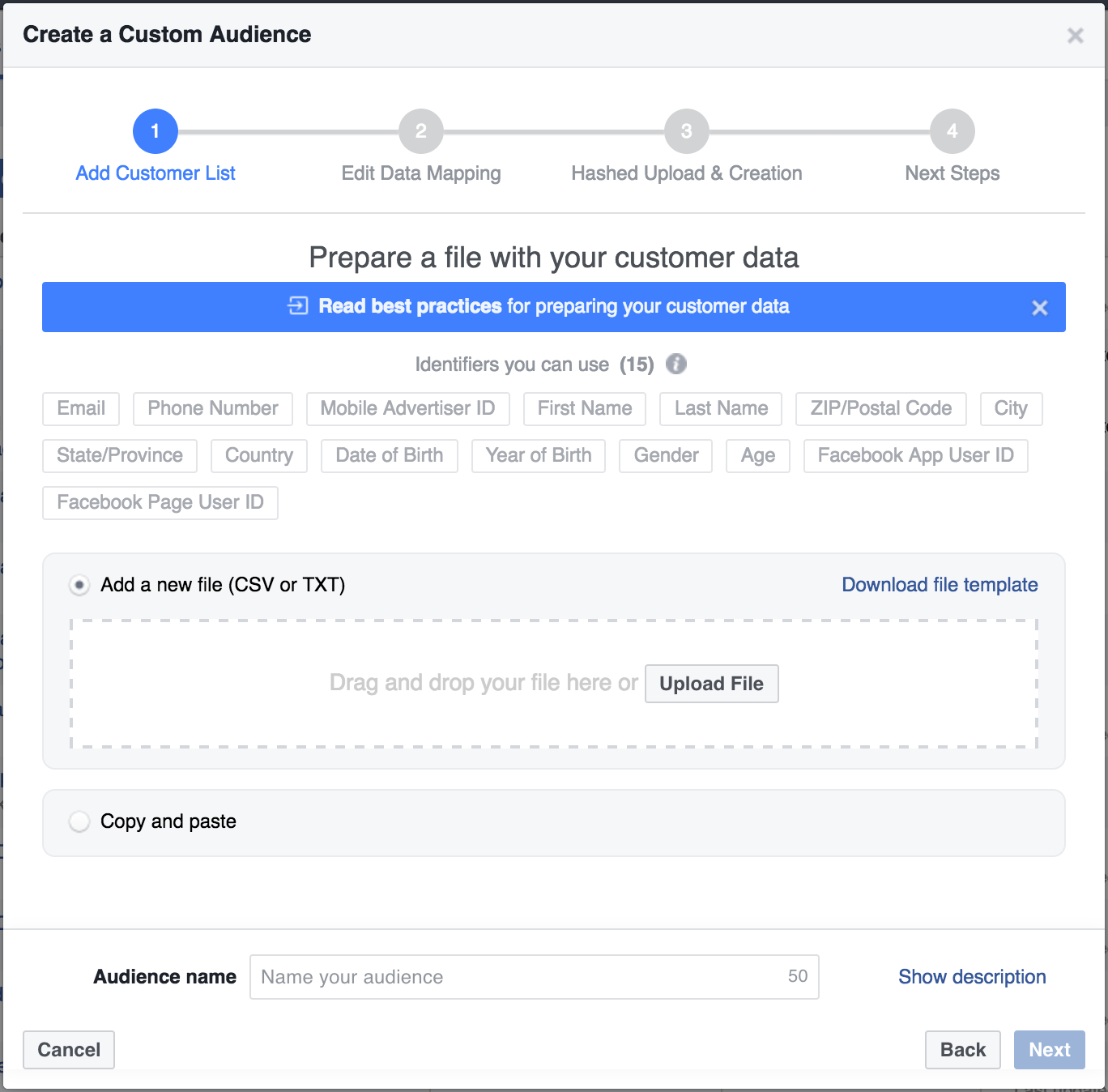
The more of these fields you populate, the higher your match rate will climb. Even partial information helps. A first name combined with a zip code might be enough for Facebook to confirm a match that email alone could not.
Step-by-Step: Enriching Your Data for Higher Match Rates
The most effective way to boost match rates is to enrich your existing data before uploading it to Facebook. If you have a newsletter list with thousands of email addresses, those emails alone are just the starting point.
Using Data Enrichment Tools
Tools like Clearbit, ZoomInfo, and Apollo can take a single email address and return dozens of additional data points. For custom audience optimization, the most valuable enrichments are:
- First and last name
- Location data (city, state, zip code)
- Phone number
- Company information (useful for B2B lookalike audiences)
Here is a practical workflow using Clearbit as an example:
- Export your email list to a Google Sheet or CSV
- Use Clearbit's Google Sheets integration or API to enrich each row
- Map the enriched fields to Facebook's custom audience template
- Upload the enriched file to Facebook Ads Manager
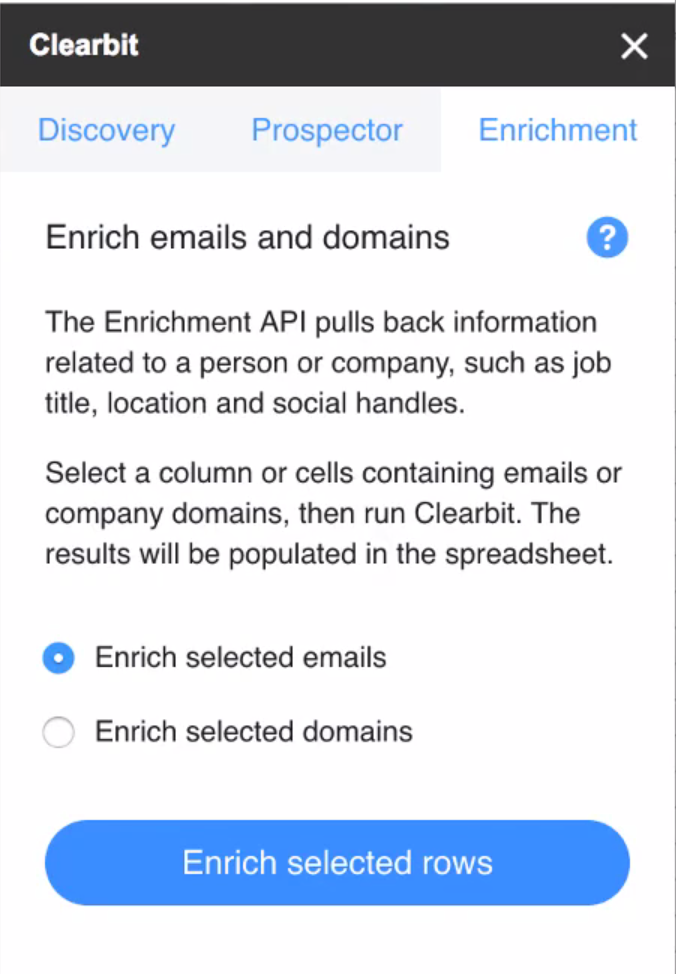
Even before using the enriched data for ad targeting, take time to analyze what the enrichment reveals. Build pivot tables around job titles, company sizes, and locations. This analysis often surfaces audience insights that inform not just targeting but creative strategy and offer positioning.
Formatting Your Data Correctly
Data formatting errors are a silent killer of match rates. Facebook's matching algorithm is strict about format. Common mistakes include:
- Phone numbers: Must include country code. Format as +1XXXXXXXXXX for US numbers. Remove dashes, spaces, and parentheses.
- Names: Lowercase is fine but remove special characters. Watch for encoding issues with international names.
- Email addresses: Trim whitespace, convert to lowercase, and remove any mailto: prefixes.
- Zip codes: Include leading zeros (e.g., 02134, not 2134). Use five-digit format for US codes.
- Country codes: Use two-letter ISO codes (US, UK, CA) rather than full country names.
Facebook provides a downloadable CSV template specifically for custom audience uploads. Use it. The template ensures your columns align with the expected identifiers and reduces formatting errors that silently degrade your match rate.
Advanced Strategies to Maximize Match Rates
Beyond basic data enrichment, several advanced tactics can push your match rates even higher.
Segment Before You Upload
Rather than uploading one massive list, break your audience into segments based on data quality. Upload your most complete records (those with email, phone, name, and location) separately from email-only records. This approach lets you:
- Measure match rates by data completeness
- Prioritize spend toward higher-match segments
- Identify which data gaps matter most for your specific audience
Use Multiple Email Addresses
Many people have separate personal and work email addresses. If your CRM captures both, include them in your upload. Facebook will hash and check each one independently. A contact who does not match on their work email might match perfectly on their personal Gmail address.
Refresh Your Audiences Regularly
Customer data decays over time. People change email addresses, phone numbers, and locations. An audience that matched at 80% six months ago may have dropped to 60% today. Set a recurring schedule to re-enrich and re-upload your custom audiences at least quarterly.
Leverage Facebook Pixel Data Alongside Custom Audiences
Website custom audiences built from pixel data typically have near-perfect match rates because Facebook already knows those visitors. Combining pixel-based audiences with uploaded list audiences gives you broader reach with strong match quality. Use the overlap analysis in Ads Manager to understand how your audience segments intersect.
Measuring and Benchmarking Your Match Rate
After uploading your custom audience, Facebook displays the audience size alongside your uploaded list count. The ratio tells you your match rate.
Here are general benchmarks to gauge your performance:
- Below 40%: Significant data quality issues. Focus on enrichment and formatting.
- 40% to 60%: Average performance for email-only lists. Room for improvement.
- 60% to 80%: Good match rate, typical when using enriched data with 3-5 identifiers.
- Above 80%: Excellent. Your data is well-maintained and properly formatted.
If your match rate falls below expectations, run a diagnostic check. Look for formatting inconsistencies, outdated email addresses, or missing country codes. Even small fixes can produce meaningful lift.
Putting It All Together
Here is the complete workflow for maximizing your custom audience match rates:
- Export your customer or lead list from your CRM
- Enrich using a tool like Clearbit, ZoomInfo, or Apollo to fill in missing data points
- Format your data according to Facebook's specifications using their CSV template
- Segment your list by data completeness for more granular control
- Upload to Facebook Ads Manager and verify the match rate
- Analyze the results and identify gaps worth addressing
- Schedule regular refreshes to combat data decay
Every percentage point of match rate improvement translates directly to more of your target audience seeing your ads. For ecommerce brands spending significant budgets on Facebook, the ROI of data enrichment often pays for itself many times over.
The Bottom Line
Custom audience targeting only works as well as your data allows it to. Most advertisers accept low match rates as an unavoidable cost of the platform, but they are not. By investing time in data enrichment, proper formatting, and regular audience maintenance, you can dramatically increase the reach and effectiveness of your Facebook campaigns.
The advertisers who win on Facebook are not just the ones with the best creative or the biggest budgets. They are the ones who treat their first-party data as a strategic asset and invest in making every contact matchable, targetable, and reachable.

.webp)

.svg)


