







If you are running multiple ad sets in Facebook Ads, there is a good chance some of your audiences overlap without you realizing it. That overlap quietly inflates your costs, triggers internal auction competition, and drags down performance across your entire account.
The Facebook audience overlap tool exists specifically to surface this problem, yet most advertisers never use it. Below, we walk through exactly what audience overlap means, why it matters, and a practical five-step audience overlap analysis you can run inside Ads Manager today.
What Is Audience Overlap? Definition and Why It Matters
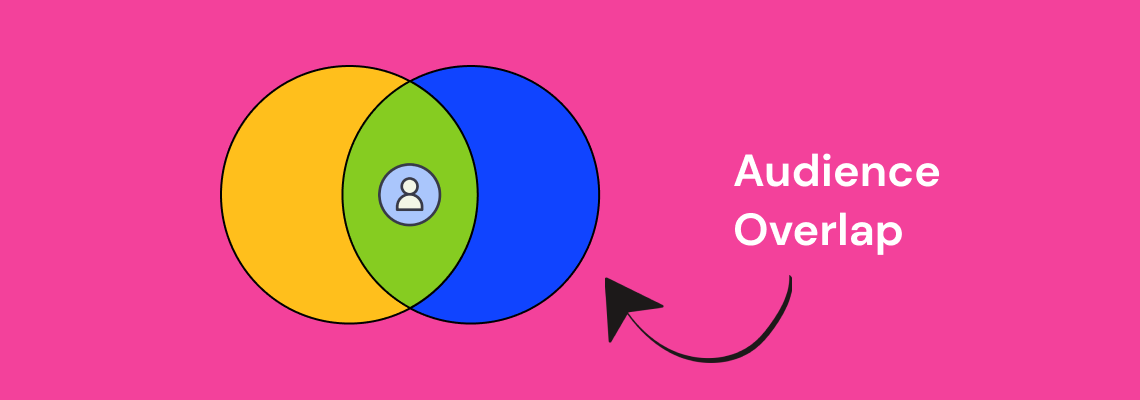
Audience overlap is the percentage of users who appear in two or more of your targeted audience segments at the same time. In Facebook Ads, this happens when the people in one ad set also fall into another ad set you are running concurrently.
Consider a concrete example. Suppose you have two active ad sets: one targeting women aged 25-34 interested in fitness, and another targeting women aged 30-45 interested in healthy cooking. Anyone who is 30-34, interested in both fitness and cooking, lands in both audiences. That is audience overlap, and it means you are bidding against yourself to reach the same person.
Meta's auction system does not let two ads from the same account compete for the same impression. Instead, it suppresses the lower-performing ad set, which means one of your campaigns is essentially being throttled without any warning in your dashboard.
Understanding audience overlap meaning at this level is the first step toward fixing the problem. The goal is not to eliminate overlap entirely - some degree is inevitable - but to keep it below the threshold where it starts costing you money (generally under 20-25%).
How Audience Overlap Hurts Your Facebook Ads Performance
When audience overlap goes unchecked, the downstream effects compound quickly. Here are the three primary ways it damages your account.
Higher Costs From Internal Auction Competition
Facebook's ad auction selects one ad per advertiser to show to a given user. When your ad sets target the same people, Facebook picks the winner and sidelines the rest. The result is that your losing ad sets get fewer impressions and higher costs per result, even though your creative and offer may be strong.
This is especially costly for DTC brands and ecommerce advertisers who run multiple product-level ad sets to the same broad interest audiences.
Wasted Budget Through Ad Fatigue
When the same user sees variations of your ads across multiple ad sets, fatigue sets in faster. Frequency climbs, click-through rates drop, and your cost per acquisition increases. This is one of the most common reasons Facebook ads stop delivering results and advertisers cannot figure out why.
Suppressed Delivery and Misleading Data
Overlapping audiences skew your reporting. An ad set might appear to be underperforming when it is actually being throttled by auction overlap. Advertisers who make optimization decisions based on this misleading data often kill campaigns that would otherwise scale, or pour budget into ad sets that only appear to win because the competition was artificially removed.
How to Run an Audience Overlap Analysis: 5 Steps
Now that the stakes are clear, here is the step-by-step process for identifying audience overlap in Facebook Ads Manager.
Step 1: Open Facebook Ads Manager and Navigate to Audiences
Log into your Facebook Business Manager account. From the main menu, click on "All Tools" and then select "Audiences" under the Assets section. This is the central hub where all your saved audiences, custom audiences, and lookalike audiences are stored.
If you have not organized your audiences recently, take a few minutes to review what is there. Outdated or duplicate audiences are a common source of unintentional overlap.
Step 2: Select the Audiences You Want to Compare
To use the audience overlap tool, select two to five audiences by checking the boxes next to their names. You can compare saved audiences, custom audiences, and lookalike audiences against each other.
Once your audiences are selected, click the three-dot menu (or the "Actions" dropdown, depending on your interface version) and choose "Show Audience Overlap." This opens the overlap comparison view.
Step 3: Read the Overlap Percentage
The audience overlap tool displays a Venn diagram with the percentage of shared users between each audience pair. Pay close attention to any pair that exceeds 20-25% overlap. These are the combinations most likely to cause auction competition and budget waste.
Document the overlap percentages for each pair. This data becomes the foundation for the strategic adjustments you will make in Step 5.
Step 4: Identify the Highest-Risk Combinations
Not all overlap is equally damaging. Prioritize the audience pairs where:
- Overlap exceeds 25% and both ad sets are active in the same campaign or running simultaneously
- Both audiences are large (over 500,000 people), since higher volume means more wasted impressions
- Both ad sets share the same optimization event (e.g., both optimizing for purchases), which intensifies auction competition
These are your highest-risk combinations and the ones you should address first.
Step 5: Apply Strategic Fixes
Based on your audience overlap analysis, here are the most effective adjustments you can make:
- Consolidate overlapping audiences: Merge ad sets that share more than 30% audience overlap into a single ad set. Give Facebook's algorithm a larger pool to optimize against rather than fragmenting your budget.
- Use exclusions: In the audience settings for each ad set, exclude the custom audiences used in other ad sets. This creates clean separation and eliminates auction competition.
- Narrow with layered targeting: Add additional interest or behavioral layers to differentiate audiences. For example, if two fitness audiences overlap heavily, narrow one to "fitness + yoga" and the other to "fitness + weightlifting."
- Leverage Advantage+ audiences: Meta's Advantage+ targeting uses machine learning to find the best users within a broader pool, which can reduce manual overlap issues.
- Restructure your campaign architecture: Consider moving from many narrow ad sets to fewer, broader ad sets. This approach, sometimes called campaign budget optimization (CBO) consolidation, reduces overlap by design.
How to Check Audience Overlap on Facebook Ads: Quick Reference
For advertisers who want a fast checklist, here is the streamlined process:
- Go to Ads Manager > Audiences
- Select 2-5 audiences using the checkboxes
- Click Actions > Show Audience Overlap
- Review the Venn diagram and note any pairs above 20-25% overlap
- Apply exclusions, merge audiences, or restructure ad sets accordingly
Run this check at least once per month, and always before launching new campaigns that target similar interest categories or lookalike seed audiences.
When Audience Overlap Is Acceptable
Not every instance of overlap requires action. There are scenarios where moderate overlap is fine or even expected:
- Top-of-funnel prospecting vs. retargeting: Your retargeting audience will naturally overlap with prospecting audiences. This is expected and handled by Facebook's auction system.
- Sequential funnel campaigns: If you are running a funnel where users move from awareness to consideration to conversion, overlap between stages is by design.
- Testing audiences: During audience testing phases, some overlap helps validate which targeting approach performs best before you consolidate.
The key distinction is whether overlapping ad sets are competing for the same auction. If they target different campaign objectives or sit at different funnel stages, the risk is lower.
Preventing Audience Overlap Before It Starts
The best approach is to build overlap prevention into your campaign architecture from the beginning. Here are three structural practices that keep overlap in check.
Use a Naming Convention That Flags Potential Overlap
Develop a clear naming system for your audiences that includes the targeting criteria. When audience names include the interest category, age range, and exclusion status, you can spot potential overlap before you even run the tool.
Audit Audiences Monthly
Audience composition shifts over time as Facebook updates interest categories and user behavior changes. A monthly cadence for running the overlap tool ensures you catch new overlap before it impacts performance. This is especially important for brands scaling Facebook ads across multiple product lines or markets.
Centralize Audience Strategy Across Campaigns
When multiple team members or agencies create audiences independently, overlap becomes nearly inevitable. Maintaining a shared audience library and documenting which audiences are active in which campaigns eliminates this coordination problem. If you are working with a PPC agency, ensure they provide audience overlap reports as part of their regular account reviews.
Audience Overlap Across Channels
While this guide focuses on Facebook, audience overlap is not limited to a single platform. Brands running campaigns across Facebook, Instagram, TikTok, and Google often reach the same users on multiple channels without realizing it. Cross-channel overlap analysis requires additional tools and a unified measurement approach, but the same principle applies: identify where you are paying multiple times to reach the same person, and consolidate.
For brands evaluating where to allocate budget, understanding how Facebook audiences compare to other platforms is a critical input. Our comparison of TikTok Ads vs. Facebook Ads covers how audience composition differs between platforms and where overlap is most likely.
Key Takeaways
Audience overlap is one of the most common and most overlooked sources of wasted spend in Facebook advertising. Running a regular audience overlap analysis inside Ads Manager takes less than ten minutes and can surface issues that are silently inflating your costs.
The five-step process - navigate to audiences, select and compare, read the overlap percentage, identify high-risk pairs, and apply strategic fixes - gives you a repeatable framework for keeping your account clean and your budget working efficiently.
If your Facebook Ads campaigns are underperforming and you have ruled out creative and offer issues, audience overlap should be the next thing you check. For brands that need hands-on support, our Social Media Ads team runs these audits as part of every account onboarding.

.webp)

.svg)


