
In the age of rapid digital transformation, AI has seeped into almost every industry, revolutionizing how we conduct business, design products, and even create content. The ClusterMagic service is a great example, which seamlessly integrates AI for content generation in a hybrid model, providing significant benefits in the SEO results of brands seeking a massive increase in organic traffic. But while AI holds immense promise, it has its limitations. Let's explore the pros and cons of using AI for content creation and understand why a hybrid approach might be the way forward.
Major publishers in sensitive niches like CNET.com, Bankrate.com, and Creditcard.com have already integrated AI-generated content. Other large companies, such as CNN and Forbes, might also be doing so. Countless smaller companies and publishers are utilizing AI, not only on their websites but also on social media, in email marketing, and virtually everywhere else.
Google's stance on AI-generated content is neutral, emphasizing that content should primarily be user-centric. In fact, Google's September 2023 Helpful Content Update removed the mention of "written by people" from their helpful content system guidelines.
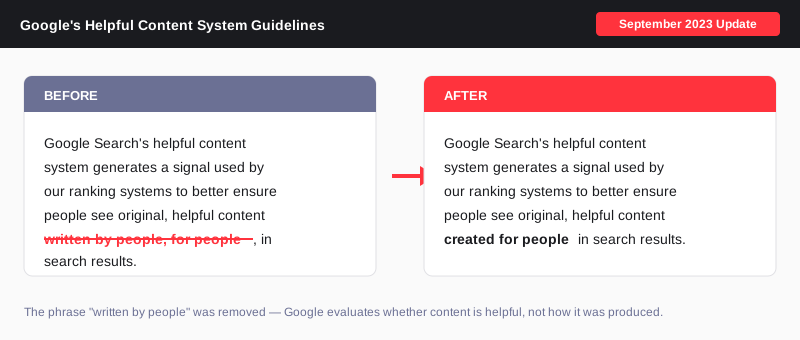
The message is clear: for content to rank well, it must be informative, answer users' queries satisfactorily, and showcase genuine expertise - regardless of how it's created.
AI Content Detectors like GPTZero, ZeroGPT, and many others are not reliable. Even OpenAI has said as much. They consistently produce false positives about human-written content. Conversely, they can be easily fooled with creative prompting or a bit of human editing.
An interesting note from OpenAI: "we found that it labeled human-written text like Shakespeare and the Declaration of Independence as AI-generated."
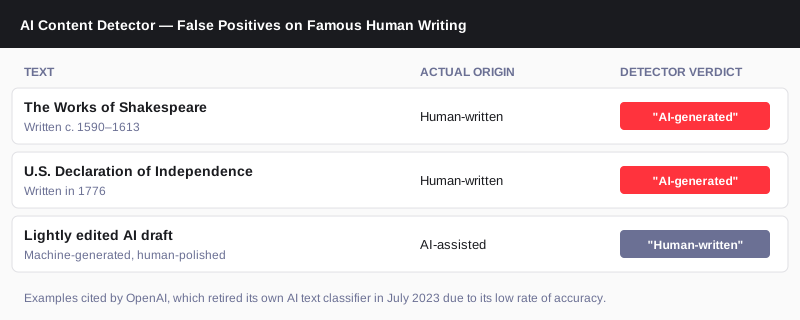
Anecdotal evidence and real-life ranking data suggest that while AI-generated content isn't penalized by search engines, it might only achieve high rankings if it meets the above criteria. The role of AI in content creation is still a developing narrative, and its significance is indispensable for maintaining a competitive edge in the future.
At EmberTribe, the understanding is clear - AI serves as a foundation, not the final product. With ClusterMagic, while AI aids in the initial draft based on expert-driven keyword research, human experts step in for the crucial phases of editing, fact-checking, and final review. This hybrid approach ensures the content is accurate and helpful, has the potential to rank, and truly represents their business.

Choosing the wrong search engine marketing company doesn't just cost you agency fees. It costs you months of wasted ad spend, missed revenue, and the time it takes to undo a poorly structured account. The market is crowded with firms that call themselves SEM specialists, but the differences in scope, structure, and accountability are significant.
This guide breaks down what SEM companies actually do, how they differ from one another and from SEO agencies, what pricing looks like in 2026, and the specific questions you should ask before signing a contract.
A search engine marketing company manages paid advertising on search engines, primarily Google Ads and Microsoft Advertising (Bing Ads). The core work includes keyword strategy, campaign architecture, bid management, ad copy, conversion tracking, and ongoing optimization to hit a target return on ad spend (ROAS) or cost per acquisition (CPA).
SEM is distinct from SEO. Where SEO builds organic rankings over months, paid search drives traffic within 24 to 72 hours of campaign launch. The tradeoff: average Google Ads CPC reached $5.26 in 2025, up nearly 13% year-over-year, which makes execution quality more important than ever. A poorly managed account at $10,000 per month in ad spend can burn budget on irrelevant clicks while a well-managed one at the same budget drives profitable customer acquisition.
Beyond Google and Bing, most SEM companies also handle YouTube ads, Google Shopping campaigns, and Performance Max, since these campaigns run through the same Google Ads platform.
Not all SEM firms are the same. Before you start evaluating vendors, it helps to know which type of firm you're looking for.

Pure-play SEM firms specialize exclusively in paid search. They run Google Ads and Microsoft Ads, and that's it. If you already have strong organic traffic and a functioning content strategy, a pure-play firm can be an efficient choice. You're paying for deep specialization, not breadth.
Full paid media agencies extend beyond search into Meta, TikTok, programmatic display, and sometimes connected TV. They're built for brands that want cross-channel coordination, where search data informs social creative and vice versa. If you're a scaling DTC brand running multiple acquisition channels, this structure tends to reduce silos and improve attribution clarity.
Full-service growth agencies combine paid search with SEO, CRO, email, and broader strategy. According to Stackmatix's SEM agency selection guide, the strongest agencies blend SEM with conversion rate optimization and content to sync data across channels. This approach is worth considering when your paid search performance is being limited by landing page quality or organic search gaps, not just bid strategy.
For more on how these agency types compare in scope and structure, see our breakdown of SEM marketing agencies.
Most growth-stage brands need both, but the allocation depends on where you are in your growth trajectory. A common split is roughly 75% of search budget toward SEO and 25% toward SEM, though this shifts significantly based on how competitive your category is organically and how quickly you need to acquire customers.
SEM makes sense as the primary channel when you're launching a new product, entering a new market, or need immediate revenue while organic rankings build. SEO makes more sense as a long-term foundation because organic customer acquisition cost is approximately 65% lower than paid search CAC once it matures.
If your question is how to find a quality SEO-focused firm alongside your paid search work, our guide to PPC companies covers the paid side, and we've also written on how to evaluate a best SEO agency for the organic side.
Understanding how SEM companies charge is critical for evaluating bids and avoiding misaligned incentives.
Percentage of ad spend is the most common model. Agencies typically charge 10% to 20% of your monthly ad spend. This works well when your budget is scaling, since the agency's fee grows with your investment. The risk is that it can create an incentive to spend more rather than spend efficiently.
Fixed monthly retainer gives you predictable costs regardless of ad spend volume. Retainers typically range from $2,500 to $10,000 per month for mid-market brands. This model works best when your budget is stable and you want clear deliverables per billing period.
Performance-based pricing ties a portion of fees to specific outcomes: leads generated, revenue driven, or ROAS targets hit. This can align incentives well, but only if the performance metrics are defined precisely and attributed accurately. Vague performance clauses are a red flag.
Hourly consulting ranges from $100 to $300 per hour and is most appropriate when you have an in-house paid search team that needs strategic guidance rather than full execution.
For small businesses, total monthly spend including ad budget and management fees typically lands between $2,000 and $8,000. For mid-market and enterprise brands, expect $15,000 to $50,000 or more per month depending on account complexity.
For context on how Google Ads management is priced and structured separately from full SEM retainers, that post covers platform-specific considerations in more detail.
The market for SEM services is noisy. These are the criteria that actually separate strong firms from expensive ones.
Proven results in your category. Ask for case studies with specific metrics: ROAS improvement, CPA reduction, revenue growth attributed to paid search. Generic claims about "increased traffic" are not a useful signal. Concrete numbers tied to accounts similar to yours in size and industry are.
Account ownership clarity. Some agencies retain ownership of your Google Ads account when you leave. Make sure your contract specifies that you own the account, the data, and the conversion history. Losing account history when you switch agencies can cost months of optimization data.
Conversion tracking rigor. A surprising number of SEM firms inherit broken conversion tracking and either don't notice or don't fix it. Before any strategy conversation, a competent firm should audit your existing tracking setup and identify gaps. If they skip this step, that's a meaningful signal about how they'll manage your account.
Transparent reporting. Ask what reporting cadence they use, what metrics appear in every report, and whether you'll have direct dashboard access. Agencies that only share curated PDFs once a month make it difficult to verify what's actually happening in your account.
Strategic integration. Ask how their paid search work connects to your landing pages. Sending high-intent traffic to a weak landing page is one of the most common ways ad spend gets wasted. A strong SEM firm either handles CRO recommendations directly or works closely with whoever does.
Before you sign with any search engine marketing company, get clear answers to these:
These questions won't guarantee a good outcome, but they will quickly filter out firms that are operating with outdated practices, limited transparency, or insufficient specialization.
A well-run SEM engagement typically follows a predictable ramp. The first 30 days should cover account audit, conversion tracking verification, keyword research, campaign architecture, and initial ad copy. Days 30 to 60 are usually the learning phase for automated bidding strategies, where Google's algorithm gathers conversion data. Days 60 to 90 are when meaningful optimization decisions should start based on real performance data.
If an agency promises dramatic ROAS improvements in the first two weeks, be skeptical. Smart Bidding requires statistical volume to perform well, and aggressive changes in the first month often reset the learning phase unnecessarily.
The right search engine marketing company for your brand depends on where paid search sits in your overall growth strategy. A pure-play SEM firm makes sense if you need deep specialization in a mature account. A full-service agency makes sense if your paid search performance is limited by factors outside the ad account itself, like weak landing pages, poor creative, or organic gaps that are driving up CPCs.
EmberTribe works with DTC and growth-stage brands to build paid search programs that are efficient, transparent, and built to scale. If you're evaluating your current SEM setup or looking for a new partner, get in touch with our team at embertribe.com to walk through what an engagement looks like.

Hiring the right search engine marketing firm is a different decision from hiring an agency. The distinction is not just terminology. Firms typically operate with a consulting-led model, meaning senior practitioners handle accounts directly rather than delegating execution to junior staff. For growth-stage and DTC brands running five- to six-figure monthly ad budgets, that difference in structure can determine whether paid search becomes a scalable acquisition channel or an expensive monthly bill.
This guide breaks down how to evaluate and select an SEM firm in 2026, including how firms differ from agencies and in-house teams, what engagement structures and pricing to expect, and the specific questions that separate strategic partners from volume shops.
The word "firm" carries a specific connotation in professional services. A law firm, a consulting firm, an accounting firm: these are practices built around senior expertise applied directly to client engagements. An SEM firm operates on the same principle.
Where a traditional SEM agency may assign an account manager who oversees a portfolio of 30 clients and hands execution to junior analysts, a paid search firm typically keeps strategic and tactical work at the senior level. The strategist who presents your quarterly roadmap is also the one pulling optimization levers day to day. This structure tends to produce better results for accounts that require nuanced decision-making, such as brands with complex product catalogs, thin margin windows, or competitive ROAS targets.
The Google Ads platform has also grown significantly more complex since the broad rollout of AI-powered campaign types. Performance Max, demand gen, and smart bidding require someone who understands how to structure campaigns to feed the algorithm correctly, not just monitor dashboards. A firm model ensures that judgment stays with experienced practitioners.
The right structure depends on your budget, your internal marketing capacity, and how much strategic depth you need.

The comparison above highlights the structural differences. SEM firms occupy a specific middle ground: more strategic depth than most agencies, more external perspective than an in-house hire, and faster to activate than building an internal function.
In-house teams carry one major advantage that neither firms nor agencies can fully replicate: institutional knowledge. An in-house specialist understands your product margins, seasonality, and customer segments without onboarding. The tradeoff is cost and coverage. A single mid-level paid search hire costs $80,000 to $140,000 per year in salary alone, before tools, benefits, and management overhead.
One person also cannot cover Google Search, Shopping, Performance Max, Microsoft Advertising, and Amazon Ads with equal depth simultaneously.
SEM agencies at the larger end often serve enterprise accounts across dozens of verticals. Their resources are broad, but account attention tends to be distributed. A search engine marketing company operating at scale may rotate your account between analysts as team composition changes, breaking the continuity that good optimization requires.
A boutique SEM firm hits the right balance for most growth-stage brands: dedicated senior attention, multi-platform expertise, and a consulting engagement model that makes strategic alignment part of the recurring workflow rather than an annual QBR.
SEM firm pricing generally follows one of three models, and the structure you agree to shapes the incentives on both sides.
Retainer-based pricing is the most common. According to Swydo's 2026 agency pricing analysis, nearly 80% of agencies now use some form of retainer, providing predictable costs and continuous optimization cycles. For SEM firms specifically, monthly retainers typically range from $3,000 to $12,000 for growth-stage accounts, with enterprise engagements running higher.
Percentage-of-spend models tie the firm's fee to a percentage of your monthly media budget, typically 10% to 20%. This model aligns the firm's revenue with your investment level, but it can create a subtle incentive to increase spend rather than improve efficiency. If a firm operating on this model recommends scaling budget, ask them to show the supporting data before agreeing.
Hybrid structures combine a base retainer with a performance bonus tied to specific KPIs, typically ROAS or CPA targets. InfluenceFlow's 2026 agency pricing guide notes that hybrid models are gaining traction specifically because they align incentives across both parties. The base fee covers core management; the bonus rewards results that exceed targets.
Most reputable SEM firms require a minimum engagement of three to six months. Paid search optimization takes time: account history accumulates, Smart Bidding algorithms need conversion data to stabilize, and creative testing requires statistically significant sample sizes. Any firm offering month-to-month contracts with no minimum is likely managing accounts reactively rather than strategically.
The quality of a firm's answers to these questions reveals more than any case study.
Who will manage my account day to day, and what is their experience level? Ask for the specific person, not a team description. Understand their seniority, how many accounts they manage simultaneously, and whether they will be your primary point of contact or whether an account manager will be in that role.
How do you approach account structure for a brand at my spend level? A strong answer involves campaign architecture decisions specific to your goals, such as how they would allocate budget across campaign types, whether they would use Performance Max or campaign-by-campaign structures, and how they handle brand vs. non-brand separation.
What does your reporting cover, and how do you connect it to revenue? As Gartner's Digital IQ research on search marketing benchmarks notes, firms that report activity without connecting to financial outcomes are showing effort, not results. Demand reports that include ROAS, CPA, and contribution to pipeline or revenue, not just impressions and clicks.
Can you walk me through a campaign you restructured and what the outcome was? This question separates firms that execute from firms that think. A firm worth hiring can describe the specific reasoning behind a structural change, not just point to a before-and-after screenshot.
What platforms do you actively manage, and do you have certifications? In 2026, a capable SEM firm should be active across Google Ads, Microsoft Advertising, and ideally have experience with Google Shopping and Performance Max. Google's official certification program is a baseline indicator, not a differentiator on its own, but the absence of active certifications is a flag.
Some agencies adopt firm-style language without firm-style operations. Watch for these warning signs.
A discovery process that lasts less than one week before campaign launch means the firm is not building strategy from your data. Effective onboarding includes access to historical account data, a review of existing creative and landing page performance, audience definition, and goal alignment before a single campaign goes live.
Reporting focused on vanity metrics such as impressions, clicks, and quality scores without revenue correlation is a sign the firm is optimizing for what looks good in a deck rather than what drives your business. Ask to see a sample report before signing.
Contracts with aggressive auto-renewal clauses or vague scope definitions should trigger a legal review. Reputable SEM firms define deliverables clearly, including reporting cadence, meeting frequency, response time commitments, and what happens if performance benchmarks are not met.
Account access held by the agency rather than the client is non-negotiable. Your Google Ads account, your data, and your conversion history belong to you. Any firm that cannot give you full admin access to your own account at any point in the engagement should be disqualified immediately.
The first 90 days of an SEM firm engagement establish the baseline. Expect the following milestones as indicators that the engagement is on track.
By the end of week two, conversion tracking should be verified and firing correctly across all campaigns. By the end of month one, campaign architecture should be finalized and initial bid strategies set based on your historical data. By the end of month three, performance should be trending toward your ROAS or CPA targets, with creative tests in progress and an optimization log documenting what changes were made and why.
If a firm cannot show you a detailed optimization log by the end of month two, ask directly what work was performed and when. Firms that operate strategically document their decisions. Shops that execute mechanically do not.
If your SEM program also needs to integrate with organic search efforts, it is worth reviewing how a search engine marketing services model coordinates paid and SEO channels. The two strategies share keyword data, landing page infrastructure, and conversion rate insights. Firms that can inform both sides of search tend to produce better overall results than those narrowly focused on paid alone.
EmberTribe works with DTC and growth-stage brands that need senior-level paid search strategy without the overhead of building an in-house function. Our engagements are structured around direct access to experienced practitioners, transparent reporting tied to revenue outcomes, and clear accountability at every stage of the funnel.
If you are evaluating SEM firms and want to understand what a strategy-first engagement looks like for your account, visit embertribe.com to start the conversation.

Paid search spending in the US crossed $110 billion in 2025, and the agency you choose to manage that investment will either compound your returns or quietly drain them. Most SEM agencies pitch the same credentials: Google Partner badges, certified specialists, and case studies from a different industry than yours. The difference between a good partner and an expensive mistake shows up in the details of how they structure campaigns, report results, and respond when performance slides.
This guide covers what search engine marketing agencies actually do, how pricing works, what to expect from the best ones, and the questions that reveal which category an agency falls into before you sign a contract.
A search engine marketing agency manages paid placement in search engine results, primarily through Google Ads and Microsoft Advertising. The core service covers campaign strategy, keyword research, ad copy development, bid management, and performance reporting. Most agencies also handle conversion tracking setup, audience segmentation, and landing page recommendations.
The scope has expanded significantly in recent years. Campaigns that once lived cleanly in keyword-based search now intersect with Performance Max, which blends Search, Shopping, Display, YouTube, and Discover into a single AI-managed budget. A competent search engine marketing services provider understands how to structure these campaigns, what signals to feed the algorithm, and where human judgment still outperforms automated defaults.
Beyond campaign mechanics, a strong SEM agency functions as a growth partner. They bring competitive intelligence, audience insights, and creative testing disciplines that translate raw ad spend into measurable revenue outcomes.
Pricing varies based on agency size, campaign complexity, and the fee structure the agency uses. Understanding the model matters because incentives differ across structures.
Percentage of ad spend is the most common model, typically ranging from 10% to 20% of monthly ad spend. At lower spend levels, a minimum monthly management fee usually applies, often between $1,500 and $3,000. This model aligns the agency's revenue with your spend, which creates a potential conflict: agencies benefit when you spend more, whether or not that additional spend is efficient.
Flat monthly retainer removes the spend-based incentive. Retainers for small to mid-market businesses typically range from $2,000 to $6,000 per month and are more common for agencies with defined service packages. This structure works well when budgets are stable and the scope of work is clearly defined.
Hourly billing is common for project-based engagements, audits, and consulting work. Rates from experienced SEM specialists run $100 to $300 per hour. Hourly arrangements are harder to budget for ongoing management but appropriate for discrete work.
Performance-based models tie fees to business outcomes rather than spend or time. These arrangements typically include a base retainer plus a variable component tied to revenue or leads. They are less common because measurement alignment is difficult to establish upfront, but they signal an agency confident enough in their work to share the risk.
For most growth-stage businesses, expect to pay $2,500 to $8,000 per month in management fees on top of ad spend. Budget less than that and you are either working with a small specialist or accepting a lower tier of service.
The technical baseline is not the differentiator. Any credentialed agency can build campaign structure, set up conversion tracking, and write ad copy. What separates the best search engine marketing companies is the quality of judgment they apply when the data is ambiguous, performance shifts, or the platform changes the rules.
Conversion architecture depth. Smart Bidding optimizes toward whatever signal you define as a conversion. The strongest agencies audit conversion definitions before launching anything, deduplicate events, apply value rules by customer segment, and build feedback loops from CRM data when the business goal is qualified leads rather than raw form fills. An agency that takes your existing conversion tracking at face value is skipping the most important upstream work.
Creative velocity. Performance Max and Demand Gen campaigns reward agencies that ship high volumes of creative across formats. Video assets, image variants, and headline combinations need regular refresh cycles, not quarterly updates. The best partners treat creative as a standing production workflow.
Negative keyword discipline. Broad match and Performance Max surface queries beyond your explicit keyword list. Without aggressive negative keyword management, spend leaks into irrelevant traffic, branded terms get cannibalized, and the algorithm learns from bad conversion signals. Weekly search term reviews are table stakes.
Diagnostic precision. When ROAS drops or CPA spikes, the explanation matters as much as the response. A strong agency can isolate whether the cause is auction pressure, match type drift, creative fatigue, landing page degradation, or tracking failure. Agencies that blame "the algorithm" or recommend increasing budget as a first response are operating without real diagnostic capability.
Platform currency. The paid search landscape changed substantially between 2024 and 2026. Agencies still pitching tightly themed exact-match ad groups and manual bidding as core strategy are a product cycle behind.
The right questions reveal operational capability faster than reviewing case studies or badge counts. Use these across any sem agency evaluation.
Ask the agency to walk through their first 30 days on a new account. A strong answer covers conversion audit, baseline performance benchmarking, campaign structural review, audience analysis, and a testing roadmap. A weak answer jumps immediately to campaign builds without mentioning measurement.
Ask how they handle Performance Max budget share versus standard Search campaigns for a business like yours. The answer should be specific to your situation, not a default recommendation.
Ask what they report on and how often. Look for a combination of leading indicators (CTR, Quality Score, impression share) and business outcomes (CPA, ROAS, revenue, lead quality). If the answer centers exclusively on clicks and impressions, that agency is not measuring what drives business results.
Ask what attribution model they use and why. There is no single right answer, but an agency that cannot articulate the tradeoffs between last-click, data-driven, and third-party attribution lacks the measurement sophistication your spend requires.
Ask whether you own the ad accounts and data if you end the relationship. Any reputable search marketing agency will confirm account ownership belongs to you. An agency that builds campaigns in their own MCC and withholds accounts on exit has engineered a lock-in, not a partnership.
Ask who specifically will work on your account and whether the senior person who sold you walks away after onboarding, leaving a junior coordinator to manage the day-to-day.
Ask how they communicate performance anomalies. A proactive agency surfaces problems before you notice them and brings a hypothesis alongside the alert. An agency that waits for you to ask is reactive by design.
If the agency cannot clearly explain where every dollar goes and what it is optimizing toward, that transparency gap will cost you.
Start with agencies that specialize in your business model. A DTC ecommerce brand has different campaign architecture needs than a B2B SaaS company or a local service business. Generalist agencies can be competent, but vertical specialists bring pattern recognition that shortens the optimization learning curve.
Check whether they use your ad budget to experiment on your behalf or charge separately for testing. The best agencies build creative and landing page testing into the core engagement, not as an upsell.
Ask for references from clients in a similar growth stage. Case studies from enterprise brands do not tell you how the agency operates when the monthly budget is $20,000 rather than $2 million. Understanding what is Google Adwords and how it connects to a broader growth strategy is the foundation any good SEM partner builds on.
Look for agencies that can speak fluently to your full growth picture. Paid search does not operate in isolation. The best partners understand how paid search interacts with SEO, landing page conversion rates, and customer lifetime value in ways that make their channel contribution legible.
Before engaging an agency, WordStream's paid search resource center and the Google Ads Help Center provide useful grounding on what the channel covers.
The first three months with any SEM agency should follow a clear progression. The first 30 days are diagnostic: account audit, conversion verification, baseline benchmarking, and initial campaign restructuring if needed. Days 31 through 60 introduce new tests, clean up technical issues, and begin generating performance data under the agency's management. By day 90, you should have enough signal to evaluate whether their strategic hypotheses are translating to improved outcomes.
If an agency promises significant revenue impact in the first 30 days, treat that with skepticism. Smart Bidding systems require conversion data volume to optimize accurately, and account restructuring often causes short-term performance dips before performance improves. An agency that sets realistic early expectations is more trustworthy than one that overpromises to close the deal.
The right SEM agency brings a point of view on your business, not just your campaigns. When the prospecting calls focus entirely on what they will do inside the platform and nothing on how they will understand your margins, customer quality, and revenue model, that conversation is telling you something important about how the engagement will go.

Most brands shopping for search engine marketing services hit the same problem: every agency sounds identical. The deliverables list looks the same. The pricing page uses the same buzzwords. The difference only becomes obvious after a few wasted months and a depleted ad budget.
This post breaks down what SEM services actually include at each level of engagement, how the main pricing models work in practice, and what signals separate a service worth buying from one that will cost you more than it generates.
SEM is a paid channel. The core mechanism is bidding on keywords so your ads appear in search results ahead of organic listings. But the service wrapping that mechanism varies enormously depending on scope and provider.
A complete SEM engagement typically covers six functional areas:
Keyword research and intent mapping. This is the foundation. A provider should map keywords to buyer intent stages: informational, navigational, and transactional. Targeting only high-volume terms without intent qualification is one of the fastest ways to burn spend on clicks that never convert.
Campaign architecture. This covers how campaigns, ad groups, and keyword match types are structured. Poor architecture leads to keyword cannibalization, quality score problems, and ad relevance issues. Google's own campaign structure guidance emphasizes tight thematic grouping because it directly affects your Quality Score and cost per click.
Ad copy creation and testing. Effective services include ongoing A/B testing of headlines and descriptions, not just a single set of ads written at launch. Ad copy decays. What performs in month one rarely performs at month six.
Bid strategy management. This includes choosing the right bidding method (manual CPC, target ROAS, maximize conversions, target CPA) and adjusting it as campaign data matures. According to WordStream's research, average Google Ads conversion rates vary significantly by industry. Bidding strategy must be calibrated to your actual numbers, not category averages.
Conversion tracking and attribution. You cannot optimize what you cannot measure. A credible SEM service sets up and audits conversion tracking as a first-order priority, not an afterthought. This includes verifying that Google Ads conversion events match what's being tracked in GA4 or your analytics platform.
Reporting and strategic review. Monthly reports should go beyond impressions and clicks. Look for cost per acquisition (CPA), return on ad spend (ROAS), impression share, and quality score trends. Providers who lead with CTR as the headline metric are often obscuring underperformance elsewhere.
Pricing for SEM services reflects both scope and the level of strategic attention your account receives. Here's how it generally breaks down in 2026:
Starter ($1,500 to $3,000/month in management fees). This tier covers the basics: keyword research, initial campaign setup across one or two campaigns, and a monthly performance report. Ad copy testing is limited and bid management is largely manual. It works for brands with a single product line and a straightforward conversion path.
Growth ($3,000 to $7,000/month). At this level, providers can manage multiple campaigns across search and potentially shopping, run ongoing A/B tests on ad copy, build out audience targeting layers, and deliver more frequent optimization cycles. Conversion tracking setup and reporting become more rigorous. This tier fits brands scaling past $20,000 in monthly ad spend.
Full-service ($7,000+/month). This level includes everything in the growth tier plus Performance Max campaigns, Shopping feed management, custom attribution modeling, and a dedicated strategist. Some providers also integrate SEM with paid social for unified budget allocation. WebFX's 2025 SEM pricing research confirms that management fees above $7,000/month typically coincide with ad budgets over $50,000/month.
Note: these are management fees only. Ad spend is billed separately and typically represents the larger share of total SEM cost.
Three primary models dominate the market. Each has different incentive structures that affect how your account is managed.
Percentage of ad spend. The agency charges 10 to 20 percent of your monthly ad budget as a management fee. This model creates a structural misalignment: the agency earns more when you spend more, regardless of whether that spend produces proportional returns. Scrutinize it closely if your budget is being pushed upward without corresponding ROAS improvement.
Flat monthly retainer. A fixed fee regardless of ad spend. This aligns the agency's incentive with efficiency rather than volume, and works best when scope is well-defined and campaigns are stable. The risk: flat fees can cause agencies to under-resource fast-growing accounts that generate more management work than the retainer covers.
Hybrid (flat plus performance). Agencies combine a base retainer with a performance bonus tied to hitting CPA or ROAS targets. A 2026 agency pricing survey cited by get-ryze.ai found that 27% of agencies now use hybrid models. For DTC brands with clear revenue attribution, this structure surfaces the most honest read on whether an agency's work is generating returns.
Deliverables lists and case studies only go so far. The most reliable evaluation signal is how a provider talks about your account before they have it.
A credible provider will ask about your current conversion tracking setup on the first call, not after the contract is signed. They will ask what your acceptable CPA or target ROAS is, not assume they know what success looks like. They will tell you what they cannot do as readily as what they can.
Red flags worth noting: proposals that lead with impressions or traffic volume rather than conversion metrics; agencies that cannot show account-level ROAS data from comparable clients; and contracts that lock you into 12-month minimums before any performance data exists.
For brands evaluating whether SEM fits into a broader paid search strategy, our breakdown of Google Ads management covers how campaign types and budget allocation interact at the account level. If you're still deciding between building an in-house capability versus outsourcing, the SEM marketing agency comparison is a useful starting point.
One benchmark worth keeping in mind: Google Ads average cost per click reached $5.26 in 2025, a 12.88% year-over-year increase. Efficient campaign management is what separates brands that scale profitably from those that just spend more.
The SEM services market is crowded. Narrowing your evaluation comes down to three questions:
First, does the provider have category experience in your vertical? Bid dynamics, average CPCs, and conversion rates vary significantly by industry. An agency with demonstrated results in ecommerce or DTC carries less onboarding risk than a generalist.
Second, is their reporting built around your business metrics or their platform metrics? Providers who optimize toward your CPA and ROAS targets, not their own quality scores, are the ones who stay.
Third, how do they handle underperformance? The answer to this question tells you more about fit than any case study. Agencies that have clear protocols for diagnosing and reversing performance declines are worth more than agencies that only know how to scale what's already working.
If you're ready to pressure-test your current paid search setup or evaluate whether outsourcing makes sense for your stage of growth, EmberTribe works with DTC and growth-stage brands on SEM strategy, campaign management, and performance-focused search marketing. Start with a conversation about your current numbers and where you want them to go.

Picking the right sem marketing agency is one of the highest-leverage decisions a growth-stage brand can make. Get it right and paid search becomes a scalable, predictable acquisition channel. Get it wrong and you burn budget on clicks that never convert while the agency sends you a PDF with a rising impressions chart. This guide breaks down exactly what to look for, what to avoid, and how to structure the conversation before you sign anything.
Search engine marketing agencies manage paid search campaigns across platforms such as Google Ads and Microsoft Advertising. The core work includes keyword research, bid strategy, ad copy creation, landing page recommendations, audience targeting, and ongoing optimization. Most agencies also handle conversion tracking setup, which is the foundation everything else depends on.
The scope varies considerably by agency size and specialty. A boutique paid search agency might embed directly in your growth team and act as a strategic partner. A larger, full-service shop might assign you to an account manager who runs dozens of accounts simultaneously. What matters most is the ratio of strategic attention to the retainer you are paying.
In-house teams have one advantage over agencies: institutional knowledge. They understand your product margins, your seasonal patterns, and your customer segments. A strong SEM agency closes that gap through a rigorous onboarding process, clear documentation, and regular communication. If an agency skips discovery and launches campaigns in week one, that is your first warning sign.
The paid search market has grown considerably. According to AgencyHandy's 2026 SEM statistics report, the global SEM services market is projected to expand from roughly $120 billion in 2024 to over $278 billion by 2034, a compound annual growth rate of approximately 8.8%. AI-powered campaign automation, smarter audience segmentation, and intensifying competition for high-intent keywords are all driving that growth.
For brands competing in ecommerce and direct-to-consumer categories, that growth in the market means more advertisers bidding on the same keywords. Cost-per-click rates have increased in most verticals over the past two years. A competent SEM agency helps you maintain profitable returns by tightening targeting, improving quality scores, and building out the long-tail keyword structure that most brands neglect.
Pricing is where a lot of brands get confused or, worse, overcharged. There are four common models. Understanding each one before your first agency conversation puts you in a much stronger negotiating position.
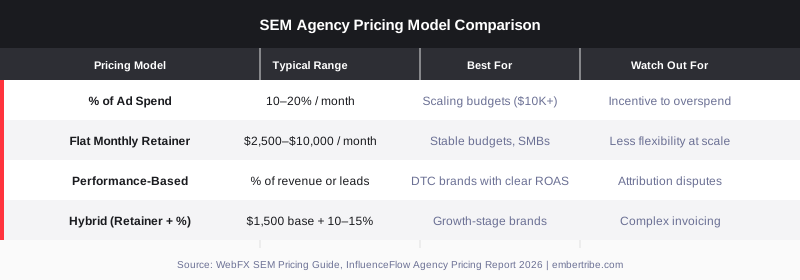
According to WebFX's SEM pricing guide, about 70% of businesses spend between $251 and $10,000 per month on SEM management, not including the actual ad spend. Most agencies charge either a flat retainer, a percentage of ad spend, or some combination of both.
Percentage of ad spend is the most common model for performance agencies. Rates typically fall between 10% and 20% monthly. At lower spend volumes (under $25K per month), you will often see a minimum fee apply because the account still requires the same hours regardless of how much you are spending. One structural downside of this model: an agency paid on percentage has a financial incentive to increase your budget even when the marginal return does not justify it.
Flat monthly retainers offer more predictability for brands with stable budgets. The InfluenceFlow 2026 agency pricing report puts the typical range for a small to mid-sized business SEM engagement at $2,500 to $10,000 per month. Mid-market companies managing $50,000 or more in monthly ad spend often pay $10,000 to $25,000 in management fees.
Performance-based pricing ties fees to results such as a target ROAS, cost per acquisition, or revenue generated. This model aligns incentives better, but attribution becomes a point of contention quickly. Clarify exactly how conversions are counted before agreeing to any performance clause.
Hybrid models combine a lower base retainer with a percentage component. This is increasingly common among growth-focused agencies because it reduces risk for both parties during ramp-up and scales fees alongside results.
Return on ad spend benchmarks vary widely by industry and by the maturity of your campaigns. A brand new to paid search will rarely hit efficient ROAS in month one. Healthy accounts take 60 to 90 days of learning before performance data is statistically meaningful.
According to First Page Sage's ROAS statistics report, ecommerce brands average approximately 2.05x ROAS on paid search. That number represents the mean across a broad range of verticals and campaign types. DTC brands with strong creative, tight audience targeting, and well-optimized landing pages routinely exceed that benchmark.
A more practical frame: calculate your break-even ROAS before you set any agency targets. If your gross margin is 50%, you need at least a 2x ROAS to break even on the ad spend alone, before accounting for management fees. Factor in the agency fee and you need to perform considerably higher just to stay profitable. Be explicit with any agency about your break-even ROAS, because an agency unwilling to anchor their strategy around your margin reality is not the right partner.
Evaluating a sem agency is not just about reviewing a pitch deck. The best agencies reveal themselves through the quality of their discovery questions, not their case study slides. Here is a practical framework for the evaluation process.
Ask every agency candidate the same set of questions and compare responses directly. The consistency of the process matters as much as any individual answer.
An agency that answers these questions with specificity and without hesitation has processes in place. An agency that pivots to case studies without addressing the mechanics of their process is giving you a sales pitch, not an operational preview.
According to Accelerated Digital Media's SEM agency red flags guide, the most consistent warning signs fall into three categories: communication, strategy, and reporting.
On communication: if you cannot get direct answers on calls and response times are consistently slow before you sign, expect that pattern to continue after you sign. On strategy: agencies that are always in "maintenance mode" without proactively testing new approaches are not earning their retainer. On reporting: if your monthly report is a static PDF showing impressions and click-through rate without connecting to revenue or conversions, your agency is optimizing for optics, not outcomes.
Other concrete red flags to watch for:
Owning your ad account is non-negotiable. If an agency insists on running campaigns through their own account rather than granting access to yours, walk away. You would be renting access to your own campaign history.
For most growth-stage brands spending under $500,000 per year in ad budget, a specialized digital marketing agency will outperform an in-house hire on a cost-adjusted basis. A senior paid search manager carries a total cost of $90,000 to $130,000 per year in salary plus benefits, and they still need tools, training, and management overhead.
An agency at a comparable cost brings a full team: strategist, account manager, conversion rate specialist, and creative support. The leverage is real, particularly in the early stages when your account needs more active optimization than a single in-house hire can provide.
The calculus shifts at scale. Brands spending $2 million or more annually in paid search often benefit from bringing core channel ownership in-house while using an agency for specific functions such as creative testing or international expansion.
Whatever pricing model you choose, get these terms in writing before you start:
Getting these terms defined before the relationship starts protects you from the most common agency disputes. Related reading: our full breakdown of what to look for in PPC companies covers the contract terms that matter most for paid channels.
Start by defining what "right" means for your specific situation. A brand spending $15,000 per month on Google Ads needs a different type of partner than one scaling toward $200,000 per month. Consider:
Once you have that picture, evaluate three to five agencies using the framework above. Ask for references from clients in similar verticals, not just from whoever they feature in the case study section of their website.
EmberTribe works specifically with DTC and ecommerce brands that are ready to scale paid search beyond the basics. Our approach is built around margin-aware ROAS targets, rigorous testing cadences, and transparent reporting that connects directly to revenue. If you are evaluating SEM partners for 2026, we would like to talk. Visit embertribe.com to learn more about how we work and what we focus on.

Hiring the wrong paid search help is expensive — not just in fees, but in wasted ad spend. If you're evaluating whether to bring in a search engine marketing consultant, you've probably already noticed that the market is noisy: freelancers, boutique agencies, and generalist consultants all claim to do the same work. They don't.
This guide breaks down what a search engine marketing consultant actually does, how they differ from an agency, what realistic costs look like, and the specific qualities that separate effective consultants from expensive ones.
A search engine marketing (SEM) consultant is a specialist who manages, optimizes, and strategizes paid search programs — primarily Google Ads and Microsoft Ads — for companies that want measurable returns from their ad spend.
Unlike a general digital marketing consultant who operates at a broad strategic level, an SEM consultant goes deep on a single channel. Their core responsibilities typically include:
Some SEM consultants also handle SEO, but the best ones specialize. If you need both, you'll often get better results hiring specialists for each or working with an integrated growth agency.
This is the most common question brands ask when they're scaling their paid search. Here's an honest breakdown.
Consultants tend to be more agile, more affordable, and more personally invested in results. The tradeoff is capacity: a solo consultant has limits on how many accounts they can actively manage at quality.
The middle ground — boutique growth marketing agencies — often gives you the best of both worlds: specialist-level expertise with the team infrastructure to execute at scale.
Pricing varies significantly based on experience, scope, and engagement type. Current benchmarks:
Hourly rates: $75–$200/hour is the typical range for experienced SEM consultants. Junior consultants start around $50/hour; seasoned specialists with a strong track record bill $150–$250+.
Monthly retainers: For ongoing account management and optimization, expect $1,500–$5,000/month for small-to-mid-size accounts. Accounts with $50K+ in monthly ad spend often warrant $5,000–$10,000/month.
Project-based work: One-time audits typically run $500–$2,500 depending on account complexity. Full strategy buildouts and onboarding projects generally fall in the $2,000–$8,000 range.
In-house alternative: For comparison, a full-time paid search manager in the US costs $70,000–$110,000 in annual salary before benefits, tools, and management overhead. A consultant is almost always more cost-efficient until your account volume justifies a dedicated hire.
The credentials that matter aren't always the ones consultants lead with. Here's what to actually evaluate:
Ask for real examples — not case studies, not screenshots, but a live walkthrough of an account they've managed. You want to see how they think about structure, how they handle underperforming campaigns, and what questions they ask before making changes.
If a consultant can't tell you exactly how they'll verify your conversion tracking before touching your campaigns, walk away. Bad attribution is the source of most wasted ad spend, and it requires a methodical approach to fix.
Paid search isn't instant. New campaigns typically need 60–90 days to exit the learning phase and generate reliable data. Any consultant promising results in two weeks is either managing expectations poorly or setting you up for disappointment.
You should own your data. The consultant should be working in your Google Ads account (not a separate one they control), and reporting should be tied to metrics that connect to revenue — not just impressions or clicks.
Google Ads certification is a baseline, not a differentiator. More meaningful signals include: active management of at least 5–10 live accounts, direct experience in your industry vertical, and a track record of improving ROAS or CPA over a 6–12 month window.
At EmberTribe, we work with growth-stage DTC brands that need their paid search programs tied directly to revenue — not managed in isolation from their broader marketing system. That means SEM strategy built around conversion tracking, landing page performance, and audience segmentation that connects paid and organic channels together.
If you're evaluating whether paid search is underperforming or if you're starting from scratch, the first step is usually an account audit — diagnosing what's working, what's wasted, and where the clearest growth levers are.
The best SEM consultants are usually too busy to be actively promoting themselves. The most reliable sourcing paths:
Before hiring, run a paid interview: pay them for a 2-hour account audit. You'll learn more from that session than from any proposal or reference call.
A skilled search engine marketing consultant can deliver significant ROI — but only if the fit is right for your stage, scope, and goals. The consultant-vs-agency decision isn't about prestige; it's about matching the level of execution you need with someone who can actually deliver it. Vet on process, track record, and transparency. The right hire makes your ad spend dramatically more efficient; the wrong one costs you months and budget you won't easily recover.
For brands that want SEM embedded in a broader paid and organic growth system, exploring how paid search integrates with channels like ecommerce CRO and conversion optimization and ecommerce growth strategy often surfaces the fastest wins.

If you're evaluating a SEM agency, you're likely staring down a familiar problem: your organic traffic is solid, but you need revenue now. Paid search delivers results in days, not months — but only when it's managed well. The difference between a strong sem agency and a mediocre one isn't effort. It's strategy, accountability, and the infrastructure they build around your campaigns.
This guide breaks down exactly what a search engine marketing agency does, how to evaluate one, and what to watch out for before you sign anything.
A SEM agency manages paid search advertising across platforms like Google Ads and Microsoft (Bing) Ads. Their core job is to capture high-intent demand — people who are actively searching for what you sell — and convert that traffic into revenue.
That scope covers a lot of ground. Depending on the engagement, a paid search agency will:
In 2026, the best agencies layer AI-driven bidding and dynamic asset generation on top of these fundamentals — but the fundamentals still have to be right. Automation without a sound account structure doesn't produce results; it just burns budget faster.
Not all paid search agencies are built the same. Here's what separates the performance-focused ones from those that generate reports without moving revenue.
Account ownership. You should own your Google Ads account — not the agency. If they want to run campaigns inside their own manager account with restricted access, that's a serious red flag. You need full ownership so the work stays with you if the relationship ends.
Conversion tracking done right. Sloppy attribution is one of the most common issues in paid search engagements. Look for agencies that implement server-side tracking or enhanced conversions, not just standard Google Tag Manager setups. If their measurement doesn't hold up under scrutiny, you can't trust their reporting.
Transparent communication on bidding strategy. Smart bidding (tCPA, tROAS, Maximize Conversions) can work well, but only with sufficient conversion data and the right targets. An agency should be able to explain clearly why they're using a specific bid strategy for your account, not just default to it because it's the path of least resistance.
Case studies with real numbers. Ask for documented client results. Not logos. Actual performance data — ROAS improvement, cost-per-acquisition reduction, revenue growth — from accounts similar to yours in size, industry, or model. Agencies that can't produce verifiable examples haven't earned the benefit of the doubt.
Landing page involvement. A SEM agency that only manages bids and ignores what happens after the click is leaving money on the table. The best agencies treat the landing page as part of the campaign, not someone else's problem.
For more on what to look for when hiring a paid advertising partner, see our guide to PPC management for ecommerce.
SEM pricing varies significantly based on agency size, ad spend volume, and service scope. The three most common structures you'll encounter:
Percentage of ad spend. The agency charges 10–20% of your monthly ad budget. This model aligns incentives around scale — as your campaigns grow, so does the fee — but it can create misaligned incentives if the agency's income rises by increasing spend rather than improving efficiency.
Monthly retainer. A flat monthly fee, typically ranging from $1,500 to $10,000+ depending on scope. This model works well for companies with stable budgets and clear deliverables. Retainers often come with a one-time setup fee of $500–$3,500 covering account audits, restructuring, and tracking implementation.
Hybrid model. A base retainer covers core management, with performance bonuses tied to hitting specific targets (ROAS, CPA, revenue). This is increasingly common in 2026 because it creates shared accountability. You pay for baseline effort, and the agency earns more when results exceed thresholds.
Most reputable agencies require a minimum engagement of three to six months. Paid search campaigns need time to accumulate data, test variables, and optimize — asking for meaningful results in 30 days is unrealistic for most accounts.
Before signing with any search engine marketing agency, run through these questions in your evaluation calls:
Any agency that hedges heavily on account ownership, attribution, or case studies is worth passing on. The best partners are direct and specific.
SEM and SEO serve different parts of the demand curve, and they work better together than in isolation.
SEO builds authority and captures intent at scale over time. A well-optimized site ranking for high-volume informational and commercial terms generates compounding returns — but those rankings take months to years to build. SEM, by contrast, is available immediately. You can be at the top of search results for high-intent terms tomorrow.
The strongest search marketing programs run both channels in parallel. SEO supports awareness and middle-of-funnel content. SEM covers bottom-of-funnel terms where purchase intent is explicit. Together, they create coverage across the entire search journey — and the data from paid search often informs which organic content is worth building.
For a deeper look at how these channels complement each other, see our breakdown of building a balanced SEO and SEM strategy.
EmberTribe works primarily with DTC brands and growth-stage companies that need paid search to pull real revenue weight — not just generate impressions. Our approach is built around three principles.
First, clean infrastructure. Before we touch bids, we audit account structure, conversion tracking, and attribution. Garbage in, garbage out. If the measurement isn't right, every optimization decision downstream is built on sand.
Second, cross-channel integration. We don't treat Google Ads as an island. Our paid search work connects to creative testing, landing page strategy, and email and SMS flows — because the customer path rarely starts and ends in one place. If you're looking at how this fits into a broader growth strategy, our post on choosing the right marketing agency for your business covers how to evaluate that full-picture thinking.
Third, accountability to revenue. ROAS and CPA are proxies. We work back from the number that matters — revenue — and build campaigns with that target as the anchor.
If your paid search isn't performing to its potential, or you're evaluating SEM agencies for the first time, we're happy to take a look at your current setup and tell you exactly what we see.
Get a free paid search audit from EmberTribe and walk away with a clear picture of what's working, what isn't, and what a focused sem agency engagement could deliver for your business.

Picking the right search marketing company is one of the highest-leverage decisions a growth-stage brand can make. Done right, it compounds: organic rankings build authority while paid search generates immediate revenue, and the two channels reinforce each other. Done wrong, you burn budget on siloed tactics that never connect to pipeline. This guide walks through what a search marketing company actually does in 2026, how to evaluate one, what pricing looks like, and the questions worth asking before you sign a contract.
A search marketing company helps businesses capture demand from search engines—primarily Google, and increasingly Bing and AI-powered answer engines that are reshaping how results surface in 2026. The term is broader than most people assume.
Pure-play SEO agencies focus exclusively on organic rankings: technical health, on-page optimization, content strategy, and link acquisition. Pure-play PPC or paid search agencies focus on advertising: Google Ads campaign structure, bidding, creative, and conversion tracking. A search marketing company—or search engine marketing company—operates across both disciplines under one roof.
That integration matters more than it used to. In 2026, Google's AI-driven results blend organic and paid placements in ways that require a unified approach. A brand that optimizes organic content in isolation from its ad campaigns misses the opportunity to use paid data to accelerate SEO and organic authority to lower paid CPCs. The best search marketing agencies understand that these channels are not competing for the same budget—they are multipliers of each other.
The terminology trips up a lot of buyers. Here is how the terms actually nest:
Search engine marketing (SEM) is the umbrella. It covers any tactic that improves a brand's visibility in search results, paid or organic. SEO and PPC both fall within SEM.
SEO is the organic side. A search marketing company running your SEO program will work on crawlability and site speed, keyword targeting and content architecture, earning backlinks from authoritative sources, and local or international signals depending on your market. Results build over six to twelve months and then compound. As we covered in our guide to search engine positioning, a well-executed organic strategy creates durable traffic that paid channels alone cannot replicate.
PPC (pay-per-click) is the paid side. This includes Google Search Ads, Performance Max campaigns, Shopping campaigns for ecommerce brands, and increasingly, ad placements within AI-generated summaries. A strong PPC management partner runs the full stack: campaign architecture, match types, negative keywords, bidding strategy, landing page alignment, and attribution.
The integration advantage: a search marketing company that runs both has access to paid keyword data that reveals what actually converts—not just what drives clicks. That intelligence directly sharpens the SEO content roadmap. Meanwhile, a brand with strong organic authority typically sees better Quality Scores in Google Ads, which lowers cost per click across paid campaigns. Siloed agencies leave this value on the table.
Not every agency that calls itself a search marketing company operates with the same depth. Here is what separates strong partners from average ones.
Ask to see a case study where organic and paid strategies were built together. If they cannot produce one, the channels are likely managed by separate teams with little cross-pollination.
An agency with real experience in your category—DTC ecommerce, SaaS, B2B services—understands the conversion economics, competitive dynamics, and seasonal patterns that a generalist firm has to learn on your dime. For SaaS brands, our guide to SaaS SEO agencies covers this vertical selection in more detail.
A credible search marketing agency will define success in revenue terms, not vanity metrics. If the initial conversation is dominated by impressions, rankings, and click counts with no connection to cost per acquisition or revenue, that is a red flag.
Search marketing has grown significantly more technical in 2026. Core Web Vitals, structured data, crawl budget management, and first-party data integration for audiences all require engineers who work alongside strategists. Ask who handles technical work and whether they are in-house or subcontracted.
You should own your accounts, have direct dashboard access, and receive reports that connect spend and effort to business outcomes without needing to reverse-engineer the agency's math.
Pricing varies widely, and the model matters as much as the number. In 2026, the dominant structures are:
The most common model, with 78% of agencies using it as their primary structure according to industry data. Retainers for search marketing services typically range from $2,500 to $15,000 per month for growth-stage brands, depending on scope, market competitiveness, and whether paid media management is included. Retainers provide predictable costs and allow the agency to think in quarters rather than one-off sprints.
Common for paid search management specifically. Agencies typically charge 10–20% of managed spend, with minimums that vary by firm. This model aligns the agency's revenue with campaign scale, though it can create incentives to increase spend rather than optimize efficiency.
A growing model, particularly popular with buyers who want their agency to have skin in the game. Structures vary: cost per qualified lead, revenue share (typically 10–25%), or a base retainer plus performance bonuses. These models work best when attribution is clean and the agency has meaningful control over the full funnel.
Used for defined scopes: a technical SEO audit, a keyword architecture buildout, or a landing page testing sprint. Appropriate when you have in-house capacity to execute but need outside expertise for a specific phase.
Most growth-stage brands find that a base retainer covering strategy and management, combined with direct ad spend they control, gives the best balance of accountability and flexibility.
The discovery process reveals more than any case study. These questions cut through positioning to expose how an agency actually works.
How do your SEO and paid teams collaborate day-to-day? You want to hear specifics: shared sprint planning, keyword data flowing between teams, landing page decisions made jointly. Vague answers about "holistic strategy" signal siloed execution.
What does the first 90 days look like? A credible agency should describe a clear onboarding sequence: audit phase, baseline measurement, priority roadmap, and first deliverables. Agencies that skip straight to pitching results without describing the work are worth scrutinizing.
Who will actually work on our account? Senior strategists who close deals often hand off to junior teams. Ask for the specific people who will manage your campaigns and their experience level.
How do you handle attribution? In a world of multi-touch journeys, last-click data tells an incomplete story. Ask how the agency models the contribution of organic and paid search to pipeline, and whether they work with your existing CRM and analytics stack.
What happens if results are below target in month four? How an agency responds to underperformance is more revealing than how they describe hypothetical success. You want transparency, a clear diagnostic process, and a willingness to pivot strategy—not defensiveness or shifting goalposts.
Can we see a client reference in our category? Reference calls are the most underused due diligence tool in agency selection. A strong partner will facilitate these readily.
EmberTribe operates as a growth marketing partner for DTC brands and growth-stage companies, not a channel-specific vendor. Our search marketing work is built on the principle that organic and paid search are more valuable together than apart—a model we've developed across hundreds of campaigns in competitive ecommerce and SaaS markets.
On the paid side, we run Google Search, Shopping, and Performance Max with full attribution and a cost-per-acquisition lens from day one. On the organic side, we build content programs and technical foundations designed to capture demand that paid cannot reach efficiently. The two programs share keyword data, conversion intelligence, and landing page learnings so each informs the other continuously.
If you are evaluating whether a dedicated search marketing company makes sense for your stage—or want to understand how our model compares to the broader agency landscape—we are happy to walk through what a scoped engagement could look like for your brand.
Ready to find out if EmberTribe is the right search marketing partner for your goals? Get in touch with our team to start the conversation.

In the age of rapid digital transformation, AI has seeped into almost every industry, revolutionizing how we conduct business, design products, and even create content. The ClusterMagic service is a great example, which seamlessly integrates AI for content generation in a hybrid model, providing significant benefits in the SEO results of brands seeking a massive increase in organic traffic. But while AI holds immense promise, it has its limitations. Let's explore the pros and cons of using AI for content creation and understand why a hybrid approach might be the way forward.
Major publishers in sensitive niches like CNET.com, Bankrate.com, and Creditcard.com have already integrated AI-generated content. Other large companies, such as CNN and Forbes, might also be doing so. Countless smaller companies and publishers are utilizing AI, not only on their websites but also on social media, in email marketing, and virtually everywhere else.
Google's stance on AI-generated content is neutral, emphasizing that content should primarily be user-centric. In fact, Google's September 2023 Helpful Content Update removed the mention of "written by people" from their helpful content system guidelines.
The message is clear: for content to rank well, it must be informative, answer users' queries satisfactorily, and showcase genuine expertise - regardless of how it's created.
AI Content Detectors like GPTZero, ZeroGPT, and many others are not reliable. Even OpenAI has said as much. They consistently produce false positives about human-written content. Conversely, they can be easily fooled with creative prompting or a bit of human editing.
An interesting note from OpenAI: "we found that it labeled human-written text like Shakespeare and the Declaration of Independence as AI-generated."
Anecdotal evidence and real-life ranking data suggest that while AI-generated content isn't penalized by search engines, it might only achieve high rankings if it meets the above criteria. The role of AI in content creation is still a developing narrative, and its significance is indispensable for maintaining a competitive edge in the future.
At EmberTribe, the understanding is clear - AI serves as a foundation, not the final product. With ClusterMagic, while AI aids in the initial draft based on expert-driven keyword research, human experts step in for the crucial phases of editing, fact-checking, and final review. This hybrid approach ensures the content is accurate and helpful, has the potential to rank, and truly represents their business.

Social media advertising is essential, and Instagram Ads is a great platform for it. In-stream video ads on Instagram can help you reach your target audience and boost your ROI. Below, we will explore these concepts and the way they can help you maximize your revenue..
In-stream video ads are a highly effective way to capture users' attention and convey your brand message. By showcasing your product or service in a visually appealing manner, you can drive awareness and generate interest among your target audience. The key lies in creating compelling content that resonates with your viewers.

These video ads can take various forms, such as pre-roll ads that play before the main content, mid-roll ads that appear during a video, or post-roll ads that play after the main content. Regardless of the placement, in-stream video ads offer brands the opportunity to engage with their audience in a more interactive and immersive way.
One of the key advantages of in-stream video ads is their ability to target specific demographics and interests. With advanced targeting options available on platforms like Instagram, advertisers can ensure that their video ads are shown to the most relevant audience. This precision targeting helps maximize the impact of the ads and increase the chances of conversion.
Instagram boasts over a billion active users, making it an ideal platform to reach a massive audience. Instagram's user base tends to be younger and more receptive to video content, providing a prime opportunity for brands to connect with their target market. The platform's visual nature and intuitive interface further enhance the effectiveness of video ads.
Instagram's in-stream video ads benefit from the platform's robust targeting capabilities, allowing advertisers to reach specific demographics, interests, and behaviors. This level of targeting precision ensures that your video ads are shown to the most relevant audience, increasing the likelihood of engagement and conversion.
Besides, Instagram's seamless integration of in-stream video ads into users' feeds ensures a non-disruptive viewing experience. The ads blend in with the organic content, appearing as a natural part of the user's browsing journey. This integration helps capture users' attention without causing annoyance or interruption, leading to higher ad recall and engagement.
Set Up Your Instagram In-Stream Video Ads
Now that you understand the benefits of in-stream video ads on Instagram, let's explore the process of setting up your ad campaign. The following steps will guide you through the process:
Prior to launching your in-stream video ad campaign, you'll need to create an Instagram business account. This step is crucial as it grants you access to Instagram's advertising tools and analytics, allowing you to monitor and optimize your campaigns effectively. To create a business account, simply follow Instagram's instructions and provide the necessary information.
Once you have set up your business account, you will gain access to a variety of features that are specifically designed for businesses. These features include the ability to create and manage ads, access to advanced analytics, and the option to promote your posts. By having a business account, you can take full advantage of Instagram's advertising capabilities and reach a wider audience.
With your business account in place, it's time to set up your first ad campaign. Instagram offers a user-friendly interface where you can specify your campaign objectives, target audience, budget, and ad placement. Take time to define your goals and allocate your resources wisely. A well-structured campaign will yield higher ROI.

When setting up your ad campaign, it's important to consider your target audience and their preferences. By understanding your audience demographics, interests, and behaviors, you can tailor your ad campaign to effectively reach and engage them. Instagram provides various targeting options, such as location, age, gender, interests, and behaviors, allowing you to refine your audience and maximize the impact of your ads.
The success of your in-stream video ads hinges on the quality and relevance of the content you produce. It's essential to create videos that align with your brand's identity and resonate with your target audience. Consider incorporating storytelling elements, showcasing your product's features, and evoking emotions to create a memorable viewing experience.
When choosing the right video content, keep in mind the length and format that works best for in-stream video ads on Instagram. Shorter videos tend to perform better, as they capture viewers' attention and deliver the message concisely. Additionally, vertical videos are more suitable for mobile viewing, which is where the majority of Instagram users access the platform.
It's also important to optimize your video content for sound-off viewing. Many Instagram users watch videos without sound, so incorporating captions, text overlays, and visually compelling imagery can help convey your message effectively. By making your videos visually appealing and engaging, you can increase the likelihood of viewers taking action and engaging with your brand.
Now that you have set up your in-stream video ad campaign, let's explore some strategies to maximize your ROI on Instagram:
Instagram offers precise targeting options to ensure your ads reach the most relevant users. Utilize demographic filters such as age, location, interests, and behaviors to narrow down your audience. By delivering your video ads to the right people, you increase the chances of generating meaningful engagement and conversions.
For example, if you are promoting a fitness product, you can target users who have shown interest in health and wellness, follow fitness influencers, or have engaged with related content. By reaching out to a specific audience segment, you can tailor your message and visuals to resonate with their interests and needs, ultimately driving higher conversion rates.
Timing is crucial when it comes to in-stream video ads. Analyze your target audience's behavior and identify the optimal times to showcase your ads. Experiment with different schedules and monitor the performance closely. By optimizing the timing, you can maximize your reach and drive higher engagement rates.
Consider factors such as the time of day, day of the week, and even seasonal trends. For instance, if you are promoting a travel destination, it may be more effective to run your ads during the holiday season when people are planning their vacations. By aligning your ad schedule with your audience's habits and preferences, you can capture their attention at the right moment, increasing the likelihood of conversions.
Call-to-action (CTA) buttons are an effective way to guide your audience to take the desired action after viewing your video ad. Instagram provides various CTAs such as "Shop Now," "Learn More," and "Sign Up." Choose a CTA that aligns with your campaign objectives and entices users to click through to your website or landing page.
When selecting a CTA, consider the next step you want your audience to take. If your goal is to drive sales, a "Shop Now" CTA can direct users to a product page where they can make a purchase. On the other hand, if you want to generate leads, a "Sign Up" CTA can lead users to a form where they can provide their contact information. By utilizing the appropriate CTA, you can guide your audience towards the desired conversion, maximizing the return on your ad investment.
Remember to regularly analyze the performance of your video ads and make data-driven adjustments to optimize your ROI. By continuously refining your targeting, scheduling, and CTAs, you can enhance the effectiveness of your Instagram video ad campaigns and achieve greater success in reaching your marketing goals.
Once your in-stream video ads are live, it's vital to monitor their performance and make data-driven adjustments. Instagram's analytics tools provide valuable insights that can help you measure the success of your campaigns.
Instagram offers a range of analytics metrics to help you evaluate the performance of your in-stream video ads. These metrics include impressions, reach, video views, engagement rates, and click-through rates. By analyzing these data points, you can identify areas for improvement and refine your future ad campaigns.
To accurately measure your ROI, it's essential to track the conversions and actions taken by users who interacted with your in-stream video ads. Implementing tracking mechanisms such as UTM parameters and conversion pixels allows you to attribute conversions back to your Instagram ads and assess their impact on your overall business goals.
Continuously monitor and evaluate the performance data of your in-stream video ads. Identify any patterns or trends and use this information to fine-tune your campaigns. Experiment with different targeting options, ad formats, and content to optimize your ROI. Remember, data-driven adjustments are key to maximizing the effectiveness of your Instagram video ads.
In conclusion, in-stream video ads on Instagram offer a powerful opportunity to connect with your target audience and drive ROI. By understanding the basics, setting up your ad campaigns strategically, implementing effective targeting strategies, and measuring performance data, you can leverage this platform to its full potential. Embrace the power of in-stream video ads on Instagram and unlock new horizons for your business.
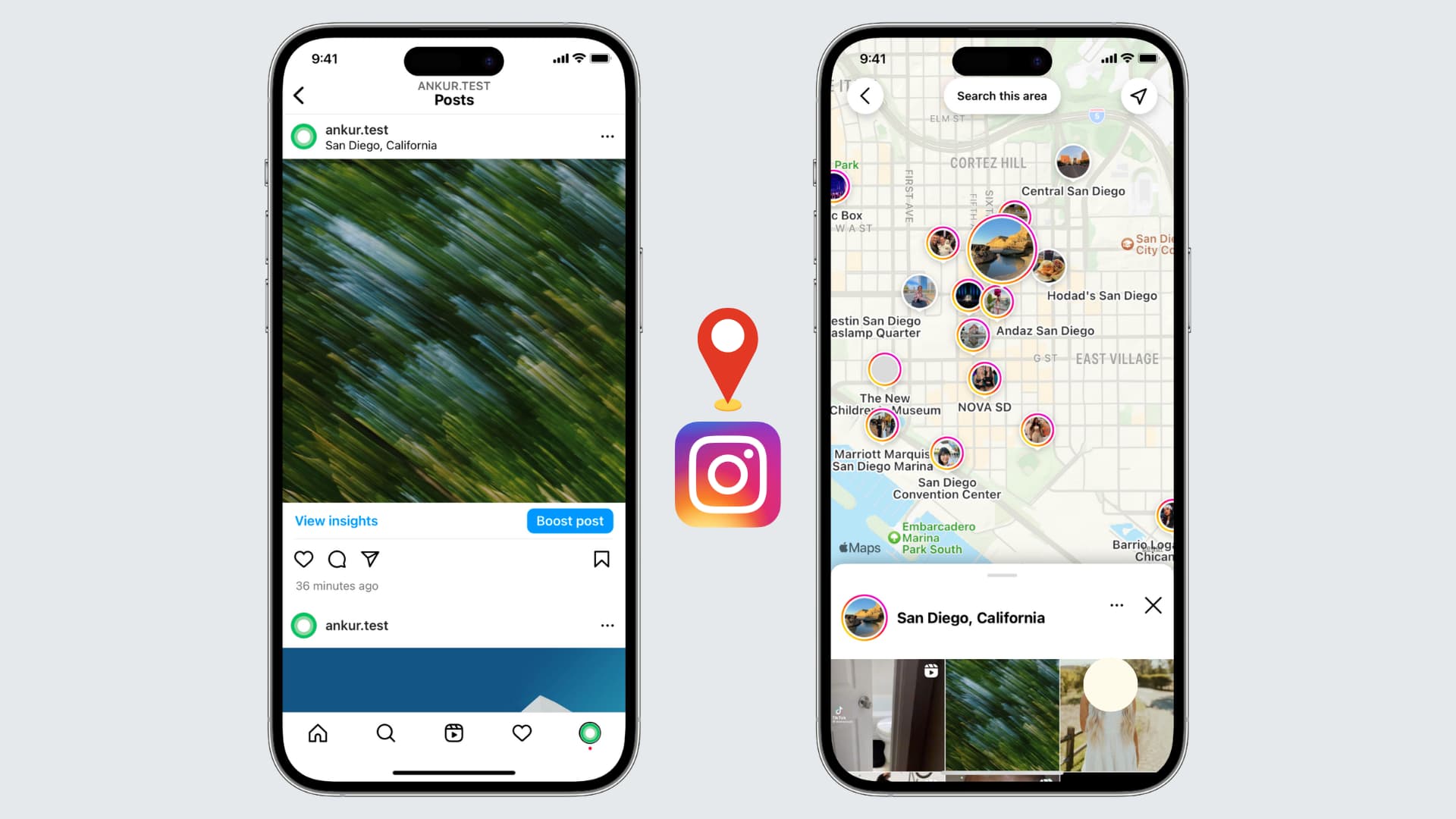
If you're an avid Instagram user looking to enhance your profile and connect with local followers, adding your location to your Instagram bio can be a game-raiser.
Before diving into the steps, it's essential to grasp why location plays a crucial role in your Instagram bio. The social media landscape, especially Instagram, thrives on personal connections and relatability. By including your location, you instantly provide potential followers with valuable information about where you live, work, or frequently visit. This simple piece of information can help foster a sense of trust and authenticity, making it easier to connect with others in your local community.
When you include your location in your Instagram bio, you are not only telling people where you are geographically but also giving them a glimpse into your lifestyle. For example, if you live in a bustling city like New York, your bio might indicate that you are a city dweller who enjoys the vibrant energy and cultural diversity that the city offers. On the other hand, if you live in a small town surrounded by nature, your bio might reflect your love for outdoor activities and a slower-paced lifestyle.
One of the primary benefits of adding your location to your Instagram bio is increased visibility. When users search for specific locations or browse through nearby profiles, having your location readily accessible in your bio gives you a better chance of appearing in those search results. This increased visibility can lead to new followers, collaborations, and even potential business opportunities.

Imagine you are a food blogger based in San Francisco. By including your location in your bio, you make it easier for people searching for food-related content in the city to discover your profile. This can result in more followers who are genuinely interested in your content and may even lead to collaborations with local restaurants or brands.
Location tagging also allows you to tap into the power of local hashtags. When you include your location in your bio, you can use location-specific hashtags in your posts to further boost your visibility. This strategy helps you connect with people who are actively searching for content related to your location, increasing the likelihood of engagement and interaction.
By including your location in your Instagram bio, you make it easier for local followers to find and connect with you. Whether you're looking to meet like-minded individuals, network with professionals in your area, or simply make new friends, adding your location can help attract the right audience. Building a strong local community on Instagram can lead to meaningful relationships both online and offline.
Now that you grasp the significance of adding your location to your Instagram bio, let's dive into the practical steps. Before making any changes, it's important to familiarize yourself with the Instagram app and navigate to your profile. Follow these steps to access your Instagram profile:
To access your Instagram profile, open the Instagram app on your mobile device and log in to your account. Once logged in, tap the profile icon, usually located in the bottom right corner. This will take you to your Instagram profile where all your posts, followers, and bio information are displayed.
Once you're on your Instagram profile, you'll be greeted by a visually appealing grid of your posts. This is where your creativity shines through as you curate a feed that reflects your personality and interests. Take a moment to browse through your posts, reminisce about the memories captured in each image, and appreciate the artistry you've shared with your followers.
Now that you've explored your posts, it's time to focus on your bio. Your Instagram bio is a small but powerful space where you can introduce yourself, showcase your passions, and leave a lasting impression on anyone who visits your profile. To make changes to your bio, navigate to the bio section by tapping the "Edit Profile" button located below your bio description. This will open up the editing options for your bio.
As you enter the bio editing screen, take a moment to reflect on who you are and what message you want to convey to your audience. Your bio should be a reflection of your personality, values, and interests. It's an opportunity to showcase your uniqueness and stand out from the crowd. Consider the tone you want to set, whether it's witty, professional, or heartfelt, and craft your bio accordingly.
Think about what makes you special and what sets you apart from others. Are you an avid traveler, a passionate foodie, or a dedicated fitness enthusiast? Incorporate these aspects into your bio to give people a glimpse into your world.
After you've made the necessary changes to your bio, take a step back and review it with a critical eye. Does it accurately represent who you are? Is it engaging and captivating? Make any final adjustments to ensure that your bio is a true reflection of yourself and leaves a lasting impression on anyone who stumbles upon your profile.
Now that you're in the bio editing section, you're ready to add your location. Simply follow these steps:
Within the bio editing section, locate the text field where your bio description is displayed. You can add your location information by typing it directly into the text field. It's important to be accurate and precise about your location to ensure the information is useful for potential followers.
After entering your location information, make sure to save your updated bio by tapping the "Save" button located in the top right corner of the screen. Once saved, your location will be visible in your Instagram bio, allowing others to easily identify your whereabouts.
Now that you know the steps to add your location to your Instagram bio, let's explore some additional tips to optimize your bio for maximum impact:
Incorporating relevant keywords related to your location can help attract specific audiences. For example, if you're a photographer based in New York City, including keywords like "NYC photographer" or "New York City-based artist" can help you stand out to users searching for those terms.
Hashtags are powerful tools for increasing your visibility on Instagram. Consider including location-specific hashtags in your bio to further connect with users interested in your area. This can expand your reach and help you gain exposure to a broader audience.

While adding your location to your Instagram bio is relatively straightforward, you may encounter some common issues along the way. Here are a few troubleshooting tips:
If your location isn't appearing in your bio after saving the changes, try refreshing your profile by closing the Instagram app and reopening it. Also ensure that your location settings are enabled in your device's privacy settings.
If you're unable to save your updated bio, double-check that you've entered your location information correctly and that you're connected to a stable internet connection. If the issue persists, try logging out and logging back into your Instagram account to resolve any temporary glitches.
By following these simple steps and implementing the tips mentioned, you can effortlessly add your location to your Instagram bio, boost your visibility, and connect with local followers. Embrace the power of location tagging and watch as your Instagram profile becomes a conversation topic.

Are your Instagram ads failing to generate the results you expected? Don't worry, you're not alone. Many businesses encounter difficulties when it comes to running successful Instagram and social media advertising campaigns. However, understanding the underlying reasons behind these setbacks is the first step towards improvement. In this article, we will delve into the basics of Instagram advertising, explore common reasons why your ads may not be working, discuss strategies to enhance your ad performance, and analyze case studies of successful Instagram ad campaigns. Let's get started!
Instagram advertising has become an essential tool for businesses to reach their target audience effectively. With its wide user base and engaging visual content, Instagram offers various advertising formats, including photo ads, video ads, carousel ads, and more. However, to make the most of your advertising efforts, it's crucial to have a solid understanding of how Instagram ads work and how to identify your target audience accurately.

Instagram ads operate by leveraging the platform's vast user data and targeting capabilities. When businesses create an ad campaign, they can define specific parameters to ensure their ads are displayed to the right audience. These parameters include interests, behavior, demographics, and more. By utilizing this data, Instagram serves ads to users who are more likely to engage with the content, increasing the chances of achieving the desired results.
When users scroll through their Instagram feed, they may come across sponsored posts that seamlessly blend with the organic content. These ads are designed to capture attention and encourage users to take action, such as visiting a website, making a purchase, or engaging with the brand in some way. The visual nature of Instagram ads allows businesses to showcase their products or services creatively, making them more appealing to potential customers.
One of the key factors in running successful Instagram ad campaigns is accurately identifying your target audience. Understanding who your ideal customers are and tailoring your ads to their preferences and needs is crucial for achieving optimal results.
Identifying your target audience involves analyzing demographic data, understanding consumer behavior, and conducting specialized research. By diving deep into your audience's characteristics, interests, and habits, you can create highly targeted ads that resonate with them on a personal level. This level of personalization not only increases the chances of engagement but also helps build brand loyalty and trust.
Failure to define your target audience properly can lead to ineffective ad performance and wasted resources. If your ads are not reaching the right people, you may experience low engagement, high bounce rates, and a low return on investment. Therefore, investing time and effort in identifying your target audience is essential for the success of your Instagram advertising campaigns.

Are you frustrated with the lack of results from your Instagram ads? If so, you're not alone. Many businesses struggle to achieve the desired outcomes from their ad campaigns on this popular social media platform. In this article, we will explore some common reasons why your Instagram ads may not be working and provide insights on how to improve their performance.
One of the most common reasons for underperforming Instagram ads is a poorly defined target audience. If you haven't invested enough time and effort into understanding who your ideal customer is, it's challenging to create ads that resonate with them. It's like shooting in the dark without a clear target.
To address this issue, take a step back and revisit your audience segmentation. Dig deep into market research and customer profiling to gain a comprehensive understanding of your target audience's demographics, interests, and behaviors. By doing so, you can tailor your ad content to their specific needs and preferences, increasing the likelihood of engagement and conversions.
Another crucial factor affecting the performance of your Instagram ads is the quality of your ad content. Are your visuals eye-catching? Is your copy compelling? Do your ads effectively convey your message and call-to-action?
If your ad content fails to capture attention and engage your audience, it's unlikely to drive the desired results. To create more effective ad content, start by analyzing your target audience's preferences and interests. Craft visually appealing images or videos that align with their aesthetics and showcase the value your product or service provides.
Moreover, pay close attention to your ad copy. Use persuasive language that resonates with your audience and clearly communicates the benefits they can expect. Incorporate strong calls-to-action that prompt users to take the desired action, such as visiting your website, making a purchase, or signing up for a newsletter.
Ad placement plays a vital role in determining your ad's reach and visibility. Instagram offers different ad placements, such as feed ads, stories ads, explore ads, and more. Selecting the wrong placement can result in your ads being shown to the wrong audience or in an ineffective context.
Ensure you choose the most suitable placement for your audience and campaign goals. For example, if you're targeting a younger demographic, stories ads might be more effective as they are a popular feature among Instagram users in that age group. On the other hand, if you want to showcase your product or service in a more detailed manner, feed ads might be the better option.
Experiment with different ad placements and closely monitor their performance. Analyze the data and make data-driven decisions to optimize your ad placements for maximum impact.
By addressing these common issues, you can improve the performance of your Instagram ads and increase your chances of achieving your marketing objectives. Remember, success on Instagram requires a deep understanding of your target audience, compelling ad content, and strategic ad placement. Keep refining your approach and stay proactive in adapting to the ever-changing landscape of social media advertising.
When it comes to evaluating the performance of your Instagram ads, simply running them is not enough. You need to measure and analyze relevant metrics to gain a comprehensive understanding of how well your ads are performing. Luckily, Instagram provides a plethora of valuable insights that can help you make informed decisions and optimize your campaigns for better results.

One of the key metrics to look at when evaluating your Instagram ad performance is impressions. Impressions refer to the number of times your ad has been displayed to users. This metric gives you an idea of how many people have seen your ad, which is crucial in assessing its reach.
Another important metric to consider is reach. Reach measures the number of unique users who have seen your ad. It provides a more accurate representation of your ad's visibility and can help you gauge the effectiveness of your targeting strategies.
Engagement is yet another vital metric to analyze. It measures the level of interaction users have with your ad, such as likes, comments, and shares. By monitoring engagement, you can determine how well your ad resonates with your target audience and whether it is driving the desired actions.
Click-through rates (CTR) are also worth examining. CTR measures the percentage of users who clicked on your ad after seeing it. A high CTR indicates that your ad is compelling and successfully driving users to take action, such as visiting your website or making a purchase.
By closely monitoring these metrics, you can identify patterns and trends in your ad performance. For example, if you notice a high number of impressions but a low engagement rate, it may indicate that your ad is not resonating with your target audience. Armed with this knowledge, you can make data-driven decisions to optimize your campaigns and improve your results.
Instagram Insights is a powerful tool that provides a wealth of information about your audience and their behavior. By leveraging this data, you can gain valuable insights into your audience's demographics, interests, and preferences.
Demographic insights allow you to understand the age, gender, and location of your audience. This information is crucial for refining your targeting strategies and ensuring that your ads are reaching the right people. For example, if you discover that the majority of your audience is located in a specific city, you can tailor your ads to cater to their local interests or preferences.
Interest insights provide you with a deeper understanding of what topics and content your audience is interested in. This knowledge allows you to create more personalized and impactful ad experiences that resonate with your target audience. For instance, if you find that your audience is highly interested in fitness and wellness, you can create ads that highlight the health benefits of your products or services.
Furthermore, Instagram Insights also offers data on the days and times when your audience is most active on the platform. This information can help you schedule your ads to reach your audience at the most opportune moments, increasing the likelihood of engagement and conversions.
By utilizing Instagram Insights effectively, you can refine your targeting strategies, create more personalized ad experiences, and ultimately drive better results for your Instagram ad campaigns.
To increase the effectiveness of your Instagram ads, consider reevaluating and refining your target audience. Use the insights gained from your analytics and research to create detailed buyer personas and adjust your ad targeting accordingly. By accurately positioning your ads in front of the right people, you can significantly improve your campaign outcomes.
Amp up the quality and impact of your ad content to capture the attention of your audience. Invest in high-quality visuals, ensure your copy is concise and persuasive, and incorporate compelling calls-to-action. Experiment with different creative elements to find what resonates best with your audience and continuously optimize your ad content for maximum engagement.
Carefully consider where your ads are placed within the Instagram platform. Test different ad placements and closely monitor their performance. You may find that certain ad formats, such as stories ads, perform better for your target audience. By strategically optimizing your ad placement, you can increase visibility and reach users who are more likely to convert.


.svg)