
Organic search still drives roughly a third of all ecommerce website traffic. Yet most online stores leave that channel underbuilt -- relying on paid ads alone while competitors quietly capture high-intent buyers through search. A strong ecommerce SEO strategy changes that equation, turning your product catalog into a compounding traffic asset that reduces acquisition costs over time.
If you run a DTC brand or growth-stage store, this guide gives you the framework to build (or fix) your organic search foundation -- from keyword research through technical execution to the emerging AI search surfaces that now influence how shoppers discover products.
SEO for ecommerce websites is fundamentally different from SEO for content sites or SaaS companies. The challenges are specific:
These realities mean you need a purpose-built approach, not a generic checklist. The payoff is significant: organic traffic compounds month over month, and unlike paid channels, it does not reset to zero when you pause spend. For a deeper look at how search engine positioning directly impacts traffic volume, the data is clear -- ranking improvements translate directly to revenue.
Effective ecommerce keyword research starts with intent, not volume. Organize your keyword targets into three tiers:
| Intent Tier | Example Keywords | Target Page Type |
|---|---|---|
| Transactional | "buy organic cotton sheets queen" | Product page |
| Commercial investigation | "best organic cotton sheets 2026" | Category or comparison page |
| Informational | "organic cotton vs bamboo sheets" | Blog post or buying guide |
Practical steps to build your keyword map:
An experienced ecommerce SEO specialist will typically start here, because the keyword map dictates every optimization decision that follows.
Technical issues kill ecommerce sites quietly. A store can have great products and strong content, but if search engines cannot efficiently crawl and index the catalog, none of it surfaces in results.
Search engines allocate a finite crawl budget to each domain. Ecommerce sites waste that budget when faceted navigation creates thousands of parameter-based URLs that add no unique value. Address this by:
noindex or blocking them via robots.txtGoogle's Core Web Vitals remain a ranking factor, and for ecommerce, speed directly affects conversion rates. Key metrics to monitor:
Schema markup is no longer optional for ecommerce stores. Implementing Product schema enables rich results that display price, availability, ratings, and shipping information directly in search results.
Priority schema types for ecommerce:
Proper technical execution is where comprehensive ecommerce SEO packages deliver the most immediate impact, because these fixes often unlock rankings that content alone cannot achieve.
Your product and category pages are your money pages. Optimizing them correctly determines whether search traffic converts.
Category pages often have the highest ranking potential for competitive head terms. Strengthen them by:
Building brand trust through your SEO presence matters here -- shoppers who land on a well-structured category page with clear product information, reviews, and transparent policies are far more likely to convert.
Product pages alone will not capture the full range of search queries your buyers use. A content strategy fills the gaps, targeting informational and commercial investigation keywords that product pages cannot rank for.
High-performing content types for ecommerce:
Each piece should link to relevant product and category pages. This creates a content hub structure where blog posts feed authority and traffic into your commercial pages.
Content also plays a critical role in earning backlinks. Authoritative buying guides and original research attract links from publications, bloggers, and industry sites -- which strengthens your entire domain's ability to rank.
Search behavior is shifting. Buyers now discover products through AI-powered surfaces like Google's AI Overviews, ChatGPT, and Perplexity. This means your SEO for ecommerce websites strategy needs to account for how AI systems select and cite sources.
Key principles for AI search visibility:
This is still an emerging area, but brands that invest in structured, authoritative content now will have a meaningful advantage as AI search adoption continues to grow.
The strongest ecommerce search strategies do not treat SEO and paid search as separate channels. They work together. Paid search data reveals which keywords convert, informing your organic priority list. Organic rankings reduce your dependence on ad spend for branded and high-volume terms, freeing budget for prospecting campaigns.
For a detailed breakdown of how to build a balanced search marketing plan that combines SEO and SEM, the integrated approach consistently outperforms either channel in isolation.
Many brands work with an ecommerce SEO consultant or dedicated ecommerce SEO services team to run this combined model, because it requires coordination between content, technical SEO, and media buying -- disciplines that rarely sit in the same person's skillset. EmberTribe's SEO services are built around this integrated model, connecting organic performance directly to revenue outcomes.
Ecommerce SEO is not a one-time project. It is an ongoing system that compounds over time -- each technical fix, each optimized product page, each piece of content strengthens your store's ability to capture organic demand.
The priority order is clear:
Stores that treat SEO as infrastructure -- not a checkbox -- consistently see lower customer acquisition costs, more resilient traffic, and stronger brand positioning in their category. The work is methodical, but the results compound in ways that paid channels simply cannot replicate.
Custom audiences remain one of the most powerful targeting features in the Facebook advertising platform. The ability to upload a list of customers or prospects and serve them ads directly is a game-changer for performance marketers.
But here is the problem most advertisers overlook: when you upload a list of 1,000 contacts, Facebook does not automatically match all of them. In many cases, match rates fall between 30% and 50%, which means more than half of your carefully curated audience never sees a single ad.
That gap between your uploaded list and the matched audience represents real revenue left on the table. Every unmatched contact is a missed opportunity to retarget a buyer, re-engage a lapsed customer, or nurture a warm lead through your sales funnel.
The good news: with the right data preparation and enrichment strategies, you can push match rates well above 70%, and in many cases above 90%.
Before diving into optimization tactics, it helps to understand the matching process itself.
When you upload a customer list, Facebook takes the identifiers you provide (email addresses, phone numbers, names, etc.) and hashes them using SHA-256 encryption. It then compares those hashes against its own database of user profiles. When a hash matches, that person becomes part of your custom audience.
The key insight is that Facebook can accept up to 15 different data points per contact to attempt a match. Most advertisers only upload email addresses. That single data point gives Facebook one shot at finding a match. If that email address is not the one the user registered with on Facebook, the match fails.
By providing multiple identifiers, you give Facebook more chances to find each person. First name, last name, phone number, city, state, zip code, date of birth, and gender all serve as additional matching signals.
Here is the full list of identifiers Facebook will use for matching:
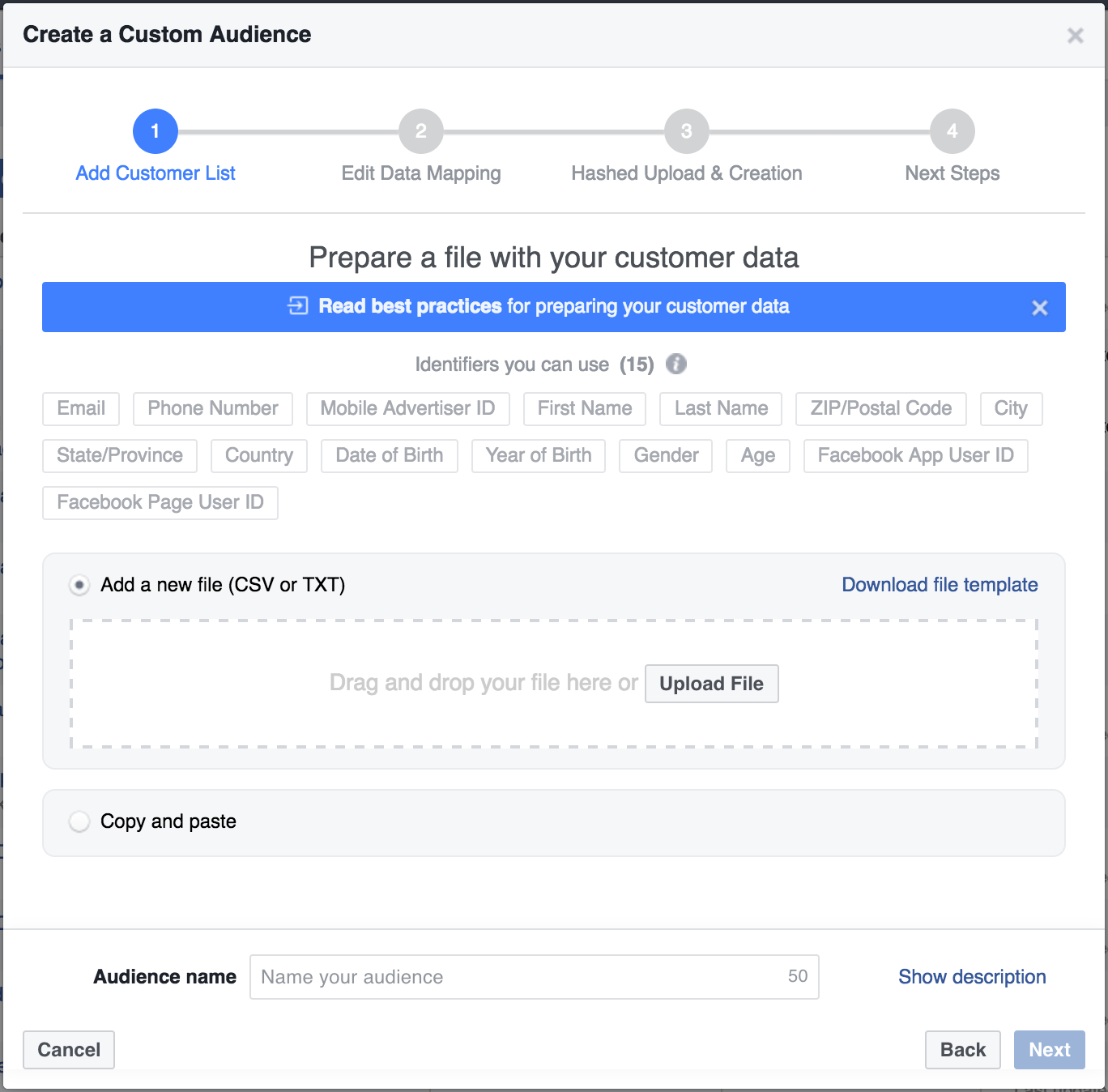
The more of these fields you populate, the higher your match rate will climb. Even partial information helps. A first name combined with a zip code might be enough for Facebook to confirm a match that email alone could not.
The most effective way to boost match rates is to enrich your existing data before uploading it to Facebook. If you have a newsletter list with thousands of email addresses, those emails alone are just the starting point.
Tools like Clearbit, ZoomInfo, and Apollo can take a single email address and return dozens of additional data points. For custom audience optimization, the most valuable enrichments are:
Here is a practical workflow using Clearbit as an example:
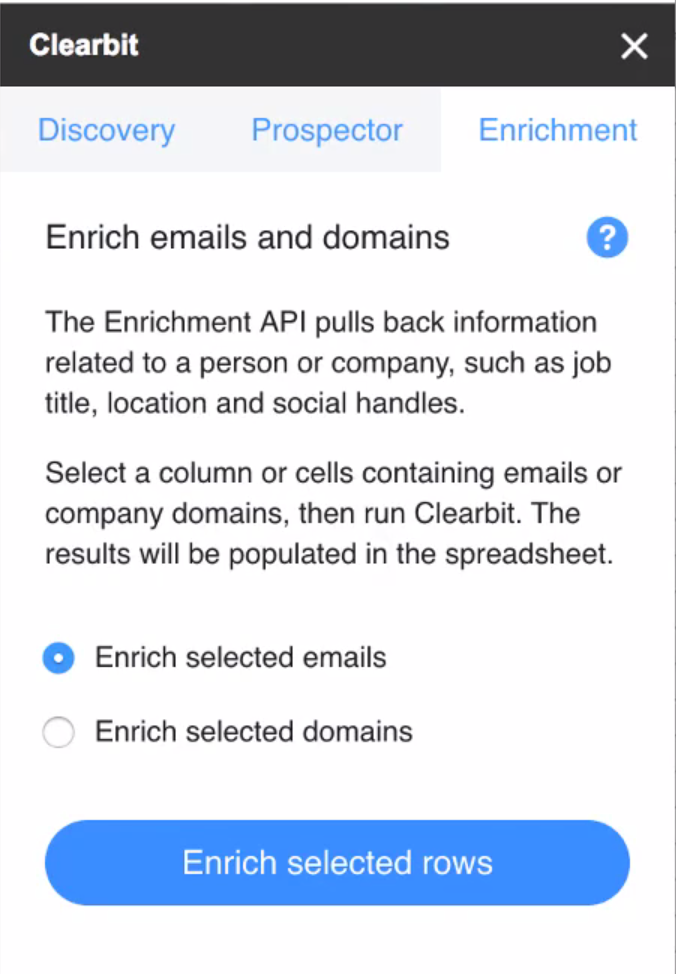
Even before using the enriched data for ad targeting, take time to analyze what the enrichment reveals. Build pivot tables around job titles, company sizes, and locations. This analysis often surfaces audience insights that inform not just targeting but creative strategy and offer positioning.
Data formatting errors are a silent killer of match rates. Facebook's matching algorithm is strict about format. Common mistakes include:
Facebook provides a downloadable CSV template specifically for custom audience uploads. Use it. The template ensures your columns align with the expected identifiers and reduces formatting errors that silently degrade your match rate.
Beyond basic data enrichment, several advanced tactics can push your match rates even higher.
Rather than uploading one massive list, break your audience into segments based on data quality. Upload your most complete records (those with email, phone, name, and location) separately from email-only records. This approach lets you:
Many people have separate personal and work email addresses. If your CRM captures both, include them in your upload. Facebook will hash and check each one independently. A contact who does not match on their work email might match perfectly on their personal Gmail address.
Customer data decays over time. People change email addresses, phone numbers, and locations. An audience that matched at 80% six months ago may have dropped to 60% today. Set a recurring schedule to re-enrich and re-upload your custom audiences at least quarterly.
Website custom audiences built from pixel data typically have near-perfect match rates because Facebook already knows those visitors. Combining pixel-based audiences with uploaded list audiences gives you broader reach with strong match quality. Use the overlap analysis in Ads Manager to understand how your audience segments intersect.
After uploading your custom audience, Facebook displays the audience size alongside your uploaded list count. The ratio tells you your match rate.
Here are general benchmarks to gauge your performance:
If your match rate falls below expectations, run a diagnostic check. Look for formatting inconsistencies, outdated email addresses, or missing country codes. Even small fixes can produce meaningful lift.
Here is the complete workflow for maximizing your custom audience match rates:
Every percentage point of match rate improvement translates directly to more of your target audience seeing your ads. For ecommerce brands spending significant budgets on Facebook, the ROI of data enrichment often pays for itself many times over.
Custom audience targeting only works as well as your data allows it to. Most advertisers accept low match rates as an unavoidable cost of the platform, but they are not. By investing time in data enrichment, proper formatting, and regular audience maintenance, you can dramatically increase the reach and effectiveness of your Facebook campaigns.
The advertisers who win on Facebook are not just the ones with the best creative or the biggest budgets. They are the ones who treat their first-party data as a strategic asset and invest in making every contact matchable, targetable, and reachable.
Google Ads is a powerful online advertising platform that can help businesses reach their target audience and drive results. Whether you're new to Google Ads or looking to improve your existing campaigns, this step-by-step guide will walk you through the process of setting up your Google Ads branch effectively.
Google Ads, formerly known as Google AdWords, is a robust advertising platform powered by Google's vast network. It offers a variety of ad formats, such as text ads, display ads, video ads, and more, allowing businesses to reach their target audience across different channels.
Text ads are the most common ad format on Google Ads. They appear as sponsored search results when users search for specific keywords related to your business. Display ads, on the other hand, are visually appealing image or banner ads that are shown on websites within Google's Display Network. Video ads, as the name suggests, are short video clips that can be displayed on YouTube (Ads) or other partner websites.
Google Ads also offers advanced targeting options to help businesses reach the right audience. You can target users based on their location, language, demographics, interests, and even specific websites or apps they visit. This level of precision ensures that your ads are shown to the most relevant audience, increasing the chances of engagement and conversion.
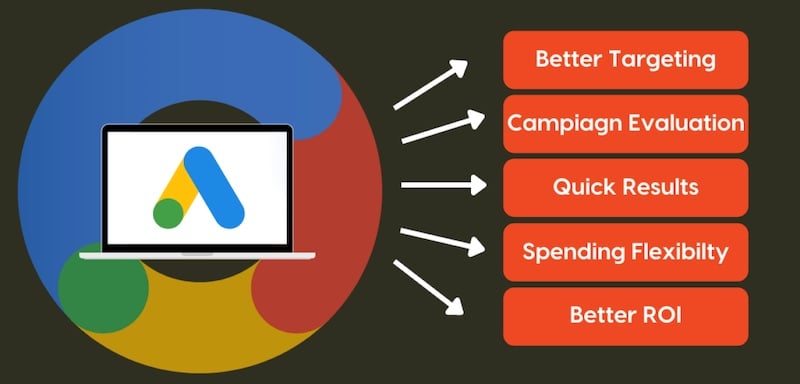
Google Ads is an essential tool for businesses of all sizes. It provides a way to increase visibility, drive website traffic, generate leads, and ultimately, grow your business. With Google Ads, you have the ability to reach users who are actively searching for products or services related to your business, increasing the chances of conversion.
One of the key advantages of Google Ads is its flexibility. You have full control over your ad budget, allowing you to set a daily or monthly spending limit. This ensures that you only spend what you can afford and gives you the flexibility to adjust your budget based on the performance of your ads.
Google Ads also provides detailed performance metrics and analytics, allowing you to track the effectiveness of your campaigns. You can see how many clicks your ads receive, the cost per click, the number of conversions, and much more. This data-driven approach enables you to make informed decisions and optimize your campaigns for maximum results.
Furthermore, Google Ads offers various ad extensions that can enhance the visibility and effectiveness of your ads. These extensions allow you to add additional information, such as phone numbers, addresses, or links to specific pages on your website. This not only makes your ads more informative but also increases the chances of users taking action.
Before diving into the setup process, there are a few things you need to prepare.
Setting up your Google Ads branch requires careful planning and organization. To ensure a smooth and successful setup, it is essential to gather all the necessary information and tools beforehand.
Start by gathering the necessary information and tools for setting up your Google Ads branch. This includes your business website URL, relevant keywords related to your business, ad images or videos, and a clear understanding of your target audience.
When it comes to your business website URL, make sure it is up-to-date and optimized for user experience. A well-designed and user-friendly website will greatly enhance the effectiveness of your Google Ads campaigns.
In terms of relevant keywords, conduct thorough research to identify the most appropriate and high-performing keywords for your business. These keywords will help you reach your target audience and increase the chances of your ads being shown to the right people at the right time.
When selecting ad images or videos, choose visuals that are visually appealing and relevant to your business. High-quality and engaging visuals can significantly improve the click-through rate of your ads.
Lastly, having a clear understanding of your target audience is crucial. Define your target audience based on demographics, interests, and behaviors. This knowledge will enable you to tailor your ads to resonate with your target audience and maximize your campaign's effectiveness.
It's important to establish clear advertising goals before setting up your Google Ads account. Determine what you want to achieve with your ads, whether it's getting more website traffic, increasing sales, or raising brand awareness. This will help you create effective campaigns that align with your business objectives.
Consider the specific metrics you want to track and measure to gauge the success of your campaigns. For example, if your goal is to increase sales, you may want to track the number of conversions or the return on ad spend (ROAS).
Furthermore, setting realistic and attainable goals is crucial. Take into account your budget, resources, and the competitive landscape of your industry. By setting achievable goals, you can stay motivated and focused throughout the setup and optimization process.
Remember, Google Ads can be a powerful tool for driving business growth, but it requires careful planning and strategic execution. By preparing the necessary information and setting clear advertising goals, you are laying the foundation for a successful Google Ads setup.
Now that you have everything in place, it's time to create your Google Ads account.
Creating a Google Ads account is a straightforward process that can be done in a few simple steps. By following these steps, you'll be well on your way to launching successful advertising campaigns:
To begin creating your Google Ads account, navigate to the Google Ads website. You can do this by typing "Google Ads" into your preferred search engine or by directly entering the URL in your browser's address bar.
Once you're on the Google Ads website, locate the "Get Started" button and click on it. This will initiate the account creation process and guide you through the necessary steps.
During the setup process, you'll be asked to provide information about your business. This includes details such as your business name, website, industry, and location. It's important to provide accurate and up-to-date information to ensure that your ads are relevant to your target audience.
One of the crucial aspects of creating a Google Ads account is setting your budget. You'll need to determine how much you're willing to spend on advertising each day. Google Ads offers various budget options, allowing you to choose what works best for your business.
Another important step in creating your Google Ads account is defining your target audience. You'll have the opportunity to specify the geographic locations where you want your ads to appear, ensuring that you're reaching the right people in the right places.
Google Ads also allows you to customize your ad scheduling preferences. This means you can choose the days and times when you want your ads to be displayed. By aligning your ad schedule with your target audience's online behavior, you can maximize the effectiveness of your campaigns.
Once you've provided all the necessary information and customized your preferences, you can proceed to complete the setup process. Review your choices to ensure everything is accurate, and then click on the "Finish" or "Create Account" button to finalize the creation of your Google Ads account.
After creating your Google Ads account, you'll gain access to the Google Ads dashboard. This dashboard serves as your central hub for managing and monitoring your advertising campaigns. Let's take a closer look at some key sections and features you'll encounter:
The "Campaigns" section is where you'll create, organize, and manage your advertising campaigns. Here, you can set campaign goals, select targeting options, and monitor performance metrics such as impressions, clicks, and conversions.
Within each campaign, you'll have the ability to create multiple ad groups. Ad groups allow you to organize your ads based on specific themes or target audiences. This level of granularity enables you to tailor your messaging and optimize your campaigns for better results.
The "Ads" section is where you'll create and manage the actual advertisements that will be shown to your target audience. You can experiment with different ad formats, headlines, descriptions, and visuals to find the most effective combination.
Keywords play a crucial role in Google Ads campaigns. In the "Keywords" section, you can research, select, and manage the keywords that trigger your ads. By choosing relevant and high-performing keywords, you can increase the chances of your ads being shown to the right audience.
The "Reports" section provides valuable insights into the performance of your campaigns. You can generate various reports that highlight key metrics and trends, allowing you to make data-driven decisions and optimize your advertising strategy.
As you navigate the Google Ads dashboard, take some time to explore the various features and settings available. Familiarize yourself with the interface, experiment with different options, and leverage the tools provided to optimize your campaigns for better performance.
With your account ready, it's time to set up your first Google Ads campaign.
When setting up your campaign, you will be presented with different campaign types. Consider your advertising goals and select the one that aligns with your objectives. The available options include Search Network campaigns, Display Network campaigns, Video campaigns, Shopping campaigns, and more.
It’s crucial to define your target audience when setting up your Google Ads campaign. Customizing your targeting options based on demographics, interests, and search intent will ensure that your ads reach the right people. Additionally, set a realistic budget that matches your advertising goals and resources to maximize your return on investment.
The effectiveness of your ads plays a vital role in the success of your Google Ads campaign.
The text in your ads should be catchy, concise, and convey the value proposition of your products or services. Highlight unique selling points, use persuasive language, and include relevant keywords to attract the attention of potential customers. Experiment with different ad variations to see which ones perform best.
Selecting the right keywords is crucial for targeting the right audience. Conduct keyword research to find relevant and high-performing keywords related to your business. Incorporate these keywords into your ad copy, headlines, and landing page content. Additionally, optimizing your website for SEO will improve your organic search rankings and increase your visibility.
Setting up your Google Ads branch doesn't have to be overwhelming. By understanding the basics of Google Ads, preparing the necessary information and tools, creating your account, setting up campaigns, and crafting effective advertisements, you can maximize the potential of this powerful advertising platform. Keep monitoring and optimizing your campaigns to ensure long-term success. Good luck!
In today's interconnected and digital age, having a strong presence on social media is essential for businesses and individuals alike. One platform that has garnered immense popularity is Instagram, with its stunning visuals and engaged user base. However, growing your number of Instagram followers can be a challenge. That's where Facebook ads come in. By leveraging the power of Facebook's ads with Instagram ads, you can effectively boost your Instagram growth and reach a wider audience.
Before diving into the specifics, it's important to understand the symbiotic relationship between Facebook ads and Instagram growth. Since Facebook owns Instagram, they have seamlessly integrated their ad platforms, making it easier than ever to target Instagram users. By utilizing Facebook ads, you can tap into the massive user base of both platforms and increase your chances of growing your Instagram followers.
But what exactly is the connection between Facebook ads and Instagram growth? Let's explore further.
One of the key advantages of using Facebook ads for Instagram growth is the ability to cross-promote your content on both platforms. By running ads simultaneously on Facebook and Instagram, you can create a cohesive brand presence and reach a wider audience.
Imagine this scenario: you have a stunning visual ad that perfectly captures the essence of your brand. By promoting this ad on both Facebook and Instagram, you not only increase its visibility but also create a consistent brand experience for your audience. This cross-promotion strategy allows you to maximize your ad campaign's impact and increase the likelihood of gaining new Instagram followers.
Cross-promotion can also help you leverage the strengths of each platform. Facebook, with its extensive targeting options, allows you to reach a specific audience based on demographics, interests, and behaviors. On the other hand, Instagram's visually-driven nature makes it ideal for showcasing your brand's aesthetics and engaging with users through captivating images and videos.
Facebook's ad platform offers a robust set of tools and features that can help you optimize your Instagram growth strategy. From advanced targeting options to detailed analytics, Facebook ads provide invaluable insights that can guide your decision-making process.
With Facebook's targeting options, you can narrow down your audience to specific demographics, interests, and even behaviors. This level of precision allows you to create ad campaigns that specifically target your desired audience on Instagram. For example, if you're a fashion brand targeting young adults interested in sustainable fashion, you can use Facebook's ad platform to reach this specific audience on Instagram.
Moreover, Facebook's analytics provide you with valuable data on the performance of your ads. You can track metrics such as reach, engagement, and conversions, allowing you to measure the effectiveness of your Instagram growth strategy. Armed with these insights, you can make data-driven decisions to optimize your ad campaigns and achieve better results. By cross-promoting your content on both platforms and leveraging Facebook's ad platform, you can increase your chances of growing your Instagram followers and expanding your brand's reach. So, if you're looking to take your Instagram growth strategy to the next level, consider incorporating Facebook ads into your marketing efforts, or working with a specialized growth agency.
Now that you understand the connection between Facebook ads and Instagram growth, it's time to set up your ads for maximum impact.
But before we dive into the nitty-gritty of setting up your Facebook ads for Instagram growth, let's take a moment to explore why this strategy is so effective.
Instagram has become one of the most popular social media platforms, with over 1 billion monthly active users. It's a visually-driven platform that allows users to share photos and videos, making it the perfect place for businesses to showcase their products or services.
By leveraging Facebook ads, you can tap into Instagram's massive user base and reach a wider audience. Facebook's powerful targeting options allow you to connect with people who are most likely to be interested in your content, increasing the chances of gaining new Instagram followers.
When creating your Facebook ads, it's crucial to select the right ad format to capture the attention of your target audience on Instagram.
Instagram offers various ad formats, including photo ads, video ads, and carousel ads. Each format has its own unique advantages and can be used to convey different messages.
Photo ads are great for showcasing a single product or highlighting a specific feature. They allow you to capture your audience's attention with a visually appealing image.
Video ads, on the other hand, give you the opportunity to tell a story and engage your audience on a deeper level. With videos, you can demonstrate how your product works or share customer testimonials.
Carousel ads are perfect for showcasing multiple products or telling a more comprehensive brand story. They allow users to swipe through a series of images or videos, providing a more interactive and immersive experience.
When choosing the right ad format, it's important to align it with your brand and resonate with your audience. Experiment with different formats to see which ones perform best and drive the most Instagram follows.
One of the greatest strengths of Facebook ads is their ability to target specific demographics, interests, and behaviors. To maximize your Instagram growth, ensure that you are targeting the right audience.
Facebook's robust targeting options allow you to narrow down your target audience and reach those most likely to be interested in your content. You can target people based on their age, gender, location, interests, and even their online behaviors.
For example, if you're a fitness brand selling workout equipment, you can target people who are interested in fitness, follow fitness influencers, or have previously purchased fitness-related products.
By reaching the right people, you increase the chances of gaining new Instagram followers who are genuinely interested in what you have to offer.
It's important to regularly analyze and optimize your targeting strategy. Keep an eye on the performance of your ads and make adjustments as needed. Test different targeting options to see which ones yield the best results and help you achieve your Instagram growth goals.
When it comes to ad campaigns, content is king. To maximize your Instagram growth, you need to create compelling ad content that captures the attention of your audience and drives engagement.
But what exactly makes ad content compelling? How can you craft ad copy and visuals that stand out from the crowd and entice users to follow you on Instagram? Let's dive deeper into the art of creating compelling ad content.
Your ad copy plays a crucial role in convincing users to follow you on Instagram. It's not just about writing a few lines of text; it's about crafting engaging and persuasive copy that clearly communicates the value proposition of following your account.
One effective strategy is to highlight the benefits and unique selling points of your content. What makes your account different from others? Is it your expertise in a specific niche? Is it the exclusive content you provide to your followers? Whatever it is, make sure to emphasize it in your ad copy.

Another important aspect of crafting engaging ad copy is to understand your target audience. What are their pain points, desires, and aspirations? Tailor your copy to resonate with their needs and aspirations, showing them how following your account can help them achieve their goals.
Instagram is known for its visually stunning content, so it's essential to use high-quality visuals in your ads. Investing in eye-catching imagery or videos can make a significant difference in attracting new Instagram followers.
When selecting visuals for your ads, pay attention to detail. Choose images or videos that not only showcase your brand or products but also evoke emotions and tell a story. Visual storytelling can be a powerful tool in capturing the attention of your audience and making your ad content memorable.
Moreover, consider the aesthetics of your visuals. Instagram users are drawn to visually appealing content, so make sure your visuals are well-composed, well-lit, and visually pleasing. Experiment with different styles and themes to find what resonates best with your target audience.
By crafting engaging ad copy and utilizing high-quality visuals, you can create compelling ad content that stands out on Instagram. Remember, the key is to understand your audience, highlight the unique value you provide, and capture their attention with visually stunning content. Start experimenting and refining your ad content strategy to drive more engagement and grow your Instagram following.
To ensure your Instagram growth strategy is effective, you need to measure the success of your Facebook ads and make data-driven decisions.
Identify key performance indicators (KPIs) to track the success of your ad campaigns. Metrics such as click-through rate, conversion rate, and cost per follower are essential to understanding the effectiveness of your ads. Regularly analyze these metrics and make necessary adjustments to optimize your campaigns for Instagram growth.
Data analytics provide valuable insights into the performance of your Facebook ads. Monitor the analytics closely and adjust your strategy accordingly. If certain ads are not performing as expected, experiment with different visuals, copy, or targeting options. Use the data at your disposal to refine your approach and maximize your Instagram growth potential.
While Facebook ads provide a powerful tool for growing your Instagram following, there are additional tips and tricks you can implement to further maximize your ad impact.
Timing plays a crucial role in the success of your Facebook ads. Experiment with different posting schedules to determine when your audience is most active and engaged. By posting your ads when your target audience is most likely to be online, you increase the chances of capturing their attention and gaining new Instagram followers.
A clear and compelling call-to-action (CTA) can significantly impact whether a user decides to follow you on Instagram. Encourage users to take action by including a strong CTA in your ad copy. Use phrases like "follow us on Instagram for more" or "join our growing community on Instagram" to prompt users to click that follow button.
As you see, utilizing Facebook ads is a powerful strategy to grow your Instagram followers. By understanding the connection between Facebook ads and Instagram growth, setting up your ads effectively, creating compelling ad content, measuring success, and implementing tips and tricks, you can maximize the impact of your ad campaigns. Leverage the power of Facebook's ad platform to reach a wider audience and achieve exponential Instagram growth.

In this post:
While some aspects of B2B lead generation are similar to its B2C cousin, there are enough differences to make it worthwhile to adjust some aspects of how you go about things. You likely have already set up your site's shopping cart to only show prices to logged-in users, allowed for credit-based accounts as well as immediate payment, and more. Now, it's time to adjust your digital marketing to better target potential B2C and B2B leads.
Just like with your shopping cart and general operations, you'll find that there is some overlap between B2B and B2C marketing. After all, people are still people, whether they're buying for themselves or their companies. However, the B2C buyer has other motivations and concerns along with their personal tastes.
This post will give you a clearer idea of now just who to reach but how to generate quality leads with digital ads.
The Facebook pixel allows interactions with your site to be tracked. It's the key to knowing which ads are pulling in traffic and what that traffic does once it arrives. It'll also let the system track which ads are not working, so you can change or pull them and avoid wasting money.
On many shopping platforms, all you need to do is insert your Facebook advertiser ID number. These include Shopify, Magento, Squarespace, and Wix. If your site doesn't support this function, you'll need to go into your page's code and paste in the pixel code snippet.
Now that you have your site's tracking is set up, it's time to get started on choosing your target audiences.
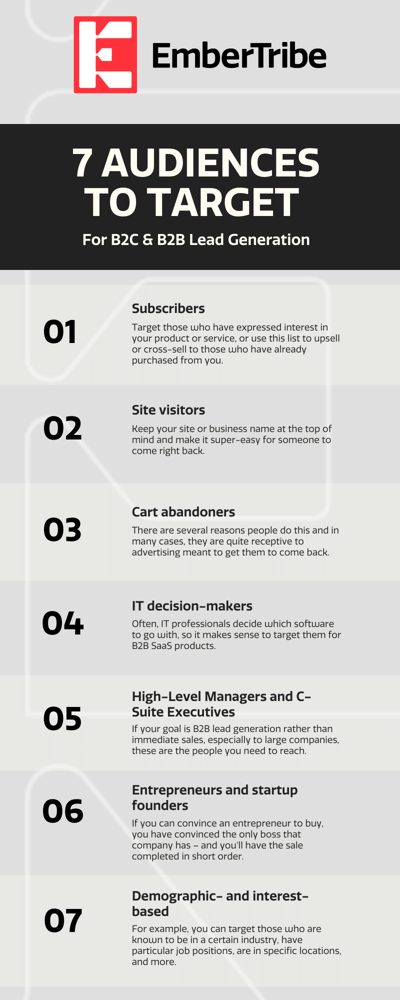
The custom audience is one of the most powerful targeting tools offered by Facebook. When you set them up, you choose who gets to see your ads based on the criteria you select. Here are some of the best audiences you can set up for B2B/B2C lead generation:
With Facebook ads, you can upload your existing email lists to target. With this feature, you can make Custom Audiences based on your existing customers, prospects, or other groups whose email addresses you already have. Use it to target those who have expressed interest in your product or service, or to upsell or cross-sell to those who have already purchased something else from you.
Those who are shown your ads based on these criteria won't know how Facebook knew to target them, but you will get to remind them of how awesome your product is! Facebook also hashes the email addresses before storing them, so humans don't get to see the information on your list and it stays safe and secure.
This group is always a prime target for personalized email drip campaigns and SMS blasts tailored to convert your contacts into paying customers.
It is common in both B2B and B2C to target people who have come to a website at a prior time. This keeps your site or business name in mind and makes it super-easy for someone to come right back. While some people are annoyed when ads "follow them around the net," this type of advertising is highly effective.
🖥️ Will your site visitors be coming back? 95% probably won't, but you can fix that! →
It makes your site or business name stand out over the clutter of other online advertising, competing sites, and other distractions. Sometimes, simply making sure that people remember who you are and what you sell is enough to convert prior visitors into customers.
Cart abandonment prospects have come to your site, added one or more items to their carts, and then gone away before completing the purchase. There are several reasons people do this, such as getting distracted, losing their internet connections, or deciding to shop around. In many cases, they are quite receptive to advertising meant to get them to come back.
This type of advertising works best for businesses that sell tangible items or products that can fit into a typical expense account budget. Buyers of small-ticket products and services often have no bureaucratic process to go through for purchase approval, and in fact, may have been ordered to "buy [x] amount of [x] item" with no further direction. Therefore, if you can get them to come back, you'll likely have a sale right away.
Many companies rely on SaaS software for their customer management, accounting, and other functions. Often, IT professionals decide which software to go with, so it makes sense to target them for B2B SaaS products. You may want to add high-level managers and C-suite personnel to this list, since they have been known to make these decisions, as well.
These people often make buying decisions for substantial purchases. If your goal is B2B lead generation rather than immediate sales, especially to large companies, these are the people you need to reach. Lower-level managers may have purchasing authority for less-expensive items and services, so if your industry falls into that category, you might want to add them to your targeting list, too.
While the size of an entrepreneur's company may not support any high-level managers or any C-suite at all, these businesses have the benefit of a very streamlined decision-making process. If you can convince an entrepreneur to buy, you have convinced the only boss that company has – and you'll have the sale completed in short order. The lack of bureaucracy at a small business is great when you need to get more cash flow in a hurry.
If you know that certain types of people are interested in buying your type of product or service, you can set up ads according to their specifications. For example, you can target those who are known to be in a certain industry, have particular job positions, are in specific locations, and more. Since you can select several criteria, you can truly fine-tune your targeting.
While these are the opposite of audiences that you want to target, they are crucial to the success of your campaigns. Excluding specific audiences from your campaigns will do much to stop your click money from being wasted on people who won't convert. It's a good idea to exclude these people from seeing your ads:
Depending on your product or service, you may want to exclude others from your campaigns, as well. Tailor your exclusion list to meet your situation.
These are just seven of the many possibilities for successful lead generation audiences. Be sure to do some brainstorming; you'll definitely come up with even more. Also, don't hesitate to tweak audiences or ad campaigns to make them more efficient, eliminate non-performers, and otherwise maximize the effectiveness of your advertising.
Here at EmberTribe, we are always ready to help you get the most from your ad campaigns. Clients report that we have doubled the conversion rate from Facebook campaigns and other marketing efforts.
Book a call today to add rocket fuel to your own campaigns!
If you are running multiple ad sets in Facebook Ads, there is a good chance some of your audiences overlap without you realizing it. That overlap quietly inflates your costs, triggers internal auction competition, and drags down performance across your entire account.
The Facebook audience overlap tool exists specifically to surface this problem, yet most advertisers never use it. Below, we walk through exactly what audience overlap means, why it matters, and a practical five-step audience overlap analysis you can run inside Ads Manager today.
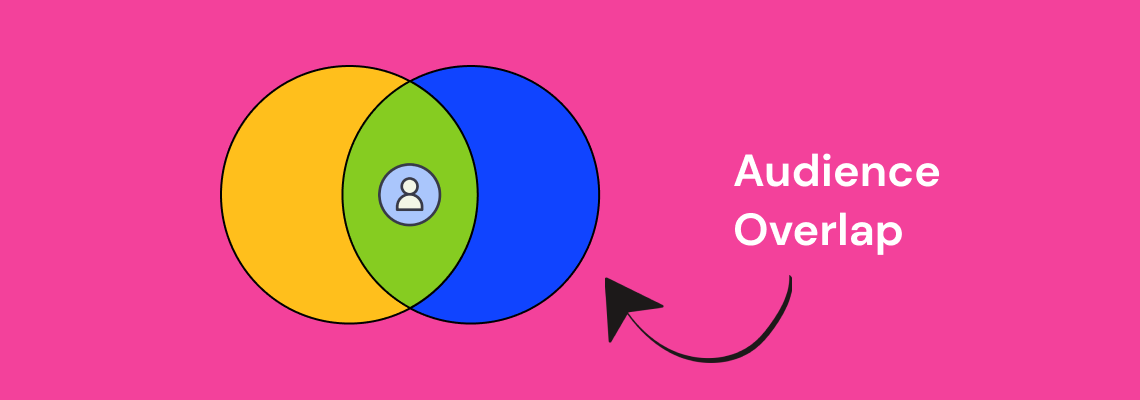
Audience overlap is the percentage of users who appear in two or more of your targeted audience segments at the same time. In Facebook Ads, this happens when the people in one ad set also fall into another ad set you are running concurrently.
Consider a concrete example. Suppose you have two active ad sets: one targeting women aged 25-34 interested in fitness, and another targeting women aged 30-45 interested in healthy cooking. Anyone who is 30-34, interested in both fitness and cooking, lands in both audiences. That is audience overlap, and it means you are bidding against yourself to reach the same person.
Meta's auction system does not let two ads from the same account compete for the same impression. Instead, it suppresses the lower-performing ad set, which means one of your campaigns is essentially being throttled without any warning in your dashboard.
Understanding audience overlap meaning at this level is the first step toward fixing the problem. The goal is not to eliminate overlap entirely -- some degree is inevitable -- but to keep it below the threshold where it starts costing you money (generally under 20-25%).
When audience overlap goes unchecked, the downstream effects compound quickly. Here are the three primary ways it damages your account.
Facebook's ad auction selects one ad per advertiser to show to a given user. When your ad sets target the same people, Facebook picks the winner and sidelines the rest. The result is that your losing ad sets get fewer impressions and higher costs per result, even though your creative and offer may be strong.
This is especially costly for DTC brands and ecommerce advertisers who run multiple product-level ad sets to the same broad interest audiences.
When the same user sees variations of your ads across multiple ad sets, fatigue sets in faster. Frequency climbs, click-through rates drop, and your cost per acquisition increases. This is one of the most common reasons Facebook ads stop delivering results and advertisers cannot figure out why.
Overlapping audiences skew your reporting. An ad set might appear to be underperforming when it is actually being throttled by auction overlap. Advertisers who make optimization decisions based on this misleading data often kill campaigns that would otherwise scale, or pour budget into ad sets that only appear to win because the competition was artificially removed.
Now that the stakes are clear, here is the step-by-step process for identifying audience overlap in Facebook Ads Manager.
Log into your Facebook Business Manager account. From the main menu, click on "All Tools" and then select "Audiences" under the Assets section. This is the central hub where all your saved audiences, custom audiences, and lookalike audiences are stored.
If you have not organized your audiences recently, take a few minutes to review what is there. Outdated or duplicate audiences are a common source of unintentional overlap.
To use the audience overlap tool, select two to five audiences by checking the boxes next to their names. You can compare saved audiences, custom audiences, and lookalike audiences against each other.
Once your audiences are selected, click the three-dot menu (or the "Actions" dropdown, depending on your interface version) and choose "Show Audience Overlap." This opens the overlap comparison view.
The audience overlap tool displays a Venn diagram with the percentage of shared users between each audience pair. Pay close attention to any pair that exceeds 20-25% overlap. These are the combinations most likely to cause auction competition and budget waste.
Document the overlap percentages for each pair. This data becomes the foundation for the strategic adjustments you will make in Step 5.
Not all overlap is equally damaging. Prioritize the audience pairs where:
These are your highest-risk combinations and the ones you should address first.
Based on your audience overlap analysis, here are the most effective adjustments you can make:
For advertisers who want a fast checklist, here is the streamlined process:
Run this check at least once per month, and always before launching new campaigns that target similar interest categories or lookalike seed audiences.
Not every instance of overlap requires action. There are scenarios where moderate overlap is fine or even expected:
The key distinction is whether overlapping ad sets are competing for the same auction. If they target different campaign objectives or sit at different funnel stages, the risk is lower.
The best approach is to build overlap prevention into your campaign architecture from the beginning. Here are three structural practices that keep overlap in check.
Develop a clear naming system for your audiences that includes the targeting criteria. When audience names include the interest category, age range, and exclusion status, you can spot potential overlap before you even run the tool.
Audience composition shifts over time as Facebook updates interest categories and user behavior changes. A monthly cadence for running the overlap tool ensures you catch new overlap before it impacts performance. This is especially important for brands scaling Facebook ads across multiple product lines or markets.
When multiple team members or agencies create audiences independently, overlap becomes nearly inevitable. Maintaining a shared audience library and documenting which audiences are active in which campaigns eliminates this coordination problem. If you are working with a PPC agency, ensure they provide audience overlap reports as part of their regular account reviews.
While this guide focuses on Facebook, audience overlap is not limited to a single platform. Brands running campaigns across Facebook, Instagram, TikTok, and Google often reach the same users on multiple channels without realizing it. Cross-channel overlap analysis requires additional tools and a unified measurement approach, but the same principle applies: identify where you are paying multiple times to reach the same person, and consolidate.
For brands evaluating where to allocate budget, understanding how Facebook audiences compare to other platforms is a critical input. Our comparison of TikTok Ads vs. Facebook Ads covers how audience composition differs between platforms and where overlap is most likely.
Audience overlap is one of the most common and most overlooked sources of wasted spend in Facebook advertising. Running a regular audience overlap analysis inside Ads Manager takes less than ten minutes and can surface issues that are silently inflating your costs.
The five-step process -- navigate to audiences, select and compare, read the overlap percentage, identify high-risk pairs, and apply strategic fixes -- gives you a repeatable framework for keeping your account clean and your budget working efficiently.
If your Facebook Ads campaigns are underperforming and you have ruled out creative and offer issues, audience overlap should be the next thing you check. For brands that need hands-on support, our Social Media Ads team runs these audits as part of every account onboarding.
GIFs have become a universal language on the internet. From blog posts and email newsletters to social media and internal communications, animated GIFs add personality, break up long-form content, and convey reactions in ways that static images and plain text simply cannot match.
But for teams that take SEO seriously, the question is valid: are GIFs helping your content strategy, or are they quietly undermining your search rankings?
The short answer is that GIFs, when used thoughtfully and optimized properly, can enhance your content without damaging your SEO performance. The longer answer involves understanding how Google handles animated images, where the risks actually lie, and what optimization techniques keep your site fast while preserving the engagement benefits that GIFs provide.

Google crawls GIFs the same way it crawls any other image format. The search engine reads the file name, alt text, surrounding context, and page metadata to determine what the image represents and how relevant it is to a given search query.
This means the standard image SEO best practices apply to GIFs just as they do to JPEGs and PNGs:
email-marketing-workflow.gif is far more useful to Google than giphy-12345.gifWhere GIFs differ from static images is in file size and rendering behavior, both of which have indirect but significant effects on SEO through page performance metrics.
GIFs do not directly hurt your search rankings. What hurts your rankings is slow page load times, and GIFs are one of the most common contributors to bloated page weight.
A single unoptimized GIF can easily reach 5-10 MB -- larger than entire web pages should be. When a page loads multiple uncompressed GIFs, the cumulative effect on Core Web Vitals can be severe:
Google has made page experience a ranking factor, which means anything that degrades load speed -- including oversized GIFs -- can pull your content down in search results.
The solution is not to stop using GIFs. It is to optimize them properly so you get the engagement benefits without the performance penalty.
There are several proven techniques for keeping GIFs fast-loading without sacrificing quality or visual impact.
The most straightforward optimization is reducing file size through compression. Several approaches work well:
A well-compressed GIF should typically be under 1 MB. If your GIF exceeds 2 MB, it is worth revisiting the source material or considering an alternative format.
For larger or longer animations, converting GIFs to HTML5 video formats (MP4 or WebM) is one of the most effective optimizations available. Video formats use modern compression codecs that deliver the same visual output at a fraction of the file size.
A 5 MB GIF can often be converted to a 200-500 KB MP4 that looks identical to the viewer. The implementation uses the HTML tag with autoplay and loop attributes to replicate the GIF experience:
<video autoplay loop muted playsinline>
  <source src="animation.webm" type="video/webm">
  <source src="animation.mp4" type="video/mp4">
</video>
This approach is particularly valuable for hero sections and above-the-fold content where page speed has the greatest impact on both SEO and user experience.
Lazy loading defers the loading of GIFs that are below the fold until the user scrolls to them. This reduces initial page load time and improves Core Web Vitals scores without removing any content.
Modern browsers support native lazy loading through a simple attribute:
<img src="reaction.gif" alt="Description" loading="lazy">For more granular control, JavaScript-based lazy loading libraries like lazysizes offer features like placeholder images, fade-in effects, and custom threshold settings.
GZIP compression at the server level can reduce GIF transfer sizes by up to 70% without any change to the original file. Most modern web servers and CDNs support GZIP or Brotli compression, and enabling it is typically a one-time configuration change.
Check with your hosting provider or CDN to confirm that compression is enabled for image assets. This optimization benefits all images on your site, not just GIFs.
GIF optimization is not purely an SEO concern. Accessibility compliance affects both user experience and search performance, and Web Content Accessibility Guidelines (WCAG) have specific requirements for animated content.
WCAG 2.1 requires that any animation that starts automatically and lasts longer than five seconds must include a mechanism for the user to pause, stop, or hide it. This matters for SEO because:
Practical ways to meet accessibility requirements for GIFs:
prefers-reduced-motion CSS media query to serve static alternatives to users who have requested reduced motion in their system settingsAlt text for GIFs should describe both the content and the action depicted. Unlike static images where you describe what is shown, GIF alt text should convey what is happening:
Descriptive alt text serves double duty: it makes your content accessible to screen reader users and gives Google additional context for understanding and ranking your content.
While the risks of GIFs are primarily performance-related, the benefits are engagement-related -- and engagement signals do influence search rankings.
Content with well-placed GIFs tends to keep readers on the page longer. Animated visuals break up walls of text and give readers visual anchors that maintain interest. Since time on page is a behavioral signal that search engines monitor, GIFs can indirectly support your rankings when they contribute to a better reading experience.
Pages that use GIFs strategically -- as visual explanations, process demonstrations, or reaction moments -- tend to have lower bounce rates than text-only pages. When readers stay and scroll rather than bouncing, Google interprets this as a positive quality signal.
Google's quality evaluators look at whether content provides a good user experience. Pages that use multimedia elements thoughtfully -- including GIFs, images, and video -- score higher on user experience criteria than pages with minimal visual content.
This is particularly relevant for content marketing strategies where the goal is creating comprehensive, authoritative resources on a topic. GIFs can serve as visual evidence, process demonstrations, or data visualizations that add genuine informational value to the page.
Content that includes GIFs is more likely to be shared on social media and linked to from other websites. While social signals themselves are not a confirmed ranking factor, backlinks from other sites remain one of the strongest ranking signals in Google's algorithm. Content that earns natural backlinks through shareability and engagement value will outperform content that does not.
Based on the data and best practices covered above, here is a framework for incorporating GIFs into your content development strategy without compromising SEO performance:
GIFs will not ruin your SEO -- but unoptimized GIFs absolutely can. The format itself is neutral in terms of search rankings. What matters is how you implement it.
When GIFs are compressed, properly tagged with alt text, lazy-loaded, and used strategically to enhance the reader experience, they become an asset to your content strategy. They keep readers engaged, reduce bounce rates, and make your content more shareable -- all signals that support stronger search performance over time.
The key is treating GIFs as a deliberate content element rather than decoration. Every GIF on the page should earn its place by adding informational value, illustrating a concept, or enhancing the reader's experience in a way that static content cannot.


With its unique and engaging content format, 🙌 TikTok provides ample opportunities for brands to showcase their products and services, as well as other social media advertising platforms. 💸
🔮 However, mistakes are easy to make.
Before diving into TikTok advertising, it is crucial to understand the costs associated and the best practices to create successful campaigns. 🎈
TikTok advertising promotes products or services 🌭🏨 through paid campaigns on TikTok.
As a fast-growing platform, TikTok offers various ad formats and targeting options to engage with your audience effectively.
Whether you aim to increase brand awareness, drive app downloads, or boost sales, TikTok advertising is a powerful tool.
TikTok’s explosive growth presents a unique opportunity to tap into a young, engaged audience. 🐥
There are 1.58 billion TikTok users. A number that speaks for itself. 😱
They spend over an hour and half daily on the platform, ⏰ making it ideal for capturing attention and building brand loyalty. 🎯
Several factors affect TikTok ad costs. The bidding strategy you choose—cost-per-click (CPC) or cost-per-impression (CPM)—plays a primary role. Other factors include ad placement, targeting options, ad duration, and ad quality score.
TikTok ad costs vary widely. On average, CPC ranges from $0.10 to $0.30, while CPM ranges from $10 to $30. These estimates depend on your targeting, bidding strategy, and campaign objectives. 📊
In-feed Ads: In-feed ads appear within the “For You” feed. They cost between $8,000 and $10,000 per campaign, with a minimum spend of $500. The cost depends on ad duration, targeting options, and audience reach. 🎥
Brand Takeover Ads: These full-screen ads appear when users open TikTok. Depending on factors like ad duration and targeting options, they cost between $20,000 and $50,000 per day. 🌟
TopView Ads: Similar to brand takeovers, TopView ads offer a longer branding experience. They cost between $50,000 and $100,000 per day. The exact cost depends on ad duration, targeting options, and audience reach. 🏆
Define your goals before allocating your budget. Determine whether you aim to increase brand awareness, drive traffic, or generate sales. Clear goals help you allocate your budget effectively. 🎯
Consider your marketing budget, potential ROI, 🏦 and objectives. Start with a smaller budget to test your campaigns and gradually increase it. Monitor performance closely and adjust your ad spend as needed. 📈
Select an ad format that aligns with your goals and resonates with your audience. Consider the user experience and creative elements. Experiment with visuals, captions, and calls-to-action. 🎬
Leverage TikTok’s targeting options to define your audience based on demographics, interests, and behaviors. Use Custom Audiences to retarget users who have shown interest in your brand. 📊 Regularly monitor and measure your campaigns. Use TikTok’s analytics to identify areas for improvement. Optimize your campaigns based on data-driven decisions to achieve better results. 📉
Regularly monitor and measure your campaigns. Use TikTok’s analytics to identify areas for improvement. Optimize your campaigns based on data-driven decisions to achieve better results. 📉
TikTok advertising offers a valuable opportunity to engage with a young, active audience. Just look at the revenue projection of the platform (2020-2027), according to Statista:

Understanding the cost is essential for leveraging TikTok's potential. By using various ad formats, targeting options, and optimization strategies, you can maximize the impact of your TikTok ads and achieve your marketing objectives. 🚀
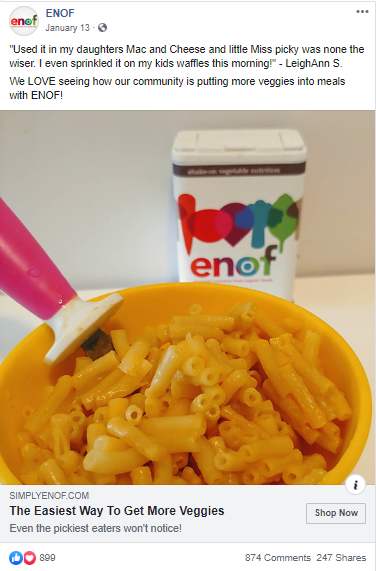
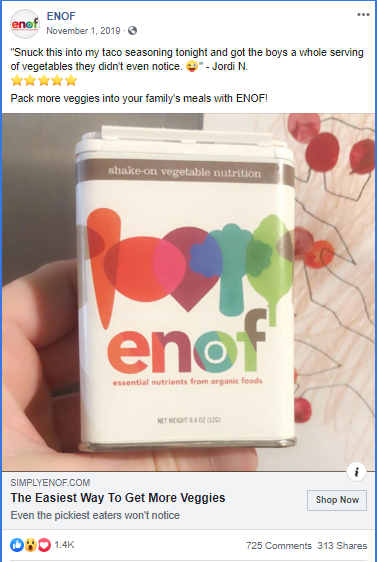
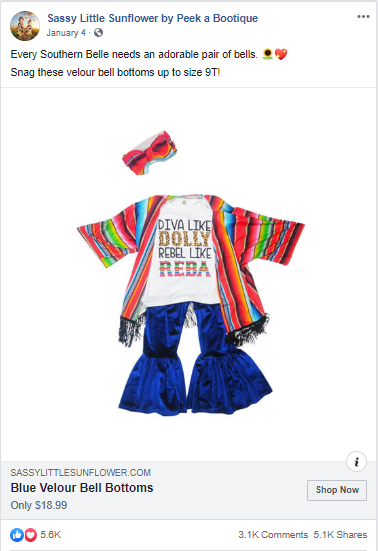
Some of our best-performing ads aren't visually impressive, so don't get too hung up on animation or polish, trust the data.
Running "ugly" ads (aka real, lo-fi, less polished) could seem counterintuitive, but if done right, it can help to bring in new customers at a low cost, help convert retargeting audiences, and bring in more traffic to your site.
Consumers trust brands that feel attainable, authentic or aren't big $$$ brands. Ads that are too polished blend in with large companies and often don't attract consumers. Think about the sort of images that you see naturally occurring from other users on your Facebook and Instagram feeds - that is what we’re going for.
If your brand is new, cottage/boutique size, organic, all-natural, "made by moms", etc. then running less-polished" ads could be for you!
Using assets like UGC won't be pixel-perfect but do prove to be very popular and ads consumers trust.
Here are some examples of ads that are producing our best results right now:
Ideas to test "ugly" ads:
Less production time helps you be faster to respond to trends, news, events, new stock, inventory issues, sales etc.
Flashy, polished ads don’t always mean great performance. So test out an “ugly” ad and see if it outperforms. You just might surprise yourself!

Have you ever heard of the acronym UGC? It refers to User-Generated Content. It relates to any form of content that is created by individuals who are not professionally affiliated with a brand. This can include customer reviews, testimonials, social media posts, photos, and videos. UGC is important in advertising because it adds credibility and authenticity to a brand's message. Consumers are more likely to trust content created by their peers rather than traditional, branded advertising. UGC also allows brands to engage with their customers on a personal level and tap into the creativity of their audience, and its complementary to other marketing tactics, like Instagram Ads. In this piece we will explore its details.

Imagine a clothing brand (maybe like this one) that encourages its customers to share photos of themselves wearing their products on social media using a specific hashtag. These user-generated photos not only showcase the brand's clothing in real-life situations but also demonstrate how customers style and enjoy the products. This type of UGC serves as a powerful marketing tool, as it allows potential customers to see the brand's products in action and gain a sense of trust and confidence in their quality.
UGC can also take the form of written reviews and testimonials. Many online retailers provide a platform for customers to leave reviews and ratings for products they have purchased. These reviews serve as a valuable source of information for potential buyers, as they provide insights into the product's performance, quality, and overall customer satisfaction. By incorporating UGC in the form of reviews, brands can showcase the positive experiences of their customers and build trust with potential buyers.
UGC ads have a significant impact on brand perception. They help build trust and credibility by providing real-life evidence of a brand's offerings. Let's explore two key ways that UGC ads can positively influence brand perception.
Trust is a crucial factor in any consumer-brand relationship. UGC ads help build trust by showcasing the experiences, opinions, and recommendations of real customers. When potential customers see that others have had positive interactions with a brand, they are more likely to trust that brand and consider its products or services.
For example, a brand can display UGC ads featuring satisfied customers using their products. These ads can include testimonials or quotes from customers, along with images or videos of them using the product. By showing real people with positive experiences, the brand builds credibility and trust with its audience.
Imagine a UGC ad for a skincare brand where customers share their before and after photos, along with their personal stories of how the brand's products transformed their skin. These authentic testimonials provide social proof and reassure potential customers that the brand's claims are genuine. This trust-building aspect of UGC ads can have a lasting impact on brand perception.
Consumers value authenticity more than ever. UGC ads provide an opportunity for brands to showcase their authenticity by giving their customers a voice. By featuring content created by users and customers, brands can demonstrate that they value their audience's opinion and are willing to engage with them on a personal level.
For instance, a brand can run a UGC campaign encouraging customers to share their experiences or creative interpretations of the brand's products. By highlighting this content in their ads, the brand shows that they appreciate their customers' input and are genuinely interested in their stories. This authenticity resonates with consumers and can positively impact their perception of the brand.
Consider a UGC ad for a fashion brand where customers are encouraged to share their unique styling ideas using the brand's clothing. By featuring these creative interpretations in their ads, the brand not only showcases the versatility of their products but also celebrates their customers' individuality. This approach fosters a sense of community and connection between the brand and its customers, enhancing brand authenticity.
Implementing UGC ads requires careful planning and execution. Here are two key strategies to consider when incorporating UGC into your advertising campaigns.
Not all UGC is suitable for every brand. It's important to identify UGC that aligns with your brand's values and resonates with your target audience. Conduct thorough research and analysis to understand the type of UGC that works best for your brand. Look for UGC that showcases your products or services in a positive light and reflects the desired image of your brand.
For example, if you are a beauty brand, you may want to focus on UGC that features customers demonstrating makeup tutorials or showcasing the results of using your products. On the other hand, if you are a travel brand, you may want to highlight UGC that captures scenic views or customer experiences during their travels.
Once you have identified suitable UGC, it's essential to integrate it seamlessly into your advertising campaigns. Ensure that the UGC ads align with your brand's visual identity and messaging. This can be achieved by incorporating your brand's logo, color scheme, and taglines into the UGC ads.
Consider using different formats such as social media posts, videos, or testimonials to keep your ad campaign dynamic and engaging. You can also leverage social media platforms and user-friendly tools to collect and curate UGC for your ads.
Measuring the success of UGC ads is crucial to understand their impact and make informed decisions for future campaigns. Here are two key performance indicators to consider when evaluating the effectiveness of your UGC ads.
One key performance indicator for UGC ads is engagement. Monitor the number of likes, comments, and shares that your UGC ads receive on social media platforms. This metric indicates how well your UGC ads are resonating with your audience and whether they are encouraging active engagement.

Another important metric to consider is conversion rate. Track the number of conversions, such as purchases or sign-ups, that result from your UGC ads. This metric illustrates how well your UGC ads are driving actual customer action and generating a return on investment.
To analyze the effectiveness of your UGC ads, compare the performance of your UGC ads to other types of ads. Analyze metrics such as click-through rates, conversion rates, and return on ad spend for UGC ads versus non-UGC ads. This analysis will help you determine the impact of UGC on your advertising campaigns and identify areas for improvement.
While UGC ads offer numerous benefits, brands may face challenges when implementing them in their advertising campaigns. Here are two common challenges and strategies to overcome them.
When using UGC in your ads, it's important to ensure that you have the necessary rights and permissions from the creators of the content. This includes obtaining consent to feature the content in your ads, giving proper attribution to the creators, and complying with copyright laws.
Develop a clear policy and guidelines for obtaining and using UGC in your ads. Educate your customers about your policy and encourage them to share their content within those guidelines. Additionally, consider using a legal team or consulting with experts to ensure that you are compliant with all legal requirements.
With UGC ads, maintaining quality and consistency can be challenging since the content is created by different individuals. To overcome this challenge, establish clear guidelines and provide examples of the type of content you are looking for. Encourage your audience to submit high-quality content that aligns with your brand's standards.
Additionally, consider implementing a review and approval process for UGC content. This way, you can ensure that the content meets your brand's guidelines before featuring it in your ads. Provide feedback to contributors to help them improve their content submissions and align with your brand's expectations.
UGC ads have proven to be a powerful tool for brands in enhancing brand perception, building trust, and boosting engagement. By incorporating UGC into their advertising campaigns, brands can tap into the authenticity and creativity of their audience. However, brands must carefully strategize and measure the success of their UGC ads while overcoming legal and quality challenges. By understanding the power of UGC and implementing it effectively, brands can elevate their advertising efforts and connect with their audience on a deeper level.
Facebook is a powerful paid social advertising platform, but it doesn’t scale the same way as paid search. In this post, you'll learn the 3 rules for Facebook ad scaling that we swear by (and why).
In this quick tip video, we’ll demonstrate how you can best scale your ad spend without killing the performance of key metrics like cost per lead.
These three "rules" are what we used to scale one client's efforts on Facebook from 0 to 400k new users every month (you can check out that case study here).
We're going to share the scaling strategy we use for our clients that allows us to spend more each month, increase the volume of incoming qualified leads, all without hurting the performance of those campaigns.
When you follow these three rules for scaling Facebook ad campaigns, you can help save your performance as you increase ad spend.
There are so many targeting options to choose from on Facebook, it's easy to get excited about getting very, very granular, and specific about who you want to target.
But if your audience size is too small, you're not going to have enough runway to scale your ads. Remember: there's always going to be opportunities down the line to create more segments. Don't overdo it from the jump!
Instead, if you find that a certain segment of your target audience has responded well to your campaigns so far, you should optimize for that segment. It's important that you don't shoot yourself in the foot by creating a too-small audience size from the start.
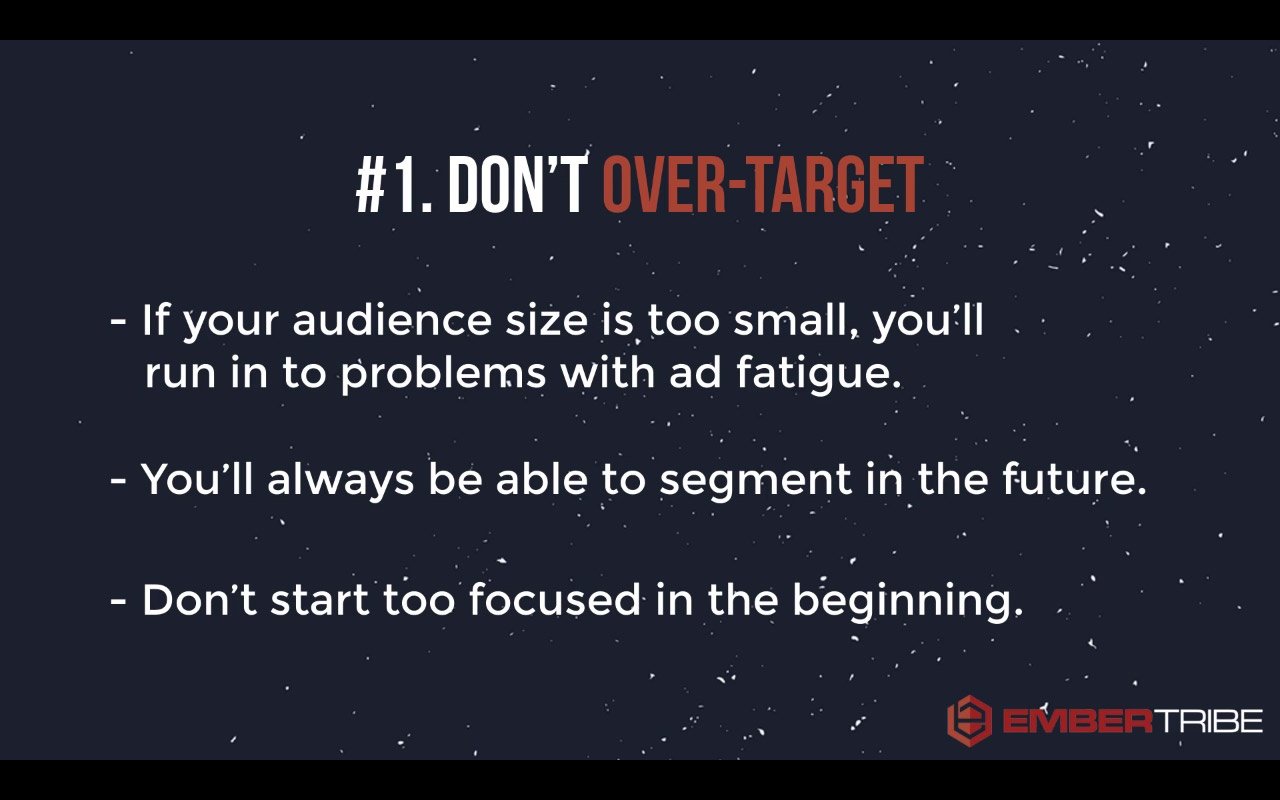
Don't get so locked in on one audience segment that you're going after because eventually, you're going to wear them out.
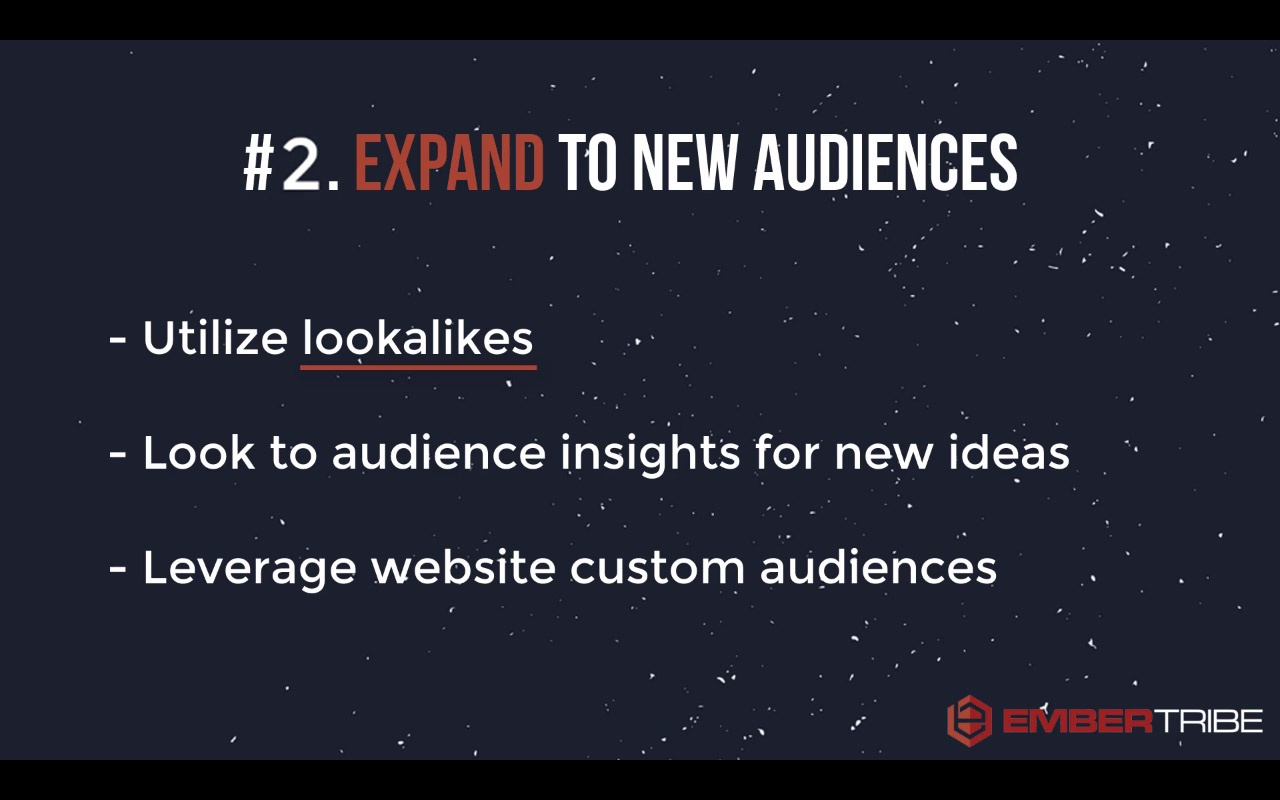
You need to get creative about the ways that you can expand to new audiences. That means taking full advantage of partner categories in Facebook, different interest targets, and especially using options like lookalike audiences.
Make sure that once you've converted a healthy number of people, you want to create a lookalike audience to allow Facebook to start expanding the target reach of your ads.
This third rule is very important. It's probably the most important rule when it comes to scaling your campaign—be mindful about how you manage your budget.
Oftentimes, the biggest mistake that we see advertisers make is that when they see something work, they have a knee-jerk reaction that they need to pump ad spend in their campaign. Unfortunately, this turns into blowing the doors off of their budget.
What you want to do instead is very incrementally increase the budgets.
The reason for this incremental increase is that Facebook optimizes through an algorithm that determines who they should show your ads to, based on who they think will respond most to your message.
If you give them too much information to optimize for, the algorithm can't work correctly. In other words, if you've increased your budget too much and try to get too many people through the funnel, Facebook just won't be able to keep up.
So, your Facebook ad campaigns need time to adjust to a new level of budget.
Try to wait two or three days before raising the budgets on your campaigns if you're testing a new angle or you launching a new ad set.
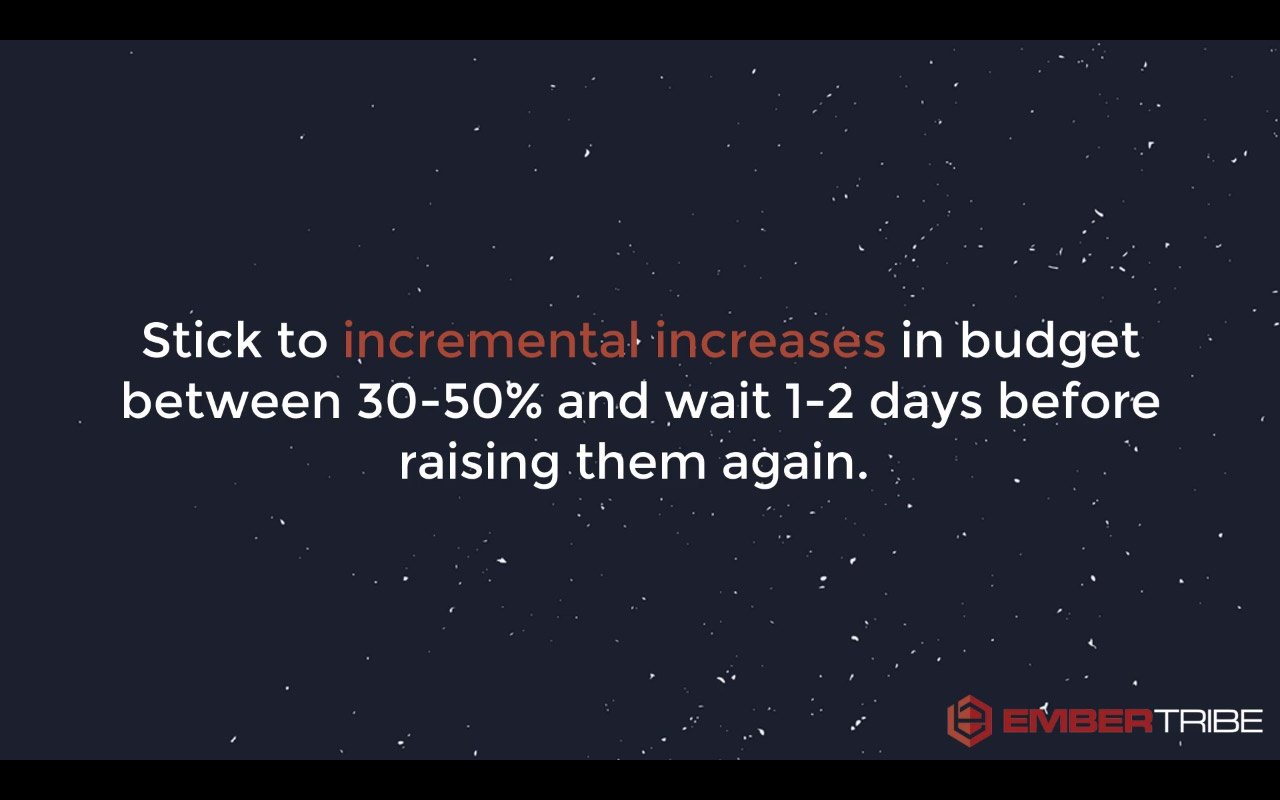
When you do raise the budget, keep each budget increase as incremental gains, like 30 to 50 percent increases to the budget.
That's going to safeguard your ads against seeing major campaign performance decline. Over time, you'll be able to scale to a higher budget...but without tanking all the hard work the algorithm has done for you so far.
There's a lot more that goes into managing your campaign than these three rules. But with these principles, you're going to be head and shoulders above 90 percent of the advertisers that don't have this 3-rule framework to scale their campaigns.
Good luck, and may your next campaign scale beyond your wildest dreams!
Find out how EmberTribe can manage your Facebook ad campaigns for you by booking a call with one of our growth experts.
Facebook unveiled a new way of monetizing live online events in 2020 and we were quick to take this new feature for a test drive.

Before we give you the details of our experience, first let’s take a look at the details of paid online events.
The need for Facebook paid online events arose from COVID-19 shutdowns that required large gatherings to either shut down or move to a totally virtual format. Enterprising businesses began using Facebook Live broadcasts more frequently to engage customers even when they couldn’t be together.
Facebook paid online events allow businesses to monetize their live online events by charging a one-time access fee collected upon guest registration. The goal is that businesses can create an event, get registrants, and collect fees all in one place—and then host their event from that same platform.

This is a pretty neat, accessible idea, especially for businesses with fewer resources on-hand to facilitate online events.
Your page is eligible for paid events as long as you’re in compliance with:
✔️ Facebook's Partner Monetization Policies
✔️ Paid Online Events Terms and Conditions
✔️ Apple's App Store Guidelines for In-App Purchases
✔️ Google Play’s Monetization and Ads Policy
Plus, your Page has to be in a region where paid online events are available.
You can check your Page’s eligibility for monetization by going to Creator Studio > Monetization > click the View Page Eligibility button in the Status widget at the top of the page.
💡 Promote your event to increase registrations and raise awareness to new audiences.
💡 Start your live stream early to tackle those pesky technical difficulties that can occur when starting an event online.
💡 Communicate expectations for your event so that registrants know what’s going to happen. Post a schedule in your event description or in posts on the event.
💡 Change the date and time if you have no purchases but still want to hold the paid event. This will give you more time to reach registrants.
💡 Only post content you have the rights to and make sure it’s in compliance with community guidelines.
EmberTribe scheduled a paid online event for one of our clients and ran an event response campaign to promote it. Here’s what we learned from our first experience with paid online events through Facebook.
The pros: solid targeting, good clickthrough rates, and good CPMs.
The cons: with $1000 spent, we only got 4 sales and $80 in revenue.
What we learned: While it’s possible that not enough people were interested in the topic or the price was too high, we believe that ultimately the problem is with event response campaigns themselves.
With event response ads, people don't even need to visit your event page. They can just click "interested" and continue scrolling through their feed. We theorize that's what most people who saw the ads were doing.
Our takeaway: Paid online events might be successful if you have really good organic reach, but we’re now wary about putting a big advertising budget behind them. If you do run an event response campaign, it's probably best to just do retargeting.
Advertising on Facebook is not for the weak-willed. There’s a lot to know and a lot to learn about Facebook ads to master Facebook marketing skills. That’s one of the reasons there are so many educational resources about Facebook advertising—there’s so much to know!
Luckily, the overlords folks at Facebook have produced tons of learning materials for us lowly marketers.

The Facebook Blueprint certification exams are targeted to digital marketers looking to demonstrate advanced proficiency using Facebook advertising services across platforms. There are 8 total certification levels:
One of our own EmberTribers, Joe, set out to test what a Facebook Blueprint Certification Exam is like and determine if it’s worth the hassle. He took the 100 level “Digital Marketing Associate” course as his test. After finishing his exam (passed with flying colors!), he reported back to us about his experience.
Here’s what he had to say:
Some other questions that our team had for Joe about the process:
Do you think the 100 certification is necessary for Facebook competency?
No, this level is not too difficult and covers a lot of the basics that any seasoned Facebook advertiser would already have under their belt. Taking the certification exam for the 100 level is more of a resume builder than a knowledge builder for those already familiar with Facebook digital marketing.
Was there a fee attached?
Yes, the fee for each exam is $99.
Is it a lifetime or time-limited certification?
The certification is good for 1 year.
Facebook's Blueprint course is a great foundational tool for advertisers. But what about the spaces "in-between" where many marketers find themselves wondering how to address using ads for growth?
Since our agency's inception, we've profitably spent more than $100 million on Facebook runnings ads for ourselves and our clients. We wanted to put all of this practical knowledge to work by creating a free Facebook ads training course for founders who are serious about growing their business with paid ads.
If you're not familiar with Facebook ads yet, you will want to start with the Facebook Blueprint course. Once you're done, we recommend bookmarking our free Facebook ads course or signing up for lessons sent directly to your email inbox.
In these training modules, we outline strategies and tactics that you won't find in the Facebook help section. Take time reviewing these training videos to learn from our deep knowledge of Facebook ads.
Digital marketers seeking a higher level of proficiency in Facebook ads should consider studying up on the 200 and up level certification to get the most bang for their buck. The certification itself, while nice to have, isn’t necessary to become a competent Facebook advertiser, but the lessons can help you boost your skill level.

And if you’re not comfortable learning the ins and outs of Facebook, it might be a good idea to bring in someone steeped in Facebook ad success. Hey, we know some people 😉.


.svg)