
Check out this TribeTalk from our Marketing Specialist, Kathryn Betancourt chatting with one of our Growth Specialists, Courtney Corner and one of our Project Managers, Deanna Spallone.
Instead of discussing paid traffic, today's TribeTalk focuses on another element we talk about often here at EmberTribe, EMAIL.
We answer questions such as: "Where to start with email?", "What should you test?", and "How can you easily create consistency?".
Where do I start?
Choose a platform for your email marketing. A few suggestions if you haven’t chosen one already are HubSpot, Klaviyo, or Mailchimp. FYI, you will have to pay for a tool to integrate your Shopify.
Next, you’ll want to build your list by capturing emails. Where should you start capturing emails? You can build your list with a subscribe option on your website, information from purchases, and run a campaign to opt-in for a chance to win a gift/shopping spree.
For your Initial email campaigns, start with a welcome series for services/Cart abandonment. For eComm businesses, these are people with high intent so use email here to push them over the line to purchase with a time-sensitive discount, creating urgency. You want people to make a decision to purchase so they don’t miss out on such a sweet offer.

Now that you got that setup, what’s next?
Build out more campaigns and test everything! Send yourself a test of each email and make sure to click photos, CTAs, links, check different devices, etc. before launching. The last thing you want is a mass email with your CTA button going to your “Summer Sale” page when you are trying to push your new “Fall Catalog”.

Pro-tip, a few tools for testing your emails that we like to use are EmailOnAcid and Litmus PutsMail.
Keep in mind mobile-friendly content! 60% of people open their emails on their phones. Something to consider is the subject line has to be shorter for it to fully appear on a mobile device. They usually show about 70 characters depending on the device.
Increase ROI by using customer-centric strategies such as personalization, segmentation, and responsive design (vs. hard sales and email blasts). We recommend using personalization across all automations, transactions, promotional streams. For context, emails with first names in the subject line often have up to 2x higher open rates.
Use automation to be the trigger for campaigns to send an upsell, cross-sell, delight, or to request a review. Triggered emails result in higher CTR.
Win-backs such as a birthday or annual gift just for being a loyal customer go a long way. Who doesn’t appreciate a good birthday gift from your favorite brand?!

Make sure to include reviews and user-generated photos. These will build your brand's credibility and authenticity as current and potential customers view what others are saying about your business.
For ongoing emails that are not automated focus on creating consistency. Make a calendar plan. Have template(s) pre-built to save time. Stick with themes so that you aren’t having to recreate the wheel every day i.e. Friday promos, Monday tips, etc.
Have specific promos just for email subscribers that you don’t run on social. Give them first access to upcoming promos (save the date/or early access) and then use this exclusivity as a hook to get more subs for your email list.
Don’t Stop Experimenting...
Try testing things like timing, segments, offers, and triggers unique to your industry/client (each with unique benchmarks).
If you want to go further, run A/B tests on subjects or design. Then compare the results of campaigns by the open rate for subject lines or CTR/conversion rate for design.
Check Google Analytics to leverage which day/time is best for sales, average repeat purchase information, and potential segments to test.
What are you testing with your marketing emails? Leave us a comment below.
Some of our best-performing ads aren't visually impressive, so don't get too hung up on animation or polish, trust the data.
Running "ugly" ads (aka real, lo-fi, less polished) could seem counterintuitive, but if done right, it can help to bring in new customers at a low cost, help convert retargeting audiences, and bring in more traffic to your site.
Consumers trust brands that feel attainable, authentic or aren't big $$$ brands. Ads that are too polished blend in with large companies and often don't attract consumers. Think about the sort of images that you see naturally occurring from other users on your Facebook and Instagram feeds - that is what we’re going for.
If your brand is new, cottage/boutique size, organic, all-natural, "made by moms", etc. then running less-polished" ads could be for you!
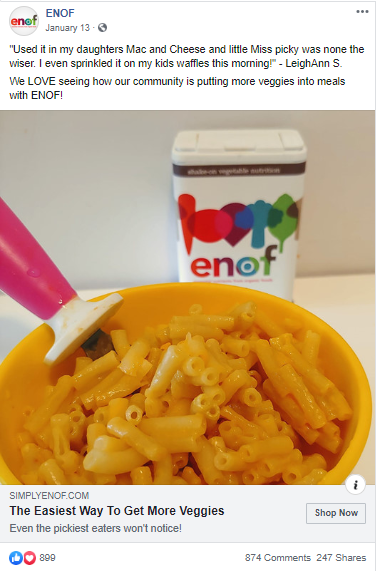
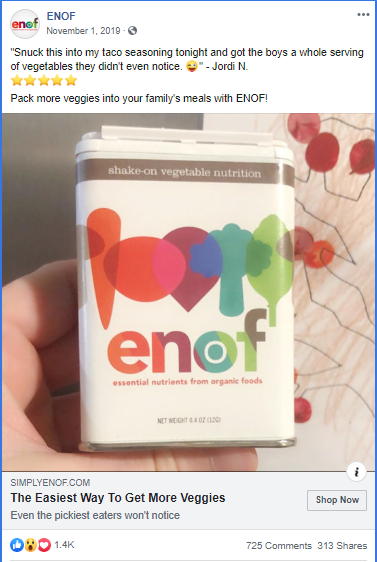
Using assets like UGC won't be pixel-perfect but do prove to be very popular and ads consumers trust.
Here are some examples of ads that are producing our best results right now:
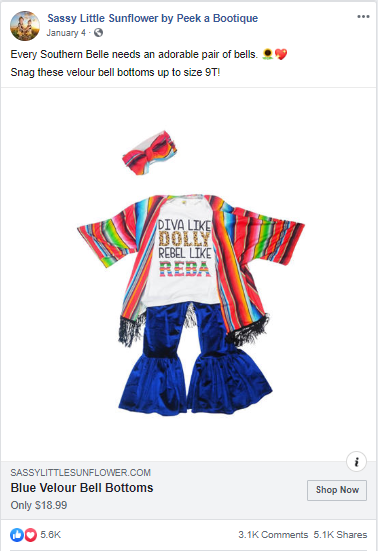
Ideas to test "ugly" ads:
Less production time helps you be faster to respond to trends, news, events, new stock, inventory issues, sales etc.
Flashy, polished ads don’t always mean great performance. So test out an “ugly” ad and see if it outperforms. You just might surprise yourself!
In this post, you'll learn:
Whether it’s a cart recovery system, upsells, a messenger bot, or a review platform, the right Shopify App can drive the conversation, streamline your workload, and boost revenue for your store in little more than a few clicks a week.
From improving conversion rates to bolstering consumer trust, you’d be hard-pressed not to find something a simple app can improve in your store.
But all that convenience comes at a cost. With over 1200 apps to choose from – many of which you’d need to pay for, right out of the gate – and no reliable way to test them, enterprising Shopify store owners can quickly find themselves overwhelmed and underwater
👋 This is exactly what we’re here for!
With decades of combined experience across hundreds of Shopify stores of every possible size and type, we’ve narrowed down the list of must-have apps to 26.
We’ve divvied these apps up into the must-have categories your store should cover, and further broken them down by cost and sophistication – so feel free to choose your own adventure with them at that point.
With this list in hand, you can’t go wrong wading into the Shopify App waters.
If you’re a digital seller, these are non-negotiable.

(Not to be confused with the Facebook Sales Channel)
If you want to advertise your products on Facebook (and you do), your best option is hands-down going to be Flexify.
1. Flexify (Free plan available. Additional charges may apply):
Sure, Shopify has the ability to add Facebook as a sales channel, which allows you to connect your product catalog to an ad account. But that will limit you (and any agency you might want to employ hint hint) in your product set creation and image-cropping options. Flexify’s free plan simplifies this whole process and does it very, very well. Flexify recently introduced its new superfeed which removes the need for pagination and can be used for Google, Pinterest, Snapchat, and Facebook.
(Not to be confused with the Google Sales Channel)
Same deal – if you’re into advertising on Google Shopping (and… you probably are), the Google Shopping Feed is your buddy.
2. Google Shopping Feed ($4.99/month. 21-day free trial.) Additional charges may apply):
Shopify has made an app to try to hook stores’ feeds into Google … but by all accounts (um, including ours), it’s awful. Do yourself a favor, skip the Shopify version and head straight to Google’s purpose-built feed app.
Repeat after us: Abandoned cart recovery = Revenue recovery
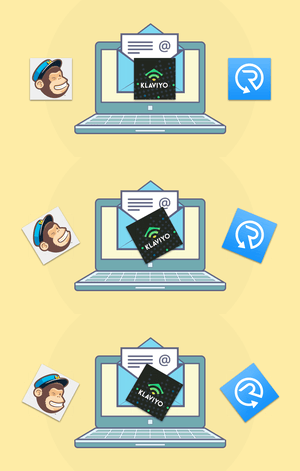
All stores need some sort of email marketing solution, which is how you’re going to at least start recovering these carts. Here are some of our favorite, low-risk options:
3. Recart ($29/month. 28-day free trial. Additional charges may apply.)
Also includes Facebook Messenger Recovery, where we’ve seen messages getting upwards of 70% open rates.
4. ShopSync (Free.)
If you’ve already got MailChimp as your email provider, nab this app for recovery. Mailchimp removed its partnership with Shopify and the only way to sync the platforms is with this app.
5. Klaviyo (Free to install. Additional charges may apply.)
Robust email platform, works beautifully with equally sophisticated stores, tons of automation options.
Got another email provider in place? See if they have a Shopify app and give it a go. The above are our favorites, but that doesn’t mean an email platform you love won’t perform adequately in its Shopify implementation. We’re just a little more skeptical (and how much do you really love that email provider anyway? 😉).
6. OneClickUpsell ($24.99/month. 30-day free trial.)
Although this app can be quite expensive, we’ve seen the OneClickUpsell app pay for itself many times over if set up properly.
7. Product Upsell by Bold Apps (From $9.99/month. 14-day free trial.)
This app is an awesome way to increase your average order value.
8. Persistent Cart (Free.)
With this app, you can keep your users logged into their cart across devices.
Capturing customers intent on leaving with some sort of promotion or discount can bump up store conversion rates, with less than 10 minutes of work.
9. Exit Offers ($9.99/month. 14-day free trial.)
10. Wheelio (From $14.92/month. 7-day free trial.)
11. Privy ( $10/month. 15-day free trial.)
When you’re good, you’re good. And you want everyone to know it.

We recommend most eCommerce stores have some sort of reviewing mechanism. They help build trust, build social reactions, and build your bottom line.
12. Product Reviews (Free):
Great for a simple review mechanism where you can manually upload reviews from other platforms, like Amazon.
13. Yotpo Reviews (Free to install. External Charges may apply.):
Perfect for a more complex reviewing mechanism – it verifies reviews to give customers a sense of trust, outputs them to your marketing on a kind of modified Facebook Dynamic Product Ad system, and more.
14. Growave (Free plan available. 14-day free trial.)
This all-in-one platform helps small- and medium-sized Shopify stores gather reviews, wishlists, loyalty programs, referrals, social login, and UGC to improve sales.
Live Chat/Messenger Shopify Apps
There are a ton of live chat apps out there and many of them work just fine. Below, however, are a few that we particularly like. Use them to answer questions, bot together some FAQ responses, direct consumers to the appropriate sections of your site or (😱) chat directly to your customers … live.
15. Chatra Live Chat + Facebook (Free plan available)
16. Tidio Live Chat (Free plan available. Additional charges may apply.)
17. Zendesk Support (Free to install. Additional charges may apply.)
18. Shogun (From $39/month. 10-day free trial.)
Custom landing page builder. Easy as pie, can fit your store theme almost out of the box.
19.Zipify (From $67/month. 14-day free trial.)
Smarter sales funnels & landing pages for your Shopify store.
20.PageFly Advanced Page Builder (Free plan available.)
Build landing pages, product pages, FAQ, home pages & funnels.
Every store is unique, with unique challenges. If your special set of circumstances seems to warrant a little something extra, one of these just may hit the spot.

More apps does not equal better store. In fact, more apps can slow your site down, confuse the systems in place, mess with your site formatting and even drive away confused customers (especially on mobile …yikes!). Consider your needs before implementing and monitor your results after 👍
21. SyncTap (Free plan available. 14-day free trial.)
Target highly profitable audiences with your Facebook ads in seconds!
22. Free Shipping Bar by Hextom (Free plan available.)
Top-of-site announcement bar for free shipping or some other sort of promotion (many themes have this as a built-in feature, just by the way. Check yours for it, first!).
23. Back in Stock (From $19/month. 30-day free trial.)
Run out of inventory quickly and often? Capture that audience before they leave the site. A pre-order app can also work well here, but this one is simpler than most.
24. Product Discount by Bold Apps ($19.99/month. 14-day free trial.)
Storewide sales, flash-sales, & scheduled sales with a click. Boom.
25. Recurring Orders & Subscriptions by Bold Apps ($19.99/month. 90-day free trial.)
For shops with a recurring business model.
26. ShipperHQ (from $50/month. 30-day free trial.):
Create an Amazon-like checkout experience with shipping rates and options that make sense, and convenient delivery options your customers will love. Instantly pull delivery dates from carriers, calculate the most accurate rates possible, set up unique shipping rules and restrictions for any checkout scenario, apply dynamic shipping discounts and promotions, automate LTL freight quoting and box selection for orders, and much more.
👉 Pssst: If you choose to upgrade to the paid version of any of these apps, you’ll need to be logged into your Shopify store as an owner to do so.
If you're ready to level up your Shopify store with less hassle and more help, book a call with us.
Check out this TribeTalk from our Marketing Specialist, Kathryn Betancourt chatting with one of our Growth Specialists, Courtney Corner and one of our Project Managers, Deanna Spallone.
Instead of discussing paid traffic, today's TribeTalk focuses on another element we talk about often here at EmberTribe, EMAIL.
We answer questions such as: "Where to start with email?", "What should you test?", and "How can you easily create consistency?".
Where do I start?
Choose a platform for your email marketing. A few suggestions if you haven’t chosen one already are HubSpot, Klaviyo, or Mailchimp. FYI, you will have to pay for a tool to integrate your Shopify.
Next, you’ll want to build your list by capturing emails. Where should you start capturing emails? You can build your list with a subscribe option on your website, information from purchases, and run a campaign to opt-in for a chance to win a gift/shopping spree.
For your Initial email campaigns, start with a welcome series for services/Cart abandonment. For eComm businesses, these are people with high intent so use email here to push them over the line to purchase with a time-sensitive discount, creating urgency. You want people to make a decision to purchase so they don’t miss out on such a sweet offer.
Now that you got that setup, what’s next?
Build out more campaigns and test everything! Send yourself a test of each email and make sure to click photos, CTAs, links, check different devices, etc. before launching. The last thing you want is a mass email with your CTA button going to your “Summer Sale” page when you are trying to push your new “Fall Catalog”.
Pro-tip, a few tools for testing your emails that we like to use are EmailOnAcid and Litmus PutsMail.
Keep in mind mobile-friendly content! 60% of people open their emails on their phones. Something to consider is the subject line has to be shorter for it to fully appear on a mobile device. They usually show about 70 characters depending on the device.
Increase ROI by using customer-centric strategies such as personalization, segmentation, and responsive design (vs. hard sales and email blasts). We recommend using personalization across all automations, transactions, promotional streams. For context, emails with first names in the subject line often have up to 2x higher open rates.
Use automation to be the trigger for campaigns to send an upsell, cross-sell, delight, or to request a review. Triggered emails result in higher CTR.
Win-backs such as a birthday or annual gift just for being a loyal customer go a long way. Who doesn’t appreciate a good birthday gift from your favorite brand?!
Make sure to include reviews and user-generated photos. These will build your brand's credibility and authenticity as current and potential customers view what others are saying about your business.
For ongoing emails that are not automated focus on creating consistency. Make a calendar plan. Have template(s) pre-built to save time. Stick with themes so that you aren’t having to recreate the wheel every day i.e. Friday promos, Monday tips, etc.
Have specific promos just for email subscribers that you don’t run on social. Give them first access to upcoming promos (save the date/or early access) and then use this exclusivity as a hook to get more subs for your email list.
Don’t Stop Experimenting...
Try testing things like timing, segments, offers, and triggers unique to your industry/client (each with unique benchmarks).
If you want to go further, run A/B tests on subjects or design. Then compare the results of campaigns by the open rate for subject lines or CTR/conversion rate for design.
Check Google Analytics to leverage which day/time is best for sales, average repeat purchase information, and potential segments to test.
What are you testing with your marketing emails? Leave us a comment below.
In this post:
Check out this TribeTalk from our Marketing Specialist, Kathryn Betancourt chatting with our Director of Operations, J.P. VanderLinden, and one of our Growth Specialist, Melanie D'Angelo.
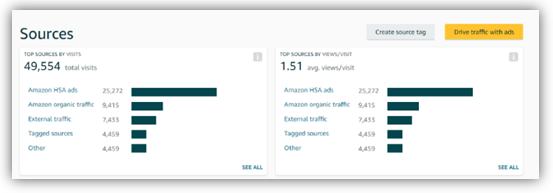
This helps pull data into Amazon but there are still issues for how to pull data OUT to other systems. It's not perfect, but it's more than we've had before, and it might be enough for folks to start exploring.
We've also discovered thatSellerly, a collection of Amazon business tools by Semrush, offers excellent marketing tools for Amazon listings designed to make selling on the marketplace easier and more effective. If Amazon's data insights are still not sufficient for you, give Sellerly a try!
Marketers understand that different ad types work better at different parts of the funnel. For example, Search is great at BOFu, Display at TOFu, etc. But what about how they work together?
Google released a report that marketers advertising on YouTube saw better conversion volume and rates from their Search campaigns. Specifically, Search conversions were 8% higher, conversion rates were 3% higher, and Search CPAs dropped 4%.
We all know that advertising on YouTube increases brand awareness and ad recall. The big questions are: Is this something driven by traditionally understood marketing practice? Or is Google itself actually influencing the algorithm to favor buyers who spend across multiple components of it's ad platform?
Regardless of what’s going on Google’s side, we recommend testing YouTube. Don’t just measure the direct performance, also measure the "halo effect" on other channels like Search & Social.

Yabba DABA Do!! Let’s discuss Facebook DABA campaigns. We think these campaigns have a lot of value for our clients.
Most folks think of Dynamic Ads as only supporting retargeting your website visitors and app users, limiting your audience size to the number of people who’ve interacted with you in the past. That’s why, despite the great performance, the possible investments advertisers have been able to make have been fairly restricted — typically, the biggest share of their budgets goes to acquiring new customers.
To help advertisers reach these audiences with top-performing ads, Facebook now offers the possibility to expand the reach of Dynamic Ads campaigns outside retargeting audiences.
Facebook’s Dynamic Ads for Broad Audiences (DABA) expands your dynamic ads to reach beyond your website or app visitors to generate demand. DABA campaigns serve personalized recommendations based on browsing activity and showcase the relevant inventory from your catalog to people likely to purchase.
Unlike lookalike audiences and retargeting site visitors, broad audience targeting captures intent in other places like:
DABA campaigns will have your potential customers saying….
What questions do you have for us? Have you tried DABA campaigns? Are you running YouTube ads? Comment below.


.svg)