

Facebook's Power 5 is a set of five automated advertising tactics that work together to improve campaign performance. Introduced by Meta as a best-practice framework, the Power 5 represents the platform's recommended approach to running ads that leverage machine learning effectively.
The five components are:
Each element works independently, but their real value emerges when used together. The Power 5 framework essentially asks advertisers to trust the algorithm with more decisions, in exchange for better performance at scale.
For Facebook advertisers who have been manually optimizing every aspect of their campaigns, this can feel counterintuitive. But the data consistently shows that advertisers who adopt these practices outperform those who insist on manual control across every variable.
Auto Advanced Matching (AAM) improves the connection between actions taken on your website and the Facebook users who took them. It works by automatically sending hashed customer information from your website, such as email addresses, phone numbers, names, and location data, to Facebook when a conversion event fires.
Without AAM enabled, Facebook relies solely on the pixel cookie to match website conversions to user profiles. As browser restrictions on third-party cookies tighten and users browse across multiple devices, cookie-based tracking misses a growing share of conversions.
AAM fills those gaps by sending additional identifiers that Facebook can use to match conversions to users. The result is more accurate attribution, larger retargeting audiences, and better optimization signals for the algorithm.
For ecommerce stores using Shopify or WooCommerce, AAM is typically enabled by default through their Facebook integrations. For custom-built sites, work with your development team to ensure the correct data layer variables are being captured.
The impact is significant. Enabling AAM typically increases custom audience match rates by 10-30% and improves attributed conversions by 5-15%.
Campaign Budget Optimization moves budget control from the ad set level to the campaign level. Instead of assigning a fixed daily budget to each ad set, you set one budget for the entire campaign and let Facebook's algorithm distribute spending across ad sets based on performance.
In a traditional setup, an advertiser might run five ad sets at $50/day each, spending $250/day total. If one ad set performs exceptionally well and another performs poorly, each still receives its fixed $50 allocation.
With CBO, the same $250/day budget is allocated dynamically. The high-performing ad set might receive $150 while the underperformer gets $20. The algorithm rebalances in real time based on which audiences are delivering the best results.
CBO is particularly powerful when combined with simplified account structure because fewer campaigns mean each campaign receives more budget, giving the algorithm more data to optimize with.
This is perhaps the most impactful and least intuitive element of the Power 5. Facebook's recommendation is to consolidate your account into fewer campaigns, fewer ad sets, and fewer ads rather than creating highly segmented structures.
Many advertisers instinctively create separate campaigns for every audience, every funnel stage, and every product line. A typical over-segmented account might have 20+ campaigns running simultaneously, each with 3-5 ad sets containing 2-3 ads.
This feels like control, but it actually works against you because:
A well-structured Facebook account for most advertisers needs only 3-5 campaigns:
Within each campaign, consolidate audiences rather than fragmenting them. Let the algorithm decide who within a broader audience set is most likely to convert.
This structure works especially well for ecommerce brands running catalog-based advertising, where dynamic ads can serve the right product to the right user without manual audience segmentation.
When you create an ad set, Facebook lets you choose where your ads appear: Feed, Stories, Reels, Marketplace, Audience Network, Messenger, and more. Automatic placements means letting Facebook decide where to show each ad based on where it is most likely to achieve your objective.
The hesitation is understandable. Advertisers worry about their carefully designed feed ads being stretched awkwardly into Stories format, or about budget being wasted on low-quality Audience Network placements.
These concerns were more valid in the early days. Facebook has significantly improved how creative adapts across placements, and the algorithm has gotten better at identifying which placements deliver actual results for each campaign.
Across our managed accounts, campaigns using automatic placements consistently achieved 10-25% lower cost per result compared to manual placement selection. The algorithm finds inventory pockets that manual selection misses, particularly in less competitive placements where CPMs are significantly lower.
Dynamic ads automatically show the right products to people who have expressed interest on your website, in your app, or elsewhere on the internet. Instead of manually creating individual ads for each product, you connect your product catalog and let Facebook generate ads dynamically.
The system connects three inputs:
When a user views a product on your site but does not purchase, Facebook can show them an ad featuring that exact product (and similar items) the next time they open the platform. This is dynamic retargeting at its most effective.
Dynamic ads are not limited to retargeting. Facebook's Dynamic Ads for Broad Audiences (DABA) uses machine learning to show products from your catalog to prospecting audiences who have never visited your site.
The algorithm analyzes user behavior patterns, product attributes, and conversion signals to predict which products each user is most likely to purchase. For catalogs with hundreds or thousands of products, this is far more efficient than manual ad creation.
The real value of the Power 5 framework is not any single element. It is how they compound when used together.
Consider the combined effect:
Each element reduces manual control in favor of algorithmic optimization. And each element provides better data to the others, creating a virtuous cycle of improving performance.
Here is a practical sequence for implementing the Power 5 in your account:
The Power 5 framework represents Facebook's clearest articulation of how advertisers should work with, rather than against, the platform's machine learning capabilities. Advertisers who embrace algorithmic optimization and feed the system with clean data and strong creative consistently outperform those who cling to manual control.
The platform has changed. The strategies that worked when manual optimization was superior, including hyper-segmented audiences, manual placement selection, and ad-set-level budgets, now actively hinder performance. The Power 5 is not just a recommendation. For serious Facebook advertisers, it is the operating system for modern campaign management.
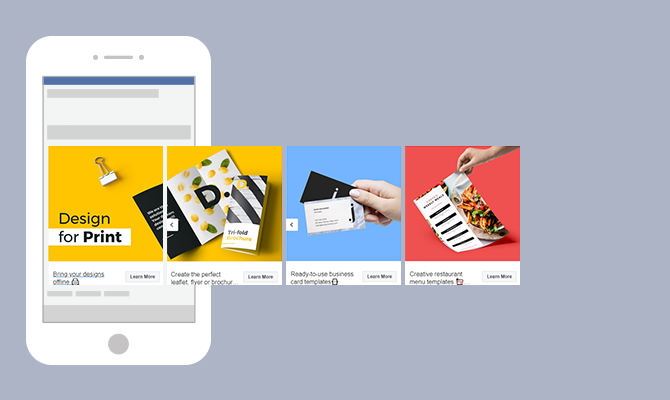
Advertising on social media platforms has become essential for businesses to reach their target audience effectively. Within the realm of social media advertising, Facebook Carousel Ads have emerged as a powerful tool to capture users' attention and drive engagement. Together, we will explore the ins and outs of creating an engaging Facebook Ad, providing you with the best practices to enhance your advertising campaigns.
First and foremost, a Facebook Carousel Ad is a dynamic advertisement format that allows businesses to showcase multiple images or videos, each with its own link, in a single ad unit. The ad appears as a scrollable carousel, enabling users to swipe through the various media elements effortlessly. This ad format offers a visually appealing and interactive way to tell a story or present different products or features.
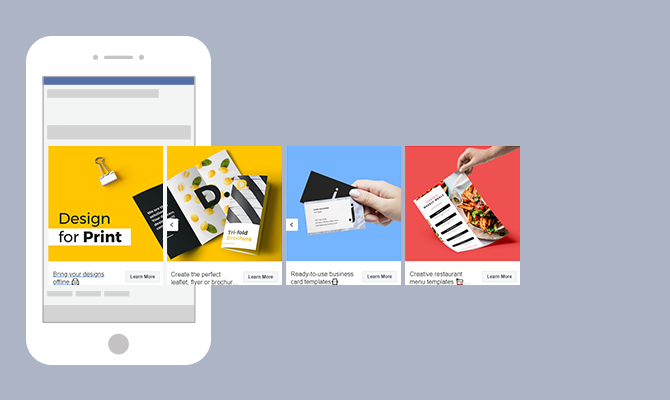
There are several compelling reasons to consider using Facebook Carousel Ads in your advertising strategy:
When it comes to increased engagement, Carousel Ads have proven to be highly effective. The scrollable format captures users' attention and encourages them to explore the different images or videos within the ad. This interactive experience creates a sense of curiosity and excitement, leading to higher click-through rates and longer time spent engaging with the ad.
Moreover, Carousel Ads offer businesses the opportunity to provide users with more information about their brand, products, or services. Instead of relying on a single image or video, Carousel Ads allow you to showcase a variety of visuals that highlight different aspects of your offerings. This enables users to gain a comprehensive understanding of what your brand represents and what you have to offer.
Storytelling is a powerful tool in advertising, and Carousel Ads provide the perfect platform for it. With the ability to present multiple images or videos in a sequential manner, businesses can take users on a journey, guiding them through a narrative that communicates their brand message effectively. This storytelling approach creates a deeper emotional connection with users, making your brand more memorable and relatable.
Carousel Ads can also significantly improve conversion rates. By including multiple links within a single ad, businesses can tailor the user experience based on their interests. For example, if a user is interested in a specific product showcased in the Carousel Ad, they can be directed to a landing page dedicated to that product. This personalized approach increases the likelihood of conversions as users are directed to the most relevant information and offerings.
Creating a successful Facebook Carousel Ad involves careful consideration of various elements. From high-quality images to compelling ad copy and attention-grabbing call-to-action (CTA) buttons, each component plays a vital role in captivating your audience and driving conversions.
When designing a Facebook Carousel Ad, the quality of your images is paramount. Clear, visually appealing images that align with your brand identity and messaging will help captivate your audience and encourage them to explore further. Imagine a carousel ad showcasing a stunning landscape, enticing travelers to embark on an adventure. The vivid colors and breathtaking scenery instantly transport viewers to a world of wanderlust, igniting their desire to learn more about the destination.
However, it's not just about aesthetics. Properly sized and well-lit images are essential to ensure optimal display across various devices and screen sizes. By investing time and effort into selecting and preparing high-quality images, you can enhance the overall impact of your carousel ad and leave a lasting impression on your target audience.
While images play a significant role in Carousel Ads, the accompanying ad copy should not be underestimated. The power of words can complement and reinforce the visual elements, effectively conveying your message to potential customers. Consider a carousel ad promoting a new line of skincare products. Alongside vibrant images showcasing the radiant effects of the products, the ad copy can highlight the key ingredients, emphasizing their nourishing properties and the resulting healthy, glowing skin.
When crafting ad copy, it's crucial to strike a balance between being concise and persuasive. Captivate your audience with compelling language that resonates with their needs and desires. By focusing on the unique features or benefits of your products or services, you can pique their interest and motivate them to take action. Additionally, incorporating a clear call-to-action (CTA) prompts users to engage further, whether it's making a purchase, signing up for a newsletter, or exploring more about your offerings.

CTA buttons serve as a crucial element in driving conversions through Carousel Ads. These buttons provide a clear and direct path for users to take the desired action. When selecting a CTA phrase, it's essential to choose impactful, action-oriented language that aligns with your campaign objectives. For instance, if you're running an e-commerce campaign, a CTA button saying "Shop Now" can create a sense of urgency and encourage users to explore your products further.
Make sure the CTA button stands out within the carousel ad, both in terms of design and placement. Consider using contrasting colors or bold typography to draw attention to the button. Additionally, strategically positioning the CTA button within the carousel sequence can increase the likelihood of user interaction. By creating a seamless user experience and making it effortless for users to take the desired action, you can maximize the effectiveness of your Carousel Ad campaign.
As you embark on creating engaging Carousel Ads, remember that each element, from high-quality images to compelling ad copy and attention-grabbing CTA buttons, contributes to the overall success of your campaign. By carefully crafting each component and ensuring they work harmoniously together, you can create a captivating and persuasive carousel ad that entices your audience and drives meaningful results.
Creating a successful Carousel Ad on Facebook requires careful consideration and attention to detail. A specialized Social Media Advertising Agency could help you implement a well-thought comprehensive strategy. By selecting the right images, writing effective ad text, and choosing the perfect call-to-action (CTA), your audience will be engaged and you will drive the desired actions. Let's dive deeper into each aspect to help you design a compelling Carousel Ad.
One of the key elements of a captivating Carousel Ad is the selection of images. High-resolution product photos can showcase the details and features of your offerings, enticing potential customers. Additionally, lifestyle images can help create a connection between your products or services and the aspirations of your target audience.
Consider going beyond static images and experiment with videos. Videos can bring your offerings to life, allowing viewers to see them in action. They can also be a powerful storytelling tool, capturing attention and conveying your brand's message effectively.
When choosing image combinations for your Carousel Ad, think about the visual appeal and the story you want to tell. Experiment with different sequences and arrangements to create a visually engaging flow that keeps viewers interested and encourages them to interact with your ad.
The ad text in your Carousel Ad plays a crucial role in conveying your message and enticing users to take action. To make the most impact, keep your ad text concise and compelling. Each ad card within the carousel should have a clear and focused message that complements the visuals.
Take the time to understand your target audience and tailor your ad text to resonate with their specific pain points or desires. By addressing their needs directly, you can create a sense of relevance and urgency, increasing the likelihood of engagement.
Consider using persuasive language, highlighting the unique benefits of your offerings, and incorporating social proof or testimonials to build trust. Remember, the goal is to capture attention and encourage users to take the desired action, whether it's making a purchase, signing up for a newsletter, or exploring more about your products or services.
The call-to-action (CTA) is the final piece of the puzzle in your Carousel Ad. It's the prompt that guides users to take the next step and convert. When selecting a CTA, it's essential to align it with the intended action you want users to take.
Start by considering the stage of the customer journey your target audience is in. Are they just discovering your brand, or are they already familiar with your offerings? Based on this understanding, choose a CTA that guides users towards the appropriate next step.
For example, if your goal is to drive immediate conversions, a CTA like "Shop Now" or "Buy Now" can be effective. On the other hand, if you're aiming to nurture leads and build a relationship, a CTA such as "Learn More" or "Sign Up" may be more suitable.
Remember to make your CTA visually prominent within the ad and ensure it stands out from the rest of the content. Use contrasting colors, compelling copy, and clear instructions to encourage users to click and take action.
By carefully selecting the right images, crafting impactful ad text, and choosing a compelling CTA, you can design a Facebook Carousel Ad that captures attention, engages your audience, and drives the desired actions. Start experimenting with these elements and monitor the performance of your ads to continuously optimize and improve their effectiveness.
For your Carousel Ads to be effective, it's crucial to target the right audience. Leverage Facebook's targeting options to define your ideal audience based on demographics, interests, behaviors, or even custom audiences. Refine your targeting strategy to maximize ad relevance and reach.
When setting your budget for Carousel Ads, consider the potential reach and the objectives of your campaign. Facebook offers various bidding options, such as cost per click (CPC) or cost per thousand impressions (CPM). Test different budget levels to find a balance between visibility and cost-effectiveness.

Regularly monitoring the performance metrics of your Carousel Ads is crucial to optimize their effectiveness. Pay attention to key metrics such as click-through rate (CTR), conversion rate, and engagement rate. Based on the insights gained, make data-driven adjustments to improve your ad campaign's performance and achieve the desired results.
By following these examples and best practices, you can create compelling and engaging Facebook Carousel Ads that captivate your audience, drive meaningful engagement, and help you achieve your marketing objectives. Remember to continuously iterate and refine your ad campaigns based on user feedback and data analysis, ensuring the ongoing success of your advertising efforts.
Google Ads is a powerful online advertising platform that can help businesses reach their target audience and drive results. Whether you're new to Google Ads or looking to improve your existing campaigns, this step-by-step guide will walk you through the process of setting up your Google Ads branch effectively.

Google Ads, formerly known as Google AdWords, is a robust advertising platform powered by Google's vast network. It offers a variety of ad formats, such as text ads, display ads, video ads, and more, allowing businesses to reach their target audience across different channels.
Text ads are the most common ad format on Google Ads. They appear as sponsored search results when users search for specific keywords related to your business. Display ads, on the other hand, are visually appealing image or banner ads that are shown on websites within Google's Display Network. Video ads, as the name suggests, are short video clips that can be displayed on YouTube (Ads) or other partner websites.
Google Ads also offers advanced targeting options to help businesses reach the right audience. You can target users based on their location, language, demographics, interests, and even specific websites or apps they visit. This level of precision ensures that your ads are shown to the most relevant audience, increasing the chances of engagement and conversion.
Google Ads is an essential tool for businesses of all sizes. It provides a way to increase visibility, drive website traffic, generate leads, and ultimately, grow your business. With Google Ads, you have the ability to reach users who are actively searching for products or services related to your business, increasing the chances of conversion.
One of the key advantages of Google Ads is its flexibility. You have full control over your ad budget, allowing you to set a daily or monthly spending limit. This ensures that you only spend what you can afford and gives you the flexibility to adjust your budget based on the performance of your ads.
Google Ads also provides detailed performance metrics and analytics, allowing you to track the effectiveness of your campaigns. You can see how many clicks your ads receive, the cost per click, the number of conversions, and much more. This data-driven approach enables you to make informed decisions and optimize your campaigns for maximum results.
Furthermore, Google Ads offers various ad extensions that can enhance the visibility and effectiveness of your ads. These extensions allow you to add additional information, such as phone numbers, addresses, or links to specific pages on your website. This not only makes your ads more informative but also increases the chances of users taking action.
Before diving into the setup process, there are a few things you need to prepare.
Setting up your Google Ads branch requires careful planning and organization. To ensure a smooth and successful setup, it is essential to gather all the necessary information and tools beforehand.
Start by gathering the necessary information and tools for setting up your Google Ads branch. This includes your business website URL, relevant keywords related to your business, ad images or videos, and a clear understanding of your target audience.
When it comes to your business website URL, make sure it is up-to-date and optimized for user experience. A well-designed and user-friendly website will greatly enhance the effectiveness of your Google Ads campaigns.
In terms of relevant keywords, conduct thorough research to identify the most appropriate and high-performing keywords for your business. These keywords will help you reach your target audience and increase the chances of your ads being shown to the right people at the right time.
When selecting ad images or videos, choose visuals that are visually appealing and relevant to your business. High-quality and engaging visuals can significantly improve the click-through rate of your ads.
Lastly, having a clear understanding of your target audience is crucial. Define your target audience based on demographics, interests, and behaviors. This knowledge will enable you to tailor your ads to resonate with your target audience and maximize your campaign's effectiveness.
It's important to establish clear advertising goals before setting up your Google Ads account. Determine what you want to achieve with your ads, whether it's getting more website traffic, increasing sales, or raising brand awareness. This will help you create effective campaigns that align with your business objectives.
Consider the specific metrics you want to track and measure to gauge the success of your campaigns. For example, if your goal is to increase sales, you may want to track the number of conversions or the return on ad spend (ROAS).
Furthermore, setting realistic and attainable goals is crucial. Take into account your budget, resources, and the competitive landscape of your industry. By setting achievable goals, you can stay motivated and focused throughout the setup and optimization process.
Remember, Google Ads can be a powerful tool for driving business growth, but it requires careful planning and strategic execution. By preparing the necessary information and setting clear advertising goals, you are laying the foundation for a successful Google Ads setup.

Now that you have everything in place, it's time to create your Google Ads account.
Creating a Google Ads account is a straightforward process that can be done in a few simple steps. By following these steps, you'll be well on your way to launching successful advertising campaigns:
To begin creating your Google Ads account, navigate to the Google Ads website. You can do this by typing "Google Ads" into your preferred search engine or by directly entering the URL in your browser's address bar.
Once you're on the Google Ads website, locate the "Get Started" button and click on it. This will initiate the account creation process and guide you through the necessary steps.
During the setup process, you'll be asked to provide information about your business. This includes details such as your business name, website, industry, and location. It's important to provide accurate and up-to-date information to ensure that your ads are relevant to your target audience.
One of the crucial aspects of creating a Google Ads account is setting your budget. You'll need to determine how much you're willing to spend on advertising each day. Google Ads offers various budget options, allowing you to choose what works best for your business.
Another important step in creating your Google Ads account is defining your target audience. You'll have the opportunity to specify the geographic locations where you want your ads to appear, ensuring that you're reaching the right people in the right places.
Google Ads also allows you to customize your ad scheduling preferences. This means you can choose the days and times when you want your ads to be displayed. By aligning your ad schedule with your target audience's online behavior, you can maximize the effectiveness of your campaigns.
Once you've provided all the necessary information and customized your preferences, you can proceed to complete the setup process. Review your choices to ensure everything is accurate, and then click on the "Finish" or "Create Account" button to finalize the creation of your Google Ads account.
After creating your Google Ads account, you'll gain access to the Google Ads dashboard. This dashboard serves as your central hub for managing and monitoring your advertising campaigns. Let's take a closer look at some key sections and features you'll encounter:
The "Campaigns" section is where you'll create, organize, and manage your advertising campaigns. Here, you can set campaign goals, select targeting options, and monitor performance metrics such as impressions, clicks, and conversions.
Within each campaign, you'll have the ability to create multiple ad groups. Ad groups allow you to organize your ads based on specific themes or target audiences. This level of granularity enables you to tailor your messaging and optimize your campaigns for better results.
The "Ads" section is where you'll create and manage the actual advertisements that will be shown to your target audience. You can experiment with different ad formats, headlines, descriptions, and visuals to find the most effective combination.
Keywords play a crucial role in Google Ads campaigns. In the "Keywords" section, you can research, select, and manage the keywords that trigger your ads. By choosing relevant and high-performing keywords, you can increase the chances of your ads being shown to the right audience.
The "Reports" section provides valuable insights into the performance of your campaigns. You can generate various reports that highlight key metrics and trends, allowing you to make data-driven decisions and optimize your advertising strategy.
As you navigate the Google Ads dashboard, take some time to explore the various features and settings available. Familiarize yourself with the interface, experiment with different options, and leverage the tools provided to optimize your campaigns for better performance.
With your account ready, it's time to set up your first Google Ads campaign.
When setting up your campaign, you will be presented with different campaign types. Consider your advertising goals and select the one that aligns with your objectives. The available options include Search Network campaigns, Display Network campaigns, Video campaigns, Shopping campaigns, and more.
It’s crucial to define your target audience when setting up your Google Ads campaign. Customizing your targeting options based on demographics, interests, and search intent will ensure that your ads reach the right people. Additionally, set a realistic budget that matches your advertising goals and resources to maximize your return on investment.
The effectiveness of your ads plays a vital role in the success of your Google Ads campaign.
The text in your ads should be catchy, concise, and convey the value proposition of your products or services. Highlight unique selling points, use persuasive language, and include relevant keywords to attract the attention of potential customers. Experiment with different ad variations to see which ones perform best.

Selecting the right keywords is crucial for targeting the right audience. Conduct keyword research to find relevant and high-performing keywords related to your business. Incorporate these keywords into your ad copy, headlines, and landing page content. Additionally, optimizing your website for SEO will improve your organic search rankings and increase your visibility.
Setting up your Google Ads branch doesn't have to be overwhelming. By understanding the basics of Google Ads, preparing the necessary information and tools, creating your account, setting up campaigns, and crafting effective advertisements, you can maximize the potential of this powerful advertising platform. Keep monitoring and optimizing your campaigns to ensure long-term success. Good luck!

Having an effective advertising strategy is crucial for businesses to reach their target audience and drive success. Google Ads is a powerful tool that allows businesses to advertise their products and services to millions of users across the globe. One essential component of Google Ads is the Customer ID, which plays a significant role in optimizing your advertising efforts, including search and social media ads. In this article, we will discuss the importance of understanding and utilizing your Google Ads Customer ID, as well as ways to protect and maximize its potential.

Your Google Ads Customer ID is a string of numbers that is assigned to your account. It serves as a way for Google to track your campaigns, ads, and overall account performance. Think of it as a digital fingerprint that is unique to your account.
With your Customer ID, Google can easily identify and organize all the data related to your advertising efforts. This includes information about your campaigns, ad groups, keywords, and more. It helps Google keep everything organized and makes it easier for you to manage your account.
First and foremost, your Customer ID is the backbone of your Google Ads account. It is the key that unlocks access to all aspects of your campaigns. With your Customer ID, you can monitor your advertising spend, track conversions, analyze performance metrics, and make data-driven decisions to optimize your campaigns.
But the importance of your Customer ID doesn't stop there. It also enables you to link your Google Ads account to other Google services, such as Google Analytics and YouTube. By doing so, you gain access to a wealth of additional data and enhanced targeting capabilities.
For example, by linking your Google Ads account to Google Analytics, you can get a deeper understanding of how your ads are performing and how they are driving traffic to your website. You can track user behavior, identify which keywords are driving the most conversions, and even set up custom reports to get the insights you need.
Similarly, linking your Google Ads account to YouTube Ads allows you to run video ads and reach a wider audience. You can leverage the power of video marketing and tap into the massive user base of YouTube to promote your products or services.
Overall, your Google Ads Customer ID is not just a random string of numbers. It is the key that unlocks the full potential of your advertising efforts. Understanding its importance and leveraging its capabilities can help you take your Google Ads campaigns to new heights.
Locating your Google Ads Customer ID is an essential step in managing your advertising campaigns effectively. Your Customer ID is a unique identifier that allows you to access and control your account. Follow the steps below to find your Customer ID:
Locating your Google Ads Customer ID is a straightforward process. Simply follow the steps below:
Once you have obtained your Customer ID, you can use it to access various features and settings within your Google Ads account. It is important to keep your Customer ID secure and confidential to protect your account from unauthorized access.

While finding your Customer ID is generally simple, there may be instances when you encounter difficulties. Some common issues and their solutions include:
Remember, your Customer ID is a crucial piece of information that allows you to manage your Google Ads account effectively. By following the steps outlined above and addressing any common issues that may arise, you will be able to locate your Customer ID and take full control of your advertising campaigns.
When it comes to running successful advertising campaigns on Google, your Google Ads Customer ID is a powerful tool that can greatly enhance your marketing strategy. Not only does it provide you with a unique identifier for your account, but it also offers a range of features and benefits that can help you achieve your advertising goals.
One of the key advantages of your Google Ads Customer ID is its ability to integrate with other Google services, such as Google Analytics. By linking these accounts, you can gain a deeper understanding of your advertising performance and audience behavior. With Google Analytics, you can track important metrics like website traffic, conversions, and user engagement, allowing you to make data-driven decisions to optimize your campaigns.
Additionally, linking your Customer ID to YouTube opens up a world of video advertising opportunities. With the rise of video content consumption, leveraging YouTube as a platform for your ads can significantly expand your reach and engagement. By connecting your Customer ID to YouTube, you can create and manage video campaigns, target specific audiences, and measure the success of your video ads.
For businesses or advertisers who manage multiple Google Ads accounts, the Customer ID becomes invaluable in streamlining their efforts. Instead of juggling multiple logins and interfaces, consolidating all accounts under one Customer ID allows for a more efficient and seamless management experience.
With a single Customer ID, you can access and manage all your accounts simultaneously, saving time and effort. This feature provides a holistic view of your advertising campaigns, making it easier to analyze performance trends, identify areas for improvement, and make strategic adjustments. Whether you're running multiple campaigns for different products or targeting different regions, having all your accounts accessible through one Customer ID simplifies administrative tasks and ensures consistency in your advertising strategy.
The Customer ID also enables you to set different access levels and permissions for team members or agencies who work on your accounts. This allows for better collaboration and control over who can make changes or view sensitive information, ensuring the security and integrity of your advertising campaigns.
Protecting your Google Ads Customer ID is crucial to maintain the security and integrity of your advertising account. Your Customer ID is a unique identifier that grants access to your account and holds sensitive information. Taking the necessary security measures will help prevent unauthorized access and potential breaches.
To safeguard your Customer ID, it is important to implement the following security measures:
In the unfortunate event that your Customer ID is compromised, it is vital to take immediate action to secure your account. Follow these steps:
By following these security measures and taking immediate action if your Customer ID is compromised, you can help protect your Google Ads account from unauthorized access and potential harm.

Your Google Ads Customer ID generates a wealth of valuable data that can provide insights into your advertising performance. By analyzing this data, you can identify trends, optimize campaign targeting, and make data-driven decisions. Key metrics include impressions, clicks, conversions, cost per click, and return on ad spend, among others. By understanding these metrics and how they relate to your business goals, you can refine your campaigns to maximize results.
Effective utilization of your Google Ads Customer ID data can significantly contribute to your business growth. By identifying profitable keywords, analyzing audience demographics, and tracking conversion rates, you can fine-tune your targeting strategy and allocate resources efficiently. Additionally, comparing data across different time periods can help identify seasonal trends, allowing you to optimize your campaigns accordingly.
Your Google Ads Customer ID is a fundamental element in unlocking the full potential of your advertising campaigns, even if they are managed by you or by a specialized ads agency. By understanding the importance of your Customer ID, locating it easily, maximizing its use, and protecting it diligently, you can harness the power of data-driven marketing to drive business growth and achieve your advertising goals effectively.

TikTok, the popular social media platform known for its short-form videos, has taken the world by storm. With over millions of users worldwide, it offers a unique opportunity for brands and individuals alike to grow their presence and engage with their audience (take a look at the graph below to get an idea about the age range of TikTok users). With a specialized e-commerce agency, you can make the most of it to boost sales, drive traffic or create brand awareness. Keep reading to delve into some strategies and techniques that can be employed to enhance your presence on TikTok.

One of the key factors to consider when aiming for organic growth on TikTok is understanding the algorithm that determines the visibility of your content. The platform's algorithm takes into account factors such as user interactions, video completion rates, and engagement levels to determine the reach of your videos.
For example, if your video receives a high number of likes, comments, and shares, it is more likely to be shown to a wider audience. On the other hand, if your video has a low completion rate or lacks engagement, it may not be promoted as prominently. By understanding how the algorithm works, you can optimize your content to increase its visibility and attract a larger audience.
It is important to note that the TikTok algorithm is constantly evolving, so staying up to date with the latest trends and changes is crucial. By keeping an eye on the platform's updates and experimenting with different content strategies, you can stay ahead of the curve and maximize your organic growth potential.
Organic growth on TikTok refers to the process of attracting genuine followers and engagement without resorting to paid promotions or advertisements. While paid promotions can certainly be effective, organic growth allows for a more authentic connection with your audience and can lead to long-term success on the platform.
By focusing on organic growth, you can build a loyal following and establish a strong presence on TikTok. This involves creating high-quality content that resonates with your target audience, engaging with your followers through comments and collaborations, and staying consistent with your posting schedule.
Additionally, organic growth allows you to tap into the viral nature of TikTok. With the right content and strategy, your videos have the potential to reach millions of users and become a trending sensation. This can significantly boost your visibility and attract even more followers and engagement.
Remember, building a successful presence on TikTok takes time and effort. It requires a deep understanding of your target audience, consistent content creation, and a willingness to adapt to the ever-changing trends. But with dedication and creativity, you can unlock the full potential of TikTok and take your content to new heights.
Once you have a good understanding of TikTok and its algorithm, it's time to dive into the strategies that can help you achieve organic growth on the platform.
But what exactly is organic growth? Organic growth refers to the process of gaining followers and engagement on TikTok without resorting to paid advertising or other artificial means. It's all about attracting genuine interest from users who are genuinely interested in your content.
Your TikTok profile serves as your virtual identity on the platform, so it's important to optimize it to attract and engage with your target audience. Follow this steps:
When it comes to creating content for TikTok, there are a few best practices to keep in mind.
TikTok is constantly evolving, with new trends and challenges emerging on a regular basis. To maximize your organic growth, it's important to stay up-to-date with the latest TikTok trends and incorporate them into your content.
Jumping on the bandwagon of a viral dance challenge, a popular meme, or a trending hashtag can help increase your visibility and attract new followers. However, it's important to put your own unique spin on these trends to stand out from the crowd and showcase your creativity.
Keep an eye on the Discover page and follow other popular TikTok creators in your niche to stay in the loop about the latest trends. By participating in these trends, you can tap into the existing user base and potentially reach a wider audience.
Remember, organic growth on TikTok takes time and effort. It's important to consistently create high-quality content, engage with your audience, and stay active on the platform. By implementing these strategies and staying true to your brand, you can build brand awareness, drive traffic, generate leads, and eventually increase conversions.

Engagement is a crucial aspect of growing your TikTok presence and building a community of loyal followers. Here are some strategies to enhance engagement on the platform.
Building a strong relationship with your audience is key to increasing engagement on TikTok. Respond to comments on your videos, engage in conversations, and show appreciation for your followers. This not only fosters a sense of community but also encourages others to engage with your content.
When responding to comments, take the time to craft thoughtful and personalized replies. This shows your followers that you value their input and encourages them to continue engaging with your content. Additionally, consider asking your audience questions in your videos or captions to prompt further discussion. By actively engaging with your audience, you create a welcoming and interactive environment that encourages others to join in.
Another way to enhance engagement with your audience is by hosting live streams. Live streaming allows you to directly interact with your followers in real-time, answering their questions, and addressing their comments. This personal connection can significantly boost engagement and create a stronger bond between you and your audience.
Collaborating with other TikTok creators can be a powerful way to expand your reach and engage with a wider audience. By duetting or creating videos together, you can tap into each other's follower base and attract new followers. Look for creators in your niche or with a similar target audience to collaborate with.
When collaborating, it's important to choose partners who align with your brand and values. This ensures that the collaboration feels authentic and resonates with both your audiences. Consider reaching out to creators who have a slightly larger following than you, as this can help expose your content to a broader audience.
When duetting with another creator, aim to add value to the original video. Whether it's through humor, a unique perspective, or additional information, providing something extra can make your duet stand out and encourage viewers to engage with your content.
(If you want real-life examples, here are The Best TikTok Campaigns for 2023)
Creating challenges or contests is another effective strategy to enhance engagement on TikTok. Encourage your followers to participate by using a specific hashtag or creating their own videos based on a theme or prompt. Not only does this foster creativity and engagement, but it also helps spread your content to a wider audience.
When designing challenges or contests, make sure they are relevant to your niche or brand. This ensures that participants are genuinely interested in your content and increases the likelihood of attracting new followers who share similar interests. Consider offering incentives, such as prizes or shoutouts, to further motivate your audience to participate.
Additionally, actively engage with participants by liking and commenting on their challenge entries. This shows appreciation for their efforts and encourages others to join in. You can also feature standout entries in your own videos, giving participants recognition and further boosting engagement.

Tracking your performance and analyzing key metrics is crucial to understand the effectiveness of your strategies and optimize your TikTok presence. Here are some important metrics to monitor.
TikTok provides a built-in analytics tool that gives you insights into your account's performance. It allows you to track metrics such as video views, followers gained, and engagement rates. Explore the analytics dashboard to gain a better understanding of your audience and make data-driven decisions.
While the specific metrics you track may depend on your goals and objectives, some key metrics to monitor include video views, likes, comments, and shares. Tracking these metrics over time can help you identify trends, understand what content resonates with your audience, and apply a data driven approach to your strategy.
Regularly analyzing your TikTok analytics and adjusting your strategy based on the data is crucial for continued growth and engagement. If certain types of content are performing exceptionally well, consider creating more of that content. Likewise, if certain videos are not resonating with your audience, try to identify the reasons behind it and make changes accordingly.
A growth agency can help you achieve exponencial growth in a cost-effective manner. For TikTok, growth requires a combination of understanding the platform's basics, implementing effective strategies, and monitoring your performance. By optimizing your profile, creating compelling content, staying up-to-date with trends, and engaging with your audience, you can grow your presence and establish a strong community on TikTok. Remember to continuously analyze your performance, make data-driven decisions, and adapt your strategy as needed. With persistence and creativity, TikTok can become a powerful platform for organic growth and engagement.

Have you ever heard of the acronym UGC? It refers to User-Generated Content. It relates to any form of content that is created by individuals who are not professionally affiliated with a brand. This can include customer reviews, testimonials, social media posts, photos, and videos. UGC is important in advertising because it adds credibility and authenticity to a brand's message. Consumers are more likely to trust content created by their peers rather than traditional, branded advertising. UGC also allows brands to engage with their customers on a personal level and tap into the creativity of their audience, and its complementary to other marketing tactics, like Instagram Ads. In this piece we will explore its details.

Imagine a clothing brand (maybe like this one) that encourages its customers to share photos of themselves wearing their products on social media using a specific hashtag. These user-generated photos not only showcase the brand's clothing in real-life situations but also demonstrate how customers style and enjoy the products. This type of UGC serves as a powerful marketing tool, as it allows potential customers to see the brand's products in action and gain a sense of trust and confidence in their quality.
UGC can also take the form of written reviews and testimonials. Many online retailers provide a platform for customers to leave reviews and ratings for products they have purchased. These reviews serve as a valuable source of information for potential buyers, as they provide insights into the product's performance, quality, and overall customer satisfaction. By incorporating UGC in the form of reviews, brands can showcase the positive experiences of their customers and build trust with potential buyers.
UGC ads have a significant impact on brand perception. They help build trust and credibility by providing real-life evidence of a brand's offerings. Let's explore two key ways that UGC ads can positively influence brand perception.
Trust is a crucial factor in any consumer-brand relationship. UGC ads help build trust by showcasing the experiences, opinions, and recommendations of real customers. When potential customers see that others have had positive interactions with a brand, they are more likely to trust that brand and consider its products or services.
For example, a brand can display UGC ads featuring satisfied customers using their products. These ads can include testimonials or quotes from customers, along with images or videos of them using the product. By showing real people with positive experiences, the brand builds credibility and trust with its audience.

Imagine a UGC ad for a skincare brand where customers share their before and after photos, along with their personal stories of how the brand's products transformed their skin. These authentic testimonials provide social proof and reassure potential customers that the brand's claims are genuine. This trust-building aspect of UGC ads can have a lasting impact on brand perception.
Consumers value authenticity more than ever. UGC ads provide an opportunity for brands to showcase their authenticity by giving their customers a voice. By featuring content created by users and customers, brands can demonstrate that they value their audience's opinion and are willing to engage with them on a personal level.
For instance, a brand can run a UGC campaign encouraging customers to share their experiences or creative interpretations of the brand's products. By highlighting this content in their ads, the brand shows that they appreciate their customers' input and are genuinely interested in their stories. This authenticity resonates with consumers and can positively impact their perception of the brand.
Consider a UGC ad for a fashion brand where customers are encouraged to share their unique styling ideas using the brand's clothing. By featuring these creative interpretations in their ads, the brand not only showcases the versatility of their products but also celebrates their customers' individuality. This approach fosters a sense of community and connection between the brand and its customers, enhancing brand authenticity.
Implementing UGC ads requires careful planning and execution. Here are two key strategies to consider when incorporating UGC into your advertising campaigns.
Not all UGC is suitable for every brand. It's important to identify UGC that aligns with your brand's values and resonates with your target audience. Conduct thorough research and analysis to understand the type of UGC that works best for your brand. Look for UGC that showcases your products or services in a positive light and reflects the desired image of your brand.
For example, if you are a beauty brand, you may want to focus on UGC that features customers demonstrating makeup tutorials or showcasing the results of using your products. On the other hand, if you are a travel brand, you may want to highlight UGC that captures scenic views or customer experiences during their travels.
Once you have identified suitable UGC, it's essential to integrate it seamlessly into your advertising campaigns. Ensure that the UGC ads align with your brand's visual identity and messaging. This can be achieved by incorporating your brand's logo, color scheme, and taglines into the UGC ads.
Consider using different formats such as social media posts, videos, or testimonials to keep your ad campaign dynamic and engaging. You can also leverage social media platforms and user-friendly tools to collect and curate UGC for your ads.
Measuring the success of UGC ads is crucial to understand their impact and make informed decisions for future campaigns. Here are two key performance indicators to consider when evaluating the effectiveness of your UGC ads.
One key performance indicator for UGC ads is engagement. Monitor the number of likes, comments, and shares that your UGC ads receive on social media platforms. This metric indicates how well your UGC ads are resonating with your audience and whether they are encouraging active engagement.

Another important metric to consider is conversion rate. Track the number of conversions, such as purchases or sign-ups, that result from your UGC ads. This metric illustrates how well your UGC ads are driving actual customer action and generating a return on investment.
To analyze the effectiveness of your UGC ads, compare the performance of your UGC ads to other types of ads. Analyze metrics such as click-through rates, conversion rates, and return on ad spend for UGC ads versus non-UGC ads. This analysis will help you determine the impact of UGC on your advertising campaigns and identify areas for improvement.
While UGC ads offer numerous benefits, brands may face challenges when implementing them in their advertising campaigns. Here are two common challenges and strategies to overcome them.
When using UGC in your ads, it's important to ensure that you have the necessary rights and permissions from the creators of the content. This includes obtaining consent to feature the content in your ads, giving proper attribution to the creators, and complying with copyright laws.
Develop a clear policy and guidelines for obtaining and using UGC in your ads. Educate your customers about your policy and encourage them to share their content within those guidelines. Additionally, consider using a legal team or consulting with experts to ensure that you are compliant with all legal requirements.
With UGC ads, maintaining quality and consistency can be challenging since the content is created by different individuals. To overcome this challenge, establish clear guidelines and provide examples of the type of content you are looking for. Encourage your audience to submit high-quality content that aligns with your brand's standards.
Additionally, consider implementing a review and approval process for UGC content. This way, you can ensure that the content meets your brand's guidelines before featuring it in your ads. Provide feedback to contributors to help them improve their content submissions and align with your brand's expectations.
UGC ads have proven to be a powerful tool for brands in enhancing brand perception, building trust, and boosting engagement. By incorporating UGC into their advertising campaigns, brands can tap into the authenticity and creativity of their audience. However, brands must carefully strategize and measure the success of their UGC ads while overcoming legal and quality challenges. By understanding the power of UGC and implementing it effectively, brands can elevate their advertising efforts and connect with their audience on a deeper level.

Did you know that 52% of US millennials use Pinterest? Among the myriad of platforms available, Pinterest has emerged as a powerful platform for enhancing e-commerce businesses. It allows to showcase their products and engage with potential customers. In this comprehensive guide, we will delve into the world of Pinterest Marketing Services, including its e-commerce ads, while exploring its basics, setting up a business account, developing a marketing strategy, and optimizing SEO to maximize your business's presence on Pinterest.
Pinterest is a visual discovery and bookmarking platform where users can discover and save ideas for various aspects of their lives. It provides a unique opportunity for businesses to showcase their products and services through visually appealing pins, which users can save and share.
When it comes to understanding the basics of Pinterest marketing, it's important to recognize the platform's user base. Pinterest has a predominantly female audience, with women in the age range of 18 to 34 years being the primary users. This demographic presents valuable opportunities for businesses targeting this specific audience.
One of the key aspects of Pinterest marketing is creating visually appealing pins that capture the attention of users. High-quality images, creative designs, and engaging content are essential for standing out in the Pinterest feed. Businesses can use this platform to showcase their products in a way that resonates with their target audience.
Pinterest marketing has proven to be a highly effective strategy for businesses in various industries. With over 450 million active users worldwide, businesses have the potential to reach a vast audience and increase brand visibility. The platform's user base is highly engaged, with users spending an average of 14.2 minutes per visit, making it an ideal platform for businesses to capture the attention of their target audience.
One of the key reasons why Pinterest marketing is essential for businesses is the strong intent to purchase among Pinterest users. According to a study conducted by Pinterest, 85% of weekly Pinners have made a purchase based on content they saw from brands on Pinterest. This presents a significant opportunity for businesses to drive conversions and increase sales.

In addition to the large user base and high intent to purchase, Pinterest offers unique features that make it a valuable platform for businesses. Rich Pins, for example, allow businesses to provide detailed information about their products, such as pricing, availability, and product descriptions. This additional information helps users make informed decisions and increases the chances of conversions.
Another valuable feature offered by Pinterest is Buyable Pins. These pins enable users to make purchases directly through the platform, without having to leave the site. This seamless shopping experience makes it easier for users to convert and provides businesses with a direct channel to drive sales.
Setting up a Pinterest business account is an important step towards establishing a strong online presence for your brand. By utilizing the platform's unique features and tools, you can effectively showcase your products or services to a wider audience. In this guide, we will explore the key elements of creating a compelling business profile and utilizing Pinterest Analytics to measure your success.
When it comes to creating your Pinterest business profile, attention to detail is crucial. Start by selecting a profile picture that accurately represents your brand. This could be your company logo or a visually appealing image that reflects your brand identity, and therefore, it will be the initial flag of your brand awareness in the mind of the consumer. Make it count!
In addition to a captivating profile picture, it is essential to provide a concise yet informative bio that highlights your business's unique selling points. Use this space to briefly explain what sets your brand apart from the competition and why users should follow or engage with your content.
Completing your profile with contact information and links to your website and other social media platforms is also crucial. This allows users to easily connect with your brand and explore your offerings further. By providing multiple avenues for engagement, you increase the chances of converting Pinterest users into loyal customers.
Once your business account is set up, it's time to dive into the world of Pinterest Analytics. This powerful tool provides valuable insights into your audience and the performance of your pins. By understanding these analytics, you can make data-driven decisions to optimize your marketing strategy and drive better results.

One of the key metrics to track is impressions, which refers to the number of times your pins are seen by users. By monitoring impressions, you can gauge the reach of your content and identify trends that resonate with your audience. Engagements, another important metric, measure the number of interactions users have with your pins, such as saves, clicks, and comments. By analyzing engagements, you can determine which pins are most effective in capturing users' attention and driving engagement.
Click-through rates (CTR) are yet another crucial metric to keep an eye on. CTR measures the percentage of users who click on your pins to visit your website or landing page. By tracking CTR, you can assess the effectiveness of your call-to-action and optimize your pins to drive more traffic to your desired destination.
By utilizing Pinterest Analytics, you can gain a deeper understanding of your audience's preferences, behaviors, and interests. This Data-Driven-Marketing allows you to tailor your content to better resonate with your target audience, resulting in increased engagement, conversions, and ultimately, business growth.
When it comes to developing a successful Pinterest marketing strategy, there are several key factors to consider. One of the first steps is identifying your target audience and understanding their preferences and interests. This can be done through thorough research and analysis of Pinterest Analytics.
By delving into the data provided by Pinterest Analytics, you can gain valuable insights into your target audience's behavior. This information will help you create content that not only resonates with them but also meets their needs and desires.
Then you should analyze your competitors. By studying what your competitors are doing on Pinterest, you can gain inspiration and identify opportunities to differentiate your brand.
Once you have a clear understanding of your target audience and have analyzed your competitors, it's time to start crafting your brand's Pinterest content strategy. Creating compelling and visually appealing content is crucial for success on this platform.
Pinterest encourages businesses to not only promote their products but also provide inspiration and helpful information to users. This means that your content strategy should go beyond simply showcasing your products. It should also include lifestyle pins, tutorials, and user-generated content.
By blending promotional pins with other types of content, you can establish your brand as an authority in your niche. This will help build trust with your audience and keep them coming back for more.
Overall, developing a Pinterest marketing strategy requires a deep understanding of your target audience, careful analysis of your competitors, and a thoughtful approach to content creation. By taking these steps, you can position your brand for success on Pinterest and tap into the platform's vast potential.
When it comes to advertising on Pinterest, there are several tools and strategies that businesses can leverage to maximize their reach and drive more traffic to their websites. Two of the most effective advertising tools on Pinterest are Promoted Pins and Pinterest Shopping Ads.
Promoted Pins are a powerful advertising tool that allows businesses to boost the visibility and reach of their pins. By strategically targeting specific keywords, interests, and demographics, promoted pins can help drive more traffic to your website, increase brand awareness, and generate leads and sales.
But how can you optimize your promoted pins to ensure they resonate with your target audience and encourage engagement? Crafting compelling visuals is key. Eye-catching images and videos can capture the attention of users as they scroll through their Pinterest feed. Additionally, compelling copy is essential. Your pin's description should be concise, yet persuasive, highlighting the unique selling points of your product or service. Finally, don't forget to include clear calls to action. Whether it's "Shop Now," "Learn More," or "Sign Up," a strong call to action can prompt users to take the desired action.
Pinterest Shopping Ads provide businesses with a unique opportunity to showcase their products to users actively searching for inspiration and research. These paid ads feature product information, pricing, and availability directly on Pinterest, making it convenient for users to explore and purchase products without leaving the platform.
For businesses looking to leverage Pinterest Shopping Ads effectively, there are a few key steps to consider. First and foremost, ensure that your product catalog is up to date and accurately reflects your inventory. This will help avoid any discrepancies or disappointments for potential customers. Additionally, optimizing your ads for mobile is crucial. Pinterest is primarily accessed through mobile devices, so it's essential to ensure that your ads are visually appealing and user-friendly on smaller screens. By doing so, you can maximize your reach and conversion potential.
Overall, Pinterest offers a range of advertising tools that businesses can utilize to expand their online presence and drive more traffic and sales. Whether it's through Promoted Pins or Pinterest Shopping Ads, taking advantage of these tools can help businesses connect with their target audience and achieve their marketing goals.
Keywords play a crucial role in Pinterest's search algorithm, making it essential to optimize your pins and boards with relevant keywords. Conduct thorough keyword research to identify popular search terms in your niche and strategically incorporate them into your pin descriptions, titles, and board names.
Consider using long-tail keywords to target specific niches and optimize your pins for different seasons, events, or trends to increase their visibility in search results.
Hashtags are another powerful tool to maximize your visibility on Pinterest. Research popular and relevant hashtags in your industry and incorporate them into your pin descriptions to increase the discoverability of your content.
Be strategic with your hashtags, using a combination of broad and specific terms to reach a wider audience while targeting users interested in your specific niche.
Mastering Pinterest marketing services is very helpful for businesses looking to expand their online presence and connect with their target audience. By understanding the basics, setting up a business account, developing a marketing strategy, utilizing advertising tools, and optimizing SEO, businesses can leverage Pinterest's potential to drive brand awareness, engagement, and conversions. Keep in mind that Pinterest is a dynamic platform, so continuously monitor analytics, adapt your strategy, and stay up to date with the latest trends to maintain a competitive edge in the ever-evolving world of social media marketing.

Finding the right ecommerce Google Ads agency for your business can be a daunting task. With so many options available, it's important to understand the role of a Google Ads agency and why your ecommerce business needs one. Here, we'll explore key factors to consider when choosing a Google Ads agency, how to evaluate their performance, questions to ask potential agencies, and how to make the final decision. By following these steps, you'll be on your way to finding the perfect agency to help grow your ecommerce business.
When it comes to online advertising, Google Ads is an incredibly powerful tool. With billions of searches conducted on Google every day, businesses have a unique opportunity to reach their target audience and drive traffic to their websites. However, navigating the intricacies of Google Ads can be challenging, especially for businesses without a dedicated marketing team or the necessary expertise. That's where a Google Ads agency comes in.
A Google Ads agency is a team of experts that specialize in managing Google Ads campaigns for businesses. They have the knowledge and experience to create and optimize ad campaigns that generate leads and drive conversions. Their expertise extends beyond simply setting up ads, as they also analyze data, monitor performance, and make adjustments to maximize results. By hiring a Google Ads agency, you're leveraging their expertise to boost your online presence and attract more customers.
Google Ads is one of the most effective advertising platforms for ecommerce businesses. It allows you to reach potential customers at the moment they're actively searching for products or services similar to what you offer. However, managing Google Ads campaigns requires expertise and constant monitoring to ensure optimal performance. By partnering with a Google Ads agency, you can offload this responsibility to professionals who specialize in navigating the complexities of the platform. They'll help you create engaging ads, target the right keywords, and maximize your advertising budget, ultimately resulting in increased website traffic and conversions for your ecommerce business.
Running a successful ecommerce business involves more than just setting up an online store and waiting for customers to come. It requires a strategic approach to marketing and advertising to stand out in a crowded online marketplace. This is where a Google Ads agency can be a game-changer for your ecommerce business.
When you partner with a Google Ads agency, they will take the time to understand your ecommerce business inside out. They'll delve deep into your product offerings,target audience, and competitive landscape. Armed with this knowledge, they will develop a comprehensive Google Ads strategy that aligns with your business goals and drives results.

One of the key advantages of using Google Ads for your ecommerce business is the ability to target specific keywords that potential customers are actively searching for. For example, if you sell organic skincare products, a Google Ads agency can help you identify relevant keywords like "organic skincare," "natural beauty products," or "vegan skincare." By targeting these keywords, your ads will appear at the top of Google's search results when someone searches for these terms, increasing the visibility of your ecommerce business and attracting potential customers.
Nonetheless, managing Google Ads campaigns requires ongoing optimization and monitoring. Bids need to be adjusted, ad copy needs to be refined, and targeting parameters need to be tweaked to stay ahead of the competition. This can be time-consuming and overwhelming for ecommerce business owners who are already juggling multiple aspects of their business. By partnering with a Google Ads agency, you can focus on running your business while leaving the intricacies of Google Ads to the experts.
A Google Ads agency will continuously monitor the performance of your campaigns, analyzing data and making data-driven decisions to improve results. They will identify trends, uncover opportunities, and make strategic adjustments to ensure that your advertising budget is being used effectively. With their help, you can maximize your return on investment and drive more traffic to your ecommerce website, ultimately leading to increased sales and revenue.
In conclusion, a Google Ads agency plays a crucial role in helping businesses navigate the complexities of Google Ads and drive results. By leveraging their expertise, businesses can reach their target audience, increase online visibility, and attract more customers. Whether you're a small business owner or an ecommerce entrepreneur, partnering with a Google Ads agency can be a game-changer for your online advertising efforts.
These factors will help you narrow down your options and find an agency that aligns with your business goals and requirements.
One of the most important factors to consider is the agency's experience and expertise. Look for an agency that has a proven track record of managing successful Google Ads campaigns for ecommerce businesses. They should have experience in your industry and possess a deep understanding of the unique challenges and opportunities within the ecommerce space. Additionally, the agency should stay up-to-date with the latest trends and best practices in Google Ads to ensure they deliver optimal results for your business.
It's crucial to find a Google Ads agency that understands the intricacies of the ecommerce industry. They should be familiar with the specific needs and requirements of ecommerce businesses, such as product listings, shopping campaigns, and conversion tracking. This industry knowledge will enable them to create tailored strategies that resonate with your target audience and drive meaningful results for your ecommerce business.
Before making a decision, it's essential to review the agency's track record and client testimonials. Look for case studies or success stories that showcase their ability to generate positive results for their clients. Additionally, reach out to their previous or current clients to get firsthand feedback on their experience working with the agency. This will provide valuable insights into the agency's communication, performance, and overall satisfaction of their clients.
Once you've narrowed down your options and selected a few potential Google Ads agencies, it's time to evaluate their performance. This step will help you assess their capabilities and determine if they're the right fit for your ecommerce business.
When evaluating an agency's performance, there are several key performance indicators (KPIs) to consider. These may include click-through rates (CTR), conversion rates, cost per click (CPC), return on ad spend (ROAS), and overall return on investment (ROI). Look for agencies that have consistently delivered positive results across these metrics, as it's a strong indicator of their ability to optimize campaigns and generate meaningful outcomes for their clients.

Google Ads agencies provide regular reports on campaign performance, which include various data and metrics. When reviewing these reports, pay attention to the level of detail provided and how well the agency explains the insights derived from the data. A good agency will not only present the numbers but also provide actionable recommendations for improvement based on the data analysis. This demonstrates their commitment to transparency and their ability to make data-driven decisions.
As you move closer to making a decision, it's crucial to ask potential Google Ads agencies a series of questions to ensure they meet your business requirements and expectations. These questions will help you gain insights into their strategies, pricing, and contract terms.
After careful consideration and evaluation, it's time to make the final decision and choose your Google Ads agency. This decision shouldn't be taken lightly, as it will have a significant impact on your ecommerce business's success.
Take the time to compare the options you've narrowed down based on their experience, expertise, performance, and pricing. Consider the agency's communication style and how well they understand your business goals. Additionally, assess their ability to align with your core values and work collaboratively with your team.
Ultimately, the right Google Ads agency for your ecommerce business will be the one that demonstrates a deep understanding of your industry, possesses the necessary expertise, and aligns with your business goals. Trust your instincts and choose an agency that you believe will be a long-term partner in helping you achieve your ecommerce business objectives.
By following the steps outlined in this article, you'll be well-equipped to find the right ecommerce Google Ads agency for your business. If you're specifically evaluating firms that specialize in paid search, the guide to choosing a Google PPC agency narrows the focus to agencies optimized around Google's ad ecosystem. Remember to consider the agency's experience, understanding of the ecommerce industry, and track record of success. Evaluate their performance based on key metrics and ask important questions to gain a clear understanding of their strategies and pricing. Making an informed decision will set your ecommerce business on the path to success with effective Google Ads campaigns.
Facebook's Power 5 is a set of five automated advertising tactics that work together to improve campaign performance. Introduced by Meta as a best-practice framework, the Power 5 represents the platform's recommended approach to running ads that leverage machine learning effectively.
The five components are:
Each element works independently, but their real value emerges when used together. The Power 5 framework essentially asks advertisers to trust the algorithm with more decisions, in exchange for better performance at scale.
For Facebook advertisers who have been manually optimizing every aspect of their campaigns, this can feel counterintuitive. But the data consistently shows that advertisers who adopt these practices outperform those who insist on manual control across every variable.
Auto Advanced Matching (AAM) improves the connection between actions taken on your website and the Facebook users who took them. It works by automatically sending hashed customer information from your website, such as email addresses, phone numbers, names, and location data, to Facebook when a conversion event fires.
Without AAM enabled, Facebook relies solely on the pixel cookie to match website conversions to user profiles. As browser restrictions on third-party cookies tighten and users browse across multiple devices, cookie-based tracking misses a growing share of conversions.
AAM fills those gaps by sending additional identifiers that Facebook can use to match conversions to users. The result is more accurate attribution, larger retargeting audiences, and better optimization signals for the algorithm.
For ecommerce stores using Shopify or WooCommerce, AAM is typically enabled by default through their Facebook integrations. For custom-built sites, work with your development team to ensure the correct data layer variables are being captured.
The impact is significant. Enabling AAM typically increases custom audience match rates by 10-30% and improves attributed conversions by 5-15%.
Campaign Budget Optimization moves budget control from the ad set level to the campaign level. Instead of assigning a fixed daily budget to each ad set, you set one budget for the entire campaign and let Facebook's algorithm distribute spending across ad sets based on performance.
In a traditional setup, an advertiser might run five ad sets at $50/day each, spending $250/day total. If one ad set performs exceptionally well and another performs poorly, each still receives its fixed $50 allocation.
With CBO, the same $250/day budget is allocated dynamically. The high-performing ad set might receive $150 while the underperformer gets $20. The algorithm rebalances in real time based on which audiences are delivering the best results.
CBO is particularly powerful when combined with simplified account structure because fewer campaigns mean each campaign receives more budget, giving the algorithm more data to optimize with.
This is perhaps the most impactful and least intuitive element of the Power 5. Facebook's recommendation is to consolidate your account into fewer campaigns, fewer ad sets, and fewer ads rather than creating highly segmented structures.
Many advertisers instinctively create separate campaigns for every audience, every funnel stage, and every product line. A typical over-segmented account might have 20+ campaigns running simultaneously, each with 3-5 ad sets containing 2-3 ads.
This feels like control, but it actually works against you because:
A well-structured Facebook account for most advertisers needs only 3-5 campaigns:
Within each campaign, consolidate audiences rather than fragmenting them. Let the algorithm decide who within a broader audience set is most likely to convert.
This structure works especially well for ecommerce brands running catalog-based advertising, where dynamic ads can serve the right product to the right user without manual audience segmentation.
When you create an ad set, Facebook lets you choose where your ads appear: Feed, Stories, Reels, Marketplace, Audience Network, Messenger, and more. Automatic placements means letting Facebook decide where to show each ad based on where it is most likely to achieve your objective.
The hesitation is understandable. Advertisers worry about their carefully designed feed ads being stretched awkwardly into Stories format, or about budget being wasted on low-quality Audience Network placements.
These concerns were more valid in the early days. Facebook has significantly improved how creative adapts across placements, and the algorithm has gotten better at identifying which placements deliver actual results for each campaign.
Across our managed accounts, campaigns using automatic placements consistently achieved 10-25% lower cost per result compared to manual placement selection. The algorithm finds inventory pockets that manual selection misses, particularly in less competitive placements where CPMs are significantly lower.
Dynamic ads automatically show the right products to people who have expressed interest on your website, in your app, or elsewhere on the internet. Instead of manually creating individual ads for each product, you connect your product catalog and let Facebook generate ads dynamically.
The system connects three inputs:
When a user views a product on your site but does not purchase, Facebook can show them an ad featuring that exact product (and similar items) the next time they open the platform. This is dynamic retargeting at its most effective.
Dynamic ads are not limited to retargeting. Facebook's Dynamic Ads for Broad Audiences (DABA) uses machine learning to show products from your catalog to prospecting audiences who have never visited your site.
The algorithm analyzes user behavior patterns, product attributes, and conversion signals to predict which products each user is most likely to purchase. For catalogs with hundreds or thousands of products, this is far more efficient than manual ad creation.
The real value of the Power 5 framework is not any single element. It is how they compound when used together.
Consider the combined effect:
Each element reduces manual control in favor of algorithmic optimization. And each element provides better data to the others, creating a virtuous cycle of improving performance.
Here is a practical sequence for implementing the Power 5 in your account:
The Power 5 framework represents Facebook's clearest articulation of how advertisers should work with, rather than against, the platform's machine learning capabilities. Advertisers who embrace algorithmic optimization and feed the system with clean data and strong creative consistently outperform those who cling to manual control.
The platform has changed. The strategies that worked when manual optimization was superior, including hyper-segmented audiences, manual placement selection, and ad-set-level budgets, now actively hinder performance. The Power 5 is not just a recommendation. For serious Facebook advertisers, it is the operating system for modern campaign management.

Managing over $200 million in Facebook ad spend across dozens of accounts and industries changes the way you think about paid social. Patterns emerge that you cannot see at smaller budgets. Assumptions get challenged. And the lessons that stick are rarely the ones you expect.
This is not a theoretical framework or a list of best practices pulled from documentation. These are the lessons we learned by spending real money, making real mistakes, and tracking real results across ecommerce, SaaS, and lead generation campaigns.
Whether you are spending $500 a month or $50,000, these principles apply. The scale may differ, but the underlying mechanics of what makes Facebook advertising work have remained remarkably consistent.
The single biggest threat to campaign performance is not audience saturation, algorithm changes, or rising CPMs. It is creative fatigue.
When the same audience sees the same ad too many times, performance does not decline gradually. It falls off a cliff. Click-through rates drop, cost per acquisition spikes, and the algorithm begins deprioritizing delivery because engagement signals weaken.
Across our accounts, we found that most static image ads begin to fatigue after 7-10 days of consistent delivery at moderate budgets. Video ads tend to last slightly longer, around 14-21 days, because they offer more visual variety within a single asset.
We built a creative rotation system that ensures fresh ads enter the mix before existing ones fatigue. The practical approach:
The brands that sustained performance at scale were the ones that treated creative production as an ongoing operation, not a one-time project.
One of the most common scaling mistakes we observed was trying to push more budget into audiences that were too small to absorb it. Facebook's auction system becomes less efficient when your audience pool is exhausted, driving up costs and reducing delivery quality.
Through testing across multiple accounts, we identified practical audience size thresholds:
When we hit scaling ceilings, the solution was almost never to increase the budget on the same audience. Instead, we expanded horizontally by adding new audience segments, testing new lookalike sources, or broadening interest targeting.
At high spend levels, audience overlap between ad sets becomes a significant issue. Two ad sets targeting different interest groups might share 60% or more of the same people. This creates internal auction competition, inflates CPMs, and wastes budget.
We learned to run overlap analyses monthly and consolidate ad sets that shared more than 30% of the same audience. This single practice consistently reduced CPMs by 10-20% across accounts.
At lower budgets, the difference between bid strategies is marginal. At higher spend levels, the wrong bid strategy can cost you thousands.
Our testing revealed clear patterns:
The critical mistake we saw repeatedly was using lowest cost bidding at scale. As budgets increase, Facebook's algorithm broadens its targeting to spend the full budget, which often means reaching less qualified users. Cost caps force the algorithm to maintain efficiency even at higher spend levels.
Every new ad set enters a learning phase where Facebook's algorithm is still figuring out who to show your ads to and when. During this phase, performance is volatile and CPAs are typically 20-50% higher than steady state.
We learned the hard way that interrupting the learning phase is one of the most expensive mistakes you can make. Making significant edits to an ad set, including budget changes greater than 20%, audience modifications, or creative swaps, resets the learning phase entirely.
Interest targeting, behavioral targeting, and demographic targeting all have value. But nothing comes close to the performance of custom audiences built from your own first-party data.
Across every account we managed, the highest ROAS consistently came from:
The accounts that invested in building and maintaining their first-party data assets, including keeping their pixel well-trained, uploading enriched customer lists, and segmenting email subscribers by engagement, consistently outperformed those relying primarily on Facebook's built-in targeting.
How you set your attribution window fundamentally changes what the data tells you. A 7-day click, 1-day view attribution window will show dramatically different ROAS numbers than a 1-day click only window.
After extensive testing, we standardized on these attribution practices:
The key insight is that your attribution window should match your buyer's actual purchase timeline. Using the wrong window either over-attributes or under-attributes revenue to your Facebook campaigns, leading to misallocated budget.
Over the course of managing $200 million in spend, we navigated iOS 14.5 privacy changes, the deprecation of detailed targeting options, the rise and maturation of Advantage+ campaigns, and multiple algorithm updates.
The accounts that maintained performance through these changes shared one trait: they adapted quickly. They did not cling to strategies that worked before the change. They tested new approaches aggressively and doubled down on what the new environment rewarded.
Specifically, the shift toward broader audiences, first-party data reliance, and creative volume has been the most significant strategic evolution. The advertisers who embraced these trends early gained a meaningful competitive advantage.
You do not need a massive budget to benefit from these insights. Here is how to apply them at any scale:
$200 million in ad spend did not teach us any single magic tactic. What it taught us is that sustainable Facebook advertising performance comes from systems, not hacks. The brands that win are the ones that build disciplined processes around creative production, audience management, data quality, and continuous testing.
The tactics will keep evolving. The fundamentals will not.
Online advertising has become an integral part of marketing strategies for businesses of all sizes. Google Ads, formerly known as Google AdWords, is one of the most popular advertising platforms, allowing businesses to display their ads across various Google services and partner websites. However, there may come a time when you no longer wish to maintain a Google Ads account. Whether it's due to changing advertising strategies or a shift in business focus, deleting your Google Ads account can be a straightforward process. In this step-by-step guide, we will walk you through the process of deleting your Google Ads account and provide insights into the implications of this decision.

Before diving into the deletion process, it's essential to understand what a Google Ads account entails. Google Ads is a pay-per-click (PPC) advertising platform that allows businesses to create and manage online advertisements. With a Google Ads account, you have access to a wide range of advertising features, including keyword targeting, ad scheduling, and performance tracking. Your account is linked to your Google account and contains information about your advertising campaigns, billing details, and account settings.
It serves as a centralized hub for managing your online advertising efforts. Within your account, you can create and group multiple advertising campaigns, each targeting specific audiences or promoting different products or services. Your account allows you to choose the desired ad format, set a budget, and customize various ad parameters such as keywords, geographic targeting, and ad placements. It also provides valuable insights and analytics on the performance of your advertising campaigns.
When you create a Google Ads account, you gain access to a powerful suite of tools that can help you reach your target audience effectively. The platform offers various ad formats, including text ads, image ads, video ads, and responsive ads. You can tailor your ads to appear on specific websites, in search engine results, or even on mobile apps, ensuring maximum visibility for your business.
There are several reasons why you might consider deleting your Google Ads account. Business priorities and strategies evolve over time, and you may find that Google Ads no longer aligns with your current advertising goals. Additionally, you may be shifting your advertising budget to other platforms or channels. Deleting your Google Ads account allows you to free up resources and focus on alternative marketing strategies that better suit your business objectives.
Furthermore, deleting your Google Ads account can be a strategic move if you have determined that your target audience does not engage with Google Ads or if you have found more cost-effective advertising channels. By redirecting your advertising budget towards platforms that yield better results, you can optimize your marketing efforts and drive higher returns.
It's important to note that deleting your Google Ads account is a permanent action. Once you delete your account, all associated campaigns, ad groups, and ads will be permanently removed. Therefore, it's crucial to carefully evaluate your advertising strategy and consider the potential impact before proceeding with the deletion process.
As you see, a Google Ads account offers businesses a powerful platform to create and manage online advertisements. It provides a wide range of advertising features, targeting options, and performance tracking tools to help you reach your target audience effectively..
Before proceeding with the deletion process, it's essential to make a few considerations and take a few precautionary steps to ensure a smooth transition.
Deleting your Google Ads account is a permanent action, and once deleted, the account cannot be recovered. Therefore, it's crucial to carefully assess the implications and consequences of this decision. Consider the following:
When you delete your Google Ads account, it's important to understand the potential impact on your ongoing advertising campaigns. Take a moment to evaluate the performance of your campaigns and consider whether deleting the account will disrupt any current marketing efforts. It's worth noting that once the account is deleted, all active campaigns will cease to run, and you will lose the ability to make any changes or optimizations.
Another aspect to consider is any remaining account balance or pending invoices. Ensure that you settle any outstanding payments before proceeding with the deletion process. Failure to do so may result in complications or financial issues down the line.
One significant consequence of deleting your Google Ads account is the loss of historical data and performance metrics. This data is valuable for analyzing past campaigns, identifying trends, and making informed decisions for future marketing strategies. Before deleting your account, take the time to export and save any important data or reports that you might need for future reference.
Google Ads provides various exporting options, such as downloading reports in CSV or Excel formats. By taking this step, you can maintain a copy of your valuable advertising data even after deleting your account. This backup can serve as a reference point or provide insights for future campaigns, ensuring that you don't lose valuable information.
Lastly, consider exploring alternative advertising platforms or strategies that could better serve your business goals. Deleting your Google Ads account opens up opportunities to try new marketing channels or approaches. Research and evaluate different platforms to determine if there are better options available that align with your objectives and target audience.
Now that you have carefully considered the implications and backed up your data, let's dive into the step-by-step process of deleting your Google Ads account.
To begin the process, log in to your Google Ads account using your Google credentials. Once logged in, navigate to the "Settings" section of your account. This can typically be found in the top-right corner of the Google Ads dashboard.
Within the "Settings" section, you will find a variety of options and preferences that you can customize to suit your needs. It's important to familiarize yourself with these settings before proceeding with the deletion process.
Take a moment to explore the different tabs and menus within the "Settings" section. You may come across features and tools that you were not aware of, which could be useful for your advertising campaigns.
Once you have located the "Settings" section, scroll down to the "Preferences" section. Here, you will find an option to "Cancel this Google Ads account." Click on this option to initiate the deletion process.
Before proceeding, it's essential to understand the consequences of deleting your Google Ads account. Deleting your account will permanently remove all your campaigns, ad groups, ads, keywords, and other associated data. This action cannot be undone, so it's crucial to make sure you have a backup of any important information.
Consider reviewing your account performance and campaign history to ensure you have extracted any valuable insights or data that you may need in the future.
Google Ads values the security of your account and requires you to confirm your intention to delete the account. Once you click on the option to cancel your account, you will be presented with a series of prompts and asked to enter your account password before being able to proceed.
Take your time to carefully review the information provided in these prompts. Google Ads wants to ensure that you fully understand the irreversible nature of this action and the potential impact it may have on your advertising efforts.
Consider the implications of deleting your account, such as losing access to historical data, performance metrics, and any ongoing campaigns. It's also important to note that deleting your Google Ads account will not affect your other Google services, such as Gmail or Google Drive.
Once you have reviewed and confirmed your understanding of the deletion process, enter your account password as requested. This additional step helps to ensure that only authorized users can delete an account.
After submitting the deletion request, your Google Ads account will be scheduled for permanent deletion. The exact timeframe for the deletion process may vary, but you will receive a confirmation email once the process is complete.
It's important to note that even after your account is deleted, Google may retain certain information for legal and regulatory purposes. However, this information will no longer be accessible to you or used for advertising purposes.
Deleting your Google Ads account is a significant decision, and it's essential to consider all the factors involved. If you are unsure about deleting your account, you may want to explore alternative options, such as pausing your campaigns or seeking assistance from a Google or Search Ads specialist.
Deleting your Google Ads account has immediate effects on your advertising campaigns and account access. It's important to be aware of these implications to manage the transition effectively.
Once your Google Ads account is deleted, your ads will no longer be eligible to appear on Google search results, partner websites, or any other platforms within the Google advertising network. Additionally, access to your account, including campaign data and historical performance metrics, will be permanently revoked. Make sure to adjust any tracking or conversion pixels that were tied to your Google Ads account to avoid any discrepancies in your analytics.
While the immediate effects are evident, there are long-term implications to consider as well. Deleting your Google Ads account may impact your advertising performance if you had campaigns running consistently. It might take time to transition to alternative marketing strategies or platforms, and the reach and visibility of your business could be affected during this period. However, by carefully planning and implementing a new advertising strategy, the long-term effects of deleting your Google Ads account can be managed effectively.
If you have second thoughts or wish to reinstate your Google Ads account in the future, it's important to understand the options available.
Once an account is permanently deleted, it cannot be recovered. Therefore, it's critical to be certain about your decision before confirming the deletion of your Google Ads account. However, if you wish to resume advertising with Google Ads in the future, you can create a new account and start afresh. Keep in mind that you will need to rebuild your campaigns and historical data will not be available.
If you accidentally deleted your Google Ads account and wish to recover it, the best course of action is to reach out to Google Ads support for assistance. While there is no guarantee of account recovery, they may be able to provide guidance or explore any possible options.
Deleting your Google Ads account is a significant decision that requires careful consideration. By following this step-by-step guide, you now have the information and insights necessary to make an informed decision about deleting your Google Ads account. Remember to evaluate the implications, back up your data, and plan alternative advertising strategies to ensure a smooth transition. While deleting your Google Ads account may come with short-term challenges, it can pave the way for a more focused and effective advertising approach that aligns with your evolving business goals.


.svg)