
The search for the best digital marketing firms typically starts after a growth plateau or a failed agency relationship. By that point, most teams have already learned what a generic vendor looks like: broad service menus, account manager overhead, and reporting that describes activity rather than results. Finding a firm that actually moves revenue requires a different evaluation framework, starting with specialization and structure before getting to price.
The distinction between a "firm" and an "agency" is largely semantic in marketing, but it signals something about positioning. Firms tend to imply structured engagements, deeper specialization, and senior-level execution rather than delegated account management. What matters more than the label is whether the vendor demonstrates vertical experience in your business model.
Retainer engagements are the clearest proxy for client satisfaction. Clients on retainer contracts stay an average of 56 months versus 24 months for project-based clients, according to InfluenceFlow's 2026 agency benchmarking report, and retainer clients churn at 18% annually versus 42% for project clients. Firms with strong retainer books are building long-term relationships because they deliver measurable outcomes. Firms that default to project work often do so because their results do not justify ongoing investment.
Full-stack firms manage multiple channels: paid search, paid social, SEO, email, and content, all under one roof. They make sense for brands that want integrated execution and attribution without coordinating multiple vendors. The risk is diluted specialization: a firm that runs everything may not be best-in-class at any single channel.
Channel-specific specialists focus on one or two channels and go deep. A paid social firm that manages Meta, TikTok, and Pinterest campaigns exclusively develops pattern recognition across thousands of accounts that a generalist cannot replicate. SEM agencies operating purely in paid search build Google Ads account structures and bidding strategies that general firms rarely match. The tradeoff is coordination complexity when you need multiple channels covered simultaneously.
Vertical specialists focus on a specific business model: DTC ecommerce, B2B SaaS, healthcare, or local services. This is the highest-signal category when the vertical matches your business. A firm that has scaled 30 Shopify brands to $10 million understands creative fatigue cycles, contribution margin targets, and LTV models in ways that a generalist cannot replicate. At the $5 million to $20 million ARR inflection point for DTC brands, vertical expertise begins to matter more than channel depth, because strategic decisions require business model understanding, not just platform mechanics.
The evaluation framework differs significantly between B2B and DTC brands, and the best firms in each category are usually not the same firms.
For DTC and ecommerce brands, creative capability is the most important signal. Creative drives 60 to 70 percent of campaign performance on paid social platforms, according to internal Google data cited by Darkroom Agency. Meta's Andromeda algorithm has further shifted the platform away from audience signals toward creative signals, meaning a firm that produces strong ad creative outperforms one that excels at audience segmentation. Firms that combine performance media buying with in-house creative production are specifically built for this environment.
For B2B brands, account-based marketing capability is the differentiating factor. B2B companies that deploy ABM strategies see 87% higher ROI than those using broad-based approaches, per Forrester Research. The ABM services market reached $1.2 billion in 2024, reflecting how much B2B marketing has shifted toward precision targeting over volume. Firms with ABM-specific expertise (intent data integration, targeted account programs, and sales-marketing alignment) serve a fundamentally different need than firms optimized for DTC acquisition.
Digital marketing firms price in three main structures: flat monthly retainer, percentage of spend, or hybrid. The right structure depends on your stage and the channels being managed.

Flat retainers are common for content, SEO, and full-service engagements. Percentage of spend (typically 10 to 20 percent) is standard for paid media management, where the fee scales with the media budget. Hybrid models split a flat strategy fee from a variable media management fee. Seventy-eight percent of digital marketing firms use retainer pricing as their primary model, per InfluenceFlow 2026, which creates predictable cost for the client and stable revenue for the firm.
Pricing signals something beyond cost. A growth-stage firm charging $2,000 per month for full-service management is almost certainly understaffed or using offshore execution layers. Firms operating in the $3,000 to $7,000 monthly range for growth-stage brands can typically support senior execution on your account.
Boutique marketing agencies with narrow specializations often deliver more output per dollar at this tier than larger shops carrying account management overhead. Understanding how to choose the right marketing agency for your stage matters more than maximizing channel coverage per dollar spent.
The evaluation process should filter on fit, not just capability. These six questions surface the information that separates genuinely strong firms from ones that present well:
What is the average annual revenue of your current clients in my category? The answer reveals whether the firm has pattern recognition at your stage or is learning on your budget.
How many accounts does each strategist manage? More than eight accounts typically means reactive management rather than proactive optimization, regardless of how the firm describes its team structure.
Can you walk through your attribution methodology? Firms that cannot explain how they connect spend to pipeline or revenue are reporting activity, not outcomes.
What was your average client retention period over the last three years? A number below 18 months signals a client satisfaction problem. Strong firms can produce this number without hesitation.
Who specifically will work on my account, and can I meet them before signing? The most common complaint in agency relationships is senior sellers handing off to junior executors after the contract is signed. Insist on meeting the actual execution team.
What does success look like in 90 days, and how will you measure it? Firms that cannot define measurable 90-day milestones are not outcomes-oriented. Clear short-term benchmarks reveal whether the firm has realistic expectations for your category.
Guaranteed ROAS or ranking promises are the most visible red flag in any firm pitch. Results depend on competitive conditions, creative quality, and spend levels that no firm controls entirely. Long-term contracts of 12 or more months with no performance clauses lock clients into underperforming relationships with no recourse. Firms that lead with proprietary technology platforms rather than strategy are often selling software subscriptions with thin service wrappers on top.
Reporting dashboards that show impressions and clicks without connecting to revenue or pipeline are designed to demonstrate activity, not outcomes. A firm worth hiring can explain which dollars drove which results, even approximately. The best digital marketing agencies share the same quality signals regardless of size: they push back on unrealistic expectations, define measurable outcomes before starting, and surface problems before clients notice them.
The strongest predictor of a productive firm relationship is vertical alignment. A firm that has worked with 20 brands at your stage and business model has already encountered your specific problems. They know which channels work at your spend level, where creative bottlenecks typically appear, and what realistic performance looks like in your category. The evaluation time invested in finding vertical alignment pays back in avoided ramp time and failed experiments.
For growth-stage ecommerce and DTC brands evaluating demand generation partners, EmberTribe works on the content and paid media programs that build compounding pipeline rather than isolated campaign spikes.

Don't let your old content go to waste.
Building a content inventory can help you build better funnels, boost your retargeting campaign efforts and better learn your audience. Fill in your content gaps with this quick and easy strategy.
Every marketer needs to have a content inventory. Basically a lay of the land of all the content that you have in your website, that can turn visitors into customers.
I want to show you how to build one of those today in 10 minutes or less.
What it's gonna do is it's going to let you build better funnels, have a more strategic retargeting campaign for your paid acquisition stuff, and really just get a better handle on who you're speaking to and where you have gaps in your content already.
Okay, so let's get to building this content inventory real fast, probably take us 10 minutes or less.
If you're like me or my team, we'll forget often, about how much content we already have on our website. So that when we go to build a funnel, or we go to build an email automation, we forget that we already have some really great stuff that we could be using, and instead just start trying to create new stuff.
Let's take a look at how to do this. The first thing you need to know is I'm building this tutorial for WordPress users, but a very similar type of thing can be repeated, no matter what platform you're on.
The first thing that you're gonna wanna do, if you're on WordPress, is to go to this plugin. You can search for it in the plugin section of your WordPress instance, but I'm using WP CSV.

Now, what this is going to do is export all of your posts into a spreadsheet format.
There's another plugin here, too, that you can use, Phimind Excel Export Plus. Just do a search for "posts to CSV," and you'll find a bunch of different solutions. But I'm gonna show you how to use WP CSV.
This is already installed on our side, and what you're gonna do is go to the plugin, go to settings, and this screen will come up.
Now you're going to choose filters. I chose to exclude all. And what this is doing is it's essentially saying, "Listen, we don't want all this other junk from WordPress," like attachments or actual pages on our site. "I just want posts."
So exclude everything, but then just deselect the option for publish, because that's the one thing we want is posts that are published.
After you've done that, you can basically go back and run this. Save it and run it, and it's gonna export a CSV of all your posts. It's gonna look something like this.
We actually cleaned ours up quite a bit. There's gonna be quite a few columns here that you don't need to use, just delete those.
Now, essentially what you've done, in one really quick step, is export all of your blog posts to a CSV format.
Now, I put it here in a Google Doc just because it's a little bit easier to share and use. That means that we have a nice, quick look at titles, the URLs, the post author, the category that it's in.

Now, I should say that, in the course of cleaning up this spreadsheet, you're going to get a slug from WordPress. So you're not gonna get the full URL. This is what it looks like. It's missing the http, www, whatever it might be. So just add a column with that right here. I'm just gonna add a column here to the left, and just put http://www, and then just paste that down for the whole column.
Now what you can do is put your top level domain in here as well. So, for us, that's EmberTribe, and then don't forget to put a little slash at the end.
Once you've done that, just paste it down to the rest of this column, and what we'd recommend is doing a concatenate function. That basically just combines these two columns into one.
I'll put a link to that resource here, but just combine these two, and then you're gonna have, at the end, one nice little group of URL here to make it complete.
After you've done that, you have a nice quick look here at a spreadsheet with your title, your URL, the author, and category.
Now, this time you can go and you can add other things in here. Like, for instance, if you wanted to put personas, like this blog post is perfect for this type of persona that you've created. Or maybe you have a certain funnel stage in mind, like this is top of funnel, or this is bottom of funnel, you can do that. Just add columns for those and you can type it in.
But what I wanted to do is show you another way to make this even more data-driven, even more actionable. And what we're gonna do for that first is actually get the shared counts, so the social sharing counts for any of these posts.
For this, we're gonna use a free tool called SharedCount.

I've already created a free account here, but you can do that on your own. You're gonna go to URL Dashboard, and we're gonna click bulk upload.
This is where we're gonna upload all the URLs that we have for our posts, and for our entire site. Just do a quick copy, a paste, and then click import URLs. Now, when we do that, this tool is going out and it's finding all the different share counts across these different social media platforms.
Right here you can see, here's a post that did really well for us. It had 382 shares on Facebook, and 68 LinkedIn shares.
If you scroll all the way down, what you can do is take this, and then export it to CSV. So now we have that CSV here, we can open it up, and there we go, boom, we have our URLs and all the share counts.

Now, if you keep the same order here, you can just actually take this, copy it, go back over to your master spreadsheet, which for us is in Google Docs, and you can paste it right here at the top.
Let me get rid of this and paste it in. Okay, so now we have all the share counts, comment, etc., all in one sheet here, which is really, really nice.
Now, if you wanna take this even further, I'm not gonna demonstrate this in this video, but you can also go to your Google Analytics, and you can pull a content report maybe for the past year, even just for all time.
Pull all the traffic and whatever other metrics you wanna pull, and then export that to a spreadsheet, and then there's a simple function in Excel called a VLOOKUP, that would very quickly kind of look up a URL, and then go have it add all the Google Analytics stated here too.
So we won't do that for our case, but what we've done is we built a really nice, robust profile of what's on our website for content, maybe how popular it's been, and what categories they belong to.
So what do you do from here? At this point, what's really interesting is that we can take this and start doing things like sorting and filtering.
Like, maybe I want to build a retargeting campaign for anybody who's viewed tutorials that we've written about Facebook.

Well, to do that, I'm just gonna go and I'm going to sort by this category for anything related to Facebook. I'm gonna add a filter, and then it'll be anything having to do with Facebook, and there we go. Now we have a nice little list here of all the things we've written about Facebook ads.
Now what I would do is maybe go to my Google Remarketing, or my Facebook website custom audiences, and add all these URLs as ones that belong to Facebook stuff. Now, anybody who visits any of these pages will automatically be retargeted with something related to Facebook that's maybe a little bit farther down the funnel in the buyer's journey.
You can do the same for really anything. Actually, this filtering is a great tactic if you wanted to add some of that qualitative data about these posts, so maybe persona, or a funnel stage, you can group things together and just in one fell swoop add it all at once.
That's how to make a content inventory that's more data-driven. Again, you can use this to figure out where you have gaps on your website, where you're missing content. You can use it to create a better funnel, so you can pick and choose from stuff that you already have. Or, you can use it to have better retargeting campaigns that really are grouping together like category types of posts.
Hope it works great for you. If you have a variation of this that you wanna share, I'd love to see it. There's a lot of ways to skin this cat, but I hope that this one's helpful to you.
It happens to the best of us. We all hit a content creation wall.
Where do you turn to generate fresh ideas for new and engaging content?
Here are 3 fast and easy ways to get the wheels turning, and to get your growth content back on the right track.

We use Ubersuggest as a great way to again, generate some quick ideas to see what people are searching for.
I'm gonna pretend that I have a stand-up paddle board company. I love stand-up paddle boards. I'm trying to understand what's some content that I can create. To attract my audience or answer questions they may have.
I'm gonna search for stand-up paddle board here. And what it's doing is it's coming up with all the things that Google will suggest in the search bar.
So when people are typing stuff into Google you know how you see those words come up beneath the search, that's what we're looking at here but all in one place.
There are some obvious ones here stand up paddle boards for sale. Stand-up paddle boarding in different cities. But, we also see like stand-up paddle board yoga.
Okay, so this is an interest to some people is to do yoga on their stand-up paddle boards. You can go through here, there's also a Workcloud option. If you really are short on time and just kinda want to look from the top down, you can pick up on the most common keywords that show up here.
Ubersuggest is the first place to go to kind of generate some new angles to approach here. You can go all the way down the alphabet, and just see what is on here.
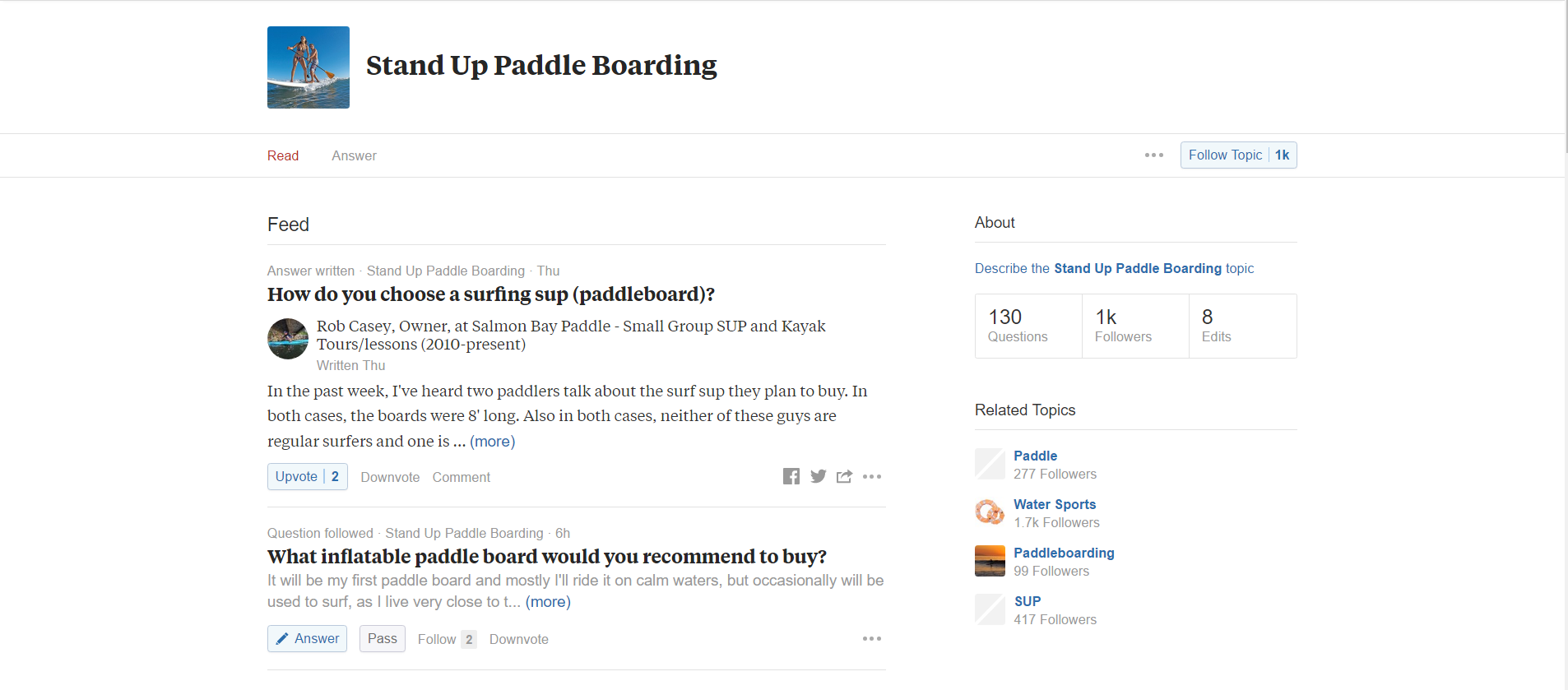
Now, the second site that I like to use is a site called Quora. Quora is basically a question and answer site where people ask questions and then other people come and answer them.
It's great if you want to set yourself apart as an expert in the space, you can answer a lot of questions.
But, kind of a separate strategy. I searched for stand-up paddle here. You can see there's a lot of great questions.
Now, Ubersuggest is good for the keywords. But, there's not a lot of context here. With Quora, we're able to see people's questions and what people are discussing in the answers about this.
Here's a question about inflatable stand-up paddle boards, are they worth buying? Here's some other stuff about related activities in kayaking. But here's one, what about paddle boards for beginners? People just getting into this.
You can see there's a lot of great stuff here. And if I click through I'm gonna see what answers are on here. And maybe there's an opportunity for me to even answer that question here and then build a blog post off of it.
Quora is a great place to get a little bit more context and understanding. Talk about idea generation and you just scroll down here and you're gonna see tons of great questions from people who are probably in the buying process already.
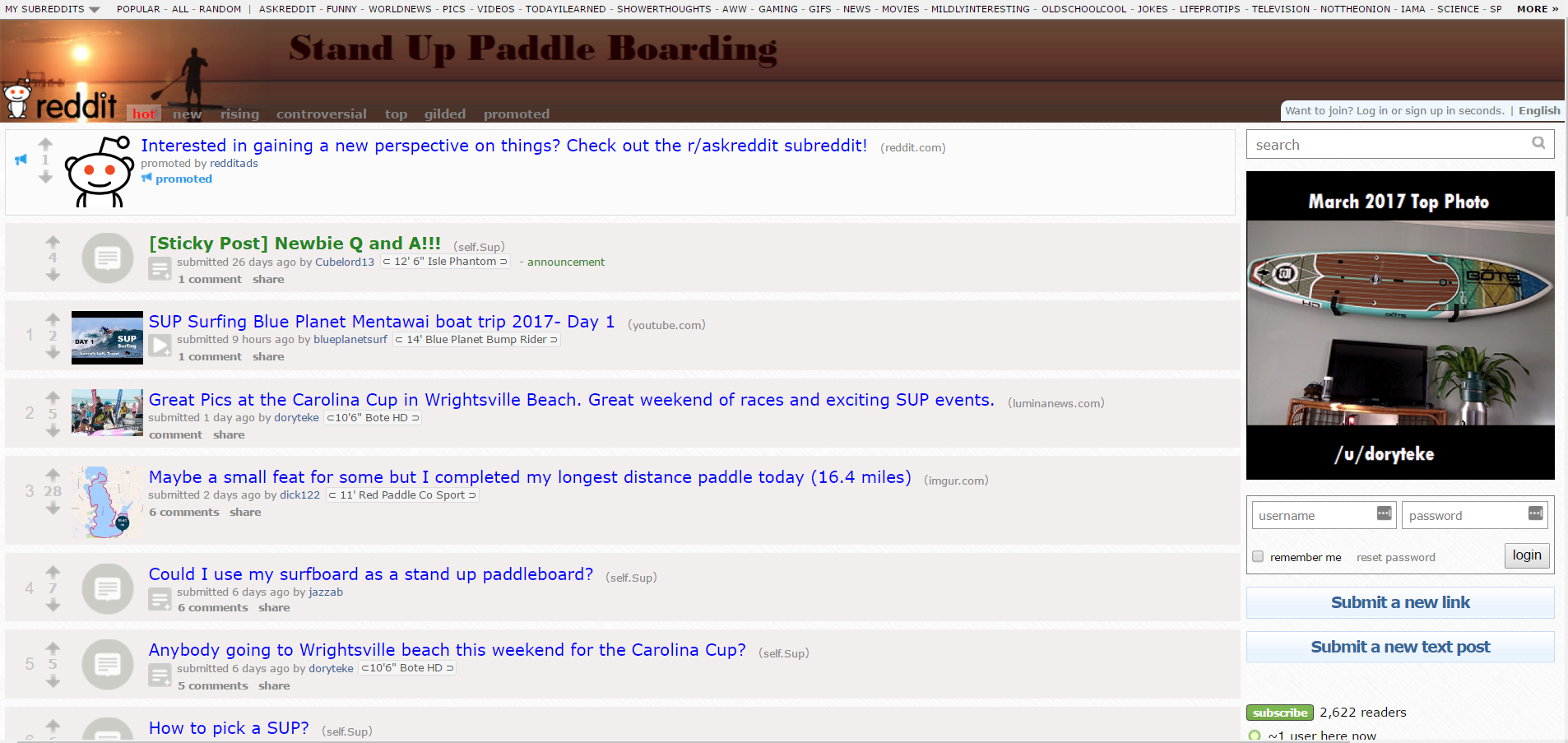
All right, the last thing I'm gonna show you is Reddit. Reddit is just another social bookmarking site but there's literally something for everything in here.
Every topic you could imagine is on Reddit.
Here is what is called a subreddit, and it is dedicated to stand-up paddle boarding.
Now, I like going to Reddit to see what people are asking, just like Quora. But Reddit is also a place where people can share cool content.
You can see what's getting the most upvotes, and you can see maybe what other content creators are doing, and how that might give you some ideas. Maybe you can take an idea and make it even better.
But could I use my surfboard as a stand-up paddle board? Okay, well which surfboards could feasibly do that? I don't know. But there's comments here, we could read through those. And just lots and lots of content here to generate ideas where you can maybe chime in.
What's a decent board under $800? Maybe that's an entire content series is based on people's price points. What should they expect and what should they look for in a board.
Lots and lots of great stuff here, but you can also see how detailed it gets. People talking about specific boards.

Between these three sites, if you just spent 15 minutes a week looking at what people are asking, what people are sharing and know what some of the general searches are out there, you're gonna have more than enough fuel to create content. And, I would just say that if you see themes pop up across each of these channels or each of these websites then make those a priority.
If you keep seeing stuff about inflatable paddle boards, make sure that you have a piece on that. Or, if you see stuff about yoga, make sure you have a piece on that.
But try to pick up on the trends and on the recurring themes across each of these sites.
All right, I hope that's helpful for you. Again, none of this is meant to replace great keyword research or great audience research. We all know that our ideas can run dry, and you need a quick boost every now and then to keep you going with your content creation.
In this post:
A Facebook ad that accumulates hundreds of likes, shares, and comments is one of the most valuable assets in your advertising account. That engagement - known as social proof - signals trust to new audiences and makes your ad significantly more effective.
But here is the problem most advertisers run into: when you duplicate a high-performing ad to target a new audience, all of that engagement disappears. The likes, the comments, the shares - gone.
The good news is there is a straightforward workaround. In this guide, we will cover what social proof is, how to build it, how to preserve it across campaigns using the existing post ID method, and four real examples of social proof in Facebook ad creative.
Social proof is the psychological principle that people look to the behavior of others when making decisions. In the context of Facebook ads, social proof takes two primary forms:
Engagement-based social proof refers to the visible reactions, comments, and shares on your ad. When a potential customer sees that an ad has 500 likes and dozens of positive comments, their natural response is to pay attention. This type of engagement creates a self-reinforcing loop: more reactions lead to more trust, which leads to more clicks and conversions.
Content-based social proof involves incorporating customer reviews, testimonials, and user-generated content directly into your ad creative or copy. Rather than relying on the ad's engagement metrics, you proactively place trust signals into the ad itself.
Both forms work because of a fundamental truth in digital advertising: your potential customer needs an external factor to rely on when making a purchase decision online. Unlike a brick-and-mortar store where shoppers can physically compare products, online buyers depend heavily on social signals to evaluate whether a product or brand is worth their money.
This is why social proof is part of nearly every successful social media advertising campaign. It can be the difference between a prospect scrolling past your ad and stopping to learn more.
Before you can reuse social proof, you need to build it. There are several proven strategies for generating engagement on your Facebook ads:
Target warm audiences first. Launch your ad to audiences that already know your brand - email subscribers, website visitors, or past customers. These audiences are more likely to engage with your content, giving your ad an initial boost of social proof before you expand to cold traffic.
Use compelling creative. Ads that provoke an emotional response, ask a question, or share a bold claim tend to generate more comments and reactions. The more people interact, the more social proof you build.
Incorporate reviews and testimonials. Including real customer feedback in your ad copy or creative adds an immediate layer of trust. We will cover specific examples of how to do this later in this article.
Run engagement-optimized campaigns. While your primary Facebook ad campaign objective might be conversions or traffic, consider running a short engagement-focused campaign first to accumulate reactions before switching objectives.
Respond to comments. When people comment on your ad, reply to them. This increases total comment count and shows potential customers that there is a real team behind the brand.
Once your ad has built up meaningful engagement, the next step is making sure you do not lose it when scaling to new audiences.
One of the most common mistakes Facebook advertisers make is duplicating a high-performing ad to show it to a new audience. The duplication creates a completely new ad with zero engagement - all of the social proof from the original is left behind.
The solution is to use the existing post ID method. This approach lets you run the same ad (with all its accumulated likes, shares, and comments) across multiple ad sets, campaigns, and audiences. Every new impression and reaction continues to build on the original post's engagement.
Here is how to do it in six steps.
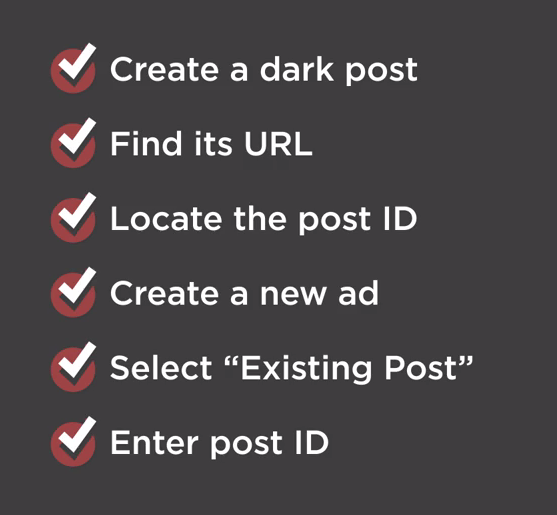
For this tactic to work, you need to start with a dark post - an unpublished page post that does not appear on your Facebook page's timeline. Dark posts are created through Ads Manager and give you the ability to:
If you are unfamiliar with dark posts, the setup takes just a few minutes and is well worth learning.
In Ads Manager, find the ad that has accumulated the engagement you want to preserve. This is the ad whose social proof you will carry forward into new campaigns.
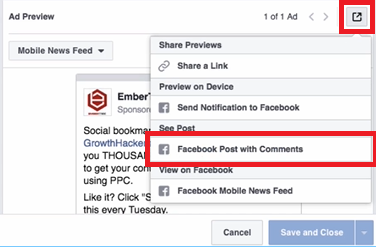
Select the ad and click the edit button. Under Ad Preview, locate the box icon in the right corner and click it, then scroll down to select the Facebook Post with Comments option.
This loads the full ad with all of its accumulated engagement:

Copy the entire URL from the browser bar. We recommend pasting it into a text editor so you can easily isolate the post ID.

The post ID is the number that appears after
/posts/in the URL. Copy everything from that number up to the question mark.

Save this number - you will need it in a later step.
Create a new ad just as you normally would for any Facebook ad campaign. Choose the objective that aligns with your goals, and set up your new target audience.
Here is where the key difference comes in. Navigate to the Ads section and click the Use Existing Post button instead of creating a new ad from scratch.


Click Enter Post ID and paste the ID you copied earlier. Click Submit.
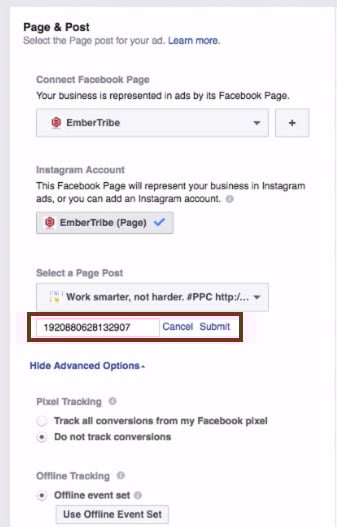
The ad appears with all of its original reactions, comments, and shares intact.

You can now go back to the ad set level, choose any audience segment, and run the ad wherever you want - all while keeping the same engagement and social proof attached to the creative.
You can repeat this process as many times as needed for new campaigns and ad sets. Every impression and reaction across all placements feeds back into the same post, continuously building your social proof.
Quick reference:
Beyond preserving engagement across campaigns, you can also build social proof directly into your ad creative by featuring customer reviews and testimonials. This approach works especially well for retargeting warm audiences who are already familiar with your brand and need a final push to convert.
Here are four proven formats for incorporating social proof into your Facebook ad creative.
Placing a short customer quote directly in the ad headline is one of the most eye-catching approaches. The headline is one of the first elements a user reads, and leading with a real customer's words immediately establishes credibility.

This format works best when the review is concise - a single sentence or phrase that captures the core benefit of the product.
Overlaying a customer testimonial directly onto the ad image makes the social proof impossible to miss. The review becomes part of the visual, which can stop users mid-scroll.
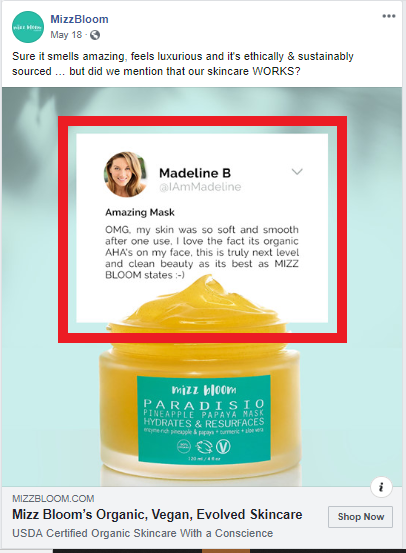
When using this approach, make sure the text is large enough to read on mobile devices and that you stay within Facebook's advertising guidelines for text-to-image ratios.
The primary text field above the ad image gives you room to share a longer customer review. This format is effective for products or services that benefit from detailed testimonials where the customer explains their experience.

For maximum impact, you can stack multiple short reviews in the primary text field. This creates a wall of positive feedback that is difficult for prospects to ignore.

When using customer reviews in your ads, keep these best practices in mind:
When incorporating reviews into your ad images, be aware of Facebook's text overlay guidelines. While Facebook previously enforced a strict 20 percent text rule on ad images, the platform now uses a more nuanced approach. However, ads with less text on the image generally perform better and receive wider distribution.
Key guidelines to follow:
For a deeper understanding of what Facebook will and will not approve, review our guide to Facebook advertising policies.
The most effective approach is to combine both social proof strategies covered in this guide. Start by creating ads that feature customer reviews in the creative, then use the existing post ID method to preserve the engagement those ads accumulate as you scale to new audiences.
This creates a compounding effect: the review in the creative builds initial trust, while the visible likes, comments, and shares reinforce that trust. Over time, your best-performing ads become increasingly powerful assets that you can deploy across your entire Facebook advertising strategy.
Have you tested the existing post ID method with your campaigns? If you are looking for more ways to optimize your Facebook ad performance, explore our guides on scaling Facebook ads without killing performance and identifying audience overlap to maximize your results.
Custom audiences remain one of the most powerful targeting features in the Facebook advertising platform. The ability to upload a list of customers or prospects and serve them ads directly is a game-changer for performance marketers.
But here is the problem most advertisers overlook: when you upload a list of 1,000 contacts, Facebook does not automatically match all of them. In many cases, match rates fall between 30% and 50%, which means more than half of your carefully curated audience never sees a single ad.
That gap between your uploaded list and the matched audience represents real revenue left on the table. Every unmatched contact is a missed opportunity to retarget a buyer, re-engage a lapsed customer, or nurture a warm lead through your sales funnel.
The good news: with the right data preparation and enrichment strategies, you can push match rates well above 70%, and in many cases above 90%.
Before diving into optimization tactics, it helps to understand the matching process itself.
When you upload a customer list, Facebook takes the identifiers you provide (email addresses, phone numbers, names, etc.) and hashes them using SHA-256 encryption. It then compares those hashes against its own database of user profiles. When a hash matches, that person becomes part of your custom audience.
The key insight is that Facebook can accept up to 15 different data points per contact to attempt a match. Most advertisers only upload email addresses. That single data point gives Facebook one shot at finding a match. If that email address is not the one the user registered with on Facebook, the match fails.
By providing multiple identifiers, you give Facebook more chances to find each person. First name, last name, phone number, city, state, zip code, date of birth, and gender all serve as additional matching signals.
Here is the full list of identifiers Facebook will use for matching:
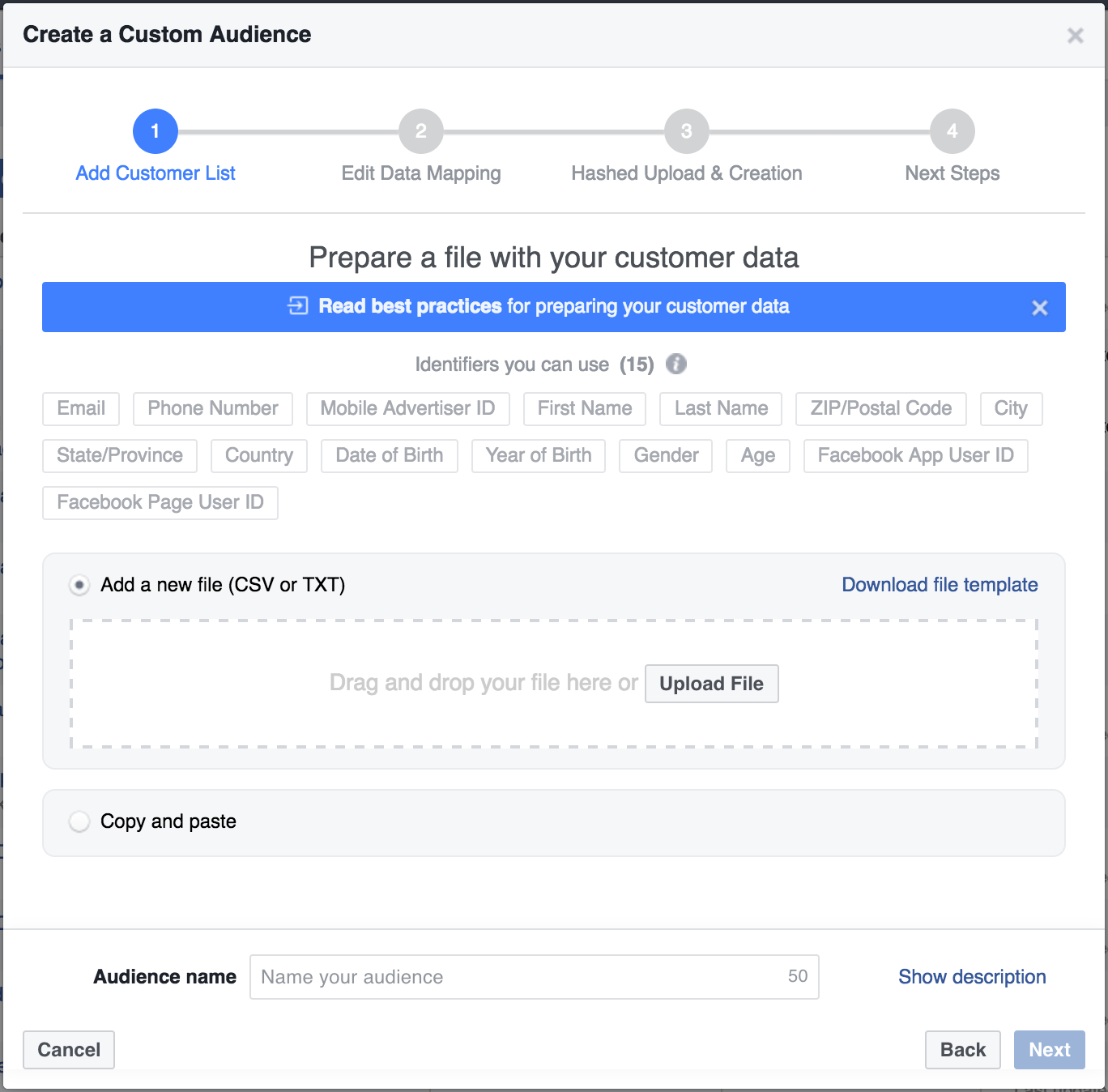
The more of these fields you populate, the higher your match rate will climb. Even partial information helps. A first name combined with a zip code might be enough for Facebook to confirm a match that email alone could not.
The most effective way to boost match rates is to enrich your existing data before uploading it to Facebook. If you have a newsletter list with thousands of email addresses, those emails alone are just the starting point.
Tools like Clearbit, ZoomInfo, and Apollo can take a single email address and return dozens of additional data points. For custom audience optimization, the most valuable enrichments are:
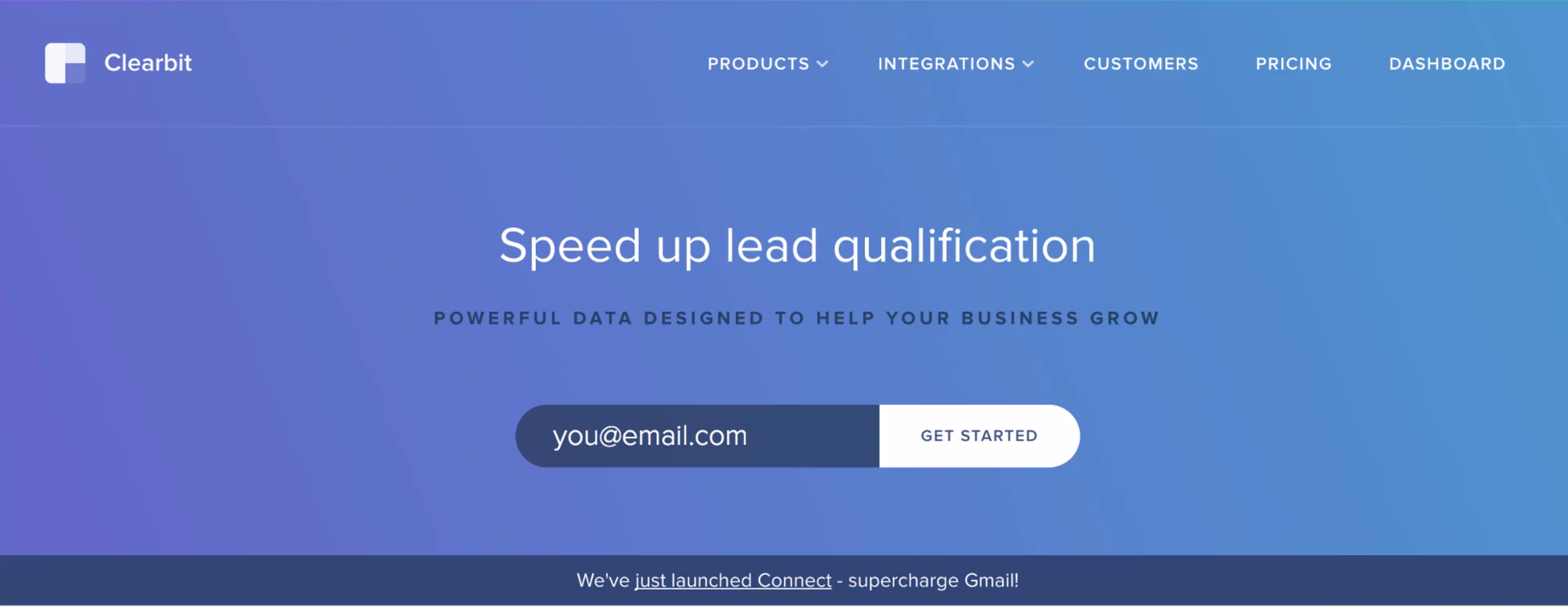
Here is a practical workflow using Clearbit as an example:
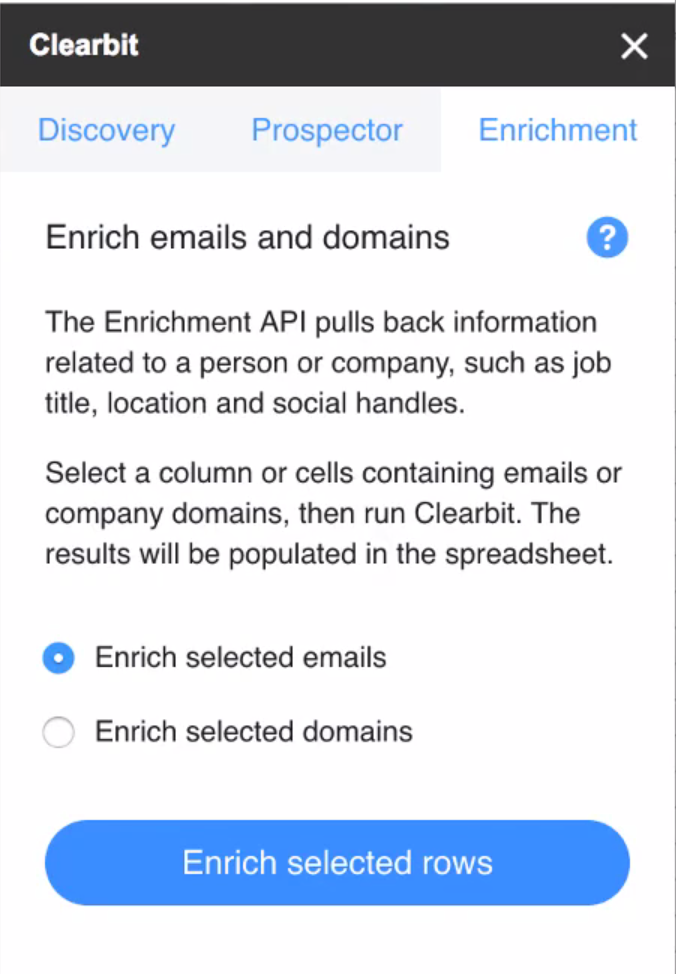
Even before using the enriched data for ad targeting, take time to analyze what the enrichment reveals. Build pivot tables around job titles, company sizes, and locations. This analysis often surfaces audience insights that inform not just targeting but creative strategy and offer positioning.
Data formatting errors are a silent killer of match rates. Facebook's matching algorithm is strict about format. Common mistakes include:
Facebook provides a downloadable CSV template specifically for custom audience uploads. Use it. The template ensures your columns align with the expected identifiers and reduces formatting errors that silently degrade your match rate.
Beyond basic data enrichment, several advanced tactics can push your match rates even higher.
Rather than uploading one massive list, break your audience into segments based on data quality. Upload your most complete records (those with email, phone, name, and location) separately from email-only records. This approach lets you:
Many people have separate personal and work email addresses. If your CRM captures both, include them in your upload. Facebook will hash and check each one independently. A contact who does not match on their work email might match perfectly on their personal Gmail address.
Customer data decays over time. People change email addresses, phone numbers, and locations. An audience that matched at 80% six months ago may have dropped to 60% today. Set a recurring schedule to re-enrich and re-upload your custom audiences at least quarterly.
Website custom audiences built from pixel data typically have near-perfect match rates because Facebook already knows those visitors. Combining pixel-based audiences with uploaded list audiences gives you broader reach with strong match quality. Use the overlap analysis in Ads Manager to understand how your audience segments intersect.
After uploading your custom audience, Facebook displays the audience size alongside your uploaded list count. The ratio tells you your match rate.
Here are general benchmarks to gauge your performance:
If your match rate falls below expectations, run a diagnostic check. Look for formatting inconsistencies, outdated email addresses, or missing country codes. Even small fixes can produce meaningful lift.
Here is the complete workflow for maximizing your custom audience match rates:
Every percentage point of match rate improvement translates directly to more of your target audience seeing your ads. For ecommerce brands spending significant budgets on Facebook, the ROI of data enrichment often pays for itself many times over.
Custom audience targeting only works as well as your data allows it to. Most advertisers accept low match rates as an unavoidable cost of the platform, but they are not. By investing time in data enrichment, proper formatting, and regular audience maintenance, you can dramatically increase the reach and effectiveness of your Facebook campaigns.
The advertisers who win on Facebook are not just the ones with the best creative or the biggest budgets. They are the ones who treat their first-party data as a strategic asset and invest in making every contact matchable, targetable, and reachable.
Facebook is a powerful paid social advertising platform, but it doesn’t scale the same way as paid search. In this post, you'll learn the 3 rules for Facebook ad scaling that we swear by (and why).
In this quick tip video, we’ll demonstrate how you can best scale your ad spend without killing the performance of key metrics like cost per lead.
These three "rules" are what we used to scale one client's efforts on Facebook from 0 to 400k new users every month (you can check out that case study here).
We're going to share the scaling strategy we use for our clients that allows us to spend more each month, increase the volume of incoming qualified leads, all without hurting the performance of those campaigns.
When you follow these three rules for scaling Facebook ad campaigns, you can help save your performance as you increase ad spend.
There are so many targeting options to choose from on Facebook, it's easy to get excited about getting very, very granular, and specific about who you want to target.
But if your audience size is too small, you're not going to have enough runway to scale your ads. Remember: there's always going to be opportunities down the line to create more segments. Don't overdo it from the jump!
Instead, if you find that a certain segment of your target audience has responded well to your campaigns so far, you should optimize for that segment. It's important that you don't shoot yourself in the foot by creating a too-small audience size from the start.
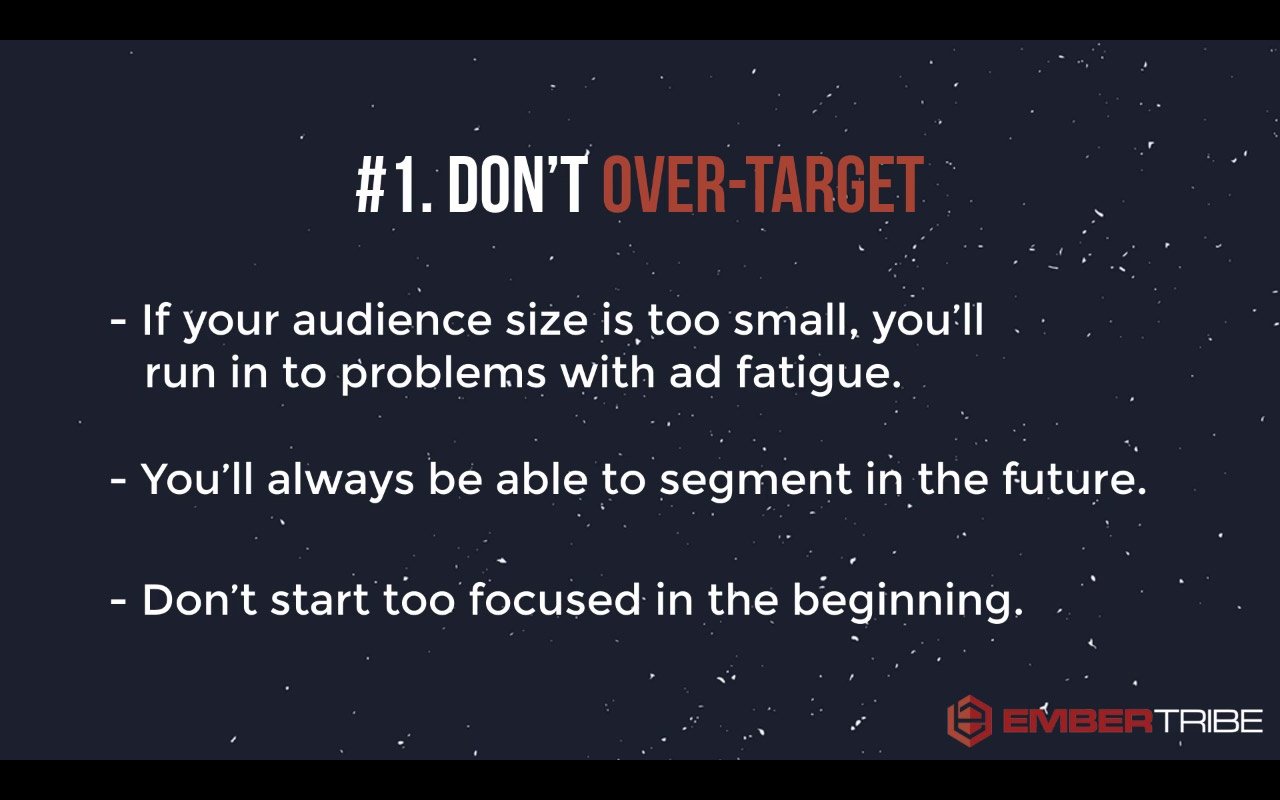
Don't get so locked in on one audience segment that you're going after because eventually, you're going to wear them out.
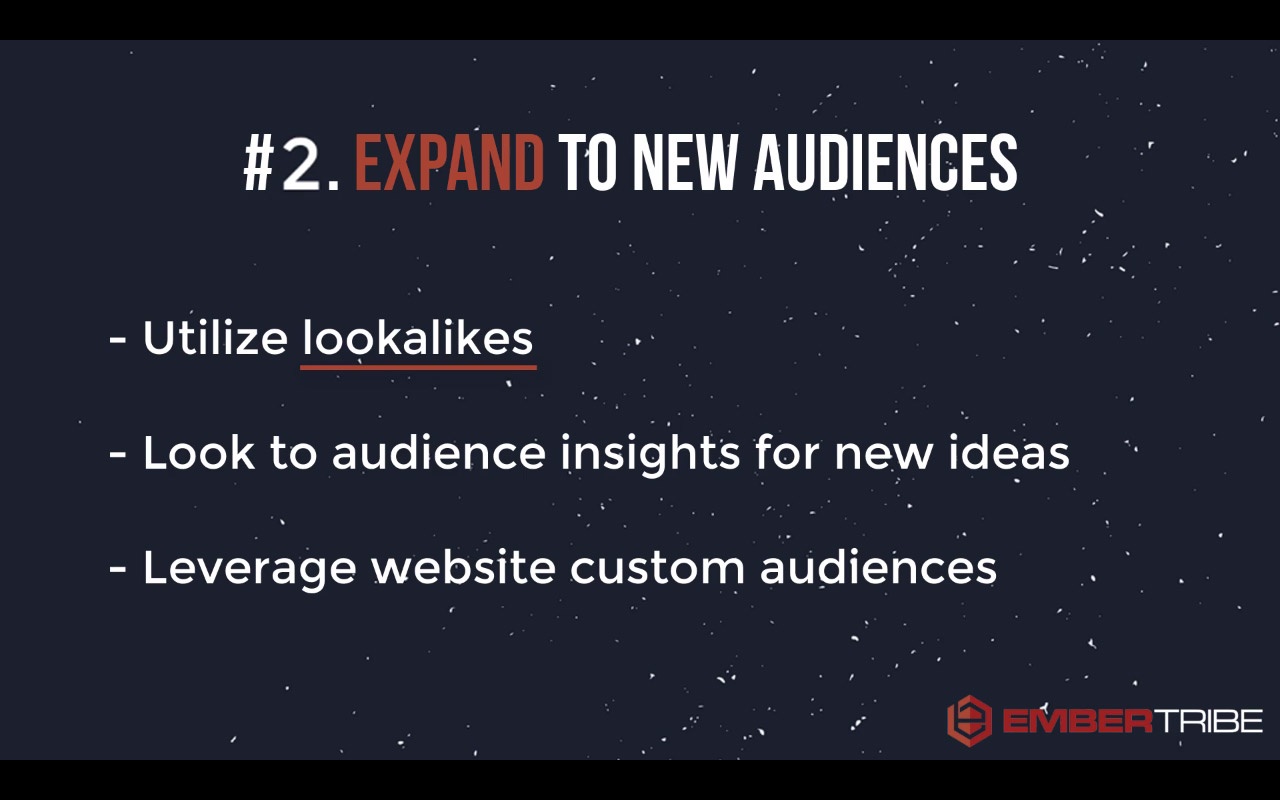
You need to get creative about the ways that you can expand to new audiences. That means taking full advantage of partner categories in Facebook, different interest targets, and especially using options like lookalike audiences.
Make sure that once you've converted a healthy number of people, you want to create a lookalike audience to allow Facebook to start expanding the target reach of your ads.
This third rule is very important. It's probably the most important rule when it comes to scaling your campaign—be mindful about how you manage your budget.
Oftentimes, the biggest mistake that we see advertisers make is that when they see something work, they have a knee-jerk reaction that they need to pump ad spend in their campaign. Unfortunately, this turns into blowing the doors off of their budget.
What you want to do instead is very incrementally increase the budgets.
The reason for this incremental increase is that Facebook optimizes through an algorithm that determines who they should show your ads to, based on who they think will respond most to your message.
If you give them too much information to optimize for, the algorithm can't work correctly. In other words, if you've increased your budget too much and try to get too many people through the funnel, Facebook just won't be able to keep up.
So, your Facebook ad campaigns need time to adjust to a new level of budget.
Try to wait two or three days before raising the budgets on your campaigns if you're testing a new angle or you launching a new ad set.
When you do raise the budget, keep each budget increase as incremental gains, like 30 to 50 percent increases to the budget.
That's going to safeguard your ads against seeing major campaign performance decline. Over time, you'll be able to scale to a higher budget...but without tanking all the hard work the algorithm has done for you so far.
There's a lot more that goes into managing your campaign than these three rules. But with these principles, you're going to be head and shoulders above 90 percent of the advertisers that don't have this 3-rule framework to scale their campaigns.
Good luck, and may your next campaign scale beyond your wildest dreams!
Find out how EmberTribe can manage your Facebook ad campaigns for you by booking a call with one of our growth experts.

It was dark. Really dark. The kind of darkness that makes you question your sanity.
The only thing louder than my pulse was the slow drip of a faucet that bounced off the concrete walls.
Cold metal handcuffs pressed firmly against my wrists. I could move, but only as far as the heavy chain would allow.
Only minutes had passed since we were blindfolded. But every second would count.
The countdown for survival was on...

Not every company subjects its crew to extreme escape scenarios, but when you’re a distributed team like EmberTribe, you have to make the most of the (face) time!
At our most recent meetup, some of our team took on the challenge of escaping from a “Breakout” room.
The team building concept is catching on quickly with dozens of franchises sprouting up across the nation. Our experience unfolded at the Greensboro, NC location.
The objective is simple: work as a team to escape! Think of it as a life-sized puzzle. Without going into specifics (you’ll have to experience that yourself!), you have to crack codes, look for clues, and use logic to escape. Each riddle you solve leads one step closer to victory.
The catch? You only have 60 minutes to do it.
The scenario we chose was called “The Kidnapping”, in which a crazed serial killer (somewhat altruistically) gives you 60 minutes to escape before...well, you know. Here’s the trailer.
The Breakout Games company records data from thousands of these escapes and monitors each one through video surveillance. The odds they gave us to escape? A mere 20% success rate.
This post isn’t so much about the destination as it was the journey, so I’ll let the cat out of the bag: we made it!

Beating the odds confirmed what I already knew: I work with some of the smartest people I’ve ever met.
But there’s a lot more that I learned about teamwork and how we’re wired.
Our team is divided evenly between folks who process internally and the loudmouths like me, who are verbal processors. This also correlates somewhat to personality.
In the breakout room, some of our quieter folks would wait, listen, think and then nail a solution that seemingly came out of thin air.
The learning here is that quiet ≠ disengaged. It’s important to remember this during brainstorming meetings and really any group context.
On the other hand, loud ≠ domineering. Verbal processors need the same space to talk through a solution.
Empathy and patience are key.
One reason why we were successful in the breakout room is that we leveraged the power of observation.
Put another way: we would state the obvious first, then figure out what that meant for next steps.
Observe. Process. Solve.
When you jump to a solution too quickly, you work on faulty assumptions. I made this mistake at one point in the breakout room. I found a puzzle piece and started working under the assumption it was meant to fit on the floor. In fact, the piece only made sense when it was held up to the wall.
This principle has a direct application to our work as an agency. We let data drive solutions for our clients. When we’re measuring performance for an ad campaign or a landing page, we carefully observe and then think about architecting a solution.
Let the facts sink in, challenge your assumptions, then think through a solution. Definitely something I want to continue to build into our culture here at Ember.
In the breakout room we all focused on a common goal. When we unlocked a new box we would huddle and observe. But then we would disperse a bit while working on the next obstacle.
Some people took notes on a whiteboard, others tinkered with puzzle pieces. Others reviewed past clues.
There was an efficient form of communication unfolding in the room where we shared information without hyper-focus on one part of the problem.
Some challenges can’t be solved until you change your perspective. In the breakout room, different clues are revealed with the lights on and others only when the lights are off.
Changing perspectives in a breakout room is easy: just walk to the other side of the room and look at the riddle differently. In the real world, it takes an intentional effort to change perspective.
One way that our team and processes can improve is to schedule time for different team members to audit our client’s accounts.
We do this already when we hit a roadblock: conversion rate is stalling, ad campaign growing tired, etc. But a big win for us will be to pre-emptively get a fresh “outside” look to make sure we aren’t missing anything in our plan of attack.
One of my favorite aspects of the escape room is the countdown. In my post-game analysis I wondered: would have we escaped after 55 minutes if there was no countdown? I’m positive that we still would have escaped, but am certain it would have taken MUCH longer.
As I continue to reflect on this experience, I wonder, where should we be self-imposing limits on ourselves as a team to generate more creativity and clever solutions?
For example, our client may have a $10M advertising budget, but what could we accomplish with $1k? Having too much of a resource (money or time) can make you lazy and potentially miss a game changing creative solution.
Not to get too philosophical, but I think highly effective people learn to dream without limits and act within constraints.
Our team’s experience with the breakout room was really fun and a big win for morale. But I’m even more grateful for the lessons we’re taking with us...beyond the reach of a hypothetical serial killer.

In order to scale your campaigns and avoid past mistakes, it's VERY important to keep track of what you're doing. This is why we plan ahead and keep track of our results using a "testing queue."
However, just keeping track is not enough. Understanding your audience, what you can offer them, and the timing of your offer is what will set you apart and lead to success in your campaigns.
In Today's Quick Tip Tuesday, JP gives you another perspective when handling your PPC campaigns and tells how to breathe new life into them with these simple pointers:
Josh: "All right, so, J.P., one of the things that we do uniquely at EmberTribe is we manage this thing called a testing-queue to try to breathe new life into campaigns. Can you explain a little bit about what that is?"
J.P: "Yeah, it's a really intentional, planned out way of documenting what steps we're gonna take to expand campaigns both horizontally and vertically to keep them going, scale up, and be really responsive."
Josh: "Awesome. So, I know that this has been a breakthrough strategy for a lot of our clients and really the fuel for this process is asking really good questions.
So like, the better questions you can ask about how these different paid advertising channels are working, the better outputs you're gonna get.
So what's kind of your process for asking those questions and maybe what are the categories that they fall into?"
J.P: "Sure, ultimately, they usually come down to audience, offer, and timing.

When you're thinking about audience, you're really trying to figure out what makes your user, your target, unique?

Is it their job title? Maybe you wanna consider how old they are or what ethnicity they are, where they live, what interests they have like television shows or cars that they drive.
What is it that sets them apart from anybody else on the street?
For offer, you wanna consider what problem you solve. Does your user even know they have a problem? Do they care? Is it costing them time? Is it costing them money?

And then, how do you solve that problem better than the 14 other companies that are trying to do the same thing? Or are you unique in the space? You're the only one solving it.
And finally, when it comes down to timing. And by timing, I don't mean day parts, or days of the week, or anything like that. I'm considering where they are in the purchase funnel.
What's their familiarity with you brand?

Are you re-targeting them or is this a cold outreach?
Are they aware of your competitors?
Do they know what to look for?
Have they engaged with any of your content before?
Do you maybe have an offer like a white paper or a webinar that can help educate them about those needs and how you solve them.
And then how do you match that offer up to where they are in the purchase funnel?"
Josh: "Awesome. So it's a really holistic way to think about your target audience and about, really, the message that you're bringing to them. And I guess at the end of the day it is about just asking good questions.
If you have an organized framework like this to use, seems like anybody can improve or optimize their campaigns or take it to the next level."
J.P: "It sure beats off-the-cuff strategies and a wall of Post-it notes."
Josh: "Yeah, definitely. Well, thanks for sharing, J.P."
J.P: "You bet."
Most B2B advertisers default to Google Ads as their primary search advertising channel. It is the largest search platform, it has the most sophisticated tooling, and it is where the majority of search volume lives. But this default behavior creates an opportunity that many B2B marketers overlook entirely: Microsoft Advertising (formerly Bing Ads).
Microsoft Advertising consistently delivers lower costs per click, less competition, and access to a high-value professional audience that skews toward exactly the decision-makers B2B brands need to reach. For advertisers willing to look beyond Google, Microsoft's platform offers one of the best risk-adjusted returns in paid search.
The single most compelling reason for B2B advertisers to invest in Microsoft Advertising is audience composition. Microsoft's search network benefits from deep integration with the enterprise software ecosystem that dominates corporate America.
Microsoft still holds significant market share in enterprise environments where IT departments control browser and search engine defaults. In many corporate settings, employees use Edge as their primary browser with Bing as the default search engine. This is not a matter of consumer preference. It is a function of enterprise software policy.
This means that when a procurement manager researches software solutions, when an operations director evaluates service providers, or when a C-suite executive investigates strategic tools, there is a meaningful probability they are doing that research through Bing. These are exactly the high-value searchers B2B advertisers need to reach.
Microsoft Advertising's user base skews toward higher household incomes compared to the general search population. For B2B advertisers selling premium solutions, professional services, or enterprise software, this demographic alignment means your ads reach people with both the authority and the budget to make purchasing decisions.
Microsoft's acquisition of LinkedIn created a unique targeting capability that Google cannot replicate. Through Microsoft Advertising, B2B advertisers can layer LinkedIn profile data, including company, industry, and job function, onto their search campaigns. This means you can bid more aggressively when a searcher matches your ideal customer profile, or exclude searches from industries or roles that are unlikely to convert.
This integration is a game-changer for B2B lead generation. No other search platform offers this level of professional demographic targeting within the search environment.
Beyond audience quality, the economics of Microsoft Advertising work strongly in B2B advertisers' favor.
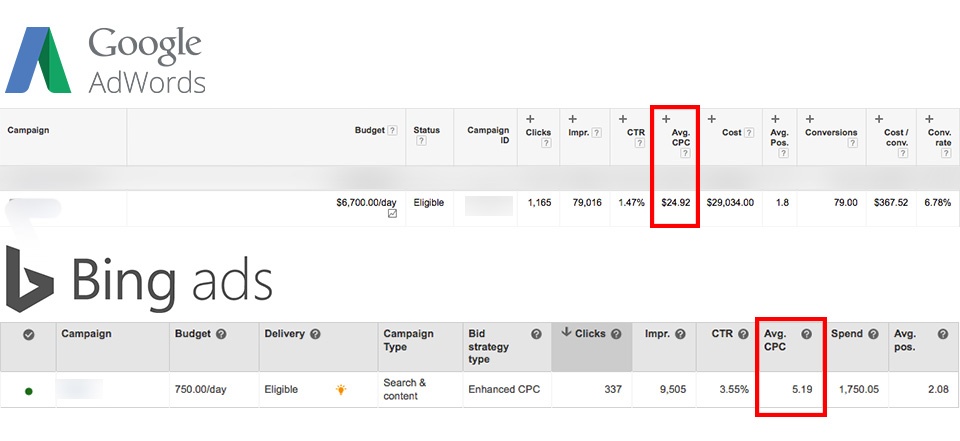
Because most advertisers default to Google, Microsoft Advertising sees significantly less competition for the same keywords. Fewer advertisers bidding on the same terms means lower costs per click across the board. For competitive B2B keywords where Google CPCs can exceed $20-50 per click, the savings on Microsoft's platform can be substantial.
This reduced competition also means higher ad positions are more accessible. On Google, achieving a top position for competitive B2B terms often requires aggressive bidding that eats into margins. On Microsoft, the same top positions are achievable at a fraction of the cost.
Microsoft Advertising consistently delivers lower CPCs than Google Ads for equivalent keywords. For B2B advertisers where search volumes are already lower and each click carries significant value, this cost efficiency directly improves the economics of your lead generation funnel.
When you combine lower CPCs with the platform's professional audience composition, the cost per qualified lead often outperforms Google significantly. The leads may be fewer in total volume, but the quality and cost efficiency frequently make Microsoft Advertising the higher-ROI channel.
B2B advertising budgets are often more constrained than B2C budgets. Microsoft Advertising's lower costs allow smaller budgets to go further, making it an ideal channel for B2B SaaS companies and professional services firms that need to maximize every dollar.
Microsoft Advertising offers several platform features that provide distinct advantages for B2B campaign management.
In Google Ads, managing campaigns across multiple business locations requires either grouping all locations into a single campaign or creating separate campaigns for each location. Microsoft Advertising offers a more flexible approach: you can run a single campaign with ad groups broken out by location. This simplifies account management while maintaining the geographic granularity that multi-location B2B businesses need.
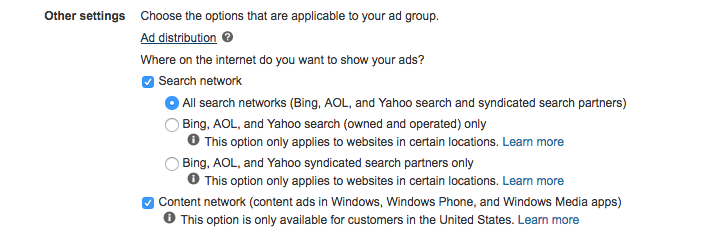
Both Google and Microsoft distribute ads across search partner networks, but they handle transparency differently. Microsoft lets you choose which search partners to include and provides transparent reporting on where your ads appear. You can specifically opt into or out of properties like Yahoo and AOL, and you can see exactly which partners are delivering results.
Google, by contrast, bundles search partners without giving advertisers the ability to select or exclude specific properties, and its reporting on partner performance is less granular.
If you are already running Google Ads campaigns, Microsoft makes it straightforward to import your existing campaign structure, keywords, and ads directly into the platform. This reduces the barrier to entry significantly. You can have a Microsoft Advertising campaign live within hours, using your proven Google Ads structure as the starting point, and then optimize from there based on Microsoft-specific performance data.
Microsoft's Audience Network extends your reach beyond search into native placements across Microsoft-owned properties including MSN, Outlook.com, and Edge. For B2B advertisers, these placements reach professionals during their workday browsing, creating additional touchpoints with your target audience outside of search intent moments.
Getting started with Microsoft Advertising for B2B lead generation follows a structured process.
Start by importing your top-performing Google Ads campaigns. This gives you a proven foundation. Then review and adjust keyword bids downward, since Microsoft's lower competition typically means you can achieve comparable positions at reduced bids.
Apply LinkedIn profile targeting to your campaigns. Start with job function and industry targeting that aligns with your ideal customer profile. Monitor performance by segment and adjust bids to allocate more budget toward the profiles that generate qualified leads.
B2B campaigns should optimize for lead quality, not just lead volume. Set up conversion tracking that captures not just form submissions but downstream indicators of lead quality. Use this data to inform bid adjustments and audience targeting refinements over time.
Once your core campaigns are performing, test expansion into Microsoft's Audience Network, experiment with additional keyword themes, and iterate on ad copy to improve conversion rates. Apply the same structured testing methodology that drives results in any paid channel.
When evaluating Microsoft Advertising performance for B2B, focus on metrics that reflect lead quality and pipeline impact:
These metrics provide a more accurate picture of channel value than surface-level indicators like click-through rate or raw conversion volume.
Microsoft Advertising should be a standard component of any serious B2B search advertising program. The combination of a professional audience, lower competition, reduced costs, and unique LinkedIn targeting capabilities creates a channel that consistently delivers high-quality leads at favorable economics.
The platform is not a replacement for Google Ads. It is a complement that extends your reach into an audience segment that many competitors ignore entirely. For B2B advertisers, that neglected audience often includes the exact decision-makers you need to reach.
Start by importing your existing Google Ads campaigns, layering LinkedIn targeting, and measuring performance against lead quality metrics rather than volume alone. The results will likely make a compelling case for increasing your Microsoft Advertising investment as a core pillar of your B2B growth marketing strategy.

The team at EmberTribe is proud to introduce J.P. VanderLinden as our first Director of Digital Marketing. From day one, EmberTribe has been committed to providing every client with exceptional service from knowledgeable industry experts. Bringing J.P. on board reaffirms that commitment and raises the bar for what our clients can expect.
Building a growth marketing agency is not just about assembling a team of skilled practitioners. It is about finding people who share a fundamental belief in how marketing should work: fast, transparent, and results-driven. When we met J.P., it was immediately clear that his philosophy aligned with the core principles EmberTribe was built on.
As Director of Digital Marketing, VanderLinden leads our paid acquisition team as we continue to provide clients with real marketing results quickly and efficiently. He also works cross-functionally with our analytics and UX teams to amplify campaign results and provide clients with complete visibility into performance data.
This cross-functional approach is central to how EmberTribe operates. Paid acquisition does not exist in a vacuum. The best campaigns are informed by analytics, supported by strong creative, and validated by conversion rate optimization. J.P.'s role bridges these disciplines so that every dollar a client spends on ads is backed by data and strategic thinking.
We built EmberTribe based on the idea that companies should see results from their marketing agency in weeks, not months. By rapidly testing, iterating, and scaling campaigns, we have been able to expand and create new lead generation channels for many of our clients in just a few weeks. This agile style of marketing is what initially drew VanderLinden to EmberTribe.
"From our first conversation, it was clear that our brand of agile marketing is what gets this guy out of bed every morning," says Co-Founder Josh Sturgeon. "J.P.'s commitment to providing clients with rapid results is why the decision to bring him on board was such a no-brainer."
The traditional agency model often looks like this: sign a contract, wait three months for a strategy deck, wait another two months for campaign launches, and then wait even longer for meaningful data. That timeline does not work for growth-stage companies with limited runway and aggressive targets. EmberTribe's approach compresses that entire cycle into weeks, and J.P.'s expertise in paid acquisition and performance marketing makes him the ideal person to lead that charge.
Agile marketing at EmberTribe follows a structured but flexible framework:
This approach applies across Facebook and Instagram ads, Google Ads, TikTok, and every other channel in the paid media mix.
VanderLinden's seven years of digital marketing experience has allowed him to work with dozens of clients across multiple industries in areas such as social media, SEO, email marketing, analytics, and copywriting. However, VanderLinden sees his future, and the future of digital marketing, in paid acquisition and analytics.
"Facebook, Twitter, Google, and all of these other networks are the future of digital marketing," says VanderLinden. "As a marketer, my job is to figure out how I can best leverage these networks to reach the right audience with the right message. By merging paid acquisition with analytics, we can quickly tap into these networks to provide our clients with results that will move the needle for them in weeks, not months."
That integration of paid media and analytics is not just a nice-to-have. It is the foundation of every successful performance marketing program. Without clear attribution and measurement, even the most creative campaigns are flying blind. J.P. brings a rigorous analytical mindset to every engagement, ensuring that creative decisions are always grounded in data.
J.P.'s work at EmberTribe centers on several key areas that directly impact client growth:
Every hire at EmberTribe is made with one question in mind: will this person make our clients more successful? The digital marketing landscape is complex and constantly changing. Growth-stage companies and DTC brands need partners who can keep up with platform changes, algorithm shifts, and evolving consumer behavior.
That is why EmberTribe invests in people who are not just skilled executors but genuine students of the craft. J.P. exemplifies this trait. His deep curiosity about how platforms work, combined with hands-on experience managing significant ad budgets, makes him uniquely effective at translating strategy into measurable results.
VanderLinden also fits seamlessly into EmberTribe's remote-first culture. "Some people love being surrounded by an office environment. However, I love the freedom of working remotely. I can reserve all of my water cooler talk for Slack," he says.
Remote work is not just a perk at EmberTribe. It is a strategic advantage. By hiring the best talent regardless of geography, we assemble teams that would be impossible to build in any single city. Our distributed model also means that clients benefit from diverse perspectives and round-the-clock availability.
The values that guide our team are straightforward:
These values are not aspirational statements on a wall. They are operating principles that shape every campaign, every client interaction, and every hiring decision, including this one.
With J.P. leading our paid acquisition efforts, clients can expect faster campaign launches, more rigorous testing frameworks, and deeper analytical insights into campaign performance. His expertise in managing growth marketing channels across the full funnel means that acquisition campaigns are always aligned with broader business objectives.
VanderLinden is already providing results to some of EmberTribe's premier clients. Whether you are looking to scale Facebook ads, build out a multi-channel paid strategy, or simply need a fresh perspective on why your current campaigns are underperforming, the team is here to help.
If you would like to discuss how EmberTribe's agile approach to paid acquisition can accelerate your growth, reach out to our team to start the conversation.
This is the first installment of a tutorial video series called, Quick Tip Tuesday #QTT! It's a weekly series of videos that bring you highly actionable advertising tactics in 90 seconds or less.
In this first episode of "Quick Tip Tuesday", we'll walk you through how Facebook advertisers can grow their audience for free while they run their campaigns.
If you want to make the most of your campaigns, spending 10 minutes or less each week, this tip is for you!
💡 Boost your Custom Audience match rate with this quick tutorial. →
Hey there, in this quick video I wanna show you how you can get more mileage out of your Facebook advertising campaigns without spending more money and really spending no more than 10 minutes a week.
This is going to make your advertising campaign more effective, it's going to let you take advantage of interacting with some of the people who have been interested in your ads, but haven't taken action yet.
So let's take a look.
The beauty of running Facebook ads is that it's a social platform, so as you run ads, people are going to start liking and sharing your ads. So what I want to show you is in three easy steps, how to make the most of when people engage with your ad.
Step one is you have to find your ad in the Ad Manager. Now, we're gonna click Preview which is that little eyeball in the upper right.
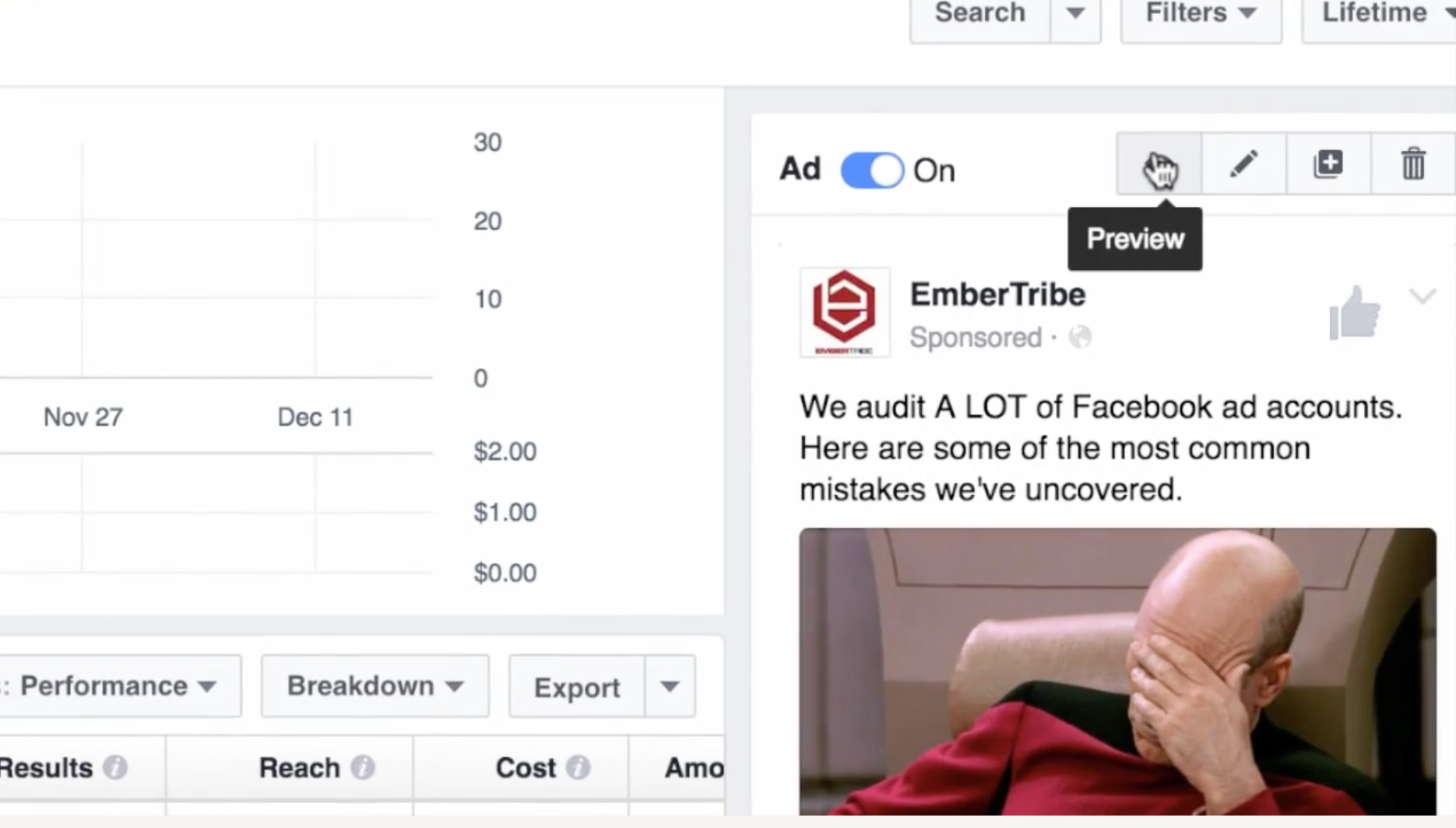
Okay that this point, scroll down and click the link where it says View Post Permalink with Comments. Okay, (step two) the next thing that you're gonna do is go down here.
You're going to see where people have liked or engaged with your ad.

Now step three, there's an option here to invite the people who have liked this post.
Now here's the beauty of this; you might have paid for the ad to get it out there and to get it in front of people, but inviting people to like your page is actually completely free.

Now great, six people, big deal. We attracted some new followers to the page, but what if you have an ad that you run for a lot longer and say there's like a thousand or so people who liked it?
Well now you can go through and start inviting all sorts of people who have engaged with your ad and showed interest in the content that you're sharing. When you've built up a decent amount of social proof (which is basically digital advertising gold), you can reuse that ad with social proof for different audiences.
So use this tactic to make the most out of your Facebook advertising by inviting people for free to your site to like your page.
Note: We've put together a scorecard that you can download and use in your own quest to create "growth content". Check it out!
Content marketing feels like a crapshoot sometimes, doesn't it?
After hours of research, writing and re-writing, you hit “publish” with the expectation that thousands of visitors will come charging through the front doors of your blog, eager to read and share your work.
Hours pass, then days, then weeks, but there’s nothing. Nada. No one. Crickets.
But what if you were able to publish content that predictably drives measurable business value?
It's what we call growth content.
"Growth content" >>> Content that drives measurable business value in the form of new users, leads, or sales.
Our team spent hours sifting through some of the world's best growth content and then built a framework from these observations. Below are the five key factors common to every great piece of growth content.

When a user first encounters your content, there's an obvious next step for them to take after reading: all roads point to your product or service. A “native connection” is a natural link between what you’re writing and what you sell.
The connection isn’t forced and the next steps for users to take is seamless. Content pieces that score high with native connection may not even make sense on their own without being able to reference a product.
At the very least, the value of the content would diminish greatly if the product did not exist. This is the case for Zapier, a technology company who has cracked the code on consistently finding that native connection.
Example: Zapier wrote anextensive blog post that unpacks the pros and cons of 25 different free CRMs. Their product helps connect apps that businesses use frequently to automate repetitive tasks. The bridges they build between apps for these tasks are called “zaps”.
Zapier built a widget that showcases zaps for each CRM solution, like this one for Google Sheets:
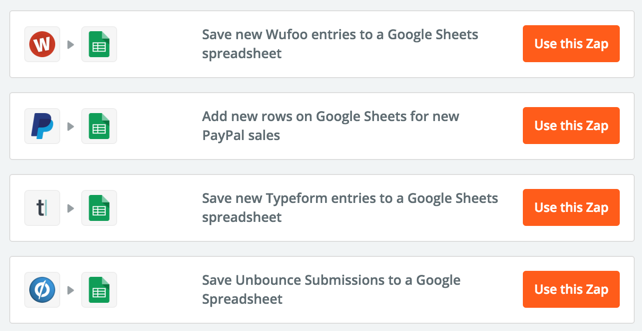
These zaps help users connect their website forms with the Google Sheets CRM option. This is brilliant, contextual placement for their product. It adds value to the content and provides a seamless next step for users to sign up for a free Zapier account.
Where does your content land on our native connection scorecard?
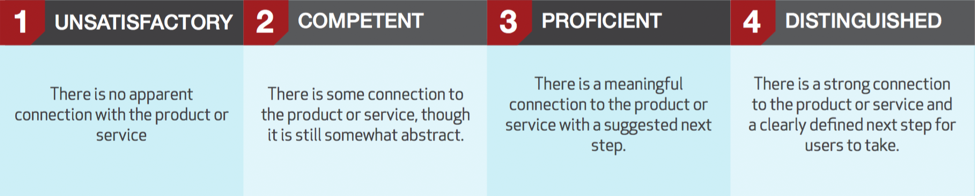
Download the entire scorecard here
Do you remember learning about potential energy in high school science? If you missed that class, let me refresh your memory. Potential energy describes the “stored” energy an object has due to its position. A bowling ball has potential energy when you hold it above your head (go ahead, let go of the ball to see what I mean).
For content to have high potential energy, it must address a key problem, goal, or collective experience shared by many in your target audience.
Potential energy might be measured by a high level of keyword search volume for the topic, a popular Q&A thread on sites like Quora, or a highly shared article on a similar topic.
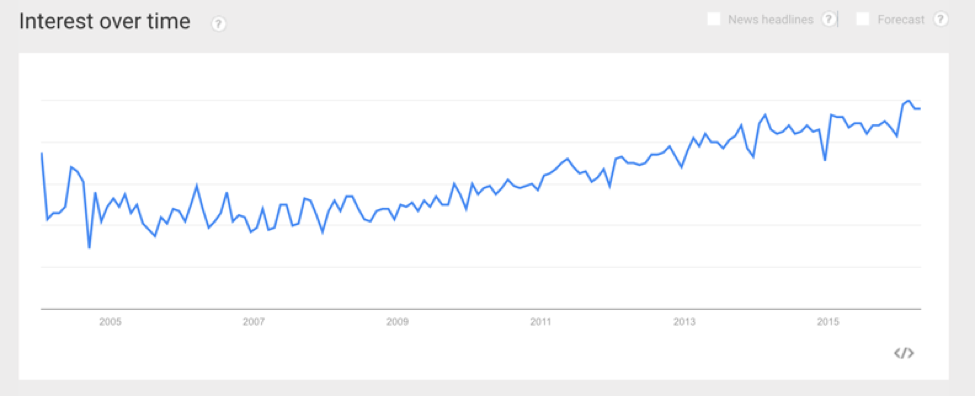
Example: The Zapier content piece cited above targets over 50k searches per month on Google for queries related to "free CRM". Also, the interest in this topic is steadily rising, as reported by Google Trends:
Where does your content land on our potential energy scorecard?
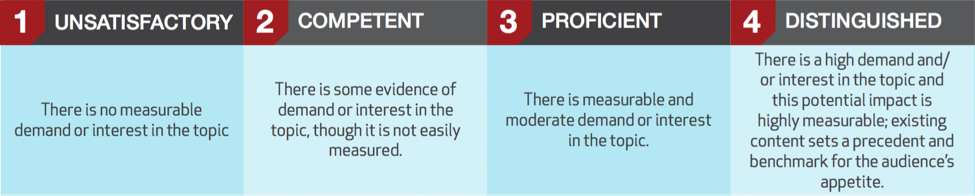
Download the entire scorecard here
Viral content reproduces visits, shares or links, with exponential returns. If your content's got virality, it begs to be shared and provides a seamless and/or unique way for users to share it on social media.
In most cases, this means that the content piece features some degree of interactivity. The interactive nature of the piece demands action from a user.
The lowest leg of viral interactivity is a social sharing button. This is where most marketers begin and end.
Moving up the ladder, we see the likes of interactive quizzes and calculators. The basic formula for success that emerges here is giving users a highly personalized, upgraded version of the content they're reading.
Example: Zenni Optical created aquiz that helped people find a style of frames that suits their lifestyle.
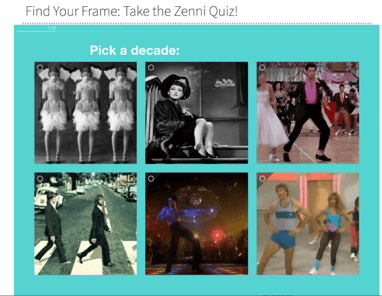
The quiz makes it easy for the user to share the personalized result on social media.
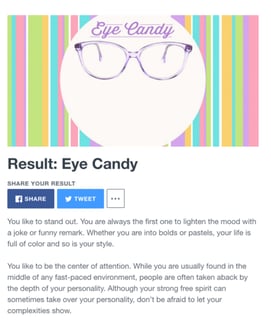
The results? 140,000 people took the quiz, 7,000 new email subscribers, and a $124,000 increase in revenue.
Where does your content land on our virality scorecard?
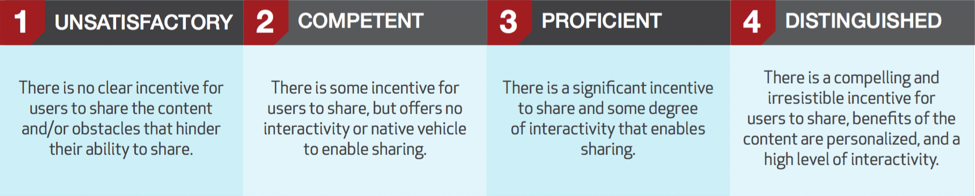
Download the entire scorecard here
Content is disruptive if it provides unique value compared to what’s currently “on the market”. Extra points if that unique value is directly tied to your product or service.
Example: BuzzSumo's blog leverages its own proprietary data, to produce massive research studies, like, How To Improve Facebook Engagement: Insights From 1bn posts
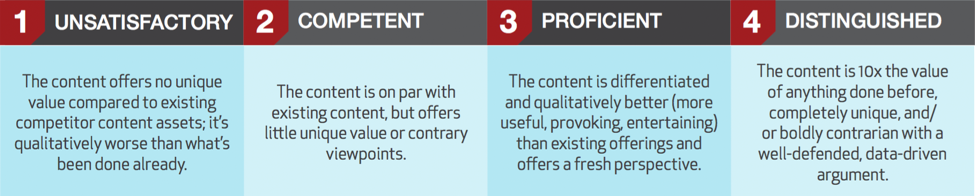
Download the entire scorecard here
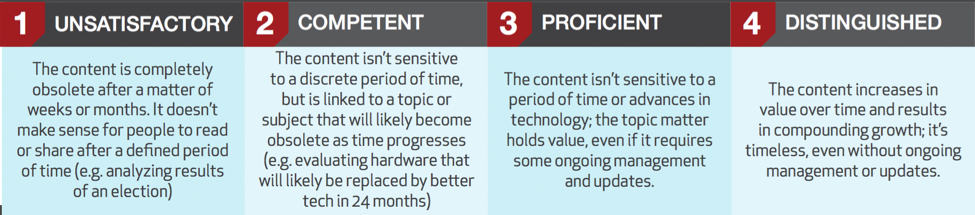
For content to be sustainable, it must be evergreen - it has staying power long after it's introduced to the world. Thus it drives compounding growth over time, and isn't made obsolete after a news cycle or particular season ends.
The crown jewel of an evergreen piece is something that grows in value as time progresses. For example, a piece that leverages user-generated content like reviews or comments.
Just because something is evergreen doesn't mean it shouldn't be updated over time. In fact, some of the best evergreen content pieces lend themselves well to updates.
Example: Moz'sSearch Engine Ranking Factors is updated each year with a comprehensive outlook on what it takes to rank high in search results.
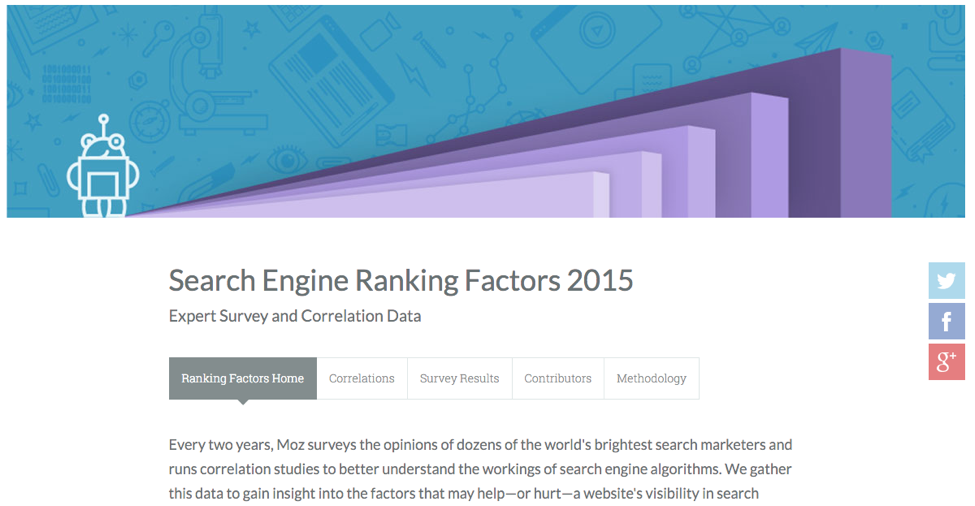
Moz draws on millions of data points that they've accumulated using their own product and technology, along with the opinions and experiences of top industry SEOs. While the URL remains the same each year, the title and data are updated and the content piece continues to drive thousands of new links, visits and customers.
Where does your content land on our sustainability scorecard?
Download the entire scorecard here
Think of this growth content framework as a strategic tool, rather than a diagnostic to grade the existing content in your inventory.
As you’re brainstorming fresh content ideas with the goal of driving new user acquisition or sales, use this framework to prioritize certain ideas over others.
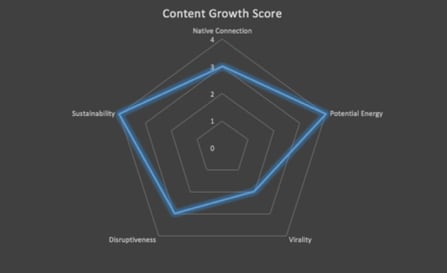
You can use the rubric we’ve created to grade your top contenders and visualize the grade like so:
Lastly, we recognize that not all content creation efforts should aim to produce growth content pieces. The needs of your audience are diverse and their path to purchase is unique. Plan appropriately for each stage in the buyer’s journey, but don’t neglect opportunities to include these attributes that are proven to drive exponential growth.

Most advertisers pour budget into Google Search and Display campaigns while overlooking one of the most targeted placements in the entire Google Ads ecosystem: Gmail. Google Sponsored Promotion (GSP) ads appear directly in a user's Gmail Promotions tab, formatted to look like a native email. When a user clicks the collapsed ad, it expands into a full-width creative that can include images, video, and a clear call to action.
The strategic advantage of Gmail ads is simple. Because you can target users based on the emails they receive, you can place your brand directly in front of people who are already engaged with your competitors or complementary products. You are not interrupting a random browsing session. You are reaching someone who has an active relationship with a company in your space and showing them a better alternative.
For brands looking to grow market share without inflating search CPCs, Gmail ads offer a low-cost, high-intent channel that most competitors are not even thinking about.
The real power of GSP ads is not the ad format itself. It is the targeting model. There are two categories of businesses you should be targeting with Gmail campaigns:
Complements are businesses, tools, or services that your target audience uses alongside your product. They are not direct competitors, but they serve the same buyer profile. For example, if you sell a landing page builder, your complements might include email marketing platforms like Mailchimp, ConvertKit, or ActiveCampaign. Users of those tools almost certainly need a landing page solution, making them a high-quality audience.
Competitors are the brands that sell directly against you. By targeting their domain in your Gmail campaign, your ad will appear in the inboxes of users who receive their marketing emails, onboarding sequences, and promotional offers. This is the digital equivalent of placing a billboard outside your competitor's storefront, except it is personalized, measurable, and far less expensive.
The combination of complement and competitor targeting gives you access to a pre-qualified audience. These users have already demonstrated interest in your category through their existing email subscriptions and purchasing behavior.
Gmail campaigns should not operate in isolation. They work best as part of a multi-channel growth marketing strategy where each channel plays a distinct role:
By positioning Gmail ads in the awareness-to-consideration phase, you create an additional touchpoint that warms up prospects before they ever search for your brand or product category.
Follow these steps to create your first GSP campaign targeting competitor and complement audiences.
In your Google Ads account, click "Create a New Campaign" and select "Display Network Only." Gmail ads run through the Display network, so this is your starting point.

Enter your campaign name, select your target location, and set your bidding strategy and daily budget. For Gmail campaigns, start with a Manual CPC bidding strategy so you maintain control over costs while gathering initial performance data. A daily budget of $20 to $50 is a reasonable starting point for testing.

Click "Save and continue" to move to the ad group configuration.
Create a naming convention that maps each ad group to a specific competitor or complement. For example: "GSP - Competitor - Mailchimp" or "GSP - Complement - LeadPages." This structure makes it easy to compare performance across targets and scale the campaign over time.
Start with a max CPC between $0.10 and $0.50. Gmail clicks tend to be significantly cheaper than Search clicks, so you do not need to bid aggressively to win placements. You can adjust bids up or down based on initial performance.
Under targeting options, choose "Display keywords" and enter the website URL of your competitor or complement. This is the critical step that defines who sees your ad.
When you enter a domain like "mailchimp.com" as a display keyword, Google will show your ad to Gmail users who have received emails from that domain. This is how you reach an audience that is already engaged with a competing or complementary brand.

Click "Narrow your targeting further" and choose "Placements" as your targeting method. This is a step many advertisers miss, and skipping it will cause your ads to show across the entire Display network rather than exclusively in Gmail.

Search for "mail.google.com" and add it as your placement target. This ensures your ads appear only within Gmail inboxes and nowhere else on the Display network.

Click "Save and continue." On the Ad Creation page, click "Skip ad creation." Gmail ads cannot be created in the standard ad builder, so you will need to use the Ad Gallery.
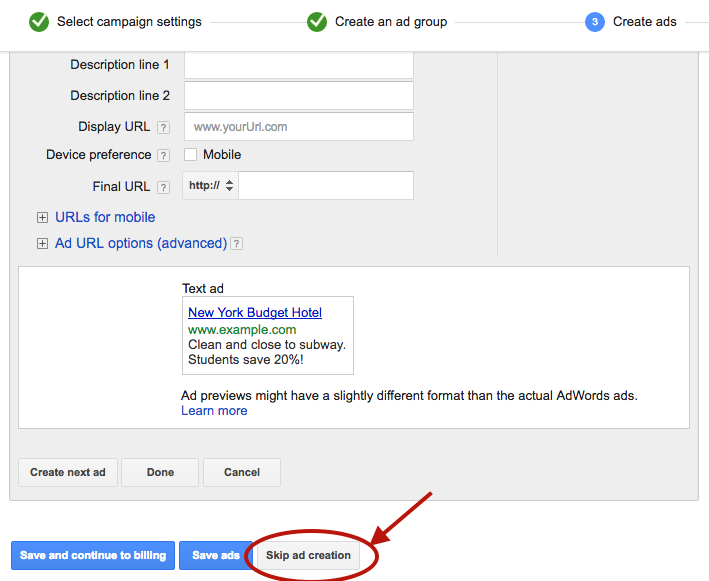
Navigate to the "Ads" tab in your account, click the red "Ad" button, and select "Ad Gallery" from the dropdown menu.
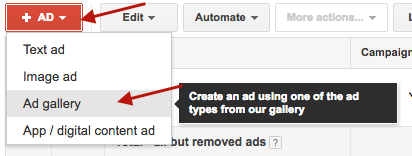
In the Ad Gallery, click "Gmail Ads" to access the Gmail-specific ad templates.

Select "Gmail image template" for the simplest and most effective format. Other template options are available, but the image template provides the best combination of visual impact and ease of setup.

Fill in the template fields:

One of the strongest advantages of Gmail ads is the ability to split-test variations of every element. Create at least two to three versions with different subject lines, images, and descriptions. Test one variable at a time to isolate what drives performance.
Click "Save" to finalize your ad. Your campaign is now live and will begin serving to Gmail users who match your targeting criteria.
Your Gmail ad appears alongside real emails. If your subject line reads like an advertisement, users will skip it. Study the subject line patterns that perform well in email marketing: curiosity-driven questions, specific numbers, and clear benefit statements all tend to outperform generic promotional copy.
The expanded Gmail ad is only the first click. If users land on a generic homepage after clicking a specific offer, you will lose them. Create dedicated landing pages that match the messaging and offer in your Gmail ad. This alignment improves both conversion rates and Quality Score.
Once you validate that your initial targets are producing cost-efficient clicks and conversions, expand your campaign by adding new competitor and complement domains as separate ad groups. Each new domain you add opens up an entirely new audience segment.
Performance will vary significantly across targets. A competitor with a large, engaged email list will generate more impressions and clicks than a smaller complement. Review performance at the ad group level weekly and adjust bids to allocate more budget toward your top-performing targets.
Gmail ad clicks are top-of-funnel interactions. Most users will not convert on the first visit. Make sure your remarketing pixel fires on the landing page so you can follow up with Display, Search, and social remarketing ads that bring these users back to convert.
Gmail ads do not generate the immediate volume of Search campaigns or the flashy creative opportunities of video and social ads. They are a surgical targeting tool that delivers incremental reach at a fraction of the cost. Because they require a different setup workflow and a targeting mindset rooted in competitive intelligence, most advertisers never bother.
That is exactly why they work. Low competition means lower CPCs, higher impression share, and the opportunity to reach your competitors' most engaged audiences before they even start searching for alternatives.
If you are looking for new growth channels that deliver qualified traffic without bidding wars, Gmail ads deserve a place in your paid media mix.


.svg)