
If you've ever asked "what is Google AdWords," the short answer is: it's the original name for what is now called Google Ads, the world's largest paid search and digital advertising platform. Google renamed AdWords to Google Ads in July 2018, but the underlying engine, pay-per-click auctions, keyword targeting, and intent-based reach, remained the same. Understanding both names matters because most search traffic still uses "AdWords" as shorthand, even in 2026.
This guide covers everything you need to know: the rebrand history, how the auction works, which campaign types exist today, what it costs, and whether the platform fits your business goals.
Google launched AdWords in October 2000, initially offering 350 advertisers the ability to bid on keywords and show text ads in search results. For nearly two decades, "AdWords" was synonymous with paid search. But by 2018, the platform had expanded well beyond keyword-based text ads to include display banners, shopping listings, YouTube video ads, and app install campaigns.
On June 26, 2018, Google officially announced the AdWords rebrand to Google Ads, alongside a broader restructuring of its entire ads business. DoubleClick advertiser products and Analytics 360 were folded into Google Marketing Platform, while DoubleClick for Publishers became Google Ad Manager. The goal was to simplify a product lineup that had grown into an alphabet soup of overlapping brand names.
The name change did not affect campaign performance, reporting, or ad auction mechanics. If you had existing campaigns running in AdWords, they continued running unchanged under the new Google Ads interface. The rebrand was cosmetic and organizational, not technical.
Today, Google Ads generates over $265 billion in annual revenue for Alphabet, making it the dominant force in digital advertising globally.
Google Ads operates on a real-time auction that runs every time a user submits a search query. Understanding how that auction works is essential for anyone spending money on the platform.
Your ad's position in search results is not determined by bid alone. Google calculates an Ad Rank score for every eligible advertiser, and the highest Ad Rank wins the top spot. According to Google's own documentation, Ad Rank is determined by six primary factors: your bid amount, your ad quality, the Ad Rank thresholds for the auction, the competitiveness of that specific auction, the context of the search (device, location, time of day), and the expected impact of your ad extensions.
Quality Score is a 1-10 rating that reflects three components: expected click-through rate, ad relevance to the keyword, and landing page experience. A higher Quality Score means Google considers your ad more relevant to the user, which can lower your effective cost per click. Critically, Google now classifies Quality Score as a diagnostic tool, not a direct input into the live auction. It signals where your ads stand relative to competitors, but Ad Rank drives actual position.
The auction uses a second-price model. You pay the minimum amount needed to beat the Ad Rank of the advertiser below you, not your full bid. This structure rewards advertisers with high-quality, relevant ads because a strong Quality Score can achieve top placement at a lower cost than a competitor with a high bid but poor ad relevance.
Working with a qualified Google Ads management team can make a measurable difference in Quality Scores, which compounds over time into lower CPCs and better placements.
The platform has expanded significantly since its AdWords days. Here are the five core campaign types available in 2026:
| Campaign Type | Primary Channel | Best For | Funnel Stage |
|---|---|---|---|
| Search | Google Search results | High-intent keyword capture | Bottom |
| Shopping | Search + Shopping tab | Product-based ecommerce sales | Bottom |
| Performance Max | All Google channels | Full-funnel automation, scaling | Full funnel |
| Display | Google Display Network (3M+ sites) | Retargeting, brand awareness | Mid/Top |
| Demand Gen | YouTube, Gmail, Discover | Interest-based demand creation | Top |
Search campaigns remain the most direct route to capturing purchase intent. When someone searches "buy running shoes size 10," a well-structured Search campaign puts your product in front of them at exactly the right moment.
Shopping campaigns display product images, prices, and ratings directly in search results. They're essential for ecommerce brands with product catalogs, as they show before organic results and often generate strong conversion rates at competitive CPCs.
Performance Max (PMax) is Google's AI-driven campaign type that serves ads across Search, Display, YouTube, Gmail, Maps, and Discover from a single campaign. Google's recommended budget allocation for ecommerce puts PMax at 50 to 60% of total spend, with AI-optimized bidding across every placement. PMax works best when fed strong creative assets and clear conversion data.
Display campaigns reach users across more than 3 million websites in the Google Display Network. They work well for retargeting visitors who browsed your site but didn't convert, and for building visual brand awareness at scale.
Demand Gen campaigns replaced Discovery ads in 2023 and run across YouTube (including Shorts), Gmail, and the Google Discover feed. They're built for upper-funnel awareness and are particularly effective for DTC brands introducing new products to cold audiences.
Google now packages its most advanced campaign types into what it calls the "Power Pack": AI Max for Search, Performance Max, and Demand Gen, designed to cover the full customer journey from awareness to conversion.
Google Ads costs vary by industry, competition level, and campaign type. There is no fixed entry price: you set a daily budget and pay when users click (CPC), view a video (CPV), or complete a target action (CPA bidding).
According to 2026 benchmark data from WordStream and other sources, the cross-industry average CPC on Search reached $2.96 in Q1 2026, up 12% from $2.64 in Q1 2025. Industry-level costs vary widely. Legal services average $8.58 per click while ecommerce averages closer to $1.16. The steepest CPCs reflect sectors with high lifetime customer value, such as finance, insurance, and legal.
On the return side, ecommerce brands using Google Ads average a blended ROAS of approximately 3.68:1 across the platform, according to Triple Whale's dataset of 18,000+ brands. Search campaigns specifically average 5.17:1 ROAS, while Performance Max averages 2.57:1. Most sustainable DTC brands target a blended ROAS of 2.5x to 4x depending on category margins, and many premium brands aim for 5:1 or higher.
For context, the minimum effective daily budget to gather meaningful data from a Search campaign starts around $20 to $30 per day, though most growth-stage brands budget significantly more to generate statistically useful conversion data within a reasonable timeframe.
Partnering with a capable PPC company that understands auction mechanics and bidding strategy can compress the learning phase and reduce wasted spend.
Google Ads is most effective for businesses where customer intent is the primary driver of conversions. If your customers search for what you sell before buying, paid search captures that intent with precision that most other channels cannot match.
Google Ads tends to perform especially well for:
Google Ads is less ideal for businesses without measurable conversion events, companies with very low average order values where CPC costs compress margins, or brands whose customers do not search before buying (impulse categories often perform better on Meta or TikTok).
For businesses that want both paid search and broader channel management, working with a full-service SEM marketing agency or a search engine marketing company can help ensure budgets are allocated across channels in a way that maximizes blended return.
The platform's core structure has four levels: Account, Campaign, Ad Group, and Ad. Campaigns hold your settings and budget. Ad Groups contain sets of keywords and the ads triggered by those keywords. Ads are the creatives users see.
A basic Search campaign setup for an ecommerce brand typically includes: a keyword list organized by intent (branded, category, competitor, long-tail), match type settings to control how broadly keywords trigger your ads, negative keywords to filter irrelevant queries, and responsive search ads with multiple headline and description variants that Google automatically tests.
From there, bidding strategy, landing page optimization, and audience layering are the primary levers for improving performance over time.
Understanding Google Ads in theory is one step. Executing profitably at scale requires continuous testing, strong campaign architecture, and the ability to read auction signals and respond quickly.
EmberTribe specializes in Google Ads management for DTC and growth-stage brands, building and managing campaigns that are grounded in data and optimized for actual business outcomes, not just platform metrics. Visit embertribe.com to learn how we approach paid search.

If you've ever asked "what is Google AdWords," the short answer is: it's the original name for what is now called Google Ads, the world's largest paid search and digital advertising platform. Google renamed AdWords to Google Ads in July 2018, but the underlying engine, pay-per-click auctions, keyword targeting, and intent-based reach, remained the same. Understanding both names matters because most search traffic still uses "AdWords" as shorthand, even in 2026.
This guide covers everything you need to know: the rebrand history, how the auction works, which campaign types exist today, what it costs, and whether the platform fits your business goals.
Google launched AdWords in October 2000, initially offering 350 advertisers the ability to bid on keywords and show text ads in search results. For nearly two decades, "AdWords" was synonymous with paid search. But by 2018, the platform had expanded well beyond keyword-based text ads to include display banners, shopping listings, YouTube video ads, and app install campaigns.
On June 26, 2018, Google officially announced the AdWords rebrand to Google Ads, alongside a broader restructuring of its entire ads business. DoubleClick advertiser products and Analytics 360 were folded into Google Marketing Platform, while DoubleClick for Publishers became Google Ad Manager. The goal was to simplify a product lineup that had grown into an alphabet soup of overlapping brand names.
The name change did not affect campaign performance, reporting, or ad auction mechanics. If you had existing campaigns running in AdWords, they continued running unchanged under the new Google Ads interface. The rebrand was cosmetic and organizational, not technical.
Today, Google Ads generates over $265 billion in annual revenue for Alphabet, making it the dominant force in digital advertising globally.
Google Ads operates on a real-time auction that runs every time a user submits a search query. Understanding how that auction works is essential for anyone spending money on the platform.
Your ad's position in search results is not determined by bid alone. Google calculates an Ad Rank score for every eligible advertiser, and the highest Ad Rank wins the top spot. According to Google's own documentation, Ad Rank is determined by six primary factors: your bid amount, your ad quality, the Ad Rank thresholds for the auction, the competitiveness of that specific auction, the context of the search (device, location, time of day), and the expected impact of your ad extensions.
Quality Score is a 1-10 rating that reflects three components: expected click-through rate, ad relevance to the keyword, and landing page experience. A higher Quality Score means Google considers your ad more relevant to the user, which can lower your effective cost per click. Critically, Google now classifies Quality Score as a diagnostic tool, not a direct input into the live auction. It signals where your ads stand relative to competitors, but Ad Rank drives actual position.
The auction uses a second-price model. You pay the minimum amount needed to beat the Ad Rank of the advertiser below you, not your full bid. This structure rewards advertisers with high-quality, relevant ads because a strong Quality Score can achieve top placement at a lower cost than a competitor with a high bid but poor ad relevance.
Working with a qualified Google Ads management team can make a measurable difference in Quality Scores, which compounds over time into lower CPCs and better placements.
The platform has expanded significantly since its AdWords days. Here are the five core campaign types available in 2026:
| Campaign Type | Primary Channel | Best For | Funnel Stage |
|---|---|---|---|
| Search | Google Search results | High-intent keyword capture | Bottom |
| Shopping | Search + Shopping tab | Product-based ecommerce sales | Bottom |
| Performance Max | All Google channels | Full-funnel automation, scaling | Full funnel |
| Display | Google Display Network (3M+ sites) | Retargeting, brand awareness | Mid/Top |
| Demand Gen | YouTube, Gmail, Discover | Interest-based demand creation | Top |
Search campaigns remain the most direct route to capturing purchase intent. When someone searches "buy running shoes size 10," a well-structured Search campaign puts your product in front of them at exactly the right moment.
Shopping campaigns display product images, prices, and ratings directly in search results. They're essential for ecommerce brands with product catalogs, as they show before organic results and often generate strong conversion rates at competitive CPCs.
Performance Max (PMax) is Google's AI-driven campaign type that serves ads across Search, Display, YouTube, Gmail, Maps, and Discover from a single campaign. Google's recommended budget allocation for ecommerce puts PMax at 50 to 60% of total spend, with AI-optimized bidding across every placement. PMax works best when fed strong creative assets and clear conversion data.
Display campaigns reach users across more than 3 million websites in the Google Display Network. They work well for retargeting visitors who browsed your site but didn't convert, and for building visual brand awareness at scale.
Demand Gen campaigns replaced Discovery ads in 2023 and run across YouTube (including Shorts), Gmail, and the Google Discover feed. They're built for upper-funnel awareness and are particularly effective for DTC brands introducing new products to cold audiences.
Google now packages its most advanced campaign types into what it calls the "Power Pack": AI Max for Search, Performance Max, and Demand Gen, designed to cover the full customer journey from awareness to conversion.
Google Ads costs vary by industry, competition level, and campaign type. There is no fixed entry price: you set a daily budget and pay when users click (CPC), view a video (CPV), or complete a target action (CPA bidding).
According to 2026 benchmark data from WordStream and other sources, the cross-industry average CPC on Search reached $2.96 in Q1 2026, up 12% from $2.64 in Q1 2025. Industry-level costs vary widely. Legal services average $8.58 per click while ecommerce averages closer to $1.16. The steepest CPCs reflect sectors with high lifetime customer value, such as finance, insurance, and legal.
On the return side, ecommerce brands using Google Ads average a blended ROAS of approximately 3.68:1 across the platform, according to Triple Whale's dataset of 18,000+ brands. Search campaigns specifically average 5.17:1 ROAS, while Performance Max averages 2.57:1. Most sustainable DTC brands target a blended ROAS of 2.5x to 4x depending on category margins, and many premium brands aim for 5:1 or higher.
For context, the minimum effective daily budget to gather meaningful data from a Search campaign starts around $20 to $30 per day, though most growth-stage brands budget significantly more to generate statistically useful conversion data within a reasonable timeframe.
Partnering with a capable PPC company that understands auction mechanics and bidding strategy can compress the learning phase and reduce wasted spend.
Google Ads is most effective for businesses where customer intent is the primary driver of conversions. If your customers search for what you sell before buying, paid search captures that intent with precision that most other channels cannot match.
Google Ads tends to perform especially well for:
Google Ads is less ideal for businesses without measurable conversion events, companies with very low average order values where CPC costs compress margins, or brands whose customers do not search before buying (impulse categories often perform better on Meta or TikTok).
For businesses that want both paid search and broader channel management, working with a full-service SEM marketing agency or a search engine marketing company can help ensure budgets are allocated across channels in a way that maximizes blended return.
The platform's core structure has four levels: Account, Campaign, Ad Group, and Ad. Campaigns hold your settings and budget. Ad Groups contain sets of keywords and the ads triggered by those keywords. Ads are the creatives users see.
A basic Search campaign setup for an ecommerce brand typically includes: a keyword list organized by intent (branded, category, competitor, long-tail), match type settings to control how broadly keywords trigger your ads, negative keywords to filter irrelevant queries, and responsive search ads with multiple headline and description variants that Google automatically tests.
From there, bidding strategy, landing page optimization, and audience layering are the primary levers for improving performance over time.
Understanding Google Ads in theory is one step. Executing profitably at scale requires continuous testing, strong campaign architecture, and the ability to read auction signals and respond quickly.
EmberTribe specializes in Google Ads management for DTC and growth-stage brands, building and managing campaigns that are grounded in data and optimized for actual business outcomes, not just platform metrics. Visit embertribe.com to learn how we approach paid search.

You may still call it Google AdWords — the legacy name stuck around long after Google rebranded the platform to Google Ads in 2018. Whatever you call it, the fundamentals of hiring an agency to manage your paid search haven't changed: you're trusting someone with real ad budget, and a bad partnership costs more than just the agency fee.
This guide covers what genuinely matters when evaluating a Google Ads agency — the criteria that separate accountable, skilled partners from agencies that optimize for their own retention rather than your results.
When people search for "google adwords agency," they're usually looking for the same thing: an agency that manages Google's paid search platform professionally. The name is outdated (Google retired the AdWords brand in 2018), but the intent behind the search is clear — find someone who knows Google Ads well enough to manage campaigns against a real budget.
Any agency worth working with will acknowledge the rebrand and speak fluently about the modern Google Ads interface, campaign types (Search, Performance Max, Shopping, Display, YouTube), and the platform's ongoing evolution. If an agency still leads with "AdWords" as a primary identifier, that's a minor signal worth noting — but what matters more is whether they can demonstrate current, hands-on expertise.
A legitimate Google Ads agency provides:
The last two points — reporting and testing — are where agencies most commonly underdeliver. Fancy dashboards with week-over-week click trends don't tell you whether the campaigns are working. Revenue-anchored reporting with clear attribution does.
This is the single most important thing to verify. Your Google Ads account should be created under your Google account — not the agency's. If the agency creates the account under their own manager account (MCA) and you don't have admin access, you have no real data portability, no ability to audit historical performance, and a painful exit path.
Any reputable agency will grant you admin-level access from the first day of the engagement. Full stop.
The percentage-of-spend model misaligns incentives fundamentally: the agency earns more when you spend more, regardless of whether that increased spend is producing proportionally better results. Look for flat monthly retainers with clear scope definitions, or performance-based models tied to revenue outcomes — not spend volume.
Google Ads campaigns need a meaningful data accumulation period before Smart Bidding algorithms can optimize effectively. Expect 60–90 days before you have enough data to evaluate campaign performance fairly. Any agency promising significant ROAS improvements within two to four weeks is either overpromising or inheriting a well-built account and claiming credit for it.
Legitimate agencies set realistic timelines and communicate clearly about what the first 30, 60, and 90 days will look like.
These are inputs, not outcomes. A click that doesn't convert is a cost, not a result. Agency reporting should lead with conversion metrics, CPA or ROAS relative to target, revenue contribution, and quality score trends — not reach and click volume. If the sample report an agency shows you during the sales process is impression-heavy, their actual reporting will be too.
Twelve-month contracts with new agencies are high risk. A three-to-six month initial engagement with a monthly option to continue is a fair ask from any established agency. Long lock-ins benefit the agency's revenue stability, not your campaign performance. If an agency insists on a year-plus commitment before you've seen any results, walk away.
Large agencies routinely win new business with senior talent and hand it off to junior account managers. Ask explicitly: "Who will be managing our account day to day, and can I speak with them before we sign?" The account manager who will handle your campaigns should be able to speak fluently about campaign structure, bidding strategy, and creative testing. If you get a sales rep instead of the practitioner, that's a flag.
Before signing, verify that the contract addresses these elements clearly:
Account ownership: Explicit language stating that the Google Ads account, all campaign data, and all creative assets belong to you — not the agency.
Termination terms: Reasonable notice periods (30 days is standard) with no early termination fees after the initial engagement period. Multi-year contracts on first-time relationships are unusual and should be questioned.
Scope of services: Specific deliverables per month — campaign types managed, ad copy cycles, landing page recommendations, reporting cadence — rather than vague language like "ongoing optimization."
Fee structure: Transparent breakdown of management fee vs. ad spend. No hidden fees for creative production, reporting tools, or account access.
Performance review cadence: At minimum, monthly reporting calls with QBRs at 90 days and 6 months. Clear definition of the KPIs that define success.
Data and tool access: You should retain access to all analytics properties, call tracking platforms, and any third-party tools used in the management of your account.
Use these in your evaluation calls:
Strong practitioners answer these questions with specifics. Generalists answer them with generalities. The difference is obvious within a few minutes.
Management fees vary significantly by scope and agency size:
These are rough ranges. The right question isn't "what's the cheapest management fee" — it's "what's the total investment relative to the revenue I should expect the campaigns to generate." An agency charging $5,000/month that improves your ROAS from 2.5× to 4.0× on $50,000/month of spend generates far more value than a $1,500/month manager who maintains flat performance.
Even after you've selected a strong agency and signed a solid contract, manage your expectations for the first quarter:
At the 90-day mark, you should have enough data to evaluate whether the agency's approach is working. That's the conversation to have before committing to an extended engagement.
Google Ads managed well is one of the most reliable acquisition channels for growth-stage ecommerce and DTC brands. The difference between a mediocre agency and a great one isn't marginal — it's often the difference between a channel that drains budget and one that compounds your customer acquisition over time.
Take the time to verify account ownership terms, understand the reporting you'll receive, and speak directly with the person managing your campaigns before you sign anything.
For more on evaluating paid media partners, see our complete guide to ecommerce PPC management agencies and our breakdown of how to choose the best ecommerce marketing agency.
Most advertisers pour budget into Google Search and Display campaigns while overlooking one of the most targeted placements in the entire Google Ads ecosystem: Gmail. Google Sponsored Promotion (GSP) ads appear directly in a user's Gmail Promotions tab, formatted to look like a native email. When a user clicks the collapsed ad, it expands into a full-width creative that can include images, video, and a clear call to action.
The strategic advantage of Gmail ads is simple. Because you can target users based on the emails they receive, you can place your brand directly in front of people who are already engaged with your competitors or complementary products. You are not interrupting a random browsing session. You are reaching someone who has an active relationship with a company in your space and showing them a better alternative.
For brands looking to grow market share without inflating search CPCs, Gmail ads offer a low-cost, high-intent channel that most competitors are not even thinking about.
The real power of GSP ads is not the ad format itself. It is the targeting model. There are two categories of businesses you should be targeting with Gmail campaigns:
Complements are businesses, tools, or services that your target audience uses alongside your product. They are not direct competitors, but they serve the same buyer profile. For example, if you sell a landing page builder, your complements might include email marketing platforms like Mailchimp, ConvertKit, or ActiveCampaign. Users of those tools almost certainly need a landing page solution, making them a high-quality audience.
Competitors are the brands that sell directly against you. By targeting their domain in your Gmail campaign, your ad will appear in the inboxes of users who receive their marketing emails, onboarding sequences, and promotional offers. This is the digital equivalent of placing a billboard outside your competitor's storefront, except it is personalized, measurable, and far less expensive.
The combination of complement and competitor targeting gives you access to a pre-qualified audience. These users have already demonstrated interest in your category through their existing email subscriptions and purchasing behavior.
Gmail campaigns should not operate in isolation. They work best as part of a multi-channel growth marketing strategy where each channel plays a distinct role:
By positioning Gmail ads in the awareness-to-consideration phase, you create an additional touchpoint that warms up prospects before they ever search for your brand or product category.
Follow these steps to create your first GSP campaign targeting competitor and complement audiences.
In your Google Ads account, click "Create a New Campaign" and select "Display Network Only." Gmail ads run through the Display network, so this is your starting point.

Enter your campaign name, select your target location, and set your bidding strategy and daily budget. For Gmail campaigns, start with a Manual CPC bidding strategy so you maintain control over costs while gathering initial performance data. A daily budget of $20 to $50 is a reasonable starting point for testing.

Click "Save and continue" to move to the ad group configuration.
Create a naming convention that maps each ad group to a specific competitor or complement. For example: "GSP - Competitor - Mailchimp" or "GSP - Complement - LeadPages." This structure makes it easy to compare performance across targets and scale the campaign over time.
Start with a max CPC between $0.10 and $0.50. Gmail clicks tend to be significantly cheaper than Search clicks, so you do not need to bid aggressively to win placements. You can adjust bids up or down based on initial performance.
Under targeting options, choose "Display keywords" and enter the website URL of your competitor or complement. This is the critical step that defines who sees your ad.
When you enter a domain like "mailchimp.com" as a display keyword, Google will show your ad to Gmail users who have received emails from that domain. This is how you reach an audience that is already engaged with a competing or complementary brand.

Click "Narrow your targeting further" and choose "Placements" as your targeting method. This is a step many advertisers miss, and skipping it will cause your ads to show across the entire Display network rather than exclusively in Gmail.

Search for "mail.google.com" and add it as your placement target. This ensures your ads appear only within Gmail inboxes and nowhere else on the Display network.

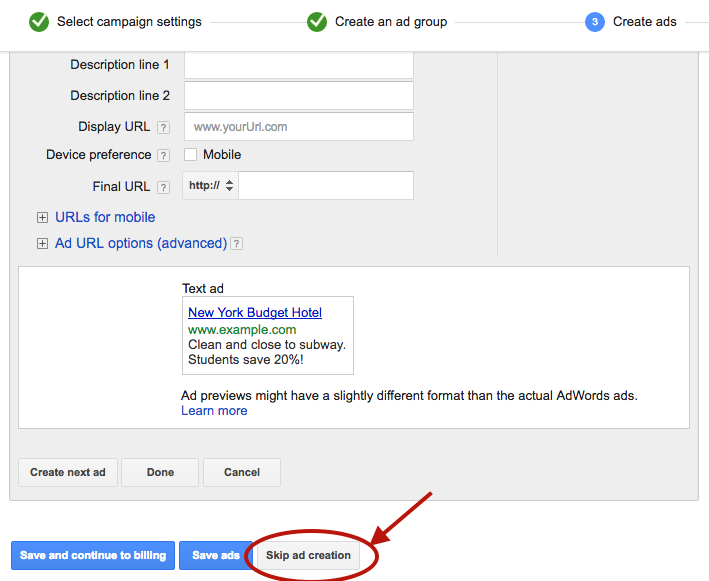
Click "Save and continue." On the Ad Creation page, click "Skip ad creation." Gmail ads cannot be created in the standard ad builder, so you will need to use the Ad Gallery.
Navigate to the "Ads" tab in your account, click the red "Ad" button, and select "Ad Gallery" from the dropdown menu.
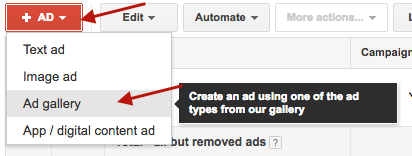
In the Ad Gallery, click "Gmail Ads" to access the Gmail-specific ad templates.

Select "Gmail image template" for the simplest and most effective format. Other template options are available, but the image template provides the best combination of visual impact and ease of setup.

Fill in the template fields:

One of the strongest advantages of Gmail ads is the ability to split-test variations of every element. Create at least two to three versions with different subject lines, images, and descriptions. Test one variable at a time to isolate what drives performance.
Click "Save" to finalize your ad. Your campaign is now live and will begin serving to Gmail users who match your targeting criteria.
Your Gmail ad appears alongside real emails. If your subject line reads like an advertisement, users will skip it. Study the subject line patterns that perform well in email marketing: curiosity-driven questions, specific numbers, and clear benefit statements all tend to outperform generic promotional copy.
The expanded Gmail ad is only the first click. If users land on a generic homepage after clicking a specific offer, you will lose them. Create dedicated landing pages that match the messaging and offer in your Gmail ad. This alignment improves both conversion rates and Quality Score.
Once you validate that your initial targets are producing cost-efficient clicks and conversions, expand your campaign by adding new competitor and complement domains as separate ad groups. Each new domain you add opens up an entirely new audience segment.
Performance will vary significantly across targets. A competitor with a large, engaged email list will generate more impressions and clicks than a smaller complement. Review performance at the ad group level weekly and adjust bids to allocate more budget toward your top-performing targets.
Gmail ad clicks are top-of-funnel interactions. Most users will not convert on the first visit. Make sure your remarketing pixel fires on the landing page so you can follow up with Display, Search, and social remarketing ads that bring these users back to convert.
Gmail ads do not generate the immediate volume of Search campaigns or the flashy creative opportunities of video and social ads. They are a surgical targeting tool that delivers incremental reach at a fraction of the cost. Because they require a different setup workflow and a targeting mindset rooted in competitive intelligence, most advertisers never bother.
That is exactly why they work. Low competition means lower CPCs, higher impression share, and the opportunity to reach your competitors' most engaged audiences before they even start searching for alternatives.
If you are looking for new growth channels that deliver qualified traffic without bidding wars, Gmail ads deserve a place in your paid media mix.


.svg)