
Picking the wrong FB ads agency costs you more than the monthly retainer. It costs you months of stalled growth, creative that never improves, and data you can't use after you leave. For DTC brands running serious budgets on Meta, the agency selection decision carries real stakes.
This guide cuts through the noise: what a strong facebook ads agency actually does, how to evaluate candidates before you sign, what pricing structures to expect, and what results a competent meta ads agency should deliver.
A facebook advertising agency manages your paid campaigns across Meta's platforms: Facebook, Instagram, and the Audience Network. That scope includes campaign strategy, audience architecture, creative production and testing, budget allocation, and performance reporting.
The agencies that consistently deliver for DTC brands go further. They operate as a creative testing engine, producing a high volume of ad variations every month to feed Meta's algorithm with fresh signal. The best facebook ads agencies run 50 or more creative assets per month per client, with clear testing cadences that isolate variables rather than guessing.
What separates a strong meta ads agency from a reseller or generalist is specialization. An agency that understands DTC unit economics, contribution margin, and blended return on ad spend will make different (and better) decisions than one optimizing for platform-reported ROAS in isolation.

Creative is the primary performance lever on Meta. The algorithm has enough data to find buyers if you give it enough quality signal. An agency that produces 5-10 creative assets per month and calls it "testing" is not testing anything meaningful.
Ask specifically: how many creative variants do you produce per client per month? How do you structure tests? What is your process for identifying a winning angle and scaling it? A credible best fb ads agency can answer these questions with specifics, not vague references to "our proven process."
This is non-negotiable. Your Business Manager, your ad account, and your pixel should all be owned by your company, with the agency added as a partner. If an agency insists on running ads from their own account, you lose all your historical data, custom audiences, and pixel history the moment the engagement ends. That is a structural conflict of interest, and it is one of the clearest red flags in any agency evaluation.
Any agency can report clicks, reach, and impressions. A strong meta ads agency ties campaign performance to real business outcomes: cost per acquisition, marketing efficiency ratio, new customer acquisition cost, and contribution margin. If their reporting centers on platform-reported ROAS without accounting for attribution windows or channel overlap, that is a sign they are managing to the dashboard rather than to your business.
For DTC brands with margins of 30-40%, a blended Meta ROAS of 3.5x to 4.5x on a 7-day click basis is a healthy target in 2026. Retargeting campaigns can reach 6x to 10x, while prospecting typically starts at 2x to 3x. Any agency quoting you guaranteed results without understanding your margin structure is making promises they cannot keep.
An ecommerce brand needs a different agency than a B2B SaaS company. Ask for case studies from clients in your category, at your spend level. Look for specifics: what ROAS did they achieve, at what budget, in which vertical?
Vague testimonials and logo walls are not evidence. Sanitized dashboards with real performance metrics are.
For more on how Meta fits into a broader paid strategy, see our breakdown of meta advertising fundamentals.
Facebook advertising agencies typically use one of three pricing structures, and each creates different incentives.
Flat monthly retainer: The most straightforward model. For smaller accounts (under $10,000 in monthly ad spend), expect retainers between $1,000 and $3,000. Mid-market advertisers ($10,000-$50,000 in spend) typically pay $2,500 to $6,000 monthly. Enterprise accounts above $50,000 often negotiate custom rates above $10,000. Flat retainers align well with scope-defined work and give you predictable costs.
Percentage of ad spend: Commonly set at 10%-20% of monthly spend, with lower percentages for larger budgets. This model creates a structural problem: the agency earns more when you spend more, regardless of efficiency. It is not always a dealbreaker, but it means you need to watch budget decisions carefully.
Hybrid retainer plus performance bonus: A smaller base fee combined with additional compensation when defined targets are hit. This can align incentives well, but the performance metrics need to be agreed on in advance and must be tied to real business outcomes, not platform metrics.
Most agencies also charge a one-time setup fee ranging from $500 to $3,000 to audit your account, restructure campaigns, and configure tracking. Factor this into your total cost of engagement. According to Meta's own advertising resources, proper account structure and pixel setup are foundational to campaign performance, so agencies that skip this step are cutting corners.
Some warning signs appear before you even sign a contract.
Guaranteed ROAS: No agency can guarantee specific returns. Meta's auction environment, your creative quality, your landing page, your offer, and your margins all affect performance. An agency that promises a specific ROAS is either lying or planning to misattribute results.
Vanity metric reporting: If their sample reports show impressions, likes, and follower growth without CPA or revenue data, their definition of success is not aligned with yours.
Opaque team structure: Ask during the sales process to meet the team that will actually manage your account. Agencies that deflect this request often assign junior or outsourced staff after the contract is signed. The person selling you the engagement should be able to introduce you to your day-to-day contact.
Percentage-of-spend pricing without accountability: If the pricing model rewards spend growth rather than efficiency, watch for campaigns that run well past their productive window and resistance to scaling back even when margins compress.
No creative production capability: If they manage the campaigns but rely entirely on you to produce creative, they cannot execute fast-enough testing cadences. In-house creative production enables tighter feedback loops between performance data and creative decisions.
For additional context on evaluating service providers across paid and organic channels, our guide on SEM marketing agency selection covers overlapping evaluation criteria.
The interview process matters as much as the pitch deck. These questions reveal operational competence rather than sales polish.
A strong facebook advertising agency should be moving key metrics within 60 to 90 days of launch. Early indicators include improving creative performance signals (higher click-through rates, lower CPMs as the algorithm optimizes), not just end-of-funnel ROAS.
By month three, you should see a clear picture of which creative angles and audience structures perform, a declining cost per acquisition trend, and reporting that connects campaign activity to business outcomes. Meta's Advantage+ Shopping campaigns, when properly structured, have delivered a 32% lower cost per acquisition compared to manual configurations across ecommerce verticals in recent benchmark data.
If you are not seeing movement on CPA by month three, that is not a "Meta problem" or a seasonality issue. That is an agency execution problem.
For DTC brands scaling to six or seven figures in monthly ad spend, the right fb ads agency becomes a core growth infrastructure decision. It connects directly to your broader ecommerce growth strategy, particularly how paid acquisition interacts with retention, email, and organic channels. Our guide on ecommerce digital marketing covers how Meta fits into a full-funnel DTC growth model.
The best fb ads agency for your brand is not necessarily the biggest or the cheapest. It is the one that owns creative testing as a competency, aligns its incentives with your outcomes, gives you full account ownership, and reports against metrics that connect to your margins.
Treat the selection process as seriously as a key hire. Ask hard questions. Demand specific answers. And walk away from any agency that cannot show you real results from real clients.
If you want to see how EmberTribe approaches Meta advertising for DTC brands, we break down our exact framework here.
Sources:

In this post:
Check out this TribeTalk from our Marketing Specialist, Kathryn Betancourt chatting with our Director of Operations, J.P. VanderLinden, and one of our Growth Specialist, Melanie D'Angelo.
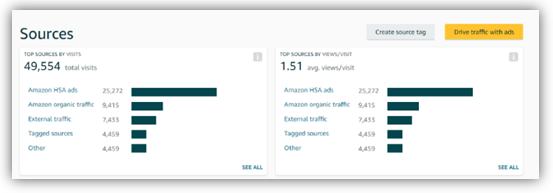
This helps pull data into Amazon but there are still issues for how to pull data OUT to other systems. It's not perfect, but it's more than we've had before, and it might be enough for folks to start exploring.
We've also discovered thatSellerly, a collection of Amazon business tools by Semrush, offers excellent marketing tools for Amazon listings designed to make selling on the marketplace easier and more effective. If Amazon's data insights are still not sufficient for you, give Sellerly a try!
Marketers understand that different ad types work better at different parts of the funnel. For example, Search is great at BOFu, Display at TOFu, etc. But what about how they work together?
Google released a report that marketers advertising on YouTube saw better conversion volume and rates from their Search campaigns. Specifically, Search conversions were 8% higher, conversion rates were 3% higher, and Search CPAs dropped 4%.
We all know that advertising on YouTube increases brand awareness and ad recall. The big questions are: Is this something driven by traditionally understood marketing practice? Or is Google itself actually influencing the algorithm to favor buyers who spend across multiple components of it's ad platform?
Regardless of what’s going on Google’s side, we recommend testing YouTube. Don’t just measure the direct performance, also measure the "halo effect" on other channels like Search & Social.

Yabba DABA Do!! Let’s discuss Facebook DABA campaigns. We think these campaigns have a lot of value for our clients.
Most folks think of Dynamic Ads as only supporting retargeting your website visitors and app users, limiting your audience size to the number of people who’ve interacted with you in the past. That’s why, despite the great performance, the possible investments advertisers have been able to make have been fairly restricted — typically, the biggest share of their budgets goes to acquiring new customers.
To help advertisers reach these audiences with top-performing ads, Facebook now offers the possibility to expand the reach of Dynamic Ads campaigns outside retargeting audiences.
Facebook’s Dynamic Ads for Broad Audiences (DABA) expands your dynamic ads to reach beyond your website or app visitors to generate demand. DABA campaigns serve personalized recommendations based on browsing activity and showcase the relevant inventory from your catalog to people likely to purchase.
Unlike lookalike audiences and retargeting site visitors, broad audience targeting captures intent in other places like:
DABA campaigns will have your potential customers saying….
What questions do you have for us? Have you tried DABA campaigns? Are you running YouTube ads? Comment below.

Managing over $200 million in Facebook ad spend across dozens of accounts and industries changes the way you think about paid social. Patterns emerge that you cannot see at smaller budgets. Assumptions get challenged. And the lessons that stick are rarely the ones you expect.
This is not a theoretical framework or a list of best practices pulled from documentation. These are the lessons we learned by spending real money, making real mistakes, and tracking real results across ecommerce, SaaS, and lead generation campaigns.
Whether you are spending $500 a month or $50,000, these principles apply. The scale may differ, but the underlying mechanics of what makes Facebook advertising work have remained remarkably consistent.
The single biggest threat to campaign performance is not audience saturation, algorithm changes, or rising CPMs. It is creative fatigue.
When the same audience sees the same ad too many times, performance does not decline gradually. It falls off a cliff. Click-through rates drop, cost per acquisition spikes, and the algorithm begins deprioritizing delivery because engagement signals weaken.
Across our accounts, we found that most static image ads begin to fatigue after 7-10 days of consistent delivery at moderate budgets. Video ads tend to last slightly longer, around 14-21 days, because they offer more visual variety within a single asset.
We built a creative rotation system that ensures fresh ads enter the mix before existing ones fatigue. The practical approach:
The brands that sustained performance at scale were the ones that treated creative production as an ongoing operation, not a one-time project.
One of the most common scaling mistakes we observed was trying to push more budget into audiences that were too small to absorb it. Facebook's auction system becomes less efficient when your audience pool is exhausted, driving up costs and reducing delivery quality.
Through testing across multiple accounts, we identified practical audience size thresholds:
When we hit scaling ceilings, the solution was almost never to increase the budget on the same audience. Instead, we expanded horizontally by adding new audience segments, testing new lookalike sources, or broadening interest targeting.
At high spend levels, audience overlap between ad sets becomes a significant issue. Two ad sets targeting different interest groups might share 60% or more of the same people. This creates internal auction competition, inflates CPMs, and wastes budget.
We learned to run overlap analyses monthly and consolidate ad sets that shared more than 30% of the same audience. This single practice consistently reduced CPMs by 10-20% across accounts.
At lower budgets, the difference between bid strategies is marginal. At higher spend levels, the wrong bid strategy can cost you thousands.
Our testing revealed clear patterns:
The critical mistake we saw repeatedly was using lowest cost bidding at scale. As budgets increase, Facebook's algorithm broadens its targeting to spend the full budget, which often means reaching less qualified users. Cost caps force the algorithm to maintain efficiency even at higher spend levels.
Every new ad set enters a learning phase where Facebook's algorithm is still figuring out who to show your ads to and when. During this phase, performance is volatile and CPAs are typically 20-50% higher than steady state.
We learned the hard way that interrupting the learning phase is one of the most expensive mistakes you can make. Making significant edits to an ad set, including budget changes greater than 20%, audience modifications, or creative swaps, resets the learning phase entirely.
Interest targeting, behavioral targeting, and demographic targeting all have value. But nothing comes close to the performance of custom audiences built from your own first-party data.
Across every account we managed, the highest ROAS consistently came from:
The accounts that invested in building and maintaining their first-party data assets, including keeping their pixel well-trained, uploading enriched customer lists, and segmenting email subscribers by engagement, consistently outperformed those relying primarily on Facebook's built-in targeting.
How you set your attribution window fundamentally changes what the data tells you. A 7-day click, 1-day view attribution window will show dramatically different ROAS numbers than a 1-day click only window.
After extensive testing, we standardized on these attribution practices:
The key insight is that your attribution window should match your buyer's actual purchase timeline. Using the wrong window either over-attributes or under-attributes revenue to your Facebook campaigns, leading to misallocated budget.
Over the course of managing $200 million in spend, we navigated iOS 14.5 privacy changes, the deprecation of detailed targeting options, the rise and maturation of Advantage+ campaigns, and multiple algorithm updates.
The accounts that maintained performance through these changes shared one trait: they adapted quickly. They did not cling to strategies that worked before the change. They tested new approaches aggressively and doubled down on what the new environment rewarded.
Specifically, the shift toward broader audiences, first-party data reliance, and creative volume has been the most significant strategic evolution. The advertisers who embraced these trends early gained a meaningful competitive advantage.
You do not need a massive budget to benefit from these insights. Here is how to apply them at any scale:
$200 million in ad spend did not teach us any single magic tactic. What it taught us is that sustainable Facebook advertising performance comes from systems, not hacks. The brands that win are the ones that build disciplined processes around creative production, audience management, data quality, and continuous testing.
The tactics will keep evolving. The fundamentals will not.
Most business owners running digital ads are trained early on to focus on ROAS. By definition, “return on ad spend” sounds like it MUST be the holy grail metric of digital marketing. You’ve spent money on advertising with the expectation that in return, you will receive revenue.
However, few words sum up the panic and despair you feel when, in the early days of your ad campaigns, you see $150 in Shopify revenue on one tab and $500 in ad spend on the other.
⬆️ Level up your ROAS with Snapchat ads. →
For most business owners, it’s impossible not to lose sight of the long-term goals.

In that moment, it’s important to take a step back and consider the bigger picture of what you’re trying to achieve, both as a company and in your digital campaigns.
The digital marketplace is complex. There are countless variables that influence whether or not someone buys from you.
😱 Are your analytics lying to you? →
Ad creative, ad copy, price, promotions, free shipping, the purchase process, trust in the brand, trust in the website, customer service, other sites selling the same product, other sites selling similar products, people who sit on a cart to decide – and then forget.
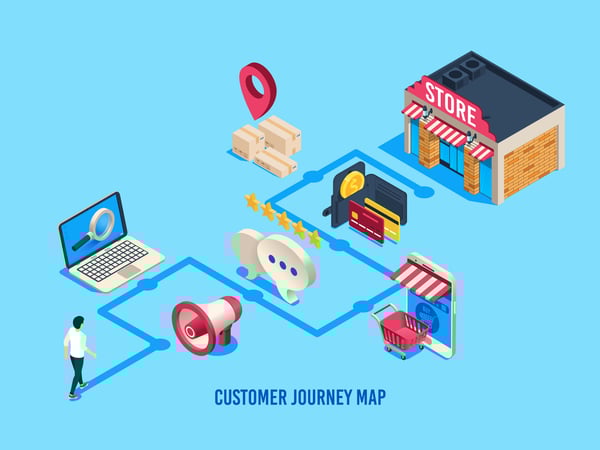
Every one of these variables – and many more – have a direct impact on whether you will get a return on your ad spend. And whether your company will be around in 6 months.
However it’s impossible to know, much less get these critical factors, right if your sole mission statement is to increase ROAS month over month.
Knowing and understanding what creates a growing and sustainable buying process requires time, iterating, testing and repeating – all of which require some ad spend.
No one wants to hear this: investing money to know your buyers’ process and what will make your company successful will lower your ROAS, as some of your money is diverted to testing. But invest, you must.

Founders are engineered to trust their gut, sometimes to a fault. They don’t want to spend money – or time – on iterating and testing because they are sure their assumptions are correct.
💊 Hard to swallow pill: Facebook ads don't always work. Here's why. →
The unfortunate reality is that the longer you begrudge ad spend on testing, the more money you waste on less effective ads, the lower your ROAS, and the longer you’re wasting money and suffering a low ROAS.
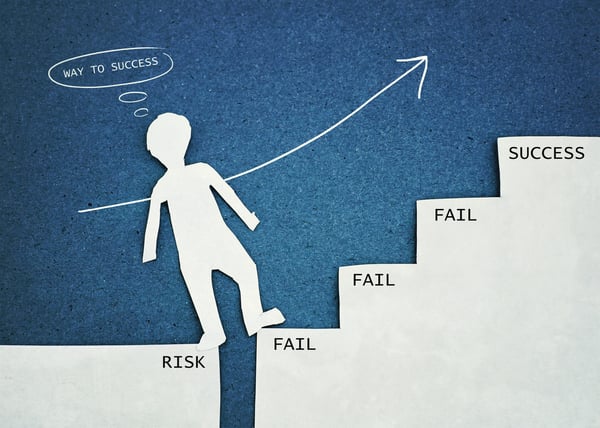
For instance, you may have perfected a BBQ rub that you sell out of every weekend at the local farmer’s marketing. You’re positive that as soon as you get your online store up and some ads running, your greatest obstacle will be keeping up with inventory. I mean, people LOVE this stuff. 😋
You get a Shopify account and start to run some ads. The ads are driving a lot of traffic to your site – you may even be getting some adds to cart. Unfortunately, your orders are bumping around 3 a day.
You may have forgotten to account for some of those critical variables or external factors we mentioned – like trust-building elements, shopping flow, technical issues and shipping issues. No one is buying from you for one or many reasons.
This is a classic case of "You don’t know what you don’t know."
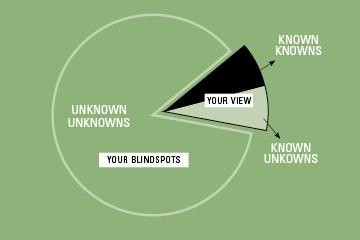
Credit: peerinsight.com
However, now that ads are driving traffic to the site, testing various usual suspects, you come to understand that people need some convincing with testimonials, BBQ awards logos, reviews, free samples – and they need free shipping to push past the finish line.
🍨 Get the scoop on conversion rate optimization. →
These external factors can be smoked out as quickly as possible (pun intended, see what we did there?), removing obstacles to people buying – and increasing that flow of ROAS back to you. But more importantly, you’re building a stronger company and a brand with staying power. You now know what’s important to your customers and are removing barriers that frustrate them. This is an exercise in growth marketing!
Let’s say your investment in market research by way of ad traffic pays off, and you get to a comfortable ROAS. It’s tempting to assume you’re good to coast into retirement on the back of your world class BBQ blend.
You may have hit a ROAS that makes you happy, but it’s important to continue viewing that number as one indicator metric of many. Even when it’s trending upward, it cannot become the focal point of your business.

As a growing company, it’s important to turn your attention and an allotment of your ad spend to understanding bigger metric fish: like the lifetime value of each customer.
And what makes one customer more valuable than another, and how do you specifically target more valuable customers?
Which customers are more likely to advocate for your product, resulting in more customers and more sales?
FEATURED RESOURCE: Use this spreadsheet to calculate critical KPIs like CPA, target ROAS, and gross profit.
Your main objective for the first few months of any digital campaign should be to come away with a deadly accurate pulse on your market conditions, your purchasing audience, what compels them to pay for your product and any obstacles getting in the way of paying for your product.
Armed with this knowledge, you can make critical decisions around HOW to market your product in digital ads, through a keen understanding of your audience’s pricing tolerance, preferred messaging and detailed targeting.
For the first phase of your digital campaign, ROAS is simply the cherry on top. You’re building the sundae from the bottom up, starting with:
While any business owner would jump at the above information, few actually get there. Far too many are dissuaded from the testing it takes to uncover this valuable information by one difficult truth: These kinds of objectives are often at odds with increasing short-term ROAS.
Unlocking seven or eight figures of revenue might mean taking a hit on the first few months of ad spend. Brace yourself – it may be even more with big ticket items or those with a long purchase path. That's not a bad thing if you're laying the foundations for long-term success!
🏫 Want to get schooled? Check out our free training resources. →
You can create ads built for faster approval , and we can tell you how.
Read on to learn:
Thanks to a long list of Facebook Ad guidelines and strict ad approval process, many marketers using Facebook advertising tools enter the land of confusion.
Population: 90% of Facebook Advertisers.
When working with Facebook Ads, it’s been always been difficult to find answers when you run into trouble. Dealing with Facebook ads that haven't been approved is no exception.
With little information provided from Facebook, you can often end up wasting time, money and ultimately, after enough disapprovals, can risk your ad account being flagged.
No artistic or educational images are allowed, even if not explicitly sexual. This includes:
The fix: When working in underwear, bathing suits, or any other industries that might get flagged—the more clothing the better. No tight cropping on individual “areas” (as mentioned above), and no poses that are “suggestive”. If possible, flat lays of the product are a great workaround. Once the item is on the model, you start to have a longer approval process and leave yourself open to the possibility of disapprovals, as well.
🔍 Find more expert tips and videos to boost your Facebook ad performance. →
As we mentioned earlier, these are some of the most common issues we’ve seen while running Facebook Ads. However, according to Facebook’s Advertising Policies, there are many other reasons why your ad may get disapproved.
Things like:
Disapprovals You Can’t Fix
Unfortunately, there are some disapprovals you can’t fix when working with Facebook Ads. Typically these disapprovals have to do with the product or service you’re promoting either has a general restriction, or more in-depth requirements within the ad targeting.
Some products that you can’t advertise on Facebook include:
“The Next Tinder”— Dating“Win Big in New York”— State Lotteries
“Get your Prescription Filled Fast”— Online Pharmacies“Buy Dogecoin, Bitcoin”, etc. — Cryptocurrency Products and Services“Visit Recovery Haven” — Drug and Alcohol Addiction Treatment Centers
Since the approval process for an individual ad can take up to 24 hours (sometimes longer in other cases), be sure to be mindful and double-check your work.
Avoid having to go through the whole approval process all over again because of a simple and fixable word misuse.
As with everything else, building Facebook Ads takes practice. Especially when just starting out or implementing new campaigns, it’s important to not let disapprovals discourage you. The majority of disapprovals we see are typically small mistakes that can be solved with quick fixes. Dropping the “you” in the headline, or making the ad copy less sensational gives you an easier starting point and can minimize future disapprovals.
At the end of the day, Facebook’s main goal is “to keep Facebook safe for people.” Keeping that goal in mind and being ready to make small tweaks to bring your ad into alignment with Facebook’s Ad Policies can have you back on the road to Facebook ad success.
If you're tired of spending time wandering the Facebook ads maze, why not bring on some help? Book a call with a growth expert to learn more about maximizing Facebook ads with the help of a top growth marketing agency.
If you have fundamental cracks in your business model, there is no Facebook targeting or performance strategy strong enough to build revenue on that foundation. That is the hard truth every eCommerce advertiser needs to hear before pouring more budget into Meta's ad platform.
There are a lot of great eCommerce ideas out there, started by some very smart entrepreneurs. And because Facebook has been a successful advertising platform for so many eCommerce businesses, it is tempting to think that Facebook advertising is the silver bullet that can sell anything.

But before you pour all of your hard-earned resources into Facebook ads, you need to take a step back and ask the hard questions about your business itself. The ads are rarely the problem. The business behind the ads usually is.
The data supports this. Across hundreds of eCommerce accounts, the campaigns that struggle the most share a common set of underlying business-level issues that no amount of audience targeting or bid optimization can fix. Let's dig into the most common reasons why Facebook ads fail for eCommerce brands, and what you can do about each one.
Ask yourself: Could people buy my product, or one almost exactly like it, somewhere else?
If you are a dropshipper, a reseller, or your product is just fairly common, it is critical that you know all other outlets where customers could buy your product. You need to have a solid answer to why someone should buy from you specifically, particularly if you are competing against trusted outlets like Amazon Prime or the option to stop at Target on the way home.
If price is your top hurdle for customers, you have a significant warning sign on your hands. With price as your primary differentiator, you are signed up for a race to the lowest possible dollar, slashing your margins. Matched against huge wholesalers and deep-pocket retailers online, it is a race that is incredibly difficult to win.
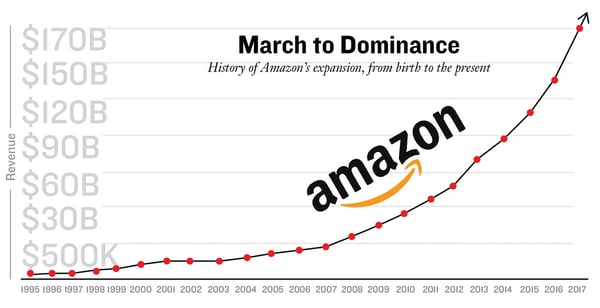
All too often, a business will run a great ad campaign, driving eager customers to their website, only to have most customers open another tab to their Prime account, enter a few search terms, and one-click purchase within seconds.
The solution: Build high-quality, descriptive landing pages.
Quality landing pages prominently displaying solid differentiators can go a long way in mitigating this. If you cannot compete on price, you have to find some other way to compete. It could be by highlighting great packaging, promoting a specific lifestyle, or going super niche with your audience focus.
Here are specific tactics to differentiate against commodity competition:
Keep testing and optimizing until you find the winning combination of audiences, ad creative, and campaigns.
Ask yourself: If people see 88 other websites today, will they really remember mine?
A staggering percentage of Facebook ad failures have nothing to do with the ads. The website users land on is uninspiring, and they immediately bounce, especially if the product is not particularly remarkable.
If you are selling water bottles, your website better make visitors excited enough to reach for their wallet immediately. The bar for eCommerce web design has risen dramatically. Shoppers expect fast load times, clean design, and a frictionless buying experience.
Take Welly for example. They sell bandages. Not exactly the most exciting product category. But they were able to make bandages not only look cool but also create a website that gets viewers genuinely excited about first aid kits. That is the power of strong brand design and storytelling.
The solution: Put your creative hat on and make your site the go-to destination for products like yours.
We recommend promoting curated bundles, product reviews, usage videos, comparison charts, and anything else to make the buying experience worth those few extra dollars and time in transit. Your website should answer three questions within five seconds of arrival: What do you sell? Why should I care? What do I do next?
Investing in conversion rate optimization on your site will compound the returns from every dollar you spend on Facebook ads. A 1% improvement in conversion rate can mean thousands in additional revenue per month.
Ask yourself: Is my unique value proposition really all that unique?
Can you immediately answer why your product is better than similar products? Or, if not your product, your brand, company, or story?
Do not expect people to spend money if your big UVP is warm sleeves on coats. People expect coats to be warm. However, if you sell coats with secret inner sleeve pockets designed for sneaking snacks into the movie theater, now you have something worth talking about.
Even if your product is fairly common, you can be strategic in your marketing. Identify the strongest benefits of your product and broadcast them. Your ads need to quickly communicate key differentiators and value-adds of the product or brand.

Do your homework and learn what your closest competitors are saying about their similar products, and stop trying to say the same things. Shake up the product dialog with features and selling points they cannot match.
The solution: Think about the problems your potential customers face and show how your product solves those problems. Try reading through customer comments, questions, and reviews. Do some brand soul-searching to figure out what makes your company distinctly unique.
Ask yourself: Do I have enough people to sell to?
There are probably a lot of left-handed people in snowy climates who would be thrilled to buy your glove-installed, left-handed, heavy-duty ice scraper. But you have already cut off a huge percentage of people to target. It will likely take a lot of testing audiences, creative, and placement to arrive at ads that will consistently sell something so niche.
Similarly, "shop local" can be a bad thing if you are too localized. There might be at least a dozen people in your neighborhood interested in your dog-walking service, but until you expand into other neighborhoods, you are capped from growth.
With hyper-specialization and micro-localization, your digital marketing is in a tough place. You need a broad enough audience to start gaining traffic and driving sales. Facebook's algorithm requires sufficient data volume to optimize effectively. If your potential audience is too small, the algorithm never exits the learning phase, and you spin your tires indefinitely.
Understanding upper funnel vs. lower funnel dynamics can help you build a broader top-of-funnel audience before narrowing down to converters.
The solution: Think of diverse ways to use your product or broader groups of people who can benefit.
Target auxiliary groups very specifically with messaging zeroed into reasons why this seemingly esoteric product could benefit them. Consider lookalike audiences based on your best existing customers to expand reach without sacrificing relevance.
Ask yourself: Would I scroll past my own creative assets?
Studies show that people see, on average, over 5,000 images a day. That is thousands of bland stock photos, manufacturer product catalog images, and stale advertising all competing for a fraction of your prospect's attention.


If you want your digital ads to catch a scroller's attention, provide imagery and creative assets that stop your target audience dead in their tracks. Think: product videos, boomerangs, animated gifs, slideshows, and lifestyle product photography.

We can point to countless creative tests and anecdotal examples where interesting creative drove engagement and sales, always beating out boring flat-lays and manufacturer-provided model images. Dropshippers, it is easy to just forward on white background product pics, but trust us: lifestyle or in-use imagery beats this out every single time. High-performing ad creative follows a consistent set of principles that any brand can implement.


The best-performing Facebook ad creative in 2026 generally falls into a few key categories:
Never lose sight of the story your creative is telling about your brand. What does your imagery say about the business and about the product?
Ask yourself: What is stopping a customer from clicking "Complete Purchase"?
People shop online because it is easy. Facebook ads can drive traffic to your site all day long, but if you have created any inconvenience for the buyer, you can count on losing sales, maybe even most of them.
The solution: Identify friction in your store or checkout process by doing a conversion rate optimization walkthrough.
If the issue is more abstract, like customers wanting to try on before they buy or feeling the quality firsthand before making a big-ticket purchase, brainstorm ways to remove the friction and turn the solution into a selling point.

Take Warby Parker, for instance. Many people are insecure about how glasses, particularly bold, trendy frames, will actually look on their face shape. Warby turns Free Shipping and Free Returns into a compelling value proposition: try on before you buy without ever having to visit the store. That reframing turned a common policy into a competitive advantage.
After working through these six common failure points, the takeaway should be clear: the answer to underperforming Facebook ads is almost never "spend more." The answer is to fix the business fundamentals that sit beneath the ads.

No matter where you stand on the spectrum of answers to these questions, brutally honest self-evaluation has the power to deliver creative solutions that can transform your business from a pretty good idea to a company that customers return to time and again, telling their friends and family about.
Before you adjust another bid or launch another campaign, run through this checklist:
If you answered "no" to any of these, you know where to focus your energy before scaling your ad spend. Comparing Facebook ads vs. alternatives like TikTok can also help you determine whether a different platform might be a better fit for your product and audience.
If you want an outsider's perspective about why your Facebook ads are not generating sales, reach out to our team for expert insights.
In this post:
A Facebook ad that accumulates hundreds of likes, shares, and comments is one of the most valuable assets in your advertising account. That engagement - known as social proof - signals trust to new audiences and makes your ad significantly more effective.
But here is the problem most advertisers run into: when you duplicate a high-performing ad to target a new audience, all of that engagement disappears. The likes, the comments, the shares - gone.
The good news is there is a straightforward workaround. In this guide, we will cover what social proof is, how to build it, how to preserve it across campaigns using the existing post ID method, and four real examples of social proof in Facebook ad creative.
Social proof is the psychological principle that people look to the behavior of others when making decisions. In the context of Facebook ads, social proof takes two primary forms:
Engagement-based social proof refers to the visible reactions, comments, and shares on your ad. When a potential customer sees that an ad has 500 likes and dozens of positive comments, their natural response is to pay attention. This type of engagement creates a self-reinforcing loop: more reactions lead to more trust, which leads to more clicks and conversions.
Content-based social proof involves incorporating customer reviews, testimonials, and user-generated content directly into your ad creative or copy. Rather than relying on the ad's engagement metrics, you proactively place trust signals into the ad itself.
Both forms work because of a fundamental truth in digital advertising: your potential customer needs an external factor to rely on when making a purchase decision online. Unlike a brick-and-mortar store where shoppers can physically compare products, online buyers depend heavily on social signals to evaluate whether a product or brand is worth their money.
This is why social proof is part of nearly every successful social media advertising campaign. It can be the difference between a prospect scrolling past your ad and stopping to learn more.
Before you can reuse social proof, you need to build it. There are several proven strategies for generating engagement on your Facebook ads:
Target warm audiences first. Launch your ad to audiences that already know your brand - email subscribers, website visitors, or past customers. These audiences are more likely to engage with your content, giving your ad an initial boost of social proof before you expand to cold traffic.
Use compelling creative. Ads that provoke an emotional response, ask a question, or share a bold claim tend to generate more comments and reactions. The more people interact, the more social proof you build.
Incorporate reviews and testimonials. Including real customer feedback in your ad copy or creative adds an immediate layer of trust. We will cover specific examples of how to do this later in this article.
Run engagement-optimized campaigns. While your primary Facebook ad campaign objective might be conversions or traffic, consider running a short engagement-focused campaign first to accumulate reactions before switching objectives.
Respond to comments. When people comment on your ad, reply to them. This increases total comment count and shows potential customers that there is a real team behind the brand.
Once your ad has built up meaningful engagement, the next step is making sure you do not lose it when scaling to new audiences.
One of the most common mistakes Facebook advertisers make is duplicating a high-performing ad to show it to a new audience. The duplication creates a completely new ad with zero engagement - all of the social proof from the original is left behind.
The solution is to use the existing post ID method. This approach lets you run the same ad (with all its accumulated likes, shares, and comments) across multiple ad sets, campaigns, and audiences. Every new impression and reaction continues to build on the original post's engagement.
Here is how to do it in six steps.
For this tactic to work, you need to start with a dark post - an unpublished page post that does not appear on your Facebook page's timeline. Dark posts are created through Ads Manager and give you the ability to:
If you are unfamiliar with dark posts, the setup takes just a few minutes and is well worth learning.
In Ads Manager, find the ad that has accumulated the engagement you want to preserve. This is the ad whose social proof you will carry forward into new campaigns.
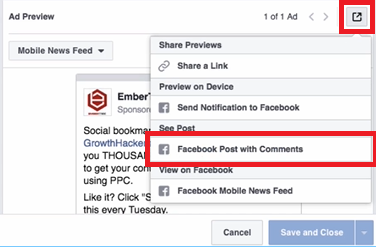
Select the ad and click the edit button. Under Ad Preview, locate the box icon in the right corner and click it, then scroll down to select the Facebook Post with Comments option.
This loads the full ad with all of its accumulated engagement:

Copy the entire URL from the browser bar. We recommend pasting it into a text editor so you can easily isolate the post ID.

The post ID is the number that appears after
/posts/in the URL. Copy everything from that number up to the question mark.

Save this number - you will need it in a later step.
Create a new ad just as you normally would for any Facebook ad campaign. Choose the objective that aligns with your goals, and set up your new target audience.
Here is where the key difference comes in. Navigate to the Ads section and click the Use Existing Post button instead of creating a new ad from scratch.


Click Enter Post ID and paste the ID you copied earlier. Click Submit.
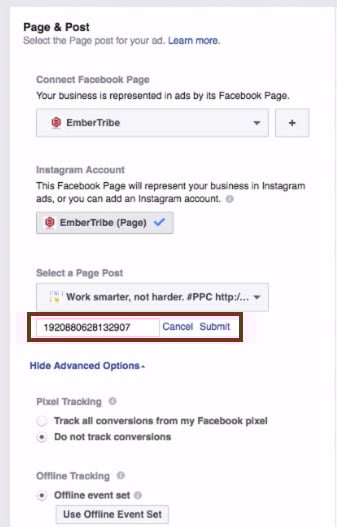
The ad appears with all of its original reactions, comments, and shares intact.

You can now go back to the ad set level, choose any audience segment, and run the ad wherever you want - all while keeping the same engagement and social proof attached to the creative.
You can repeat this process as many times as needed for new campaigns and ad sets. Every impression and reaction across all placements feeds back into the same post, continuously building your social proof.
Quick reference:
Beyond preserving engagement across campaigns, you can also build social proof directly into your ad creative by featuring customer reviews and testimonials. This approach works especially well for retargeting warm audiences who are already familiar with your brand and need a final push to convert.
Here are four proven formats for incorporating social proof into your Facebook ad creative.
Placing a short customer quote directly in the ad headline is one of the most eye-catching approaches. The headline is one of the first elements a user reads, and leading with a real customer's words immediately establishes credibility.

This format works best when the review is concise - a single sentence or phrase that captures the core benefit of the product.
Overlaying a customer testimonial directly onto the ad image makes the social proof impossible to miss. The review becomes part of the visual, which can stop users mid-scroll.
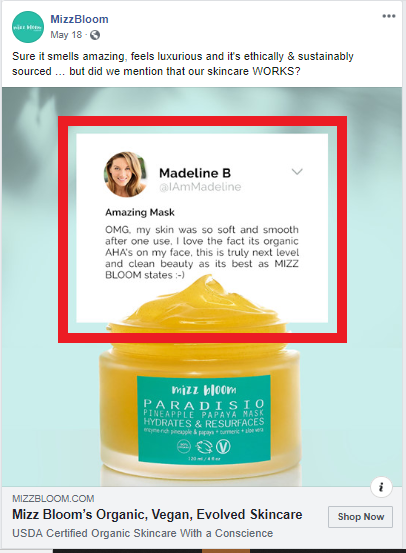
When using this approach, make sure the text is large enough to read on mobile devices and that you stay within Facebook's advertising guidelines for text-to-image ratios.
The primary text field above the ad image gives you room to share a longer customer review. This format is effective for products or services that benefit from detailed testimonials where the customer explains their experience.

For maximum impact, you can stack multiple short reviews in the primary text field. This creates a wall of positive feedback that is difficult for prospects to ignore.

When using customer reviews in your ads, keep these best practices in mind:
When incorporating reviews into your ad images, be aware of Facebook's text overlay guidelines. While Facebook previously enforced a strict 20 percent text rule on ad images, the platform now uses a more nuanced approach. However, ads with less text on the image generally perform better and receive wider distribution.
Key guidelines to follow:
For a deeper understanding of what Facebook will and will not approve, review our guide to Facebook advertising policies.
The most effective approach is to combine both social proof strategies covered in this guide. Start by creating ads that feature customer reviews in the creative, then use the existing post ID method to preserve the engagement those ads accumulate as you scale to new audiences.
This creates a compounding effect: the review in the creative builds initial trust, while the visible likes, comments, and shares reinforce that trust. Over time, your best-performing ads become increasingly powerful assets that you can deploy across your entire Facebook advertising strategy.
Have you tested the existing post ID method with your campaigns? If you are looking for more ways to optimize your Facebook ad performance, explore our guides on scaling Facebook ads without killing performance and identifying audience overlap to maximize your results.
Custom audiences remain one of the most powerful targeting features in the Facebook advertising platform. The ability to upload a list of customers or prospects and serve them ads directly is a game-changer for performance marketers.
But here is the problem most advertisers overlook: when you upload a list of 1,000 contacts, Facebook does not automatically match all of them. In many cases, match rates fall between 30% and 50%, which means more than half of your carefully curated audience never sees a single ad.
That gap between your uploaded list and the matched audience represents real revenue left on the table. Every unmatched contact is a missed opportunity to retarget a buyer, re-engage a lapsed customer, or nurture a warm lead through your sales funnel.
The good news: with the right data preparation and enrichment strategies, you can push match rates well above 70%, and in many cases above 90%.
Before diving into optimization tactics, it helps to understand the matching process itself.
When you upload a customer list, Facebook takes the identifiers you provide (email addresses, phone numbers, names, etc.) and hashes them using SHA-256 encryption. It then compares those hashes against its own database of user profiles. When a hash matches, that person becomes part of your custom audience.
The key insight is that Facebook can accept up to 15 different data points per contact to attempt a match. Most advertisers only upload email addresses. That single data point gives Facebook one shot at finding a match. If that email address is not the one the user registered with on Facebook, the match fails.
By providing multiple identifiers, you give Facebook more chances to find each person. First name, last name, phone number, city, state, zip code, date of birth, and gender all serve as additional matching signals.
Here is the full list of identifiers Facebook will use for matching:
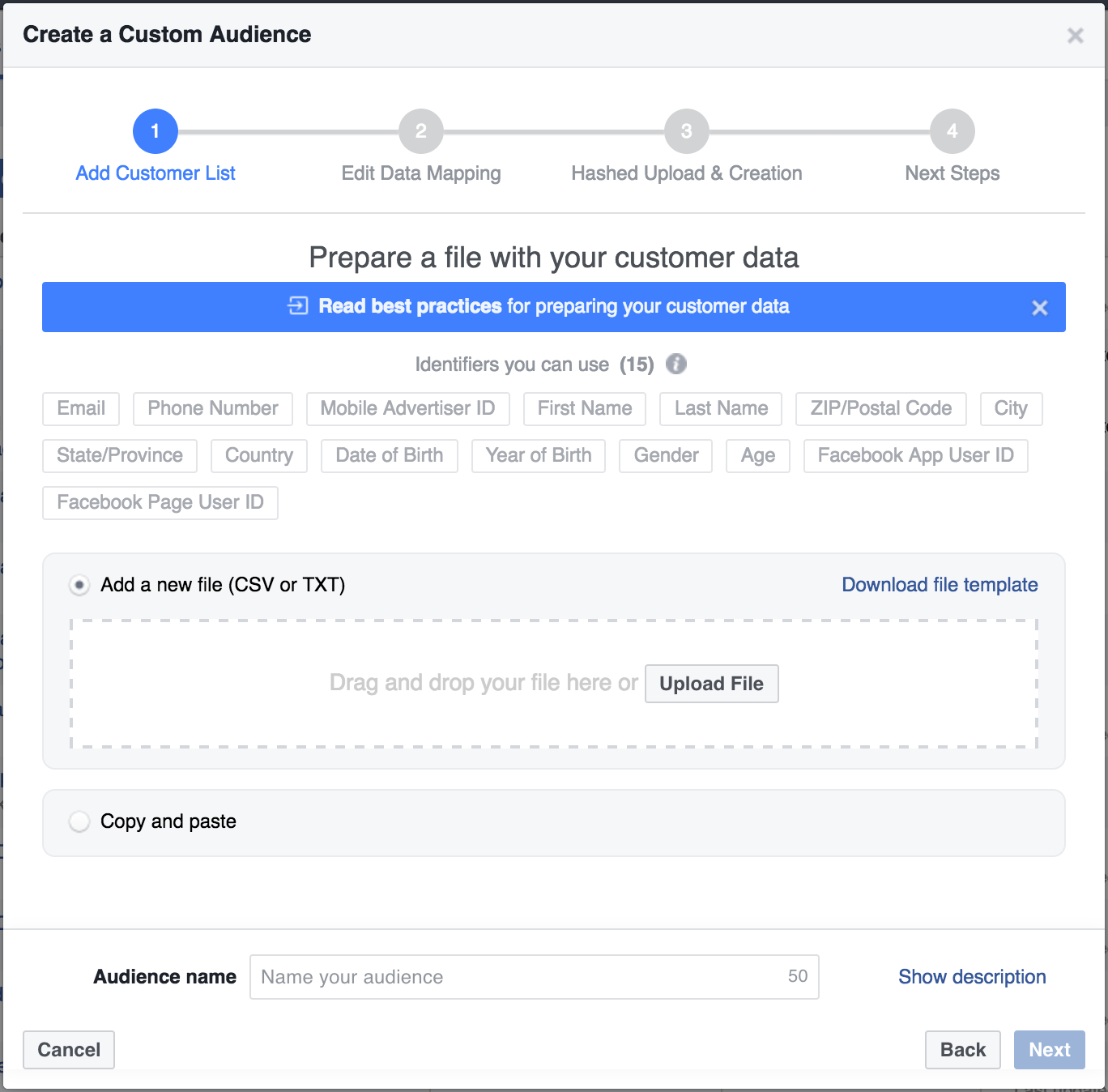
The more of these fields you populate, the higher your match rate will climb. Even partial information helps. A first name combined with a zip code might be enough for Facebook to confirm a match that email alone could not.
The most effective way to boost match rates is to enrich your existing data before uploading it to Facebook. If you have a newsletter list with thousands of email addresses, those emails alone are just the starting point.
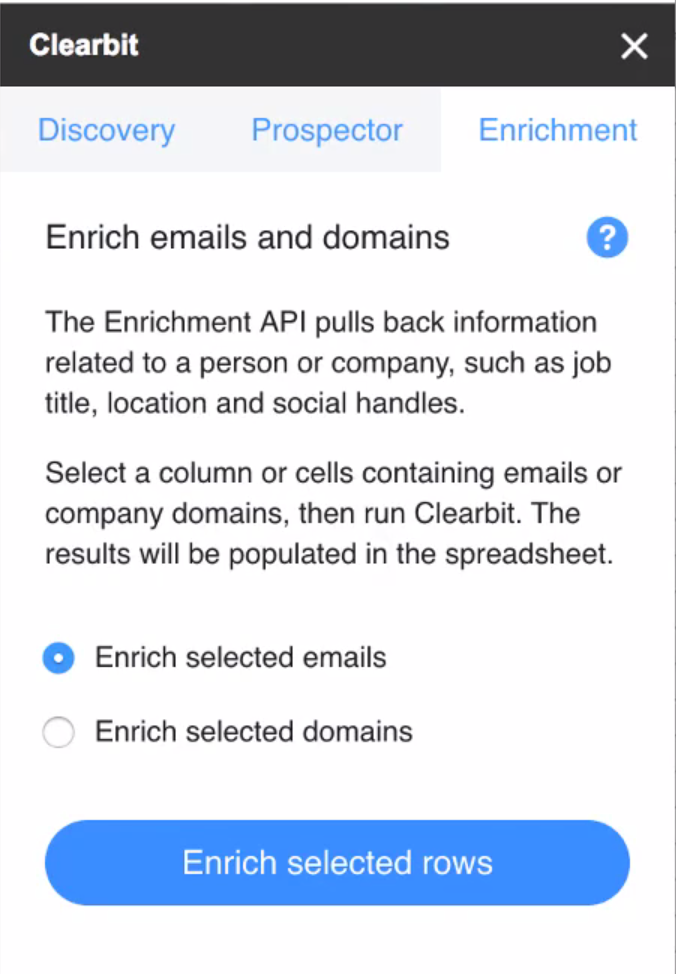
Tools like Clearbit, ZoomInfo, and Apollo can take a single email address and return dozens of additional data points. For custom audience optimization, the most valuable enrichments are:
Here is a practical workflow using Clearbit as an example:
Even before using the enriched data for ad targeting, take time to analyze what the enrichment reveals. Build pivot tables around job titles, company sizes, and locations. This analysis often surfaces audience insights that inform not just targeting but creative strategy and offer positioning.
Data formatting errors are a silent killer of match rates. Facebook's matching algorithm is strict about format. Common mistakes include:
Facebook provides a downloadable CSV template specifically for custom audience uploads. Use it. The template ensures your columns align with the expected identifiers and reduces formatting errors that silently degrade your match rate.
Beyond basic data enrichment, several advanced tactics can push your match rates even higher.
Rather than uploading one massive list, break your audience into segments based on data quality. Upload your most complete records (those with email, phone, name, and location) separately from email-only records. This approach lets you:
Many people have separate personal and work email addresses. If your CRM captures both, include them in your upload. Facebook will hash and check each one independently. A contact who does not match on their work email might match perfectly on their personal Gmail address.
Customer data decays over time. People change email addresses, phone numbers, and locations. An audience that matched at 80% six months ago may have dropped to 60% today. Set a recurring schedule to re-enrich and re-upload your custom audiences at least quarterly.
Website custom audiences built from pixel data typically have near-perfect match rates because Facebook already knows those visitors. Combining pixel-based audiences with uploaded list audiences gives you broader reach with strong match quality. Use the overlap analysis in Ads Manager to understand how your audience segments intersect.
After uploading your custom audience, Facebook displays the audience size alongside your uploaded list count. The ratio tells you your match rate.
Here are general benchmarks to gauge your performance:
If your match rate falls below expectations, run a diagnostic check. Look for formatting inconsistencies, outdated email addresses, or missing country codes. Even small fixes can produce meaningful lift.
Here is the complete workflow for maximizing your custom audience match rates:
Every percentage point of match rate improvement translates directly to more of your target audience seeing your ads. For ecommerce brands spending significant budgets on Facebook, the ROI of data enrichment often pays for itself many times over.
Custom audience targeting only works as well as your data allows it to. Most advertisers accept low match rates as an unavoidable cost of the platform, but they are not. By investing time in data enrichment, proper formatting, and regular audience maintenance, you can dramatically increase the reach and effectiveness of your Facebook campaigns.
The advertisers who win on Facebook are not just the ones with the best creative or the biggest budgets. They are the ones who treat their first-party data as a strategic asset and invest in making every contact matchable, targetable, and reachable.
Facebook is a powerful paid social advertising platform, but it doesn’t scale the same way as paid search. In this post, you'll learn the 3 rules for Facebook ad scaling that we swear by (and why).
In this quick tip video, we’ll demonstrate how you can best scale your ad spend without killing the performance of key metrics like cost per lead.
These three "rules" are what we used to scale one client's efforts on Facebook from 0 to 400k new users every month (you can check out that case study here).
We're going to share the scaling strategy we use for our clients that allows us to spend more each month, increase the volume of incoming qualified leads, all without hurting the performance of those campaigns.
When you follow these three rules for scaling Facebook ad campaigns, you can help save your performance as you increase ad spend.
There are so many targeting options to choose from on Facebook, it's easy to get excited about getting very, very granular, and specific about who you want to target.
But if your audience size is too small, you're not going to have enough runway to scale your ads. Remember: there's always going to be opportunities down the line to create more segments. Don't overdo it from the jump!
Instead, if you find that a certain segment of your target audience has responded well to your campaigns so far, you should optimize for that segment. It's important that you don't shoot yourself in the foot by creating a too-small audience size from the start.
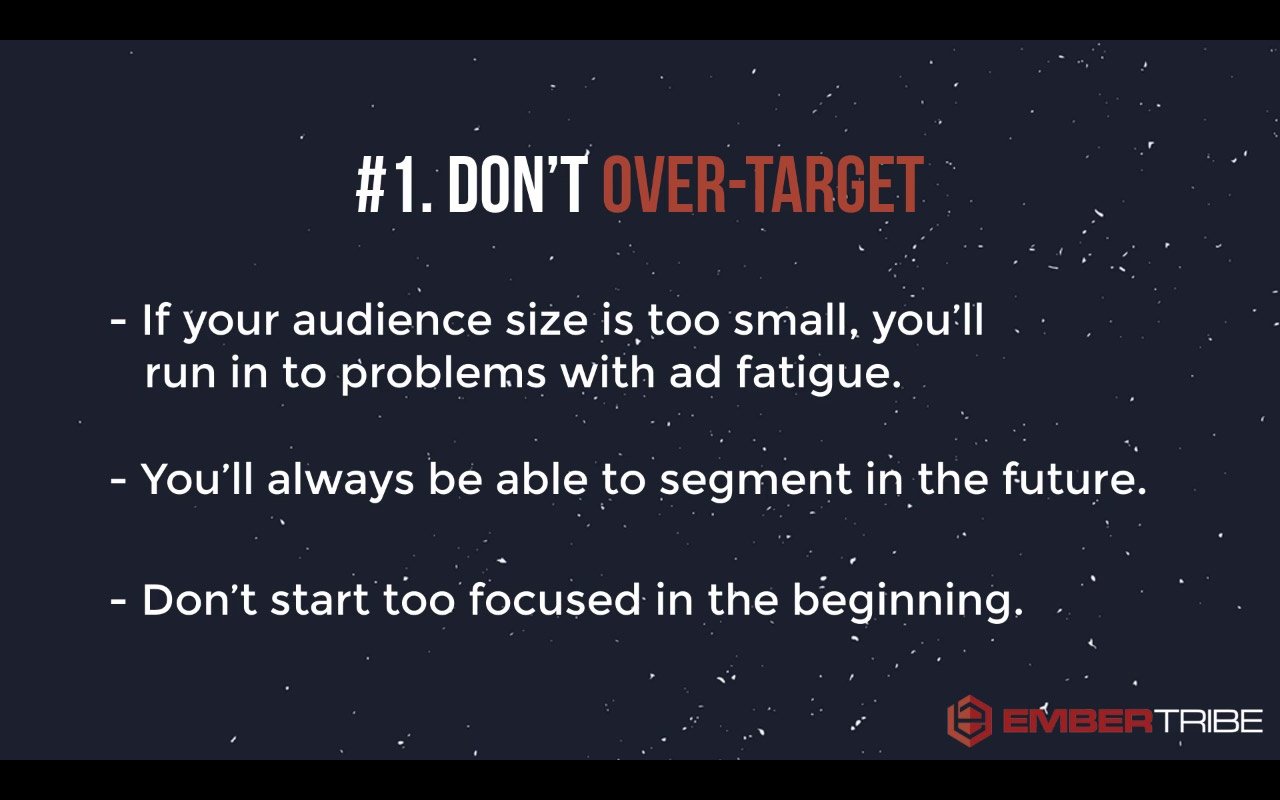
Don't get so locked in on one audience segment that you're going after because eventually, you're going to wear them out.
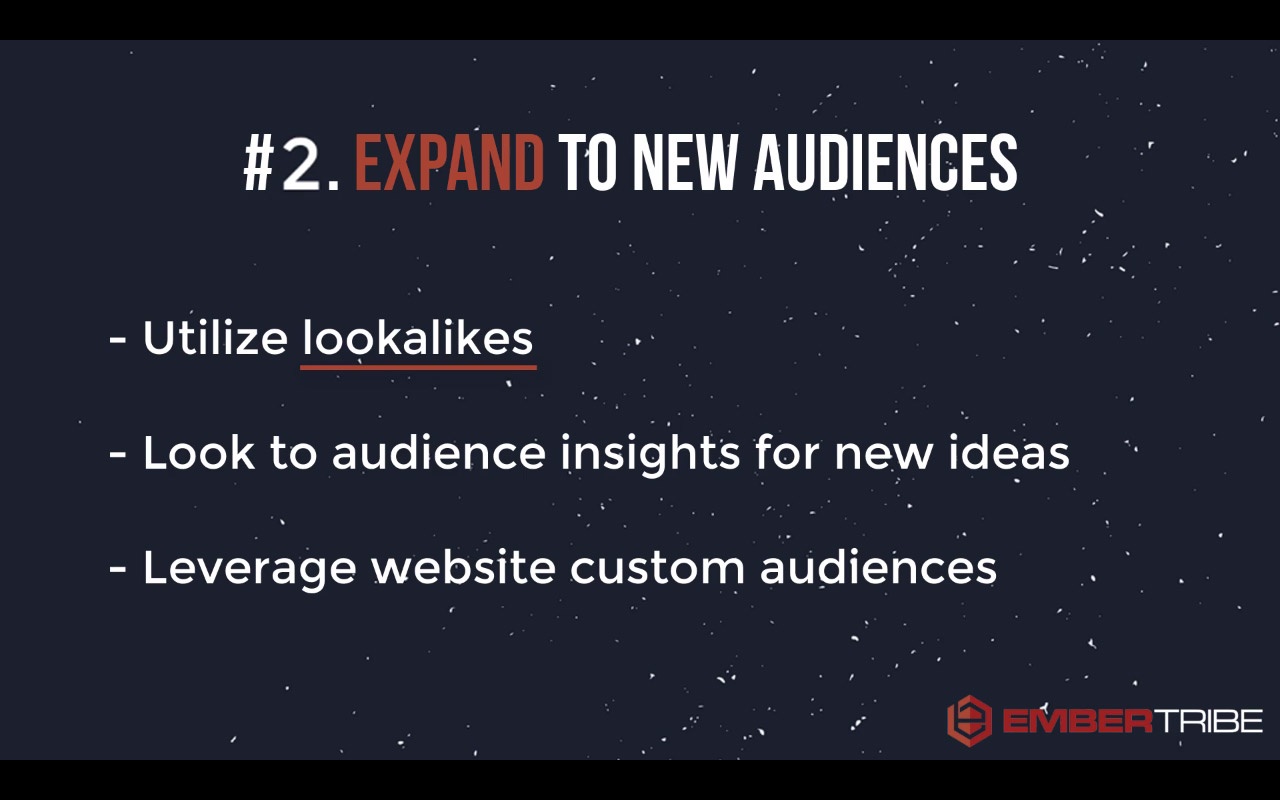
You need to get creative about the ways that you can expand to new audiences. That means taking full advantage of partner categories in Facebook, different interest targets, and especially using options like lookalike audiences.
Make sure that once you've converted a healthy number of people, you want to create a lookalike audience to allow Facebook to start expanding the target reach of your ads.
This third rule is very important. It's probably the most important rule when it comes to scaling your campaign—be mindful about how you manage your budget.
Oftentimes, the biggest mistake that we see advertisers make is that when they see something work, they have a knee-jerk reaction that they need to pump ad spend in their campaign. Unfortunately, this turns into blowing the doors off of their budget.
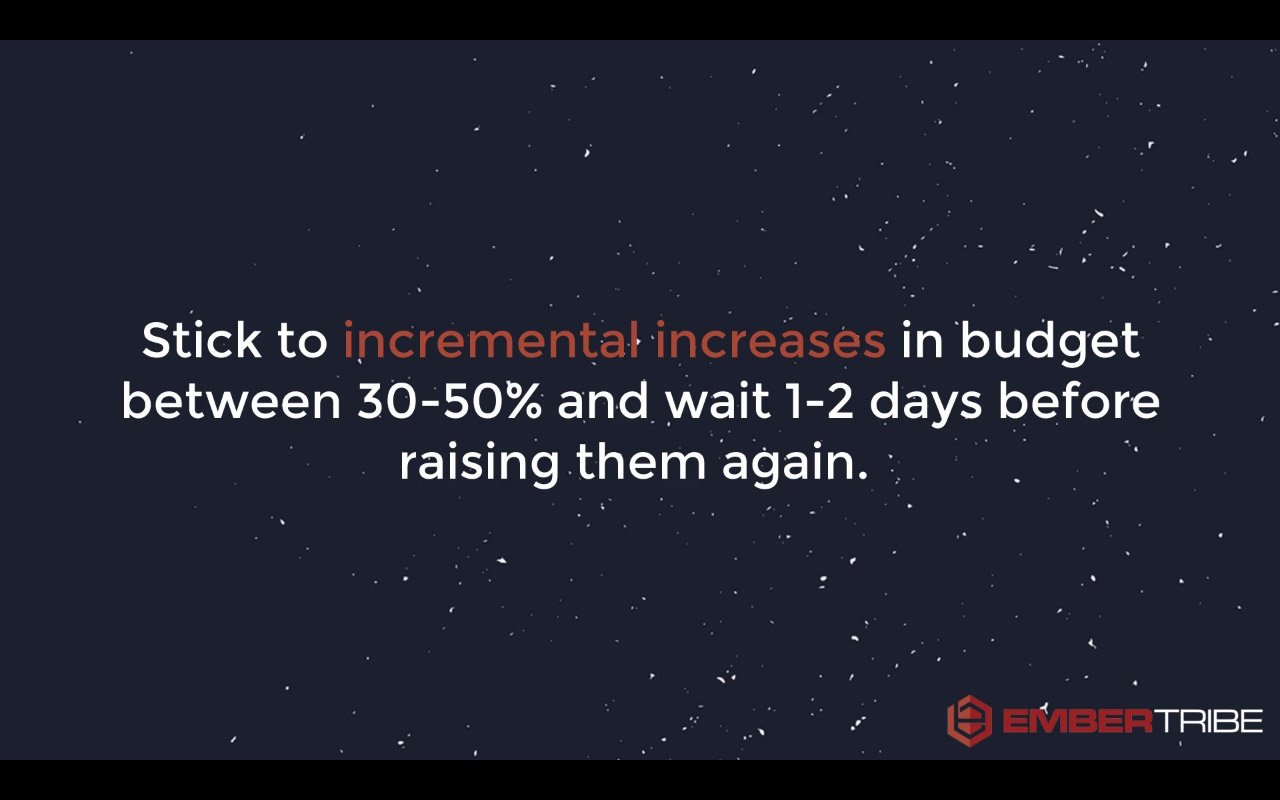
What you want to do instead is very incrementally increase the budgets.
The reason for this incremental increase is that Facebook optimizes through an algorithm that determines who they should show your ads to, based on who they think will respond most to your message.
If you give them too much information to optimize for, the algorithm can't work correctly. In other words, if you've increased your budget too much and try to get too many people through the funnel, Facebook just won't be able to keep up.
So, your Facebook ad campaigns need time to adjust to a new level of budget.
Try to wait two or three days before raising the budgets on your campaigns if you're testing a new angle or you launching a new ad set.
When you do raise the budget, keep each budget increase as incremental gains, like 30 to 50 percent increases to the budget.
That's going to safeguard your ads against seeing major campaign performance decline. Over time, you'll be able to scale to a higher budget...but without tanking all the hard work the algorithm has done for you so far.
There's a lot more that goes into managing your campaign than these three rules. But with these principles, you're going to be head and shoulders above 90 percent of the advertisers that don't have this 3-rule framework to scale their campaigns.
Good luck, and may your next campaign scale beyond your wildest dreams!
Find out how EmberTribe can manage your Facebook ad campaigns for you by booking a call with one of our growth experts.
This is the first installment of a tutorial video series called, Quick Tip Tuesday #QTT! It's a weekly series of videos that bring you highly actionable advertising tactics in 90 seconds or less.
In this first episode of "Quick Tip Tuesday", we'll walk you through how Facebook advertisers can grow their audience for free while they run their campaigns.
If you want to make the most of your campaigns, spending 10 minutes or less each week, this tip is for you!
💡 Boost your Custom Audience match rate with this quick tutorial. →
Hey there, in this quick video I wanna show you how you can get more mileage out of your Facebook advertising campaigns without spending more money and really spending no more than 10 minutes a week.
This is going to make your advertising campaign more effective, it's going to let you take advantage of interacting with some of the people who have been interested in your ads, but haven't taken action yet.
So let's take a look.
The beauty of running Facebook ads is that it's a social platform, so as you run ads, people are going to start liking and sharing your ads. So what I want to show you is in three easy steps, how to make the most of when people engage with your ad.
Step one is you have to find your ad in the Ad Manager. Now, we're gonna click Preview which is that little eyeball in the upper right.
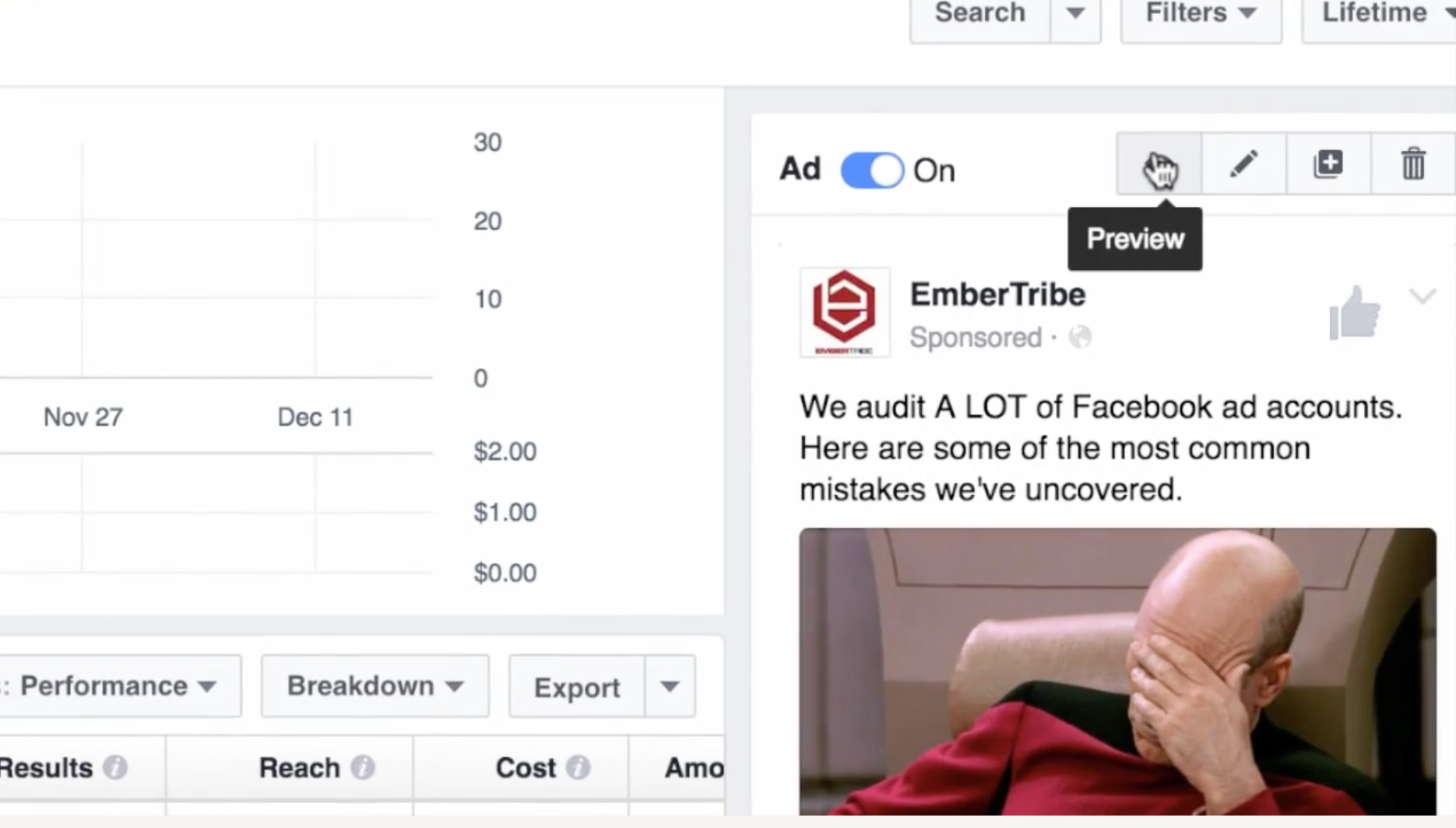
Okay that this point, scroll down and click the link where it says View Post Permalink with Comments. Okay, (step two) the next thing that you're gonna do is go down here.
You're going to see where people have liked or engaged with your ad.

Now step three, there's an option here to invite the people who have liked this post.
Now here's the beauty of this; you might have paid for the ad to get it out there and to get it in front of people, but inviting people to like your page is actually completely free.

Now great, six people, big deal. We attracted some new followers to the page, but what if you have an ad that you run for a lot longer and say there's like a thousand or so people who liked it?
Well now you can go through and start inviting all sorts of people who have engaged with your ad and showed interest in the content that you're sharing. When you've built up a decent amount of social proof (which is basically digital advertising gold), you can reuse that ad with social proof for different audiences.
So use this tactic to make the most out of your Facebook advertising by inviting people for free to your site to like your page.


.svg)