
Most marketing teams have access to more data than ever, yet still struggle to answer a simple question: is our spend working? The problem is not a lack of data. It is a lack of one coherent analytics dashboard that surfaces the right numbers at the right time.
A well-built marketing analytics dashboard eliminates the context-switching between ad platforms, CRM reports, and spreadsheets. It gives your team a single source of truth, enabling faster decisions and tighter feedback loops between creative, media, and revenue.
A marketing analytics dashboard is a centralized, interactive interface that pulls data from multiple sources and displays key performance indicators in one view. The best implementations update in real time or near-real time, automatically refreshing as campaigns run and orders come in.
Unlike static reports, a live dashboard lets you react. You can spot a ROAS drop on a Tuesday morning and adjust bids before the day burns through budget. That speed-to-insight gap is where growth compounds or erodes.
According to Improvado's 2026 dashboard research, the average marketing team now manages data from more than a dozen platforms. Without a dashboard aggregating that data, teams default to manual exports and lose hours every week to reconciliation work.
The metrics you include depend on your funnel stage and business model, but these are the non-negotiables for DTC and growth-stage brands.
For a deeper breakdown of how these metrics fit into a full measurement stack, see our guide to marketing analytics services.
Choosing the right tool depends on your team size, technical resources, and data sources. Here is how the leading platforms compare.
Looker Studio is free and integrates natively with Google Analytics 4, Google Ads, Search Console, BigQuery, and YouTube Analytics. For teams whose data lives primarily in the Google ecosystem, it is hard to beat on cost-to-value. The trade-off is that building complex cross-channel views requires more configuration and some familiarity with data blending.
Looker Studio works best as a reporting layer when your underlying data is already clean and consolidated. If you are pulling from six ad platforms, you will likely need a connector or a warehouse in between.
Databox is purpose-built for marketing KPI monitoring. It connects to Shopify, Google Ads, Meta Ads, HubSpot, and email platforms in minutes, with pre-built templates that get you to a working dashboard quickly. The mobile app is strong, and goal-tracking features make it easy to align team performance against targets.
Pricing starts at $169/month for professional tiers. The tradeoff versus Looker Studio is cost, though the time saved on setup and maintenance often justifies it for lean teams. Per Graphed's comparison, Databox wins on speed and goal tracking while Looker Studio wins on customization.
Power BI is the enterprise-grade option with the deepest Microsoft ecosystem integration. At $14 to $25 per user per month, it offers a massive library of interactive visualizations, AI-powered anomaly detection, and robust data governance. For brands running significant spend on Microsoft Advertising or already invested in Azure, it is a natural fit.
Power BI's visualization engine is more powerful than Looker Studio's out of the box, but it requires more technical setup and a steeper learning curve for non-technical stakeholders.
For Shopify brands running heavy paid social, Triple Whale has become the default analytics dashboard. It handles first-party pixel tracking, attribution modeling, and creative analytics in one place. The Summary page gives founders and media buyers a daily snapshot of blended ROAS, new customers, and contribution margin without any manual work.
If your entire stack is Shopify plus Meta plus TikTok, Triple Whale's purpose-built metrics (MER, nCAC, Blended ROAS) reduce the cognitive load of working across generic BI tools.
For a broader comparison of platforms at different price points, our analytics platforms guide covers how these tools fit into a full martech stack.
Having the tools is only half the equation. The architecture matters just as much.
Start by mapping every touchpoint that influences revenue: paid channels, organic search, email, SMS, and your ecommerce platform. Each source needs a reliable, automated connection to your dashboard. Manual CSV imports are a liability; one missed export skews every downstream metric.
Your web analytics tool is the anchor. Every campaign should pass UTM parameters consistently so sessions, conversions, and revenue can be attributed correctly before they surface in your dashboard.
A CEO wants blended ROAS, revenue, and new customer count. A media buyer wants campaign-level CPA and impression share. A retention manager wants repeat rate and LTV cohorts. Building one monolithic dashboard that serves all three usually serves none of them well.
Create views for each role. Most tools support this natively through page-based dashboards or user-level permissions. The goal is to reduce the cognitive load for each viewer so they can act immediately on what they see.
Raw numbers without context are incomplete. Set target ranges for your key metrics and configure alerts that fire when performance moves outside acceptable bounds. A 20% drop in conversion rate overnight is a different signal than a gradual 5% decline over two weeks, and your dashboard should make that distinction obvious.
AgencyAnalytics' 2026 benchmark data shows that teams using alert-based dashboards respond to anomalies an average of 4 hours faster than teams relying on scheduled reports. For campaigns running $10,000 per day, that response time difference is material.
Real-time dashboards are valuable, but they are only as reliable as the underlying data pipelines. Google Ads data can lag by 3 to 4 hours. Meta data can lag longer. Understand the refresh cadence for each data source and label it in your dashboard so viewers do not mistake stale data for current performance.
For SEO and organic data, a daily or weekly refresh is typically sufficient. Pair this with your SEO web analytics reporting to track organic performance alongside paid in a unified view.
Tracking too many metrics. A dashboard with 40 KPIs is not more informative than one with 12. Each additional metric dilutes attention. Start with the metrics that directly answer "should we spend more, less, or differently?"
Ignoring attribution methodology. Last-click attribution overstates the value of bottom-funnel channels and understates the contribution of prospecting campaigns. Understand the attribution model your dashboard uses before drawing conclusions about channel performance.
No single owner. Dashboards decay without ownership. Assign one person to review the data quality, update connections when APIs change, and flag when metrics deviate from expectations. Without this, dashboards become untrustworthy and teams revert to gut feel.
Mixing marketing metrics with finance metrics without context. Revenue on your analytics dashboard is marketing revenue. It may not match your finance team's recognized revenue due to returns, chargebacks, and timing differences. Label this clearly to avoid confusion in cross-functional reviews.
Early-stage brands with limited budgets should start with Looker Studio plus GA4. It is free, well-documented, and sufficient for tracking the core acquisition and conversion metrics that matter most before hitting seven figures.
Scaling brands running $50,000 or more per month in ad spend should evaluate Databox, Triple Whale, or a custom Looker Studio setup backed by a data warehouse. At this stage, the cost of bad data or slow reporting exceeds the cost of better tooling.
Enterprise teams with complex attribution needs and large analyst teams benefit most from Power BI or Tableau, where data governance, custom modeling, and multi-team access are non-negotiable.
The right analytics dashboard is the one your team actually uses. Choose a tool that matches your technical capacity, connects reliably to your data sources, and makes the right metrics immediately visible to the people making daily decisions.
Want help building a measurement framework that connects your analytics dashboard to actual revenue outcomes? Our marketing analytics services are built for growth-stage brands that need clarity, not more complexity.


Most brands collect website data. Few know what to do with it. The gap between having access to site web analytics and actually using that data to grow revenue is where most growth-stage companies stall. The numbers sit in a dashboard, updated daily, mostly ignored.
This guide closes that gap. We cover what site web analytics actually measure, which metrics matter for DTC brands, how to read a report without drowning in noise, and how to translate data into decisions that move the business forward.
Site web analytics is the collection, measurement, and analysis of data about how visitors interact with your website. At its core, the goal is simple: understand what people do when they arrive, where they came from, and whether they completed a valuable action.
Web analytics tools capture this data by placing a tracking script on every page. That script fires events, sends pageview data to a collection server, and stores behavioral patterns that you can query through a reporting interface. The raw data falls into four categories.
Acquisition data shows where your visitors came from: organic search, paid ads, email, social media, referral sites, or direct traffic. This data answers "which channels are working?" before you spend another dollar.
Behavior data captures what visitors do once they arrive: which pages they view, how long they stay, where they click, and at what point they leave. This reveals friction in your funnel before you notice it in revenue.
Conversion data tracks whether visitors completed a goal, whether that's a purchase, email signup, or a product page visit. According to Contentsquare, conversion rate is one of the ten most critical web analytics metrics for any site measuring business outcomes.
Technical data covers page load speed, device type, browser, and screen size. Slow pages and broken mobile layouts are conversion killers that only show up when you look at this layer.
There are dozens of metrics available in any analytics platform. These are the ones that consistently drive decisions for growth-stage DTC brands.
A session is a single visit to your site. One user can generate multiple sessions across different days or after the session timeout window expires. Watching the ratio of sessions to users helps you understand how often your audience is returning versus how heavily you rely on first-time traffic. A returning visitor rate below 15% often signals weak retention or email engagement.
Google Analytics 4 defines bounce rate as the percentage of sessions that were not engaged, meaning the visitor left without spending 10 or more seconds, converting, or viewing a second page. A bounce rate of 40-55% is typical for most industries, though ecommerce sites with strong landing page intent can see higher rates without negative consequences. Context matters more than the raw number.
Knowing your sessions count tells you how busy the site is. Knowing where those sessions came from tells you why. A brand that attributes 70% of sessions to paid search and 5% to organic is one ad account suspension away from losing most of its pipeline. Traffic mix is a risk management metric as much as a performance metric.
Overall conversion rate is a blunt instrument. Breaking it down by traffic source reveals which channels send ready-to-buy visitors and which send browsers. Email subscribers typically convert at 3-5x the rate of cold paid traffic. If they don't, that signals a messaging misalignment in your flows.
Understanding website analytics reporting at the channel level is where the real optimization leverage lives.
These two metrics together tell you whether content is doing its job. If visitors from organic search spend under 45 seconds on a product category page and view only one page, the content probably isn't answering their question or the page experience isn't compelling enough to explore further.
Google's Core Web Vitals measure Largest Contentful Paint (LCP), Interaction to Next Paint (INP), and Cumulative Layout Shift (CLS). Poor scores directly correlate with higher bounce rates and lower conversion. For DTC brands running paid acquisition, slow pages are among the most expensive problems you can ignore because you pay to bring visitors to pages that immediately lose them.
Opening an analytics dashboard without a clear question is the fastest way to waste an hour. Structure your review around a repeatable framework instead.
Start with the trend line. Before you look at any single metric, compare the current period to the same period last week, last month, or last year. Is overall traffic up or down? Is conversion rate moving in the right direction? Anomalies in the trend line tell you where to investigate.
Segment before you conclude. A flat conversion rate can hide a strong organic channel masked by a collapsing paid channel. Never interpret a top-line number without breaking it down by at least one dimension, whether that's traffic source, device type, landing page, or geography.
Identify the constraint. At any given moment, one part of your funnel limits growth more than any other. If you have strong traffic but weak conversion, the constraint is on-site experience or offer clarity. If you have strong conversion but declining traffic, the constraint is acquisition. How to read web analytics starts with identifying where visitors are dropping off relative to where you want them to go.
Look at exit pages. The pages where visitors most frequently leave your site are the most honest signal of where your funnel breaks. High exits on a product detail page suggest pricing, trust, or product-fit issues. High exits on checkout suggest UX friction or payment anxiety.
Review on a fixed cadence. Ad hoc analysis is reactive. Building a weekly or biweekly analytics reporting rhythm lets you spot trends before they become problems and catch wins before they're forgotten in the noise.
Data without action is just a bill for server storage. Here is how high-performing DTC brands translate site web analytics into growth moves.
Once you can see conversion rate by traffic source, budget allocation becomes clearer. A channel driving 20% of traffic at a 4% conversion rate deserves more spend than one driving 30% of traffic at a 0.8% rate. Research from McKinsey found that companies using data to drive marketing decisions are significantly more likely to outperform competitors on profitability. Web analytics is where that data starts.
High exit rates on high-traffic pages represent recoverable revenue. If 3,000 visitors per month land on your primary product page and 70% exit without acting, a conversion rate improvement of even 1% on that page is worth tracking down. Whether the fix is a faster load time, stronger social proof, or a clearer call to action, the analytics report gives you the starting point.
Organic search analytics shows which keywords bring visitors to which pages, and whether those visitors convert. Pages with strong traffic and low conversion often need better intent alignment. Pages with strong conversion and low traffic are candidates for link building or content expansion. SEO-focused web analytics connects content investments directly to business outcomes.
A/B tests without analytics are guesses. Analytics without A/B tests are observations. The two work together: analytics reveals which pages have the most impact potential, and test results confirm whether a hypothesis improved performance. Never run a test on a low-traffic page, and never trust a test result that doesn't have statistical significance backing it up.
The brands that get the most out of site web analytics are the ones that build it into their workflow rather than treating it as a one-off audit. Weekly reviews take 20 minutes when you have a standard template. Monthly reviews go deeper into trends and channel mix. Quarterly reviews inform budget allocation and content strategy.
The goal is not to know every number in the dashboard. The goal is to know which numbers answer the questions that matter most to the business right now, and to check those numbers on a cadence short enough to act on what you find.
If your analytics setup isn't giving you clear answers to the questions above, the problem is usually setup, not the tool. Verify that goals and conversions are tracked correctly, that UTM parameters are consistently applied across every paid campaign, and that your reporting views are segmented in a way that matches how you actually make decisions.
Start with the data you already have. The next marketing decision you make will be better for it.

Your website generates data every second. Every pageview, scroll, click, and abandoned cart is recorded somewhere. The challenge most growth-stage brands face is not a shortage of website data. It is knowing which data to act on, and building a system that turns signals into decisions fast enough to matter.
This guide covers the core categories of website data, the metrics that drive real business outcomes, the tools that collect and surface them, and a repeatable framework for turning raw numbers into revenue.
Website data is the collective record of how users find, interact with, and respond to your site. It spans traffic sources, behavioral patterns, technical performance, and conversion events. Analyzed together, these data streams reveal where growth is happening, where it is leaking, and what to fix first.
Most teams track website data across four categories: acquisition (how users arrive), behavior (what they do), performance (how fast and reliably the site delivers), and conversion (what percentage of users complete meaningful actions). Each category answers different questions and informs different decisions.
Acquisition data tells you which channels are sending users to your site and, critically, how valuable those users are compared to one another. Organic search accounts for roughly 53% of total website traffic across industries, making it the single largest acquisition source for most brands. Paid accounts for around 5%, direct 25%, and referral 13%.
But raw channel volume is not the right optimization target. Two channels can deliver identical session counts and wildly different revenue. Always segment acquisition data by downstream behavior: which sources produce the longest sessions, the highest conversion rates, and the best customer lifetime value. That segmentation is where channel strategy gets defensible.
Behavioral data is where most brands underinvest. Acquisition data shows you who arrived. Behavioral data shows you whether the site delivered on the promise that brought them there.
Google Analytics 4 replaced the traditional bounce rate with engagement rate, a more useful metric for modern browsing patterns. An engaged session meets at least one of three criteria: it lasts more than 10 seconds, includes a conversion event, or contains at least two pageviews. The median engagement rate across industries sits around 52.6%, which means almost half of all sessions show no meaningful interaction.
Bounce rate benchmarks vary significantly by industry and channel, but the cross-industry median hovers near 47.4%. Mobile sessions bounce at 51.8% versus 39.7% on desktop, a 12-point gap that reflects the friction many sites still create for mobile users. If your mobile bounce rate significantly exceeds your desktop rate, that gap is worth investigating with session recordings before touching anything else.
Average session duration across all industries is approximately 4 minutes and 41 seconds, but ecommerce benchmarks sit lower, closer to 2 minutes. B2C ecommerce visitors average about 92 seconds per session, which means the UX work of surfacing the right product quickly is not optional.
Pages per session reveals how deeply users explore the site. The B2B average lands near 1.89 pages per session. For DTC brands, higher pages-per-session often correlates with higher intent, especially in browse-heavy categories like apparel or home goods.
Beyond aggregate engagement metrics, path analysis reveals the specific pages where users exit your funnel. Most analytics platforms let you build custom funnel reports: product page to cart to checkout to purchase. Each drop-off point is a conversion optimization opportunity with a quantifiable revenue impact. For a systematic approach to improving these conversion steps, see our guide to analytics dashboards and how to build one that tracks funnel health in real time.
Conversion data ties behavioral signals to business outcomes. Tracked correctly, it answers the question every growth team needs to answer: what is a session actually worth?
Ecommerce conversion rates typically range from 2% to 4% for organic traffic, while SaaS landing pages convert between 1% and 3% depending on offer complexity and traffic quality. These benchmarks are starting points, not targets. The more useful comparison is your own site's conversion rate over time, segmented by source, device, and landing page.
Not every meaningful action is a purchase. Micro-conversions (email list signups, add-to-cart events, video plays, quiz completions) give you leading indicators of intent before the final transaction. When macro-conversions are low, micro-conversion data often reveals whether the problem is traffic quality, product-market fit, or funnel friction.
Revenue per session is a composite metric that captures both traffic quality and conversion rate in one number. It is calculated by dividing total revenue by total sessions over a given period. Tracking this metric by acquisition source quickly shows which channels deliver profitable traffic and which inflate session counts without contributing to revenue.
Website performance data is frequently siloed in engineering teams, but it belongs in every marketer's dashboard. Site speed directly affects both search rankings and conversion rates. Google's Core Web Vitals data consistently links faster load times to lower bounce rates and higher conversion rates across every device type.
If your LCP is above 4 seconds on mobile, no amount of CRO work on the product page will compensate. The technical debt is upstream of everything else.
Selecting the right tool stack depends on your team's technical resources, traffic volume, and privacy obligations. For a full comparison of analytics platforms by category and use case, see Analytics Platforms: How to Choose the Right One.
GA4 remains the dominant platform with over 44% market share across tracked websites. Its event-based data model, machine learning-powered insights, and BigQuery integration make it the default choice for brands that need depth. GA4's AI-generated insights surface anomaly detection and predictive metrics like purchase probability and churn likelihood automatically.
The constraint is privacy compliance. Several European data protection authorities have ruled GA4 non-compliant under GDPR. Brands with significant EU traffic need a supplemental or replacement solution.
For a deeper orientation to GA4's reporting interface and configuration, see Google Analytics 4: The Complete GA4 Overview.
Plausible Analytics and Fathom Analytics are cookieless, consent-free platforms that measure 100% of traffic without requiring a cookie banner. They sacrifice the depth of GA4 for simplicity and compliance. Both are appropriate as primary tools for lean teams or EU-heavy audiences, and as supplemental tools for brands that want cookieless data alongside their GA4 implementation.
Hotjar and Microsoft Clarity add the qualitative layer that quantitative traffic data cannot provide. Session recordings, heatmaps, and rage-click reports show you exactly how users are failing to engage with a page, not just that they bounced. Pairing a behavioral tool with GA4 gives you the "what" and the "why" in one stack.
Collecting website data is the easy part. Turning it into decisions that produce revenue is where most teams stall. This four-step framework structures the analysis so insights translate to action.
Before any optimization, record current performance across your core metrics: sessions by channel, engagement rate, conversion rate, revenue per session, and Core Web Vitals scores. Baselines give you a before state to measure against and prevent the common error of celebrating short-term variance as a trend.
Aggregate data hides the truth. A 2% conversion rate across all sessions might mask a 5% rate on organic desktop and 0.8% on paid mobile.
Before drawing conclusions, segment by source, device, landing page, and user type (new vs. returning). Segmentation is where the actionable signal separates from the noise.
Not all website data problems are equal. A broken checkout flow that affects 100% of purchase-intent visitors deserves more urgency than a suboptimal blog post meta title. Prioritize fixes by the product of: traffic volume affected multiplied by conversion impact multiplied by revenue per conversion. This calculation prevents the team from optimizing low-stakes pages while high-stakes leaks persist.
Every change should be treated as a hypothesis. Whether you are modifying a CTA button, restructuring a product page, or shifting budget between channels, define the expected outcome, set a measurement window, and record the result. Data-driven marketing requires systematic experimentation, not one-time fixes. Teams that build testing cadences compound their learning over time in ways that make individual optimizations look small by comparison.
Website data tells different stories depending on where in the funnel you look. Top-of-funnel analysis is about acquisition efficiency: which channels bring quality traffic at sustainable cost. Mid-funnel analysis is about engagement: are users finding what they came for, and are they progressing through the site in meaningful ways. Bottom-of-funnel analysis is about conversion: where do purchase-intent visitors fall out, and why.
Tying these three views together requires consistent UTM tagging, clean event tracking configuration, and a reporting cadence that surfaces each layer of the funnel to the right stakeholders. For brands building out their SEO channel, understanding how website data connects to search performance is particularly valuable. Our analytics for SEO guide covers that intersection in detail.
Most teams focus almost exclusively on sessions and conversion rates. Two categories of website data consistently go undertracked.
Return visit patterns: The ratio of returning visitors to new visitors signals brand equity. A site that can only grow by acquiring new traffic is vulnerable to paid media cost inflation. A site with strong returning visitor rates has compounding organic momentum.
Revenue attribution by landing page: Most analytics configurations track conversions at the session level without connecting them back to the first page a user landed on in that session. When you can map landing pages to revenue, content decisions become financial decisions.
Fixing these tracking gaps typically requires clean event implementation and a few custom GA4 explorations, but the payoff is a website data picture that is significantly more complete than what most competitors are working from.
Website data is only as useful as your ability to act on it quickly and correctly. The brands that compound growth are not necessarily the ones with the most data. They are the ones with the tightest loop between measurement, interpretation, and execution. Build that loop, and the data starts working for you.
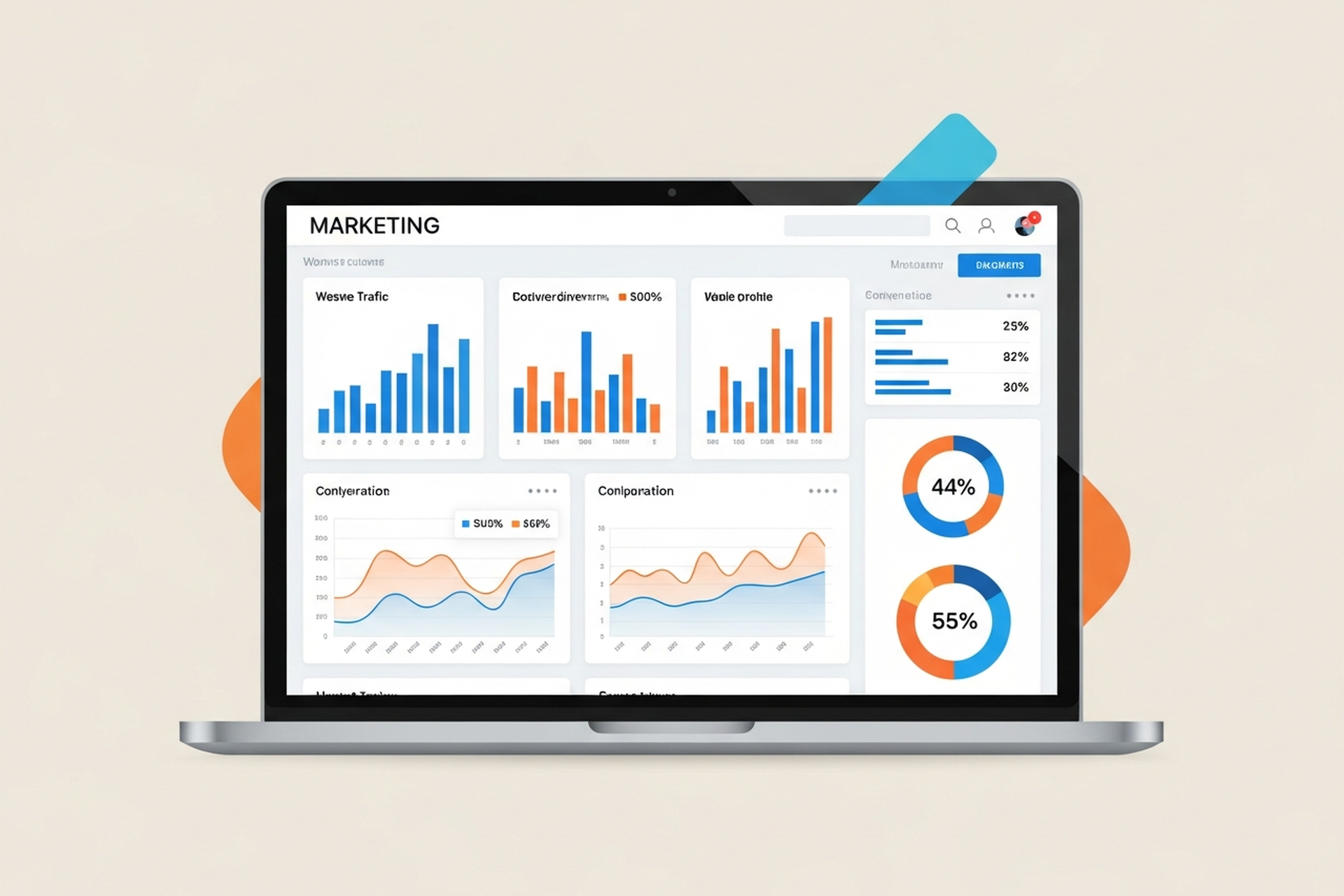
The marketing analytics tools market hit $5.4 billion in 2026, nearly doubling from $3.1 billion five years earlier. That growth reflects both increased demand for data-driven decision-making and an increasingly fragmented landscape of tools competing for budget.
The result: most marketing teams have too many analytics tools, not too few — and still don't have clear answers to the questions that matter most.
This guide cuts through the stack bloat. It covers the core categories of marketing analytics tools, what each does well, and how to evaluate what your business actually needs at its current stage.
Marketing analytics tools fall into three distinct functional categories. Understanding what each category does prevents the most common mistake: buying attribution software when you need better web analytics, or layering on a dashboard tool when the underlying data is broken.
Web analytics platforms track what happens on your website — pages visited, sessions, bounce rates, on-site behavior, and conversion events. They're the foundation layer of your measurement stack.
Google Analytics 4 (GA4) is the dominant free option and the starting point for most businesses. Its event-based model is significantly more flexible than Universal Analytics, but the setup requires more intentionality — the default configuration tracks very little that's actually useful.
Adobe Analytics is the enterprise alternative: more customizable, more expensive, and built for large organizations with dedicated analytics teams. For most growth-stage brands, it's overkill.
Heap and Mixpanel take a different approach — retroactive event tracking means you can analyze user behavior that happened before you thought to track it. These are particularly useful for SaaS and subscription businesses trying to understand product engagement.
What to look for: accurate session attribution, custom event tracking, and the ability to build conversion funnels that map to your actual customer journey — not just generic page views.
Attribution platforms answer the question web analytics can't: which marketing touchpoints actually drove revenue? In a world of multi-channel acquisition, understanding how channels interact is the difference between doubling down on what works and cutting budget from channels that are quietly driving sales.
The challenge is that attribution is fundamentally hard. iOS privacy changes, browser restrictions on third-party cookies, and the inherent complexity of multi-touch journeys mean no attribution model is perfectly accurate. The goal is "directionally correct" — accurate enough to make better budget decisions.
Key platforms in 2026:
Triple Whale — Built specifically for Shopify brands. Pulls in ad platform data, on-site analytics, and post-purchase surveys into a unified view. Strong for DTC brands running paid social, Google, and email.
Northbeam — Deterministic attribution with media mix modeling. Well-suited for brands spending $500K+ per year across channels who need accurate cross-channel attribution that doesn't rely on cookies.
SegmentStream — Incrementality-focused attribution using machine learning. Particularly strong for brands where last-click attribution consistently undercredits upper-funnel channels like YouTube or branded search.
Rockerbox — A solid mid-market option that centralizes ad spend data with multi-touch attribution models and solid integrations.
One critical insight: attribution accuracy depends more on data infrastructure than the model itself. A sophisticated model applied to poor data produces poor insights. Get your event tracking right before investing in an advanced attribution platform.
Dashboards aggregate data from multiple sources — ad platforms, web analytics, CRM, email — into unified views that make cross-channel performance visible without running exports from six different tools.
Looker Studio is free and integrates natively with Google products. For teams already running GA4 and Google Ads, it's often sufficient.
Supermetrics is a data connector that pulls ad platform and analytics data into spreadsheets, Looker Studio, or BI tools. Useful for teams that want custom reporting without full BI infrastructure.
Power BI and Tableau are full business intelligence platforms. They're appropriate when you have a dedicated analyst or data team and need to blend marketing data with CRM, inventory, or financial data.
Domo and Klipfolio sit in the middle — more powerful than basic dashboards, less complex than full BI tools, and well-suited for marketing teams that want automated reporting without an analytics engineering function.
The most useful framework for choosing marketing analytics tools is to start with the decisions you need to make, not the data you'd like to have.
Ask: What business question does this tool help me answer?
Before adding any tool to your stack, define the specific question it answers. "We want more data visibility" is not a question. "We want to know whether Meta or Google drives more first-order revenue for customers who didn't come through direct search" is a question — and that points specifically toward an attribution platform.
Ask: Is our current data accurate?
More tools don't fix bad data. If your GA4 events aren't firing correctly, your UTM parameters are inconsistent, or your Shopify/CRM integration is incomplete, adding an attribution platform will produce confidently wrong answers. Fix the foundation first.
Consider your stage:
Buying attribution software before fixing event tracking. GA4 out of the box tracks a fraction of what you need. Before adding more tools, instrument your site correctly: purchase events, add-to-cart, checkout steps, and lead form submissions should all be firing accurately.
Paying for dashboards that nobody uses. Dashboard tools are often sold on the premise that everyone will have access to the same data. In practice, dashboards only add value if the team is disciplined about using them to make decisions. A weekly data review ritual matters more than which dashboard tool you're using.
Over-relying on last-click attribution. Google Ads and Meta both default to last-click or last-touch attribution models, which credit the final touchpoint before conversion. This systematically undervalues upper-funnel content, email nurture, and organic channels. Any ecommerce growth strategy that relies solely on platform-reported attribution will over-invest in bottom-funnel channels and starve the top.
Adding tools to solve what processes should solve. If your team doesn't review performance data weekly and adjust spend accordingly, another analytics tool won't change that. Analytics tools enable better decisions — they don't make decisions automatic.
The purpose of marketing analytics tools isn't to produce reports. It's to surface insights that change what you do next. At EmberTribe, we've seen growth-stage brands completely transform their channel mix — and their acquisition costs — once they have attribution that accurately reflects how customers actually move through their funnel.
B2B lead generation and DTC ecommerce look different from an attribution standpoint, but the underlying principle is the same: connect every dollar spent to a downstream revenue outcome, and allocate accordingly.
The brands that do this well treat analytics as an operational function, not a reporting function. Data review is part of weekly planning, not a monthly ritual someone does the day before a board meeting.
A practical starting stack for most DTC brands:
Add dashboard tooling and BI infrastructure as your team grows and reporting needs become more complex. The goal at every stage is decision-quality data — not comprehensive data.
Marketing analytics tools only deliver value if they improve the decisions you make. Start with the questions that matter to your business, ensure your foundational data is accurate, and add tools that specifically answer those questions at your current scale.
The marketing analytics tools market is full of sophisticated products that promise complete visibility. Most brands need less than they think, configured better than it currently is.
Build the foundation right. The rest follows.
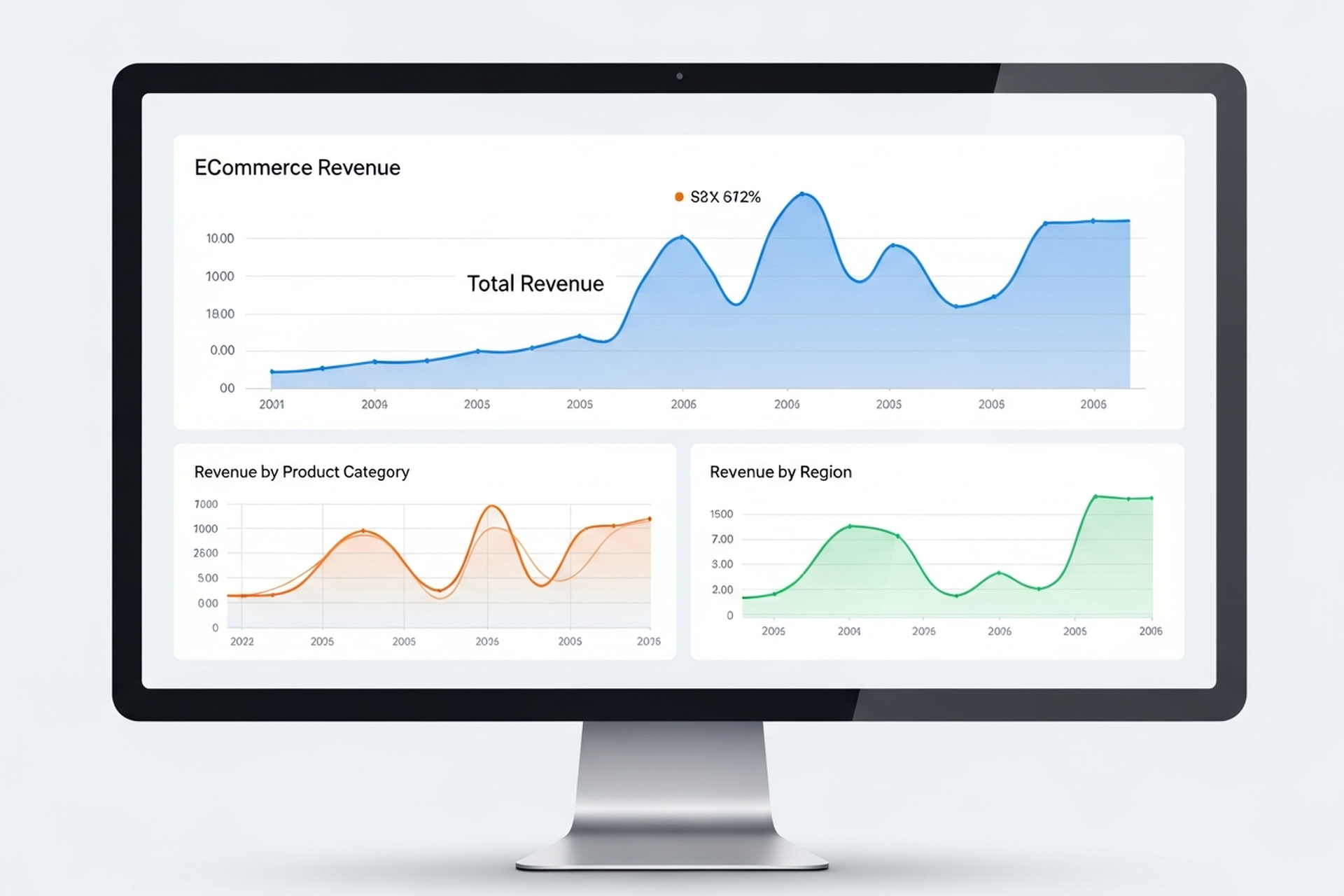
Most ecommerce stores are drowning in data and starving for insight. GA4 dashboards are full of sessions, bounce rates, and pageviews — numbers that describe what happened but don't tell you what to do next. Meanwhile, the metrics that actually drive growth decisions are either buried three reports deep or not being tracked at all.
Ecommerce analytics, done well, narrows your focus to the numbers that connect directly to revenue, margin, and sustainable growth. This guide covers the metrics worth your attention, the tools that surface them, and — most importantly — how to translate data into decisions.
The problem isn't usually a lack of data. It's a lack of a measurement framework. Without one, teams end up tracking everything equally and acting on nothing consistently.
A useful ecommerce analytics setup starts with a clear hierarchy: a small number of primary KPIs that define whether the business is healthy, a second layer of diagnostic metrics that explain why those KPIs are where they are, and a third layer of operational metrics that guide day-to-day decisions.
Most stores invert this — they optimize for operational metrics (sessions, ad clicks, open rates) without connecting them to the primary KPIs that determine whether the business is actually growing.
CVR is the percentage of visitors who complete a purchase. It's the foundational measure of how well your store turns traffic into revenue.
Formula: (Orders / Sessions) × 100
Benchmark: ecommerce conversion rates by industry vary, but a 2–3% conversion rate is a reasonable baseline for most direct-to-consumer stores. Stores above 3.5% have typically invested meaningfully in CRO and UX.
A low CVR tells you that something between arrival and checkout is breaking down — whether that's product-market fit, pricing, trust signals, site speed, or checkout friction. CVR is the best single indicator of your store's health at the mid-funnel level.
AOV measures how much customers spend per transaction. It's one of the fastest levers to pull when you want to grow revenue without acquiring more customers.
Formula: Revenue / Number of Orders
Even a 10% improvement in AOV compounds quickly across your customer base. The highest-impact tactics for increasing AOV are typically product bundling, cross-sell recommendations at cart, free shipping thresholds set slightly above your average transaction size, and subscription upsells where the product fits.
The critical nuance: don't chase AOV at the expense of conversion rate. If discounting or offer changes are required to move AOV, you may be eroding the margin gains you're trying to create.
LTV predicts how much total revenue a customer will generate over their relationship with your brand. It's the most important metric for evaluating the long-term health of your acquisition strategy — and the one most often ignored in early-stage growth.
Basic formula: AOV × Purchase Frequency × Customer Lifespan
In 2026, sophisticated ecommerce teams go further: they segment LTV by acquisition channel, product category, and cohort to understand which customers are actually profitable — not just which ones ordered the most. A customer acquired through a 40%-off promotion often has a dramatically different LTV than one acquired through organic search.
LTV compared to CAC is the ratio that matters most for sustainable growth. A healthy benchmark is LTV:CAC of 3:1 or higher — meaning you recover your acquisition cost three times over. Below 2:1 and you're likely under-investing in retention. Above 5:1 and you may be under-investing in acquisition.
CAC tells you how much you're spending to bring in each new customer. It's only meaningful in context — specifically in relation to LTV.
Formula: Total Marketing and Sales Spend / New Customers Acquired
A common mistake is calculating CAC only against paid channels. Blended CAC — total acquisition spend (paid media, influencer, affiliate, content, brand) divided by all new customers — gives a more accurate picture of what growth is actually costing you.
Tracking CAC by channel lets you see where acquisition efficiency is improving or degrading over time, which informs budget allocation decisions.
ROAS measures revenue generated per dollar of ad spend. It's useful for evaluating campaign-level efficiency but should never be used as a standalone measure of business health — it ignores margin, CAC, and LTV.
Formula: Revenue from Ads / Ad Spend
A 3× ROAS sounds strong but may be unprofitable if your gross margin is 30% and shipping costs are high. Focus on ROAS as a directional signal and contribution margin as the business truth.
This is the metric that most ecommerce brands undertrack and should be reporting first. Contribution margin is what remains after all variable costs — COGS, shipping, fulfillment, returns, and ad spend — are subtracted from revenue.
It tells you whether growing revenue is actually building value or just moving money through a leaky system at scale. If contribution margin is negative, growth is destruction. If it's positive and growing, you have a business worth scaling.
Beyond the primary KPIs, a second layer of metrics helps explain why primary metrics are moving:
You don't need an expensive tech stack to get started. The hierarchy of tools:
Layer 1 — Traffic and Behavior (Free) Google Analytics 4 covers sessions, traffic source, conversion events, and basic funnel analysis. It requires setup investment to be useful (proper event tracking, conversion goals, channel groupings) but is the right starting point for stores under $1M in revenue.
Layer 2 — Attribution and Profit Analytics As ad spend scales, platform-reported ROAS becomes unreliable due to overlapping attribution windows. Tools like Triple Whale, Northbeam, or Rockerbox give you a unified view of channel contribution across Meta, Google, TikTok, and email. These are worth the investment once you're spending $20K+/month on paid media.
Layer 3 — Behavior Analytics Heatmaps and session recordings (Hotjar, Microsoft Clarity) show you where users drop off and why — information that quantitative analytics alone can't surface. Pair these with CRO testing methodology to systematically improve conversion.
Layer 4 — Customer Analytics Platforms like Klaviyo (for email/SMS data) and Lifetimely or Glew (for LTV and cohort analysis) layer customer intelligence on top of transaction data. They're essential for understanding which acquisition channels actually produce high-value customers over time.
Data only earns its keep when it leads to action. A practical framework:
Weekly: Review CVR, ROAS, and ad spend pacing against targets. Flag outliers.
Monthly: Review AOV trends, return rate, email revenue contribution, and new vs. returning customer split. Identify one or two specific hypotheses for the month's optimization focus.
Quarterly: Run a cohort analysis. Compare LTV:CAC by acquisition channel. Evaluate where you're deploying budget relative to where your highest-LTV customers are actually coming from.
This rhythm prevents two failure modes: over-reacting to weekly noise and under-reacting to slow-moving problems (like a gradually declining repeat purchase rate) that only become obvious at the quarterly view.
The most common mistake growth-stage ecommerce brands make is scaling ad spend before their analytics foundation is solid. If you can't attribute revenue accurately, calculate a reliable CAC, or measure LTV by cohort, you're making acquisition decisions based on incomplete information — and the errors compound as spend increases.
Getting ecommerce analytics right — clean tracking, meaningful reporting, and a consistent review cadence — is the prerequisite for efficient growth. At EmberTribe, we treat the analytics audit as the first step in any engagement with an ecommerce brand, because the data quality determines the quality of every decision that follows.
The goal isn't more dashboards. It's fewer metrics, better understood, acted on consistently.
For more on turning your analytics into growth, see our framework for scaling your ecommerce store efficiently and our breakdown of ecommerce CRO tactics that improve conversion.

Most teams that say they "use analytics" are really just watching numbers change. They check traffic each Monday, glance at bounce rate, and feel vaguely informed. The data is there — they're just not asking it the right questions.
Analytics in web marketing is a discipline, not a dashboard habit. Done well, it tells you which channels are actually driving revenue, where your funnel breaks down, what visitors are doing before they convert (or don't), and which pages are dragging down your overall performance.
This guide covers what you need to know to build an analytics practice that informs real decisions — from the foundational metrics worth tracking, to the tools most commonly used, to the implementation details that most teams skip.
Web analytics has never been more accessible. Google Analytics 4 is free, most CMS platforms include built-in stats, and there's a tool for every layer of user behavior.
The gap isn't in access to data. It's in what most teams do with it.
The three most common failure modes:
Tracking everything, acting on nothing. More dashboards don't create better decisions. Teams that measure 40 metrics simultaneously are often less decisive than teams tracking five well-defined KPIs with clear action thresholds.
Confusing correlation with causation. Traffic goes up the same week you send an email campaign. Organic rankings improve after a site redesign. These might be related, or they might not. Drawing conclusions without properly structured attribution creates false confidence and poor spending decisions.
Ignoring the implementation layer. Analytics is only as accurate as its setup. Misconfigured conversion tracking, duplicate pageview events, missing UTM parameters, and unfiltered internal traffic are all common problems that silently corrupt your data.
There are dozens of web analytics metrics. Most teams track too many of them. Here are the ones that connect most directly to business performance:
Understanding where traffic comes from and whether that source is growing or declining is the starting point for any channel-level decision.
Engagement metrics tell you whether your traffic is qualified. High traffic with low engagement is often a sign of poorly targeted acquisition, misleading meta descriptions, or content that doesn't match search intent.
Conversion metrics are where analytics connects to business outcomes. They're the most important category and often the most poorly configured.
Still the default for most organizations. GA4 is free, integrates with the full Google marketing stack (Google Ads, Search Console, BigQuery), and has solid machine learning-powered insights built in.
The major shift from Universal Analytics (its predecessor) is the event-based data model. Every interaction is now tracked as an event rather than a pageview or session, which enables much more granular behavioral analysis — but also requires more deliberate implementation to configure correctly.
GA4's built-in AI surfaces automated anomaly detection and predictive audiences, which can flag significant traffic changes before you notice them manually.
GA4 is the standard starting point for most organizations regardless of what else is in the stack.
Where GA4 tells you what is happening in aggregate, Hotjar (and its free alternative, Microsoft Clarity) shows you why at the individual session level. Session recordings, heatmaps, and click maps reveal exactly how users are navigating your pages — where they're clicking, where they're stopping, what they're ignoring.
This behavioral layer is essential for conversion rate optimization. Quantitative data from GA4 tells you a page has a high exit rate. Qualitative data from Hotjar shows you that users are rage-clicking a button that doesn't work on mobile.
For SaaS products and apps, standard web analytics misses most of the interesting data — which features are being used, where users drop off in onboarding, what actions predict retention. Mixpanel and Amplitude are event-based product analytics platforms built for this depth of behavioral analysis.
Both track events at the user level (rather than the session level), which means you can analyze the paths individual users take through your product — not just aggregate traffic patterns.
Data lives in multiple systems — GA4, Google Ads, Facebook Ads, your CRM, email platform. Looker Studio connects these sources into unified dashboards, so you're looking at the full picture rather than switching between tools.
The value isn't in the tool itself but in the unified view it enables: revenue by channel, CAC by campaign, and funnel performance from first touch to close — all in one place.
The biggest analytics problems aren't conceptual — they're technical. Here are the implementation details that most teams get wrong:
Every conversion event on your site should be explicitly defined and verified before drawing conclusions from the data. Form submissions, button clicks, purchases, and demo bookings should each fire a distinct, measurable event — not a generic "page viewed" trigger.
In GA4, verify that your key conversion events are marked as such in the platform. Then test them manually: submit a form, complete a purchase, click a CTA button. Confirm the events fire correctly in the GA4 realtime report.
UTM parameters are how analytics platforms identify the source, medium, campaign, and content of your traffic. Without consistent UTM tagging on all marketing links — email campaigns, social posts, paid ads, partner links — your source attribution becomes unreliable.
The biggest UTM mistake: inconsistent naming conventions. "Email" and "email" are treated as different sources in GA4. "paid_social" and "Paid-Social" will split your data. Define a standard and enforce it across every team that creates tracking links.
If you're on the same IP address as your team, your visits to the site are inflating traffic data and corrupting conversion rates. Filter internal traffic in GA4 by defining internal IP addresses as filters, or by setting an internal traffic property.
This is particularly important for small companies where internal browsing represents a meaningful percentage of total sessions.
If your website and checkout, booking system, or community platform live on different domains, sessions will break between them unless cross-domain tracking is properly configured. A visitor who lands on your main site and checks out on your ecommerce subdomain will appear as two separate users unless the domains are linked in your GA4 configuration.
Analytics tools are infrastructure. The practice is what you do with them.
A few principles that distinguish teams that genuinely use analytics from teams that just have it installed:
Tie every dashboard to a decision. Before adding a metric to your reporting, ask: what decision does this data inform? If you can't answer that, the metric probably doesn't belong in your weekly review.
Establish baselines before drawing conclusions. Knowing your current conversion rate is 1.8% tells you nothing without context. Knowing it was 2.1% last month and 1.4% six months ago gives you a trend to act on.
Use analytics to generate hypotheses, not to confirm assumptions. The most valuable use of behavioral data is to surface unexpected patterns — pages that convert better than expected, traffic sources you weren't investing in, content that drives outsized engagement. These anomalies are where growth opportunities hide.
Separate reporting cadences. Weekly dashboards for operational metrics (traffic, conversion rate, ad spend efficiency). Monthly reviews for channel-level trends and budget decisions. Quarterly analysis for strategic pivots and benchmark comparisons.
Analytics in web marketing is the infrastructure that connects activity to outcomes. Without it, you're spending budget based on intuition and reporting performance based on impression. With it, you can identify exactly which channels, pages, and content types are generating revenue — and make decisions with proportional confidence.
The tools are accessible. GA4 is free. Hotjar has a free tier. Looker Studio is free. The barrier isn't cost — it's configuration and discipline.
Set up tracking correctly before you scale anything. Define the metrics that connect to your business goals rather than the ones that look good in a deck. Review data regularly with specific decisions in mind. And treat anomalies as opportunities, not noise.
Web analytics done well doesn't just tell you what happened. It tells you what to do next.

Most SaaS founders can name their revenue number. Fewer can tell you their net revenue retention, their LTV:CAC ratio, or why their DAU/MAU ratio matters more than their user count. If you're building or scaling a SaaS product in 2026, mastering your SaaS KPIs is not optional — it's the difference between fundraising with leverage and scrambling to explain churn to investors.
This guide breaks down every metric that matters, with current industry benchmarks and guidance on what "good" actually looks like at each company stage.
In 2026, investors and acquirers have become far more selective. The era of growth-at-all-costs is behind us. Capital efficiency, retention, and unit economics now drive valuations more than raw ARR growth.
The SaaS companies trading at premium multiples share a common thread: they track the right metrics, benchmark against their peer group, and adjust strategy based on data rather than intuition. Understanding your SaaS data analytics isn't just a finance function — it's a growth function.
Tracking vanity metrics (page views, registered users, email opens) feels productive but obscures the signals that actually predict revenue trajectory. The KPIs in this guide are the ones that appear in every serious investor deck, every M&A diligence process, and every high-performing growth team's weekly review.
ARR and MRR are the foundation. MRR tracks your predictable subscription revenue in a given month; ARR is simply MRR multiplied by 12. Both should be tracked net of discounts and credits.
The components that build (or erode) MRR tell the real story:
Benchmarks for ARR growth rate: StageGoodGreatWorld-ClassSeed / Pre-Series A100%+ YoY150%+ YoY200%+ YoYSeries A50–80% YoY100%+ YoY150%+ YoYSeries B+30–50% YoY60%+ YoY80%+ YoYPublic / Scale20–30% YoY40%+ YoY60%+ YoY
The median public SaaS company grows ARR at roughly 26% annually. Consistent 30–50% YoY growth signals healthy, investable expansion.
As your growth rate matures, investors apply the Rule of 40 — your ARR growth rate plus your profit margin should exceed 40%. Companies scoring above 60% command 2–3x higher valuation multiples than those below the threshold.
These are the metrics that separate SaaS businesses from software resellers. Retention tells you whether your product is creating real value.
Churn rate measures the percentage of customers (or revenue) lost in a given period. Low churn is the single most important indicator of product-market fit.
Monthly churn benchmarks by segment: SegmentAcceptableGoodExceptionalSMB SaaS< 5%< 3%< 1.5%Mid-Market< 2%< 1.5%< 0.8%Enterprise< 1%< 0.5%< 0.3%
The average B2B SaaS company runs around 3.5% monthly churn — roughly 2.6% voluntary and 0.8% involuntary (failed payments). Involuntary churn is often underestimated and entirely fixable with dunning automation and payment retry logic.
NRR measures revenue from your existing customer base over time, accounting for expansion, contraction, and churn. It is arguably the most important single metric in SaaS.
An NRR above 100% means your existing customers are spending more over time — your business grows even without adding a single new customer. Public SaaS companies with NRR above 120% trade at 25% higher valuation multiples than those below 100%.
NRR benchmarks: RatingNRRBelow average< 100%Solid100–110%Strong110–120%World-class125%+
Companies like Snowflake and Atlassian have achieved NRR above 130%. For most growth-stage SaaS companies, targeting 110–120% is the right ambition.
Growth is not free. The quality of your customer acquisition determines whether your unit economics support sustainable scaling.
CAC is total sales and marketing spend divided by the number of new customers acquired in a period. Track it by channel — blended CAC hides where you're burning money.
This tells you how long it takes to recover what you spent to acquire a customer. Shorter payback periods mean faster capital recycling and less reliance on external funding.
CAC payback benchmarks: RatingPayback PeriodStrong< 12 monthsSolid12–18 monthsAcceptable18–24 monthsConcerning> 24 months
The median SaaS company runs a 15–18 month CAC payback period. Series A investors increasingly want to see sub-12 months as a prerequisite.
Lifetime Value (LTV) divided by Customer Acquisition Cost tells you the return on every dollar you invest in growth. This is the core efficiency metric for any SaaS sales funnel.
LTV is typically calculated as: Average Revenue Per Account / Monthly Churn Rate.
LTV:CAC benchmarks: RatingRatioMinimum viable3:1Solid4:1Excellent5:1+
A 3:1 ratio is the floor — below that, your unit economics make it very difficult to build a self-sustaining business. The best-performing SaaS companies hit 5:1 or higher, which unlocks aggressive reinvestment in acquisition without burning cash reserves.
For a deeper look at connecting acquisition metrics to revenue outcomes, the B2B SaaS Lead Generation Playbook covers how to structure your funnel to improve both CAC and close rate simultaneously.
Revenue metrics tell you what happened. Engagement metrics tell you what's about to happen.
The DAU/MAU ratio measures what percentage of your monthly active users return on any given day. It's the best proxy for product stickiness — how deeply embedded your software is in users' daily workflows.
DAU/MAU benchmarks: RatingRatioLow engagement< 10%Average10–25%Strong25–40%Exceptional40%+
A DAU/MAU above 25% indicates habitual daily use. Consumer apps like Slack and Notion target 40%+. For B2B workflow tools, 20–30% is typically strong.
Low DAU/MAU is an early churn warning signal — users who don't use the product regularly won't pay for it long.
MetricGoodGreatWorld-ClassMonthly Churn< 3%< 1.5%< 0.5%NRR100–110%110–120%125%+LTV:CAC3:14:15:1+CAC Payback< 18 months< 12 months< 9 monthsGross Margin65–70%70–75%80%+DAU/MAU15–25%25–40%40%+ARR Growth (Series A)50% YoY80% YoY100%+ YoYRule of 40 Score40+60+80+
Not every SaaS KPI deserves equal attention at every stage. Here's where to focus:
Obsess over churn and product engagement. Before you build a growth machine, you need to know your product retains users. Target monthly churn below 3% and DAU/MAU above 15% before doubling down on acquisition spend.
Nail unit economics. Investors want to see LTV:CAC above 3:1, CAC payback under 18 months, and NRR trending toward 110%. Your SaaS content marketing strategy should be generating predictable inbound pipeline that keeps your blended CAC healthy.
Shift focus to NRR and the Rule of 40. Expansion revenue — upsells, cross-sells, seat additions — should be contributing materially to ARR growth. Gross margin protection becomes critical as headcount and infrastructure costs scale.
Revenue quality, efficiency ratios, and free cash flow margin dominate. The Rule of 40 becomes the headline efficiency metric, and NRR above 120% becomes a prerequisite for premium multiple maintenance.
Tracking MRR but ignoring MRR movement. New MRR, expansion MRR, contraction MRR, and churned MRR are four separate signals. A flat MRR could mean everything is fine — or it could mean churned and new MRR are exactly canceling each other out.
Using blended CAC. Channel-level CAC reveals where you're acquiring customers efficiently and where you're overspending. Blended CAC hides both.
Ignoring involuntary churn. Failed payments account for roughly 23% of all SaaS churn. This is recoverable revenue that gets written off as lost customers when it shouldn't be.
Setting vanity NRR targets. NRR of 100% is not a win — it means you're running in place. Aim for 110%+ to build genuine net retention leverage.
Understanding your SaaS KPIs is step one. Acting on them — adjusting messaging, fixing funnel leaks, improving onboarding conversion, increasing expansion revenue — is where growth actually happens.
EmberTribe works with growth-stage SaaS companies to connect their analytics to their acquisition and retention strategy. From identifying which acquisition channels produce the lowest CAC to improving trial-to-paid conversion rates, we turn metric visibility into revenue movement.
Explore how our SaaS growth approach has helped B2B software companies improve unit economics and scale more efficiently.
Ready to turn your SaaS data into a growth engine? Talk to EmberTribe.

This post is part of a blog series, "Here Be Metrics," breaking down the primary aspects of the so-called pirate metrics for growth marketing. Keep up with this series and others by subscribing to our blog!
Seeing a skull and bones on the high seas sent people fleeing in fear of imminent attack, for pirates wasted little time once their presence was known.

Although they should not attack customers, corporations today should likewise waste little time taking action once a target sees their brand. The move from awareness to acquisition is a critical process in the customer lifecycle, and the businesses that master it build the foundation for sustainable, profitable growth.
In the pirate metrics framework (AAARRR: Awareness, Acquisition, Activation, Revenue, Retention, Referral), acquisition sits at a pivotal point. It is the moment when an anonymous audience member becomes a known contact, a lead, or a customer. Everything that follows in the growth engine depends on how effectively you execute this transition.
The goal of acquisition is to move people from undefined groups to individual leads or customers. It is the conversion from passive observer to active participant in your brand's ecosystem.
While cannons and swords were effective when pillaging ships and towns along the high seas, today's civilized markets call for a more nuanced approach. Corporations must entice, rather than force, customers to join their tribe.
Image Credit: 500 Hats
Acquisition can be defined as the moment of the very first transaction with a customer, or simply the act of bringing new customers and clients into your business. This transaction often is not a monetary payment for goods or services. Instead, it is normally an exchange of information and permission. The target audience volunteers their personal information with the understanding that the company will contact them in the future.
To entice customers to make this exchange, many companies offer immediate value in return. Coupons, PDF downloads, ebooks, free trials, and membership deals are all common offerings that serve as the catalyst for converting an interested visitor into an identifiable lead.
Image Credit: 500 Hats
With regard to metrics, acquisition focuses on data related to lead capture and the efficiency of your conversion process. Understanding these numbers is fundamental to optimizing your sales funnel and improving growth over time.
These metrics tell you how many potential customers you are bringing into your pipeline:
Volume alone tells an incomplete story. These metrics reveal how efficiently your acquisition engine operates:
The relationship between these metrics matters as much as the individual numbers. A low CPL is meaningless if those leads never convert to customers. A high CAC is acceptable if lifetime value is proportionally higher. Growth marketers obsess over the ratios and unit economics, not vanity metrics in isolation. This approach to understanding what truly matters beyond surface-level ROAS separates effective acquisition strategies from wasteful ones.
For online marketing campaigns, the volume of acquisition data available makes this metric category particularly powerful. In addition to the core metrics listed above, digital marketers can access highly granular data points including:
With such detailed information, the moment of acquisition can be fine-tuned to maximize the conversion rate and minimize the cost of acquisition. This data-driven approach is what separates modern growth marketing from traditional advertising.
Tracking metrics is necessary but not sufficient. You need a deliberate strategy for generating leads and converting them efficiently. Here is a framework for building acquisition systems that scale.
Relying on a single channel for customer acquisition is fragile. Algorithm changes, cost increases, or market shifts can devastate your pipeline overnight. The most resilient acquisition strategies spread effort across multiple growth marketing channels:
The gap between a visitor arriving at your site and that visitor becoming a lead is where acquisition happens. Every element of the lead capture experience affects your conversion rate:
Landing pages. Dedicated landing pages with a single CTA consistently outperform general website pages for lead capture. Remove navigation, minimize distractions, and focus every element on the conversion goal.
Forms. Ask for only the information you need at the point of capture. Every additional field reduces completion rates. You can always collect more data later in the relationship.
Lead magnets. The value exchange must feel fair to the prospect. A generic "subscribe to our newsletter" CTA underperforms a specific, high-value offer like "Download our 2026 DTC Growth Playbook" or "Get a free audit of your ad account."
Social proof. Testimonials, client logos, case study results, and review scores near your lead capture points reduce friction and increase trust. Showing real results, like the outcomes from proven case studies, gives prospects confidence to take the next step.
Acquisition does not exist in a vacuum. It is one step in a larger journey that begins with awareness and extends through activation, revenue, retention, and referral. The most effective acquisition strategies consider what happens before and after the lead capture moment.
Before acquisition: Invest in awareness-stage content and advertising that warms your target audience before asking for anything in return. Cold audiences who have had zero prior exposure to your brand convert at significantly lower rates than those who have engaged with your content.
After acquisition: Plan your activation sequence before you generate leads. A lead that sits in your database without a follow-up plan is a wasted acquisition. Automated email sequences, personalized outreach, and timely follow-up calls ensure that new leads move toward the next stage of the funnel rather than going cold.
Even experienced marketers make acquisition errors that limit growth. Watch for these common pitfalls:
Optimizing for the wrong metric. Maximizing lead volume while ignoring lead quality fills your pipeline with contacts who will never buy. Focus on qualified leads and downstream conversion rates, not raw numbers.
Ignoring channel attribution. If you cannot attribute leads to specific channels and campaigns, you cannot optimize your spend. Invest in proper tracking and attribution before scaling your budget. Understanding which audiences to target for lead generation requires solid attribution data.
Neglecting the post-capture experience. Acquisition is not the finish line. A lead captured without a clear activation path is money spent with no return. Build your nurture sequences and sales processes before you increase acquisition spend.
Over-investing in one channel. Even if one channel is performing well today, market conditions change. Allocate a portion of your budget to testing new channels continuously.
Do not waste time delaying acquisition. The moment your target demographic becomes aware of your brand, move toward actions that will acquire them as customers. The pirates of the high seas did not dally, and neither should you.
Start by auditing your current acquisition metrics. Calculate your CAC, measure your lead conversion rates by channel, and identify the biggest drop-off points in your funnel. Then prioritize the improvements that will have the highest impact on volume and efficiency.
Acquisition is the engine that powers every subsequent stage of the growth marketing framework. Master it, measure it relentlessly, and optimize it continuously, and you build the foundation for a business that scales predictably and profitably.

Growing up, I loved visiting my grandparents out in the country.
One humid August afternoon, I grabbed a pail and headed out to the farm. It was blueberry season. If I could bring back enough blueberries to Grandma's kitchen, it would turn into pie (aka a slice of heaven on earth).
So I picked blueberries like a madman that day, furiously grabbing at the bushes. But no matter how hard I worked, the pail would barely fill.
It was far too late before I noticed the quarter-sized hole in my pail. A cluster of blueberries trailed behind me, never to be recovered again.
Here's a troubling fact: 95% of the visitors who reach your website will never come back again.
That's not a quarter-sized hole in your pail, it's a crater.
Of course, the 95% rule will vary depending on your industry. If you want a quick gut check on where you stand, just open up your Google Analytics profile and look at the ratio between new/returning visitors.
Wherever the numbers fall for your site, the story is probably the same: the majority of people aren't coming back.

You've worked so hard to drive traffic to your site. Furiously writing content, hustling on social media and even paying for visitors.
But that hard work is wasted when users visit your site, don't convert, then leave and never come back.
Most marketers make the mistake of treating their visitors as a "disposable audience". Our answer to losing 95% of our blueberries is to...pick more and more blueberries.
There's a better way to fix this problem and it can lead to explosive growth for your business.
Retargeting is a tool that's been around for awhile now, but a lot of marketers still haven't put it into practice.
Retargeting, also known as "remarketing", is a way to stay in front of your prospective customers with display ads that follow them around the web.
Ever shop online? You've probably been retargeted. Let's say you've been window shopping for a new laptop. Somehow, magically, that same laptop starts showing up in your Facebook news feed, on the sidebar of some random blog you're reading, etc.
It's not a coincidence, it's retargeting!
There are two ways to approach retargeting:
Site-Based: Site-based retargeting is the most common approach. When a user visits your site, they are "tagged" (cookied) through a pixel provided by a retargeting platform. Once a user is tagged, you'll be able to serve them ads throughout a broad network of websites and apps.
The beauty of this approach is that you can set up refined campaigns based on the pages that users did (or didn't) view. For example, a user reached a checkout page but did not complete their order.
Why didn't they buy? Maybe they didn't have their credit card on hand, maybe they ran out of time, maybe they wanted to shop around. Whatever the reason, retargeting gives you a second, third, fourth chance to close the deal.
List-Based: List-based retargeting is also known as "custom audience targeting" and "CRM Retargeting". Unlike site-based retargeting, which targets visitors of specific pages on your site, list-based retargeting uses email addresses.
With site-based retargeting, users are tagged directly when they interact with your site. With the list-based approach, a retargeting vendor will use a network of data partners to tag a user based on their email address.
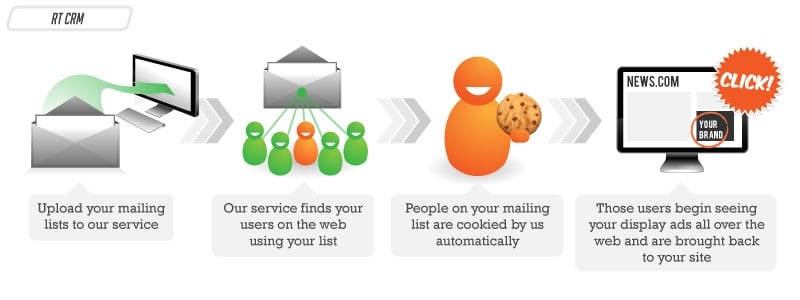
Image credit: Retargeter
The applications are endless. Do you want to re-awaken cold leads that haven't visited your site in awhile? Segment your list and get back in front of them. Want to up-sell existing customers or advertise a complementary product? List-based retargeting is a powerful tool at your disposal.
Retargeting isn't just a tactic to increase sales. It can be used to build brand awareness and amplify your content marketing efforts.
A key ingredient to building trust with your audience is to get repeat visits to your site. The more value you can provide with free content upfront, the more people will trust your brand.
Larry Kim of Wordstream implemented retargeting to re-engage their blog visitors. They saw a 50% lift in repeat visits once retargeting ran its course.

Site-based retargeting is a powerful way to re-engage your audience. If your blog is organized by categories in the URL, like, "YourDomain.com/blog/PPC/Blog-Post", it's easy to create retargeting rules that promote new content to past site visitors based on what they've read previously.
For example, create a retargeting rule that serves ads to visitors who read anything on your blog in the "PPC" category over the last 90 days. Did you just publish a new blog post that fits into that category? Serve ads to those audience segments and jumpstart traffic to your post.
Worried about breaking the bank for something that doesn't necessarily have a direct impact on sales?
Good news. Getting people back to your site is typically less expensive than getting them there in the first place. I say "typically", because costs will vary between ad exchanges and there's always an exception to the rule.


.svg)