







Analytics for SEO: The Complete 2026 Practitioner Guide
Most SEO programs collect data. Few actually use it. The gap between teams that rank and teams that stall often comes down to one thing: whether analytics is guiding decisions or just filling dashboards.
Connecting the right data sources, tracking the metrics that signal real search performance, and building a repeatable workflow to act on what you find is what separates SEO programs that grow from ones that plateau. This guide covers exactly that.
Why Analytics Is Central to SEO Strategy
Search engine optimization without analytics is guesswork. You might publish consistently, build links, and optimize pages, but without measurement you cannot tell which efforts are compounding and which are wasting budget.
The strongest SEO programs treat analytics as a feedback loop. Content goes live, data comes back, priorities shift based on what the numbers show. That cycle, done weekly, is what drives compounding organic growth. For a deeper look at how analytics fits into a broader web measurement strategy, the guide on SEO web analytics covers the foundational layer in detail.
The Two Tools That Power SEO Analytics
Most SEO analytics workflows run on two free platforms: Google Analytics 4 and Google Search Console. Each tells a different part of the story, and they are most powerful when used together.
Google Analytics 4 (GA4)
GA4 is an event-based analytics platform. Every interaction on your site, whether a scroll, a form fill, or a page view, is captured as an event. For SEO purposes, the most important GA4 reports are:
- Traffic Acquisition: Isolate organic search as a channel and monitor session trends over time.
- Landing Pages: See which pages earn organic entries and how those sessions perform (engagement rate, conversions, bounce).
- Engagement: GA4 measures engaged sessions rather than raw pageviews. An engaged session lasts longer than 10 seconds, includes a conversion event, or contains two or more pageviews. This is a sharper quality signal than bounce rate alone.
GA4's shift to event-based measurement also means conversions are now called "key events." You can mark specific actions, such as form submissions, purchases, or demo requests, as key events, then filter organic traffic data against those conversions to understand which organic pages actually drive business outcomes.
Google Search Console (GSC)
Search Console shows what happens in the SERP before users reach your site. The Performance report is the core tool, surfacing four metrics for every query and page combination:
- Impressions: How many times your URL appeared in search results
- Clicks: How many users clicked through to your site
- CTR: Click-through rate, clicks divided by impressions
- Average Position: Where your URL ranked on average across the reporting period
The Google Search Central documentation notes that combining Search Console with GA4 gives you a more complete view of how audiences discover and experience your site. That integration is worth setting up immediately.
How to Link GA4 and Google Search Console
The integration is straightforward. Inside GA4, go to Admin, then Property Settings, then Search Console Links. You will need to be a verified owner of the property in Search Console and have Editor access in GA4.
Once linked, a Search Console collection appears in your GA4 reports under Reports Library. You get two reports: Queries (showing keyword data alongside GA4 engagement metrics) and Google Organic Search Traffic (landing page performance with Search Console signals layered in). New integrations can take 24 to 48 hours to populate data.
This linked view is where the most actionable insights come from. You can see not just which queries drive traffic, but whether that traffic engages and converts once it arrives.
The Metrics That Actually Matter for SEO
Not every metric in GA4 or Search Console deserves weekly attention. The ones below have a direct line to rankings, traffic quality, and revenue.
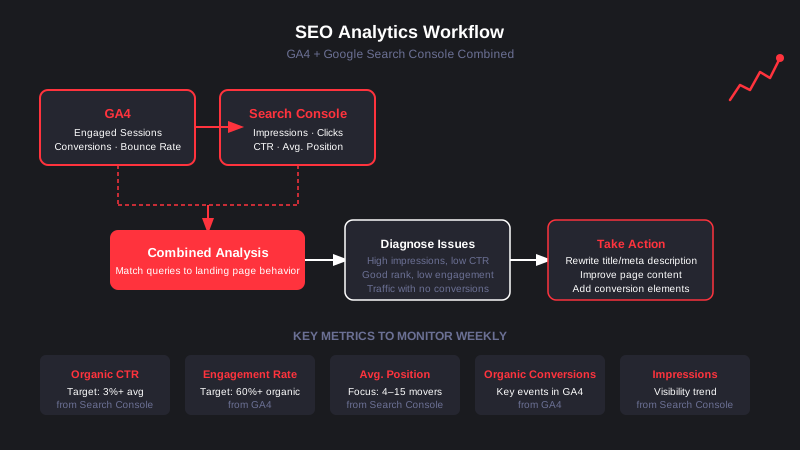
Organic CTR
Click-through rate measures how often searchers choose your result after seeing it. A keyword with high impressions and low CTR is ranking but failing to earn the click, usually because the title tag or meta description is not compelling enough. The benchmark to watch: a CTR under 3 percent for positions 1 through 5 usually signals a weak title or mismatched intent.
Engagement Rate on Organic Landing Pages
If users arrive from organic search and immediately leave, that signals a mismatch between what the SERP promised and what the page delivered. A healthy engagement rate for organic traffic sits at 60 percent or higher. Pages below that threshold need a content or UX audit.
Average Position for Mid-Ranked Pages
Pages ranking in positions 4 through 15 are the highest-leverage targets in any SEO program. They have already established relevance with Google but are not yet earning the click volume they could. A focused optimization effort on these pages, updating content, improving internal linking, and strengthening the page's topical depth, often produces meaningful traffic lifts within 60 to 90 days.
Organic Conversions (Key Events)
Raw traffic numbers are vanity metrics if they do not tie back to business outcomes. In GA4, segment key event completions by "Organic Search" to see which landing pages produce qualified leads, purchases, or sign-ups from search. According to AgencyAnalytics' 2026 SEO KPI guide, practitioners consistently rank conversions and revenue as the most valuable SEO metrics, while raw rankings are treated as secondary signals.
Impressions Trend
Impressions measure your overall search visibility. A growing impressions trend, even before clicks increase, often indicates that content is gaining traction and freshness in Google's index. A sudden impressions drop is an early warning signal worth investigating in the Coverage and Index reports inside Search Console.
A Weekly SEO Analytics Workflow
The research process and publish cadence matter less than the review loop. A consistent weekly workflow turns data into action.
Step 1: Open Search Console Performance and filter the last 28 days. Sort by impressions. Identify pages with high impressions but CTR below 3 percent. These are rewrite candidates.
Step 2: Pull the same pages in GA4 under Reports, then Engagement, then Pages and Screens. Filter by organic traffic. Review engagement rate and key event conversion data for each page.
Step 3: Cross-reference. A page with strong impressions, decent position, but low engagement rate likely has an intent mismatch. A page with strong CTR but no conversions likely has a conversion barrier (weak CTA, poor UX, or misaligned offer).
Step 4: Prioritize fixes based on traffic potential and business value. A mid-funnel page driving 2,000 organic sessions per month with a 0.2 percent conversion rate has far more leverage than a top-of-funnel page with 300 sessions and 5 percent engagement.
This workflow scales. Once it is in muscle memory, running it takes 30 minutes a week and consistently surfaces the highest-ROI SEO work on your site.
SEO Analytics Tools Beyond GA4 and GSC
GA4 and Search Console handle the core workflow. For teams that need more, a handful of tools layer in additional capability.
Looker Studio (free): Combines GA4 and Search Console data into visual dashboards that update automatically. Useful for presenting SEO performance to stakeholders without exporting spreadsheets.
Ahrefs / Semrush: Third-party rank trackers and backlink tools that supplement Search Console's keyword data with competitive benchmarks, keyword difficulty scores, and backlink monitoring. Neither replaces Search Console, but both add context that GSC cannot provide.
Screaming Frog: A technical SEO crawler that identifies indexing issues, broken links, duplicate content, and missing metadata at scale. Complements analytics data by showing what Search Console might flag in Coverage reports.
For a structured comparison of analytics platforms including GA4 alternatives, the analytics platforms guide breaks down the full stack with pricing and use cases.
Connecting Analytics to SEO Decisions
Data has no value until it changes what you do. The teams that get the most from analytics for SEO are not the ones with the most sophisticated dashboards. They are the ones with the clearest decision rules.
If CTR drops below 3 percent on a page ranking in the top 5, rewrite the title tag. If engagement rate on an organic landing page falls below 50 percent, audit the content for intent match. If impressions grow but clicks plateau, check whether a Featured Snippet or AI Overview is intercepting the click. These rules, applied consistently, make analytics a decision engine rather than a reporting exercise.
Building that discipline takes time, but the compound effect is significant. Backlinko's 2026 SEO metrics hub notes that teams tracking organic conversion rate alongside traffic consistently outperform teams optimizing for rankings alone, because they optimize toward outcomes rather than vanity signals.
If you are building or auditing your analytics foundation, the web analytics tool comparison covers which platforms work best at different stages of growth, including when GA4 alone is sufficient and when to add a more specialized layer.
What Good Looks Like
A mature SEO analytics practice has three characteristics: it measures both visibility (impressions, position) and quality (engagement, conversions), it connects those metrics to decisions on a regular cadence, and it is simple enough to run without a data analyst.
GA4 and Search Console, linked and reviewed weekly, give most teams everything they need to build that practice. The goal is not more data. It is clearer signals and faster action on what the data reveals.

.webp)

.svg)


