
Most marketing teams have access to more data than ever, yet still struggle to answer a simple question: is our spend working? The problem is not a lack of data. It is a lack of one coherent analytics dashboard that surfaces the right numbers at the right time.
A well-built marketing analytics dashboard eliminates the context-switching between ad platforms, CRM reports, and spreadsheets. It gives your team a single source of truth, enabling faster decisions and tighter feedback loops between creative, media, and revenue.
A marketing analytics dashboard is a centralized, interactive interface that pulls data from multiple sources and displays key performance indicators in one view. The best implementations update in real time or near-real time, automatically refreshing as campaigns run and orders come in.
Unlike static reports, a live dashboard lets you react. You can spot a ROAS drop on a Tuesday morning and adjust bids before the day burns through budget. That speed-to-insight gap is where growth compounds or erodes.
According to Improvado's 2026 dashboard research, the average marketing team now manages data from more than a dozen platforms. Without a dashboard aggregating that data, teams default to manual exports and lose hours every week to reconciliation work.
The metrics you include depend on your funnel stage and business model, but these are the non-negotiables for DTC and growth-stage brands.
For a deeper breakdown of how these metrics fit into a full measurement stack, see our guide to marketing analytics services.
Choosing the right tool depends on your team size, technical resources, and data sources. Here is how the leading platforms compare.
Looker Studio is free and integrates natively with Google Analytics 4, Google Ads, Search Console, BigQuery, and YouTube Analytics. For teams whose data lives primarily in the Google ecosystem, it is hard to beat on cost-to-value. The trade-off is that building complex cross-channel views requires more configuration and some familiarity with data blending.
Looker Studio works best as a reporting layer when your underlying data is already clean and consolidated. If you are pulling from six ad platforms, you will likely need a connector or a warehouse in between.
Databox is purpose-built for marketing KPI monitoring. It connects to Shopify, Google Ads, Meta Ads, HubSpot, and email platforms in minutes, with pre-built templates that get you to a working dashboard quickly. The mobile app is strong, and goal-tracking features make it easy to align team performance against targets.
Pricing starts at $169/month for professional tiers. The tradeoff versus Looker Studio is cost, though the time saved on setup and maintenance often justifies it for lean teams. Per Graphed's comparison, Databox wins on speed and goal tracking while Looker Studio wins on customization.
Power BI is the enterprise-grade option with the deepest Microsoft ecosystem integration. At $14 to $25 per user per month, it offers a massive library of interactive visualizations, AI-powered anomaly detection, and robust data governance. For brands running significant spend on Microsoft Advertising or already invested in Azure, it is a natural fit.
Power BI's visualization engine is more powerful than Looker Studio's out of the box, but it requires more technical setup and a steeper learning curve for non-technical stakeholders.
For Shopify brands running heavy paid social, Triple Whale has become the default analytics dashboard. It handles first-party pixel tracking, attribution modeling, and creative analytics in one place. The Summary page gives founders and media buyers a daily snapshot of blended ROAS, new customers, and contribution margin without any manual work.
If your entire stack is Shopify plus Meta plus TikTok, Triple Whale's purpose-built metrics (MER, nCAC, Blended ROAS) reduce the cognitive load of working across generic BI tools.
For a broader comparison of platforms at different price points, our analytics platforms guide covers how these tools fit into a full martech stack.
Having the tools is only half the equation. The architecture matters just as much.
Start by mapping every touchpoint that influences revenue: paid channels, organic search, email, SMS, and your ecommerce platform. Each source needs a reliable, automated connection to your dashboard. Manual CSV imports are a liability; one missed export skews every downstream metric.
Your web analytics tool is the anchor. Every campaign should pass UTM parameters consistently so sessions, conversions, and revenue can be attributed correctly before they surface in your dashboard.
A CEO wants blended ROAS, revenue, and new customer count. A media buyer wants campaign-level CPA and impression share. A retention manager wants repeat rate and LTV cohorts. Building one monolithic dashboard that serves all three usually serves none of them well.
Create views for each role. Most tools support this natively through page-based dashboards or user-level permissions. The goal is to reduce the cognitive load for each viewer so they can act immediately on what they see.
Raw numbers without context are incomplete. Set target ranges for your key metrics and configure alerts that fire when performance moves outside acceptable bounds. A 20% drop in conversion rate overnight is a different signal than a gradual 5% decline over two weeks, and your dashboard should make that distinction obvious.
AgencyAnalytics' 2026 benchmark data shows that teams using alert-based dashboards respond to anomalies an average of 4 hours faster than teams relying on scheduled reports. For campaigns running $10,000 per day, that response time difference is material.
Real-time dashboards are valuable, but they are only as reliable as the underlying data pipelines. Google Ads data can lag by 3 to 4 hours. Meta data can lag longer. Understand the refresh cadence for each data source and label it in your dashboard so viewers do not mistake stale data for current performance.
For SEO and organic data, a daily or weekly refresh is typically sufficient. Pair this with your SEO web analytics reporting to track organic performance alongside paid in a unified view.
Tracking too many metrics. A dashboard with 40 KPIs is not more informative than one with 12. Each additional metric dilutes attention. Start with the metrics that directly answer "should we spend more, less, or differently?"
Ignoring attribution methodology. Last-click attribution overstates the value of bottom-funnel channels and understates the contribution of prospecting campaigns. Understand the attribution model your dashboard uses before drawing conclusions about channel performance.
No single owner. Dashboards decay without ownership. Assign one person to review the data quality, update connections when APIs change, and flag when metrics deviate from expectations. Without this, dashboards become untrustworthy and teams revert to gut feel.
Mixing marketing metrics with finance metrics without context. Revenue on your analytics dashboard is marketing revenue. It may not match your finance team's recognized revenue due to returns, chargebacks, and timing differences. Label this clearly to avoid confusion in cross-functional reviews.
Early-stage brands with limited budgets should start with Looker Studio plus GA4. It is free, well-documented, and sufficient for tracking the core acquisition and conversion metrics that matter most before hitting seven figures.
Scaling brands running $50,000 or more per month in ad spend should evaluate Databox, Triple Whale, or a custom Looker Studio setup backed by a data warehouse. At this stage, the cost of bad data or slow reporting exceeds the cost of better tooling.
Enterprise teams with complex attribution needs and large analyst teams benefit most from Power BI or Tableau, where data governance, custom modeling, and multi-team access are non-negotiable.
The right analytics dashboard is the one your team actually uses. Choose a tool that matches your technical capacity, connects reliably to your data sources, and makes the right metrics immediately visible to the people making daily decisions.
Want help building a measurement framework that connects your analytics dashboard to actual revenue outcomes? Our marketing analytics services are built for growth-stage brands that need clarity, not more complexity.


Most marketing teams have access to more data than ever, yet still struggle to answer a simple question: is our spend working? The problem is not a lack of data. It is a lack of one coherent analytics dashboard that surfaces the right numbers at the right time.
A well-built marketing analytics dashboard eliminates the context-switching between ad platforms, CRM reports, and spreadsheets. It gives your team a single source of truth, enabling faster decisions and tighter feedback loops between creative, media, and revenue.
A marketing analytics dashboard is a centralized, interactive interface that pulls data from multiple sources and displays key performance indicators in one view. The best implementations update in real time or near-real time, automatically refreshing as campaigns run and orders come in.
Unlike static reports, a live dashboard lets you react. You can spot a ROAS drop on a Tuesday morning and adjust bids before the day burns through budget. That speed-to-insight gap is where growth compounds or erodes.
According to Improvado's 2026 dashboard research, the average marketing team now manages data from more than a dozen platforms. Without a dashboard aggregating that data, teams default to manual exports and lose hours every week to reconciliation work.
The metrics you include depend on your funnel stage and business model, but these are the non-negotiables for DTC and growth-stage brands.
For a deeper breakdown of how these metrics fit into a full measurement stack, see our guide to marketing analytics services.
Choosing the right tool depends on your team size, technical resources, and data sources. Here is how the leading platforms compare.
Looker Studio is free and integrates natively with Google Analytics 4, Google Ads, Search Console, BigQuery, and YouTube Analytics. For teams whose data lives primarily in the Google ecosystem, it is hard to beat on cost-to-value. The trade-off is that building complex cross-channel views requires more configuration and some familiarity with data blending.
Looker Studio works best as a reporting layer when your underlying data is already clean and consolidated. If you are pulling from six ad platforms, you will likely need a connector or a warehouse in between.
Databox is purpose-built for marketing KPI monitoring. It connects to Shopify, Google Ads, Meta Ads, HubSpot, and email platforms in minutes, with pre-built templates that get you to a working dashboard quickly. The mobile app is strong, and goal-tracking features make it easy to align team performance against targets.
Pricing starts at $169/month for professional tiers. The tradeoff versus Looker Studio is cost, though the time saved on setup and maintenance often justifies it for lean teams. Per Graphed's comparison, Databox wins on speed and goal tracking while Looker Studio wins on customization.
Power BI is the enterprise-grade option with the deepest Microsoft ecosystem integration. At $14 to $25 per user per month, it offers a massive library of interactive visualizations, AI-powered anomaly detection, and robust data governance. For brands running significant spend on Microsoft Advertising or already invested in Azure, it is a natural fit.
Power BI's visualization engine is more powerful than Looker Studio's out of the box, but it requires more technical setup and a steeper learning curve for non-technical stakeholders.
For Shopify brands running heavy paid social, Triple Whale has become the default analytics dashboard. It handles first-party pixel tracking, attribution modeling, and creative analytics in one place. The Summary page gives founders and media buyers a daily snapshot of blended ROAS, new customers, and contribution margin without any manual work.
If your entire stack is Shopify plus Meta plus TikTok, Triple Whale's purpose-built metrics (MER, nCAC, Blended ROAS) reduce the cognitive load of working across generic BI tools.
For a broader comparison of platforms at different price points, our analytics platforms guide covers how these tools fit into a full martech stack.
Having the tools is only half the equation. The architecture matters just as much.
Start by mapping every touchpoint that influences revenue: paid channels, organic search, email, SMS, and your ecommerce platform. Each source needs a reliable, automated connection to your dashboard. Manual CSV imports are a liability; one missed export skews every downstream metric.
Your web analytics tool is the anchor. Every campaign should pass UTM parameters consistently so sessions, conversions, and revenue can be attributed correctly before they surface in your dashboard.
A CEO wants blended ROAS, revenue, and new customer count. A media buyer wants campaign-level CPA and impression share. A retention manager wants repeat rate and LTV cohorts. Building one monolithic dashboard that serves all three usually serves none of them well.
Create views for each role. Most tools support this natively through page-based dashboards or user-level permissions. The goal is to reduce the cognitive load for each viewer so they can act immediately on what they see.
Raw numbers without context are incomplete. Set target ranges for your key metrics and configure alerts that fire when performance moves outside acceptable bounds. A 20% drop in conversion rate overnight is a different signal than a gradual 5% decline over two weeks, and your dashboard should make that distinction obvious.
AgencyAnalytics' 2026 benchmark data shows that teams using alert-based dashboards respond to anomalies an average of 4 hours faster than teams relying on scheduled reports. For campaigns running $10,000 per day, that response time difference is material.
Real-time dashboards are valuable, but they are only as reliable as the underlying data pipelines. Google Ads data can lag by 3 to 4 hours. Meta data can lag longer. Understand the refresh cadence for each data source and label it in your dashboard so viewers do not mistake stale data for current performance.
For SEO and organic data, a daily or weekly refresh is typically sufficient. Pair this with your SEO web analytics reporting to track organic performance alongside paid in a unified view.
Tracking too many metrics. A dashboard with 40 KPIs is not more informative than one with 12. Each additional metric dilutes attention. Start with the metrics that directly answer "should we spend more, less, or differently?"
Ignoring attribution methodology. Last-click attribution overstates the value of bottom-funnel channels and understates the contribution of prospecting campaigns. Understand the attribution model your dashboard uses before drawing conclusions about channel performance.
No single owner. Dashboards decay without ownership. Assign one person to review the data quality, update connections when APIs change, and flag when metrics deviate from expectations. Without this, dashboards become untrustworthy and teams revert to gut feel.
Mixing marketing metrics with finance metrics without context. Revenue on your analytics dashboard is marketing revenue. It may not match your finance team's recognized revenue due to returns, chargebacks, and timing differences. Label this clearly to avoid confusion in cross-functional reviews.
Early-stage brands with limited budgets should start with Looker Studio plus GA4. It is free, well-documented, and sufficient for tracking the core acquisition and conversion metrics that matter most before hitting seven figures.
Scaling brands running $50,000 or more per month in ad spend should evaluate Databox, Triple Whale, or a custom Looker Studio setup backed by a data warehouse. At this stage, the cost of bad data or slow reporting exceeds the cost of better tooling.
Enterprise teams with complex attribution needs and large analyst teams benefit most from Power BI or Tableau, where data governance, custom modeling, and multi-team access are non-negotiable.
The right analytics dashboard is the one your team actually uses. Choose a tool that matches your technical capacity, connects reliably to your data sources, and makes the right metrics immediately visible to the people making daily decisions.
Want help building a measurement framework that connects your analytics dashboard to actual revenue outcomes? Our marketing analytics services are built for growth-stage brands that need clarity, not more complexity.

Choosing among analytics platforms is one of the first decisions a growing brand has to get right. Get it wrong and you spend months collecting data that doesn't answer the questions your team is actually asking. Get it right and every growth decision, from budget allocation to product changes, sits on a foundation of reliable evidence.
The market has matured significantly. Google Analytics 4 is now effectively universal for web tracking, while purpose-built tools for product analytics (Mixpanel, Amplitude) and ecommerce attribution (Triple Whale, Northbeam) have carved out distinct, non-overlapping niches. The product analytics market is projected to reach $25.4 billion by 2026, growing at an 18.3% CAGR, and the share of analytics budgets flowing to specialized tools is growing at 28% annually.
This guide organizes the major platforms by use case so you can match the right tool to your business type, team maturity, and budget.
Before comparing specific tools, it helps to understand the three distinct categories. Most organizations benefit from tools in more than one category, but the priorities differ by business model.
Web analytics platforms track traffic sources, sessions, page behavior, and conversion events. They answer acquisition-level questions: where are visitors coming from, and which of them convert.
Product analytics platforms track individual user behavior inside an application or experience. They answer engagement questions: which features drive retention, and where do users drop off in a workflow.
Marketing attribution platforms reconcile spend and revenue across paid channels. They answer efficiency questions: which channels are actually driving profitable customers, and how should budget shift.
GA4 is the baseline layer every business needs, regardless of what else they run. It covers traffic acquisition, on-site behavior, and conversion event tracking with no per-seat cost.
The tool's strength is breadth: one implementation gives you data on paid search, organic, social, email, and direct traffic in a single interface. Its weakness is depth, particularly for understanding individual user journeys or building cohort analyses that require clean identity resolution.
For most DTC brands under $1M in annual revenue, GA4 paired with a well-configured Google Ads account covers the core analytics need. The investment required is implementation quality, not subscription spend.
Mixpanel repositioned itself in 2025 as a product-led growth enabler rather than a generic analytics tool. It shifted to event-based pricing with a free tier covering 20 million events per month and unlimited data history. Paid plans start at $24 per month, with enterprise pricing beginning around $14,000 annually.
Mixpanel excels at user-level analysis: funnel reports that show exactly where users drop off across a defined workflow, retention cohorts that compare behavior across signup date groups, and flow reports that reveal paths users take through your product. These are capabilities GA4 approximates but does not fully deliver.
The best fit is B2B SaaS teams and product-led growth companies that need to understand feature adoption and user activation rates, not just traffic volume.
Amplitude targets the enterprise end of the product analytics market. Entry-level pricing is $49 per month, but the platform's differentiated value comes at higher tiers: built-in A/B experimentation, predictive analytics, and data governance features that matter when you're coordinating across multiple product teams.
Where Mixpanel is optimized for self-serve insight by individual analysts, Amplitude is built for organizations that need controlled data access, standardized event taxonomies, and integration with experimentation infrastructure. The tradeoff is complexity: Amplitude requires more upfront configuration and typically a dedicated analyst or data team to operate well.
Both platforms expanded startup program eligibility in 2026 in response to investor pressure for accessible early-stage analytics, so cost is less of a differentiator at seed stage than it once was.
Heap takes a different approach from both Mixpanel and Amplitude: it captures all user interactions automatically, without requiring teams to pre-define which events to track. This retroactive analysis capability is valuable when you don't know what questions you'll want to answer in advance.
The tradeoff is cost. Heap's paid plans start at approximately $2,000 per month, making it the most expensive of the three product analytics options by a significant margin. It's best suited to established SaaS businesses with dedicated data teams that value flexibility over cost efficiency.
Triple Whale is the leading ecommerce attribution platform for Shopify brands, holding 33% mid-market adoption according to Ramp's spend data, more than double Northbeam's 16%. Pricing starts at $129 per month, scaled by annual revenue.
The platform's core value is a unified view of channel contribution across Meta, Google, TikTok, and email, all reconciled against Shopify order data in real time. Its Moby AI layer, added in 2025, adds conversational querying of live store data and automated media buyer recommendations. Sub-3-second report load times mean media buyers can monitor campaign performance during active spend without context switching.
For DTC brands spending $20,000 or more per month on paid media, Triple Whale replaces the error-prone practice of comparing platform-reported ROAS across channels, each using different attribution windows. The result is a single profit-aware view of what's actually working.
Northbeam targets mid-market and enterprise ecommerce brands that need more rigorous attribution methodology than standard last-click or multi-touch models. Pricing starts at $1,000 per month, based on pageview volume.
In late 2025, Northbeam launched a Clicks + Deterministic Views model developed in partnership with Meta, TikTok, Snapchat, and Pinterest, tying first-party transaction data to both clicks and view-through ad exposures processed through a clean room. This is a meaningful capability for brands running significant upper-funnel spend on video and connected TV, where view-through attribution is the only way to measure impact accurately.
Unlike Triple Whale, Northbeam supports non-Shopify platforms including WooCommerce, BigCommerce, and Magento. It suits teams with dedicated analytics resources who prioritize measurement rigor over speed and accessibility.
The right analytics stack depends heavily on your business model:
DTC ecommerce (Shopify): GA4 as the web layer, Triple Whale for paid media attribution and profit analytics, and Klaviyo for email/SMS revenue tracking. This covers acquisition, attribution, and customer lifetime value without requiring a dedicated data team.
Mid-market ecommerce (multi-platform or high-spend): GA4 plus Northbeam for sophisticated attribution, particularly if you run significant spend on channels where view-through matters (streaming video, Pinterest, Snapchat).
B2B SaaS or product-led growth: GA4 for top-of-funnel acquisition data, Mixpanel for in-product behavior analysis. Upgrade to Amplitude at the enterprise tier when A/B experimentation infrastructure becomes a priority.
Early-stage (under $1M revenue or $10K/month ad spend): GA4 alone, configured properly, is sufficient. Over-investing in attribution tools before ad spend reaches a threshold where attribution ambiguity actually costs money is a common and expensive mistake.
For more on building the right measurement foundation for growth, see our guide to ecommerce digital marketing and our breakdown of conversion optimization frameworks.
When shortlisting analytics platforms, five criteria matter most:
Data ownership and portability. Can you export raw event data? Do you control the schema? Platforms that lock you into proprietary data models create switching costs that compound over time.
Implementation complexity. Some tools (Heap, GA4 with auto-tracking) require less upfront engineering. Others (Amplitude, Northbeam) demand significant setup investment. Match the tool to your team's capacity, not just your budget.
Attribution methodology transparency. Multi-touch attribution models differ significantly in how they allocate credit. Understand whether a platform uses data-driven attribution, linear touch, or a proprietary model before committing, and whether the methodology is auditable.
Identity resolution. How does the platform handle anonymous-to-known user stitching? This matters for any business with a pre-login experience, a mobile app alongside a web product, or a long consideration cycle before conversion.
Integrations with your existing stack. An analytics platform that doesn't connect cleanly to your CRM, ad platforms, and data warehouse creates reconciliation work that erodes the value of the data. Check native integrations and the quality of available connectors before signing.
The most effective analytics setups layer tools by function rather than trying to find a single platform that does everything. A practical architecture for a growth-stage DTC brand:
Start with GA4 properly configured, including named conversion events, custom channel groupings, and audience lists feeding back into Google Ads. This alone separates you from most competitors running default implementations.
Add a marketing attribution layer (Triple Whale for most Shopify brands) once paid media spend reaches a threshold where channel-to-channel comparison is distorting budget decisions. The typical signal is when ROAS reported in Meta Ads Manager and ROAS computed from actual orders diverge by more than 30%.
Layer in product or behavioral analytics only when you have a defined product experience (a subscription portal, a loyalty app, a personalized quiz) and specific engagement questions the web analytics layer cannot answer.
This staged approach avoids paying for capability you're not ready to use and keeps your data stack simple enough that a small team can actually act on the output. For a deeper look at how analytics connects to growth strategy, see our ecommerce growth framework.
The most common mistake is choosing an analytics platform based on what a competitor is using rather than what your current team can implement, maintain, and act on. A well-configured GA4 setup beats a poorly implemented Amplitude instance on every dimension that matters: data quality, decision speed, and cost.
The right platform is the one your team will actually use. Start with the simplest tool that answers your highest-priority questions, build the habit of acting on the data, and upgrade when you outgrow the current setup, not before.
At EmberTribe, we help DTC brands and growth-stage companies build analytics stacks that match their current stage and scale with their ambition. If you're not sure which tools belong in your stack or whether your current setup is giving you accurate data, get in touch at embertribe.com.

Most Shopify stores are not under-tracked. They are over-reported. GA4 shows one revenue number, Shopify shows another, Meta claims it drove the sale, and Klaviyo claims credit too.
The average ecommerce team runs 17 to 20 platforms in their martech stack, yet 65% still cite data integration as their single biggest barrier to effective measurement. The problem is rarely a shortage of data. It is a shortage of the right tools, configured for the right questions.
This guide organizes the best ecommerce analytics tools by function so you can match each one to your business stage and budget, instead of buying everything at once and measuring nothing well.
Ecommerce analytics tools fall into four layers, and each layer answers a different question. Buying a Layer 4 profit analytics platform before you have clean Layer 1 tracking is like installing a turbocharger on a car with a broken engine.
The framework below moves from foundational to advanced. Most brands should start at Layer 1, validate that tracking is accurate, then add each subsequent layer as revenue and ad spend scale.

Google Analytics 4 is the standard starting point for any ecommerce store. It covers sessions, traffic source, conversion events, and basic funnel analysis at no cost. The trade-off is configuration overhead: GA4 requires proper event tracking, conversion goal setup, and custom channel groupings to be genuinely useful.
For stores under $1M in annual revenue, GA4 is the right primary analytics tool. For stores spending $20K or more per month on paid media, it is a necessary foundation but not a sufficient attribution solution.
Shopify's native analytics dashboard is included with every plan and requires no setup. It surfaces sales by channel, customer reports, and conversion rates directly from your store's transaction data. The limitation is scope: it only sees what happens inside Shopify, not the full marketing picture that drives customers there.
Use Shopify Analytics for operational decisions (top products, peak times, return rates) and a dedicated attribution tool for channel-level decisions.
Microsoft Clarity provides heatmaps and session recordings for free. It shows where users drop off, which elements get clicks, and how far people scroll on product and checkout pages. For diagnosing conversion problems, it is one of the highest-leverage free tools available. Pair it with your CVR data from Shopify to form testable hypotheses before running CRO experiments.
Once you are spending consistently on paid media across Meta, Google, and TikTok, platform-reported ROAS becomes unreliable. Each platform takes credit for conversions with overlapping attribution windows, inflating individual channel numbers by 20 to 60%. This is where purpose-built attribution tools become essential.
For a broader comparison of attribution approaches, see our breakdown of analytics platforms for DTC and SaaS brands.
Triple Whale is the dominant attribution platform for Shopify-first DTC brands. It pulls data from Shopify, Meta, Google, TikTok, and email into a single dashboard with real-time reporting and sub-3-second load times. Pricing starts at $129 per month, making it accessible for brands at the $500K to $5M revenue stage.
Triple Whale's strength is its unified "Pixel" that tracks individual purchase journeys across channels, giving you a single view of blended CAC and true ROAS. It also includes creative analytics so you can see which ad creatives are actually driving revenue, not just clicks.
Northbeam takes a different approach, combining multi-touch attribution with media mix modeling (MMM). It is built for brands with complex, multi-channel marketing setups and starts at around $1,000 per month. The investment makes sense once you are spending $100K or more per month on paid media and need modeling-level precision for budget allocation.
Northbeam is more configurable and better suited to brands that run both direct-response and brand-building campaigns simultaneously. For straightforward Shopify DTC operations, Triple Whale typically offers better value at lower spend levels.
Rockerbox sits between GA4 and Northbeam in terms of complexity and cost. It excels at unifying ad platform data with Shopify revenue in a clean, rules-based attribution model. It is a strong choice for brands that want more than GA4 offers but are not yet ready for the investment of Northbeam.
Owned channel performance belongs in a separate category because it answers a different question: how much of your revenue comes from customers you already have?
Klaviyo is the standard email and SMS platform for Shopify brands, and its analytics layer is more useful than most teams realize. Klaviyo attributes revenue directly from campaign to purchase with segment-level granularity, showing you which flows and campaigns are driving repeat purchases and which audience segments have the highest LTV.
Healthy ecommerce stores derive 25 to 40% of total revenue from email and SMS. If your owned channel share is below 15%, Klaviyo's analytics will quickly show you where the opportunity lies. Pricing is free up to 250 contacts, making it accessible at every stage.
For a deeper look at how analytics and email work together to build retention, see our guide on ecommerce analytics metrics that drive growth.
For brands running dedicated SMS programs, both Postscript and Attentive provide channel-level revenue attribution, opt-in source tracking, and A/B testing for SMS campaigns. The distinction matters because SMS subscribers often convert at 2 to 4 times the rate of email subscribers, and understanding which acquisition sources produce the highest-value SMS subscribers requires platform-native analytics.
This layer answers the question that earlier layers cannot: are the customers you are acquiring actually profitable over time?
Lifetimely is purpose-built for Shopify profit and customer analytics. It tracks contribution margin per order (factoring in COGS, shipping, and ad spend), runs cohort LTV analysis by acquisition source, and produces a profit and loss view that connects marketing spend to net margin. This is the tool that reveals whether a high-ROAS channel is actually generating profitable customers or just high-frequency returners.
Ecommerce brands should target a 3:1 LTV to CAC ratio as a baseline health benchmark. Lifetimely makes that calculation visible at the channel and cohort level, not just as a business-wide average.
BeProfit and Glew serve similar functions: pulling Shopify order data, COGS, and ad spend into profitability dashboards. BeProfit is more focused on unit economics per SKU and order, while Glew adds broader customer segmentation and channel analytics. Both are strong choices for brands that want profitability visibility without building custom data infrastructure.
StoreHero is a newer entrant focused on connecting ad efficiency to unit economics in a single dashboard. It is particularly useful for brands running multiple channels simultaneously and wanting to see contribution margin impact by campaign in near-real-time.
Choosing tools based on current revenue and ad spend avoids over-investing in complexity before you need it.
Under $500K ARR: GA4, Shopify Analytics, Microsoft Clarity. Focus on clean event tracking and understanding where conversion is breaking down before spending on attribution tools.
$500K to $2M ARR: Add Triple Whale once paid ad spend reaches $10K to $20K per month. Add Klaviyo from day one if you are running email. This stack answers the core questions at a cost that makes sense.
$2M to $10M ARR: Add Lifetimely or BeProfit for profitability visibility. Evaluate Northbeam if you are running heavy cross-channel campaigns and need media mix modeling. Your analytics budget at this stage should be 1 to 3% of total ad spend.
$10M and above: Consider a dedicated data warehouse (Snowflake or BigQuery) with a BI layer on top. At this stage, custom reporting built on first-party data often outperforms any off-the-shelf tool. For a broader view of how enterprise analytics stacks are assembled, see our guide to marketing analytics tools and how to choose the right stack.
The most common failure is purchasing attribution tools before fixing the tracking underneath them. If GA4 is missing conversion events, if Shopify orders are not being attributed to the right source, or if UTM parameters are inconsistently applied across campaigns, every layer on top of that foundation will report inaccurate data.
Before evaluating Triple Whale or Northbeam, audit your GA4 setup for event tracking completeness, verify that your Shopify order data is clean, and confirm that all paid campaigns use consistent UTM conventions. Attribution tools surface and amplify what is already in your data. They cannot fix a broken foundation.
A solid analytics stack built on accurate first-party data is the foundation of every paid media decision, budget allocation, and retention strategy that scales. The tools are available at every price point. The discipline to configure them correctly, and to act on what they report, is the actual differentiator.
Google Analytics 4 is the measurement foundation most growth-stage brands are either still setting up or barely scratching the surface of. If you've been getting by on session counts and bounce rates, it's worth understanding what GA4 actually offers, because the platform has matured significantly and the gap between a basic install and a properly configured property is now wider than ever.
This guide covers how GA4 works, what its key reports show you, and what you need to do to get accurate, actionable data from it.
Universal Analytics (UA) was built around sessions and pageviews as the primary units of measurement. GA4 replaced that foundation entirely with an event-based data model, meaning every interaction (a page load, a button click, a scroll, a purchase) is recorded as an event. This shift was not cosmetic. It changes how you think about measurement at a structural level.
Sessions still exist in GA4 as a dimension, but they're derived from events rather than being the core unit. The benefit is greater flexibility: you can track anything as an event, attach custom parameters to it, and analyze behavior across both web and mobile app in a single property. For brands running both a website and an app, this unified view is a meaningful upgrade.
The other major shift was the end of Universal Analytics itself. Google shut down UA data processing in 2024, making GA4 the only supported option for new and ongoing measurement.
Every data point sent to GA4 is an event. Events carry a name (like page_view, purchase, or video_play) and a set of parameters that provide context. Parameters can include things like page URL, product name, transaction ID, or any custom value you define.
GA4 groups events into three categories:
page_view, first_visit, session_start, and scroll.Keeping event naming consistent and descriptive is one of the highest-leverage configuration decisions you can make early on. Schemas like form_submit with a form_type parameter are far more useful than a proliferation of separate, narrowly named events.
GA4 ships with five core report sections, each answering a different question about your audience and their behavior.

The Real-Time report shows what's happening on your site or app right now. It displays active users in the last 30 minutes, segmented by device, location, and traffic source, with a live view of which events are firing. It's useful for validating that a new tag is working, checking campaign launch traffic, or confirming that a conversion event is recording correctly.
Acquisition reports answer where your users are coming from. The default channel grouping breaks traffic into categories like Organic Search, Paid Search, Direct, Referral, Email, and the newer AI Assistant channel (which captures traffic arriving from tools like ChatGPT, Gemini, and Claude). Within each channel, you can drill into source and medium for more granular attribution data.
This is where GA4 departs most visibly from UA. Instead of bounce rate as the headline metric, GA4 leads with engaged sessions: sessions that lasted at least 10 seconds, triggered a conversion event, or included two or more page or screen views. The engagement rate is the percentage of sessions that meet this threshold. You'll also find event counts, conversion counts, and page-level performance here.
For ecommerce brands, the Monetization section is where you track revenue, average purchase value, and the standard ecommerce event funnel from view_item through purchase. This section requires that you implement the GA4 ecommerce schema correctly, which involves structured event parameters like items, currency, and value. Done right, it gives you a clear picture of where buyers are dropping off and what purchase patterns look like.
The Retention report shows new versus returning user ratios over time, along with cohort analysis and user lifetime metrics. For subscription businesses or brands with repeat purchase cycles, this section is particularly valuable for understanding whether acquisition channels are bringing in durable customers or one-time visitors.
Most GA4 installs are technically live but practically broken, because the default setup leaves a lot of important configuration undone. Here's what matters most.
Create a property and data stream. Start in Google Analytics Admin by creating a new GA4 property. Then create a Web data stream for your site. You'll receive a Measurement ID starting with G-, which you'll use in your tag configuration.
Install via Google Tag Manager. GTM is the most practical installation method for most teams. Create a GA4 Configuration tag with your Measurement ID, set the trigger to Initialization - All Pages, and publish. This ensures the base tag fires before any event tags and gives you a clean foundation for adding events later.
Configure conversions. GA4 doesn't automatically mark any event as a conversion. You need to go into your Events list and toggle on conversion status for the events that matter to your business: purchases, form submissions, phone clicks, or whatever constitutes a meaningful action for your funnel. Without this step, your Acquisition reports have no conversion column to report against.
Extend data retention. By default, GA4 stores event-level data for two months. For the Explore section, that means you can only analyze two months of data in custom reports. Go to Admin, then Data Settings, then Data Retention, and extend this to 14 months. Do this before you need it, not after, since the setting is not retroactive.
Link Google Ads and Search Console. Connecting GA4 to your Google Ads account enables import of conversion data and unlocks the Advertising reports section. Linking Search Console brings organic query data directly into GA4's acquisition view. Both take under five minutes and significantly expand what you can measure. See our breakdown of analytics platforms for how GA4 compares to other tools in your stack.
Standard reports are useful for routine monitoring, but the Explore section is where GA4 separates itself from simpler analytics tools. Explore gives you access to funnel exploration, path analysis, segment overlap, user lifetime analysis, and cohort exploration, all built on a flexible drag-and-drop interface.
Funnel exploration lets you define a multi-step conversion path and see exactly where users drop off at each stage. Path analysis shows you what pages or events users navigate to before or after any given point. These are the kinds of analyses that used to require exporting data to a separate BI tool, and they're now available natively in GA4.
For teams with advanced needs, GA4's BigQuery export provides access to raw event-level data for SQL-based analysis, predictive modeling, and cross-system data blending. This is free for standard exports and is one of the most significant technical advantages GA4 holds over most competing platforms.
Google has continued expanding GA4's capabilities throughout 2025 and into 2026. Three additions stand out for growth marketers:
The AI Assistant channel now appears in default channel group reports, capturing traffic from users who click links shared in AI chat tools. As AI-driven discovery grows as a referral source, having this data categorized correctly is increasingly important for attribution accuracy.
Data-driven attribution has become more robust. GA4's machine learning model now assigns conversion credit dynamically across touchpoints based on observed behavior patterns, rather than relying on rigid rules like last-click or linear. For brands running multi-channel campaigns, this produces more accurate ROI estimates across channels. See our guide on web analytics tools for context on how attribution models vary across platforms.
Flexible conversion attribution settings now allow you to adjust attribution independently for each conversion event, giving you finer control over how credit is distributed across your acquisition channels.
GA4 is a measurement platform, not an analysis engine that produces recommendations on its own. The data it collects is only as useful as the questions you bring to it. Brands that get the most out of GA4 treat it as an ongoing system: they define what conversions matter, review Acquisition and Engagement reports on a regular cadence, build Explore analyses around specific hypotheses, and update their event tracking as their site evolves.
The configuration work described above takes a few hours for most sites, but the payoff is a data foundation that supports real decision-making. Understanding where your buyers come from, what they do on your site, and where they stop is the baseline for every meaningful growth experiment you'll run. That starts with getting GA4 right. For a look at the cost structure behind GA4's free and paid tiers, see our breakdown of Google Analytics cost, and for how it fits alongside SEO measurement, our guide on SEO and web analytics is worth a read.
Choosing the right marketing analytics services is one of the most consequential decisions a growth-stage brand can make. Data is abundant. Insight is not. And the gap between a brand that knows its numbers and one that just has dashboards is where margin, scale, and competitive advantage are won or lost.
This guide breaks down what marketing analytics services actually include, how to distinguish managed services from software tools, what to expect to pay, and how to evaluate a provider before you sign a contract.
Many brands conflate analytics software with analytics services. They are not the same thing.
Software tools, whether Google Analytics 4, Triple Whale, or Northbeam, give you access to data. They require your team to configure tracking, interpret outputs, and decide what to do next. A managed marketing analytics service adds a human layer: strategy, configuration, interpretation, and recommendations delivered on a recurring basis.
A full-scope marketing data analytics service typically covers four work streams:
Data stack setup and maintenance. This includes implementing tracking across your site and ad platforms, connecting data sources through ETL pipelines, and routing clean data to a central warehouse or BI layer. Without a reliable data foundation, every report that follows is suspect.
Reporting and dashboards. A provider builds and maintains visual reporting that surfaces the KPIs your team actually uses. The best services go beyond static dashboards to deliver anomaly alerts, trend context, and period-over-period commentary.
Attribution and measurement. This is where analytics services for marketing separate themselves from basic reporting. Multi-touch attribution, media mix modeling, and incrementality testing work together to answer the question that matters most: which spend is driving real revenue, and which is just claiming credit for it?
Insights and strategy consulting. Raw data without interpretation is overhead. The highest-value providers deliver regular analysis sessions where they explain what the data means, surface risks and opportunities, and recommend specific budget or channel changes.

The table above illustrates how these layers stack. Most full-service retainers bundle all four, with pricing reflecting the depth and cadence of each.
The market is saturated with analytics platforms. Improvado's 2026 comparison of marketing analytics tools catalogues more than two dozen platforms, from self-serve options like Funnel.io to enterprise systems like Salesforce Marketing Cloud Intelligence.
But a tool subscription does not equal an analytics program. Here is the practical difference:
For DTC and ecommerce brands without a dedicated analytics function, managed services typically deliver faster time-to-insight and fewer blind spots than a self-serve tool stack. According to Segwise's 2026 DTC analytics buyer's guide, the brands that extract the most value from analytics combine the right platform layer with consistent human interpretation of results.
The question is not which tool to buy. It is whether your team has the bandwidth and skill to turn raw platform data into decisions, or whether a service provider closes that gap more efficiently.
| Service Layer | What's Included | Typical Cost |
|---|---|---|
| Data Stack Setup | GA4, pixel implementation, ETL pipelines, warehouse | $1,500–$5,000 one-time |
| Reporting & Dashboards | Custom Looker Studio, Tableau, or native dashboards | $500–$2,500/mo |
| Attribution & Measurement | Multi-touch, incrementality testing, MMM | $2,000–$8,000/mo |
| Insights & Strategy | Weekly or monthly reviews, budget reallocation guidance | $3,000–$12,000/mo |
| Full Managed Retainer | All layers bundled | $5,000–$20,000/mo |
Pricing varies significantly based on the number of channels tracked, reporting frequency, and whether the provider runs incrementality tests or media mix modeling in-house versus licensing a third-party tool. GA consulting engagements on the low end start around $250 per month, but those rarely include strategy or measurement depth.
Average ecommerce ROAS dropped to 2.87:1 in 2025, with Meta CPMs inflating between 15 and 22 percent across most verticals. In that environment, measurement is not a nice-to-have. It is a direct profitability lever.
The difference between sophisticated marketing measurement services and basic reporting shows up in four areas:
Attribution breadth. Basic reporting tells you which channel got last-click credit. Advanced attribution tells you which channel influenced the conversion earlier in the journey, and which spend is generating incremental lift versus just claiming credit on top of organic intent.
Creative-level analysis. Channel attribution tells you Facebook drove revenue. Creative analytics tells you which specific ad, hook, or visual drove it. For DTC brands optimizing at scale, this distinction determines whether your creative testing program compounds or flatlines.
Incrementality and modeling. The measurement triangle of multi-touch attribution, media mix modeling, and incrementality testing has become the standard framework for serious brands. According to CaliberMind's 2025 State of Marketing Attribution Report, 46.9% of US marketers plan to increase investment in MMM over the next year. Providers who can run or interpret these models are in a different category from those who build GA4 dashboards.
Actionable recommendations. Data without a recommendation is noise. The best marketing analytics service relationships end each reporting cycle with a specific action: reallocate budget here, pause this campaign, test this audience. If your provider sends a report and waits for you to ask what it means, that is a gap worth addressing.
Before signing with any provider, work through these questions:
What is their data stack? Ask what tools they use for tracking, data transport, warehousing, and visualization. Providers with a coherent stack, where each layer has a purpose, make for more reliable partners than those who bolt together whatever the client already has.
How do they handle attribution? If the answer is "we use GA4 attribution," that is a signal. GA4 is a useful layer, but last-click default attribution systematically undervalues upper-funnel channels. Providers who combine GA4 with platform-native data, triple attribution, or incrementality testing are operating at a higher level.
What does a typical deliverable look like? Ask to see a sample report or a past client dashboard. The best providers produce outputs that a marketing leader can act on without a data science background.
Who owns the work if you leave? Data portability matters. Your warehouse, your dashboards, and your historical data should be yours. Some providers build in proprietary tooling that makes migration painful. Clarify ownership terms before you sign.
What is their DTC or ecommerce experience? General analytics expertise does not automatically transfer to ecommerce. Brands that sell direct-to-consumer have specific measurement challenges around customer lifetime value, repeat purchase attribution, and cross-channel ROAS that require category-specific experience.
You can find additional evaluation criteria in our guide to analytics platforms, which covers the tool layer in detail. And if you are evaluating providers alongside agencies, our breakdown of best digital marketing firms includes criteria relevant to analytics capability.
Analytics services are only as valuable as the decisions they enable. A measurement program that surfaces data without connecting it to conversion optimization leaves significant ROI on the table.
The brands that get the most from marketing analytics services use measurement outputs to drive a continuous improvement loop: test a channel or creative, measure the incremental result, reallocate spend toward what works, and repeat. That loop requires both a reliable data layer and a team or partner capable of interpreting it quickly enough to act.
For ecommerce brands building toward scale, analytics is not a reporting function. It is an operating function. The providers worth hiring treat it that way.
EmberTribe works with DTC and growth-stage brands to design and manage marketing analytics programs built around real measurement, not vanity dashboards. We combine tracking setup, attribution modeling, and strategic reporting into a single engagement.
If you want to know which channels are driving incremental revenue and which are just claiming credit for it, start a conversation with EmberTribe.

Choosing marketing analytics software is no longer a straightforward decision. The market has expanded dramatically, with the global marketing attribution software segment alone projected to reach $10.1 billion by 2030, up from $5.3 billion in 2025. More tools means more specialization, and more specialization means the wrong choice is easier to make.
This guide is a buyer's guide, not a platform overview. It covers the major software categories, profiles six specific tools with distinct use cases, and gives you a framework for choosing based on your business type and budget. If you are looking for a broader view of measurement stacks, the analytics platforms post covers that landscape. If you want a managed service to handle measurement for you, see marketing analytics services.
Before evaluating specific products, understanding the category structure prevents the most common buying mistake: purchasing attribution software when the real problem is missing web analytics, or adding a BI tool when the underlying data is fragmented.
Web analytics platforms track on-site behavior: sessions, pages viewed, conversion events, and traffic sources. They are the foundation layer. Every brand needs at least one before adding anything else.
Attribution software answers the question of which marketing channels and campaigns actually drove revenue. These tools use pixel tracking, server-side data, and statistical models to assign credit across touchpoints. They are most valuable for brands running paid media across multiple channels.
Business intelligence (BI) tools are visualization and reporting layers. They pull data from multiple sources, including web analytics, attribution platforms, ad accounts, and CRMs, and present it in unified dashboards. They require more technical setup but offer the most flexibility.
Channel-specific and ecommerce analytics tools are built for a particular context: Shopify stores, email programs, or a single ad platform. They go deep instead of wide and are often the right choice for brands with a dominant acquisition channel.
GA4 is the default foundation layer. It is free, integrates with every major ad platform, and covers the web analytics use case well. The event-based data model is more flexible than its predecessor, though the interface has a steep learning curve. GA4 now offers only data-driven attribution and last-click models after deprecating linear and time-decay options in late 2023.
GA4 is the right starting point for any brand that does not yet have web analytics in place. It is not a replacement for paid attribution tools once your media spend scales past $50K per month.
Triple Whale is built specifically for Shopify DTC brands. It pulls order data, pixel data, and ad platform data into a single dashboard, giving operators a blended ROAS view that accounts for the attribution gaps left by iOS privacy changes. Plans are priced based on trailing twelve-month revenue, starting around $129 per month for early-stage brands.
The tool shines for brands spending $1K to $100K per month on paid social. It is less useful if your revenue model is complex, subscription-heavy, or requires deep cross-channel statistical modeling.
Northbeam is positioned for brands that have outgrown simple last-click attribution and need statistically rigorous multi-touch and media mix modeling. Pricing starts at $1,500 per month for the Starter MTA plan, with Professional tiers at $2,500 per month and up.
The investment makes sense for brands spending $3 million or more annually on paid media, where improving budget allocation by even a few percentage points generates significant return. For brands below that threshold, Triple Whale or Rockerbox will cover most of the same ground at a lower cost.
Rockerbox focuses on cross-channel attribution with an emphasis on raw data access. It tracks every marketing touchpoint, including view-through events and offline channels, and lets analysts export clean data to their own warehouse or BI tool. DoubleVerify acquired Rockerbox in 2025, signaling continued institutional investment in the platform.
Rockerbox is a strong fit for multi-channel DTC brands that want attribution data they can own and model themselves, rather than being locked into one platform's algorithmic black box.
HubSpot Analytics operates differently from the tools above. It is identity-based rather than event-based, tying website behavior directly to contacts in the CRM. This makes it the clearest choice for tracking revenue attribution at the contact and deal level, not just the session level.
The trade-off is cost. Revenue attribution in HubSpot requires Marketing Hub Enterprise, starting at $3,600 per month. For B2B teams where connecting marketing activity to closed revenue is the core reporting need, that investment is justified. For DTC brands optimizing paid social, it is usually not the right fit.
Looker is a BI and data exploration platform, not an out-of-the-box analytics tool. It requires a data warehouse (BigQuery, Snowflake, Redshift) and engineering resources to configure properly. In exchange, it offers near-unlimited flexibility in how you define metrics, build dashboards, and combine data from any source.
Looker belongs in the stack for enterprise marketing teams and data-forward growth companies that have outgrown the reporting layers built into their attribution and CRM tools. Budget is custom and typically starts in the range of tens of thousands of dollars annually.
The table below shows each tool's category, primary use case, starting price, and best fit at a glance.
The right software depends on where your business is, not just what you want to measure. Here is a practical framework by stage.
Early stage (under $50K/month ad spend): Start with GA4 and native ad platform reporting. Both are free and cover the vast majority of what you need to optimize campaigns and understand channel performance. Add a paid attribution tool only after you have consistent tracking in place and clear questions that native reporting cannot answer.
Growth stage ($50K to $500K/month ad spend): This is where dedicated marketing analytics software earns its cost. For Shopify-first brands, Triple Whale provides the clearest single view of blended ROAS. For multi-channel brands with significant offline or upper-funnel investment, Rockerbox or a mid-tier attribution platform gives you the cross-channel picture. Budget $500 to $2,000 per month for this layer. Building a custom solution at this stage is rarely worth the engineering cost.
Scale stage ($500K+/month ad spend): At this level, the cost of measurement errors is large enough to justify enterprise tooling. Northbeam's media mix modeling capabilities, Looker-based custom reporting, and potentially a dedicated data team all become rational investments. Understanding how these tools interact is part of building a mature measurement practice.
Some growth-stage companies consider building internal analytics infrastructure rather than buying software. The case for building is strongest when your data model is genuinely unusual (complex subscription + DTC hybrid, multi-brand structures, international markets), when you have a data engineering team already in place, and when off-the-shelf attribution models consistently produce results that do not match business reality.
For the vast majority of brands, buying wins on time-to-value. Configuring GA4 takes hours. Building a comparable event pipeline from scratch takes months. The same math applies at the attribution layer: the models inside Northbeam and Rockerbox took years of development to produce. Replicating them is a significant undertaking that does not pay off unless your data volume and complexity genuinely exceed what existing tools can handle.
The most common middle path is buy-and-augment: use established software for the measurement layer, export raw data to a warehouse, and build custom reporting on top in Looker or a similar BI tool. This gives you the reliability of tested software with the flexibility of custom analysis. For a deeper look at the services side of this question, see marketing analytics services.
Knowing what to expect prevents overpaying and helps set realistic budgets before vendor conversations.
Entry-level tools (GA4, Looker Studio, basic HubSpot) run from free to $50 per month and cover web analytics and basic reporting. Mid-tier attribution software (Triple Whale, Rockerbox, similar tools) ranges from $150 to $1,500 per month depending on revenue and feature tier. Enterprise attribution and BI platforms (Northbeam, full HubSpot Enterprise, Looker) start at $1,500 to $3,600 per month and scale with data volume, seats, and custom contract terms.
According to one 2026 pricing guide, enterprise marketing analytics contracts can exceed $50,000 annually when implementation, data engineering, and custom integrations are included. Plan for total cost of ownership, not just software licensing.
The best marketing analytics software is the one your team will actually use to make decisions. A $2,000-per-month attribution platform that sits underutilized is a worse investment than GA4 with disciplined campaign tagging and consistent reporting habits.
Start with the questions you need answered, then match software to those questions. If you want to know which channels drove revenue last month, attribution software is the right category. If you want to understand how users behave on your site before they convert, web analytics is the starting point. If you need to combine ten data sources into a single exec dashboard, a BI tool belongs in the conversation.
EmberTribe helps DTC brands and growth-stage companies build measurement stacks that answer the questions that matter, without overbuilding. If you are evaluating marketing analytics software and want a second opinion on your stack, reach out at embertribe.com.

Most SEO programs collect data. Few actually use it. The gap between teams that rank and teams that stall often comes down to one thing: whether analytics is guiding decisions or just filling dashboards.
Connecting the right data sources, tracking the metrics that signal real search performance, and building a repeatable workflow to act on what you find is what separates SEO programs that grow from ones that plateau. This guide covers exactly that.
Search engine optimization without analytics is guesswork. You might publish consistently, build links, and optimize pages, but without measurement you cannot tell which efforts are compounding and which are wasting budget.
The strongest SEO programs treat analytics as a feedback loop. Content goes live, data comes back, priorities shift based on what the numbers show. That cycle, done weekly, is what drives compounding organic growth. For a deeper look at how analytics fits into a broader web measurement strategy, the guide on SEO web analytics covers the foundational layer in detail.
Most SEO analytics workflows run on two free platforms: Google Analytics 4 and Google Search Console. Each tells a different part of the story, and they are most powerful when used together.
GA4 is an event-based analytics platform. Every interaction on your site, whether a scroll, a form fill, or a page view, is captured as an event. For SEO purposes, the most important GA4 reports are:
GA4's shift to event-based measurement also means conversions are now called "key events." You can mark specific actions, such as form submissions, purchases, or demo requests, as key events, then filter organic traffic data against those conversions to understand which organic pages actually drive business outcomes.
Search Console shows what happens in the SERP before users reach your site. The Performance report is the core tool, surfacing four metrics for every query and page combination:
The Google Search Central documentation notes that combining Search Console with GA4 gives you a more complete view of how audiences discover and experience your site. That integration is worth setting up immediately.
The integration is straightforward. Inside GA4, go to Admin, then Property Settings, then Search Console Links. You will need to be a verified owner of the property in Search Console and have Editor access in GA4.
Once linked, a Search Console collection appears in your GA4 reports under Reports Library. You get two reports: Queries (showing keyword data alongside GA4 engagement metrics) and Google Organic Search Traffic (landing page performance with Search Console signals layered in). New integrations can take 24 to 48 hours to populate data.
This linked view is where the most actionable insights come from. You can see not just which queries drive traffic, but whether that traffic engages and converts once it arrives.
Not every metric in GA4 or Search Console deserves weekly attention. The ones below have a direct line to rankings, traffic quality, and revenue.
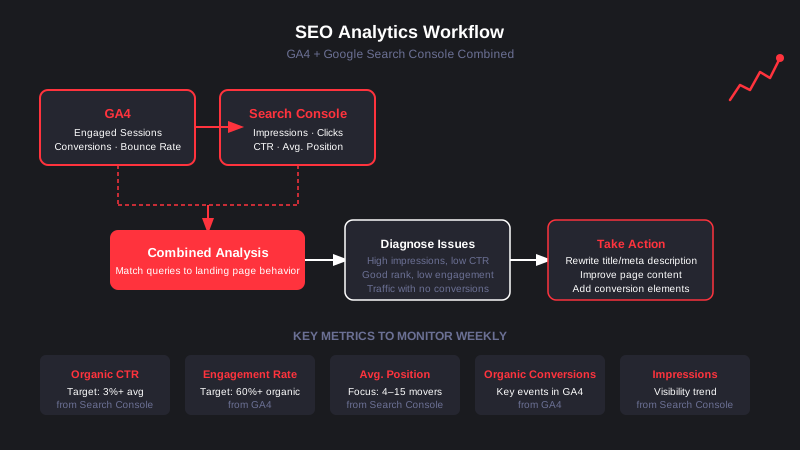
Click-through rate measures how often searchers choose your result after seeing it. A keyword with high impressions and low CTR is ranking but failing to earn the click, usually because the title tag or meta description is not compelling enough. The benchmark to watch: a CTR under 3 percent for positions 1 through 5 usually signals a weak title or mismatched intent.
If users arrive from organic search and immediately leave, that signals a mismatch between what the SERP promised and what the page delivered. A healthy engagement rate for organic traffic sits at 60 percent or higher. Pages below that threshold need a content or UX audit.
Pages ranking in positions 4 through 15 are the highest-leverage targets in any SEO program. They have already established relevance with Google but are not yet earning the click volume they could. A focused optimization effort on these pages, updating content, improving internal linking, and strengthening the page's topical depth, often produces meaningful traffic lifts within 60 to 90 days.
Raw traffic numbers are vanity metrics if they do not tie back to business outcomes. In GA4, segment key event completions by "Organic Search" to see which landing pages produce qualified leads, purchases, or sign-ups from search. According to AgencyAnalytics' 2026 SEO KPI guide, practitioners consistently rank conversions and revenue as the most valuable SEO metrics, while raw rankings are treated as secondary signals.
Impressions measure your overall search visibility. A growing impressions trend, even before clicks increase, often indicates that content is gaining traction and freshness in Google's index. A sudden impressions drop is an early warning signal worth investigating in the Coverage and Index reports inside Search Console.
The research process and publish cadence matter less than the review loop. A consistent weekly workflow turns data into action.
Step 1: Open Search Console Performance and filter the last 28 days. Sort by impressions. Identify pages with high impressions but CTR below 3 percent. These are rewrite candidates.
Step 2: Pull the same pages in GA4 under Reports, then Engagement, then Pages and Screens. Filter by organic traffic. Review engagement rate and key event conversion data for each page.
Step 3: Cross-reference. A page with strong impressions, decent position, but low engagement rate likely has an intent mismatch. A page with strong CTR but no conversions likely has a conversion barrier (weak CTA, poor UX, or misaligned offer).
Step 4: Prioritize fixes based on traffic potential and business value. A mid-funnel page driving 2,000 organic sessions per month with a 0.2 percent conversion rate has far more leverage than a top-of-funnel page with 300 sessions and 5 percent engagement.
This workflow scales. Once it is in muscle memory, running it takes 30 minutes a week and consistently surfaces the highest-ROI SEO work on your site.
GA4 and Search Console handle the core workflow. For teams that need more, a handful of tools layer in additional capability.
Looker Studio (free): Combines GA4 and Search Console data into visual dashboards that update automatically. Useful for presenting SEO performance to stakeholders without exporting spreadsheets.
Ahrefs / Semrush: Third-party rank trackers and backlink tools that supplement Search Console's keyword data with competitive benchmarks, keyword difficulty scores, and backlink monitoring. Neither replaces Search Console, but both add context that GSC cannot provide.
Screaming Frog: A technical SEO crawler that identifies indexing issues, broken links, duplicate content, and missing metadata at scale. Complements analytics data by showing what Search Console might flag in Coverage reports.
For a structured comparison of analytics platforms including GA4 alternatives, the analytics platforms guide breaks down the full stack with pricing and use cases.
Data has no value until it changes what you do. The teams that get the most from analytics for SEO are not the ones with the most sophisticated dashboards. They are the ones with the clearest decision rules.
If CTR drops below 3 percent on a page ranking in the top 5, rewrite the title tag. If engagement rate on an organic landing page falls below 50 percent, audit the content for intent match. If impressions grow but clicks plateau, check whether a Featured Snippet or AI Overview is intercepting the click. These rules, applied consistently, make analytics a decision engine rather than a reporting exercise.
Building that discipline takes time, but the compound effect is significant. Backlinko's 2026 SEO metrics hub notes that teams tracking organic conversion rate alongside traffic consistently outperform teams optimizing for rankings alone, because they optimize toward outcomes rather than vanity signals.
If you are building or auditing your analytics foundation, the web analytics tool comparison covers which platforms work best at different stages of growth, including when GA4 alone is sufficient and when to add a more specialized layer.
A mature SEO analytics practice has three characteristics: it measures both visibility (impressions, position) and quality (engagement, conversions), it connects those metrics to decisions on a regular cadence, and it is simple enough to run without a data analyst.
GA4 and Search Console, linked and reviewed weekly, give most teams everything they need to build that practice. The goal is not more data. It is clearer signals and faster action on what the data reveals.

Most DTC brands already collect data. The problem is that the data lives in five different places, tells five different stories, and rarely points to a clear action. Customer analytics software is supposed to solve that, but choosing the wrong platform creates more noise, not less.
This guide breaks down what customer analytics software actually does, which platforms are worth evaluating, and how to match a tool to where your brand is right now.
Customer analytics software collects, processes, and surfaces behavioral data about the people who interact with your brand. At the core, it answers three questions: who your customers are, how they behave, and what drives them to buy (or stop buying).
The best platforms track behavior across the full customer journey: from the first ad click to product page engagement, cart behavior, checkout completion, post-purchase patterns, and eventual churn signals. This is different from standard web analytics, which stops at sessions and pageviews. Customer data analytics tools go deeper, connecting individual user identities to sequences of actions over time.
Key data types that flow through a modern customer analytics stack include event data (every click, scroll, and interaction), transaction data (order history, AOV, refunds), product data (which SKUs drive LTV), and user profile data from your CRM or CDP. The richness of that data determines how actionable your reporting actually becomes.
Before evaluating platforms, get clear on the metrics that matter most for growth-stage ecommerce brands.
LTV is the total revenue a single customer generates over the full duration of their relationship with your brand. It's the north-star metric for DTC because it determines how much you can afford to spend acquiring a customer in the first place. LTV by cohort, acquisition channel, and first-product purchased gives you the granular view needed to make smarter paid media decisions.
Customer acquisition cost (CAC) in isolation tells you nothing useful. Measured against LTV, it becomes the most important unit-economics number in your business. A ratio above 3:1 is healthy; below 1:1 means you're systematically losing money on each customer acquired. Most brands scaling on paid social are operating at ratios far lower than they realize.
Cohort analysis groups customers by when they first purchased and tracks how they behave over subsequent months. Ecommerce analytics research consistently shows that retention curves reveal the true health of a brand: if month-2 repurchase rates are weak across every acquisition cohort, no amount of new customer acquisition will fix the underlying problem.
Cart abandonment exceeds 70% across ecommerce broadly in 2026. The metric itself is table stakes; the useful version is abandonment segmented by traffic source, device, product category, and customer segment. That segmentation is where customer behavior analytics separates from basic funnel tracking.
Proactive churn analysis looks at behavioral signals before a customer formally "churns": increasing time between orders, declining email engagement, browsing without purchasing. Platforms with predictive capabilities can score customers by churn probability, letting retention teams intervene early rather than after the fact.
Choosing the right platform depends on your team's technical capacity, your primary use case, and your current scale. Here's how the main options stack up.

Amplitude has established itself as the enterprise-grade leader for behavioral analytics and product-led growth. Its core strength is behavioral cohorts that persist across analytics, experimentation, and user surveys. Predictive cohorts score users by likelihood to activate, retain, or churn, and native A/B testing is built directly into the platform.
Amplitude ranked first across multiple categories in G2's Winter 2026 report. It's best suited for growth teams running frequent experiments who need deep retention analytics backed by enterprise governance and support. Pricing is event-based and scales with volume; expect significant investment at the mid-market level.
Mixpanel prioritizes real-time granular event analysis and an intuitive interface that non-technical users can navigate without engineering support. Its AI query assistant lets marketing and growth teams pull custom reports without writing SQL. The free tier covers 20 million events per month, the most generous in its category.
Mixpanel is a strong choice for scaling brands that need detailed user journey mapping and fast feedback loops on product or funnel changes. At higher volumes, pricing moves to $650-1,200+/month. It integrates well with Segment as a data routing layer, which matters if you're building a composable analytics stack. Learning how to pair the right analytics platforms is often more valuable than chasing the most feature-rich single tool.
Heap takes a fundamentally different approach: instead of requiring manual event instrumentation, it captures every click, form submission, and page interaction automatically from day one. No tracking code decisions upfront. This is a significant advantage for brands without dedicated engineering resources.
The retroactive analysis capability is Heap's real differentiator: you can define events after the fact and run analysis on historical behavior that predates your instrumentation. Minimum pricing starts around $2,000/month, which means it makes more sense for brands with established revenue and a data team that can act on what it surfaces.
For Shopify-first DTC brands, Triple Whale has become the dominant analytics layer. Its AI suite (Moby) answers data questions in plain language, runs attribution analysis, and generates forecasts without requiring a BI setup. The platform focuses on profit-oriented reporting: contribution margin, blended CAC, and channel-level ROAS, the metrics DTC operators actually use to make daily decisions.
Triple Whale is less useful as a general customer behavior analytics tool and more useful as an operational dashboard for performance marketing teams. If you're running Shopify and spending meaningfully on paid social, it's likely the fastest path to actionable daily reporting.
Segment is not a visualization tool; it's a customer data platform that routes event data from your website, app, and backend to every downstream tool in your stack. Think of it as the plumbing that connects your customer analytics software together. Using Segment upstream of Mixpanel or Amplitude means you instrument once and can swap analytics tools without re-engineering your tracking layer.
For brands building a serious analytics stack, Segment or a similar CDP is worth the investment early. It also enables real-time personalization and audience building across your ad platforms and email tools.
The mistake most brands make is choosing a platform based on feature lists rather than their actual operational context. A few frameworks that cut through the noise:
Early-stage (under $5M revenue): Mixpanel's free tier plus Google Analytics 4 covers most reporting needs. Focus on getting clean event tracking in place rather than adding platform complexity. The highest-value analytics work at this stage is fixing attribution gaps and tracking the right conversion events.
Growth-stage ($5M-$50M revenue): This is where investing in a real customer behavior analytics layer pays off. Triple Whale is a natural fit for Shopify brands. Mixpanel or Amplitude makes sense if you're building a product-led motion or need cohort-level retention analysis. Adding Segment as a CDP backbone is worth evaluating if you're running more than three analytics tools simultaneously.
Scale ($50M+): Amplitude or a full data warehouse setup (Snowflake plus Looker or Metabase) becomes the right investment. Enterprise analytics platforms earn their cost at this stage through governance, experimentation infrastructure, and the ability to build custom models on top of first-party data.
Understanding how marketing analytics software fits into a broader data strategy is the prerequisite to making the platform decision confidently. The tool is only as good as the data flowing into it and the team acting on it.
Platform comparisons focus on features, but the factors that determine long-term value are less visible on a feature matrix.
Data ownership: Where does your customer data live, and can you export it? Lock-in risk is real. Platforms that store your event data in a proprietary warehouse make it expensive to switch.
Engineering overhead: Platforms that require heavy instrumentation to get value will compound your technical debt over time. Auto-capture tools (Heap, PostHog) reduce ongoing maintenance. Event-based platforms (Mixpanel, Amplitude) offer more precision but demand more upfront investment.
Privacy and compliance: With third-party cookie deprecation and evolving privacy regulations, your customer insights software needs to be built around first-party data from the ground up. Evaluate how each platform handles consent management, data residency, and compliance with GDPR and CCPA requirements.
Integration depth: Your analytics platform needs to connect to your ad platforms, ESP, CRM, and Shopify store without requiring custom engineering for each connection. Check the native integration library before committing.
The right web analytics tool strategy starts with understanding your current data gaps, not your aspirational reporting needs. Pick the platform that solves today's most expensive blind spot, instrument it properly, and build from there.
Customer analytics software is infrastructure, not a shortcut. The brands that get the most value from these platforms share a common trait: they have a consistent practice of reviewing data, forming hypotheses, running experiments, and closing the loop.
The platform matters. The process matters more. Start with the metrics closest to revenue (LTV, LTV:CAC, cohort retention), build dashboards your team actually reviews weekly, and treat every reporting gap as a prioritized project. That discipline compounds faster than any platform upgrade.

Google Analytics cost is one of the most Googled questions in the analytics space, and the answer is rarely satisfying: "it depends." GA4, the current standard, is free for most users. But that free label can obscure real costs that show up in implementation, data infrastructure, and enterprise contracts. This post breaks down every layer so you can budget accurately.
The short answer: Google Analytics 4 is free to use. You create an account, add a tracking snippet or deploy via Google Tag Manager, and you're collecting data within minutes. No credit card, no trial period, no per-seat fee.
The free tier is genuinely capable. It supports event-based tracking across web and app, up to 25 custom dimensions, audience building for Google Ads, and data retention up to 14 months. For most small and mid-size brands, this covers the full analytics workflow.
Where the free tier runs out: data sampling. At high traffic volumes, GA4 starts returning sampled results in Explorations reports rather than processing every row. You also get limited export controls and no formal SLA from Google.
GA4 360 is Google's enterprise analytics tier, sold through Google's direct sales team or certified reseller partners. Google does not publish a self-serve price, so you need a quote. Based on current market data, pricing starts around $50,000 per year for lower-volume enterprise accounts and scales toward $150,000 or more annually at roughly 500 million monthly hits.
Key GA4 360 features beyond the free tier:
One pricing detail that catches enterprise buyers off guard: subproperties and roll-up properties carry their own billing. Events in each subproperty are charged at half the rate of the source property. For complex account structures, this can push total cost well above the base contract figure.
GA4 is free to license, but deploying it correctly at a growth-stage DTC brand is not free. These are the real costs you should plan for.
Implementation and setup. The shift from Universal Analytics to GA4's event-based model fundamentally changed how tracking is configured. Proper implementation requires defining an event taxonomy, setting up Google Tag Manager correctly, configuring conversions, and testing data integrity across devices. A developer or analytics consultant typically charges $2,000 to $10,000 for a complete implementation, depending on complexity.
BigQuery export fees. GA4's free tier includes a daily batch export to BigQuery (not streaming). According to Google's BigQuery pricing, the first 10 GB of storage per month is free. Beyond that, active logical storage costs $0.02 per GB per month. Query processing costs $5 per TB scanned, with the first 1 TB of queries per month free.
For brands with millions of monthly events, monthly BigQuery costs typically run $20 to $200. Poorly structured queries (running against full historical tables rather than partitioned date ranges) can push costs significantly higher, so proper query hygiene matters from day one.
Ongoing maintenance. Analytics configurations drift. Tracking breaks when developers update site code. New campaigns need new conversion events. A retainer for ongoing analytics management typically runs $500 to $3,000 per month depending on scope.
BI tool integrations. GA4 connects natively to Looker Studio for free, but connecting to Tableau, Power BI, or custom dashboards usually requires a third-party connector or engineering time.
| Tier | Annual Cost | Sampling | BigQuery Export | Support |
|---|---|---|---|---|
| GA4 Free | $0 | Yes (at scale) | Batch (daily, free) | Community only |
| GA4 360 | $50,000–$150,000+ | None | Streaming (real-time) | Dedicated SLA |
| Plausible (alternative) | ~$108–$2,400 | None | No | Email support |
| Mixpanel (alternative) | $0–$65,000+ | None | Limited | Varies by tier |
| Amplitude (alternative) | $0–$100,000+ | None | Yes (Growth+) | Varies by tier |
Pricing figures reflect 2026 market data. GA4 360 pricing is contract-based and varies by event volume and account structure.

If you are evaluating whether GA4 is the right tool or whether a paid alternative delivers better value, here is how the main options compare.
Plausible Analytics is a privacy-focused, open-source alternative. Plausible's pricing starts at $9 per month (billed annually) for up to 10,000 monthly pageviews, scaling to $19/month for 100,000 pageviews. It does not require cookie consent banners under GDPR, which reduces friction in European markets. The tradeoff: far less depth than GA4 for event-level analysis.
Mixpanel uses event-based pricing with a free tier up to 20 million monthly events. Paid plans start at $20 per month for self-serve. At 5 million events per month, you're looking at roughly $650 per month. Mixpanel shines for product analytics and funnel analysis, particularly for SaaS and mobile products.
Amplitude offers a free Starter tier up to 50,000 monthly tracked users (MTUs). The Plus plan starts at $49 per month. Mid-market Growth contracts typically run $30,000 to $100,000 per year depending on user volume. Amplitude provides deep behavioral cohort analysis and is favored by product teams at growth-stage companies.
For DTC brands focused on ecommerce attribution rather than product analytics, GA4's free tier combined with a solid analytics tracking setup typically outperforms these alternatives on a cost-per-insight basis.
The decision tree is simpler than the pricing landscape suggests.
If you are generating fewer than 500 million monthly events and your reporting needs are met by standard GA4 Explorations, the free tier is the right call. Invest the money you save into implementation quality and BigQuery hygiene instead.
If you are running a large ecommerce operation with high-volume traffic, need real-time streaming data into a warehouse, or require unsampled reports for executive dashboards, GA4 360 is worth the contract conversation. The jump to $50,000+ per year is significant, but the alternative (building workarounds for sampled data) costs engineering time and erodes confidence in your numbers.
If GA4's data model does not fit your use case (particularly for product-led growth or SaaS), a dedicated product analytics platform like Mixpanel or Amplitude may deliver more value despite the higher per-seat cost. See our marketing analytics software comparison for a deeper look at how these platforms stack up.
When you add up all the components for a mid-size DTC brand running GA4 free, a realistic annual budget looks like this:
Total real cost of "free" GA4: roughly $9,000 to $50,000 per year, depending on internal capability and scope. That is not a knock on GA4. It is a realistic framing for CFOs and marketing directors who assume free means zero budget impact.
If you are comparing this against marketing analytics services or a managed analytics stack, use those full-cost figures rather than just the software license.
GA4's zero license cost is genuinely attractive, but the value it delivers depends entirely on how well it is configured. Mis-fired events, duplicate sessions, and broken conversion tracking erode trust in data faster than any pricing decision.
EmberTribe works with DTC and growth-stage brands to design and implement analytics stacks that capture clean data and surface actionable insights, without the overhead of an in-house data team. Talk to our team at embertribe.com to scope what a properly built analytics infrastructure looks like for your brand.
Most brands have Google Analytics installed. Far fewer are using it to actually understand SEO performance. The gap between having data and acting on data is where organic growth stalls, and closing that gap starts with building the right SEO web analytics foundation.
This guide covers the tool stack, the metrics that matter, and the tracking mistakes that quietly cost brands rankings.
General web analytics tells you what happened on your site. SEO web analytics tells you why search traffic arrived, which queries drove it, which pages converted it, and where the funnel breaks down.
That distinction matters because organic search operates on a different timeline and logic than paid channels. A ranking improvement you made in February might not show up as meaningful traffic until April. Without dedicated SEO analytics discipline, those slow-moving signals get buried in aggregate dashboards.
The core difference comes down to combining two data sources: behavioral data from your site (GA4) and SERP data from search engines (Google Search Console). Neither is complete alone.
GA4 and Google Search Console are the non-negotiable starting point for any SEO measurement stack. Google has updated its documentation on how to integrate and interpret both tools, including new guidance on using Looker Studio to merge the datasets for more complete analysis.
Linking the two takes about five minutes. In GA4, go to Admin, scroll to the Property column, click Search Console Links, then select your verified GSC property. New integrations take 24 to 48 hours before data begins flowing. Once linked, you can see search queries alongside on-site engagement in a single report.
What each tool provides:
Google Search Console shows you what happens before the click: impressions, click-through rates, average position, and index coverage. It tells you whether Google can see your content and how users respond to it in search results.
GA4 shows you what happens after the click: sessions by landing page, engagement rate, conversions, and revenue attribution. It tells you whether organic visitors are actually converting to the outcomes you care about.
Together, they answer the complete question: which content ranks, who clicks, and what do they do next.
Tracking the wrong metrics creates the illusion of insight without the substance. The following are the metrics that directly connect to ranking performance and organic revenue.

Organic sessions measure non-paid search visits and live in GA4 under Acquisition > Traffic Acquisition. Filter by session source "Organic Search." Month-over-month growth is the target; a flat or declining trend warrants immediate investigation.
Click-through rate (CTR) is your ratio of clicks to impressions in Search Console. Position 1 averages 27.6% CTR according to 2025 SEO benchmark data. If your top-ranked pages are seeing CTR below 15 to 20%, your title tags and meta descriptions are underperforming and should be revised before additional content is produced.
Average position reflects your mean SERP ranking across queries. It should be evaluated at the page level, not just site-wide. A page sitting at position 8 to 12 is in a high-leverage zone where incremental content improvements and link building can push it to page one, often with far better ROI than targeting new keywords from scratch.
Engagement rate in GA4 replaced bounce rate as the primary on-page quality signal. It measures sessions where users actively interacted with the page (scrolled, clicked, or spent meaningful time). A healthy engagement rate for organic traffic is above 55%. Pages below that threshold often signal a mismatch between what the searcher expected and what the page delivers.
Core Web Vitals (LCP, INP, CLS) appear in both GSC and Google's PageSpeed Insights. For LCP, Google defines "Good" as under 2.5 seconds. INP should be under 200ms and CLS under 0.1. All three affect your Page Experience signal, which is a confirmed ranking factor.
Organic conversions tie your SEO traffic to revenue or lead outcomes. In GA4, create a segment for organic source traffic and filter your key conversion events. If organic sessions are growing but conversions are flat, the issue is likely landing page quality or conversion path friction.
GA4 and GSC form the foundation, but a complete SEO analytics setup typically adds one competitive intelligence layer and one technical audit layer.
For competitive and keyword intelligence, Semrush and Ahrefs are the two dominant options. Semrush integrates directly with GA4 for traffic data overlays, making it useful for brands that want unified visibility across on-page and off-page signals. Ahrefs has historically been stronger for backlink analysis and its Site Explorer remains the fastest way to understand the link profile of any competitor. Neither tool is a replacement for GSC or GA4; they complement the foundation with data that your own properties can't surface.
For technical audits, Screaming Frog is the standard for crawl analysis. It surfaces redirect chains, broken internal links, missing canonical tags, and pages blocked from indexing. Running a monthly crawl and cross-referencing with GSC's Coverage report catches technical issues before they compound into ranking losses.
Our breakdown of analytics platforms covers how to layer these tools together based on team size and budget.
The default GA4 setup captures organic sessions but misses several configurations that are important for SEO analysis.
First, set up landing page reports. In GA4, navigate to Reports > Engagement > Landing Page. Filter by session medium "organic" to see which specific URLs are receiving organic traffic and how those sessions behave. This view shows you which content is doing actual ranking work versus which pages look good in aggregate but are rarely discovered through search.
Second, configure conversion events for your key organic goals. If you're an ecommerce brand, "purchase" is the obvious event. Growth-stage companies should also track "generate_lead," "sign_up," or whatever micro-conversions indicate genuine intent. Linking these to the landing page report shows you not just which pages rank, but which pages earn revenue.
Third, create a custom comparison report in GA4 that pulls GSC query data alongside on-site behavior. The GSC dimensions (query, landing page, device) can be added to Looker Studio alongside GA4 metrics to build a single dashboard that eliminates the need to switch between tools for routine SEO reviews.
The most common tracking failure is treating GSC and GA4 data as interchangeable. GSC counts clicks from the SERP; GA4 records sessions using its attribution model. Discrepancies between the two are expected and do not indicate a tracking bug. Trying to reconcile the exact numbers wastes time better spent acting on trends.
The second common mistake is tracking rankings without tracking landing page engagement. A keyword at position 3 that delivers a 25% engagement rate and 0.3% conversion rate is underperforming relative to a keyword at position 7 with 68% engagement and 2.1% conversion. Rankings are a means to an end, not the end.
Third, brands regularly underuse the Coverage and Indexing reports in Search Console. Pages that aren't indexed can't rank. Checking the Coverage report monthly and investigating any "Excluded" or "Error" statuses is basic hygiene that many teams skip entirely.
For brands building on Shopify, WordPress, or other platforms, our guide on web analytics for SaaS and DTC brands covers platform-specific tracking configurations.
SEO analytics should close a feedback loop that informs every content decision. When you can see which pages are ranking, which queries trigger them, how users engage, and whether that engagement converts, you have a defensible answer to the question: what should we publish next?
The pages that rank well but have weak engagement are candidates for content refreshes. The pages that have strong engagement but sit at positions 8 to 15 are candidates for link building and on-page optimization. The queries that generate impressions but no clicks indicate title tag or meta description problems that are often fixed in under an hour.
That feedback loop is what separates brands that steadily compound organic traffic from those that produce content without a strategic basis. The data is already in your tools. The work is building the habit of reading and acting on it consistently.
For a broader look at how analytics tools fit together across marketing channels, see our guide to analytics platforms for growth-stage brands.
The brands that win in organic search are not the ones with the largest content libraries. They are the ones that understand their data well enough to prioritize correctly. SEO web analytics makes that prioritization possible.
If you need help building a measurement stack that connects organic performance to revenue, EmberTribe works with DTC and growth-stage companies to implement and interpret analytics frameworks that actually drive decisions. Visit embertribe.com to start the conversation.

Most marketing teams know Google Analytics 4 exists. Far fewer know how to use it for SEO in any meaningful way. GA4 surfaces organic traffic data, landing page performance, and Search Console signals, but only if you know where to look and how to connect the pieces. This guide covers exactly that: how to set up SEO tracking in Google Analytics, which reports actually matter, and how to turn the data into decisions that move rankings.
Search rankings are a means to an end. What matters is whether organic visitors take action when they land on your site. GA4 bridges that gap by connecting top-of-funnel discovery signals (impressions, clicks, search position) to on-site behavior (engagement, scroll depth, conversions). No other free tool does this in a single interface.
Without GA4, your SEO data lives in isolation: Google Search Console shows you what searchers see before they click, but nothing after. GA4 fills that gap. Together, they give you a complete picture of organic performance.
For DTC brands and growth-stage companies, this matters even more. Every organic visit has a cost (content, technical work, link building), and GA4 helps you calculate whether that investment is driving real business outcomes, not just traffic.
The most important step for tracking SEO in Google Analytics is linking Google Search Console to your GA4 property. Without this connection, GA4 shows organic traffic volumes but not the keyword and query data behind them.
How to link GSC to GA4:
Once linked, two new reports appear under Reports > Search Console: Google Organic Search Queries and Google Organic Search Traffic. These reports combine GSC metrics (impressions, clicks, CTR, position) with GA4 behavioral data. They are the foundation of any serious GA4 SEO tracking setup.
One important note: Search Console data carries a 48-72 hour delay, and data attribution models differ between GA4 and GSC. GA4 uses data-driven attribution by default, while GSC uses last non-direct click.
Expect small discrepancies between the two tools. Plan for a 3-day data lag before drawing conclusions from either report.
Once GSC is linked, your next reference point is the Traffic Acquisition report. This is where GA4 shows all sessions grouped by channel, including Organic Search.
Path: Reports > Acquisition > Traffic Acquisition
Look for the Organic Search row. The default metrics here are sessions, engaged sessions, engagement rate, average engagement time, and key events (what GA4 calls conversions). This view gives you a quick read on whether organic traffic is growing or declining, and how engaged those visitors are compared to other channels.
For a more complete view, add a secondary dimension. With "Session source / medium" as the secondary dimension, you can see which specific search engines are sending traffic, separating Google organic from Bing, DuckDuckGo, and others. For most brands, Google organic will dominate, but the breakdown is useful for auditing tracking accuracy.
What to look for:
This pairs well with the broader data principles covered in our guide to web analytics: what the data actually tells you.
The two Search Console reports unlocked by the GSC integration are where SEO-specific insights live.
Path: Reports > Search Console > Google Organic Search Queries
This report shows the search terms driving impressions and clicks to your site, alongside average position and CTR. It mirrors the Performance report in GSC but adds engagement context.
Sort by impressions to find queries where you rank but rarely get clicked. A query with 5,000 impressions and a 1% CTR has room to grow through title tag and meta description optimization. Sort by average position to find terms where you rank on page two, where small improvements in content quality or link authority could push you to page one.
Path: Reports > Search Console > Google Organic Search Traffic
This report shows organic performance by landing page. You can see which specific pages on your site receive organic clicks, their average search position, and how engaged those visitors are after landing.
Sort by clicks to confirm your highest-traffic organic pages. Then look at the engagement metrics alongside. A page receiving 3,000 organic clicks per month with a 35% engagement rate is a candidate for content improvement. The content is ranking, but something about the experience or content depth is failing visitors once they arrive.
The standard Engagement > Landing Page report in GA4 shows all channels together. To isolate SEO performance by landing page, you need to build a filtered report in Explorations.
How to create the report:
The result is a report showing every page that received at least one organic session, with engagement metrics alongside. This becomes one of your most actionable SEO reports: pages with high sessions but low engagement rate need content work; pages with high engagement rate but low sessions need link building or broader keyword targeting.
Set the date range to at least 90 days. Short windows create noise that obscures trends. Compare to the previous equivalent period to spot which pages are gaining organic traction and which are declining. This kind of analysis is covered in depth in our analytics for SEO practitioner guide.
Organic traffic that doesn't convert is just vanity traffic. GA4 makes it possible to measure whether SEO efforts drive real business outcomes, not just clicks.
Set up key events for SEO outcomes:
Once key events are configured, go back to the Traffic Acquisition report and look at the Key Events column for the Organic Search row. This tells you the total conversion volume attributable to organic traffic. You can also use Explorations to build a report that shows which specific organic landing pages are driving conversions, not just traffic.
Google's official Search Console integration documentation covers the technical setup in detail if you need to validate your configuration.
With the reports above in place, a regular SEO audit workflow in GA4 looks like this:
Weekly:
Monthly:
Quarterly:
For a broader view of how analytics choices affect performance measurement, our guide to analytics platforms walks through how GA4 fits alongside other tools in a modern marketing stack.
GA4 is powerful, but there are meaningful gaps. It does not show keyword rankings over time (you need Google Search Console or a dedicated rank tracker for that). It does not show backlink data.
GA4 also cannot attribute traffic changes to specific content updates or technical changes you made. For that level of attribution, you need timestamps and a changelog tracked separately.
For those signals, you need a complementary stack. GA4 handles behavioral and conversion data well. GSC handles query and impression data. Rank trackers like Ahrefs or Semrush handle position tracking and competitive analysis.
GA4 is not a replacement for these tools. It is the layer that connects organic traffic to business outcomes.
The brands that get the most from SEO analytics treat GA4 as the measurement layer and GSC as the discovery layer. Together, they answer the two questions that matter: what are people searching for, and what happens when they find you? Our full overview of SEO web analytics tracking goes deeper on how to align these two data sources into a single reporting workflow.
Tracking SEO in Google Analytics 4 requires a deliberate setup: GSC linked, organic filters applied, key events configured, and a regular review cadence in place. Most teams skip at least one of these steps and end up with data they cannot act on.
The payoff for getting it right is significant. You stop optimizing for rankings as an abstract metric and start optimizing for organic revenue, lead volume, and content quality. That shift in measurement is often what separates brands that plateau at organic traffic from those that compound it month over month.
If you want help building a GA4 setup that connects your SEO investment to measurable business outcomes, EmberTribe works with DTC and growth-stage brands to do exactly that.

Choosing the right web analytics tool is one of the highest-leverage decisions a growth-stage brand can make. The wrong choice means months of collecting data that doesn't answer your actual questions. The right one means every channel decision, landing page test, and funnel optimization sits on a foundation of reliable evidence.
The market in 2026 is more fragmented than it was three years ago. Google Analytics 4 still dominates raw market share at roughly 44% of all tracked websites, but privacy legislation across Europe has accelerated adoption of cookieless alternatives. European data protection authorities have ruled GA4 non-compliant in multiple countries, including Austria, France, Italy, Denmark, Finland, and Norway, pushing brands to evaluate the full landscape rather than defaulting to the familiar.
This guide organizes the major tools by type, maps them to realistic use cases, and helps you decide whether one tool is enough or whether a layered approach serves you better.
Not all analytics tools measure the same things. Before comparing specific products, it helps to understand the three distinct categories. Most mature ecommerce and DTC brands use tools from more than one category.
Quantitative traffic analytics tools (GA4, Matomo) track sessions, pageviews, acquisition channels, conversion events, and funnel steps. They answer "what is happening and how often." They are the foundation of any analytics stack.
Behavioral and heatmap tools (Hotjar, Microsoft Clarity) record sessions, generate click and scroll heatmaps, and surface rage clicks or dead clicks. They answer "how are users physically interacting with the page." They are the diagnostic layer on top of traffic data.
Privacy-first lightweight tools (Plausible, Fathom) are cookieless, consent-free alternatives that measure 100% of your traffic without a cookie banner. They sacrifice depth for simplicity, speed, and compliance. They are increasingly the primary analytics tool for brands selling into the EU.
Understanding which category you need most, and which combination, is the real evaluation question.
The table below covers the six tools most commonly evaluated by DTC and ecommerce brands in 2026. For a deeper breakdown of broader analytics platforms including product analytics and attribution tools, see Analytics Platforms.

| Tool | Type | Starting Price | Privacy-First | Best For |
|---|---|---|---|---|
| Google Analytics 4 | Quantitative | Free | No (cookie-based) | Traffic + conversion reporting |
| Plausible | Privacy-first | $9/mo (10k PV) | Yes (cookieless) | Simple, GDPR-compliant reporting |
| Fathom | Privacy-first | $14/mo (100k PV) | Yes (cookieless) | Agencies, multi-site management |
| Matomo | Quantitative + full features | Free (self-hosted) | Yes (configurable) | Data ownership, enterprise |
| Hotjar | Behavioral / heatmap | Free / $32+/mo | Partial | Heatmaps, session replay, UX |
| Microsoft Clarity | Behavioral / heatmap | Free | Partial | Free heatmaps + session replay |
GA4 is free and integrates natively with Google Ads, Looker Studio, and BigQuery. Its event-based data model is more flexible than Universal Analytics was, and the Explore reports enable sophisticated funnel analysis without a separate tool. The tradeoffs are real: a default data retention window of just two months, a complex interface that requires training, and ongoing legal challenges in the EU that make it unsuitable as the sole analytics tool for brands with heavy European traffic.
For brands primarily serving the US market, GA4 remains the logical starting point. It is worth understanding how much Google Analytics actually costs at scale before assuming it is truly free for high-volume sites.
Both tools are built in Europe, operate without cookies, and require no consent banner under GDPR. Plausible starts at $9/month for 10,000 pageviews and fits all key metrics onto a single dashboard: sessions, bounce rate, top pages, referrers, and goal conversions. Fathom starts at $14/month for 100,000 pageviews and includes unlimited sites on every plan, making it particularly strong for agencies managing multiple properties.
Neither tool offers heatmaps, session replay, A/B testing, or ecommerce funnel depth. They are deliberately minimal. For brands that need clean, compliant traffic data and nothing else, this simplicity is a feature.
Matomo is the most feature-complete open-source alternative to GA4. The self-hosted version is free and keeps all data on your own servers. The cloud version charges per hit (any pageview or event), with pricing that scales to approximately $170/month at one million hits. Matomo includes heatmaps, session recordings, A/B testing, and a tag manager in its premium add-ons, making it the closest single-tool alternative to a full analytics stack.
The practical limitation is implementation complexity. Self-hosting requires server maintenance, and the interface is more demanding than GA4. Matomo is most appropriate for brands with an in-house technical team or a strong preference for data sovereignty.
Hotjar and Microsoft Clarity occupy the behavioral analytics category. Hotjar's free tier supports 35 daily sessions; paid plans start at $32/month and scale with session volume. Microsoft Clarity is entirely free, with no session caps, no feature gating, and AI-powered insight summaries added in recent updates. Clarity added code-free funnel tracking in 2025, which meaningfully reduces the setup barrier.
The compliance note: as of October 2025, Clarity enforces consent signals for sessions from the EEA, UK, and Switzerland. Neither tool is cookieless in the way Plausible or Fathom are. Both require a consent mechanism for EU traffic.
The most effective analytics stacks combine a quantitative tool with a behavioral tool. GA4 tells you that your checkout page has a 70% drop-off rate. Hotjar or Clarity shows you where users are clicking, where they stop scrolling, and what they do right before abandoning. Together they create a feedback loop: metric surfaces the problem, behavior data diagnoses the cause.
For brands with EU traffic concerns, the common combination is Plausible or Fathom for compliant traffic measurement plus Microsoft Clarity for behavioral data (with a consent banner). This setup covers the "what" and the "how" without exposing you to GDPR risk on traffic counting.
For a broader look at how web analytics fits into a full measurement strategy, see Marketing Analytics Software.
The three practical combinations by use case:
Early-stage brand (US-focused): GA4 plus Microsoft Clarity. Both are free. GA4 handles traffic and conversion reporting. Clarity handles behavioral diagnostics.
EU or privacy-sensitive brand: Plausible or Fathom for traffic plus Microsoft Clarity (with consent) for behavioral data. Clean, compliant, and low-cost.
Scaling brand needing full ownership: Matomo self-hosted covers both traffic and behavior in one platform. Higher setup cost, but complete data sovereignty and no recurring vendor fees.
Before committing to a tool, evaluate four dimensions. Start with your traffic geography: US-only brands have more flexibility than brands with significant EU or UK audiences. Then consider who will use the data. A solo founder needs a simple dashboard, while an analyst team needs event flexibility and export options.
Next, decide whether you need behavioral data alongside traffic data. If yes, plan for two tools or choose Matomo's all-in-one approach. Finally, audit your required integrations. GA4's native Google Ads connection is hard to replicate, and PostHog covers web analytics, product analytics, and feature flags for stacks that lean toward product-led growth.
The goal is not to collect the most data. It is to collect the data that directly informs decisions your team is actually making.
Getting the analytics foundation right early prevents the painful migration projects that consume engineering and marketing cycles later. The best web analytics tool is not the one with the most features; it is the one your team will actually use, that answers your actual questions, and that keeps you compliant in every market you sell into.
If you want help auditing your current analytics setup or building a measurement strategy that connects traffic data to revenue, EmberTribe works with growth-stage brands to do exactly that. Start with a clear picture of what you need to know, then choose the tools that get you there.


.svg)