
Online advertising has become an integral part of marketing strategies for businesses of all sizes. Google Ads, formerly known as Google AdWords, is one of the most popular advertising platforms, allowing businesses to display their ads across various Google services and partner websites. However, there may come a time when you no longer wish to maintain a Google Ads account. Whether it's due to changing advertising strategies or a shift in business focus, deleting your Google Ads account can be a straightforward process. In this step-by-step guide, we will walk you through the process of deleting your Google Ads account and provide insights into the implications of this decision.

Before diving into the deletion process, it's essential to understand what a Google Ads account entails. Google Ads is a pay-per-click (PPC) advertising platform that allows businesses to create and manage online advertisements. With a Google Ads account, you have access to a wide range of advertising features, including keyword targeting, ad scheduling, and performance tracking. Your account is linked to your Google account and contains information about your advertising campaigns, billing details, and account settings.
It serves as a centralized hub for managing your online advertising efforts. Within your account, you can create and group multiple advertising campaigns, each targeting specific audiences or promoting different products or services. Your account allows you to choose the desired ad format, set a budget, and customize various ad parameters such as keywords, geographic targeting, and ad placements. It also provides valuable insights and analytics on the performance of your advertising campaigns.
When you create a Google Ads account, you gain access to a powerful suite of tools that can help you reach your target audience effectively. The platform offers various ad formats, including text ads, image ads, video ads, and responsive ads. You can tailor your ads to appear on specific websites, in search engine results, or even on mobile apps, ensuring maximum visibility for your business.
There are several reasons why you might consider deleting your Google Ads account. Business priorities and strategies evolve over time, and you may find that Google Ads no longer aligns with your current advertising goals. Additionally, you may be shifting your advertising budget to other platforms or channels. Deleting your Google Ads account allows you to free up resources and focus on alternative marketing strategies that better suit your business objectives.
Furthermore, deleting your Google Ads account can be a strategic move if you have determined that your target audience does not engage with Google Ads or if you have found more cost-effective advertising channels. By redirecting your advertising budget towards platforms that yield better results, you can optimize your marketing efforts and drive higher returns.
It's important to note that deleting your Google Ads account is a permanent action. Once you delete your account, all associated campaigns, ad groups, and ads will be permanently removed. Therefore, it's crucial to carefully evaluate your advertising strategy and consider the potential impact before proceeding with the deletion process.
As you see, a Google Ads account offers businesses a powerful platform to create and manage online advertisements. It provides a wide range of advertising features, targeting options, and performance tracking tools to help you reach your target audience effectively..
Before proceeding with the deletion process, it's essential to make a few considerations and take a few precautionary steps to ensure a smooth transition.
Deleting your Google Ads account is a permanent action, and once deleted, the account cannot be recovered. Therefore, it's crucial to carefully assess the implications and consequences of this decision. Consider the following:
When you delete your Google Ads account, it's important to understand the potential impact on your ongoing advertising campaigns. Take a moment to evaluate the performance of your campaigns and consider whether deleting the account will disrupt any current marketing efforts. It's worth noting that once the account is deleted, all active campaigns will cease to run, and you will lose the ability to make any changes or optimizations.
Another aspect to consider is any remaining account balance or pending invoices. Ensure that you settle any outstanding payments before proceeding with the deletion process. Failure to do so may result in complications or financial issues down the line.
One significant consequence of deleting your Google Ads account is the loss of historical data and performance metrics. This data is valuable for analyzing past campaigns, identifying trends, and making informed decisions for future marketing strategies. Before deleting your account, take the time to export and save any important data or reports that you might need for future reference.
Google Ads provides various exporting options, such as downloading reports in CSV or Excel formats. By taking this step, you can maintain a copy of your valuable advertising data even after deleting your account. This backup can serve as a reference point or provide insights for future campaigns, ensuring that you don't lose valuable information.
Lastly, consider exploring alternative advertising platforms or strategies that could better serve your business goals. Deleting your Google Ads account opens up opportunities to try new marketing channels or approaches. Research and evaluate different platforms to determine if there are better options available that align with your objectives and target audience.
Now that you have carefully considered the implications and backed up your data, let's dive into the step-by-step process of deleting your Google Ads account.
To begin the process, log in to your Google Ads account using your Google credentials. Once logged in, navigate to the "Settings" section of your account. This can typically be found in the top-right corner of the Google Ads dashboard.
Within the "Settings" section, you will find a variety of options and preferences that you can customize to suit your needs. It's important to familiarize yourself with these settings before proceeding with the deletion process.
Take a moment to explore the different tabs and menus within the "Settings" section. You may come across features and tools that you were not aware of, which could be useful for your advertising campaigns.
Once you have located the "Settings" section, scroll down to the "Preferences" section. Here, you will find an option to "Cancel this Google Ads account." Click on this option to initiate the deletion process.
Before proceeding, it's essential to understand the consequences of deleting your Google Ads account. Deleting your account will permanently remove all your campaigns, ad groups, ads, keywords, and other associated data. This action cannot be undone, so it's crucial to make sure you have a backup of any important information.
Consider reviewing your account performance and campaign history to ensure you have extracted any valuable insights or data that you may need in the future.
Google Ads values the security of your account and requires you to confirm your intention to delete the account. Once you click on the option to cancel your account, you will be presented with a series of prompts and asked to enter your account password before being able to proceed.
Take your time to carefully review the information provided in these prompts. Google Ads wants to ensure that you fully understand the irreversible nature of this action and the potential impact it may have on your advertising efforts.
Consider the implications of deleting your account, such as losing access to historical data, performance metrics, and any ongoing campaigns. It's also important to note that deleting your Google Ads account will not affect your other Google services, such as Gmail or Google Drive.
Once you have reviewed and confirmed your understanding of the deletion process, enter your account password as requested. This additional step helps to ensure that only authorized users can delete an account.
After submitting the deletion request, your Google Ads account will be scheduled for permanent deletion. The exact timeframe for the deletion process may vary, but you will receive a confirmation email once the process is complete.
It's important to note that even after your account is deleted, Google may retain certain information for legal and regulatory purposes. However, this information will no longer be accessible to you or used for advertising purposes.
Deleting your Google Ads account is a significant decision, and it's essential to consider all the factors involved. If you are unsure about deleting your account, you may want to explore alternative options, such as pausing your campaigns or seeking assistance from a Google or Search Ads specialist.
Deleting your Google Ads account has immediate effects on your advertising campaigns and account access. It's important to be aware of these implications to manage the transition effectively.
Once your Google Ads account is deleted, your ads will no longer be eligible to appear on Google search results, partner websites, or any other platforms within the Google advertising network. Additionally, access to your account, including campaign data and historical performance metrics, will be permanently revoked. Make sure to adjust any tracking or conversion pixels that were tied to your Google Ads account to avoid any discrepancies in your analytics.
While the immediate effects are evident, there are long-term implications to consider as well. Deleting your Google Ads account may impact your advertising performance if you had campaigns running consistently. It might take time to transition to alternative marketing strategies or platforms, and the reach and visibility of your business could be affected during this period. However, by carefully planning and implementing a new advertising strategy, the long-term effects of deleting your Google Ads account can be managed effectively.
If you have second thoughts or wish to reinstate your Google Ads account in the future, it's important to understand the options available.
Once an account is permanently deleted, it cannot be recovered. Therefore, it's critical to be certain about your decision before confirming the deletion of your Google Ads account. However, if you wish to resume advertising with Google Ads in the future, you can create a new account and start afresh. Keep in mind that you will need to rebuild your campaigns and historical data will not be available.
If you accidentally deleted your Google Ads account and wish to recover it, the best course of action is to reach out to Google Ads support for assistance. While there is no guarantee of account recovery, they may be able to provide guidance or explore any possible options.
Deleting your Google Ads account is a significant decision that requires careful consideration. By following this step-by-step guide, you now have the information and insights necessary to make an informed decision about deleting your Google Ads account. Remember to evaluate the implications, back up your data, and plan alternative advertising strategies to ensure a smooth transition. While deleting your Google Ads account may come with short-term challenges, it can pave the way for a more focused and effective advertising approach that aligns with your evolving business goals.

🎱 Brands are on the hunt for fresh ways to connect with their audience. TikTok, the rising star of social media platforms, is where the action is. 🌟

Brands that tap into TikTok’s vast user base can unlock unparalleled potential. However, to truly shine on TikTok, expert guidance is crucial. This is where a TikTok Ads Agency steps in. 👔
🎲 Their role? To craft a strategy that maximizes your brand’s impact on this vibrant platform.
TikTok has exploded in popularity, boasting over millions of monthly users worldwide.
💰This makes it a goldmine for brands aiming to reach a diverse, engaged audience.
TikTok’s short-form videos and smart algorithm offer a unique stage for brands to showcase products and services.
But TikTok isn’t just about entertainment. It’s also a hub for education, DIY content, and social causes. 🎨
Brands that tap into this can engage users deeply by offering value through informative and inspiring content.
TikTok’s massive appeal, especially among Gen Z, offers brands a rare opportunity. 💎
Unlike other platforms, TikTok is all about authenticity and creativity.
It’s where brands can connect with users on a personal level, in a way that feels genuine. 💡
TikTok’s interactive features, like challenges and duets, turn passive viewers into active participants.
This level of engagement not only builds brand loyalty but also amplifies reach as users share their interactions, creating a ripple effect of advocacy.
A TikTok Ads Agency specializes in navigating the complexities of TikTok advertising. From crafting a tailored strategy to creating engaging content, they cover it all.
Their in-depth knowledge of TikTok’s tools, targeting options, and best practices ensures your brand’s success. ☘️ And they don’t just stop at the basics. They go above and beyond to deliver exceptional results.
Working with a TikTok Ads Agency brings several benefits. First, you tap into their expertise and industry insights. They stay ahead of trends, algorithm changes, and audience preferences, keeping your brand competitive. Let’s dive into the key benefits:
Creating an effective TikTok ad strategy starts with understanding the platform and its users. As you navigate TikTok, focus on these key elements to ensure success.
By understanding your target audience, crafting creative content, and using the right ad formats, your brand can make a lasting impact on TikTok.
Tracking the success of your TikTok campaigns is key to making informed decisions. Use metrics like impressions, reach, engagement, and conversions to gauge effectiveness.
Impressions show how often your ad is viewed, while reach highlights unique viewers. Engagement rate measures likes, comments, and shares, indicating interaction levels.
Conversion rate shows the percentage of users taking the desired action, like a purchase. 📈
👩🔬 Analyzing these metrics helps optimize your strategy for better results.

TikTok is full of opportunities, but it also presents challenges. Being aware of these challenges and having the right strategies in place can help you navigate them successfully.
The future of TikTok advertising is filled with exciting possibilities. As the platform evolves, staying informed and adaptable will be key to continued success. Is important to stay tuned on emerging trends.
Here are a few: 🚀
To stay ahead, keep up with trends, embrace a test-and-learn approach, and continuously refine your strategy.
TikTok’s landscape is ever-changing, and brands that adapt will thrive. 📶

Conversion rate optimization (CRO) is a crucial component of any successful online business strategy. It involves understanding user behavior, analyzing website data, and implementing strategies to maximize conversions. To help you on your CRO journey, here are three inspiring quotes that will motivate you to improve your conversion rates.
One of the most fundamental aspects of conversion rate optimization is testing. Testing allows you to gather data, identify potential improvements, and make informed decisions. As industry expert John A. Shedd once said,
"A ship in harbor is safe, but that is not what ships are built for."
When we think about this quote in the context of conversion rate optimization (CRO), it serves as a powerful reminder of the need to take risks and step outside of our comfort zones. It's easy to play it safe and stick with what we know, but true growth and improvement come from embracing the unknown and testing different strategies.
Just like a ship is built to sail the open seas, businesses are built to explore new horizons and reach new heights. By staying in our comfort zone, we limit our potential for growth and miss out on valuable opportunities. Testing different approaches, designs, and messaging is the key to unlocking these opportunities and driving more conversions.
When John A. Shedd said, "A ship in harbor is safe, but that is not what ships are built for," he was emphasizing the importance of pushing boundaries and venturing into uncharted territories. While it may be comforting to stay within the confines of a harbor, a ship's true purpose is to navigate the vast ocean and explore new destinations.
Similarly, in the world of CRO, playing it safe and sticking with the status quo will only limit our potential for growth. By embracing the unknown and testing different strategies, we can gather valuable insights and uncover hidden opportunities. It is through these calculated risks that we can achieve remarkable results and surpass our previous limitations.
In the context of CRO, this quote reminds us that playing it safe and sticking with the status quo will only limit our potential for growth. Testing different approaches, designs, and messaging can lead to valuable insights and ultimately drive more conversions. By taking calculated risks and embracing testing, we can push the boundaries of what is possible and achieve remarkable results.

When we think about the quote, "A ship in harbor is safe, but that is not what ships are built for," in relation to CRO, it becomes clear that staying within our comfort zone will only hinder our progress. Just as a ship is designed to sail the open seas, businesses are built to explore new horizons and reach new heights. Testing allows us to navigate uncharted territories and discover innovative ways to optimize conversion rates.
By continuously testing and experimenting with different strategies, we can gather data-driven insights that guide our decision-making process. This iterative approach to CRO enables us to identify potential improvements and make informed decisions, leading to better conversion rates and ultimately, increased success.
User experience (UX) is a critical factor in conversion rate optimization. As Steve Jobs famously stated,
"Design is not just what it looks like and feels like. Design is how it works."
This quote emphasizes the importance of prioritizing functionality and usability in design. It's not enough for a website to look visually appealing; it must also provide a seamless and intuitive user experience. The design should be focused on facilitating the user journey and making it as easy as possible for visitors to convert.
In the realm of CRO, this quote encourages us to view design as a means to enhance the user experience and drive conversions. By prioritizing usability and implementing intuitive design principles, we can create a website that not only looks great but also works seamlessly to guide users towards conversions. A well-designed website not only delights users but also builds trust and credibility, ultimately boosting conversion rates.
Analytics provide valuable insights that can shape your CRO strategy. As Marissa Mayer once said,
"Data beats opinions."
This quote emphasizes the importance of making data-driven decisions over relying solely on personal opinions or assumptions. Analytics allow us to gain a deep understanding of user behavior, identify patterns, and make informed decisions based on tangible evidence.
In the context of CRO, this quote reminds us that relying on gut feelings or personal opinions can lead to suboptimal results. By embracing data and utilizing robust analytics tools, we can uncover valuable insights about user behavior and preferences. This data-driven approach enables us to make informed optimizations that have a direct impact on conversion rates.

Imagine this: you're in the process of defining your business's mission statement and core values. You want to create a strategy that not only focuses on improving conversion rates but also aligns with your vision for the company. As you search for inspiration, you come across a quote by Steve Jobs: "Innovation distinguishes between a leader and a follower." This quote resonates with you and becomes the driving force behind your business strategy. It reminds you to always strive for innovation and be a leader in your industry.
A quote can serve as a guiding principle that aligns with your core values and aspirations. By incorporating meaningful quotes into your CRO strategy, you can create a sense of purpose and clarity that will propel you towards success.
If you are running multiple ad sets in Facebook Ads, there is a good chance some of your audiences overlap without you realizing it. That overlap quietly inflates your costs, triggers internal auction competition, and drags down performance across your entire account.
The Facebook audience overlap tool exists specifically to surface this problem, yet most advertisers never use it. Below, we walk through exactly what audience overlap means, why it matters, and a practical five-step audience overlap analysis you can run inside Ads Manager today.
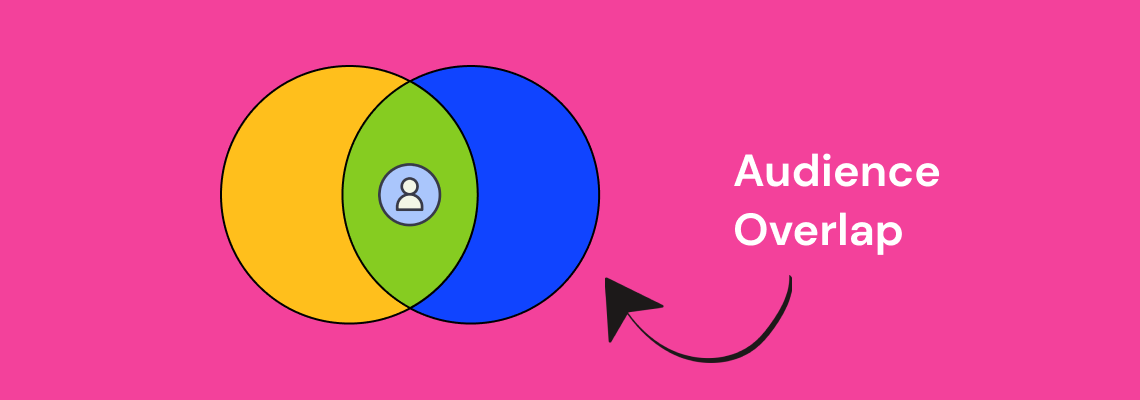
Audience overlap is the percentage of users who appear in two or more of your targeted audience segments at the same time. In Facebook Ads, this happens when the people in one ad set also fall into another ad set you are running concurrently.
Consider a concrete example. Suppose you have two active ad sets: one targeting women aged 25-34 interested in fitness, and another targeting women aged 30-45 interested in healthy cooking. Anyone who is 30-34, interested in both fitness and cooking, lands in both audiences. That is audience overlap, and it means you are bidding against yourself to reach the same person.
Meta's auction system does not let two ads from the same account compete for the same impression. Instead, it suppresses the lower-performing ad set, which means one of your campaigns is essentially being throttled without any warning in your dashboard.
Understanding audience overlap meaning at this level is the first step toward fixing the problem. The goal is not to eliminate overlap entirely - some degree is inevitable - but to keep it below the threshold where it starts costing you money (generally under 20-25%).
When audience overlap goes unchecked, the downstream effects compound quickly. Here are the three primary ways it damages your account.
Facebook's ad auction selects one ad per advertiser to show to a given user. When your ad sets target the same people, Facebook picks the winner and sidelines the rest. The result is that your losing ad sets get fewer impressions and higher costs per result, even though your creative and offer may be strong.
This is especially costly for DTC brands and ecommerce advertisers who run multiple product-level ad sets to the same broad interest audiences.
When the same user sees variations of your ads across multiple ad sets, fatigue sets in faster. Frequency climbs, click-through rates drop, and your cost per acquisition increases. This is one of the most common reasons Facebook ads stop delivering results and advertisers cannot figure out why.
Overlapping audiences skew your reporting. An ad set might appear to be underperforming when it is actually being throttled by auction overlap. Advertisers who make optimization decisions based on this misleading data often kill campaigns that would otherwise scale, or pour budget into ad sets that only appear to win because the competition was artificially removed.
Now that the stakes are clear, here is the step-by-step process for identifying audience overlap in Facebook Ads Manager.
Log into your Facebook Business Manager account. From the main menu, click on "All Tools" and then select "Audiences" under the Assets section. This is the central hub where all your saved audiences, custom audiences, and lookalike audiences are stored.
If you have not organized your audiences recently, take a few minutes to review what is there. Outdated or duplicate audiences are a common source of unintentional overlap.
To use the audience overlap tool, select two to five audiences by checking the boxes next to their names. You can compare saved audiences, custom audiences, and lookalike audiences against each other.
Once your audiences are selected, click the three-dot menu (or the "Actions" dropdown, depending on your interface version) and choose "Show Audience Overlap." This opens the overlap comparison view.
The audience overlap tool displays a Venn diagram with the percentage of shared users between each audience pair. Pay close attention to any pair that exceeds 20-25% overlap. These are the combinations most likely to cause auction competition and budget waste.
Document the overlap percentages for each pair. This data becomes the foundation for the strategic adjustments you will make in Step 5.
Not all overlap is equally damaging. Prioritize the audience pairs where:
These are your highest-risk combinations and the ones you should address first.
Based on your audience overlap analysis, here are the most effective adjustments you can make:

For advertisers who want a fast checklist, here is the streamlined process:
Run this check at least once per month, and always before launching new campaigns that target similar interest categories or lookalike seed audiences.
Not every instance of overlap requires action. There are scenarios where moderate overlap is fine or even expected:
The key distinction is whether overlapping ad sets are competing for the same auction. If they target different campaign objectives or sit at different funnel stages, the risk is lower.
The best approach is to build overlap prevention into your campaign architecture from the beginning. Here are three structural practices that keep overlap in check.
Develop a clear naming system for your audiences that includes the targeting criteria. When audience names include the interest category, age range, and exclusion status, you can spot potential overlap before you even run the tool.
Audience composition shifts over time as Facebook updates interest categories and user behavior changes. A monthly cadence for running the overlap tool ensures you catch new overlap before it impacts performance. This is especially important for brands scaling Facebook ads across multiple product lines or markets.
When multiple team members or agencies create audiences independently, overlap becomes nearly inevitable. Maintaining a shared audience library and documenting which audiences are active in which campaigns eliminates this coordination problem. If you are working with a PPC agency, ensure they provide audience overlap reports as part of their regular account reviews.
While this guide focuses on Facebook, audience overlap is not limited to a single platform. Brands running campaigns across Facebook, Instagram, TikTok, and Google often reach the same users on multiple channels without realizing it. Cross-channel overlap analysis requires additional tools and a unified measurement approach, but the same principle applies: identify where you are paying multiple times to reach the same person, and consolidate.
For brands evaluating where to allocate budget, understanding how Facebook audiences compare to other platforms is a critical input. Our comparison of TikTok Ads vs. Facebook Ads covers how audience composition differs between platforms and where overlap is most likely.
Audience overlap is one of the most common and most overlooked sources of wasted spend in Facebook advertising. Running a regular audience overlap analysis inside Ads Manager takes less than ten minutes and can surface issues that are silently inflating your costs.
The five-step process - navigate to audiences, select and compare, read the overlap percentage, identify high-risk pairs, and apply strategic fixes - gives you a repeatable framework for keeping your account clean and your budget working efficiently.
If your Facebook Ads campaigns are underperforming and you have ruled out creative and offer issues, audience overlap should be the next thing you check. For brands that need hands-on support, our Social Media Ads team runs these audits as part of every account onboarding.
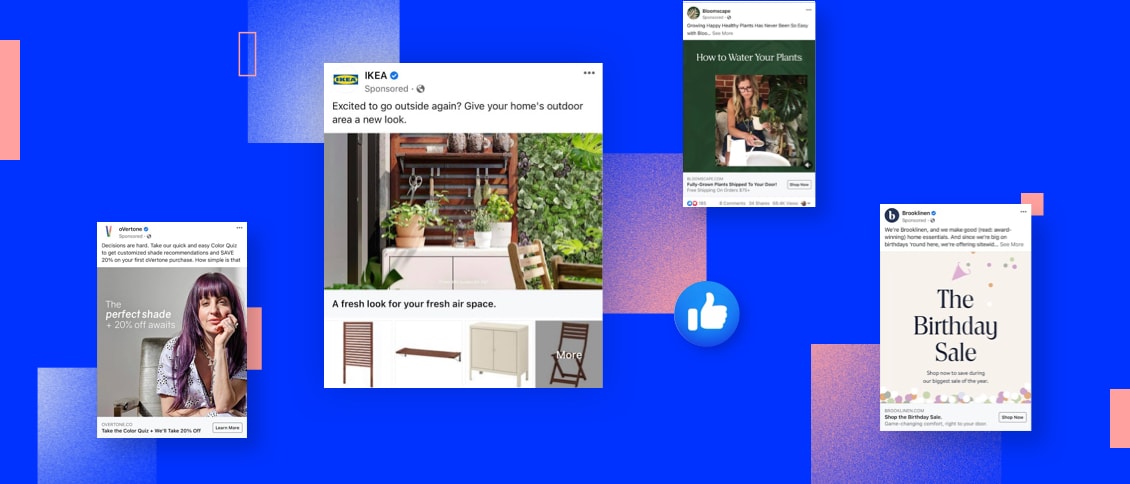
Automation is a powerful tool for businesses to streamline their processes and maximize efficiency. One area where automation can play a significant role is in managing Facebook Lead Ads. With the help of Zapier, a leading automation platform, businesses can effortlessly integrate and automate their Facebook Ads campaigns. Keep reading to learn the basics of Zapier, how it works with Facebook Lead Ads, and how to set it up for your business.
Zapier is an automation tool that connects different web applications and allows them to work together seamlessly. It eliminates the need for manual data entry and repetitive tasks by automating workflows, known as Zaps, between various apps.

Imagine a scenario where you receive an email with an attachment, and you want to automatically save that attachment to your cloud storage. With Zapier, you can create a Zap that triggers this action whenever a new email with an attachment arrives in your inbox. This saves you the time and effort of manually downloading and uploading the file.
One of the most remarkable aspects of Zapier is that it doesn't require any coding knowledge. This means that even non-technical users can leverage the power of automation to streamline their workflows and boost productivity.
Now that we have a better understanding of Zapier, let's explore another essential tool in the digital marketing realm - Facebook Lead Ads.
In today's highly competitive business landscape, capturing leads is crucial for sustained growth. This is where Facebook Lead Ads come into play. Facebook Lead Ads is a powerful lead generation tool that allows businesses to collect valuable information from potential customers directly within the Facebook platform.
Traditionally, businesses would direct users to a landing page to fill out a form or provide their contact information. However, this process often leads to a drop-off in conversions, as users may find it cumbersome to navigate away from their current browsing experience.
With Facebook Lead Ads, businesses can create compelling offers or sign-up forms that capture user information, such as name, email address, phone number, and more, without requiring users to leave the Facebook platform. This seamless user experience significantly increases the chances of generating leads and driving conversions.
Moreover, Facebook Lead Ads also provide a valuable opportunity for businesses to target their ads to specific audiences. By leveraging Facebook's powerful targeting capabilities, businesses can ensure that their ads reach the right people, maximizing the effectiveness of their lead generation campaigns.
By integrating Zapier with Facebook Lead Ads, businesses can further enhance their lead generation efforts. For example, whenever a user submits their information through a Facebook Lead Ad, Zapier can automatically add that lead to a CRM system or send a personalized email to the user, nurturing the lead generation funnel and facilitating the sales process.
The first step in automating your Facebook Lead Ads with Zapier is to create a Zapier account. Simply visit the Zapier website and sign up for a free account. Once you've created your account, you can start exploring the platform and setting up your automation workflows.
When you sign up for a Zapier account, you'll be asked to provide some basic information such as your name, email address, and a password. Once you've entered this information, you'll need to verify your email address to activate your account. After verifying your email, you'll have full access to the Zapier platform and its features.
Creating a Zapier account is quick and easy, and it opens up a world of possibilities for automating your workflows. Whether you're a small business owner looking to streamline your processes or a marketer wanting to integrate different apps, Zapier provides a seamless solution.
After creating your Zapier account, you will be redirected to the Zapier dashboard. The dashboard serves as the control center for managing your Zaps and monitoring their performance. It provides a user-friendly interface where you can create, edit, and manage your automation workflows.
Once you're on the Zapier dashboard, you'll notice a clean and organized layout that makes it easy to navigate. The left-hand side of the dashboard displays the main menu, which includes options such as "Zaps," "Tasks," "Team," and "Settings." These menu options allow you to access different areas of the platform and customize your Zapier experience.
Within the dashboard, you can create new Zaps by clicking on the "Make a Zap" button. This will take you to the Zap editor, where you can define the trigger and action for your automation workflow. The Zap editor provides a step-by-step process to guide you through the setup, making it simple even for beginners.
Additionally, the Zapier dashboard offers various features to help you manage your Zaps effectively. You can view the status of your Zaps, track the number of tasks completed, and troubleshoot any errors that may occur. With this level of control and visibility, you can ensure that your automation workflows are running smoothly and efficiently.
Overall, the Zapier dashboard is designed to provide a seamless user experience, empowering you to automate your tasks and save valuable time. Whether you're a tech-savvy professional or a non-technical user, Zapier's intuitive interface makes it easy to set up and manage your automation workflows.
Integrating Zapier with Facebook can greatly enhance your workflow and automate various actions. By connecting your Facebook account to Zapier, you'll be able to access your Facebook Lead Ads data and streamline your lead generation process.
To get started, you'll need to connect your Facebook account to Zapier. This process is quick and easy. Simply navigate to the Zapier dashboard and click on "Connected Accounts." In the search bar, type "Facebook" and select it from the list of available options. Follow the prompts to authorize the connection between Zapier and your Facebook account.
Once the connection is established, you'll have access to a wide range of Facebook integrations and automation possibilities.
After successfully connecting your Facebook account to Zapier, it's time to configure your Facebook Lead Ads in Zapier. This step is crucial as it allows you to define the specific criteria that will trigger the automation process.
To begin, navigate to the Zapier dashboard and click on "Make a Zap." From the list of available apps, select Facebook Lead Ads as the trigger app. This will ensure that any new lead generated through your Facebook Lead Ads will initiate the automation process.
Once you've selected Facebook Lead Ads as the trigger app, follow the on-screen instructions to customize your trigger settings. This includes specifying the criteria that must be met for the automation to be triggered. For example, you can set up the automation to only trigger when a lead fills out a specific form or meets certain demographic criteria.
By configuring your Facebook Lead Ads in Zapier, you can ensure that your automation process is tailored to your specific needs and requirements. This level of customization allows you to maximize the efficiency and effectiveness of your lead generation efforts.
Facebook Lead Ads are a powerful tool for generating leads and capturing valuable customer information. However, manually managing and processing these leads can be time-consuming and inefficient. That's where Zapier comes in. With Zapier, you can automate the process of handling your Facebook Lead Ads, saving you time and effort.
Once you've configured your Facebook Lead Ads as the trigger in Zapier, the possibilities for automation are endless. You can set up actions that will be performed automatically when the trigger conditions are met. These actions can include sending email notifications to your team, adding data to a spreadsheet for easy tracking and analysis, creating new CRM entries to keep your customer database up to date, and much more.
With Zapier's user-friendly interface, setting up these triggers and actions is a breeze. Simply select the desired trigger and action from the available options, and Zapier will guide you through the process of connecting your Facebook Lead Ads account and the app or service you want to integrate with. It's a seamless and intuitive experience that requires no coding or technical expertise.
What's more, Zapier offers a vast range of integrations, allowing you to connect your Facebook Lead Ads with popular apps and services like Gmail, Google Sheets, Salesforce, Mailchimp, and many others. This means you can tailor your automation workflow to best suit your business needs and leverage the tools you already use to streamline your lead generation and management process.
Before deploying your automation workflow, it's crucial to test it to ensure it functions correctly. Zapier provides a testing feature that allows you to simulate trigger events and verify if the desired actions are being performed as expected. This way, you can catch any potential issues or errors before they impact your actual campaigns and ensure a smooth and seamless automation process.

During the testing phase, you can review the data that is being passed between your Facebook Lead Ads and the connected app or service. This gives you the opportunity to fine-tune your automation and make any necessary adjustments to ensure the accuracy and reliability of your lead data. By thoroughly testing your automation, you can have peace of mind knowing that your workflow is working flawlessly and that your leads are being processed efficiently.
Additionally, Zapier provides detailed logs and activity history, allowing you to monitor the performance of your automation over time. This gives you valuable insights into how your leads are being handled and how your automation is contributing to your overall marketing strategy and influencing the customer journey. You can track metrics like the number of leads processed, the time it takes for actions to be executed, and any errors or issues that may arise.
When setting up triggers and actions in Zapier, it's important to consider best practices to optimize your automation. Here are a few tips to keep in mind:
Despite the seamless nature of automation, issues can sometimes occur. Here are a few common issues you may encounter while automating your Facebook Lead Ads with Zapier and helpful troubleshooting tips:
The combination of Facebook Lead Ads with Zapier can be a groundbreaker for your business, by streamlining your lead generation and management process. By setting up triggers and actions, you can automate repetitive tasks, save time, ensure the accuracy and efficiency of your lead data, and bring your social media advertising strategy to the next level. Don't forget to thoroughly test your automation before deploying it to ensure a seamless and error-free experience. With these tips, you will be able to save time, increase productivity, and focus on other important aspects of your business.
As businesses strive to connect with their target audience, Facebook Lead Ads have emerged as a valuable tool. Understanding the importance of Facebook Lead Ads and harnessing their benefits can significantly enhance your marketing strategy. Moreover, automating the integration of Facebook Lead Ads with Google Sheets can streamline your data management processes. This is where Zapier, a leading automation tool, comes into play.
Facebook Lead Ads have revolutionized the way businesses gather leads and interact with potential customers. With an aim to simplify the lead generation process, Facebook provides an efficient platform for businesses to showcase their products or services directly to their target audience. Unlike traditional lead generation methods, Facebook Lead Ads eliminate the need for users to fill out lengthy forms, resulting in higher conversion rates.
But what makes Facebook Lead Ads so effective? One key factor is the power of Facebook's extensive user base and advanced targeting capabilities. With over 2.8 billion monthly active users, Facebook allows businesses to precisely reach their desired audience. By leveraging demographic, geographic, and interest-based targeting options, businesses can ensure that their ads are seen by the right people at the right time. This precision targeting not only increases the chances of lead generation but also allows for a more efficient allocation of marketing resources, leading to improved ROI.
Besides, Facebook Lead Ads offer a seamless user experience. When a user clicks on a lead ad, a pre-populated form appears, already filled with their Facebook profile information. This eliminates the need for users to manually enter their details, making the process quick and convenient. By reducing friction in the lead generation process, Facebook Lead Ads significantly increase the likelihood of users completing the form and becoming leads.
Facebook Lead Ads have revolutionized the way businesses gather leads and interact with potential customers. Automating the integration of Facebook Lead Ads with Google Sheets brings numerous benefits to businesses. By eliminating the manual transfer of data from Facebook to Google Sheets, automation saves valuable time and reduces the risk of human error. This ensures accurate and up-to-date data in your Google Sheets, enabling you to make data-driven decisions with confidence.
Additionally, automation enables real-time data syncing. As new leads come in through Facebook Lead Ads, the information is automatically updated in your Google Sheets. This real-time access to leads empowers your sales and marketing teams to react promptly, improving response times and increasing the chances of lead conversion.
Moreover, automating the integration between Facebook Lead Ads and Google Sheets allows for seamless collaboration and data sharing within your organization. Multiple team members can access and work with the lead data simultaneously, fostering better teamwork and coordination.
Furthermore, automation opens up opportunities for advanced data analysis and reporting. With the lead data readily available in Google Sheets, businesses can leverage various data visualization tools and techniques to gain deeper insights into their lead generation efforts. This enables businesses to identify trends, patterns, and areas for improvement, ultimately optimizing their lead generation strategies, which, in the end, will enhance lead management process, save time, reduce errors, and enable data-driven decision-making.
Google Sheets is a powerful cloud-based spreadsheet tool that offers a wide range of features for data management and analysis. Whether you're dealing with simple lists or complex datasets, Google Sheets provides a user-friendly interface and robust functionality.
Google Sheets offers several advantages for businesses in terms of collaboration, accessibility, and integration. Firstly, multiple team members can work on the same sheet simultaneously, fostering collaboration and boosting productivity.
Secondly, Google Sheets provides seamless accessibility. As a cloud-based platform, it enables you to access your data from anywhere, ensuring that you are always in sync with the latest information.
Lastly, Google Sheets integrates smoothly with other Google Workspace tools. This integration allows for efficient data import/export processes and enables the utilization of additional analysis and visualization tools.
Google Sheets offers a wide array of functionalities that make data management a breeze. From data validation and conditional formatting to filtering and sorting capabilities, Google Sheets provides the tools you need to organize and analyze your data effectively.
Furthermore, Google Sheets supports powerful functions and formulas that enable complex calculations and data manipulation. These features empower you to derive insights from your data, enhancing your decision-making process.

Zapier is an automation platform that enables you to connect various apps and automate workflows without the need for coding. With its user-friendly interface and extensive app directory, Zapier streamlines repetitive tasks and enhances productivity.
Zapier operates on a simple principle: "If this, then that." This means that when a trigger event occurs in one app, Zapier performs the specified actions in another app. These automated actions, known as Zaps, enable seamless data transfer and task automation across multiple apps.
To connect your Facebook Lead Ads to Google Sheets, Zapier acts as the bridge between the two platforms. It monitors your Facebook Lead Ads for new leads and transfers the collected data to your specified Google Sheets, eliminating manual data entry.
Zapier offers several advantages when it comes to automating the integration of Facebook Lead Ads with Google Sheets. Firstly, Zapier provides a wide range of built-in integrations, including comprehensive support for Facebook Lead Ads and Google Sheets.
Secondly, Zapier's automation capabilities enable you to set up advanced workflows and perform complex actions. For example, you can apply filters and conditions to control which leads are transferred to Google Sheets, ensuring data accuracy and relevance.
Lastly, Zapier allows for seamless scalability. As your business grows and your automation needs evolve, Zapier provides the flexibility to adapt and integrate with additional apps, extending the automation capabilities of your workflow.
Setting up the automation between Facebook Lead Ads and Google Sheets with Zapier is a straightforward process. By following these steps, you can seamlessly integrate the two platforms and automate your lead management workflow.
Before setting up the integration, make sure you have a Facebook Page and an active Facebook Lead Ads campaign. Ensure that your lead form captures all the necessary information you require from your potential customers. To optimize your lead generation efforts, consider utilizing custom questions or multi-step forms that align with your specific business objectives.
Once your lead form is ready, you can move on to the next step of the integration process.
Next, create a Google Sheets document that will serve as the destination for your Facebook Lead Ads data. Define the columns in your spreadsheet to match the fields you would like to capture from your leads. This ensures that the data is organized in a structured manner, making it easier to analyze and utilize later on.
While setting up the integration between Facebook Lead Ads and Google Sheets with Zapier is generally straightforward, you may encounter some common issues. Knowing how to address these issues can help you ensure a seamless and uninterrupted automation process.
If your Zap encounters connection problems, double-check your account credentials for both Facebook and Google Sheets. Ensure that you have granted the necessary permissions to Zapier to access your accounts.
Verify that your Facebook Lead Ads campaign is active and that the lead form you selected is correctly linked to your Facebook Page. Similarly, confirm that your Google Sheets document exists and is accessible to your Google account.
If the problem persists, consult Zapier's support documentation or reach out to their customer support team for assistance.
To make the most of the automated integration between Facebook Lead Ads and Google Sheets, consider implementing the following tips:
Connecting your Facebook Lead Ads to Google Sheets automatically with Zapier offers numerous benefits for your marketing and data management efforts. By automating the integration, you can optimize your lead generation funnel, enhance data accuracy, and improve your overall lead management workflow. Take advantage of the power of Facebook Lead Ads, Google Sheets, and Zapier to unlock the full potential of your marketing strategy.

Advertising has become an essential component of any successful business strategy. With social media platforms taking center stage, it's crucial for businesses to choose the right platform to maximize their reach and engage with their target audience. Two of the most popular platforms for advertising right now are TikTok and Facebook. Together, we will delve into the intricacies of TikTok ads versus Facebook ads to help you make an informed decision about which platform is the better option for your business.
TikTok, a video-sharing platform, has taken the world by storm with its short, snappy videos that captivate users. With over 2 billion downloads worldwide and a predominantly younger user base, TikTok offers a unique opportunity to connect with Gen Z and millennial audiences in a creative and engaging way.
When it comes to TikTok ads, businesses have a variety of options to choose from. One popular ad format is the "In-Feed Ad," which appears in users' feeds as they scroll through the app. These ads can be up to 60 seconds long and can include clickable links, making them a powerful tool for driving traffic to a website or promoting a specific product or service.
Another type of TikTok ad is the "Brand Takeover Ad," which allows businesses to dominate the app's interface for a brief period of time. When users open the app, they are immediately greeted with a full-screen ad from the brand. This format provides maximum visibility and can be highly effective in creating brand awareness.
On the other hand, Facebook remains the behemoth of social media platforms, boasting more than 2.8 billion monthly active users. Facebook ads provide businesses with a versatile range of formats to target their audience, from image and video ads to carousel and collection ads. Facebook's extensive targeting options allow businesses to reach specific demographics and interests, making it a compelling choice for advertising.
One of the key advantages of Facebook ads is the ability to create highly targeted campaigns. Businesses can choose from a wide range of targeting options, including age, gender, location, interests, and even behaviors. This level of granularity ensures that ads are shown to the most relevant audience, increasing the chances of engagement and conversions.
In addition to targeting options, Facebook also offers a variety of ad placements to suit different marketing objectives. For example, businesses can choose to display their ads in users' news feeds, in the right-hand column of the desktop version, or even in the Messenger app. This flexibility allows businesses to tailor their ads to the platform and placement that will yield the best results.
Furthermore, Facebook's ad formats are designed to capture users' attention and drive action. Video ads, for instance, can autoplay in users' feeds, grabbing their attention as they scroll through. Carousel ads, on the other hand, allow businesses to showcase multiple products or features in a single ad, increasing the chances of engagement and conversions.
Ultimately, both TikTok and Facebook offer unique opportunities for businesses to reach and engage with their target audience. While TikTok excels in its ability to captivate younger audiences with short and creative videos, Facebook's extensive user base and targeting options make it a powerful platform for businesses of all sizes. By understanding the basics of both platforms and tailoring their ad strategies accordingly, businesses can maximize their advertising efforts and drive meaningful results.
When considering the reach of both platforms, understanding their user demographics is essential. TikTok predominantly attracts younger users, with 41% of its users falling between the ages of 16 and 24. This younger demographic is highly engaged and actively seeks new content, making TikTok an ideal platform to nurture brand awareness and build a loyal following. Additionally, TikTok's algorithmic recommendation system ensures that users are constantly exposed to new and trending content, further enhancing its reach among younger audiences.
On the other hand, Facebook's user base is more diverse in terms of age and interests, catering to a wider range of target markets. With over 2.8 billion monthly active users, Facebook remains the largest social media platform in terms of user base. This vast user base allows businesses to reach a broader audience, including older demographics who may not be as active on TikTok.
In terms of global presence, Facebook's reach is unrivaled. With users in virtually every country around the world, Facebook offers businesses the opportunity to target local, national, and international markets. The platform's localization features, such as language preferences and location-based targeting, enable businesses to tailor their content to specific regions and cultures. This global reach has made Facebook a go-to platform for businesses looking to expand their reach and connect with a diverse audience.
TikTok, although rapidly expanding its global footprint, is still more concentrated in certain regions, primarily the United States, India, and China. However, the platform's popularity is steadily growing in other parts of the world, with Europe, Southeast Asia, and Latin America seeing significant increases in user adoption. As TikTok continues to expand its reach, businesses have the opportunity to tap into emerging markets and engage with a younger, highly active audience.
Furthermore, TikTok's unique format, centered around short-form video content, offers businesses a creative and engaging way to connect with their target audience. The platform's emphasis on user-generated content and viral challenges has led to the rise of influencers and brand collaborations, providing businesses with new avenues for brand promotion and product placement. If you want to know how to craft a brilliant TikTok Ad, just click here.

While Facebook offers a wide range of advertising options, including targeted ads, sponsored posts, and messenger ads, TikTok's advertising capabilities are still evolving. However, with the platform's growing popularity and the introduction of features like TikTok Ads Manager, businesses can now leverage TikTok's vast user base to reach their target audience through various advertising formats and different tactics, such as storytelling.
As you see, both TikTok and Facebook offer unique opportunities for businesses to expand their reach and connect with their target audience. While TikTok's reach is primarily concentrated among younger users and is rapidly expanding globally, Facebook's unrivaled user base and global presence make it an essential platform for businesses looking to reach a diverse audience. By understanding the demographics and features of each platform, businesses can develop effective marketing strategies to maximize their reach and engagement on both TikTok and Facebook.
Understanding the costs associated with advertising on both platforms is crucial for budgeting and determining the overall effectiveness of your marketing strategy. TikTok ads tend to be more expensive due to the higher demand and limited ad inventory. However, the higher cost can be offset by the potential for greater user engagement and increased brand visibility.
When it comes to TikTok ads, the higher cost can be attributed to several factors. Firstly, TikTok has quickly gained popularity among users, especially among younger demographics. As a result, the demand for advertising space on the platform has skyrocketed. With more businesses vying for limited ad inventory, the cost of placing ads on TikTok has naturally increased.
Secondly, TikTok offers a unique and highly engaging user experience. The platform's short-form videos, creative filters, and popular challenges have captivated millions of users worldwide. This high level of user engagement makes TikTok an attractive platform for advertisers looking to connect in a meaningful way. As a result, the increased potential for user engagement on TikTok ads contributes to their higher cost.
On the other hand, Facebook offers a range of pricing options, including cost per click (CPC) and cost per thousand impressions (CPM). This flexibility allows businesses to choose the pricing model that aligns with their advertising goals and budget constraints. In this regard, a Pay Per Click Agency can help you define a well-suited strategy to your business.
With the ability to set daily budgets, businesses can have more control over their ad spend on Facebook. This means that if a business has a limited budget, they can allocate their resources strategically and ensure that their ads are being shown to the right audience at the right time. This level of control and flexibility can be particularly beneficial for small businesses or startups with limited advertising budgets.
At last, Facebook's extensive targeting options enable advertisers to reach specific demographics, interests, and behaviors. This level of granularity ensures that ads are shown to the most relevant audience, increasing the chances of user engagement and conversions. By leveraging these targeting capabilities, adapting them to their own goals, businesses can optimize their ad spend and maximize their return on investment.
Exploring the different ad formats offered by each platform is essential to determine which one aligns best with your business objectives. TikTok offers a variety of ad formats, including in-feed ads, brand takeovers, and branded hashtags. These formats allow businesses to engage with users in a way that feels native to the platform, seamlessly blending into the user experience.
Facebook, on the other hand, offers a wide range of ad formats that cater to different objectives. From single image ads to video ads, Facebook's versatility allows businesses to convey their brand message effectively. Additionally, Facebook's dynamic ads enable businesses to create personalized content based on user behavior and interests, increasing the chances of conversion.
Evaluating the performance of your ads is essential to gauge the effectiveness of your marketing efforts. TikTok provides a range of performance metrics, including video views, engagement rate, and follower growth. These metrics allow businesses to analyze the success of their ad campaigns and make data-driven decisions.
Similarly, Facebook offers robust analytics to help businesses measure the impact of their ads. From reach and impressions to click-through rates and conversion tracking, Facebook provides businesses with valuable insights into their campaign performance, allowing for optimization and refinement.

Both TikTok and Facebook offer unique opportunities for businesses to connect with their target audience and achieve their marketing objectives. TikTok provides an avenue to engage with a younger, highly engaged demographic through creative and captivating videos. On the other hand, Facebook's extensive targeting options and global reach make it an attractive choice for businesses of all sizes.
In the long run, the choice between TikTok and Facebook ads comes down to your business goals, target audience, and budget. It is essential to consider these factors and conduct thorough market research to make an informed decision that aligns with your business objectives.
Remember, success in advertising hinges on understanding your audience, crafting compelling content, and continually analyzing and optimizing your campaigns. By leveraging the strengths of both TikTok and Facebook, businesses can create powerful marketing strategies that drive results and propel their brand to new heights.
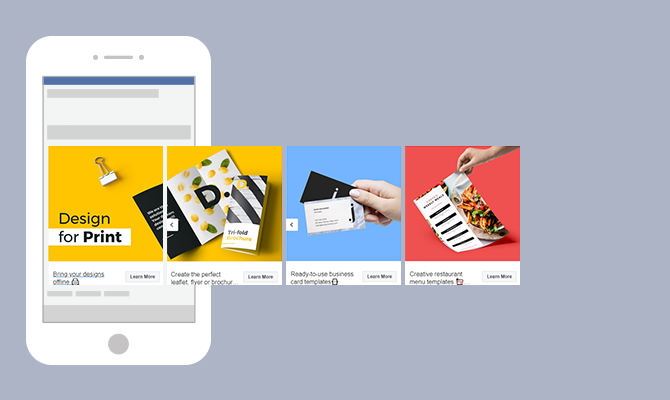
Advertising on social media platforms has become essential for businesses to reach their target audience effectively. Within the realm of social media advertising, Facebook Carousel Ads have emerged as a powerful tool to capture users' attention and drive engagement. Together, we will explore the ins and outs of creating an engaging Facebook Ad, providing you with the best practices to enhance your advertising campaigns.
First and foremost, a Facebook Carousel Ad is a dynamic advertisement format that allows businesses to showcase multiple images or videos, each with its own link, in a single ad unit. The ad appears as a scrollable carousel, enabling users to swipe through the various media elements effortlessly. This ad format offers a visually appealing and interactive way to tell a story or present different products or features.
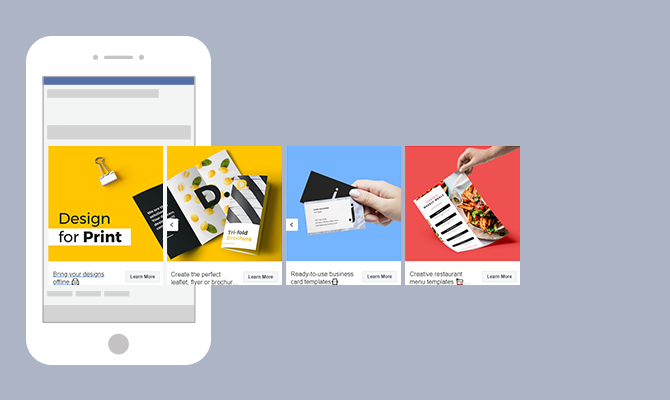
There are several compelling reasons to consider using Facebook Carousel Ads in your advertising strategy:
When it comes to increased engagement, Carousel Ads have proven to be highly effective. The scrollable format captures users' attention and encourages them to explore the different images or videos within the ad. This interactive experience creates a sense of curiosity and excitement, leading to higher click-through rates and longer time spent engaging with the ad.
Moreover, Carousel Ads offer businesses the opportunity to provide users with more information about their brand, products, or services. Instead of relying on a single image or video, Carousel Ads allow you to showcase a variety of visuals that highlight different aspects of your offerings. This enables users to gain a comprehensive understanding of what your brand represents and what you have to offer.
Storytelling is a powerful tool in advertising, and Carousel Ads provide the perfect platform for it. With the ability to present multiple images or videos in a sequential manner, businesses can take users on a journey, guiding them through a narrative that communicates their brand message effectively. This storytelling approach creates a deeper emotional connection with users, making your brand more memorable and relatable.
Carousel Ads can also significantly improve conversion rates. By including multiple links within a single ad, businesses can tailor the user experience based on their interests. For example, if a user is interested in a specific product showcased in the Carousel Ad, they can be directed to a landing page dedicated to that product. This personalized approach increases the likelihood of conversions as users are directed to the most relevant information and offerings.
Creating a successful Facebook Carousel Ad involves careful consideration of various elements. From high-quality images to compelling ad copy and attention-grabbing call-to-action (CTA) buttons, each component plays a vital role in captivating your audience and driving conversions.
When designing a Facebook Carousel Ad, the quality of your images is paramount. Clear, visually appealing images that align with your brand identity and messaging will help captivate your audience and encourage them to explore further. Imagine a carousel ad showcasing a stunning landscape, enticing travelers to embark on an adventure. The vivid colors and breathtaking scenery instantly transport viewers to a world of wanderlust, igniting their desire to learn more about the destination.
However, it's not just about aesthetics. Properly sized and well-lit images are essential to ensure optimal display across various devices and screen sizes. By investing time and effort into selecting and preparing high-quality images, you can enhance the overall impact of your carousel ad and leave a lasting impression on your target audience.
While images play a significant role in Carousel Ads, the accompanying ad copy should not be underestimated. The power of words can complement and reinforce the visual elements, effectively conveying your message to potential customers. Consider a carousel ad promoting a new line of skincare products. Alongside vibrant images showcasing the radiant effects of the products, the ad copy can highlight the key ingredients, emphasizing their nourishing properties and the resulting healthy, glowing skin.
When crafting ad copy, it's crucial to strike a balance between being concise and persuasive. Captivate your audience with compelling language that resonates with their needs and desires. By focusing on the unique features or benefits of your products or services, you can pique their interest and motivate them to take action. Additionally, incorporating a clear call-to-action (CTA) prompts users to engage further, whether it's making a purchase, signing up for a newsletter, or exploring more about your offerings.

CTA buttons serve as a crucial element in driving conversions through Carousel Ads. These buttons provide a clear and direct path for users to take the desired action. When selecting a CTA phrase, it's essential to choose impactful, action-oriented language that aligns with your campaign objectives. For instance, if you're running an e-commerce campaign, a CTA button saying "Shop Now" can create a sense of urgency and encourage users to explore your products further.
Make sure the CTA button stands out within the carousel ad, both in terms of design and placement. Consider using contrasting colors or bold typography to draw attention to the button. Additionally, strategically positioning the CTA button within the carousel sequence can increase the likelihood of user interaction. By creating a seamless user experience and making it effortless for users to take the desired action, you can maximize the effectiveness of your Carousel Ad campaign.
As you embark on creating engaging Carousel Ads, remember that each element, from high-quality images to compelling ad copy and attention-grabbing CTA buttons, contributes to the overall success of your campaign. By carefully crafting each component and ensuring they work harmoniously together, you can create a captivating and persuasive carousel ad that entices your audience and drives meaningful results.
Creating a successful Carousel Ad on Facebook requires careful consideration and attention to detail. A specialized Social Media Advertising Agency could help you implement a well-thought comprehensive strategy. By selecting the right images, writing effective ad text, and choosing the perfect call-to-action (CTA), your audience will be engaged and you will drive the desired actions. Let's dive deeper into each aspect to help you design a compelling Carousel Ad.
One of the key elements of a captivating Carousel Ad is the selection of images. High-resolution product photos can showcase the details and features of your offerings, enticing potential customers. Additionally, lifestyle images can help create a connection between your products or services and the aspirations of your target audience.
Consider going beyond static images and experiment with videos. Videos can bring your offerings to life, allowing viewers to see them in action. They can also be a powerful storytelling tool, capturing attention and conveying your brand's message effectively.
When choosing image combinations for your Carousel Ad, think about the visual appeal and the story you want to tell. Experiment with different sequences and arrangements to create a visually engaging flow that keeps viewers interested and encourages them to interact with your ad.
The ad text in your Carousel Ad plays a crucial role in conveying your message and enticing users to take action. To make the most impact, keep your ad text concise and compelling. Each ad card within the carousel should have a clear and focused message that complements the visuals.
Take the time to understand your target audience and tailor your ad text to resonate with their specific pain points or desires. By addressing their needs directly, you can create a sense of relevance and urgency, increasing the likelihood of engagement.
Consider using persuasive language, highlighting the unique benefits of your offerings, and incorporating social proof or testimonials to build trust. Remember, the goal is to capture attention and encourage users to take the desired action, whether it's making a purchase, signing up for a newsletter, or exploring more about your products or services.
The call-to-action (CTA) is the final piece of the puzzle in your Carousel Ad. It's the prompt that guides users to take the next step and convert. When selecting a CTA, it's essential to align it with the intended action you want users to take.
Start by considering the stage of the customer journey your target audience is in. Are they just discovering your brand, or are they already familiar with your offerings? Based on this understanding, choose a CTA that guides users towards the appropriate next step.
For example, if your goal is to drive immediate conversions, a CTA like "Shop Now" or "Buy Now" can be effective. On the other hand, if you're aiming to nurture leads and build a relationship, a CTA such as "Learn More" or "Sign Up" may be more suitable.
Remember to make your CTA visually prominent within the ad and ensure it stands out from the rest of the content. Use contrasting colors, compelling copy, and clear instructions to encourage users to click and take action.
By carefully selecting the right images, crafting impactful ad text, and choosing a compelling CTA, you can design a Facebook Carousel Ad that captures attention, engages your audience, and drives the desired actions. Start experimenting with these elements and monitor the performance of your ads to continuously optimize and improve their effectiveness.
For your Carousel Ads to be effective, it's crucial to target the right audience. Leverage Facebook's targeting options to define your ideal audience based on demographics, interests, behaviors, or even custom audiences. Refine your targeting strategy to maximize ad relevance and reach.
When setting your budget for Carousel Ads, consider the potential reach and the objectives of your campaign. Facebook offers various bidding options, such as cost per click (CPC) or cost per thousand impressions (CPM). Test different budget levels to find a balance between visibility and cost-effectiveness.
Regularly monitoring the performance metrics of your Carousel Ads is crucial to optimize their effectiveness. Pay attention to key metrics such as click-through rate (CTR), conversion rate, and engagement rate. Based on the insights gained, make data-driven adjustments to improve your ad campaign's performance and achieve the desired results.
By following these examples and best practices, you can create compelling and engaging Facebook Carousel Ads that captivate your audience, drive meaningful engagement, and help you achieve your marketing objectives. Remember to continuously iterate and refine your ad campaigns based on user feedback and data analysis, ensuring the ongoing success of your advertising efforts.
Google Ads is a powerful online advertising platform that can help businesses reach their target audience and drive results. Whether you're new to Google Ads or looking to improve your existing campaigns, this step-by-step guide will walk you through the process of setting up your Google Ads branch effectively.

Google Ads, formerly known as Google AdWords, is a robust advertising platform powered by Google's vast network. It offers a variety of ad formats, such as text ads, display ads, video ads, and more, allowing businesses to reach their target audience across different channels.
Text ads are the most common ad format on Google Ads. They appear as sponsored search results when users search for specific keywords related to your business. Display ads, on the other hand, are visually appealing image or banner ads that are shown on websites within Google's Display Network. Video ads, as the name suggests, are short video clips that can be displayed on YouTube (Ads) or other partner websites.
Google Ads also offers advanced targeting options to help businesses reach the right audience. You can target users based on their location, language, demographics, interests, and even specific websites or apps they visit. This level of precision ensures that your ads are shown to the most relevant audience, increasing the chances of engagement and conversion.
Google Ads is an essential tool for businesses of all sizes. It provides a way to increase visibility, drive website traffic, generate leads, and ultimately, grow your business. With Google Ads, you have the ability to reach users who are actively searching for products or services related to your business, increasing the chances of conversion.
One of the key advantages of Google Ads is its flexibility. You have full control over your ad budget, allowing you to set a daily or monthly spending limit. This ensures that you only spend what you can afford and gives you the flexibility to adjust your budget based on the performance of your ads.
Google Ads also provides detailed performance metrics and analytics, allowing you to track the effectiveness of your campaigns. You can see how many clicks your ads receive, the cost per click, the number of conversions, and much more. This data-driven approach enables you to make informed decisions and optimize your campaigns for maximum results.
Furthermore, Google Ads offers various ad extensions that can enhance the visibility and effectiveness of your ads. These extensions allow you to add additional information, such as phone numbers, addresses, or links to specific pages on your website. This not only makes your ads more informative but also increases the chances of users taking action.
Before diving into the setup process, there are a few things you need to prepare.
Setting up your Google Ads branch requires careful planning and organization. To ensure a smooth and successful setup, it is essential to gather all the necessary information and tools beforehand.
Start by gathering the necessary information and tools for setting up your Google Ads branch. This includes your business website URL, relevant keywords related to your business, ad images or videos, and a clear understanding of your target audience.
When it comes to your business website URL, make sure it is up-to-date and optimized for user experience. A well-designed and user-friendly website will greatly enhance the effectiveness of your Google Ads campaigns.
In terms of relevant keywords, conduct thorough research to identify the most appropriate and high-performing keywords for your business. These keywords will help you reach your target audience and increase the chances of your ads being shown to the right people at the right time.
When selecting ad images or videos, choose visuals that are visually appealing and relevant to your business. High-quality and engaging visuals can significantly improve the click-through rate of your ads.
Lastly, having a clear understanding of your target audience is crucial. Define your target audience based on demographics, interests, and behaviors. This knowledge will enable you to tailor your ads to resonate with your target audience and maximize your campaign's effectiveness.
It's important to establish clear advertising goals before setting up your Google Ads account. Determine what you want to achieve with your ads, whether it's getting more website traffic, increasing sales, or raising brand awareness. This will help you create effective campaigns that align with your business objectives.
Consider the specific metrics you want to track and measure to gauge the success of your campaigns. For example, if your goal is to increase sales, you may want to track the number of conversions or the return on ad spend (ROAS).
Furthermore, setting realistic and attainable goals is crucial. Take into account your budget, resources, and the competitive landscape of your industry. By setting achievable goals, you can stay motivated and focused throughout the setup and optimization process.
Remember, Google Ads can be a powerful tool for driving business growth, but it requires careful planning and strategic execution. By preparing the necessary information and setting clear advertising goals, you are laying the foundation for a successful Google Ads setup.

Now that you have everything in place, it's time to create your Google Ads account.
Creating a Google Ads account is a straightforward process that can be done in a few simple steps. By following these steps, you'll be well on your way to launching successful advertising campaigns:
To begin creating your Google Ads account, navigate to the Google Ads website. You can do this by typing "Google Ads" into your preferred search engine or by directly entering the URL in your browser's address bar.
Once you're on the Google Ads website, locate the "Get Started" button and click on it. This will initiate the account creation process and guide you through the necessary steps.
During the setup process, you'll be asked to provide information about your business. This includes details such as your business name, website, industry, and location. It's important to provide accurate and up-to-date information to ensure that your ads are relevant to your target audience.
One of the crucial aspects of creating a Google Ads account is setting your budget. You'll need to determine how much you're willing to spend on advertising each day. Google Ads offers various budget options, allowing you to choose what works best for your business.
Another important step in creating your Google Ads account is defining your target audience. You'll have the opportunity to specify the geographic locations where you want your ads to appear, ensuring that you're reaching the right people in the right places.
Google Ads also allows you to customize your ad scheduling preferences. This means you can choose the days and times when you want your ads to be displayed. By aligning your ad schedule with your target audience's online behavior, you can maximize the effectiveness of your campaigns.
Once you've provided all the necessary information and customized your preferences, you can proceed to complete the setup process. Review your choices to ensure everything is accurate, and then click on the "Finish" or "Create Account" button to finalize the creation of your Google Ads account.
After creating your Google Ads account, you'll gain access to the Google Ads dashboard. This dashboard serves as your central hub for managing and monitoring your advertising campaigns. Let's take a closer look at some key sections and features you'll encounter:
The "Campaigns" section is where you'll create, organize, and manage your advertising campaigns. Here, you can set campaign goals, select targeting options, and monitor performance metrics such as impressions, clicks, and conversions.
Within each campaign, you'll have the ability to create multiple ad groups. Ad groups allow you to organize your ads based on specific themes or target audiences. This level of granularity enables you to tailor your messaging and optimize your campaigns for better results.
The "Ads" section is where you'll create and manage the actual advertisements that will be shown to your target audience. You can experiment with different ad formats, headlines, descriptions, and visuals to find the most effective combination.
Keywords play a crucial role in Google Ads campaigns. In the "Keywords" section, you can research, select, and manage the keywords that trigger your ads. By choosing relevant and high-performing keywords, you can increase the chances of your ads being shown to the right audience.
The "Reports" section provides valuable insights into the performance of your campaigns. You can generate various reports that highlight key metrics and trends, allowing you to make data-driven decisions and optimize your advertising strategy.
As you navigate the Google Ads dashboard, take some time to explore the various features and settings available. Familiarize yourself with the interface, experiment with different options, and leverage the tools provided to optimize your campaigns for better performance.
With your account ready, it's time to set up your first Google Ads campaign.
When setting up your campaign, you will be presented with different campaign types. Consider your advertising goals and select the one that aligns with your objectives. The available options include Search Network campaigns, Display Network campaigns, Video campaigns, Shopping campaigns, and more.
It’s crucial to define your target audience when setting up your Google Ads campaign. Customizing your targeting options based on demographics, interests, and search intent will ensure that your ads reach the right people. Additionally, set a realistic budget that matches your advertising goals and resources to maximize your return on investment.
The effectiveness of your ads plays a vital role in the success of your Google Ads campaign.
The text in your ads should be catchy, concise, and convey the value proposition of your products or services. Highlight unique selling points, use persuasive language, and include relevant keywords to attract the attention of potential customers. Experiment with different ad variations to see which ones perform best.

Selecting the right keywords is crucial for targeting the right audience. Conduct keyword research to find relevant and high-performing keywords related to your business. Incorporate these keywords into your ad copy, headlines, and landing page content. Additionally, optimizing your website for SEO will improve your organic search rankings and increase your visibility.
Setting up your Google Ads branch doesn't have to be overwhelming. By understanding the basics of Google Ads, preparing the necessary information and tools, creating your account, setting up campaigns, and crafting effective advertisements, you can maximize the potential of this powerful advertising platform. Keep monitoring and optimizing your campaigns to ensure long-term success. Good luck!

Having an effective advertising strategy is crucial for businesses to reach their target audience and drive success. Google Ads is a powerful tool that allows businesses to advertise their products and services to millions of users across the globe. One essential component of Google Ads is the Customer ID, which plays a significant role in optimizing your advertising efforts, including search and social media ads. In this article, we will discuss the importance of understanding and utilizing your Google Ads Customer ID, as well as ways to protect and maximize its potential.

Your Google Ads Customer ID is a string of numbers that is assigned to your account. It serves as a way for Google to track your campaigns, ads, and overall account performance. Think of it as a digital fingerprint that is unique to your account.
With your Customer ID, Google can easily identify and organize all the data related to your advertising efforts. This includes information about your campaigns, ad groups, keywords, and more. It helps Google keep everything organized and makes it easier for you to manage your account.
First and foremost, your Customer ID is the backbone of your Google Ads account. It is the key that unlocks access to all aspects of your campaigns. With your Customer ID, you can monitor your advertising spend, track conversions, analyze performance metrics, and make data-driven decisions to optimize your campaigns.
But the importance of your Customer ID doesn't stop there. It also enables you to link your Google Ads account to other Google services, such as Google Analytics and YouTube. By doing so, you gain access to a wealth of additional data and enhanced targeting capabilities.
For example, by linking your Google Ads account to Google Analytics, you can get a deeper understanding of how your ads are performing and how they are driving traffic to your website. You can track user behavior, identify which keywords are driving the most conversions, and even set up custom reports to get the insights you need.
Similarly, linking your Google Ads account to YouTube Ads allows you to run video ads and reach a wider audience. You can leverage the power of video marketing and tap into the massive user base of YouTube to promote your products or services.
Overall, your Google Ads Customer ID is not just a random string of numbers. It is the key that unlocks the full potential of your advertising efforts. Understanding its importance and leveraging its capabilities can help you take your Google Ads campaigns to new heights.
Locating your Google Ads Customer ID is an essential step in managing your advertising campaigns effectively. Your Customer ID is a unique identifier that allows you to access and control your account. Follow the steps below to find your Customer ID:
Locating your Google Ads Customer ID is a straightforward process. Simply follow the steps below:
Once you have obtained your Customer ID, you can use it to access various features and settings within your Google Ads account. It is important to keep your Customer ID secure and confidential to protect your account from unauthorized access.

While finding your Customer ID is generally simple, there may be instances when you encounter difficulties. Some common issues and their solutions include:
Remember, your Customer ID is a crucial piece of information that allows you to manage your Google Ads account effectively. By following the steps outlined above and addressing any common issues that may arise, you will be able to locate your Customer ID and take full control of your advertising campaigns.
When it comes to running successful advertising campaigns on Google, your Google Ads Customer ID is a powerful tool that can greatly enhance your marketing strategy. Not only does it provide you with a unique identifier for your account, but it also offers a range of features and benefits that can help you achieve your advertising goals.
One of the key advantages of your Google Ads Customer ID is its ability to integrate with other Google services, such as Google Analytics. By linking these accounts, you can gain a deeper understanding of your advertising performance and audience behavior. With Google Analytics, you can track important metrics like website traffic, conversions, and user engagement, allowing you to make data-driven decisions to optimize your campaigns.
Additionally, linking your Customer ID to YouTube opens up a world of video advertising opportunities. With the rise of video content consumption, leveraging YouTube as a platform for your ads can significantly expand your reach and engagement. By connecting your Customer ID to YouTube, you can create and manage video campaigns, target specific audiences, and measure the success of your video ads.
For businesses or advertisers who manage multiple Google Ads accounts, the Customer ID becomes invaluable in streamlining their efforts. Instead of juggling multiple logins and interfaces, consolidating all accounts under one Customer ID allows for a more efficient and seamless management experience.
With a single Customer ID, you can access and manage all your accounts simultaneously, saving time and effort. This feature provides a holistic view of your advertising campaigns, making it easier to analyze performance trends, identify areas for improvement, and make strategic adjustments. Whether you're running multiple campaigns for different products or targeting different regions, having all your accounts accessible through one Customer ID simplifies administrative tasks and ensures consistency in your advertising strategy.
The Customer ID also enables you to set different access levels and permissions for team members or agencies who work on your accounts. This allows for better collaboration and control over who can make changes or view sensitive information, ensuring the security and integrity of your advertising campaigns.
Protecting your Google Ads Customer ID is crucial to maintain the security and integrity of your advertising account. Your Customer ID is a unique identifier that grants access to your account and holds sensitive information. Taking the necessary security measures will help prevent unauthorized access and potential breaches.
To safeguard your Customer ID, it is important to implement the following security measures:
In the unfortunate event that your Customer ID is compromised, it is vital to take immediate action to secure your account. Follow these steps:
By following these security measures and taking immediate action if your Customer ID is compromised, you can help protect your Google Ads account from unauthorized access and potential harm.

Your Google Ads Customer ID generates a wealth of valuable data that can provide insights into your advertising performance. By analyzing this data, you can identify trends, optimize campaign targeting, and make data-driven decisions. Key metrics include impressions, clicks, conversions, cost per click, and return on ad spend, among others. By understanding these metrics and how they relate to your business goals, you can refine your campaigns to maximize results.
Effective utilization of your Google Ads Customer ID data can significantly contribute to your business growth. By identifying profitable keywords, analyzing audience demographics, and tracking conversion rates, you can fine-tune your targeting strategy and allocate resources efficiently. Additionally, comparing data across different time periods can help identify seasonal trends, allowing you to optimize your campaigns accordingly.
Your Google Ads Customer ID is a fundamental element in unlocking the full potential of your advertising campaigns, even if they are managed by you or by a specialized ads agency. By understanding the importance of your Customer ID, locating it easily, maximizing its use, and protecting it diligently, you can harness the power of data-driven marketing to drive business growth and achieve your advertising goals effectively.

The fashion industry on Facebook is fiercely competitive. Thousands of clothing brands fight for the same audience's attention in a feed that moves fast and forgives nothing. Running ads alone is not enough. The brands that win are the ones that approach Facebook advertising with clear strategies for targeting, creative, ad formats, and retargeting.
Below, we break down four strategies that consistently drive results for clothing brands on Facebook, with actionable steps you can implement immediately.
Facebook's advertising platform offers a combination of scale and precision that is difficult to replicate on other channels. With billions of monthly active users and granular targeting options based on demographics, interests, and behaviors, clothing brands can reach exactly the right audience at exactly the right moment.
Several features make Facebook particularly effective for fashion:
The brands that extract the most value from Facebook do not just use these features. They build systematic strategies around them.
The most compelling ad creative in the world will underperform if it reaches the wrong people. Audience targeting is the foundation of any successful Facebook advertising campaign, and for clothing brands, getting it right requires understanding both who your customer is and how they behave online.
Start by building a detailed profile of your target buyer. Go beyond basic demographics like age and gender. Consider:
For example, a streetwear brand targeting 18-to-30-year-olds interested in music, urban culture, and sneakers will use fundamentally different targeting than a premium workwear brand targeting professionals aged 30 to 50 who follow business publications and luxury travel accounts.
Facebook provides three powerful audience targeting tools that clothing brands should use in combination:
Custom audiences allow you to upload your existing customer list or email subscribers and target them directly. This is invaluable for launching new collections to people who have already purchased from you, or for creating lookalike audiences based on your best customers.
Lookalike audiences use Facebook's algorithm to find users who share characteristics with a source audience you define (typically your customer list or high-value purchasers). Start with a 1% lookalike for the closest match, and test expanding to 2-3% as you scale.
Detailed targeting lets you layer demographics, interests, and behaviors to reach cold audiences. For clothing brands, this includes interests in specific fashion publications, competitor brands, fashion influencers, and shopping behaviors like "engaged shoppers" or "online clothing buyers."
The key to effective targeting is continuous refinement. Monitor which audience segments produce the best return on ad spend (ROAS), and systematically shift budget toward the highest performers while testing new audience hypotheses.
In the fashion industry, visual quality is everything. Your ad creative is the first and often only impression you make on a potential customer scrolling through their feed. Mediocre imagery or uninspiring copy will get scrolled past in milliseconds.
Product photography for Facebook ads needs to be substantially better than standard ecommerce product shots. The feed is competitive, and clothing brands that invest in strong visuals consistently outperform those that rely on basic product images.
Effective approaches include:
Test your creative concepts broadly. A video testimonial from a customer might dramatically outperform a professional photoshoot, or vice versa. The point is to let data guide your creative direction rather than assumptions.
Ad copy for clothing brands should be concise, benefit-driven, and aligned with your audience's values.
Focus on what the customer gains from wearing your clothing, not just what the product is. Instead of describing fabric composition, speak to how it feels. Instead of listing features, paint a picture of the experience.
If sustainability is a core brand value, weave it into your copy naturally. Customers who care about ethical fashion respond to messaging about organic materials, ethical sourcing, and environmental impact, but only when it is authentic to the brand.
End every ad with a clear, specific call to action. "Shop the Collection," "Get Your Size Before It Sells Out," or "See the Full Lookbook" are more compelling than generic "Learn More" buttons.

Carousel ads are one of the most effective ad formats for clothing brands because they allow you to showcase multiple products or angles within a single ad unit. Users can swipe through cards, creating an interactive browsing experience that mirrors the act of flipping through a lookbook.
The carousel format provides several distinct advantages for clothing brands:
To maximize performance from carousel ads, follow these guidelines:
Lead with your strongest card. The first image determines whether someone engages with the rest of the carousel. Use your most visually striking product or your best-selling item.
Maintain visual consistency. All cards should feel like they belong to the same brand and campaign. Consistent lighting, background treatment, and styling create a cohesive browsing experience.
Include individual card copy. Each carousel card has its own headline and description. Use these to highlight specific product benefits, price points, or differentiating features.
End with a clear call to action. The final card can serve as a call-to-action card linking to your full collection, a sale page, or a best-sellers category.
Test carousel against single image and video. Carousel ads consistently perform well for clothing brands, but they do not always win. Test the format against strong single-image and video ads to determine what works best for your specific audience and product line.
Retargeting is where clothing brands often see their highest return on ad spend. These campaigns target people who have already demonstrated interest in your brand by visiting your website, viewing specific products, or starting the checkout process.
The reality of ecommerce is that most visitors do not buy on their first visit. For clothing brands, where purchase decisions often involve considerations of size, fit, style, and price, the path from first visit to purchase typically requires multiple touchpoints.
Retargeting keeps your brand visible during this consideration period. It reminds the prospect of the specific items they were interested in, addresses potential objections, and provides incentives to complete the purchase.
The most effective retargeting strategies segment audiences by the specific action they took (or did not take) and serve tailored messaging to each segment:
Product viewers who did not add to cart. These prospects showed interest but were not compelled enough to take the next step. Serve ads that reinforce the product's value proposition, showcase customer reviews, or offer a different angle on the same product.
Cart abandoners. These prospects were close to purchasing but dropped off at checkout. This is often the highest-ROAS retargeting segment. Address common objections: highlight free shipping, easy returns, or flexible payment options. A modest discount (10-15%) can be effective at recovering these sales without training customers to wait for discounts.
Past purchasers. Existing customers are your most valuable audience for cross-sell and upsell campaigns. Show them complementary products, new arrivals that match their purchase history, or exclusive loyalty offers.
Engaged non-visitors. People who have interacted with your Facebook or Instagram content (liked, commented, saved, or watched a video) but have not yet visited your site. These are warm audiences that may need one more push to click through.
The foundation of retargeting is the Facebook Pixel installed on your website. Ensure your pixel is tracking all key events: page views, product views, add to cart, initiate checkout, and purchase.
Set your retargeting windows based on your typical sales funnel length. For a $40 t-shirt, a 7-day retargeting window may be sufficient. For a $200 jacket, you might extend to 14 or 30 days to account for the longer consideration period.
Frequency capping is also important. Showing the same retargeting ad 20 times in a week creates fatigue and negative brand associations. Set frequency limits and rotate creative to keep your retargeting campaigns fresh.
Optimization is not a one-time effort. The clothing brands that achieve sustained success on Facebook treat advertising as a continuous cycle of testing, measuring, and refining.
Monitor these metrics at each level of your advertising operation:
Track these metrics by audience segment, ad format, and creative concept. The combination that works best today may not be the same one that works best next quarter as audiences evolve and creative fatigue sets in.
Adopt a structured approach to testing:
This systematic approach prevents the common trap of making random, reactive changes that make it impossible to understand what is actually driving results.
Optimizing your Facebook clothing ads is not about finding a single winning formula and running it forever. It is about building a system that consistently identifies opportunities, tests improvements, and scales what works.
The four strategies outlined here, precise audience targeting, compelling ad creative, strategic use of carousel formats, and systematic retargeting, form the foundation of that system. Each strategy reinforces the others: better targeting puts your best creative in front of the right people, carousel ads increase engagement and consideration, and retargeting captures the value from every visitor who does not convert immediately.
The brands that invest in building this system, rather than chasing individual ad hacks, are the ones that build durable competitive advantages in the fast-moving world of Facebook advertising for ecommerce.

Many businesses struggle with creating an effective Instagram ads strategy that delivers the desired results. If you find yourself in this situation, fret not! Just keep cool, and read on.
A well-defined Instagram ads strategy is the foundation for success in advertising on this platform. It allows you to align your ads with your business goals, target the right audience, and maximize your return on investment (ROI). Without a clear strategy in place, your ads may fall flat and fail to generate the desired engagement or conversions.
Developing a solid Instagram ads strategy starts with defining your objectives. Are you looking to increase brand awareness, drive website traffic, or boost sales? Once you have a clear goal in mind, you can then determine the best approach to achieve it. This may involve selecting the right ad formats, crafting compelling ad copy, and optimizing your targeting parameters.
Understanding the common mistakes made in Instagram advertising is crucial in identifying the root causes of your strategy's underperformance. Some common mistakes include:
One of the most common mistakes businesses make in Instagram advertising is creating ads that are irrelevant or poorly targeted. If your ads are not reaching the right audience, they are unlikely to generate the desired results. It's important to take the time to understand your target audience and tailor your ads to their interests and preferences.
In addition to targeting, the quality of your content plays a crucial role in the success of your Instagram ads. Inconsistent or low-quality content can deter users from engaging with your ads and may even damage your brand's reputation. It's important to invest in creating visually appealing and compelling content that captures the attention of your audience.
Data and analytics are valuable tools that can provide insights into the performance of your Instagram ads. Ignoring this data can prevent you from identifying areas for improvement and optimizing your ads for better results. By regularly reviewing your analytics, you can uncover trends, identify successful strategies, and make informed decisions to enhance your advertising efforts.
Lastly, many businesses overlook ad optimization opportunities. Instagram offers various features and tools that can help improve the performance of your ads, such as A/B testing, ad scheduling, and ad placement optimization. By taking advantage of these opportunities, you can refine your ads and maximize their impact.
Identifying and rectifying these mistakes is the first step towards rejuvenating your advertising efforts. Let's explore how you can identify the specific problem areas within your Instagram ads strategy.
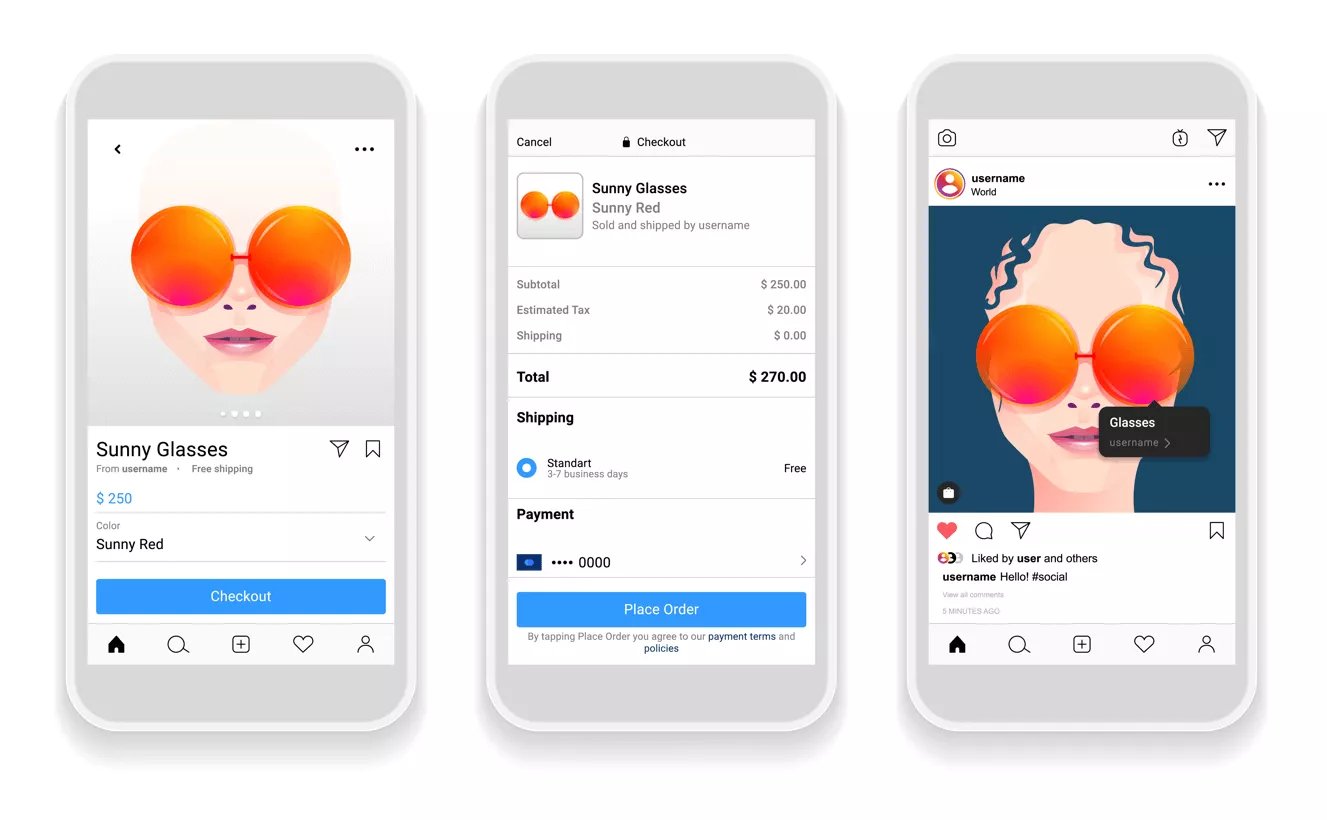
Scrutinize your ad campaign performance metrics, such as click-through rates (CTR), impressions, and engagement rates. This analysis will shed light on which ads are underperforming and where improvements can be made. Utilize Instagram's analytics tools to gain valuable insights into your audience's behavior and preferences.
When analyzing your Instagram ad performance, it's important to take a deep dive into the data. Look beyond the surface-level numbers and try to understand the underlying factors that may be impacting your ads' performance. Are there specific demographics that are not responding well to your ads? Is there a particular time of day when your ads receive higher engagement? By answering these questions, you can refine your targeting and scheduling strategies to optimize your ad performance.
Take the time to read through the comments and feedback left by your audience. This qualitative data can provide valuable insights into how your audience perceives and interacts with your ads. Look for common themes or recurring feedback that may indicate areas for improvement.
Be on the lookout for warning signs that indicate your Instagram ad strategy is not delivering the desired results. For instance, consistently low engagement rates, high bounce rates, or declining conversion figures may indicate areas that need attention. Recognizing these signs early on will enable you to take timely action.
One important aspect to consider when recognizing signs of a failing Instagram ad strategy is the alignment between your ads and your target audience. Are you targeting the right audience with your ads? Are you using the right messaging and visuals to capture their attention? It's crucial to ensure that your ads resonate with your target audience and effectively communicate your brand's value proposition.
In addition to analyzing the performance metrics, it's also beneficial to conduct competitor research. Look at what your competitors are doing on Instagram and analyze their ad strategies. Are they targeting a similar audience? What types of content are they using? By understanding what works for your competitors, you can gain insights that can inform your own ad strategy and help you stand out in the crowded Instagram landscape.
Remember, identifying the problem with your Instagram ads is just the first step. Once you have identified the issues, it's important to develop a plan of action to address them. Experiment with different ad formats, messaging, and targeting strategies to find what works best for your brand. Continuously monitor and analyze your ad performance to ensure ongoing success.
Once you have identified the problem areas in your Instagram ads strategy, it's time to revamp and breathe new life into your campaigns. Here are some essential steps to help you get back on track:
One common mistake is failing to understand your target audience thoroughly. Revisit and refine your buyer personas to ensure your ads align with your audience's needs, preferences, and demographics.
By understanding their motivations and pain points, you can tailor your ad strategy to resonate with them on a deeper level. Consider segmenting your target audience into different groups based on demographics, interests, or buying stages. This segmentation allows you to create more personalized and targeted ads, increasing the likelihood of engagement and conversions.
Reevaluate the content and design of your ads. Experiment with different formats, visuals, and messaging to capture your audience's attention. Ensure your ad content is compelling, concise, and aligned with your brand's voice. When it comes to ad content, storytelling can be a powerful tool. Craft narratives that connect with your audience on an emotional level, evoking their curiosity and interest. Use persuasive language and compelling visuals to create a memorable experience for viewers. Testimonials, reviews, and customer stories can be powerful assets in boosting the credibility of your brand.
Stay informed about the latest tools and features offered by Instagram for advertising. Explore options such as carousel ads, video ads, and Instagram Shopping to enhance the effectiveness of your campaigns. Continually educate yourself about the platform's capabilities and evolving trends. Carousel ads, for example, allow you to showcase multiple products or features within a single ad, providing a more immersive experience for your audience. Video ads, on the other hand, can convey your brand's message in a dynamic and engaging way, capturing attention and driving higher engagement rates.
Instagram Shopping is another valuable feature to consider. It enables users to browse and purchase products directly within the app, streamlining the buying process and increasing conversion rates. By leveraging these tools and features, you can elevate your Instagram ads strategy and stay ahead of the competition.
Set up a routine for monitoring your ad campaign performance. Regularly assess key metrics and compare them with your predefined goals to gauge performance accurately. Leverage data and analytics tools to gain insights into your audience's preferences and behavior.
Based on your performance analysis, make data-driven decisions and adjust your strategy accordingly. This may involve tweaking your target audience, refining your ad content, or experimenting with new ad formats. Continuously learn from your campaign results and iterate to optimize your results.
Stay abreast of the latest trends and updates in Instagram advertising. The social media landscape is constantly evolving, and what works today might not work tomorrow. Adaptation and agility are key to staying ahead of your competition and capitalizing on new opportunities.

Invest in continuous learning and enhancement of your Instagram ads strategy. Attend webinars, industry conferences, or join online communities to stay connected with fellow marketers and gain valuable insights. Engage in A/B testing and experimentation to keep refining your approach and optimizing your ad performance.
If your Instagram ads strategy is not delivering the desired results, don’t fret, strive. Just take care of it. By understanding the basics, analyzing your performance, making necessary adjustments, and future-proofing your strategy, you can turn your Instagram ads into a powerful tool for achieving your business goals. Embrace creativity, data-driven decision-making, and a willingness to adapt, and watch as your Instagram ads soar to new heights of success!

Search advertising has become a popular strategy to drive traffic to websites and increase brand visibility. Two common approaches to search advertising are Dynamic Search Ads (DSA) and Responsive Search Ads (RSA). But which is better for your business? In this article, we will delve into the basics of search ads, explore the mechanisms behind DSA and RSA, compare their performance and costs, and provide insights to help you make an informed decision.
Search ads are a powerful tool for businesses to reach their target audience and increase their online visibility. By understanding the different types of search ads available, you can optimize your advertising strategy and maximize your return on investment.
Dynamic Search Ads, or DSA, are a type of search advertisement that relies on Google's algorithm to match relevant search queries with the content of your website. Instead of relying on specific keywords, DSA dynamically generates headlines and landing pages based on the information found on your website.

This automation allows for a more targeted and efficient advertising approach. With DSA, you can reach potential customers who are actively searching for products or services similar to what you offer, even if they are not using the exact keywords you have specified in your campaign.
DSA is particularly useful for businesses with large websites or frequently changing inventory. It saves time and effort by automatically creating and updating ads based on the content of your website. This means that as your website evolves, your ads will adapt accordingly, ensuring that your advertising remains relevant and up-to-date.
When a user enters a search query that matches the content on your website, Google's advanced algorithms come into play. These algorithms analyze the user's search intent and dynamically generate a headline and landing page for your ad. This process ensures that your ads are highly relevant to the user's search, increasing the chances of capturing their attention and driving them to click on your ad.
DSA takes advantage of Google's extensive web crawling technology, which continuously scans and indexes websites across the internet. This allows DSA to stay up-to-date with the latest content on your website, ensuring that your ads reflect the most current information available.
On the other hand, Responsive Search Ads, or RSA, are a flexible ad format that allows you to create multiple headlines and descriptions. Google will automatically test different combinations to determine the best-performing variations. With RSA, you can provide up to 15 different headlines and 4 descriptions, giving you a wide range of possibilities to tailor your ad to various search queries. This flexibility allows you to experiment with different messaging and calls to action, helping you find the most effective combination that resonates with your target audience.
The functioning of RSA is quite fascinating. When you provide multiple headlines and descriptions, Google's algorithm starts testing different combinations to see which ones resonate best with your target audience. It analyzes various factors such as user behavior, search intent, and historical performance to determine the most compelling ad variations.
As the algorithm learns and gathers insights about your audience, it adapts and optimizes your ads accordingly. This means that over time, your ads become more tailored and compelling, increasing the chances of driving higher engagement and conversions.

When it comes to performance, both Dynamic Search Ads (DSA) and Responsive Search Ads (RSA) have their strengths and offer unique benefits for advertisers.
DSA is well-suited for websites with a large inventory or frequently changing content. It automatically generates ads based on your website's content, saving you time and effort in creating individual ads for each product or service. This dynamic approach ensures that your ads are always up-to-date and relevant to what users are searching for.
At the same time, RSA allows for more ad customization and testing. With RSA, you can create multiple headlines and descriptions, and Google's machine learning algorithms will automatically test different combinations to find the most effective ad variations. This enables you to fine-tune your messaging based on user preferences and increase the chances of capturing the attention of potential customers.
Ultimately, the optimal approach may vary depending on your specific business needs and goals. If you have a large inventory or frequently changing content, DSA can be a powerful tool to ensure your ads are always relevant. If you prefer more control over your ad messaging and want to test different variations, RSA offers greater flexibility.
In terms of cost, both DSA and RSA operate under a pay-per-click (PPC) model, where you only pay when a user clicks on your ad. This means that you are not charged for impressions or views, but only for actual engagement with your ads.
While the actual costs can vary depending on factors such as competition and ad quality, both DSA and RSA offer a cost-efficient way to reach your target audience. With DSA, you can benefit from automatically generated ads that are tailored to the content of your website, potentially increasing the relevance and click-through rate of your ads. With RSA, the ability to test different ad variations can help you optimize your campaigns and improve your return on investment.
It's important to carefully monitor and optimize your campaigns, regardless of whether you choose DSA or RSA, to maximize your return on investment. Regularly reviewing your ad performance, adjusting your targeting options, and refining your ad messaging can help you achieve better results and make the most out of your advertising budget.
Advertising goals and customization:
Target audience and search intent:
Ultimately, the decision between DSA and RSA depends on your specific business needs and goals. Some businesses may benefit from a combination of both approaches, using DSA to capture a broad audience and RSA to tailor messaging for specific target segments. Regular analysis and optimization of your search ad campaigns will help you refine your strategy and achieve better results over time.


.svg)