
In the age of rapid digital transformation, AI has seeped into almost every industry, revolutionizing how we conduct business, design products, and even create content. The ClusterMagic service is a great example, which seamlessly integrates AI for content generation in a hybrid model, providing significant benefits in the SEO results of brands seeking a massive increase in organic traffic. But while AI holds immense promise, it has its limitations. Let's explore the pros and cons of using AI for content creation and understand why a hybrid approach might be the way forward.
Major publishers in sensitive niches like CNET.com, Bankrate.com, and Creditcard.com have already integrated AI-generated content. Other large companies, such as CNN and Forbes, might also be doing so. Countless smaller companies and publishers are utilizing AI, not only on their websites but also on social media, in email marketing, and virtually everywhere else.
Google's stance on AI-generated content is neutral, emphasizing that content should primarily be user-centric. In fact, Google's September 2023 Helpful Content Update removed the mention of "written by people" from their helpful content system guidelines.
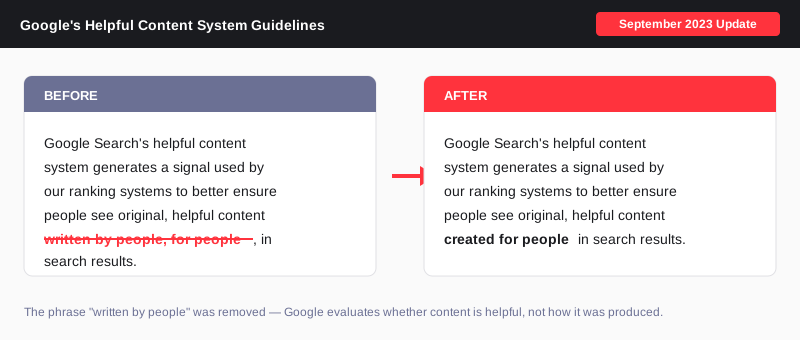
The message is clear: for content to rank well, it must be informative, answer users' queries satisfactorily, and showcase genuine expertise - regardless of how it's created.
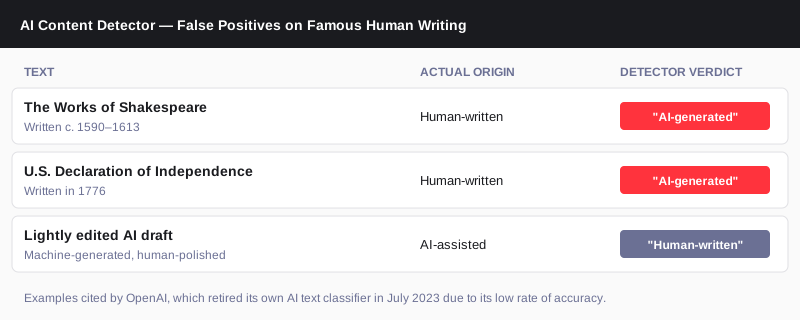
AI Content Detectors like GPTZero, ZeroGPT, and many others are not reliable. Even OpenAI has said as much. They consistently produce false positives about human-written content. Conversely, they can be easily fooled with creative prompting or a bit of human editing.
An interesting note from OpenAI: "we found that it labeled human-written text like Shakespeare and the Declaration of Independence as AI-generated."
Anecdotal evidence and real-life ranking data suggest that while AI-generated content isn't penalized by search engines, it might only achieve high rankings if it meets the above criteria. The role of AI in content creation is still a developing narrative, and its significance is indispensable for maintaining a competitive edge in the future.
At EmberTribe, the understanding is clear - AI serves as a foundation, not the final product. With ClusterMagic, while AI aids in the initial draft based on expert-driven keyword research, human experts step in for the crucial phases of editing, fact-checking, and final review. This hybrid approach ensures the content is accurate and helpful, has the potential to rank, and truly represents their business.
Instagram Highlights let you pin your best story content to your profile permanently — but most people only know the basic method. In this guide, we cover how to add highlights on Instagram, how to create new ones from scratch, and the workaround that lets you add highlights without posting to your story.
Instagram Highlights are collections of story clips pinned to your profile page, displayed directly below your bio. Unlike regular stories that disappear after 24 hours, Highlights stay visible for as long as you keep them.
Think of them as a virtual storefront. When someone visits your profile, Highlights are the first content they can browse — making them a powerful tool for personal branding and content curation. Each Highlight can be dedicated to a specific theme, product line, or topic, letting you attract like-minded followers or customers who connect with your content.
For businesses, Highlights are especially useful for showcasing testimonials, product demos, FAQs, behind-the-scenes content, and promotions — all without cluttering your main feed.
The standard method for creating Instagram Highlights pulls from your story archive. Here is how to do it:
Your new Highlight will now appear on your profile, right below your bio.
Note: Your stories are automatically saved to your archive by default. If yours aren't showing up, go to Settings > Privacy > Story and make sure "Save story to archive" is turned on.
You can also create a Highlight directly from a story you are currently viewing or have just posted:
This method is great for building Highlights in real time as you post stories throughout the day.
This is the workaround most people don't know about. If you want to add content to your Highlights without it showing up in your live story feed (where your followers would see it for 24 hours), follow these steps:

By using this method, you can keep your story feed clean while still building out your Highlights with the content you want. It is especially useful for businesses that want to add curated content to Highlights without sending notifications or cluttering their followers' story trays.
Pro tip: If the story appears briefly before you delete it, you can also toggle your account to private, post the story, immediately delete it, wait 24 hours, then restore and add to Highlights — then switch back to public. This ensures zero visibility.
Keeping your Highlights fresh and well-organized is important for making a good first impression. Here is how to edit or remove them:
The individual stories inside the Highlight will remain in your archive — only the Highlight collection itself is removed.
Instagram does not offer a built-in reorder feature. However, when you edit a Highlight (even just opening and saving it without changes), it moves to the front of the row. Use this trick to reorder your Highlights by editing them in reverse order of how you want them displayed.
Your Highlight covers are the first thing visitors see. Use custom-designed icons or branded images that clearly represent each category. Consistent cover designs make your profile look polished and professional.
Group your content into clear themes — products, testimonials, tutorials, behind-the-scenes, events. This makes it easier for visitors to find what they are looking for and keeps your profile structured.
Review your Highlights regularly and remove outdated content. A Highlight full of old promotions or expired offers hurts your credibility. Aim to refresh your Highlights at least once per quarter.
Place your most important Highlights first (closest to the left side of your profile). For businesses, this might be a "Start Here" guide, your best testimonials, or your core product showcase. For personal brands, consider leading with your strongest content or most popular series.
Yes. Post the story, delete it immediately, wait 24 hours, restore it from "Recently Deleted," and then add it to a Highlight from your archive. We walk through the full steps above.
Yes. Any photo or video that has been posted as a story and saved to your archive can be added to a Highlight — regardless of when it was originally posted. Just make sure "Save story to archive" is enabled in your settings.
Highlights stay on your profile indefinitely. Unlike stories, they do not expire after 24 hours. You can keep them visible for as long as you want and remove them at any time.
There is no limit to the number of Highlights you can create, and each individual Highlight can hold up to 100 story clips. Once a Highlight reaches 100, the oldest story is removed when a new one is added.
You can see viewer lists for story clips within a Highlight for up to 48 hours after the original story was posted. After that window, viewer data is no longer available — but the content remains in your Highlight.
Instagram Highlights are one of the most underused features on the platform. Whether you are building a brand, growing your Instagram presence, or just want a better-organized profile, taking the time to create and manage your Highlights will pay off every time someone visits your page.


.svg)