
Most ecommerce brands waste significant ad budget before realizing the problem is structural, not tactical. The campaigns are live. The spend is real. But without the right service components in place, a Google Ads account becomes an expensive way to generate traffic that doesn't convert at a sustainable rate. Ecommerce PPC services are what bridge that gap between spending money on ads and building a repeatable acquisition engine.
This guide covers what those services actually include, what the right agency brings to the table, how pricing works, and what performance benchmarks you should hold your campaigns to.
Ecommerce pay per click management is not a single campaign type. It's a coordinated system of campaign structures, feed optimization, audience targeting, and conversion tracking that work together to drive profitable revenue. Top agencies build and manage all of these components.
Shopping campaigns are the foundation of most ecommerce Google Ads services. Unlike text search ads, Shopping ads pull directly from your product feed in Google Merchant Center, displaying product images, prices, and store names in search results.
Feed quality is what determines who sees your Shopping ads and how often. A strong ecommerce PPC agency audits your product titles, descriptions, GTINs, and category mappings before launching, because even well-structured campaigns underperform when the underlying feed has gaps. Google's Merchant Center Help Center outlines the technical requirements, but turning those requirements into competitive advantage is the agency's job.
SKU-level bidding is where experienced teams separate winners from losers. Segmenting campaigns by margin, conversion rate, and inventory level gives you precise control over which products get budget and at what cost.
Performance Max (PMax) gives Google's AI access to your entire inventory across Search, Shopping, Display, YouTube, Gmail, and Maps from a single campaign. It's powerful and increasingly dominant in ecommerce accounts, but it requires active management to prevent it from cannibalizing your branded terms and existing high-performing campaigns.
The core of effective PMax management is asset group architecture. A competent ecommerce PPC agency builds asset groups around product categories or customer segments, not as a single catch-all campaign. Audience signals guide the algorithm toward your best-fit customers rather than letting it learn from scratch on your budget. Negative keyword and brand exclusion lists prevent PMax from taking credit for sales that your other campaigns or organic search would have closed anyway.
For a deeper look at how PMax fits into a full paid search strategy, Store Growers' Performance Max guide is one of the most thorough independent resources available.
Text search ads complement Shopping and PMax in three specific ways: brand defense, competitor targeting, and long-tail keyword coverage. Brand campaigns protect your name in results when competitors bid against your terms. Competitor campaigns capture high-intent buyers who are actively evaluating alternatives. Long-tail campaigns reach shoppers with specific product intent that Shopping ads sometimes miss.
Search campaigns also give you direct control over messaging that Shopping and PMax don't. When you need to promote a specific offer, communicate a guarantee, or address a common objection, text ads let you say exactly what needs to be said.
Remarketing is where ecommerce PPC recaptures revenue that would otherwise leave permanently. Dynamic remarketing shows users the exact products they viewed, with current pricing and availability, as they browse other sites across Google's Display Network.
The three segments that matter most are cart abandoners, product viewers who didn't add to cart, and past customers primed for repeat purchases. Each requires different bid strategies and creative approaches. Cart abandonment campaigns typically justify the highest bids because purchase intent has already been demonstrated. Past customer campaigns often deliver the highest ROAS in an account because you're not paying to build trust from scratch.
For more on how remarketing fits into a full ecommerce Google Ads strategy, see our guide to ecommerce Google Ads agency selection.
No service component matters if you can't accurately measure what's working. Conversion tracking setup, verification, and maintenance is a core part of any serious ecommerce PPC service.
This includes confirming that purchase events fire correctly, that values pass accurately, that attribution windows align with your sales cycle, and that you have visibility into which campaigns drive new customers versus return purchases. Brands that rely on last-click attribution consistently make worse budget decisions than those with full-funnel measurement in place.
Understanding how agencies charge helps you evaluate proposals accurately and avoid structures that create misaligned incentives.
The most common model: the agency charges 10% to 20% of your monthly ad budget as a management fee. At $20,000 per month in spend, that's $2,000 to $4,000 in fees. This model scales naturally as your account grows, but it creates an incentive to increase spend before performance fully justifies it. Watch for agencies pushing budget increases before establishing strong ROAS at current spend levels.
A fixed fee regardless of spend volume, typically $1,500 to $10,000 per month depending on account complexity and agency tier. This model works well for brands with stable budgets and benefits you as spend grows without a corresponding fee increase. It also removes the perverse incentive to chase spend for its own sake.
Some agencies combine a lower base retainer with a performance bonus tied to revenue or ROAS above a threshold. When structured well, this aligns agency incentives with your actual business outcomes. When structured poorly, it can push short-term tactics over sustainable account health. Scrutinize what the performance triggers actually measure.
Resources like WordStream's PPC benchmarks and industry research from Search Engine Land can help you calibrate whether proposed fee structures are in line with market norms.
Return on ad spend is the primary performance metric for most ecommerce accounts, but raw ROAS numbers without context are easy to misread.
The standard benchmark is a 3:1 to 5:1 ROAS for ecommerce, meaning $3 to $5 in revenue for every $1 spent on ads. High-ticket categories like furniture or electronics can operate profitably at 3:1 to 4:1 because average order values are large. Fast-moving consumer goods and apparel often need 5:1 or higher to cover thin margins and return rates.
What matters more than hitting a benchmark is hitting your specific breakeven ROAS. That number comes from your gross margin: if your margins are 50%, you break even at 2:1 ROAS and become profitable above it. If your margins are 25%, you need 4:1 just to cover costs. A strong ecommerce PPC agency starts the engagement by calculating your target ROAS from your actual unit economics, not by quoting industry averages.
Attribution methodology also shifts apparent ROAS significantly. Brands measuring on last-click attribution will report higher ROAS than those using data-driven attribution or marketing mix modeling, because last-click gives full credit to the final touchpoint and ignores assists. Be skeptical of ROAS numbers from agencies that haven't disclosed how they're measuring.
For context on how PPC management fits into broader paid acquisition strategy, our guide to PPC management for ecommerce covers the full decision framework.
The service list above is table stakes. What differentiates high-performing agencies is how they apply those components to your specific business.
Business economics first. The first conversation with a serious agency covers your average order value, customer lifetime value, gross margins, and target CPA. An agency that jumps straight to campaign structure before understanding your unit economics is optimizing for activity rather than outcomes.
Feed quality as a competitive advantage. Most ecommerce brands treat their product feed as a technical requirement to satisfy, not a performance lever to optimize. Agencies that treat feed titles, attributes, and category mappings as creative and strategic inputs consistently outperform those that set and forget.
Creative involvement. In 2026, ad creative is where performance is increasingly won or lost, especially across Shopping, PMax asset groups, and remarketing display. Agencies that treat creative as something the client provides are operating with one hand tied.
Account ownership. You should own every ad account, pixel, audience list, and conversion event from day one. Agencies that house accounts under their own management umbrella and retain ownership when you leave create leverage that works against you. This is a non-negotiable.
Conversion rate perspective. The best ecommerce PPC teams treat your landing page performance as their problem, not yours. Traffic without conversion rate context leads to spend increases that improve revenue at the cost of efficiency. Look for agencies that raise CRO questions without being prompted.
For a broader view of how ecommerce digital marketing channels work together, our ecommerce marketing guide covers the full picture beyond paid search.
Ask for case studies with real numbers from brands in your category and at a comparable spend level. Broad claims about client growth don't tell you whether those results are repeatable in your competitive environment.
Request a sample reporting dashboard before you commit. The structure of an agency's reporting tells you what they think matters. Dashboards heavy on impressions and clicks with revenue buried five pages in signal a disconnect from business outcomes. Dashboards that lead with revenue, ROAS, CPA, and new customer percentage signal the right orientation.
Confirm technical setup standards: tag audits before launch, conversion testing protocols, and negative keyword management processes. Gaps in any of these create measurement errors and wasted spend that compound over time.
Finally, ask directly how they think about the relationship between PMax and Shopping campaigns. The answer reveals whether they're managing your account proactively or letting Google's automation run unattended. Both require budget.
Ecommerce PPC services done well are a systematic investment in repeatable revenue. The campaign types, the feed, the creative, and the measurement infrastructure all have to work together. When they do, paid search becomes one of the most predictable acquisition channels in your growth stack.
If you're evaluating what a structured ecommerce PPC engagement looks like, reach out to the EmberTribe team. We'll start with your unit economics and build from there.


Most founders we talk to can quote their ROAS to two decimals and have no idea what their real customer acquisition cost is. They have a number their ad platform shows them, a different number their finance team uses, and a gut feeling that neither is right. Customer acquisition cost is the number that actually decides whether a business grows or quietly runs out of money, which is why getting it wrong is so expensive.
After managing more than $200M in paid media across hundreds of DTC and SaaS brands, we see the same pattern repeatedly. CAC looks fine when it's calculated wrong, panics set in when it's calculated right, and the fix usually lives in three or four specific places inside the funnel. This guide walks through what CAC actually includes, how it breaks down by channel, what the benchmarks look like in 2026, and the levers that reliably bring it down.
At its simplest, customer acquisition cost is the total amount you spend on sales and marketing divided by the number of new customers you bring in during that period. The basic formula looks like this:
CAC = (Sales + Marketing Costs) / New Customers Acquired
That's the part everyone agrees on. The argument starts when you ask what counts as a sales and marketing cost. Most early-stage teams plug ad spend into the numerator, maybe add agency fees, and call it done. That's the number that flatters the deck and breaks the business.
A fully loaded CAC calculation includes everything you spend to turn a stranger into a paying customer:
According to this Amplitude guide to customer acquisition cost, leaving out indirect costs like salaries, software, and overhead typically understates true CAC by 30 to 50 percent. That's not a rounding error. That's the difference between a healthy unit economics story and a business that looks profitable on paper and bleeds cash in the bank account.
The simple rule: if you wouldn't have spent the money without a new-customer goal attached, it belongs in CAC.
Blended CAC is useful for boardroom conversations. Channel-level CAC is what you actually manage. The cost to acquire a new customer looks completely different across paid search, paid social, organic, and retention work, and understanding the mix is the difference between optimizing and guessing.
Here's how the major channels typically break down for growth-stage DTC and SaaS brands: ChannelTypical CAC RangeWhat Drives ItGoogle SearchMid to highCommercial-intent keywords, quality score, competitionGoogle ShoppingLow to midFeed quality, product-level bids, marginMeta prospectingMid to highCreative strength, iOS 14 attribution loss, audience saturationMeta retargetingLowWarm audience size, frequency capsTikTokMidCreative velocity, organic spilloverOrganic searchVery lowRequires time and compounding content investmentEmail and SMSVery lowAlready captured, mostly retention not acquisitionAffiliateVariableCommission structure, partner quality
Two things matter more than the numbers themselves. First, the cheapest channel is not the best channel, because the cheapest channels usually have the lowest volume ceilings. Second, channel CAC shifts constantly, especially on Meta, where the combination of iOS 14 attribution loss and creative fatigue can move a steady number 20 to 40 percent in a quarter.
One analysis of post-iOS 14 Facebook attribution found average CAC jumped roughly 12 percent after Apple's AppTrackingTransparency update forced Meta into a shortened window. The ads didn't get worse. The measurement did. Any CAC strategy built after 2021 has to account for this gap between platform-reported performance and what the bank account shows.
Benchmarks are a starting point, not a verdict. What looks expensive in one vertical is cheap in another, and margin structure matters more than the headline number. Here are the ranges we see across the brands and SaaS companies we work with, cross-referenced with public data from 2026: IndustryTypical CAC RangeNotesConsumer ecommerce (blended)$60 to $90Up roughly 40 percent over two yearsPremium and luxury DTC$130 to $380+Longer consideration, higher AOV requiredSMB SaaS$200 to $500Self-serve motion, lower ACVMid-market SaaS$1,000 to $5,000Longer sales cycle, AE-led motionEnterprise SaaS$10,000 to $15,000+Field sales, long evaluation cyclesFintech SaaS$1,400 to $14,700Highest in the category, driven by regulation
Ecommerce numbers are pulled from this 2026 ecommerce CAC vertical report, with SaaS ranges cross-checked against public benchmark data.
A $75 CAC on a $40 average order value is broken. A $300 CAC on a subscription product with a $1,200 lifetime value is healthy. Your industry benchmark only tells you whether you're in the neighborhood. Your LTV tells you whether the neighborhood is affordable.
Customer acquisition cost means nothing in isolation. The number that decides whether your acquisition math is sustainable is the LTV to CAC ratio, which compares the lifetime value of a customer to what it costs to get them in the door.
The accepted baseline is a 3:1 ratio, meaning every dollar spent on acquisition should return three dollars in lifetime value. This benchmark comes up in nearly every serious finance and operator resource, including this Harvard Business School breakdown of the LTV to CAC ratio.
What the benchmark really means in practice:
One nuance most benchmark posts skip: LTV is not a single number. Cohort LTV at 6, 12, and 24 months tells very different stories, and your CAC ratio should be anchored to the LTV number you can actually realize inside your planning horizon. Using a theoretical 5-year LTV to justify today's spend is how companies end up explaining away losses that never resolve.
We covered the broader measurement mistake in this breakdown of why ROAS alone is the wrong north-star metric, and the same principle applies here. The number on the platform dashboard is not the number your business runs on.
Reducing CAC is almost always a fix in one of four places: creative, targeting, landing experience, or retention. Everything else is a variation on these four. Here's where the actual gains live:
Creative is the single biggest lever in paid social CAC and one of the largest in paid search display. Brands running three to five new ad concepts per week reliably outperform brands cycling one or two per month. The win isn't just better CTR, it's the compounding effect of defeating audience fatigue before it settles in.
A CAC problem is often a conversion rate problem wearing a paid media costume. If your landing page converts at 1.5 percent and the category average is 3 percent, you are paying twice as much per customer as competitors with the exact same traffic. Product page speed, above-the-fold clarity, trust signals, and checkout friction move this number reliably.
Most brands spend too heavily on the channel that used to work and too lightly on the one that's working now. Quarterly channel reallocation, based on blended CAC and not platform-reported ROAS, usually uncovers a 15 to 25 percent efficiency gain within a single quarter.
This one surprises people. Raising your average order value, attach rate, or repeat purchase frequency mathematically lowers the CAC you can afford to pay. That often unlocks channels you thought were too expensive and shifts what "good" CAC looks like for your business.
Before optimizing anything, make sure the CAC number you're optimizing toward is real. Blended CAC from your finance team, not platform CAC from Ads Manager, should be the north star. The upper funnel vs lower funnel tradeoffs explain why the two numbers drift apart and how to reconcile them.
Most brands reach a point where fixing CAC internally stops being realistic. That point usually looks like one of these: paid media spend crosses roughly $50,000 a month, the team running it is part-time or junior, the channel mix has grown to three or more platforms, or creative has become the bottleneck. At that stage, the question stops being "can we bring CAC down" and becomes "what's the fastest way to get to a sustainable number."
A good outside partner brings three things: fresh eyes on a measurement stack that's probably been duct-taped together, creative throughput that internal teams rarely match, and the ability to make channel-level calls without internal politics. A bad partner brings spreadsheets and excuses. Our guide to PPC management for ecommerce brands breaks down what to look for if you're weighing that decision.
The decision isn't really agency versus in-house. It's whether your current setup can get to healthy unit economics in the next 90 days, and if not, what changes.
Customer acquisition cost is the number that decides whether the rest of your marketing program is worth running. Get the calculation right first, compare it to a realistic LTV second, and optimize the four levers that move it third. If the math isn't working after an honest look at those three steps, the problem usually isn't effort. It's expertise or capacity.
EmberTribe has been managing paid media and running unit economics work for growth-stage DTC brands and SaaS companies since 2012. If you want a second set of eyes on your CAC, your channel mix, or the measurement stack you're using to make decisions, our paid media team can walk through where the gains actually live for your business.
Most ecommerce brands shopping for a ppc management company are evaluating the wrong things. They compare dashboards, ask about reporting cadence, and request case study decks — when the question that actually matters is simpler: does this agency connect paid traffic to revenue, or just traffic to clicks?
The difference is everything. With average ecommerce Google Ads ROAS sitting at 2.87x in 2025 — and Search campaigns outperforming at 5.17x for brands with optimized funnels — there's a clear gap between median performance and what's achievable. The gap rarely lives in bid strategy. It lives in whether your agency treats PPC as an isolated channel or as one lever in a growth system.
This guide covers what ecommerce PPC management actually entails, how to assess agencies on criteria that predict results, and what a full-funnel approach looks like in practice.
PPC management is not a set-it-and-check-it function. For ecommerce brands running Google Ads, Meta, or both, active management encompasses campaign architecture, audience segmentation, creative strategy, bid optimization, landing page alignment, and feed management — often simultaneously.
The scope expands significantly at scale. A brand spending $20K/month has different complexity than one spending $200K, but the categories of work remain constant. What changes is the number of SKUs, the number of audiences, the frequency of creative refreshes, and the sophistication of attribution required.
Ecommerce PPC is specifically demanding because:
Agencies that only optimize within the ad platform are leaving significant performance on the table. The ones worth hiring understand that paid traffic quality is validated downstream, in conversion rate and repeat purchase rate — not in the campaign dashboard alone.
The agency-vs-in-house debate is often framed around cost, but the real variable is access to compounding expertise. A strong in-house hire builds institutional knowledge and alignment with your brand. A strong agency brings pattern recognition across dozens of accounts, access to beta features, and a team structure that doesn't leave you exposed when someone quits.
For most DTC brands under $50M in annual revenue, an ecommerce PPC agency offers better ROI on the dollar than a single in-house hire — provided you choose the right one. A senior paid media manager in-house costs $90,000-$130,000 annually in salary alone, before benefits, tools, and management overhead. Agency retainers for comparable expertise typically run $2,500-$8,000/month, with performance-oriented models available at larger spend levels.
Where in-house wins: brands with highly complex product lines requiring deep domain knowledge, or those running integrated creative and media operations where speed of execution matters more than breadth.
Where agencies win: brands that need platform expertise across Google, Meta, and emerging channels, want accountability tied to results, and benefit from cross-account learning that no single brand can replicate internally.
The choice is not permanent. Many brands start with an agency, build internal competency, and eventually hire in-house for execution while retaining an agency for strategy.
Most agency evaluation checklists focus on surface signals: years in business, client logos, platform certifications. These are not irrelevant, but they are lagging indicators. The criteria that predict results are forward-looking.
An agency worth hiring wants to understand your margins, your average order value, your customer acquisition economics, and your retention profile before they talk about campaign structure. If the first conversation is about which campaign types they prefer, that's a signal they optimize for activity rather than outcomes.
The right question at the start of an engagement is: what does a customer need to be worth for this channel to make sense at your margins?
Case studies are easy to construct favorably. What you want to see is specific attribution to revenue outcomes: ROAS at the account level, impact on CAC over time, and ideally context on what changed and why. Be skeptical of case studies that show CTR improvements without connecting them to revenue.
Ask for examples of accounts they've managed through a difficult period — rising CPCs, algorithm changes, a creative slump. How an agency manages adversity tells you far more than how they perform when everything is working.
Finding the right ecommerce Google Ads agency often comes down to this: does the agency treat your landing pages and conversion rate as their problem or yours? Agencies that drive traffic to underperforming pages and call it a client-side issue are managing to their contract, not your results. The best ecommerce PPC agencies have a CRO perspective built into how they think about campaign performance.
For Meta and increasingly for Google (through Performance Max), creative is the primary lever of performance. An agency that can't speak fluently about creative strategy, testing methodology, and refresh cadence is limited in how much they can move the needle. Ask specifically: how do you determine when a creative is fatigued? What does a testing matrix look like for a new offer?
Not every red flag is dramatic. Some of the most common problems with PPC agencies are subtle and only visible after you've signed.
Vanity metric reporting. If monthly reports lead with impressions, clicks, and CTR without tying directly to revenue and ROAS, the agency is optimizing for what looks good rather than what matters. Your report should answer one question first: did we make money on this spend?
Long-term contracts without performance provisions. A 12-month contract with no performance clause is a risk transfer from the agency to you. Reputable agencies are willing to tie continuation to results — not because they guarantee specific numbers, but because they're confident enough in their process to accept accountability.
Over-reliance on automation without strategic oversight. Smart Bidding and Performance Max have legitimate use cases, but they are not a strategy. Agencies that point to Google's machine learning as the explanation for both successes and failures have outsourced their judgment to an algorithm.
No mention of your full funnel. As we've written about from managing over $200M in Facebook ad spend, paid media performance compounds when it's integrated with what happens after the click. An agency that never asks about your email flows, your post-purchase experience, or your LTV is leaving growth on the table.
Ecommerce brands typically run paid search and paid social in parallel, but the strategic role of each differs. Google Search captures existing demand — people actively searching for your product or category. Meta creates demand — showing your product to people who fit your customer profile before they've searched.
Google Shopping and Performance Max have become the default for product-focused campaigns, though the rise of Performance Max has compressed visibility into where spend actually goes. Smart advertisers are balancing Search and broader campaigns strategically, using Search for high-intent terms where control matters and Performance Max for prospecting at scale.
CPCs in competitive ecommerce categories have risen approximately 33% year-over-year in some verticals, according to recent WordStream benchmarks. This makes creative differentiation and landing page conversion more important than ever — because you're paying more per click, the cost of a poor conversion rate compounds faster.
For brands new to structuring a campaign hierarchy, our foundational PPC tips for lead generation cover the tactical fundamentals that apply across ecommerce and lead-gen contexts alike.
Agency pricing for PPC management follows three primary models:
Flat retainer: $1,500-$10,000/month depending on account complexity, number of platforms, and service scope. Most common for brands spending $10K-$100K/month on ads.
Percentage of spend: Typically 10-20% of monthly ad spend. Common at higher spend levels; creates aligned incentives but can also incentivize spend inflation.
Performance-based: A base retainer plus a performance bonus tied to ROAS or revenue targets. Less common but increasingly available from agencies confident in their results.
What you're buying at each tier: At $2,000-$3,000/month, expect solid execution with a dedicated account manager and monthly strategy reviews. At $5,000-$10,000/month, expect deeper creative involvement, more frequent optimization, and multi-platform coordination. Above $10,000/month, you're typically working with a senior team with direct involvement in strategic decisions.
Be clear on what's included. Creative production, landing page work, and feed optimization are often billed separately.
Before committing to any ecommerce PPC agency, get clear answers to these questions:
The right paid media partner won't just run your campaigns — they'll challenge your assumptions about where your growth constraints actually are. That's the difference between an agency that manages spend and one that drives growth.
The brands that extract the most value from ecommerce PPC aren't necessarily running the most sophisticated campaigns. They're the ones who've connected paid traffic to every downstream touchpoint — product pages built to convert, post-purchase flows that extend LTV, and attribution frameworks that show the real economics of acquisition.
A ppc management company earns its fee when it helps you answer the question that matters: is paid traffic making us more profitable over time? That requires more than platform expertise. It requires a partner who understands your business well enough to know what profitable growth actually looks like — and who holds themselves accountable to it.

Marketing experts know it. Pay-Per-Click (PPC) efforts can be a game-changer for businesses looking to grow their customer base. With the right approach, PPC -a paid marketing strategy- can result in a significant increase in lead generation and ultimately lead to higher conversion rates. As you know, sales doesn't come raining from the sky. But they might. Join us to learn more about PPC lead generation tips and how they might boost your customer base.
Look at the lead-to-sale conversion rate, the average lifetime value of customers acquired through PPC, and other relevant metrics. This will help you assess the overall effectiveness of your lead generation strategy and its impact on your business's bottom line.
After analyzing your performance metrics, it's time to identify areas of improvement. Look for patterns or trends in your data that may indicate areas where you can make changes. Are there keywords that are performing exceptionally well? Are there ad copy variations that are resulting in higher click-through rates? By identifying these areas, you can make targeted improvements to your campaigns.
Consider a few analytic activities. As conducting competitive analysis to gain insights from your industry peers. Or looking at what strategies and tactics they are employing and determine if there are any opportunities for you to learn from their successes or differentiate yourself in the market.
Also, don't overlook the importance of optimizing your landing pages. Analyze the user experience, page load times, and the clarity of your call-to-action. By making improvements to your landing pages, you can increase the conversion rate of your PPC campaigns and generate more qualified leads.
Lastly, consider exploring new channels and tactics to supplement your PPC lead generation efforts. This could include social media advertising, content marketing, or influencer partnerships. If you're evaluating external help, the guide to top PPC management companies outlines how to vet providers and what to expect from a managed PPC engagement. By diversifying your lead generation strategy, you can reach a wider audience and tap into new sources of high-quality leads.
One of the most critical aspects of PPC lead generation is optimizing your landing pages for conversion. A landing page is the webpage where users are directed after clicking on your ad. It serves as the first point of contact between the user and your business, making it crucial to create an impactful first impression.
A well-optimized landing page can significantly impact your conversion rates. By ensuring that your landing page is appealing, user-friendly, and relevant, you can increase the chances of converting visitors into leads. This can be achieved by using persuasive copy, prominent call-to-action (CTA) buttons, and a clean and intuitive design.
When designing your landing page, it's important to keep a few best practices in mind. First, make sure that your message aligns with the ad that led users to your landing page. This helps to maintain consistency and reinforce the value proposition you promised in your ad. Additionally, keep your landing page clutter-free and easy to navigate, ensuring that visitors can quickly find the information they need.
The success of any PPC campaign relies heavily on the selection of relevant keywords and the creation of compelling ad copy. These two components work hand in hand to attract your target audience and entice them to click on your ads.
Keywords are the foundation of any PPC campaign. They are the terms or phrases that users type into search engines when looking for products or services that your business offers. By conducting thorough keyword research, you can identify the keywords that your target audience is using and incorporate them into your ads.
Once you have a list of relevant keywords, it's time to craft compelling ad copy. Your ad copy should be concise, engaging, and relevant to the user's search intent. Highlight the unique selling points of your business and include a strong call-to-action to encourage users to click on your ad.
A/B testing, also known as split testing, is a strategy that allows you to compare two different versions of an element within your PPC campaign to determine which one performs better. By implementing A/B testing, you can continuously optimize your campaigns and improve your lead generation efforts.
A/B testing involves creating two or more variations of an element, such as an ad headline or a landing page layout, and then randomly showing different versions to your audience. By analyzing the performance metrics of each variation, you can identify which one generates the highest conversion rates and make data-driven decisions to improve your campaigns.
When conducting A/B testing for PPC, it's important to test one element at a time to accurately measure its impact. For example, you can test different ad headlines or call-to-action buttons. Additionally, make sure to track and analyze your results accurately to draw meaningful conclusions and make informed optimization decisions.
By following these three tips, you can significantly improve your PPC lead generation results. Remember to continuously monitor your campaigns, analyze your performance metrics, and make data-driven optimizations to maximize your lead generation efforts. With the right strategy and consistent effort, PPC lead generation can be a powerful tool in growing your business. With them, maybe, you'll start to capitalize those marketing efforts.

Search marketing is one of the highest-ROI channels available to growth-stage brands, yet most companies lean too heavily on one side of the equation. They either pour budget into paid search and watch traffic vanish the moment spend stops, or they commit entirely to organic SEO and wait months for results that may never materialize.
The best-performing brands do both, and they do both strategically. Below, we break down exactly how SEO and SEM work independently, where each one excels, and how to build a balanced search marketing plan that compounds over time.
Search marketing refers to getting your website and web pages to rank prominently on search engines like Google and Bing through both paid and unpaid methods.
Ranking well is non-negotiable. Studies consistently show that the vast majority of web users look no further than the first page of search results. With billions of active websites competing for attention, the gap between page one and page two is the difference between visibility and obscurity.

The strongest search marketing strategies combine both organic and paid methods. Organic growth tends to be more cost-effective over the long run, but results take time to build. Once you have established authority, though, those rankings tend to hold. Paid advertising, on the other hand, delivers immediate visibility but disappears the instant your budget runs out.
Understanding this dynamic is the foundation of any balanced search marketing plan.
Search Engine Optimization is the discipline of earning high rankings on search engines through organic, unpaid methods. It requires a combination of content quality, technical rigor, and off-site authority building.
There are three primary pillars of SEO, and each one plays a distinct role in how search engines evaluate your site.
On-page SEO involves everything that lives directly on your web pages. This includes the content itself, how keywords are used, heading structure, meta tags, and image optimization.
The most important factor by far is content quality. Google uses sophisticated machine-learning algorithms to evaluate whether your content genuinely serves the searcher's intent. The algorithm looks at how closely your content aligns with authoritative sources in your field, how long readers stay on the page, and whether the content format matches user expectations.
To optimize on-page SEO effectively, focus on these fundamentals:
A popular planning approach for on-page SEO is the topic cluster model, where pillar pages link to related cluster content. This signals topical authority to search engines and helps users navigate your site more effectively.
Technical SEO covers the behind-the-scenes elements that affect how search engines crawl and index your site. This includes page load speed, mobile responsiveness, site architecture, HTTPS security, XML sitemaps, and structured data markup.
Technical SEO mistakes are some of the most common barriers to ranking. A site that loads slowly or renders poorly on mobile devices will struggle to rank regardless of how strong the content is. Google has been explicit that Core Web Vitals and mobile-friendliness are direct ranking factors.
Off-page SEO is primarily about backlinks, which are links from other websites pointing to yours. Search engines treat backlinks as votes of confidence. The more high-quality, relevant sites that link to your content, the more authority your domain accumulates.
Effective off-page SEO strategies include guest posting on complementary sites, creating linkable research or data assets, and building relationships with industry publications. The key is quality over quantity. A single backlink from a well-regarded industry site carries more weight than dozens of links from low-authority directories.
Without genuinely valuable content, none of the technical optimization in the world will move the needle. Google's algorithm has become increasingly sophisticated at distinguishing between content that was created to rank and content that was created to serve the reader.
The brands that win at SEO consistently are the ones producing content that their audience would seek out even if search engines did not exist. This principle should guide every content decision you make.
Search Engine Marketing uses paid advertising to place your web pages at the top of search engine results pages. We call this a rent-to-own approach: you pay for prime positioning while building the organic authority needed to hold those positions without ad spend.
Through platforms like Google Ads, you bid on keywords and phrases that represent your business. When a user searches for something matching your keywords, your ad competes for placement at the top of the results page. You only pay when someone clicks through to your site, which is why this model is often called pay-per-click (PPC).
When you set up a Google Ads campaign, you select target keywords, set a daily or monthly budget, and create ad copy that appears in search results. Google runs an auction for each search query, weighing your bid amount against your ad's Quality Score, which factors in ad relevance, expected click-through rate, and landing page experience.
This means that simply outbidding competitors is not enough. Brands that invest in high-quality landing pages and ad relevance can often win top placements while spending less per click than competitors with weaker ads.
SEM is particularly valuable in several scenarios:
The trade-off is clear: SEM delivers immediate results, but those results are directly tied to your budget. Stop spending, and the traffic stops.
It is worth noting that a meaningful percentage of users deliberately skip paid ads in search results. These users prefer organic listings, either out of habit or because they associate organic results with greater trustworthiness. By relying exclusively on SEM, you miss this segment entirely.
The honest answer is that the right balance depends on your specific situation. It depends on your industry, your goals, your budget, and the time horizon you are working with.
SEO is the better investment when you have more time than budget. If you can commit to producing high-quality content consistently, building backlinks through outreach, and keeping your site technically sound, then SEO will deliver compounding returns over time. Once you earn a top-three organic position for a valuable keyword, the ongoing cost of maintaining that position is a fraction of what it would cost to hold the same visibility through paid ads.
SEO is also essential for building long-term brand authority. When your brand consistently appears in organic results for industry-relevant searches, it reinforces credibility with potential customers in a way that paid ads cannot replicate.
SEM is the better choice when you need results now. If you are launching a new product, entering a new market, or running a time-sensitive promotion, SEM gets you in front of the right audience immediately. It is also valuable for testing. Before investing months of effort in SEO content for a given keyword, you can run paid ads to validate whether that keyword actually drives qualified traffic and conversions.
SEM is also a practical necessity in highly competitive verticals where organic ranking timelines stretch into years rather than months.
The most effective search marketing plans use SEO and SEM together as complementary strategies rather than competing alternatives.
Here is how the combination works in practice. You use SEM to drive immediate traffic and conversions while simultaneously investing in SEO content and technical optimization. As your organic rankings improve, you can gradually shift budget away from paid keywords where you now rank organically. Over time, your cost per acquisition decreases because a growing share of your traffic comes from organic search.
This is the rent-to-own model. You pay first for positioning, and you eventually own that positioning through the strength of your content and domain authority. Brands that execute this strategy well often see their overall marketing ROI improve significantly as organic traffic begins to supplement and eventually replace paid traffic for key terms.
Building a balanced plan requires more than simply running SEO and SEM in parallel. It requires coordination between the two.
Start by understanding where you stand. Identify the keywords you currently rank for organically, the keywords you are paying for through SEM, and where the gaps exist. Tools like Google Search Console, SEMrush, and Ahrefs can provide this data.
Classify your target keywords by purchase intent (informational, navigational, transactional) and competitive difficulty. High-intent, high-competition keywords are good candidates for immediate SEM investment. Lower-competition, informational keywords are often better served by SEO content that builds topical authority.
One of the most underutilized advantages of running both channels is the data feedback loop. Your SEM campaigns generate real conversion data that reveals which keywords, messaging, and landing pages drive revenue. Use this data to prioritize your SEO content calendar and allocate resources to the organic keywords with the highest proven revenue potential.
As your SEO efforts produce results, systematically reduce SEM spend on keywords where you have achieved strong organic positions. Reinvest that budget into new keyword opportunities or higher up the funnel where organic coverage is still thin.
Track search marketing performance as a combined channel. Monitor total search traffic (paid plus organic), blended cost per acquisition, and the ratio of organic to paid traffic over time. The goal is to see the organic share increase steadily while overall search traffic and conversions grow.
SEO and SEM are not competing strategies. They are two sides of the same coin, and the brands that treat them as a unified system consistently outperform those that pick one or the other.
If you are early stage with limited organic authority, start with SEM to generate traffic and revenue while you build your content foundation. If you have been running ads for years but have neglected SEO, now is the time to invest in the organic side before rising CPCs erode your margins.
The goal is a search presence that delivers both immediate results and long-term compounding value. That only happens when SEO and SEM work together.
When am I going to start seeing results?
How fast can we scale to $25,000?
How much am I going to spend on testing?
These questions (and more) come up frequently as we're talking to companies who are considering working with us to grow their business. Whether they are just starting out on a new eCommerce store or looking to increase their app signups 3x in Q2, the underlying question is really the same.

Let's face it: digital marketers (and marketing agencies) have really turned their approach into a "black box" over the years. Whether they do it by hiding behind jargon, slapping clever branding over the top, or creating complex or confusing diagrams, the end result is confused business owners who don't really understand what their dollars are going towards, or why.
Now, take a deep breath.
For you, with us, that stops here.
We're about to open the box.
I have two little kids, one preschooler and one toddler. Both are (alarmingly) ambulatory, moving all over the house and getting into everything they aren't supposed to. The older one can unlock deadbolts, push open screen doors, climb ladders and stairs, while the younger is content with simple seeing how fast she can get her body moving in a single direction before she either topples forward or encounters an object that refuses to budge when she slams into it.
Why do I bring this up? Because they didn't start this way.
Yes, it's a tired cliche, but it's so true: you have to walk before you can run.
If your business has never run an ad before, never used marketing to sell, never attempted to convince someone unfamiliar with the brand, product, or service that they should part with their hard-earned Benjamin Franklins, then your first question should not be, "How much can I make?"
You don't have TRACTION yet.
By traction I mean a pattern of desired behavior occurring in a consistent, somewhat predictable fashion. This could mean generating leads, getting purchases, onboarding new users or whatever else your business goal, it doesn't matter. The point is that you need to be able to say that you can cause it to happen, repeatedly, with your efforts.
When we work with clients who have never run ads before, or who are just starting out, our first forays out into the marketplace are focused on finding who will buy and what will cause them to buy. Put another way, this is about audience and creative/offer.
Let's bust a myth: just because you have a product or service does not mean people will buy it. This is not Field of Dreams.
On the contrary, you have to wade through scores of unqualified or uninterested people to find your best candidates, and then test multiple different messages, angles, images, videos, taglines and more in order to find traction.
"Okay, but how long does that take?"
Well, that depends.
I know, that's not what you were hoping for. And if I can tell you that it would take 2 weeks or 2 months or whatever, I definitely would. Instead, here's what I can tell you:
When you work with us, you aren't hiring wizards (or gurus or ninjas) - you're hiring data-driven marketers. So we're going to test, and test, and test, and generate lots of data, and then we're going to do what the data tells us.
👉 Set up your campaigns to get more qualified leads. →
Sometimes it's fast, and we see traction in just a few weeks. Sometimes it takes less time, sometimes it takes longer. All the factors above impact that.
But the good news is, once you have TRACTION, you can move on to start thinking about...
Too many times we'll talk to a business owner who is putting money into ads and wants to see immediate return. If they don't get a certain CPA or ROAS in the first 3 weeks, they think there's something "wrong" with the ads. They don't realize they are trying to run before walking, that you can't build a house without the foundation, or whatever analogy you best identify with.
💡 ROAS isn't everything, it's just a part of the equation. →
Once we help our clients find TRACTION, then (and only then) is it time to start discussing PROFIT.
Why?
If you don't have enough data points, you can't optimize.
Put another way, if you don't have anyone buying from you, how do you know who your best customers are?
Getting this data and acting on it is the basis of improving your PROFIT metrics. If you want a better CPA, you need to find out which creative gets the best response and then test small optimizations on it - a new emoji, a different headline, a carousel vs a static image. If you want better ROAS, you can segment by device type or placement or time of day that gives you the best baseline.
The key to the PROFIT stage is having goals. And I don't mean "I want to retire and sleep on a bed of Andrew Jacksons every night" type goals, more like "If I can generate new users for $20 each that means I'm profitable and am basically printing money" goals.
We help our clients walk through some simple calculations to set their goals. For an eCommerce store this might include repeat purchase rate, average order value (AOV), and cost of goods sold (COGS). For a SaaS client, we would consider lifetime value (LTV), profit margins, and upsells. Whatever the case, we want to end up with a single number.
That number is our PROFIT goal. If we can hit that goal with consistency, it unlocks us to move on the third and final stage.
Ah yes, scaling. The magical, mystical land of unicorns and rainbows where you trade $1 for $4 ten thousand times while eating ice cream in your pajamas.
Okay, well, not quite, but that's how the "get rich quick" YouTube personalities pitch it. Sounds fun, huh?
Truth is, scaling isn't the end - it's the beginning.
When this client partnered with EmberTribe, their goal was to find strategies to scale sales. Now our client has experienced scale from $18K to $370K lifetime revenue, with an $111K lifetime spend.
You can't start putting more dollars into your campaigns until they are making you money back consistently, and you can't do that until you build a system of repeatable client generation. Hence the reason it's the final step. But there's another reason we counsel clients to be smart about getting to this stage: the game changes.
If you want to triple your investment in ads, especially on a channel like Facebook Ads, just about the worst thing you can do is start jacking your budgets up quickly.
😑 Facebook ads not working? This could be why. →
This causes the algorithm to have to start relearning, and oftentimes can tank your PROFIT, forcing you to go back to the drawing board. Instead, you have to be intentional, constantly revisiting your PROFIT goals and testing new TRACTION experiments to widen your funnel. And this is why we insist on walking through the process with clients - because failing to do the hard work on the front end ends up in a house of cards that falls apart, leaving everyone unhappy.
Some of our best success stories are clients who did things the right way, worked with us to build a repeatable system for growth and testing, and then let us run wild with new audiences, creative, automation, rules and more. Their accounts grew from 5 to 7 figures in ad spend profitably not by some mystical proprietary technology or the wizardry of a paid acquisition savant, but by being intentional, creating a solid foundation, and trusting the process.
It's not easy. It's not as fast as we'd like. But the results are worth it, and the potential that it opens up are amazing.
No black box. No magic. No single genius with the inside track on the algorithm.
Just lots of testing, patience, observation, analysis, failure, growth and consistency.
That's the secret sauce of EmberTribe, and it's one of the reasons we've had such great success for ourselves and our clients since our inception: a three-step process of TRACTION, PROFIT, SCALE that works across industries, across business models, regardless of the age or success of the business to date.
In order to scale your campaigns and avoid past mistakes, it's VERY important to keep track of what you're doing. This is why we plan ahead and keep track of our results using a "testing queue."
However, just keeping track is not enough. Understanding your audience, what you can offer them, and the timing of your offer is what will set you apart and lead to success in your campaigns.
In Today's Quick Tip Tuesday, JP gives you another perspective when handling your PPC campaigns and tells how to breathe new life into them with these simple pointers:
Josh: "All right, so, J.P., one of the things that we do uniquely at EmberTribe is we manage this thing called a testing-queue to try to breathe new life into campaigns. Can you explain a little bit about what that is?"
J.P: "Yeah, it's a really intentional, planned out way of documenting what steps we're gonna take to expand campaigns both horizontally and vertically to keep them going, scale up, and be really responsive."
Josh: "Awesome. So, I know that this has been a breakthrough strategy for a lot of our clients and really the fuel for this process is asking really good questions.
So like, the better questions you can ask about how these different paid advertising channels are working, the better outputs you're gonna get.
So what's kind of your process for asking those questions and maybe what are the categories that they fall into?"
J.P: "Sure, ultimately, they usually come down to audience, offer, and timing.

When you're thinking about audience, you're really trying to figure out what makes your user, your target, unique?

Is it their job title? Maybe you wanna consider how old they are or what ethnicity they are, where they live, what interests they have like television shows or cars that they drive.
What is it that sets them apart from anybody else on the street?
For offer, you wanna consider what problem you solve. Does your user even know they have a problem? Do they care? Is it costing them time? Is it costing them money?

And then, how do you solve that problem better than the 14 other companies that are trying to do the same thing? Or are you unique in the space? You're the only one solving it.
And finally, when it comes down to timing. And by timing, I don't mean day parts, or days of the week, or anything like that. I'm considering where they are in the purchase funnel.
What's their familiarity with you brand?

Are you re-targeting them or is this a cold outreach?
Are they aware of your competitors?
Do they know what to look for?
Have they engaged with any of your content before?
Do you maybe have an offer like a white paper or a webinar that can help educate them about those needs and how you solve them.
And then how do you match that offer up to where they are in the purchase funnel?"
Josh: "Awesome. So it's a really holistic way to think about your target audience and about, really, the message that you're bringing to them. And I guess at the end of the day it is about just asking good questions.
If you have an organized framework like this to use, seems like anybody can improve or optimize their campaigns or take it to the next level."
J.P: "It sure beats off-the-cuff strategies and a wall of Post-it notes."
Josh: "Yeah, definitely. Well, thanks for sharing, J.P."
J.P: "You bet."
Most B2B advertisers default to Google Ads as their primary search advertising channel. It is the largest search platform, it has the most sophisticated tooling, and it is where the majority of search volume lives. But this default behavior creates an opportunity that many B2B marketers overlook entirely: Microsoft Advertising (formerly Bing Ads).
Microsoft Advertising consistently delivers lower costs per click, less competition, and access to a high-value professional audience that skews toward exactly the decision-makers B2B brands need to reach. For advertisers willing to look beyond Google, Microsoft's platform offers one of the best risk-adjusted returns in paid search.
The single most compelling reason for B2B advertisers to invest in Microsoft Advertising is audience composition. Microsoft's search network benefits from deep integration with the enterprise software ecosystem that dominates corporate America.
Microsoft still holds significant market share in enterprise environments where IT departments control browser and search engine defaults. In many corporate settings, employees use Edge as their primary browser with Bing as the default search engine. This is not a matter of consumer preference. It is a function of enterprise software policy.
This means that when a procurement manager researches software solutions, when an operations director evaluates service providers, or when a C-suite executive investigates strategic tools, there is a meaningful probability they are doing that research through Bing. These are exactly the high-value searchers B2B advertisers need to reach.
Microsoft Advertising's user base skews toward higher household incomes compared to the general search population. For B2B advertisers selling premium solutions, professional services, or enterprise software, this demographic alignment means your ads reach people with both the authority and the budget to make purchasing decisions.
Microsoft's acquisition of LinkedIn created a unique targeting capability that Google cannot replicate. Through Microsoft Advertising, B2B advertisers can layer LinkedIn profile data, including company, industry, and job function, onto their search campaigns. This means you can bid more aggressively when a searcher matches your ideal customer profile, or exclude searches from industries or roles that are unlikely to convert.
This integration is a game-changer for B2B lead generation. No other search platform offers this level of professional demographic targeting within the search environment.
Beyond audience quality, the economics of Microsoft Advertising work strongly in B2B advertisers' favor.
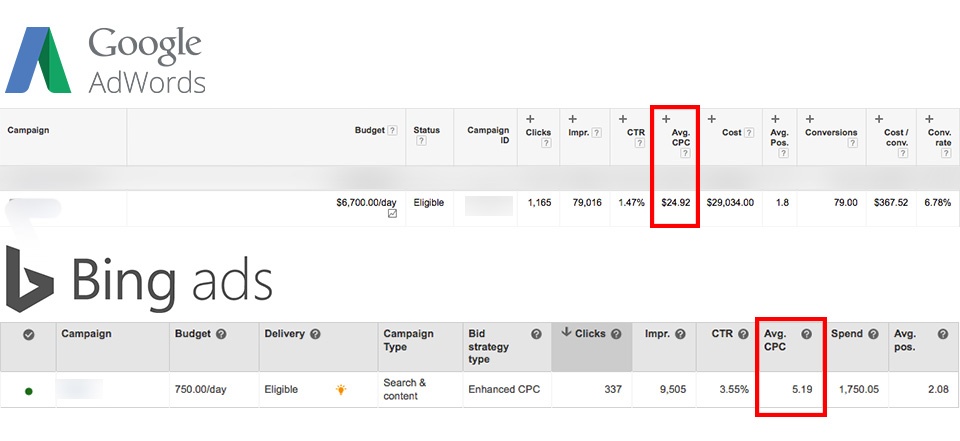
Because most advertisers default to Google, Microsoft Advertising sees significantly less competition for the same keywords. Fewer advertisers bidding on the same terms means lower costs per click across the board. For competitive B2B keywords where Google CPCs can exceed $20-50 per click, the savings on Microsoft's platform can be substantial.
This reduced competition also means higher ad positions are more accessible. On Google, achieving a top position for competitive B2B terms often requires aggressive bidding that eats into margins. On Microsoft, the same top positions are achievable at a fraction of the cost.
Microsoft Advertising consistently delivers lower CPCs than Google Ads for equivalent keywords. For B2B advertisers where search volumes are already lower and each click carries significant value, this cost efficiency directly improves the economics of your lead generation funnel.
When you combine lower CPCs with the platform's professional audience composition, the cost per qualified lead often outperforms Google significantly. The leads may be fewer in total volume, but the quality and cost efficiency frequently make Microsoft Advertising the higher-ROI channel.
B2B advertising budgets are often more constrained than B2C budgets. Microsoft Advertising's lower costs allow smaller budgets to go further, making it an ideal channel for B2B SaaS companies and professional services firms that need to maximize every dollar.
Microsoft Advertising offers several platform features that provide distinct advantages for B2B campaign management.
In Google Ads, managing campaigns across multiple business locations requires either grouping all locations into a single campaign or creating separate campaigns for each location. Microsoft Advertising offers a more flexible approach: you can run a single campaign with ad groups broken out by location. This simplifies account management while maintaining the geographic granularity that multi-location B2B businesses need.
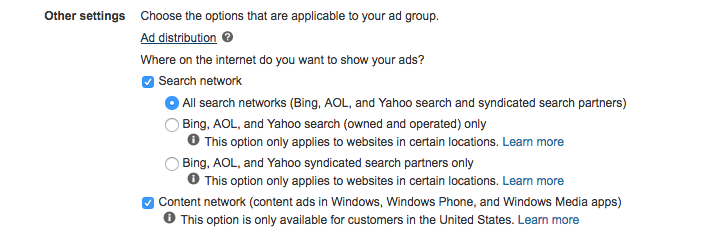
Both Google and Microsoft distribute ads across search partner networks, but they handle transparency differently. Microsoft lets you choose which search partners to include and provides transparent reporting on where your ads appear. You can specifically opt into or out of properties like Yahoo and AOL, and you can see exactly which partners are delivering results.
Google, by contrast, bundles search partners without giving advertisers the ability to select or exclude specific properties, and its reporting on partner performance is less granular.
If you are already running Google Ads campaigns, Microsoft makes it straightforward to import your existing campaign structure, keywords, and ads directly into the platform. This reduces the barrier to entry significantly. You can have a Microsoft Advertising campaign live within hours, using your proven Google Ads structure as the starting point, and then optimize from there based on Microsoft-specific performance data.
Microsoft's Audience Network extends your reach beyond search into native placements across Microsoft-owned properties including MSN, Outlook.com, and Edge. For B2B advertisers, these placements reach professionals during their workday browsing, creating additional touchpoints with your target audience outside of search intent moments.
Getting started with Microsoft Advertising for B2B lead generation follows a structured process.
Start by importing your top-performing Google Ads campaigns. This gives you a proven foundation. Then review and adjust keyword bids downward, since Microsoft's lower competition typically means you can achieve comparable positions at reduced bids.
Apply LinkedIn profile targeting to your campaigns. Start with job function and industry targeting that aligns with your ideal customer profile. Monitor performance by segment and adjust bids to allocate more budget toward the profiles that generate qualified leads.
B2B campaigns should optimize for lead quality, not just lead volume. Set up conversion tracking that captures not just form submissions but downstream indicators of lead quality. Use this data to inform bid adjustments and audience targeting refinements over time.
Once your core campaigns are performing, test expansion into Microsoft's Audience Network, experiment with additional keyword themes, and iterate on ad copy to improve conversion rates. Apply the same structured testing methodology that drives results in any paid channel.
When evaluating Microsoft Advertising performance for B2B, focus on metrics that reflect lead quality and pipeline impact:
These metrics provide a more accurate picture of channel value than surface-level indicators like click-through rate or raw conversion volume.
Microsoft Advertising should be a standard component of any serious B2B search advertising program. The combination of a professional audience, lower competition, reduced costs, and unique LinkedIn targeting capabilities creates a channel that consistently delivers high-quality leads at favorable economics.
The platform is not a replacement for Google Ads. It is a complement that extends your reach into an audience segment that many competitors ignore entirely. For B2B advertisers, that neglected audience often includes the exact decision-makers you need to reach.
Start by importing your existing Google Ads campaigns, layering LinkedIn targeting, and measuring performance against lead quality metrics rather than volume alone. The results will likely make a compelling case for increasing your Microsoft Advertising investment as a core pillar of your B2B growth marketing strategy.
This is the first installment of a tutorial video series called, Quick Tip Tuesday #QTT! It's a weekly series of videos that bring you highly actionable advertising tactics in 90 seconds or less.
In this first episode of "Quick Tip Tuesday", we'll walk you through how Facebook advertisers can grow their audience for free while they run their campaigns.
If you want to make the most of your campaigns, spending 10 minutes or less each week, this tip is for you!
💡 Boost your Custom Audience match rate with this quick tutorial. →
Hey there, in this quick video I wanna show you how you can get more mileage out of your Facebook advertising campaigns without spending more money and really spending no more than 10 minutes a week.
This is going to make your advertising campaign more effective, it's going to let you take advantage of interacting with some of the people who have been interested in your ads, but haven't taken action yet.
So let's take a look.
The beauty of running Facebook ads is that it's a social platform, so as you run ads, people are going to start liking and sharing your ads. So what I want to show you is in three easy steps, how to make the most of when people engage with your ad.
Step one is you have to find your ad in the Ad Manager. Now, we're gonna click Preview which is that little eyeball in the upper right.
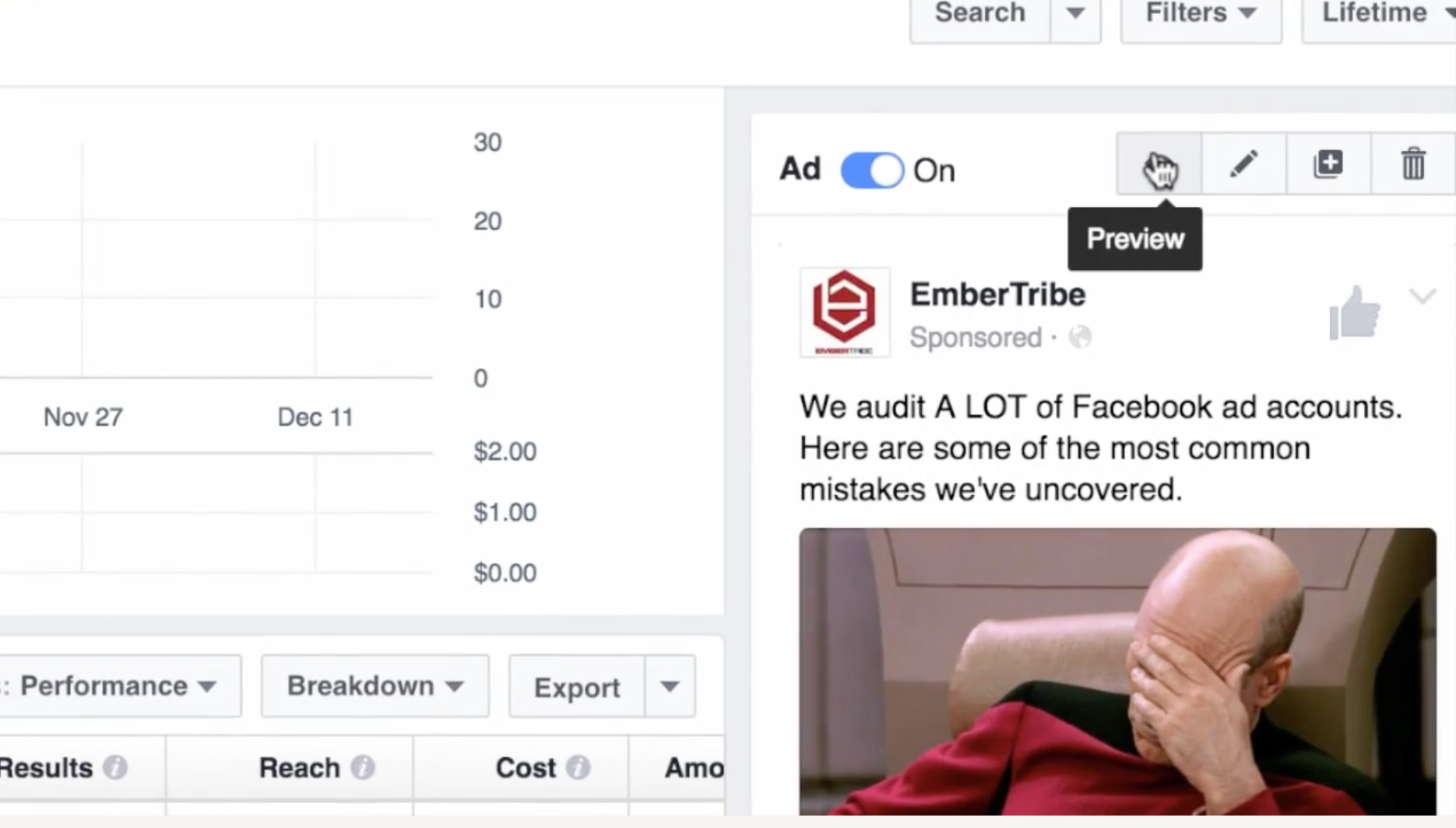
Okay that this point, scroll down and click the link where it says View Post Permalink with Comments. Okay, (step two) the next thing that you're gonna do is go down here.
You're going to see where people have liked or engaged with your ad.

Now step three, there's an option here to invite the people who have liked this post.
Now here's the beauty of this; you might have paid for the ad to get it out there and to get it in front of people, but inviting people to like your page is actually completely free.

Now great, six people, big deal. We attracted some new followers to the page, but what if you have an ad that you run for a lot longer and say there's like a thousand or so people who liked it?
Well now you can go through and start inviting all sorts of people who have engaged with your ad and showed interest in the content that you're sharing. When you've built up a decent amount of social proof (which is basically digital advertising gold), you can reuse that ad with social proof for different audiences.
So use this tactic to make the most out of your Facebook advertising by inviting people for free to your site to like your page.
Most advertisers pour budget into Google Search and Display campaigns while overlooking one of the most targeted placements in the entire Google Ads ecosystem: Gmail. Google Sponsored Promotion (GSP) ads appear directly in a user's Gmail Promotions tab, formatted to look like a native email. When a user clicks the collapsed ad, it expands into a full-width creative that can include images, video, and a clear call to action.
The strategic advantage of Gmail ads is simple. Because you can target users based on the emails they receive, you can place your brand directly in front of people who are already engaged with your competitors or complementary products. You are not interrupting a random browsing session. You are reaching someone who has an active relationship with a company in your space and showing them a better alternative.
For brands looking to grow market share without inflating search CPCs, Gmail ads offer a low-cost, high-intent channel that most competitors are not even thinking about.
The real power of GSP ads is not the ad format itself. It is the targeting model. There are two categories of businesses you should be targeting with Gmail campaigns:
Complements are businesses, tools, or services that your target audience uses alongside your product. They are not direct competitors, but they serve the same buyer profile. For example, if you sell a landing page builder, your complements might include email marketing platforms like Mailchimp, ConvertKit, or ActiveCampaign. Users of those tools almost certainly need a landing page solution, making them a high-quality audience.
Competitors are the brands that sell directly against you. By targeting their domain in your Gmail campaign, your ad will appear in the inboxes of users who receive their marketing emails, onboarding sequences, and promotional offers. This is the digital equivalent of placing a billboard outside your competitor's storefront, except it is personalized, measurable, and far less expensive.
The combination of complement and competitor targeting gives you access to a pre-qualified audience. These users have already demonstrated interest in your category through their existing email subscriptions and purchasing behavior.
Gmail campaigns should not operate in isolation. They work best as part of a multi-channel growth marketing strategy where each channel plays a distinct role:
By positioning Gmail ads in the awareness-to-consideration phase, you create an additional touchpoint that warms up prospects before they ever search for your brand or product category.
Follow these steps to create your first GSP campaign targeting competitor and complement audiences.
In your Google Ads account, click "Create a New Campaign" and select "Display Network Only." Gmail ads run through the Display network, so this is your starting point.

Enter your campaign name, select your target location, and set your bidding strategy and daily budget. For Gmail campaigns, start with a Manual CPC bidding strategy so you maintain control over costs while gathering initial performance data. A daily budget of $20 to $50 is a reasonable starting point for testing.

Click "Save and continue" to move to the ad group configuration.
Create a naming convention that maps each ad group to a specific competitor or complement. For example: "GSP - Competitor - Mailchimp" or "GSP - Complement - LeadPages." This structure makes it easy to compare performance across targets and scale the campaign over time.
Start with a max CPC between $0.10 and $0.50. Gmail clicks tend to be significantly cheaper than Search clicks, so you do not need to bid aggressively to win placements. You can adjust bids up or down based on initial performance.
Under targeting options, choose "Display keywords" and enter the website URL of your competitor or complement. This is the critical step that defines who sees your ad.
When you enter a domain like "mailchimp.com" as a display keyword, Google will show your ad to Gmail users who have received emails from that domain. This is how you reach an audience that is already engaged with a competing or complementary brand.

Click "Narrow your targeting further" and choose "Placements" as your targeting method. This is a step many advertisers miss, and skipping it will cause your ads to show across the entire Display network rather than exclusively in Gmail.

Search for "mail.google.com" and add it as your placement target. This ensures your ads appear only within Gmail inboxes and nowhere else on the Display network.

Click "Save and continue." On the Ad Creation page, click "Skip ad creation." Gmail ads cannot be created in the standard ad builder, so you will need to use the Ad Gallery.
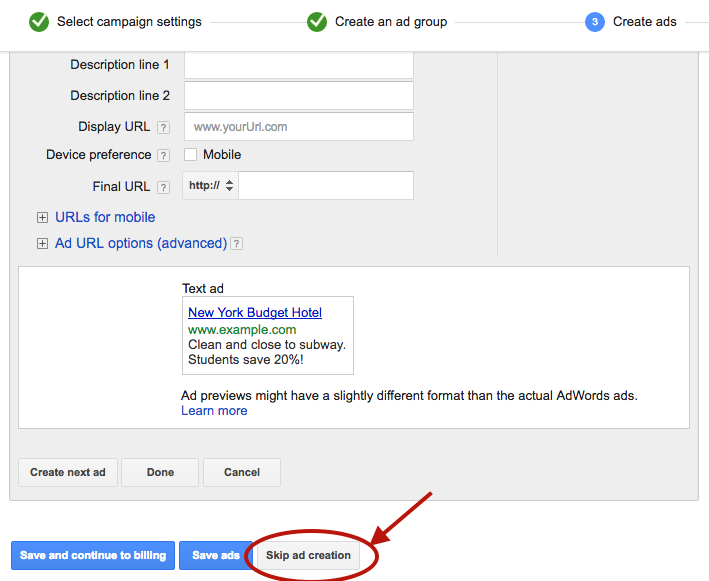
Navigate to the "Ads" tab in your account, click the red "Ad" button, and select "Ad Gallery" from the dropdown menu.
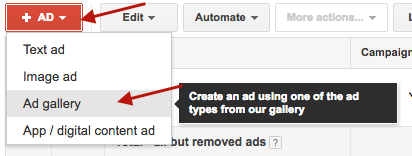
In the Ad Gallery, click "Gmail Ads" to access the Gmail-specific ad templates.

Select "Gmail image template" for the simplest and most effective format. Other template options are available, but the image template provides the best combination of visual impact and ease of setup.

Fill in the template fields:

One of the strongest advantages of Gmail ads is the ability to split-test variations of every element. Create at least two to three versions with different subject lines, images, and descriptions. Test one variable at a time to isolate what drives performance.
Click "Save" to finalize your ad. Your campaign is now live and will begin serving to Gmail users who match your targeting criteria.
Your Gmail ad appears alongside real emails. If your subject line reads like an advertisement, users will skip it. Study the subject line patterns that perform well in email marketing: curiosity-driven questions, specific numbers, and clear benefit statements all tend to outperform generic promotional copy.
The expanded Gmail ad is only the first click. If users land on a generic homepage after clicking a specific offer, you will lose them. Create dedicated landing pages that match the messaging and offer in your Gmail ad. This alignment improves both conversion rates and Quality Score.
Once you validate that your initial targets are producing cost-efficient clicks and conversions, expand your campaign by adding new competitor and complement domains as separate ad groups. Each new domain you add opens up an entirely new audience segment.
Performance will vary significantly across targets. A competitor with a large, engaged email list will generate more impressions and clicks than a smaller complement. Review performance at the ad group level weekly and adjust bids to allocate more budget toward your top-performing targets.
Gmail ad clicks are top-of-funnel interactions. Most users will not convert on the first visit. Make sure your remarketing pixel fires on the landing page so you can follow up with Display, Search, and social remarketing ads that bring these users back to convert.
Gmail ads do not generate the immediate volume of Search campaigns or the flashy creative opportunities of video and social ads. They are a surgical targeting tool that delivers incremental reach at a fraction of the cost. Because they require a different setup workflow and a targeting mindset rooted in competitive intelligence, most advertisers never bother.
That is exactly why they work. Low competition means lower CPCs, higher impression share, and the opportunity to reach your competitors' most engaged audiences before they even start searching for alternatives.
If you are looking for new growth channels that deliver qualified traffic without bidding wars, Gmail ads deserve a place in your paid media mix.

Growing up, I loved visiting my grandparents out in the country.
One humid August afternoon, I grabbed a pail and headed out to the farm. It was blueberry season. If I could bring back enough blueberries to Grandma's kitchen, it would turn into pie (aka a slice of heaven on earth).
So I picked blueberries like a madman that day, furiously grabbing at the bushes. But no matter how hard I worked, the pail would barely fill.
It was far too late before I noticed the quarter-sized hole in my pail. A cluster of blueberries trailed behind me, never to be recovered again.
Here's a troubling fact: 95% of the visitors who reach your website will never come back again.
That's not a quarter-sized hole in your pail, it's a crater.
Of course, the 95% rule will vary depending on your industry. If you want a quick gut check on where you stand, just open up your Google Analytics profile and look at the ratio between new/returning visitors.
Wherever the numbers fall for your site, the story is probably the same: the majority of people aren't coming back.

You've worked so hard to drive traffic to your site. Furiously writing content, hustling on social media and even paying for visitors.
But that hard work is wasted when users visit your site, don't convert, then leave and never come back.
Most marketers make the mistake of treating their visitors as a "disposable audience". Our answer to losing 95% of our blueberries is to...pick more and more blueberries.
There's a better way to fix this problem and it can lead to explosive growth for your business.
Retargeting is a tool that's been around for awhile now, but a lot of marketers still haven't put it into practice.
Retargeting, also known as "remarketing", is a way to stay in front of your prospective customers with display ads that follow them around the web.
Ever shop online? You've probably been retargeted. Let's say you've been window shopping for a new laptop. Somehow, magically, that same laptop starts showing up in your Facebook news feed, on the sidebar of some random blog you're reading, etc.
It's not a coincidence, it's retargeting!
There are two ways to approach retargeting:
Site-Based: Site-based retargeting is the most common approach. When a user visits your site, they are "tagged" (cookied) through a pixel provided by a retargeting platform. Once a user is tagged, you'll be able to serve them ads throughout a broad network of websites and apps.
The beauty of this approach is that you can set up refined campaigns based on the pages that users did (or didn't) view. For example, a user reached a checkout page but did not complete their order.
Why didn't they buy? Maybe they didn't have their credit card on hand, maybe they ran out of time, maybe they wanted to shop around. Whatever the reason, retargeting gives you a second, third, fourth chance to close the deal.
List-Based: List-based retargeting is also known as "custom audience targeting" and "CRM Retargeting". Unlike site-based retargeting, which targets visitors of specific pages on your site, list-based retargeting uses email addresses.
With site-based retargeting, users are tagged directly when they interact with your site. With the list-based approach, a retargeting vendor will use a network of data partners to tag a user based on their email address.
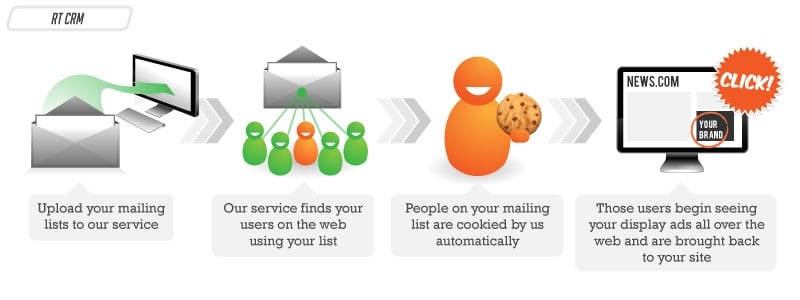
Image credit: Retargeter
The applications are endless. Do you want to re-awaken cold leads that haven't visited your site in awhile? Segment your list and get back in front of them. Want to up-sell existing customers or advertise a complementary product? List-based retargeting is a powerful tool at your disposal.
Retargeting isn't just a tactic to increase sales. It can be used to build brand awareness and amplify your content marketing efforts.
A key ingredient to building trust with your audience is to get repeat visits to your site. The more value you can provide with free content upfront, the more people will trust your brand.
Larry Kim of Wordstream implemented retargeting to re-engage their blog visitors. They saw a 50% lift in repeat visits once retargeting ran its course.

Site-based retargeting is a powerful way to re-engage your audience. If your blog is organized by categories in the URL, like, "YourDomain.com/blog/PPC/Blog-Post", it's easy to create retargeting rules that promote new content to past site visitors based on what they've read previously.
For example, create a retargeting rule that serves ads to visitors who read anything on your blog in the "PPC" category over the last 90 days. Did you just publish a new blog post that fits into that category? Serve ads to those audience segments and jumpstart traffic to your post.
Worried about breaking the bank for something that doesn't necessarily have a direct impact on sales?
Good news. Getting people back to your site is typically less expensive than getting them there in the first place. I say "typically", because costs will vary between ad exchanges and there's always an exception to the rule.


.svg)