
In the age of rapid digital transformation, AI has seeped into almost every industry, revolutionizing how we conduct business, design products, and even create content. The ClusterMagic service is a great example, which seamlessly integrates AI for content generation in a hybrid model, providing significant benefits in the SEO results of brands seeking a massive increase in organic traffic. But while AI holds immense promise, it has its limitations. Let's explore the pros and cons of using AI for content creation and understand why a hybrid approach might be the way forward.
Major publishers in sensitive niches like CNET.com, Bankrate.com, and Creditcard.com have already integrated AI-generated content. Other large companies, such as CNN and Forbes, might also be doing so. Countless smaller companies and publishers are utilizing AI, not only on their websites but also on social media, in email marketing, and virtually everywhere else.
Google's stance on AI-generated content is neutral, emphasizing that content should primarily be user-centric. In fact, Google's September 2023 Helpful Content Update removed the mention of "written by people" from their helpful content system guidelines.
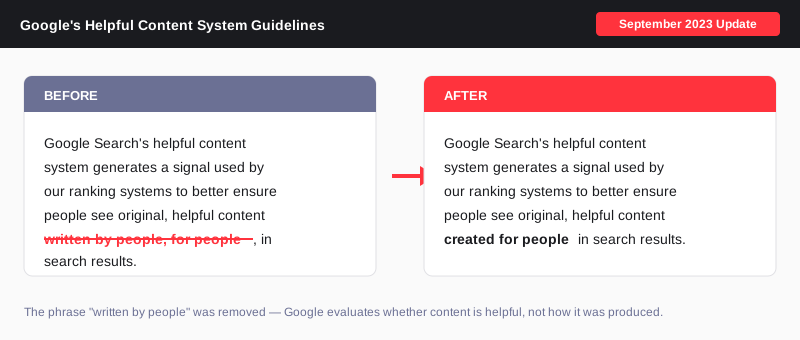
The message is clear: for content to rank well, it must be informative, answer users' queries satisfactorily, and showcase genuine expertise - regardless of how it's created.
AI Content Detectors like GPTZero, ZeroGPT, and many others are not reliable. Even OpenAI has said as much. They consistently produce false positives about human-written content. Conversely, they can be easily fooled with creative prompting or a bit of human editing.
An interesting note from OpenAI: "we found that it labeled human-written text like Shakespeare and the Declaration of Independence as AI-generated."

Anecdotal evidence and real-life ranking data suggest that while AI-generated content isn't penalized by search engines, it might only achieve high rankings if it meets the above criteria. The role of AI in content creation is still a developing narrative, and its significance is indispensable for maintaining a competitive edge in the future.
At EmberTribe, the understanding is clear - AI serves as a foundation, not the final product. With ClusterMagic, while AI aids in the initial draft based on expert-driven keyword research, human experts step in for the crucial phases of editing, fact-checking, and final review. This hybrid approach ensures the content is accurate and helpful, has the potential to rank, and truly represents their business.

We all love the idea of having our own Pinterest board, right? It shows off our taste to the world, allowing them a glimpse into just how unique and interesting we are.

Here are some other Pinterest tips to keep in mind:
📌 Make sure to include branding in your content, but keep it subtle enough so that it doesn’t stick out like a sore thumb. If it’s too in your face, your audience may not want to pin it and you lose traction from the start.
📌 Another Pinterest best practice to keep in mind is to focus on keywords that your audience is likely to search. If you use targeted keywords, you will come up in users’ searches and your brand will gain increased visibility. Take some time to compile relevant keywords and come up with appropriate board names.
📌 Pinterest, like Instagram, is a very visual platform and not just any old images will do. Plan your Pinterest imagery to catch the attention of a scroller.
📌 Don’t just post and pin to create content. Be deliberate with your content strategy—this is a good time to curate your board. Entire boards can draw users and turn them into followers, so that they know where to keep going for more content. For example, if you’re a men’s clothing eCommerce shop, don’t just pin a shirt or slacks here and there, create boards with outfit ideas for different occasions and seasons.
📌 Remember, a pin can be linked back to a description for more context. This means Pinterest can always play a part in a larger advertising campaign for your business. Just pop your store URL, or even better, a landing page URL, into the pin to lead traffic to your website.
📌 When in doubt, research what other companies are doing with their organic content on Pinterest, and emulate the strategies you like.
Any avid Pinterest user won't think twice before answering a firm “No”!
But that’s probably because they use real life to influence their Pinterest boards and not because they're marketing mavens.
The truth is, Pinterest does not rely entirely on fresh content to overtake older content on its feed. Pinterest has stated that all content across board browsing, search browsing, home feed, and category feed is viewed equally. 🤯
Pinterest decides what should make it to a person’s feed according to the quality of each post as opposed to how recently it was uploaded. As a brand, quality over quantity will definitely serve you well.

& nbsp;

In this post:
This is the question Halley, our Director of Marketing, wants to help you figure out.
If you don’t know what we mean by “cashflow runway,” we’re definitely not talking about planes, trains, or automobiles. We’re talking about creating a strategic way to fund your eCommerce brand—this is your cash flow runway.
A lot of business owners don’t look at this. They just look at their bank accounts and see their balance, and take this information at face value. What they’re overlooking is the timeline for how long that cash is going to last. This is especially important to think about when you’re thinking about ways to grow your eCommerce business — and aligning your cash position with a clear ecommerce growth strategy ensures your runway actually funds the right bets.
Your cash flow runway is a crucial component of growth that a lot of founders and store owners ignore. Don’t be one of them!
In short, your cash flow is how much money you have, divided by the monthly costs of running your business (sometimes referred to as “burn rate”).

So if you have $200,000 in the bank and it costs $50,000 per month to keep your business running, you have a four-month cash flow runway.
This is a simple formula for a very important piece of information! Your cash flow calculation helps you see where (and when) you’re going to need a cash injection from an investor like Clearco. With an investment, you’re able to focus on growth without worrying about running out of critical funds.
You should check your cash flow runway frequently. Is your burn rate increasing? Do you have the funds on hand to keep your store live for 3 months? 6 months? 9 months? If you’re constantly short on cash and short on time trying to keep up with your invoices and billing, you should consider seeking opportunities to inject your business with additional cash.
This is a tough question! If you’re running out of money and your cash flow runway has become a cash flow parking lot, there are still steps you can take to keep your business afloat. First, you should look at cutting immediate expenses to save on costs. You can also look at what inventory you have existing and run a sale for a product you have a lot of inventory for to get a quick injection of cash. And, finally, if you qualify for funding from reputable eCommerce investors, like Clearco, we would encourage you to jump on the opportunity!
In short: it depends. The answer comes down to how realistic your goals are in relation to the channel fit. In other words, the less proven a channel is for a business, the more they should expect to spend on that channel before they start seeing positive returns.
There are so many digital advertising channels and, if you’re not careful, it can be easy to overspend on strategies that just aren’t working for you. There is such a thing as growing too fast, and that often comes from investing in too many channels that aren’t bringing returns
Maybe you're investing in Facebook, TikTok, Pinterest, and Snapchat, but in reality, you should only be investing in one. Usually, for our eCommerce clients, we recommend advertising on Facebook. Facebook (which also includes Instagram ads) is a powerful platform for testing and selling products. It’s a great starting point for testing a lot of messaging, position, and pricing. Ha.ving one solid platform that can give you valuable insights into how your funnel is performing gives key findings that can be used to expand to other channels. This approach also gives you early benchmarks to test against when you’re figuring out your advertising budget.
Before embarking on any new marketing initiative, you should consider what the impact would be if it:
If the result of those scenarios is that the business goes under or is irreparably damaged, don't do it. That's not experimenting or taking a risk, that's gambling.
If you’re curious about strategic ways to turn your cash flow runway into a growth runway with sustainable growth systems, book a discovery call with our team to get started!
This post is part of a blog series, "Here Be Metrics," breaking down the primary aspects of the so-called pirate metrics for growth marketing. Keep up with this series and others by subscribing to our blog!
Seeing a skull and bones on the high seas sent people fleeing in fear of imminent attack, for pirates wasted little time once their presence was known.

Although they should not attack customers, corporations today should likewise waste little time taking action once a target sees their brand. The move from awareness to acquisition is a critical process in the customer lifecycle, and the businesses that master it build the foundation for sustainable, profitable growth.
In the pirate metrics framework (AAARRR: Awareness, Acquisition, Activation, Revenue, Retention, Referral), acquisition sits at a pivotal point. It is the moment when an anonymous audience member becomes a known contact, a lead, or a customer. Everything that follows in the growth engine depends on how effectively you execute this transition.
The goal of acquisition is to move people from undefined groups to individual leads or customers. It is the conversion from passive observer to active participant in your brand's ecosystem.
While cannons and swords were effective when pillaging ships and towns along the high seas, today's civilized markets call for a more nuanced approach. Corporations must entice, rather than force, customers to join their tribe.
Image Credit: 500 Hats
Acquisition can be defined as the moment of the very first transaction with a customer, or simply the act of bringing new customers and clients into your business. This transaction often is not a monetary payment for goods or services. Instead, it is normally an exchange of information and permission. The target audience volunteers their personal information with the understanding that the company will contact them in the future.
To entice customers to make this exchange, many companies offer immediate value in return. Coupons, PDF downloads, ebooks, free trials, and membership deals are all common offerings that serve as the catalyst for converting an interested visitor into an identifiable lead.
Image Credit: 500 Hats
With regard to metrics, acquisition focuses on data related to lead capture and the efficiency of your conversion process. Understanding these numbers is fundamental to optimizing your sales funnel and improving growth over time.
These metrics tell you how many potential customers you are bringing into your pipeline:
Volume alone tells an incomplete story. These metrics reveal how efficiently your acquisition engine operates:
The relationship between these metrics matters as much as the individual numbers. A low CPL is meaningless if those leads never convert to customers. A high CAC is acceptable if lifetime value is proportionally higher. Growth marketers obsess over the ratios and unit economics, not vanity metrics in isolation. This approach to understanding what truly matters beyond surface-level ROAS separates effective acquisition strategies from wasteful ones.
For online marketing campaigns, the volume of acquisition data available makes this metric category particularly powerful. In addition to the core metrics listed above, digital marketers can access highly granular data points including:
With such detailed information, the moment of acquisition can be fine-tuned to maximize the conversion rate and minimize the cost of acquisition. This data-driven approach is what separates modern growth marketing from traditional advertising.
Tracking metrics is necessary but not sufficient. You need a deliberate strategy for generating leads and converting them efficiently. Here is a framework for building acquisition systems that scale.
Relying on a single channel for customer acquisition is fragile. Algorithm changes, cost increases, or market shifts can devastate your pipeline overnight. The most resilient acquisition strategies spread effort across multiple growth marketing channels:
The gap between a visitor arriving at your site and that visitor becoming a lead is where acquisition happens. Every element of the lead capture experience affects your conversion rate:
Landing pages. Dedicated landing pages with a single CTA consistently outperform general website pages for lead capture. Remove navigation, minimize distractions, and focus every element on the conversion goal.
Forms. Ask for only the information you need at the point of capture. Every additional field reduces completion rates. You can always collect more data later in the relationship.
Lead magnets. The value exchange must feel fair to the prospect. A generic "subscribe to our newsletter" CTA underperforms a specific, high-value offer like "Download our 2026 DTC Growth Playbook" or "Get a free audit of your ad account."
Social proof. Testimonials, client logos, case study results, and review scores near your lead capture points reduce friction and increase trust. Showing real results, like the outcomes from proven case studies, gives prospects confidence to take the next step.
Acquisition does not exist in a vacuum. It is one step in a larger journey that begins with awareness and extends through activation, revenue, retention, and referral. The most effective acquisition strategies consider what happens before and after the lead capture moment.
Before acquisition: Invest in awareness-stage content and advertising that warms your target audience before asking for anything in return. Cold audiences who have had zero prior exposure to your brand convert at significantly lower rates than those who have engaged with your content.
After acquisition: Plan your activation sequence before you generate leads. A lead that sits in your database without a follow-up plan is a wasted acquisition. Automated email sequences, personalized outreach, and timely follow-up calls ensure that new leads move toward the next stage of the funnel rather than going cold.
Even experienced marketers make acquisition errors that limit growth. Watch for these common pitfalls:
Optimizing for the wrong metric. Maximizing lead volume while ignoring lead quality fills your pipeline with contacts who will never buy. Focus on qualified leads and downstream conversion rates, not raw numbers.
Ignoring channel attribution. If you cannot attribute leads to specific channels and campaigns, you cannot optimize your spend. Invest in proper tracking and attribution before scaling your budget. Understanding which audiences to target for lead generation requires solid attribution data.
Neglecting the post-capture experience. Acquisition is not the finish line. A lead captured without a clear activation path is money spent with no return. Build your nurture sequences and sales processes before you increase acquisition spend.
Over-investing in one channel. Even if one channel is performing well today, market conditions change. Allocate a portion of your budget to testing new channels continuously.
Do not waste time delaying acquisition. The moment your target demographic becomes aware of your brand, move toward actions that will acquire them as customers. The pirates of the high seas did not dally, and neither should you.
Start by auditing your current acquisition metrics. Calculate your CAC, measure your lead conversion rates by channel, and identify the biggest drop-off points in your funnel. Then prioritize the improvements that will have the highest impact on volume and efficiency.
Acquisition is the engine that powers every subsequent stage of the growth marketing framework. Master it, measure it relentlessly, and optimize it continuously, and you build the foundation for a business that scales predictably and profitably.

Marketing for SaaS (Software as a Service) companies can often be challenging. With the increasing number of competitors and evolving consumer expectations, it's crucial for SaaS companies to stay ahead of the game to maximize their growth potential. In this article, we will explore seven essential tips for marketing your SaaS company effectively and driving sustainable growth.
It's important to understand the fundamentals of SaaS marketing and its significance. SaaS marketing refers to the process of promoting and selling software products on a subscription model. Unlike traditional software sales, SaaS companies focus on building long-term relationships with customers. It involves a strategic approach to attract, engage, and retain customers in a highly competitive market.
Successful SaaS marketing goes beyond simply selling a product; it involves creating a comprehensive marketing strategy that encompasses various elements such as branding, content creation, lead generation, and customer relationship management.
Developing a successful SaaS marketing strategy requires careful planning and execution. Here are some key elements to consider:
These elements form the foundation of a successful SaaS marketing strategy. By incorporating them into your overall marketing plan, you can effectively reach your target audience, generate leads, and drive business growth.
Remember, SaaS marketing is an ongoing process that requires constant adaptation and optimization. Stay up-to-date with industry trends, monitor competitor strategies, and regularly evaluate and refine your marketing tactics to stay ahead in the ever-evolving SaaS landscape.
A distinct and memorable brand identity is essential for attracting and retaining customers in the competitive SaaS industry. In order to stand out from the crowd and establish a strong presence in the market, there are several key aspects to consider.
Your unique selling proposition (USP) is what sets your SaaS company apart from competitors. It is the foundation upon which your brand identity is built. Clearly defining your USP is crucial in order to effectively communicate the value your product provides to customers.
When defining your USP, it is important to consider the key features, benefits, and value that your product offers. What makes your SaaS company unique? How does your product solve a problem or fulfill a need that other competitors cannot? These are the questions you need to answer in order to create a persuasive message that resonates with your target audience.
By highlighting the uniqueness of your offering, you can differentiate yourself from the competition and attract customers who are specifically looking for the benefits that your product provides. This will not only help you acquire new customers but also retain them in the long run.

Consistency is key when it comes to building a strong brand image. In order to establish a recognizable and memorable brand, it is important to ensure that your brand elements are consistently applied across all marketing channels.
One of the most important brand elements is your logo. Your logo should be visually appealing and reflect the essence of your brand. It should be placed prominently on all marketing materials, including your website, social media profiles, and promotional materials.
In addition to your logo, your color scheme, typography, and tone of voice also play a crucial role in creating a consistent brand image. Choose colors that align with your brand values and evoke the desired emotions in your target audience. Select fonts that are easy to read and reflect the personality of your brand. And finally, develop a tone of voice that is consistent across all communication channels, whether it's your website, social media posts, or customer support interactions.
By ensuring consistency in your brand elements, you create recognition and reinforce the credibility of your brand. Customers will be able to easily identify your brand and associate it with the positive experiences they have had with your product or service.
Building a strong brand identity takes time and effort, but it is a worthwhile investment. By defining your unique selling proposition and creating a consistent brand image, you can attract and retain customers in the competitive SaaS industry, ultimately leading to long-term success for your business.
Search engine optimization (SEO) plays a vital role in driving organic traffic to your website and increasing your visibility in search engine result pages (SERPs). By implementing effective SEO strategies, you can improve your website's ranking and attract potential customers. Here are some best practices for SaaS SEO:
SEO is crucial for increasing your website's visibility and attracting organic traffic. When potential customers search for solutions related to your SaaS company, a well-optimized website will have a higher chance of appearing in the top search results. By utilizing relevant keywords, optimizing meta tags, and improving site speed, you can improve your ranking in search engine results, leading to increased exposure and higher chances of attracting potential customers.
To effectively implement SEO for your SaaS company, consider the following best practices:
Keyword research is a critical step in SEO. By understanding the search terms your target audience uses, you can optimize your website's content to align with their needs. Use keyword research tools to identify high-demand keywords that are relevant to your SaaS product or service. This will help you create content that addresses the pain points and needs of your potential customers.
Content is king in SEO. By creating informative and keyword-rich content, you can attract and engage your target audience. Develop blog posts, articles, and guides that provide valuable insights and solutions related to your SaaS product or service. Incorporate relevant keywords naturally into your content to improve its visibility in search engine results.
On-page optimization is essential for improving your website's visibility in search engine results. Optimize your meta titles, meta descriptions, headers, and URLs with relevant keywords to help search engines understand the content of your web pages. This will increase the likelihood of your website appearing in relevant search queries.
Backlinks are an important factor in SEO. By building high-quality backlinks from reputable websites in your industry, you can enhance your website's authority and visibility. Reach out to industry influencers, guest post on relevant blogs, and participate in online communities to build valuable backlinks that will improve your website's SEO performance.

Regular monitoring and analysis of your SEO performance are crucial for identifying areas for improvement. Utilize analytical tools such as Google Analytics to track your website's traffic, keyword rankings, and user behavior. Analyze the data to identify trends, strengths, and weaknesses in your SEO strategy. This will help you make informed decisions and optimize your SEO efforts for better results.
By implementing these best practices, you can enhance your SaaS company's SEO performance and increase your website's visibility in search engine results. Remember to stay up-to-date with the latest SEO trends and algorithms to ensure long-term success in driving organic traffic to your website.
Content marketing is a powerful tool for SaaS companies to engage their target audience and establish thought leadership. Consider the following tips to create compelling and relevant content:
Content marketing allows SaaS companies to deliver valuable information and insights to their target audience, positioning themselves as industry experts and thought leaders. By offering relevant and informative content, you can build trust, establish credibility, and drive customer engagement.
Here are some tips to help you create engaging and relevant content for your SaaS company:
Social media has become an integral part of the marketing strategies for SaaS companies. Follow these tips to effectively leverage social media:
Each social media platform has its own strengths and characteristics. Understanding your target audience and their preferred platforms will help you choose the most suitable ones for your SaaS business. Consider factors such as audience demographics, engagement levels, and platform capabilities when making your decision.
Boosting engagement on social media is crucial for increasing brand visibility and fostering customer loyalty. Consider implementing these strategies:
By understanding the basics of SaaS marketing, building a strong brand identity, implementing strong SEO methodologies, utilizing content marketing, and harnessing the power of social media, you can drive sustainable growth and establish a strong presence in the market. Stay proactive, adapt to the ever-changing landscape, and continuously optimize your marketing efforts to stay ahead of the competition.
If you have a store on Shopify, you are in it to generate sales.
One of the best ways to drive revenue is through email marketing to your Shopify customers. Email marketing is a powerful tool for retaining customers and keeping them engaged with your brand long after the initial purchase.
A valuable feature of Shopify is that each time customers create an account at your eCommerce site, they are agreeing to receive messages from your store. That lays the foundation for using Shopify email marketing as a direct connection to your customers - one that you own and control entirely.
Unlike social media or paid ads, which customers may scroll past without noticing, emails are delivered directly to their inbox. Email marketing also provides an exceptionally high ROI. For every dollar you spend on email marketing, companies report an average return of $42 - a figure that consistently outperforms every other digital channel.
If you are looking for D2C (direct-to-consumer) email marketing templates to help ramp up sales, here is what you need to know.
Before diving into the specific templates, it is worth understanding why email deserves a central role in your Shopify marketing stack.
You own the channel. Unlike Facebook or Instagram, where algorithm changes can cut your reach overnight, your email list is an asset you fully control. No platform can throttle your access to subscribers who opted in.
Segmentation drives personalization. Shopify's native data - purchase history, browsing behavior, average order value - allows you to segment your audience and send highly relevant messages. Personalized emails generate transaction rates six times higher than generic broadcasts.
Email fuels the full funnel. From upper-funnel awareness through lower-funnel conversion, email meets customers at every stage. Welcome sequences introduce your brand, post-purchase flows build loyalty, and win-back campaigns re-engage lapsed buyers.
Timing is automated. The most effective Shopify email marketing strategies rely on behavioral triggers rather than manual sends. When a customer takes (or does not take) a specific action, the right message arrives automatically at the right moment.
There are many Shopify email marketing templates you may choose to test with your customers. However, the three most important Shopify emails you need in your toolbox are:
We are going to break down the purpose of each of these message types, provide examples, and give you free customizable email templates to use for your Shopify store.
The welcome email is your first formal introduction to your customers. They might have found you through an ad, through social media, or via organic search, but up until this point you have not had the opportunity to speak directly to your audience. With emails, you can send highly personalized messages to people who have entered your funnel.
This email should introduce your brand, define your unique selling proposition, and nudge people to become customers.
Key metrics to watch: Open rates for welcome emails typically range from 50-60%, far exceeding the 15-25% average for regular marketing emails. If your welcome email open rate falls below 40%, revisit your subject line and sender name.
Subject: Welcome to our family!
Janna, thanks for joining our community!
We believe in using only carbon-neutral raw materials and sustainable products to create a diverse line of distinct and colorful jewelry that will make you look great.
Check out our new springtime collection and get 10% off your first order.
SHOP NOW
Subject: Welcome to our family!
[FIRST NAME], thanks for joining our community!
We believe in [UNIQUE VALUE PROPOSITION].
Check out [PRODUCT or COLLECTION] and [OFFER] for your first order.
[Call-to-action button]
After a purchase, you should always send a thank you to your customer to solidify the relationship and reassure them that their order is being processed.
This email message should also include order and tracking information.
Order confirmation emails have the highest open rates in eCommerce - often exceeding 70%. Now that you have your customer's attention, you have a prime opportunity to upsell related products or offer an additional incentive to attract repeat business.
Subject: Your order confirmation
Lindsey, thanks for the order! We will process it as soon as possible and let you know when it is shipped.
Here is your order summary:
View your order online. If you have any questions about your order, please contact us.
Customers that bought this often purchased these items.
It is not too late to add them to your purchase and get them delivered together with no additional shipping charges.
If you order from us again, please use the discount code SUMMERTIME10 for 10% off your next order. Remember, shipping is always free!
SHOP NOW
Subject: Your order confirmation
[First Name], thanks for the order! We will process it as soon as possible and let you know when it is shipped.
Here is your order summary:
[LIST ORDER DETAILS]
View your order online [Include a link]. If you have any questions about your order, please contact us [Link to contact information].
Customers that bought this often purchased these items.
[LIST COMPATIBLE ITEMS]
It is not too late to add them to your purchase and get them delivered together with no additional shipping charges.
If you order from us again, please use this [OFFER] for [EXCLUSIVE BENEFIT], and remember [UNIQUE CUSTOMER SERVICE CALL OUT]!
[Call-to-action button]
When an item ships, you should also send a shipping email with an order update and tracking information. It is another effective touchpoint to seek additional sales.
Subject: Your Order Has Shipped
Logan, your order #1234567890 has shipped.
It is scheduled to arrive on May 3rd via UPS. Use tracking number 0000000000000456 to follow its journey to your door.
We want to thank you for being a loyal customer and offer you this exclusive discount code for your next order. Use code IMAHAPPYCUSTOMER to get 10% off your next purchase.
Subject: Your Order Has Shipped
[FIRST NAME], your order [ORDER NUMBER] has shipped. It is scheduled to arrive on [DATE] via UPS. Use tracking number [TRACKING NUMBER] to follow its journey to your door.
We want to thank you for being a loyal customer and offer you this exclusive discount code for your next order. Use code [UNIQUE CODE] to get [OFFER].
It is frustrating that so many shoppers select items and put them in their shopping carts but never complete the sale. More than 8 out of 10 online shopping orders were abandoned in recent years, according to industry data. These are prime targets for remarketing.
Think of the abandoned cart email in two stages. The first should be sent within an hour after the abandonment occurs. It should remind shoppers that they did not complete the sale. The second should occur a day or two after the first email to remind them again and offer them an incentive to convert.
Subject: Your cart is waiting
Trina, are you still thinking it over? We noticed you left some items in your shopping cart. Do not worry, they are still waiting for you!
Click here to keep shopping
Subject: Your cart is waiting
[FIRST NAME], are you still thinking it over?
We noticed you left some items in your shopping cart. Do not worry, they are still waiting for you!
[CALL-TO-ACTION]
Subject: Items in your cart are about to expire
Trina, those items you left in your shopping cart are about to expire. If you are ready to make your purchase, act now!
Still not sure? If you buy within the next 24 hours, you can use the special discount code 5OFFTODAY to get a 5% discount on your purchase.
USE DISCOUNT
[FIRST NAME], those items you left in your shopping cart are about to expire. If you are ready to make your purchase, act now!
Still not sure? If you [ACTION TO TAKE], you can use the [SPECIAL OFFER] on your purchase.
[CALL-TO-ACTION BUTTON]
If they have not acted after the second email, they are probably not going to convert on this purchase for the time being, but at least they have entered your funnel.
The difference between a mediocre abandoned cart sequence and a high-performing one comes down to timing and escalation:
Even modest recovery rates translate to significant revenue at scale. A store processing 1,000 abandoned carts per month that recovers just 10% is reclaiming 100 orders that would have otherwise been lost.
Launching email campaigns is only the beginning. To continuously improve your Shopify email marketing, track these core metrics:
For a deeper understanding of how email communications flow and impact deliverability, review our guide on email flow fundamentals.
Another effective email tactic is targeted at lapsed customers. It can be as simple as letting customers know you have missed them, highlighting a product or new promotion, and adding an incentive to entice them to re-engage.
You may also want to use email marketing for:
Consider pairing your email strategy with SMS marketing for time-sensitive offers and transactional updates. SMS open rates exceed 95%, making it an ideal complement to email for abandoned cart recovery and shipping notifications.
For brands exploring the ideal format for their regular newsletters, our analysis of newsletter length best practices provides data-driven guidance on keeping subscribers engaged without overwhelming them.
EmberTribe is an eCommerce Digital Marketing Agency that gets results. We use email marketing as part of our proven growth system that has driven hundreds of millions of dollars in eCommerce sales. While email marketing is an important part of your growth strategy, it takes a comprehensive marketing strategy to achieve greatness.
If you are ready to significantly increase conversions and revenue for your D2C eCommerce site, contact us at EmberTribe today and let us help you grow your business.
It is crucial for businesses to effectively market their products and services online. For Software as a Service (SaaS) businesses in particular, content marketing for SaaS plays a pivotal role in attracting and retaining customers. However, implementing an effective content marketing strategy requires specialized knowledge and expertise that may not be readily available in-house. This is where a SaaS content marketing agency can be invaluable.
SaaS content marketing refers to the creation and distribution of valuable and relevant content with the aim of attracting and retaining customers for SaaS businesses. Unlike traditional advertising, content marketing focuses on providing educational and informative content that addresses the pain points and challenges of the target audience.
But why is this approach so effective for SaaS businesses? The answer lies in the nature of the SaaS industry itself. SaaS products and services are often complex and require a certain level of understanding from potential customers. By providing educational content, a SaaS content marketing agency helps bridge the knowledge gap and empowers your audience to make informed decisions.
A SaaS content marketing agency is a professional service provider that specializes in helping SaaS businesses create and execute content marketing strategies. Their primary goal is to create engaging and persuasive content that resonates with the target audience, ultimately driving more traffic, generating more leads, and increasing conversions.
But what exactly does it mean to create engaging and persuasive content? It's about more than just writing a few blog posts or social media updates. A SaaS content marketing agency goes beyond the surface level and delves deep into understanding your target audience.
They conduct extensive research to identify the pain points and challenges that your potential customers face. This allows them to create content that not only captures their attention but also provides valuable solutions. By addressing these pain points, the agency can position your SaaS business as an authority in the industry, building trust and credibility with your audience.
Choosing the right SaaS marketing agency can be a game-changer for your business. With the right expertise and experience, they can help you reach your target audience, generate leads, and drive growth. However, with so many agencies out there, it can be overwhelming to make a decision. That's why it's crucial to consider the following factors:
Look for agencies that have proven expertise and experience in the SaaS industry. A track record of successful campaigns and satisfied clients is a testament to their capabilities.
When it comes to SaaS marketing, industry knowledge is key. An agency that understands the unique challenges and opportunities in the SaaS space will be better equipped to create effective strategies and deliver results. Look for agencies that have worked with SaaS companies similar to yours and have a deep understanding of the industry's dynamics.
Consider the range of services offered by the agency. Do they provide comprehensive content marketing solutions, including strategy development, content creation, and distribution? Make sure their services align with your specific needs.
Effective content marketing involves more than just creating blog posts or social media updates. It requires a strategic approach that encompasses various elements, such as SEO optimization, email marketing, and lead nurturing. Look for an agency that can provide a holistic approach to your content marketing efforts and has a proven track record in delivering results across different channels.
While cost should not be the sole determining factor, it is important to evaluate the agency's pricing structure and the value you will receive in return. Request detailed proposals and compare them to ensure you are getting the best value for your investment.
When it comes to pricing, it's important to strike a balance between affordability and quality. While it may be tempting to go for the cheapest option, keep in mind that quality and expertise come at a price. Look for an agency that offers transparent pricing and can demonstrate the value they will bring to your business. Consider factors such as the agency's reputation, the expertise of their team, and the results they have delivered for their clients. Remember, the right agency will not only help you achieve your marketing goals but also become a trusted partner in your business's growth.
Once you have shortlisted a few potential agencies, it is essential to evaluate their effectiveness in delivering results for SaaS businesses. Making the right choice can have a significant impact on the success of your content marketing efforts. Here are some key factors to consider:
Ask for case studies or examples of their previous work. This will give you a glimpse into their track record and the kind of results they have achieved for their clients. Look for agencies that have successfully increased website traffic, generated quality leads, and improved conversion rates. These tangible outcomes demonstrate their ability to deliver measurable results.
Additionally, seek feedback from their past and current clients. This will provide you with valuable insights into the agency's performance, professionalism, and ability to meet deadlines. Client testimonials and reviews can give you a well-rounded view of their strengths and weaknesses.
Understanding the agency's approach to content marketing is crucial. Are they up-to-date with the latest trends and best practices? Do they have a clear strategy for creating valuable and engaging content that aligns with your target audience's needs and preferences?
Look for agencies that prioritize research and data-driven insights. A successful content marketing strategy requires a deep understanding of your target audience, their pain points, and the solutions they seek. The agency should be able to demonstrate how they conduct audience research, develop buyer personas, and tailor content to resonate with your ideal customers.
Also, consider their expertise in different content formats such as blog posts, whitepapers, videos, infographics, and social media content. A diverse content mix, including paid ads, can help you reach a wider audience and engage them effectively.
Every SaaS business is unique, and it is crucial to find an agency that understands your specific needs. Consider factors such as their understanding of your industry, target audience, and unique selling points.
An agency that specializes in SaaS content marketing will have a better grasp of the challenges and opportunities in your industry. They will be familiar with the language, trends, and pain points that resonate with your target audience. This industry knowledge can save you time and effort in explaining your business context and help the agency create content that truly speaks to your customers.
When it comes to making the final decision, consider the pros and cons of each agency and how they align with your business objectives.
Review the strengths and weaknesses of each agency based on the factors mentioned earlier. Consider the agency's capabilities, level of expertise, and their ability to meet your specific requirements. A comprehensive evaluation will help you make an informed decision.
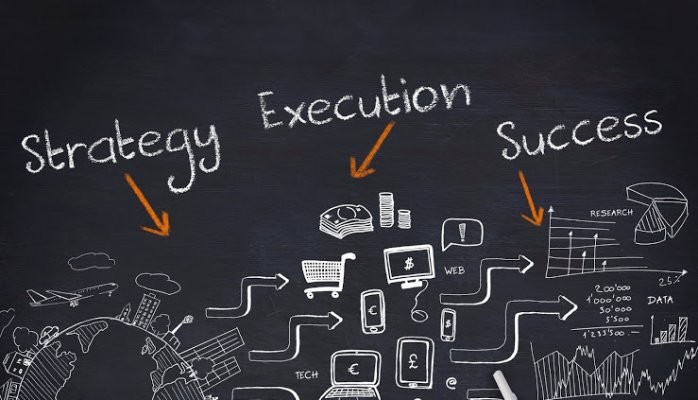
Choosing a SaaS content marketing agency is not just about hiring a service provider; it is about establishing a long-term partnership. Look for agencies that demonstrate a willingness to collaborate, communicate effectively, and align with your company's culture and values.
Before entering into a partnership, clearly communicate your expectations and goals to the agency. This will ensure that both parties are aligned and working towards a common objective within a flexible but precise marketing strategy. Regular communication and performance tracking will help you gauge the effectiveness of the partnership and make adjustments if necessary.
Choosing the right SaaS content marketing agency is a critical decision that can significantly impact your business's success. By understanding the role of a SaaS content marketing agency, evaluating key factors, and assessing their effectiveness, you can make an informed decision that drives growth and engagement for your SaaS business. If you want to compare the top options before committing, our breakdown of the best SaaS marketing agencies covers leading firms by specialty, pricing, and fit.

Most advertisers pour budget into Google Search and Display campaigns while overlooking one of the most targeted placements in the entire Google Ads ecosystem: Gmail. Google Sponsored Promotion (GSP) ads appear directly in a user's Gmail Promotions tab, formatted to look like a native email. When a user clicks the collapsed ad, it expands into a full-width creative that can include images, video, and a clear call to action.
The strategic advantage of Gmail ads is simple. Because you can target users based on the emails they receive, you can place your brand directly in front of people who are already engaged with your competitors or complementary products. You are not interrupting a random browsing session. You are reaching someone who has an active relationship with a company in your space and showing them a better alternative.
For brands looking to grow market share without inflating search CPCs, Gmail ads offer a low-cost, high-intent channel that most competitors are not even thinking about.
The real power of GSP ads is not the ad format itself. It is the targeting model. There are two categories of businesses you should be targeting with Gmail campaigns:
Complements are businesses, tools, or services that your target audience uses alongside your product. They are not direct competitors, but they serve the same buyer profile. For example, if you sell a landing page builder, your complements might include email marketing platforms like Mailchimp, ConvertKit, or ActiveCampaign. Users of those tools almost certainly need a landing page solution, making them a high-quality audience.
Competitors are the brands that sell directly against you. By targeting their domain in your Gmail campaign, your ad will appear in the inboxes of users who receive their marketing emails, onboarding sequences, and promotional offers. This is the digital equivalent of placing a billboard outside your competitor's storefront, except it is personalized, measurable, and far less expensive.
The combination of complement and competitor targeting gives you access to a pre-qualified audience. These users have already demonstrated interest in your category through their existing email subscriptions and purchasing behavior.
Gmail campaigns should not operate in isolation. They work best as part of a multi-channel growth marketing strategy where each channel plays a distinct role:
By positioning Gmail ads in the awareness-to-consideration phase, you create an additional touchpoint that warms up prospects before they ever search for your brand or product category.
Follow these steps to create your first GSP campaign targeting competitor and complement audiences.
In your Google Ads account, click "Create a New Campaign" and select "Display Network Only." Gmail ads run through the Display network, so this is your starting point.

Enter your campaign name, select your target location, and set your bidding strategy and daily budget. For Gmail campaigns, start with a Manual CPC bidding strategy so you maintain control over costs while gathering initial performance data. A daily budget of $20 to $50 is a reasonable starting point for testing.

Click "Save and continue" to move to the ad group configuration.
Create a naming convention that maps each ad group to a specific competitor or complement. For example: "GSP - Competitor - Mailchimp" or "GSP - Complement - LeadPages." This structure makes it easy to compare performance across targets and scale the campaign over time.
Start with a max CPC between $0.10 and $0.50. Gmail clicks tend to be significantly cheaper than Search clicks, so you do not need to bid aggressively to win placements. You can adjust bids up or down based on initial performance.
Under targeting options, choose "Display keywords" and enter the website URL of your competitor or complement. This is the critical step that defines who sees your ad.
When you enter a domain like "mailchimp.com" as a display keyword, Google will show your ad to Gmail users who have received emails from that domain. This is how you reach an audience that is already engaged with a competing or complementary brand.

Click "Narrow your targeting further" and choose "Placements" as your targeting method. This is a step many advertisers miss, and skipping it will cause your ads to show across the entire Display network rather than exclusively in Gmail.

Search for "mail.google.com" and add it as your placement target. This ensures your ads appear only within Gmail inboxes and nowhere else on the Display network.

Click "Save and continue." On the Ad Creation page, click "Skip ad creation." Gmail ads cannot be created in the standard ad builder, so you will need to use the Ad Gallery.
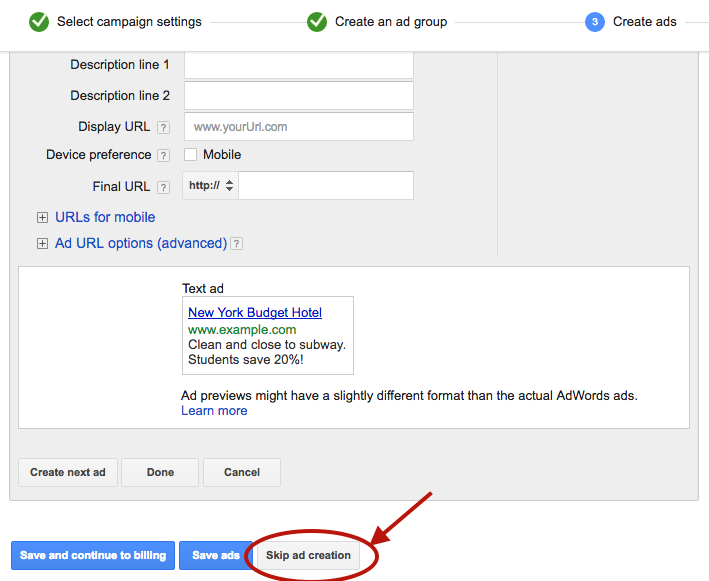
Navigate to the "Ads" tab in your account, click the red "Ad" button, and select "Ad Gallery" from the dropdown menu.
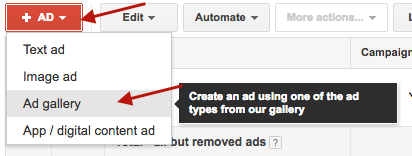
In the Ad Gallery, click "Gmail Ads" to access the Gmail-specific ad templates.

Select "Gmail image template" for the simplest and most effective format. Other template options are available, but the image template provides the best combination of visual impact and ease of setup.

Fill in the template fields:

One of the strongest advantages of Gmail ads is the ability to split-test variations of every element. Create at least two to three versions with different subject lines, images, and descriptions. Test one variable at a time to isolate what drives performance.
Click "Save" to finalize your ad. Your campaign is now live and will begin serving to Gmail users who match your targeting criteria.
Your Gmail ad appears alongside real emails. If your subject line reads like an advertisement, users will skip it. Study the subject line patterns that perform well in email marketing: curiosity-driven questions, specific numbers, and clear benefit statements all tend to outperform generic promotional copy.
The expanded Gmail ad is only the first click. If users land on a generic homepage after clicking a specific offer, you will lose them. Create dedicated landing pages that match the messaging and offer in your Gmail ad. This alignment improves both conversion rates and Quality Score.
Once you validate that your initial targets are producing cost-efficient clicks and conversions, expand your campaign by adding new competitor and complement domains as separate ad groups. Each new domain you add opens up an entirely new audience segment.
Performance will vary significantly across targets. A competitor with a large, engaged email list will generate more impressions and clicks than a smaller complement. Review performance at the ad group level weekly and adjust bids to allocate more budget toward your top-performing targets.
Gmail ad clicks are top-of-funnel interactions. Most users will not convert on the first visit. Make sure your remarketing pixel fires on the landing page so you can follow up with Display, Search, and social remarketing ads that bring these users back to convert.
Gmail ads do not generate the immediate volume of Search campaigns or the flashy creative opportunities of video and social ads. They are a surgical targeting tool that delivers incremental reach at a fraction of the cost. Because they require a different setup workflow and a targeting mindset rooted in competitive intelligence, most advertisers never bother.
That is exactly why they work. Low competition means lower CPCs, higher impression share, and the opportunity to reach your competitors' most engaged audiences before they even start searching for alternatives.
If you are looking for new growth channels that deliver qualified traffic without bidding wars, Gmail ads deserve a place in your paid media mix.
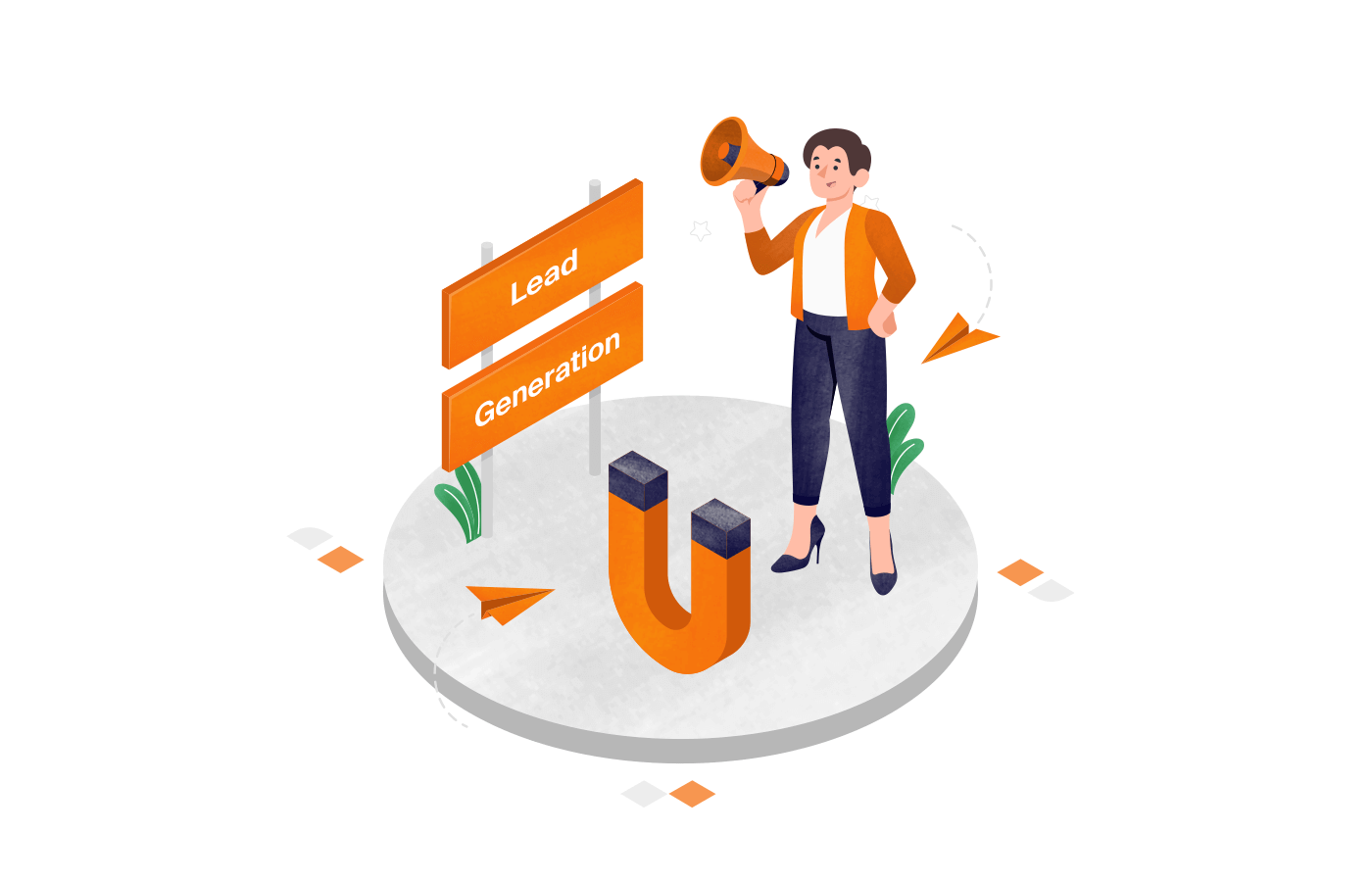
Lead generation has become a crucial aspect of any organization's marketing strategy. As businesses strive to expand their customer base and increase sales, understanding lead generation pricing becomes paramount. This article aims to provide a comprehensive overview of lead generation pricing, from its definition to the factors influencing it, and offer practical tips on budgeting and evaluating the return on investment (ROI) of these efforts.

In simple terms, lead generation refers to the process of attracting and converting potential customers into leads, who express interest in a company's products or services. These leads then become valuable assets for the sales team, as they can be nurtured and eventually converted into paying customers.
Lead generation is a multifaceted strategy that involves various tactics and techniques to capture the attention of potential customers. It is not just about getting people to visit a website or filling out a form; it is about building relationships and creating opportunities for businesses to connect with their target audience.
Lead generation plays a pivotal role in the growth and success of a business. By generating high-quality leads, companies can create a steady stream of potential customers, thereby increasing their chances of closing deals and driving revenue. Moreover, lead generation helps businesses build brand awareness, establish authority in their industry, and cultivate long-term relationships with customers.
When done effectively, lead generation can be a game-changer for businesses, providing them with a competitive edge in the market. It allows companies to proactively reach out to potential customers, rather than waiting for them to come across their products or services. This proactive approach not only increases the likelihood of conversions but also enables businesses to tailor their offerings to meet the specific needs and preferences of their target audience.
When it comes to lead generation, several key components work synergistically to achieve optimal results. These components include:
An effective website is the foundation of a successful lead generation strategy. It should be visually appealing, user-friendly, and optimized for search engines. Compelling landing pages with clear call-to-actions help guide visitors towards taking the desired action, whether it's filling out a form, subscribing to a newsletter, or making a purchase.
Engaging content is another crucial component of lead generation. By creating valuable and informative content, businesses can attract potential customers and establish themselves as industry experts. This can be achieved through blog posts, whitepapers, ebooks, videos, and webinars, among other content formats.
Lead capture forms and lead magnets play a vital role in capturing visitor information. These forms should be strategically placed on landing pages and offer something of value in exchange for contact details, such as a free ebook, a discount code, or access to exclusive content. This incentivizes visitors to provide their information willingly.
Targeted advertising and marketing campaigns help businesses reach the right audience and generate qualified leads. By leveraging data and analytics, companies can identify their target market and create customized campaigns that resonate with their audience's needs and preferences. This can be done through various channels, such as social media advertising, search engine marketing, email marketing, and content syndication.
Marketing automation tools streamline lead nurturing and follow-up processes, allowing businesses to engage with leads at scale. These tools automate repetitive tasks, such as sending personalized emails, tracking customer interactions, and scoring leads based on their level of engagement. By nurturing leads through targeted and timely communication, businesses can increase their chances of converting them into paying customers.
Here are [5 proven strategies to boost lead generation].
Now that we've covered the basics of lead generation, it's time to explore the various pricing models commonly used in this realm. Understanding the pros and cons of each model is crucial for businesses to make informed decisions and maximize their return on investment.
When it comes to lead generation, businesses have several pricing models to choose from. Each model offers its own advantages and disadvantages, catering to different business needs and goals. Let's take a closer look at three popular pricing models: Cost Per Lead (CPL), Monthly Retainer, and Performance-Based.
The cost per lead (CPL) model, as the name suggests, entails businesses paying a fixed amount for each lead they receive. This model offers a predictable and measurable approach to lead generation pricing. With CPL, companies have greater control over their budget, as they only pay for actual leads.
However, it is important to carefully evaluate the quality of leads generated under the CPL model. While lower-cost leads may seem appealing, they may not always translate into qualified prospects. Businesses need to ensure that the leads they receive are relevant and have a higher likelihood of conversion.
In the monthly retainer model, businesses work with lead generation agencies or consultants on an ongoing basis, paying a fixed monthly fee for their services. This model offers a more comprehensive approach, as the agency takes responsibility for managing the entire lead generation process.
The advantage of the monthly retainer model lies in its scalability and flexibility. Businesses can adjust their lead generation efforts according to their needs, whether it's increasing or decreasing the volume of leads generated. This model allows businesses to have a dedicated team working on their lead generation efforts, ensuring consistent results.
At the same time, it's important to note that the cost of retaining a lead generation agency can be higher compared to other pricing models. Businesses need to carefully assess their budget and the value they expect to receive from the agency before committing to a monthly retainer.
The performance-based model aligns lead generation pricing with the desired outcomes. Instead of paying a fixed fee or cost per lead, businesses only compensate lead generation agencies based on the actual performance achieved, such as the number of qualified leads or converted customers.
This model provides a clear incentive for the agency to deliver tangible results. The agency's compensation is directly tied to the success of the lead generation campaign, motivating them to put in their best efforts. It also allows businesses to closely track their return on investment (ROI) and ensure that they are getting the desired results.
However, implementing a performance-based model requires businesses to carefully define and measure the key performance indicators (KPIs) that will determine the agency's compensation. This ensures fair compensation for both parties and avoids any potential disputes.
While understanding the pricing models is crucial, it is equally important to consider the factors that influence lead generation pricing. By identifying these factors, businesses can set realistic expectations and allocate their resources effectively.
The quality of leads greatly impacts the pricing. High-quality leads, who are more likely to convert into paying customers, generally incur higher costs. Factors that contribute to lead quality include the relevance of the target audience, the level of interest demonstrated, and the accuracy of the contact information provided.
For example, let's say a business is targeting professionals in the healthcare industry who have shown a strong interest in a specific product. These leads are more likely to convert into customers compared to leads from a general audience. Therefore, the cost per lead for such high-quality leads would be higher due to the increased chances of conversion.
The industry in which a business operates and the characteristics of its target market can significantly influence lead generation pricing. Industries with intense competition or niche markets may require more targeted and tailored lead generation strategies, resulting in higher costs.
Consider a business operating in the highly competitive technology industry. The target market for this business consists of tech-savvy individuals who are constantly bombarded with advertisements and marketing campaigns. In order to stand out from the competition and capture the attention of these potential leads, the business may need to invest in more sophisticated lead generation tactics, such as personalized email campaigns or social media advertising. These additional efforts would naturally increase the overall cost of lead generation.
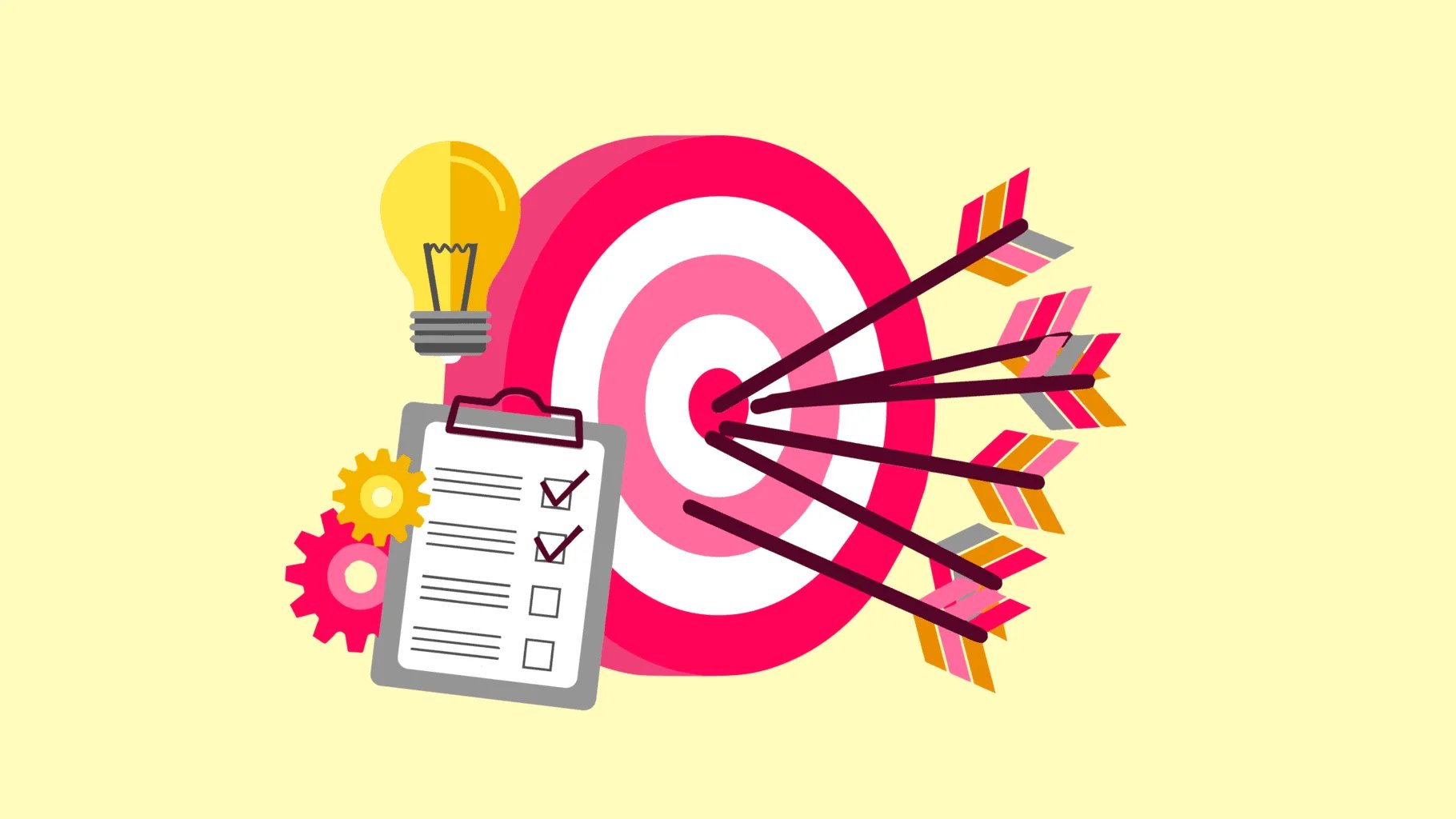
Let's say a business wants to implement a comprehensive lead generation strategy that includes not only capturing leads but also nurturing them through personalized email sequences and targeted content. This level of service requires a greater investment of time, resources, and expertise from the lead generation agency. As a result, the pricing for such a customized and hands-on approach would be higher compared to a more basic lead generation package.
At the same time, businesses that require advanced analytics to track and measure the effectiveness of their lead generation efforts may need to pay a premium for the tools and expertise needed to provide such insights. These analytics can help businesses optimize their lead generation strategies and improve their return on investment.
As you see, several factors influence lead generation pricing, including the quality of leads, the industry and target market, and the level of service and customization required. By understanding these factors, businesses can make informed decisions about their lead generation strategies and budget accordingly.
Prior to budgeting for lead generation, it is crucial for businesses to determine their specific lead needs. This involves assessing the desired volume of leads, the expected conversion rate, and the target cost per lead. By setting clear objectives and benchmarks, businesses can allocate their budget more effectively.
Allocating resources for lead generation involves finding a balance between investing in various lead generation strategies and managing costs. Some resources that would require allocation include advertising budgets, staff dedicated to lead generation efforts, and the technology needed to support these activities.
To evaluate the return on investment (ROI) of lead generation efforts, businesses must establish key performance metrics and regularly measure their performance against these benchmarks. Metrics such as the cost per lead, lead-to-customer conversion rate, and customer lifetime value are valuable indicators of lead generation success.
Based on the ROI analysis, businesses should make data-driven decisions to optimize their lead generation strategy. This might involve reallocating resources, refining targeting criteria, or experimenting with new lead generation tactics. Continuous monitoring and adaptation are crucial for achieving long-term success in lead generation.
To thrive in today's highly competitive business landscape, understanding lead generation pricing is essential. By comprehending the various pricing models, considering influencing factors, and budgeting wisely, organizations can maximize their lead generation efforts and ultimately drive revenue growth. Additionally, by evaluating the ROI of lead generation and making necessary adjustments, businesses can continuously refine their approach and stay ahead of the curve.
It was dark. Really dark. The kind of darkness that makes you question your sanity.
The only thing louder than my pulse was the slow drip of a faucet that bounced off the concrete walls.
Cold metal handcuffs pressed firmly against my wrists. I could move, but only as far as the heavy chain would allow.
Only minutes had passed since we were blindfolded. But every second would count.
The countdown for survival was on...

Not every company subjects its crew to extreme escape scenarios, but when you’re a distributed team like EmberTribe, you have to make the most of the (face) time!
At our most recent meetup, some of our team took on the challenge of escaping from a “Breakout” room.
The team building concept is catching on quickly with dozens of franchises sprouting up across the nation. Our experience unfolded at the Greensboro, NC location.
The objective is simple: work as a team to escape! Think of it as a life-sized puzzle. Without going into specifics (you’ll have to experience that yourself!), you have to crack codes, look for clues, and use logic to escape. Each riddle you solve leads one step closer to victory.
The catch? You only have 60 minutes to do it.
The scenario we chose was called “The Kidnapping”, in which a crazed serial killer (somewhat altruistically) gives you 60 minutes to escape before...well, you know. Here’s the trailer.
The Breakout Games company records data from thousands of these escapes and monitors each one through video surveillance. The odds they gave us to escape? A mere 20% success rate.
This post isn’t so much about the destination as it was the journey, so I’ll let the cat out of the bag: we made it!
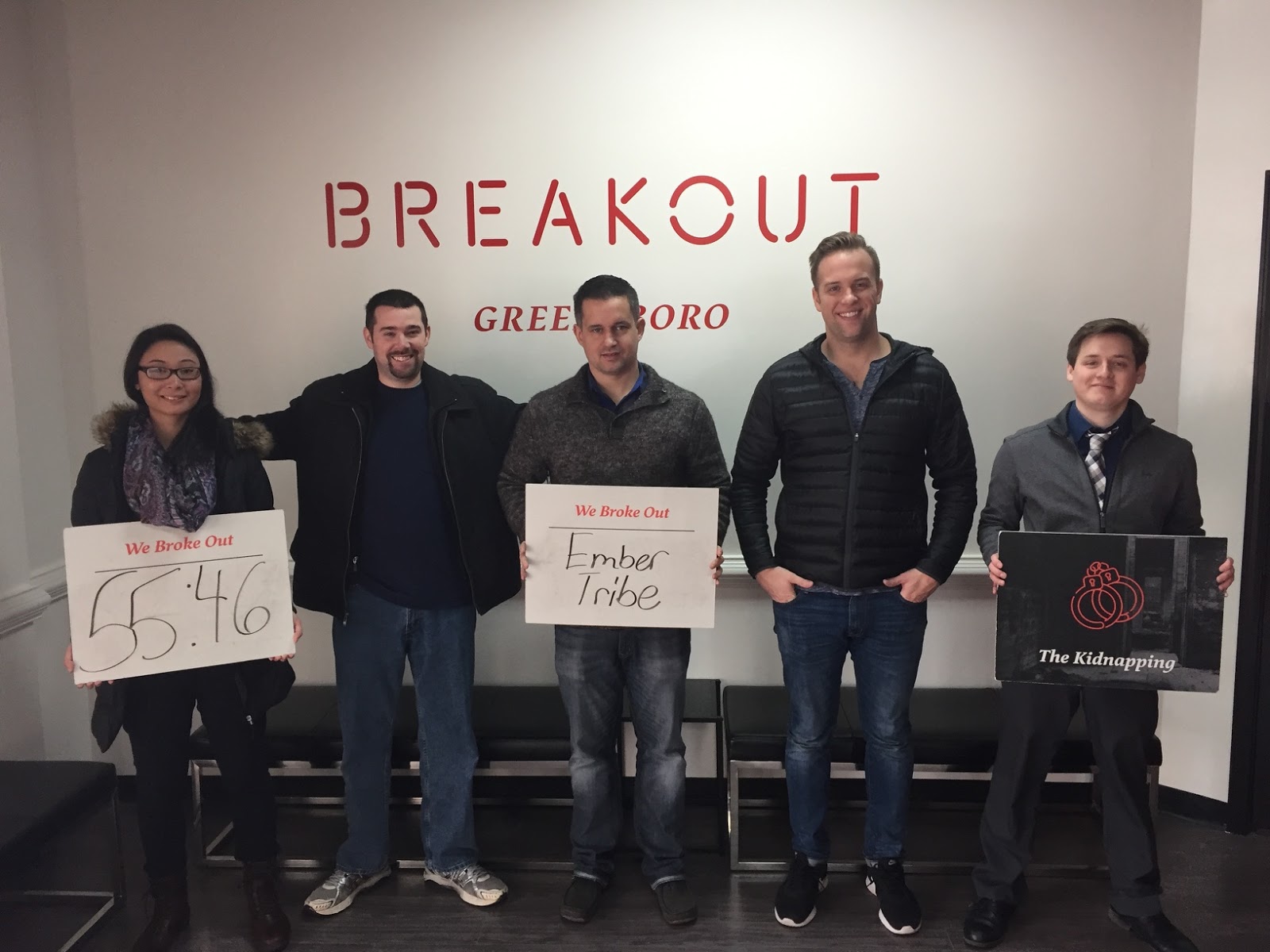
Beating the odds confirmed what I already knew: I work with some of the smartest people I’ve ever met.
But there’s a lot more that I learned about teamwork and how we’re wired.
Our team is divided evenly between folks who process internally and the loudmouths like me, who are verbal processors. This also correlates somewhat to personality.
In the breakout room, some of our quieter folks would wait, listen, think and then nail a solution that seemingly came out of thin air.
The learning here is that quiet ≠ disengaged. It’s important to remember this during brainstorming meetings and really any group context.
On the other hand, loud ≠ domineering. Verbal processors need the same space to talk through a solution.
Empathy and patience are key.
One reason why we were successful in the breakout room is that we leveraged the power of observation.
Put another way: we would state the obvious first, then figure out what that meant for next steps.
Observe. Process. Solve.
When you jump to a solution too quickly, you work on faulty assumptions. I made this mistake at one point in the breakout room. I found a puzzle piece and started working under the assumption it was meant to fit on the floor. In fact, the piece only made sense when it was held up to the wall.
This principle has a direct application to our work as an agency. We let data drive solutions for our clients. When we’re measuring performance for an ad campaign or a landing page, we carefully observe and then think about architecting a solution.
Let the facts sink in, challenge your assumptions, then think through a solution. Definitely something I want to continue to build into our culture here at Ember.
In the breakout room we all focused on a common goal. When we unlocked a new box we would huddle and observe. But then we would disperse a bit while working on the next obstacle.
Some people took notes on a whiteboard, others tinkered with puzzle pieces. Others reviewed past clues.
There was an efficient form of communication unfolding in the room where we shared information without hyper-focus on one part of the problem.
Some challenges can’t be solved until you change your perspective. In the breakout room, different clues are revealed with the lights on and others only when the lights are off.
Changing perspectives in a breakout room is easy: just walk to the other side of the room and look at the riddle differently. In the real world, it takes an intentional effort to change perspective.
One way that our team and processes can improve is to schedule time for different team members to audit our client’s accounts.
We do this already when we hit a roadblock: conversion rate is stalling, ad campaign growing tired, etc. But a big win for us will be to pre-emptively get a fresh “outside” look to make sure we aren’t missing anything in our plan of attack.
One of my favorite aspects of the escape room is the countdown. In my post-game analysis I wondered: would have we escaped after 55 minutes if there was no countdown? I’m positive that we still would have escaped, but am certain it would have taken MUCH longer.
As I continue to reflect on this experience, I wonder, where should we be self-imposing limits on ourselves as a team to generate more creativity and clever solutions?
For example, our client may have a $10M advertising budget, but what could we accomplish with $1k? Having too much of a resource (money or time) can make you lazy and potentially miss a game changing creative solution.
Not to get too philosophical, but I think highly effective people learn to dream without limits and act within constraints.
Our team’s experience with the breakout room was really fun and a big win for morale. But I’m even more grateful for the lessons we’re taking with us...beyond the reach of a hypothetical serial killer.

Marketing experts know it. Pay-Per-Click (PPC) efforts can be a game-changer for businesses looking to grow their customer base. With the right approach, PPC -a paid marketing strategy- can result in a significant increase in lead generation and ultimately lead to higher conversion rates. As you know, sales doesn't come raining from the sky. But they might. Join us to learn more about PPC lead generation tips and how they might boost your customer base.
Look at the lead-to-sale conversion rate, the average lifetime value of customers acquired through PPC, and other relevant metrics. This will help you assess the overall effectiveness of your lead generation strategy and its impact on your business's bottom line.
After analyzing your performance metrics, it's time to identify areas of improvement. Look for patterns or trends in your data that may indicate areas where you can make changes. Are there keywords that are performing exceptionally well? Are there ad copy variations that are resulting in higher click-through rates? By identifying these areas, you can make targeted improvements to your campaigns.
Consider a few analytic activities. As conducting competitive analysis to gain insights from your industry peers. Or looking at what strategies and tactics they are employing and determine if there are any opportunities for you to learn from their successes or differentiate yourself in the market.
Also, don't overlook the importance of optimizing your landing pages. Analyze the user experience, page load times, and the clarity of your call-to-action. By making improvements to your landing pages, you can increase the conversion rate of your PPC campaigns and generate more qualified leads.
Lastly, consider exploring new channels and tactics to supplement your PPC lead generation efforts. This could include social media advertising, content marketing, or influencer partnerships. If you're evaluating external help, the guide to top PPC management companies outlines how to vet providers and what to expect from a managed PPC engagement. By diversifying your lead generation strategy, you can reach a wider audience and tap into new sources of high-quality leads.
One of the most critical aspects of PPC lead generation is optimizing your landing pages for conversion. A landing page is the webpage where users are directed after clicking on your ad. It serves as the first point of contact between the user and your business, making it crucial to create an impactful first impression.
A well-optimized landing page can significantly impact your conversion rates. By ensuring that your landing page is appealing, user-friendly, and relevant, you can increase the chances of converting visitors into leads. This can be achieved by using persuasive copy, prominent call-to-action (CTA) buttons, and a clean and intuitive design.
When designing your landing page, it's important to keep a few best practices in mind. First, make sure that your message aligns with the ad that led users to your landing page. This helps to maintain consistency and reinforce the value proposition you promised in your ad. Additionally, keep your landing page clutter-free and easy to navigate, ensuring that visitors can quickly find the information they need.
The success of any PPC campaign relies heavily on the selection of relevant keywords and the creation of compelling ad copy. These two components work hand in hand to attract your target audience and entice them to click on your ads.
Keywords are the foundation of any PPC campaign. They are the terms or phrases that users type into search engines when looking for products or services that your business offers. By conducting thorough keyword research, you can identify the keywords that your target audience is using and incorporate them into your ads.
Once you have a list of relevant keywords, it's time to craft compelling ad copy. Your ad copy should be concise, engaging, and relevant to the user's search intent. Highlight the unique selling points of your business and include a strong call-to-action to encourage users to click on your ad.
A/B testing, also known as split testing, is a strategy that allows you to compare two different versions of an element within your PPC campaign to determine which one performs better. By implementing A/B testing, you can continuously optimize your campaigns and improve your lead generation efforts.
A/B testing involves creating two or more variations of an element, such as an ad headline or a landing page layout, and then randomly showing different versions to your audience. By analyzing the performance metrics of each variation, you can identify which one generates the highest conversion rates and make data-driven decisions to improve your campaigns.
When conducting A/B testing for PPC, it's important to test one element at a time to accurately measure its impact. For example, you can test different ad headlines or call-to-action buttons. Additionally, make sure to track and analyze your results accurately to draw meaningful conclusions and make informed optimization decisions.
By following these three tips, you can significantly improve your PPC lead generation results. Remember to continuously monitor your campaigns, analyze your performance metrics, and make data-driven optimizations to maximize your lead generation efforts. With the right strategy and consistent effort, PPC lead generation can be a powerful tool in growing your business. With them, maybe, you'll start to capitalize those marketing efforts.
In today's competitive B2B landscape, lead generation is the engine that powers sustainable revenue growth. One platform that has become a go-to solution for growth-focused teams is Apollo. By combining a massive B2B contact database with AI-powered outreach sequences, Apollo gives marketing and sales teams the infrastructure to generate qualified leads at scale while keeping cost per acquisition under control.
This guide breaks down how Apollo works, the strategies that drive results, and the metrics you should track to ensure every dollar spent delivers maximum return.
Apollo is a sales intelligence and engagement platform built for B2B lead generation. It provides access to a database of over 275 million contacts across 73 million companies, paired with tools for email sequencing, calling, task management, and analytics.
What sets Apollo apart from traditional prospecting tools is how it combines data enrichment with execution. Rather than purchasing a static list and importing it into a separate outreach tool, Apollo lets you identify prospects, enrich their profiles, build multi-step sequences, and track engagement - all inside a single platform.
For growth-stage companies that need to move quickly without hiring a large sales development team, Apollo eliminates the friction between research and action.
Getting results from Apollo starts with proper setup. A misconfigured instance leads to wasted emails, low reply rates, and poor data quality. Here is the foundational work that matters most.
Before running a single search, document your ideal customer profile (ICP) with specificity. Apollo's filters are powerful, but they only work when you know exactly who you are looking for. Key attributes to define include:
A tightly defined ICP reduces list size but dramatically increases conversion rates. Teams that skip this step often see open rates below 15% and reply rates below 1% - numbers that make outbound financially unviable.
Email deliverability is the silent killer of outbound campaigns. Apollo provides built-in tools to help, but you need to set them up proactively:
Bounce rates above 3% will damage your sender reputation and can land your domain on blocklists. This is one area where spending time upfront saves significant cost downstream.
Once your foundation is solid, the following strategies separate high-performing Apollo campaigns from average ones.
The days of single-touch outreach are over. Effective Apollo sequences typically include 5-8 touchpoints spread across 14-21 days, combining email, LinkedIn connection requests, and phone calls. A proven structure includes:
This multi-channel approach increases reply rates by 2-3x compared to email-only sequences because it meets prospects where they are most active.
Apollo's intent signals indicate when a company is actively researching topics related to your solution. Prospects showing buying intent convert at significantly higher rates than cold contacts because the timing aligns with their existing evaluation process.
Practical ways to leverage intent data include:
This approach is particularly effective for B2C and B2B lead generation teams that need to prioritize limited SDR capacity.
Generic templates get ignored. Apollo's AI features can help you personalize at scale by dynamically inserting company-specific data points, recent news mentions, and technographic details into your messaging. The key is balancing personalization with efficiency:
Generating leads is only valuable if you can prove the return. Here are the metrics that matter and how to track them effectively.
When evaluating your Apollo lead generation performance, track KPIs across three levels:
Activity metrics - These confirm your team is executing at the right volume:
Engagement metrics - These indicate whether your messaging resonates:
Revenue metrics - These connect outbound activity to business outcomes:
The most common mistake teams make is optimizing for activity metrics while ignoring revenue metrics. Sending more emails does not create value if those emails do not convert into pipeline.
Apollo's built-in analytics cover engagement metrics well, but you need additional tools for full-funnel visibility:
By analyzing data across these platforms, you gain a holistic view of which sequences, segments, and messaging strategies drive the highest return.
Even experienced teams make errors that erode performance. Watch for these common pitfalls:
Targeting too broadly. A list of 50,000 contacts feels productive but almost always underperforms a focused list of 2,000 well-researched prospects. Quality beats quantity in outbound.
Neglecting list hygiene. Contact data decays at roughly 30% per year. People change jobs, companies restructure, and email addresses go stale. Verify your lists regularly and remove contacts who have bounced or unsubscribed.
Sending without testing. A/B test subject lines, opening sentences, CTAs, and sequence length. Small improvements in open and reply rates compound significantly over thousands of sends.
Ignoring negative signals. When prospects unsubscribe, mark you as spam, or explicitly say they are not interested, respect those signals immediately. Continuing to contact them damages your domain reputation and brand.
Failing to align sales and marketing. Apollo works best when marketing and sales teams share a unified ICP, consistent messaging, and clear handoff processes. Misalignment leads to duplicated effort and conflicting outreach.
Once you have a proven sequence generating positive ROI, the next step is scaling without sacrificing quality. Key scaling levers include:
The goal is building a repeatable, measurable outbound engine that generates predictable pipeline month over month - not sporadic bursts of activity followed by periods of inaction.
Apollo lead generation offers B2B teams a powerful, consolidated platform to identify, engage, and convert qualified prospects. But the platform alone does not guarantee results. Success depends on precise targeting, disciplined execution, deliverability hygiene, and rigorous measurement.
Start with a tightly defined ICP, build multi-touch sequences that provide genuine value, track metrics at every stage of the funnel, and continuously optimize based on data. When these elements come together, Apollo becomes one of the highest-ROI investments in your growth stack.

Instagram has emerged as a dominant force in the digital marketing landscape. With its visually-driven format and highly engaged user base, it offers businesses a unique opportunity to showcase their products and connect with their audience. In order to stand out and capture the attention of users, it is crucial to create engaging Instagram ad mockups. But, first, what are them?
Instagram has revolutionized the way brands advertise, allowing them to showcase their products in a visually appealing and captivating manner. As a result, it has become an integral part of digital marketing strategies for many businesses. With the ability to target specific demographics and interests, Instagram ads can effectively reach the right audience and drive engagement.
However, in order to make the most of Instagram ads, mockups must resonate with your target audience. Ad mockups serve as a preview of your actual ad and allow you to experiment with different visuals, copy, and brand identity elements.
Ad mockups are an essential part of the creative process when it comes to Instagram advertising. They allow you to experiment with various design elements, test different approaches, and refine your messaging before investing in a full-scale ad campaign. By creating mockups, you can ensure that your ads are visually appealing, on-brand, and effectively convey your message to your target audience.
Creating ad mockups also helps you align your marketing goals with your creative strategy. By visualizing how your ad will look and feel, you can make informed decisions about the overall design, color scheme, and layout. This ensures that your ad not only captures the attention of your target audience but also aligns with your brand's identity and values.
By carefully considering these essential components, you can create an ad that stands out from the rest and effectively captures the attention of your target audience.

Before diving into the design phase, take the time to plan your ad campaign thoroughly. Define your campaign objectives, target audience, and key messaging. Conduct market research to understand your audience's preferences and interests. By laying a solid foundation, you can create a mockup that aligns with your overall marketing strategy.
Once you have a clear understanding of your campaign objectives and target audience, it's time to bring your mockup to life. Use graphic design tools or hire a professional designer to create visually appealing ad mockups. Experiment with different layouts, colors, and fonts to find the combination that resonates with your audience and aligns with your brand identity.
Remember to adhere to Instagram's ad guidelines and ensure that your mockup meets the required specifications for seamless integration into the platform. Pay attention to image resolution, aspect ratio, and file size to prevent any issues during the ad creation process.
Once your ad mockup is ready, it's crucial to review it thoroughly before finalizing the design. Take a step back and evaluate your mockup from the perspective of your target audience. Does it convey your message effectively? Is it visually compelling? Are there any areas for improvement?
Seek feedback from your team or trusted individuals to gather different perspectives. Use this feedback to refine your mockup further and make any necessary adjustments. This iterative process ensures that you create an ad that truly resonates with your audience and meets your campaign objectives.
Creating an engaging Instagram ad mockup requires thoughtful planning and attention to detail. Here are some additional tips to enhance the effectiveness of your ad mockup:
Invest time in understanding your target audience's preferences, interests, and pain points. Tailor your ad mockup to resonate with their needs and desires. By crafting ads that speak directly to your audience, you can increase engagement and drive conversions.

Instagram offers a range of features such as Stories, IGTV, and shopping tags that can enhance the effectiveness of your ad mockup. Explore these features and experiment with different formats to create a compelling ad experience.
Don't be afraid to test different versions of your ad mockup to see which resonates best with your audience. A/B testing can provide valuable insights and help you optimize your ad for maximum impact. Monitor key metrics such as click-through rates, engagement rates, and conversions to gauge the success of your ad campaign.
There you go. An engaging Instagram ad mockup is a crucial step in driving successful ad campaigns on the platform. By understanding the importance of ad mockups, incorporating essential elements, and following a systematic approach, you can create ads that captivate your audience and drive meaningful results for your business.


.svg)