
Businesses that run Google Ads well earn an average of $2 for every $1 spent, and Google itself estimates the platform can deliver up to 800% ROI for advertisers who structure their campaigns correctly. The gap between those results and the advertisers who burn through budget without traction almost always comes down to setup decisions made in the first few hours. This guide walks you through every step, from opening your account to launching a campaign built to convert.
Before logging into Google Ads, two things need to be in place: a Google account linked to your business and a clear conversion goal. That goal could be a purchase, a form submission, a phone call, or a page visit. Without it, you have no signal to optimize toward and no way to know whether your spend is working.
You also need a landing page that matches your ad's promise. Sending traffic to a generic homepage is one of the most common reasons new campaigns underperform. The page a user lands on should directly address whatever the ad offered.
Go to ads.google.com and sign in with your Google account. Google will walk you through a "Smart campaign" setup by default, but skip past it to access Expert Mode. Expert Mode gives you access to all campaign types, full bidding controls, and manual keyword management, which is what you need to run campaigns that scale.
Set your billing country, time zone, and currency carefully. These settings cannot be changed after account creation and affect how your reporting data lines up with your business records.
Conversion tracking is the most important step in this entire process, and it comes before you create a single campaign. In Google Ads, go to Tools, then Measurement, then Conversions. Define your conversion action, whether that is a purchase, a lead form, or a button click.
Install the Google tag on your site and set up the specific conversion event. For purchase-based businesses, enhanced conversions are worth enabling immediately. Enhanced conversions use hashed first-party data to improve measurement accuracy by 20 to 30%, which means your bidding algorithms have better data to work with from day one. Without solid conversion tracking, automated bidding strategies have nothing to learn from.
Google Ads offers several campaign types, each suited to a different goal. For most brands running their first campaign, Search is the right starting point.
Search campaigns show text ads to people actively searching for your product or service. They capture high-intent traffic, and the keyword control makes them easier to manage than other formats. Understanding the full landscape of search advertising helps you fit Search campaigns into a broader paid media strategy.
Performance Max campaigns run across all Google inventory, including Search, Display, YouTube, Gmail, and Shopping, using Google AI to allocate budget. They work best when you already have conversion history and creative assets ready. Starting a brand-new account with PMax before you have conversion data usually leads to wasted spend in the first few weeks.
Shopping campaigns are built for ecommerce and pull product data from your Merchant Center feed. If you sell physical products, a well-structured ecommerce PPC approach treats Shopping and Search as complementary rather than competing channels.
Display and Video campaigns run on Google's network of websites and on YouTube. They are better suited for awareness and retargeting than for direct response in most cases.
Campaign structure directly affects your Quality Score, your budget efficiency, and your ability to read performance data. A common mistake is putting every keyword into one ad group with generic ad copy. Tight structure prevents this.
Organize campaigns around a single product category, service line, or funnel stage. Inside each campaign, create ad groups around tightly related keyword themes. Each ad group should have five to fifteen closely related keywords and ad copy that speaks directly to that specific intent. When your keywords, ads, and landing page all point to the same topic, Google rewards you with a higher Quality Score, which lowers your cost per click.
Keywords are the mechanism that connects your ads to the right search queries. Start with terms your customers actually use, not internal product terminology. Tools like Google Keyword Planner are built into your account and show estimated search volume and bid ranges for any term.
Use a mix of match types strategically. Exact match gives you precise control over which queries trigger your ads. Phrase match expands reach to queries containing your keyword phrase. Broad match, especially when paired with Smart Bidding, lets Google's algorithm discover related queries, but it requires enough conversion data to work well.
Negative keywords are just as important as your target keywords. Add irrelevant terms from the start so your budget is not wasted on queries that will never convert. Review your search terms report weekly in the early weeks of a campaign to catch new negatives before they accumulate cost.
If you want to see what queries are driving results for competitors, reverse-engineering a competitor's keyword strategy can surface opportunities you would not have found through keyword tools alone.
Google Search ads use a Responsive Search Ad format. You provide up to fifteen headlines and four descriptions, and Google tests combinations to find what performs best. Write headlines that include your primary keyword, a specific benefit, and a call to action. Avoid vague phrases like "great service" or "learn more." Specificity converts better.
Pin a headline only when accuracy requires it, such as a brand name or a specific offer. Otherwise, letting Google rotate through combinations gives the algorithm more data to optimize. Include at least one description that provides proof, whether that is a number, a guarantee, a result, or a customer outcome.
Enable ad extensions, now called assets, across the board. Sitelinks, callouts, structured snippets, and call assets expand your ad's footprint on the search results page and improve click-through rate without adding cost per click.
Bidding strategy determines how Google spends your budget and how aggressively it competes in each auction. The right strategy depends on where your account is in its data lifecycle.
For a new account with no conversion history, start with Maximize Clicks with a cost-per-click cap. This gets impressions and clicks while limiting exposure until your tracking is validated. Once you have at least 30 conversions in a 30-day window, switch to Maximize Conversions. After you reach 50 or more weekly conversions consistently, you can layer in a Target CPA to hold Google to a specific cost per acquisition.
Target ROAS is the right choice once you have consistent purchase data and want to optimize for revenue rather than conversion volume. It works well for ecommerce brands where order values vary and you want Google to prioritize higher-value transactions. According to Google's own bidding guidance, Smart Bidding strategies perform best when campaigns are given enough conversion data and are not interrupted by frequent structural changes.
Set a daily budget at the campaign level. A realistic starting budget for Search is enough to generate at least ten to twenty clicks per day based on the average CPC in your category. The average CPC across all industries in Google Ads is $4.22, so a $50 to $100 daily budget gives you enough volume to start seeing meaningful data within a week.
Review your campaign settings before going live. Confirm that your location targeting is set to your actual service area, not a broader default. Check that the Google Search Network is included and that Search Partners and Display Network are turned off until you have baseline data.
Set an ad schedule only if you have a specific business reason to limit hours. Otherwise, let the campaign run and use the data to identify any time-of-day patterns worth acting on.
Google Ads is not a set-it-and-forget-it channel. The first two weeks are about validating your tracking and catching early issues. After that, shift to a weekly optimization rhythm.
Each week, review your search terms report and add negatives, check quality scores by ad group, and compare conversion rates across keywords. Pause keywords that have spent beyond three times your target CPA without converting. Test one new headline or description variant per ad group per month rather than changing everything at once. Isolating variables is the only way to know what actually moved the needle.
Monthly, assess campaign-level performance against your goals, review impression share to understand whether budget or bid constraints are limiting reach, and consider whether your landing pages need updates based on the traffic data you are collecting.
For brands that want support building campaigns from scratch or scaling an existing account, EmberTribe's Google Ads management services cover full-funnel paid search strategy built around measurable growth.
Google Ads excels at capturing demand that already exists. When someone searches for what you offer, Search campaigns put your brand in front of them at exactly the right moment. That makes it one of the most efficient channels for converting high-intent prospects.
What it cannot do is create demand for something people are not actively searching for. If your product or category is new to the market, you may need Display or Video campaigns to build awareness before Search campaigns can reach their potential. Understanding how Google Ads works as a platform gives you a sharper view of where it fits in your overall growth model.
The brands that get the most from Google Ads treat it as a data system, not just an advertising channel. Every campaign generates information about what your customers are searching for, what language converts, and which offers drive action. Run it with that lens and you are building an asset that compounds over time.
Sources:
Most advertisers pour budget into Google Search and Display campaigns while overlooking one of the most targeted placements in the entire Google Ads ecosystem: Gmail. Google Sponsored Promotion (GSP) ads appear directly in a user's Gmail Promotions tab, formatted to look like a native email. When a user clicks the collapsed ad, it expands into a full-width creative that can include images, video, and a clear call to action.
The strategic advantage of Gmail ads is simple. Because you can target users based on the emails they receive, you can place your brand directly in front of people who are already engaged with your competitors or complementary products. You are not interrupting a random browsing session. You are reaching someone who has an active relationship with a company in your space and showing them a better alternative.
For brands looking to grow market share without inflating search CPCs, Gmail ads offer a low-cost, high-intent channel that most competitors are not even thinking about.
The real power of GSP ads is not the ad format itself. It is the targeting model. There are two categories of businesses you should be targeting with Gmail campaigns:
Complements are businesses, tools, or services that your target audience uses alongside your product. They are not direct competitors, but they serve the same buyer profile. For example, if you sell a landing page builder, your complements might include email marketing platforms like Mailchimp, ConvertKit, or ActiveCampaign. Users of those tools almost certainly need a landing page solution, making them a high-quality audience.
Competitors are the brands that sell directly against you. By targeting their domain in your Gmail campaign, your ad will appear in the inboxes of users who receive their marketing emails, onboarding sequences, and promotional offers. This is the digital equivalent of placing a billboard outside your competitor's storefront, except it is personalized, measurable, and far less expensive.
The combination of complement and competitor targeting gives you access to a pre-qualified audience. These users have already demonstrated interest in your category through their existing email subscriptions and purchasing behavior.
Gmail campaigns should not operate in isolation. They work best as part of a multi-channel growth marketing strategy where each channel plays a distinct role:
By positioning Gmail ads in the awareness-to-consideration phase, you create an additional touchpoint that warms up prospects before they ever search for your brand or product category.
Follow these steps to create your first GSP campaign targeting competitor and complement audiences.
In your Google Ads account, click "Create a New Campaign" and select "Display Network Only." Gmail ads run through the Display network, so this is your starting point.

Enter your campaign name, select your target location, and set your bidding strategy and daily budget. For Gmail campaigns, start with a Manual CPC bidding strategy so you maintain control over costs while gathering initial performance data. A daily budget of $20 to $50 is a reasonable starting point for testing.

Click "Save and continue" to move to the ad group configuration.
Create a naming convention that maps each ad group to a specific competitor or complement. For example: "GSP - Competitor - Mailchimp" or "GSP - Complement - LeadPages." This structure makes it easy to compare performance across targets and scale the campaign over time.
Start with a max CPC between $0.10 and $0.50. Gmail clicks tend to be significantly cheaper than Search clicks, so you do not need to bid aggressively to win placements. You can adjust bids up or down based on initial performance.
Under targeting options, choose "Display keywords" and enter the website URL of your competitor or complement. This is the critical step that defines who sees your ad.
When you enter a domain like "mailchimp.com" as a display keyword, Google will show your ad to Gmail users who have received emails from that domain. This is how you reach an audience that is already engaged with a competing or complementary brand.

Click "Narrow your targeting further" and choose "Placements" as your targeting method. This is a step many advertisers miss, and skipping it will cause your ads to show across the entire Display network rather than exclusively in Gmail.

Search for "mail.google.com" and add it as your placement target. This ensures your ads appear only within Gmail inboxes and nowhere else on the Display network.

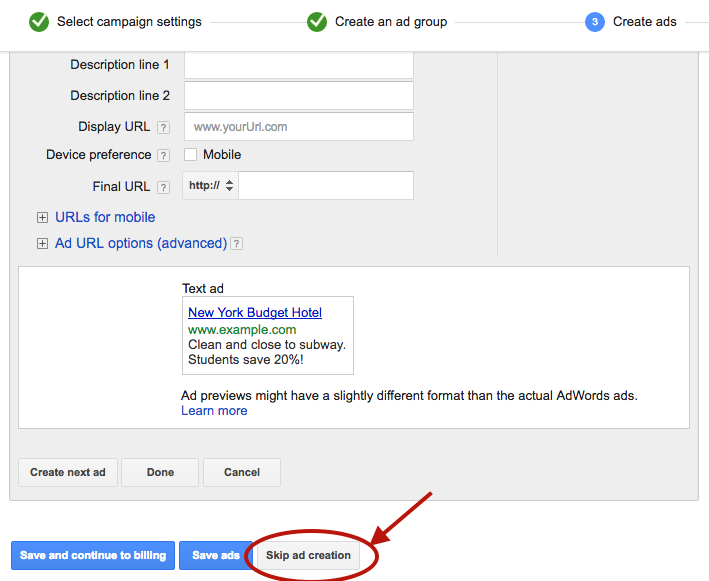
Click "Save and continue." On the Ad Creation page, click "Skip ad creation." Gmail ads cannot be created in the standard ad builder, so you will need to use the Ad Gallery.
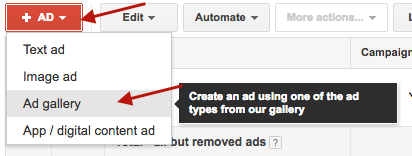
Navigate to the "Ads" tab in your account, click the red "Ad" button, and select "Ad Gallery" from the dropdown menu.
In the Ad Gallery, click "Gmail Ads" to access the Gmail-specific ad templates.

Select "Gmail image template" for the simplest and most effective format. Other template options are available, but the image template provides the best combination of visual impact and ease of setup.

Fill in the template fields:

One of the strongest advantages of Gmail ads is the ability to split-test variations of every element. Create at least two to three versions with different subject lines, images, and descriptions. Test one variable at a time to isolate what drives performance.
Click "Save" to finalize your ad. Your campaign is now live and will begin serving to Gmail users who match your targeting criteria.
Your Gmail ad appears alongside real emails. If your subject line reads like an advertisement, users will skip it. Study the subject line patterns that perform well in email marketing: curiosity-driven questions, specific numbers, and clear benefit statements all tend to outperform generic promotional copy.
The expanded Gmail ad is only the first click. If users land on a generic homepage after clicking a specific offer, you will lose them. Create dedicated landing pages that match the messaging and offer in your Gmail ad. This alignment improves both conversion rates and Quality Score.
Once you validate that your initial targets are producing cost-efficient clicks and conversions, expand your campaign by adding new competitor and complement domains as separate ad groups. Each new domain you add opens up an entirely new audience segment.
Performance will vary significantly across targets. A competitor with a large, engaged email list will generate more impressions and clicks than a smaller complement. Review performance at the ad group level weekly and adjust bids to allocate more budget toward your top-performing targets.
Gmail ad clicks are top-of-funnel interactions. Most users will not convert on the first visit. Make sure your remarketing pixel fires on the landing page so you can follow up with Display, Search, and social remarketing ads that bring these users back to convert.
Gmail ads do not generate the immediate volume of Search campaigns or the flashy creative opportunities of video and social ads. They are a surgical targeting tool that delivers incremental reach at a fraction of the cost. Because they require a different setup workflow and a targeting mindset rooted in competitive intelligence, most advertisers never bother.
That is exactly why they work. Low competition means lower CPCs, higher impression share, and the opportunity to reach your competitors' most engaged audiences before they even start searching for alternatives.
If you are looking for new growth channels that deliver qualified traffic without bidding wars, Gmail ads deserve a place in your paid media mix.


Online advertising has become an integral part of marketing strategies for businesses of all sizes. Google Ads, formerly known as Google AdWords, is one of the most popular advertising platforms, allowing businesses to display their ads across various Google services and partner websites. However, there may come a time when you no longer wish to maintain a Google Ads account. Whether it's due to changing advertising strategies or a shift in business focus, deleting your Google Ads account can be a straightforward process. In this step-by-step guide, we will walk you through the process of deleting your Google Ads account and provide insights into the implications of this decision.

Before diving into the deletion process, it's essential to understand what a Google Ads account entails. Google Ads is a pay-per-click (PPC) advertising platform that allows businesses to create and manage online advertisements. With a Google Ads account, you have access to a wide range of advertising features, including keyword targeting, ad scheduling, and performance tracking. Your account is linked to your Google account and contains information about your advertising campaigns, billing details, and account settings.
It serves as a centralized hub for managing your online advertising efforts. Within your account, you can create and group multiple advertising campaigns, each targeting specific audiences or promoting different products or services. Your account allows you to choose the desired ad format, set a budget, and customize various ad parameters such as keywords, geographic targeting, and ad placements. It also provides valuable insights and analytics on the performance of your advertising campaigns.
When you create a Google Ads account, you gain access to a powerful suite of tools that can help you reach your target audience effectively. The platform offers various ad formats, including text ads, image ads, video ads, and responsive ads. You can tailor your ads to appear on specific websites, in search engine results, or even on mobile apps, ensuring maximum visibility for your business.
There are several reasons why you might consider deleting your Google Ads account. Business priorities and strategies evolve over time, and you may find that Google Ads no longer aligns with your current advertising goals. Additionally, you may be shifting your advertising budget to other platforms or channels. Deleting your Google Ads account allows you to free up resources and focus on alternative marketing strategies that better suit your business objectives.
Furthermore, deleting your Google Ads account can be a strategic move if you have determined that your target audience does not engage with Google Ads or if you have found more cost-effective advertising channels. By redirecting your advertising budget towards platforms that yield better results, you can optimize your marketing efforts and drive higher returns.
It's important to note that deleting your Google Ads account is a permanent action. Once you delete your account, all associated campaigns, ad groups, and ads will be permanently removed. Therefore, it's crucial to carefully evaluate your advertising strategy and consider the potential impact before proceeding with the deletion process.
As you see, a Google Ads account offers businesses a powerful platform to create and manage online advertisements. It provides a wide range of advertising features, targeting options, and performance tracking tools to help you reach your target audience effectively..
Before proceeding with the deletion process, it's essential to make a few considerations and take a few precautionary steps to ensure a smooth transition.
Deleting your Google Ads account is a permanent action, and once deleted, the account cannot be recovered. Therefore, it's crucial to carefully assess the implications and consequences of this decision. Consider the following:
When you delete your Google Ads account, it's important to understand the potential impact on your ongoing advertising campaigns. Take a moment to evaluate the performance of your campaigns and consider whether deleting the account will disrupt any current marketing efforts. It's worth noting that once the account is deleted, all active campaigns will cease to run, and you will lose the ability to make any changes or optimizations.
Another aspect to consider is any remaining account balance or pending invoices. Ensure that you settle any outstanding payments before proceeding with the deletion process. Failure to do so may result in complications or financial issues down the line.
One significant consequence of deleting your Google Ads account is the loss of historical data and performance metrics. This data is valuable for analyzing past campaigns, identifying trends, and making informed decisions for future marketing strategies. Before deleting your account, take the time to export and save any important data or reports that you might need for future reference.
Google Ads provides various exporting options, such as downloading reports in CSV or Excel formats. By taking this step, you can maintain a copy of your valuable advertising data even after deleting your account. This backup can serve as a reference point or provide insights for future campaigns, ensuring that you don't lose valuable information.
Lastly, consider exploring alternative advertising platforms or strategies that could better serve your business goals. Deleting your Google Ads account opens up opportunities to try new marketing channels or approaches. Research and evaluate different platforms to determine if there are better options available that align with your objectives and target audience.
Now that you have carefully considered the implications and backed up your data, let's dive into the step-by-step process of deleting your Google Ads account.
To begin the process, log in to your Google Ads account using your Google credentials. Once logged in, navigate to the "Settings" section of your account. This can typically be found in the top-right corner of the Google Ads dashboard.
Within the "Settings" section, you will find a variety of options and preferences that you can customize to suit your needs. It's important to familiarize yourself with these settings before proceeding with the deletion process.
Take a moment to explore the different tabs and menus within the "Settings" section. You may come across features and tools that you were not aware of, which could be useful for your advertising campaigns.
Once you have located the "Settings" section, scroll down to the "Preferences" section. Here, you will find an option to "Cancel this Google Ads account." Click on this option to initiate the deletion process.
Before proceeding, it's essential to understand the consequences of deleting your Google Ads account. Deleting your account will permanently remove all your campaigns, ad groups, ads, keywords, and other associated data. This action cannot be undone, so it's crucial to make sure you have a backup of any important information.
Consider reviewing your account performance and campaign history to ensure you have extracted any valuable insights or data that you may need in the future.
Google Ads values the security of your account and requires you to confirm your intention to delete the account. Once you click on the option to cancel your account, you will be presented with a series of prompts and asked to enter your account password before being able to proceed.
Take your time to carefully review the information provided in these prompts. Google Ads wants to ensure that you fully understand the irreversible nature of this action and the potential impact it may have on your advertising efforts.
Consider the implications of deleting your account, such as losing access to historical data, performance metrics, and any ongoing campaigns. It's also important to note that deleting your Google Ads account will not affect your other Google services, such as Gmail or Google Drive.
Once you have reviewed and confirmed your understanding of the deletion process, enter your account password as requested. This additional step helps to ensure that only authorized users can delete an account.
After submitting the deletion request, your Google Ads account will be scheduled for permanent deletion. The exact timeframe for the deletion process may vary, but you will receive a confirmation email once the process is complete.
It's important to note that even after your account is deleted, Google may retain certain information for legal and regulatory purposes. However, this information will no longer be accessible to you or used for advertising purposes.
Deleting your Google Ads account is a significant decision, and it's essential to consider all the factors involved. If you are unsure about deleting your account, you may want to explore alternative options, such as pausing your campaigns or seeking assistance from a Google or Search Ads specialist.
Deleting your Google Ads account has immediate effects on your advertising campaigns and account access. It's important to be aware of these implications to manage the transition effectively.
Once your Google Ads account is deleted, your ads will no longer be eligible to appear on Google search results, partner websites, or any other platforms within the Google advertising network. Additionally, access to your account, including campaign data and historical performance metrics, will be permanently revoked. Make sure to adjust any tracking or conversion pixels that were tied to your Google Ads account to avoid any discrepancies in your analytics.
While the immediate effects are evident, there are long-term implications to consider as well. Deleting your Google Ads account may impact your advertising performance if you had campaigns running consistently. It might take time to transition to alternative marketing strategies or platforms, and the reach and visibility of your business could be affected during this period. However, by carefully planning and implementing a new advertising strategy, the long-term effects of deleting your Google Ads account can be managed effectively.
If you have second thoughts or wish to reinstate your Google Ads account in the future, it's important to understand the options available.
Once an account is permanently deleted, it cannot be recovered. Therefore, it's critical to be certain about your decision before confirming the deletion of your Google Ads account. However, if you wish to resume advertising with Google Ads in the future, you can create a new account and start afresh. Keep in mind that you will need to rebuild your campaigns and historical data will not be available.
If you accidentally deleted your Google Ads account and wish to recover it, the best course of action is to reach out to Google Ads support for assistance. While there is no guarantee of account recovery, they may be able to provide guidance or explore any possible options.
Deleting your Google Ads account is a significant decision that requires careful consideration. By following this step-by-step guide, you now have the information and insights necessary to make an informed decision about deleting your Google Ads account. Remember to evaluate the implications, back up your data, and plan alternative advertising strategies to ensure a smooth transition. While deleting your Google Ads account may come with short-term challenges, it can pave the way for a more focused and effective advertising approach that aligns with your evolving business goals.


Understanding the difference between upper funnel and lower funnel marketing is one of the most important strategic decisions a growth team can make. Where you invest — awareness or conversion — determines the type of customer you attract, the cost of acquiring them, and how fast your pipeline grows.
This guide breaks down upper funnel vs. lower funnel marketing across strategies, metrics, and tactics, so you can allocate budget and effort where it actually moves the needle.
The marketing funnel is a framework that maps the customer journey from first awareness to final conversion. At the top, potential customers discover your brand through advertising, content, or word of mouth. As they move down, they evaluate their options, compare alternatives, and eventually make a purchase decision.
The funnel gives marketers a shared language for diagnosing problems and allocating resources. If traffic is high but conversions are low, the issue is in the lower funnel. If nobody knows you exist, the upper funnel needs work. Without this framework, teams waste budget on the wrong activities at the wrong time.
The funnel is also not strictly linear. Customers enter at different stages, revisit earlier stages, and sometimes skip steps entirely. That makes continuous optimization and personalization essential — not optional.
Upper funnel marketing targets people who are not yet aware of your brand or product. The goal is visibility: getting your message in front of the right audience at scale, building brand awareness, and generating initial interest.
This is the stage where you are casting a wide net. You are not asking anyone to buy. You are introducing your brand, educating your audience, and earning their attention.
The upper funnel is defined by broad reach and low-commitment engagement. Key characteristics include:
Effective upper funnel strategies focus on reach and engagement without pushing for an immediate conversion:
Upper funnel success cannot be measured by conversions alone. The right metrics for this stage include: MetricWhat It MeasuresReachTotal unique people who saw your contentImpressionsTotal number of times your content was displayedBrand liftChange in brand awareness or perception after campaign exposureVideo view ratePercentage of viewers who watched a meaningful portion of your videoEngagement rateLikes, shares, comments, and saves relative to reachShare of voiceYour brand's visibility relative to competitors in the same spaceCPMCost per thousand impressions — the efficiency of your awareness spend
The key distinction: upper funnel metrics measure exposure and attention, not action. If you are evaluating upper funnel campaigns by ROAS alone, you are measuring the wrong thing.
Lower funnel marketing targets people who already know about your brand and are actively considering a purchase. The goal shifts from awareness to conversion: turning interested prospects into paying customers.
At this stage, prospects have done their research. They know what they need and are evaluating specific solutions. Your job is to remove friction, address objections, and make the purchase decision easy.
The lower funnel is defined by high intent and conversion-focused tactics:
Lower funnel marketing is about converting the demand that upper funnel campaigns generated:
Lower funnel metrics are tied directly to revenue and efficiency: MetricWhat It MeasuresConversion ratePercentage of visitors who complete a desired actionROASRevenue generated per dollar spent on advertisingCPA / CACCost per acquisition or cost per customer acquiredCart abandonment ratePercentage of shoppers who add items but do not complete the purchaseCustomer lifetime value (LTV)Total revenue a customer generates over their relationship with your brandRepeat purchase ratePercentage of customers who buy more than onceLead-to-customer ratePercentage of leads that convert into paying customers
Driving lower funnel conversions requires removing every obstacle between intent and action. Effective tactics include:
The best lower funnel strategies do not feel aggressive. They make the buying process easier, not pushier.
While both stages serve the same goal — revenue growth — the approach, audience, and metrics are fundamentally different. DimensionUpper FunnelLower FunnelGoalBuild awareness and generate interestConvert interest into purchasesAudienceBroad, often unaware of your brandNarrow, already engaged and consideringStrategiesContent, social, influencer, SEO, displayRetargeting, email, demos, promotionsMetricsReach, impressions, engagement, CPMConversion rate, ROAS, CPA, LTVContent typeEducational, entertaining, thought leadershipProduct-focused, testimonial-driven, offer-basedChannelsSocial media, display, video, blogEmail, retargeting, search ads, landing pagesTimelineLong-term pipeline buildingShort-term conversionBudget mindsetInvestment in future demandDirect return on spend
The biggest difference is where the customer's head is at. Upper funnel prospects are exploring — they have a problem but may not know the solution exists. Lower funnel prospects are deciding — they know the options and are choosing between them.
This means the same message will not work at both stages. An upper funnel audience needs education. A lower funnel audience needs conviction.
You will often hear "top of funnel" (TOFU) and "bottom of funnel" (BOFU) used interchangeably with "upper funnel" and "lower funnel." In most practical contexts, they mean the same thing:
The main difference is that the TOFU/MOFU/BOFU framework explicitly includes a middle stage — MOFU, or "middle of funnel" — which covers the consideration phase. The upper/lower framework sometimes folds consideration into either stage depending on the marketer.
For most teams, the terminology does not matter as much as the principle: different stages of the buyer journey require different strategies, content, and metrics. Whether you call it "top of funnel" or "upper funnel," the playbook is the same.
Knowing the theory is useful, but the real value comes from segmenting your audience by funnel stage and targeting them accordingly. Here is how to build those segments:
Upper funnel users show exploratory behavior:
Lower funnel users show purchase-intent behavior:
Most ad platforms and analytics tools let you create these segments directly:
The goal is to stop treating all prospects the same. A first-time visitor and a cart abandoner should see completely different messages.
The biggest mistake teams make is treating upper and lower funnel as separate efforts run by different people with different goals. In reality, they are two halves of the same engine.
Upper funnel campaigns that do not feed the lower funnel are wasted awareness. Lower funnel campaigns that run without upper funnel support eventually exhaust their audience and see rising CPAs.
Here is how to align them:
Teams that build a connected full-funnel strategy consistently outperform those that optimize each stage in isolation. The upper funnel feeds the lower funnel. The lower funnel validates the upper funnel. Neither works as well alone.
Upper funnel vs. lower funnel marketing is not a question of which one matters more. Every business needs both. The key is understanding what each stage requires — different strategies, different metrics, different content — and aligning them into a growth system that compounds over time. Start by identifying where your biggest gaps are today, then build a strategy that connects awareness to conversion at every step.


.svg)