






Tracking every dollar you spend on Facebook advertising is not optional - it is foundational to running profitable campaigns. Your Facebook ads receipt is the primary record of what you paid, when you paid it, and which campaigns drove those charges. Whether you need receipts for accounting, tax documentation, or performance analysis, knowing where to find them and how to interpret them is critical.
This guide walks you through accessing your Facebook ad receipts in Ads Manager, reading the billing summary and transaction history, and using that data to calculate and improve your return on investment.
What Is a Facebook Ads Receipt?
A Facebook ads receipt is a detailed billing document generated by Meta that records every advertising transaction on your account. Each receipt includes the campaigns that incurred charges, the total amount spent, applicable taxes, payment method used, and the date of each transaction.
Receipts differ from your Ads Manager performance reports. While performance reports show metrics like impressions, clicks, and conversions, your receipt focuses specifically on the financial side - what was charged, when, and how. Together, these two data sources give you a complete picture of campaign economics.
Why You Should Regularly Check Your Facebook Ad Receipts
There are several concrete reasons to review your receipts on a consistent schedule:
- Budget compliance. Receipts confirm that your actual spend aligns with your planned budget. Discrepancies between your set daily or lifetime budgets and the amounts on your receipts can signal delivery issues or billing errors.
- Unauthorized charges. If multiple team members have access to your ad account, receipts are the fastest way to catch unexpected or unauthorized ad spend.
- Tax and accounting records. Facebook ads receipts serve as official documentation for business expense reporting. Many businesses need these records for quarterly or annual tax filings.
- Campaign cost analysis. By reviewing receipts alongside performance data, you can calculate the true cost per acquisition for each campaign and identify where money is being wasted.
- Billing error detection. Occasionally, ads may be charged incorrectly due to technical issues. Regular receipt checks help you catch and resolve these discrepancies before they compound.
If you are managing ad spend across multiple campaigns or clients, systematic receipt review becomes even more important. This is especially true for agencies and ecommerce businesses scaling their Facebook ads across product lines.
How to Find Your Facebook Ads Receipt in Ads Manager
Accessing your receipt takes just a few steps inside Meta Ads Manager. Here is the process:
Step 1: Navigate to the Billing Section
Log into your Facebook account and open the Ads Manager dashboard. In the left-hand sidebar, look for the Billing section (sometimes listed under Payment Settings depending on your account type). Click on it to access all payment-related settings and records.
Step 2: Open Your Payment History
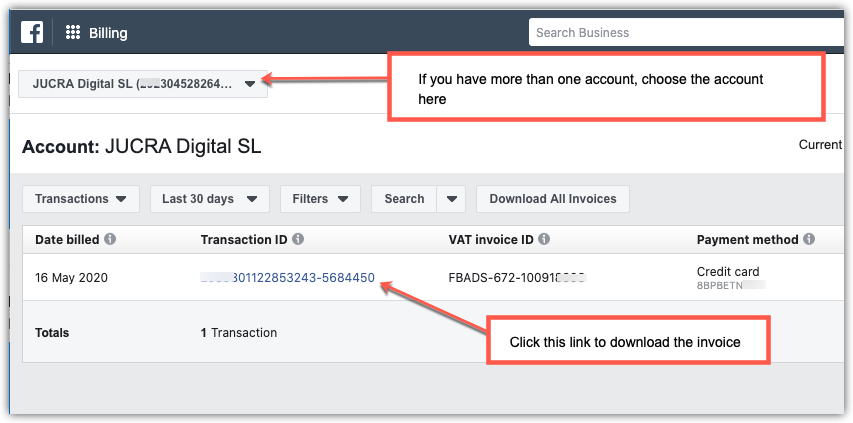
Within the Billing section, click on Payment History. This view displays a chronological list of every transaction processed against your ad account. Each entry shows the transaction date, the amount charged, and the payment method used.
Step 3: Download Your Facebook Ads Receipt
To download an individual receipt, locate the specific transaction in your payment history and click the Download link or receipt icon next to it. Facebook generates a PDF receipt that includes a full breakdown of charges, taxes, and payment details.
You can also set a custom date range to view receipts for a specific billing period. This is particularly useful when you need to pull receipts for monthly accounting, quarterly reporting, or tax preparation.
How to Get Facebook Ads Receipts via Email
Facebook can also send receipt notifications to the email address associated with your ad account. To verify this is enabled, check your Notification Settings within the Ads Manager. If you need to forward receipts to an accountant or bookkeeper, ensure that your notification preferences include billing-related emails. You can then set up email forwarding rules to automatically route receipt emails to the appropriate team member.
For businesses managing multiple ad accounts, consider exporting receipts in bulk by selecting a date range in the Payment History view and downloading all transactions at once.
How to Read Your Facebook Ads Billing Summary
Once you have your receipt, understanding what it tells you is the next step. The billing summary section at the top of each receipt provides a high-level overview of your charges.
Key Fields in the Billing Summary
- Total Amount Spent: The sum of all ad charges during the billing period. This reflects the gross amount before any credits or refunds are applied.
- Credits and Refunds: Any promotional credits, billing adjustments, or refunds issued by Meta during the period. These reduce your net payable amount.
- Net Amount Payable: The final amount charged to your payment method after credits and refunds have been applied.
- Billing Period: The specific date range covered by the receipt.
- Payment Method: The credit card, PayPal account, or other payment method used for the transaction.
Understanding the Transaction History
Below the billing summary, the transaction history provides a line-by-line breakdown of individual charges. Each entry includes:
- Date: When the specific charge was processed.
- Description: The campaign or ad set associated with the charge.
- Amount: The dollar amount for that particular transaction.
- Adjustments: Any credits, refunds, or corrections applied to the specific charge.
This level of detail is critical for identifying which campaigns are consuming the most budget and whether that spend is justified by results. Cross-referencing transaction amounts with your campaign performance data reveals whether high-spend campaigns are also your highest-performing ones.
How to Check Money Spent on Facebook Advertising
Beyond downloading receipts, there are several ways to monitor your total Facebook ad spend:
- Ads Manager Dashboard: The main Ads Manager view shows real-time spend data for each active campaign. You can filter by date range, campaign, ad set, or individual ad.
- Account Spending Limit: Under Payment Settings, you can set an account-level spending limit. This prevents your total spend from exceeding a set amount, which is useful for controlling costs on shared accounts.
- Billing Threshold: Facebook charges your payment method either when you hit a billing threshold or at the end of your billing period, whichever comes first. Understanding this billing cadence helps explain why receipt amounts may not match your daily spend exactly.
- Automated Rules: You can create automated rules within Ads Manager to pause campaigns or receive notifications when spend exceeds a defined threshold.
For teams that need spend visibility across multiple accounts, the Meta Business Suite provides an aggregated view of billing and payment data across all ad accounts within a business portfolio.
How to Calculate Your Return on Investment from Facebook Ads
Your receipt tells you what you spent. Calculating return on investment tells you whether that spend was worth it.
The Facebook Ads ROI Formula
The standard formula for return on investment is:
ROI = (Revenue - Cost of Ads) / Cost of Ads x 100
For example, if you spent $2,000 on Facebook ads and generated $8,000 in revenue directly attributable to those ads, your ROI would be:
($8,000 - $2,000) / $2,000 x 100 = 300% ROI
This means you earned $3 for every $1 spent on advertising.
ROI vs. ROAS: What Is the Difference?
Return on investment and return on ad spend are related but distinct metrics.
- ROI accounts for all costs associated with running campaigns, including creative production, agency fees, tools, and the ad spend itself.
- ROAS measures only the revenue generated relative to the ad spend. The formula is: Revenue / Ad Spend.
A campaign with a 4x ROAS means you earned $4 in revenue for every $1 in ad spend. But that does not account for the $500 you paid a designer for the creative or the monthly fee for your analytics tools. ROI gives you the complete profitability picture.
Understanding the distinction between these metrics is essential for making sound budget decisions. For a deeper look at why ROAS alone can be misleading, see our guide on going beyond ROAS for ecommerce brands.
Connecting Receipts to ROI Analysis
To calculate ROI accurately, you need to connect your receipt data (the cost side) with your revenue data (the return side). Here is how:
- Pull your receipt data for the billing period you want to analyze.
- Match receipt charges to specific campaigns using the transaction history descriptions.
- Pull revenue data from your ecommerce platform, CRM, or Facebook Pixel conversion tracking.
- Calculate ROI per campaign rather than just at the account level. This reveals which campaigns are profitable and which are burning budget.
Tips to Improve Your Facebook Ads Return on Investment
A positive ROI is the starting point. Consistently improving it requires disciplined optimization.
Optimize Your Ad Spend Allocation
Not every campaign deserves equal budget. Review your receipts and performance data together to identify:
- High ROAS campaigns that should receive increased budget.
- Low ROAS campaigns that need creative refreshes, audience adjustments, or should be paused entirely.
- Campaigns in the learning phase that need time and consistent spend before you can evaluate them fairly.
Reallocating budget from underperforming campaigns to proven winners is one of the fastest ways to improve overall account ROI. For specific tactics on managing budget at scale, review our guide on scaling Facebook ads without killing performance.
Target the Right Audience
Ad spend efficiency is directly tied to audience quality. Poor targeting means your budget reaches people who are unlikely to convert. Focus on:
- Custom Audiences built from your customer lists, website visitors, or engagement data. For guidance on improving these audiences, see our walkthrough on boosting match rates for Facebook custom audiences.
- Lookalike Audiences modeled on your highest-value customers.
- Exclusion audiences that prevent you from spending money on people who have already converted or who fall outside your ideal customer profile. Identifying and resolving audience overlap is critical here.
Improve Your Ad Creative and Landing Pages
Even with precise targeting, your ROI will suffer if your creative does not convert. Test variations of headlines, images, and calls to action systematically. Ensure that your landing pages match the promise of your ad and that the path from click to conversion is as short as possible.
If your campaigns are generating clicks but not conversions, the problem often sits on the landing page rather than in the ad itself. Review your Facebook ad strategy to diagnose common failure points.
Final Word
Your Facebook ads receipt is more than a billing record - it is a performance tool. By regularly accessing your receipts through Ads Manager, reading the billing summary carefully, and connecting that cost data to revenue outcomes, you gain the clarity needed to make better allocation decisions.
Calculate your ROI at the campaign level, not just the account level. Compare your ROI and ROAS metrics to understand true profitability. And use the spend data from your receipts to continuously shift budget toward what works.
The advertisers who treat receipt analysis as part of their optimization workflow - not just a bookkeeping task - are the ones who consistently improve their return on every dollar spent.

.webp)

.svg)


