
Most B2B content programs look busy but produce nothing. Traffic ticks up, a whitepaper gets downloaded 47 times, and someone in marketing declares it a success. Meanwhile, sales still has no qualified leads and the CEO is asking why they're spending $12,000 a month on content.
The problem usually isn't the content itself. It's that most B2B content writing services optimize for output, not outcomes. Getting this right requires understanding what you're actually buying.
B2B content operates under fundamentally different constraints than B2C. The buyer isn't making an impulse decision with their own money. They're building a business case for a committee, managing internal politics, and assessing vendor risk over a sales cycle that might run 6 to 18 months.
This changes what good content looks like:
For companies exploring content marketing strategies that connect to revenue, the first step is usually accepting that B2B content requires a different investment than what most agencies pitch.
Not all content formats work equally in B2B contexts. The ones worth investing in depend on where your buyers are in the decision process.

SEO blog posts are the workhorse of top-of-funnel B2B content. A well-optimized post on a high-intent search term brings in buyers actively researching solutions. This is where most B2B content budgets should start, and most agencies underproduce here in favor of flashier formats.
Case studies are the most underrated mid-funnel asset. A specific, detailed case study with real numbers does more work than any brochure. The challenge: most companies either don't write them or write them in a format so generic they're useless.
Whitepapers and long-form guides matter when your buyer needs to make a business case internally. The research has documented a significant disconnect here: according to Scribewise's 2024 B2B content report, 86% of B2B marketers still prioritize whitepapers, but only 27% of buyers find them useful. Invest selectively.
Email nurture sequences keep warm leads from going cold. A well-written 6-email sequence tied to a content download or demo request is often worth more per dollar than a new blog post.
Thought leadership content (LinkedIn articles, bylined pieces, contributed content) builds the personal credibility that enterprise buyers use to validate vendor choices. This is usually founder or executive-authored but requires a skilled writer to execute well.
According to the Content Marketing Institute's 2025 B2B benchmarks, 87% of B2B marketers report content helped with brand awareness, but only 62% say it generated leads and even fewer say it drove revenue. The gap between content activity and content results is wide.
The reasons are consistent:
No documented strategy. Most companies produce content without a documented strategy connecting topics to buyer personas, funnel stages, or revenue goals. You end up with a content calendar that feels busy but doesn't address what buyers actually search for.
Wrong funnel targeting. Many B2B content programs over-invest in awareness content and under-invest in consideration and decision-stage content. Someone searching "best [category] software for mid-market companies" is much closer to buying than someone reading a trend piece.
Volume-first execution. Commodity writing services optimize for throughput. You get 20 posts a month written by generalists with no domain expertise. None of them rank. None of them convert.
No performance loop. Content gets published, traffic gets tracked, and that's where the measurement ends. Revenue attribution, pipeline influence, and lead quality analysis are rarely built in.
Choosing a writing service deserves the same rigor as hiring any other revenue-generating vendor. Here's what separates competent from mediocre:
Ask to see ranking examples. Any serious B2B writing service should be able to show you organic ranking samples for posts they've written. Not just "this post is live": posts that rank on page one for competitive terms.
Test subject matter depth. Give them a topic in your category and ask for a sample outline. Generalist writers produce generic outlines. Writers with domain fluency immediately identify the sub-questions that matter.
Understand their SEO process. B2B content that doesn't rank is just expensive brand awareness. Ask specifically how they approach keyword research, content structure for search intent, and internal linking.
Check their analytics integration. Do they track content's influence on leads and pipeline, or just pageviews? Services that measure only traffic are optimizing for the wrong thing.
Verify their revision process. You will need revisions. A service that treats revisions as exceptions rather than part of the process will create friction every cycle.
Pricing varies by scope, expertise level, and delivery model. Here's a realistic breakdown:
| Engagement Type | Typical Range | What You Get |
|---|---|---|
| Per blog post (generalist) | $300–$700 | 1,000–1,500 word posts, limited SEO |
| Per blog post (specialist) | $800–$2,500 | Deep research, SEO-optimized, subject matter expertise |
| Monthly retainer (agency) | $5,000–$15,000 | 4–12 pieces/month + strategy + distribution |
| Whitepaper or long-form guide | $2,000–$8,000 | 3,000–10,000 words, research-heavy |
| Case study | $1,500–$4,000 | Interview-based, customer-validated |
For SaaS companies building a content strategy around pipeline, a realistic starting budget for meaningful organic results is $4,000–$7,000/month, enough to produce 4–6 substantive posts with proper SEO, not 15 thin ones.
The 62% cost advantage content marketing holds over outbound channels is real, but only when the content is built to rank and convert. Cheap volume defeats the economic case entirely.
Not every company should hire an external writing service immediately.
Start with freelancers when you have a small budget, a clear topic area, and enough internal subject matter knowledge to brief and edit writers effectively. Platforms like Contently and ClearVoice vet specialist writers for B2B verticals.
Move to an agency when you need consistent volume, strategic guidance, and a team that can handle content planning, SEO, and distribution together. A good marketing agency with content capabilities will tie content output to business metrics from day one.
Build an internal function when content is a primary growth channel and you're producing enough volume (10+ pieces per month) that the economics of a full-time hire become favorable.
The wrong time to hire an external service: before you have a clear point of view on what your buyers care about and what makes your company's perspective worth reading.
Set realistic expectations before you start. Content marketing requires 6 to 12 months before meaningful organic traction. Anyone promising significant organic traffic gains in 90 days is either selling paid placement or overpromising.
A realistic arc for a B2B content program:
The 87% of B2B marketers who report content helping with brand awareness are largely measuring the right thing wrong. The question isn't "did content help?": it's "which specific posts drove which pipeline, and what would we have paid for that traffic through paid channels?"
Companies that document a content strategy see 33% higher ROI than those that don't. The operational difference between the two is usually having a writing service that can execute against a real brief, not just fill a content calendar.
The decision isn't whether to invest in B2B content. It's whether to invest in content that compounds or content that just accumulates. The difference is expertise, strategy, and measurement, all of which show up clearly in how a writing service talks about their work before you hire them.
If you're ready to build a content program that ties directly to pipeline, EmberTribe works with B2B and growth-stage brands to build and execute content strategies that show up in revenue, not just traffic reports.

Don't let your old content go to waste.
Building a content inventory can help you build better funnels, boost your retargeting campaign efforts and better learn your audience. Fill in your content gaps with this quick and easy strategy.
Every marketer needs to have a content inventory. Basically a lay of the land of all the content that you have in your website, that can turn visitors into customers.
I want to show you how to build one of those today in 10 minutes or less.
What it's gonna do is it's going to let you build better funnels, have a more strategic retargeting campaign for your paid acquisition stuff, and really just get a better handle on who you're speaking to and where you have gaps in your content already.
Okay, so let's get to building this content inventory real fast, probably take us 10 minutes or less.
If you're like me or my team, we'll forget often, about how much content we already have on our website. So that when we go to build a funnel, or we go to build an email automation, we forget that we already have some really great stuff that we could be using, and instead just start trying to create new stuff.
Let's take a look at how to do this. The first thing you need to know is I'm building this tutorial for WordPress users, but a very similar type of thing can be repeated, no matter what platform you're on.
The first thing that you're gonna wanna do, if you're on WordPress, is to go to this plugin. You can search for it in the plugin section of your WordPress instance, but I'm using WP CSV.

Now, what this is going to do is export all of your posts into a spreadsheet format.
There's another plugin here, too, that you can use, Phimind Excel Export Plus. Just do a search for "posts to CSV," and you'll find a bunch of different solutions. But I'm gonna show you how to use WP CSV.
This is already installed on our side, and what you're gonna do is go to the plugin, go to settings, and this screen will come up.
Now you're going to choose filters. I chose to exclude all. And what this is doing is it's essentially saying, "Listen, we don't want all this other junk from WordPress," like attachments or actual pages on our site. "I just want posts."
So exclude everything, but then just deselect the option for publish, because that's the one thing we want is posts that are published.
After you've done that, you can basically go back and run this. Save it and run it, and it's gonna export a CSV of all your posts. It's gonna look something like this.
We actually cleaned ours up quite a bit. There's gonna be quite a few columns here that you don't need to use, just delete those.
Now, essentially what you've done, in one really quick step, is export all of your blog posts to a CSV format.
Now, I put it here in a Google Doc just because it's a little bit easier to share and use. That means that we have a nice, quick look at titles, the URLs, the post author, the category that it's in.

Now, I should say that, in the course of cleaning up this spreadsheet, you're going to get a slug from WordPress. So you're not gonna get the full URL. This is what it looks like. It's missing the http, www, whatever it might be. So just add a column with that right here. I'm just gonna add a column here to the left, and just put http://www, and then just paste that down for the whole column.
Now what you can do is put your top level domain in here as well. So, for us, that's EmberTribe, and then don't forget to put a little slash at the end.
Once you've done that, just paste it down to the rest of this column, and what we'd recommend is doing a concatenate function. That basically just combines these two columns into one.
I'll put a link to that resource here, but just combine these two, and then you're gonna have, at the end, one nice little group of URL here to make it complete.
After you've done that, you have a nice quick look here at a spreadsheet with your title, your URL, the author, and category.
Now, this time you can go and you can add other things in here. Like, for instance, if you wanted to put personas, like this blog post is perfect for this type of persona that you've created. Or maybe you have a certain funnel stage in mind, like this is top of funnel, or this is bottom of funnel, you can do that. Just add columns for those and you can type it in.
But what I wanted to do is show you another way to make this even more data-driven, even more actionable. And what we're gonna do for that first is actually get the shared counts, so the social sharing counts for any of these posts.
For this, we're gonna use a free tool called SharedCount.

I've already created a free account here, but you can do that on your own. You're gonna go to URL Dashboard, and we're gonna click bulk upload.
This is where we're gonna upload all the URLs that we have for our posts, and for our entire site. Just do a quick copy, a paste, and then click import URLs. Now, when we do that, this tool is going out and it's finding all the different share counts across these different social media platforms.
Right here you can see, here's a post that did really well for us. It had 382 shares on Facebook, and 68 LinkedIn shares.
If you scroll all the way down, what you can do is take this, and then export it to CSV. So now we have that CSV here, we can open it up, and there we go, boom, we have our URLs and all the share counts.

Now, if you keep the same order here, you can just actually take this, copy it, go back over to your master spreadsheet, which for us is in Google Docs, and you can paste it right here at the top.
Let me get rid of this and paste it in. Okay, so now we have all the share counts, comment, etc., all in one sheet here, which is really, really nice.
Now, if you wanna take this even further, I'm not gonna demonstrate this in this video, but you can also go to your Google Analytics, and you can pull a content report maybe for the past year, even just for all time.
Pull all the traffic and whatever other metrics you wanna pull, and then export that to a spreadsheet, and then there's a simple function in Excel called a VLOOKUP, that would very quickly kind of look up a URL, and then go have it add all the Google Analytics stated here too.
So we won't do that for our case, but what we've done is we built a really nice, robust profile of what's on our website for content, maybe how popular it's been, and what categories they belong to.
So what do you do from here? At this point, what's really interesting is that we can take this and start doing things like sorting and filtering.
Like, maybe I want to build a retargeting campaign for anybody who's viewed tutorials that we've written about Facebook.

Well, to do that, I'm just gonna go and I'm going to sort by this category for anything related to Facebook. I'm gonna add a filter, and then it'll be anything having to do with Facebook, and there we go. Now we have a nice little list here of all the things we've written about Facebook ads.
Now what I would do is maybe go to my Google Remarketing, or my Facebook website custom audiences, and add all these URLs as ones that belong to Facebook stuff. Now, anybody who visits any of these pages will automatically be retargeted with something related to Facebook that's maybe a little bit farther down the funnel in the buyer's journey.
You can do the same for really anything. Actually, this filtering is a great tactic if you wanted to add some of that qualitative data about these posts, so maybe persona, or a funnel stage, you can group things together and just in one fell swoop add it all at once.
That's how to make a content inventory that's more data-driven. Again, you can use this to figure out where you have gaps on your website, where you're missing content. You can use it to create a better funnel, so you can pick and choose from stuff that you already have. Or, you can use it to have better retargeting campaigns that really are grouping together like category types of posts.
Hope it works great for you. If you have a variation of this that you wanna share, I'd love to see it. There's a lot of ways to skin this cat, but I hope that this one's helpful to you.
It happens to the best of us. We all hit a content creation wall.
Where do you turn to generate fresh ideas for new and engaging content?
Here are 3 fast and easy ways to get the wheels turning, and to get your growth content back on the right track.

We use Ubersuggest as a great way to again, generate some quick ideas to see what people are searching for.
I'm gonna pretend that I have a stand-up paddle board company. I love stand-up paddle boards. I'm trying to understand what's some content that I can create. To attract my audience or answer questions they may have.
I'm gonna search for stand-up paddle board here. And what it's doing is it's coming up with all the things that Google will suggest in the search bar.
So when people are typing stuff into Google you know how you see those words come up beneath the search, that's what we're looking at here but all in one place.
There are some obvious ones here stand up paddle boards for sale. Stand-up paddle boarding in different cities. But, we also see like stand-up paddle board yoga.
Okay, so this is an interest to some people is to do yoga on their stand-up paddle boards. You can go through here, there's also a Workcloud option. If you really are short on time and just kinda want to look from the top down, you can pick up on the most common keywords that show up here.
Ubersuggest is the first place to go to kind of generate some new angles to approach here. You can go all the way down the alphabet, and just see what is on here.
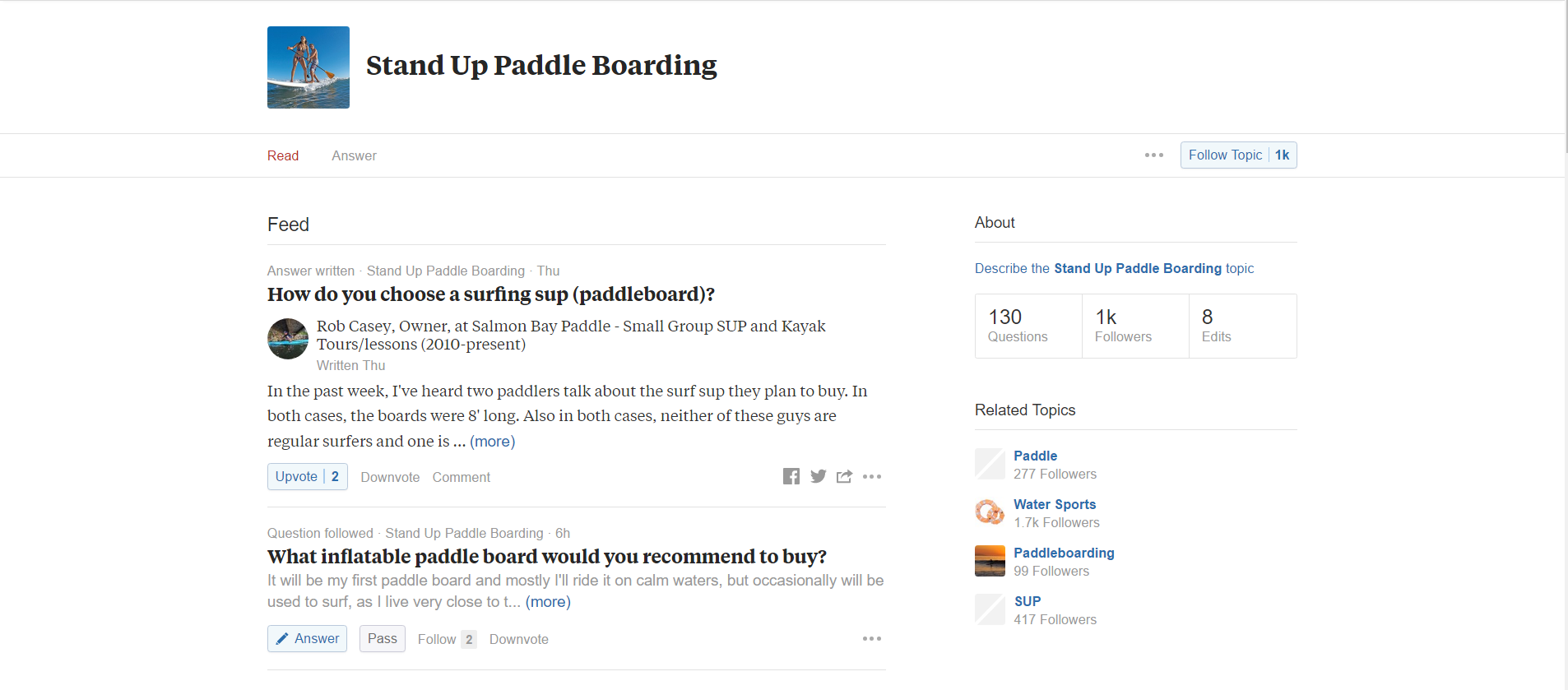
Now, the second site that I like to use is a site called Quora. Quora is basically a question and answer site where people ask questions and then other people come and answer them.
It's great if you want to set yourself apart as an expert in the space, you can answer a lot of questions.
But, kind of a separate strategy. I searched for stand-up paddle here. You can see there's a lot of great questions.
Now, Ubersuggest is good for the keywords. But, there's not a lot of context here. With Quora, we're able to see people's questions and what people are discussing in the answers about this.
Here's a question about inflatable stand-up paddle boards, are they worth buying? Here's some other stuff about related activities in kayaking. But here's one, what about paddle boards for beginners? People just getting into this.
You can see there's a lot of great stuff here. And if I click through I'm gonna see what answers are on here. And maybe there's an opportunity for me to even answer that question here and then build a blog post off of it.
Quora is a great place to get a little bit more context and understanding. Talk about idea generation and you just scroll down here and you're gonna see tons of great questions from people who are probably in the buying process already.

All right, the last thing I'm gonna show you is Reddit. Reddit is just another social bookmarking site but there's literally something for everything in here.
Every topic you could imagine is on Reddit.
Here is what is called a subreddit, and it is dedicated to stand-up paddle boarding.
Now, I like going to Reddit to see what people are asking, just like Quora. But Reddit is also a place where people can share cool content.
You can see what's getting the most upvotes, and you can see maybe what other content creators are doing, and how that might give you some ideas. Maybe you can take an idea and make it even better.
But could I use my surfboard as a stand-up paddle board? Okay, well which surfboards could feasibly do that? I don't know. But there's comments here, we could read through those. And just lots and lots of content here to generate ideas where you can maybe chime in.
What's a decent board under $800? Maybe that's an entire content series is based on people's price points. What should they expect and what should they look for in a board.
Lots and lots of great stuff here, but you can also see how detailed it gets. People talking about specific boards.

Between these three sites, if you just spent 15 minutes a week looking at what people are asking, what people are sharing and know what some of the general searches are out there, you're gonna have more than enough fuel to create content. And, I would just say that if you see themes pop up across each of these channels or each of these websites then make those a priority.
If you keep seeing stuff about inflatable paddle boards, make sure that you have a piece on that. Or, if you see stuff about yoga, make sure you have a piece on that.
But try to pick up on the trends and on the recurring themes across each of these sites.
All right, I hope that's helpful for you. Again, none of this is meant to replace great keyword research or great audience research. We all know that our ideas can run dry, and you need a quick boost every now and then to keep you going with your content creation.
Note: We've put together a scorecard that you can download and use in your own quest to create "growth content". Check it out!
Content marketing feels like a crapshoot sometimes, doesn't it?
After hours of research, writing and re-writing, you hit “publish” with the expectation that thousands of visitors will come charging through the front doors of your blog, eager to read and share your work.
Hours pass, then days, then weeks, but there’s nothing. Nada. No one. Crickets.
But what if you were able to publish content that predictably drives measurable business value?
It's what we call growth content.
"Growth content" >>> Content that drives measurable business value in the form of new users, leads, or sales.
Our team spent hours sifting through some of the world's best growth content and then built a framework from these observations. Below are the five key factors common to every great piece of growth content.

When a user first encounters your content, there's an obvious next step for them to take after reading: all roads point to your product or service. A “native connection” is a natural link between what you’re writing and what you sell.
The connection isn’t forced and the next steps for users to take is seamless. Content pieces that score high with native connection may not even make sense on their own without being able to reference a product.
At the very least, the value of the content would diminish greatly if the product did not exist. This is the case for Zapier, a technology company who has cracked the code on consistently finding that native connection.
Example: Zapier wrote anextensive blog post that unpacks the pros and cons of 25 different free CRMs. Their product helps connect apps that businesses use frequently to automate repetitive tasks. The bridges they build between apps for these tasks are called “zaps”.
Zapier built a widget that showcases zaps for each CRM solution, like this one for Google Sheets:
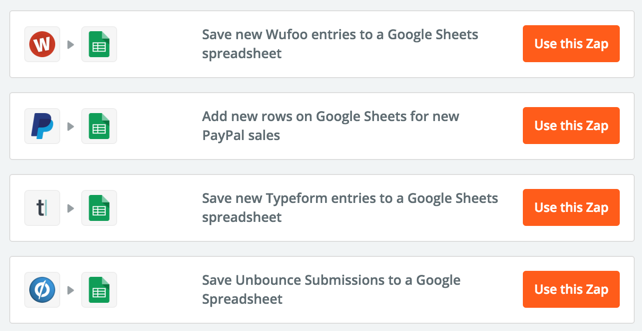
These zaps help users connect their website forms with the Google Sheets CRM option. This is brilliant, contextual placement for their product. It adds value to the content and provides a seamless next step for users to sign up for a free Zapier account.
Where does your content land on our native connection scorecard?
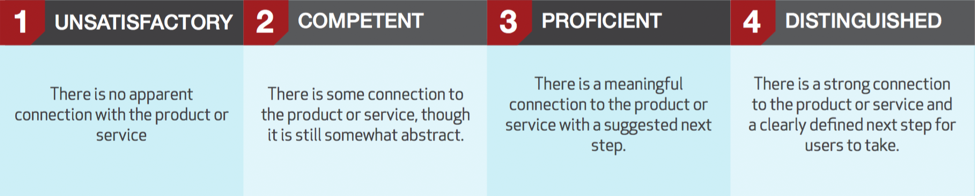
Download the entire scorecard here
Do you remember learning about potential energy in high school science? If you missed that class, let me refresh your memory. Potential energy describes the “stored” energy an object has due to its position. A bowling ball has potential energy when you hold it above your head (go ahead, let go of the ball to see what I mean).
For content to have high potential energy, it must address a key problem, goal, or collective experience shared by many in your target audience.
Potential energy might be measured by a high level of keyword search volume for the topic, a popular Q&A thread on sites like Quora, or a highly shared article on a similar topic.
Example: The Zapier content piece cited above targets over 50k searches per month on Google for queries related to "free CRM". Also, the interest in this topic is steadily rising, as reported by Google Trends:

Where does your content land on our potential energy scorecard?
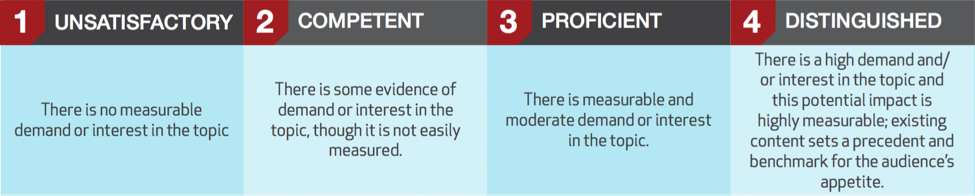
Download the entire scorecard here
Viral content reproduces visits, shares or links, with exponential returns. If your content's got virality, it begs to be shared and provides a seamless and/or unique way for users to share it on social media.
In most cases, this means that the content piece features some degree of interactivity. The interactive nature of the piece demands action from a user.
The lowest leg of viral interactivity is a social sharing button. This is where most marketers begin and end.
Moving up the ladder, we see the likes of interactive quizzes and calculators. The basic formula for success that emerges here is giving users a highly personalized, upgraded version of the content they're reading.
Example: Zenni Optical created aquiz that helped people find a style of frames that suits their lifestyle.
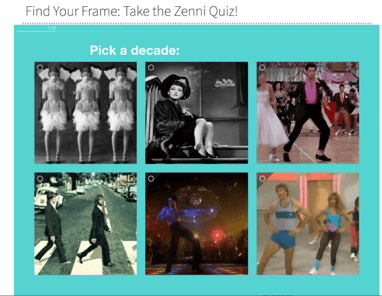
The quiz makes it easy for the user to share the personalized result on social media.

The results? 140,000 people took the quiz, 7,000 new email subscribers, and a $124,000 increase in revenue.
Where does your content land on our virality scorecard?
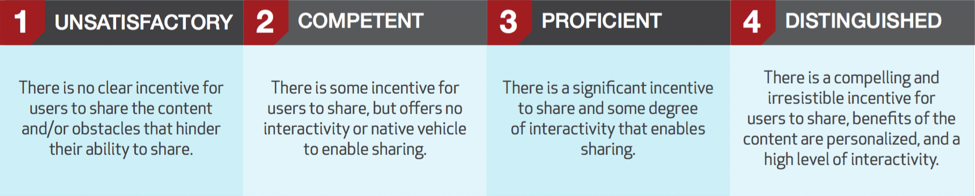
Download the entire scorecard here
Content is disruptive if it provides unique value compared to what’s currently “on the market”. Extra points if that unique value is directly tied to your product or service.
Example: BuzzSumo's blog leverages its own proprietary data, to produce massive research studies, like, How To Improve Facebook Engagement: Insights From 1bn posts
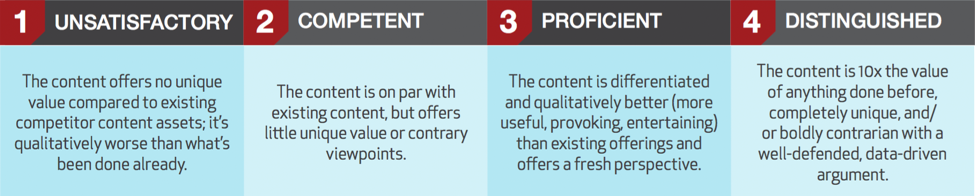
Download the entire scorecard here
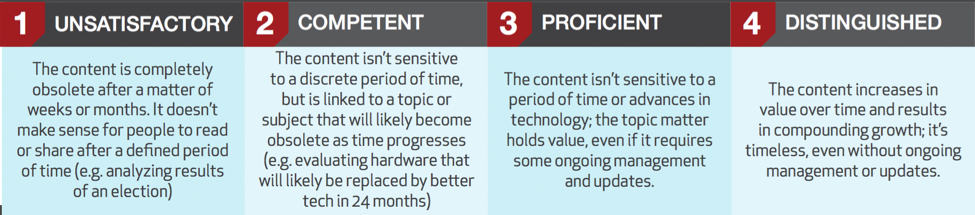
For content to be sustainable, it must be evergreen - it has staying power long after it's introduced to the world. Thus it drives compounding growth over time, and isn't made obsolete after a news cycle or particular season ends.
The crown jewel of an evergreen piece is something that grows in value as time progresses. For example, a piece that leverages user-generated content like reviews or comments.
Just because something is evergreen doesn't mean it shouldn't be updated over time. In fact, some of the best evergreen content pieces lend themselves well to updates.
Example: Moz'sSearch Engine Ranking Factors is updated each year with a comprehensive outlook on what it takes to rank high in search results.
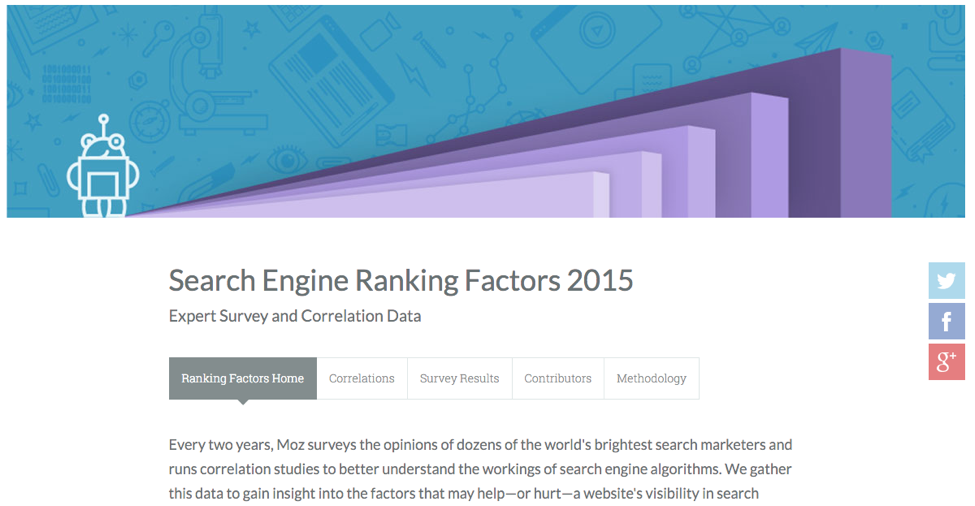
Moz draws on millions of data points that they've accumulated using their own product and technology, along with the opinions and experiences of top industry SEOs. While the URL remains the same each year, the title and data are updated and the content piece continues to drive thousands of new links, visits and customers.
Where does your content land on our sustainability scorecard?
Download the entire scorecard here
Think of this growth content framework as a strategic tool, rather than a diagnostic to grade the existing content in your inventory.
As you’re brainstorming fresh content ideas with the goal of driving new user acquisition or sales, use this framework to prioritize certain ideas over others.
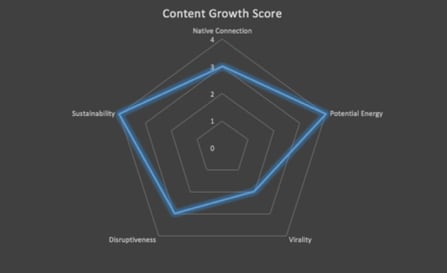
You can use the rubric we’ve created to grade your top contenders and visualize the grade like so:
Lastly, we recognize that not all content creation efforts should aim to produce growth content pieces. The needs of your audience are diverse and their path to purchase is unique. Plan appropriately for each stage in the buyer’s journey, but don’t neglect opportunities to include these attributes that are proven to drive exponential growth.


.svg)